

Hashids NPM (開発者向けのしくみ)

最新のWebアプリケーションでは、データセキュリティとプライバシーの確保が重要です。 データベースIDやURLのような機密情報を保護する効果的な方法の1つは、ハッシュ化されたり復号化されたりするユニークで可逆な暗号化ハッシュに数値データを変換するJavaScriptライブラリHashidsを使用することです。 この記事では、ReactアプリケーションにHashidsをシームレスに統合して識別子を難読化およびデコードする方法を探ります。
Hashidsとは何ですか?
Hashidsは、数値データをハッシュ文字列に変換する小型で強力なライブラリです。 主な目的は、数値識別子を難読化して機密情報の露出を防ぐことです。 この変換は可逆的であり、必要に応じて元の数値データを取得することができます。 Hashidsは、YouTubeのようなIDを数値から生成したり、機密データをエンコードしたり、データベースIDを安全にユーザーに公開したりするため for JavaScriptライブラリです。
HashidsをReactアプリケーションに統合する
ReactアプリケーションにHashidsを統合するには、次の手順に従ってください。
ステップ1: Hashids npmをインストール
まず、Reactプロジェクトにnpmを介してHashidsをインストールします。
npm install hashids
# or
yarn add hashids
npm install hashids
# or
yarn add hashidsステップ2: Hashidsインスタンスの初期化
Reactコンポーネントまたはユーティリティファイルで、塩とオプションで最小ハッシュ長を設定した新しいHashidsインスタンスを初期化します。
import { useState, useEffect } from 'react';
import Hashids from 'hashids';

// React component demonstrating Hashids integration
const MyComponent = () => {
  const [hashids, setHashids] = useState(null);

  useEffect(() => {
    // Initialize the Hashids library with a custom salt string and minimum hash length of 8
    const initHashids = new Hashids('your_salt_here', 8); // Replace 'your_salt_here' with your actual salt or configure custom alphabet
    setHashids(initHashids);
  }, []);

  // Other component logic here
  return (
    <div>
      {/* Your JSX content */}
    </div>
  );
};

export default MyComponent;
import { useState, useEffect } from 'react';
import Hashids from 'hashids';
// React component demonstrating Hashids integration
const MyComponent = () => {
const [hashids, setHashids] = useState(null);
useEffect(() => {
// Initialize the Hashids library with a custom salt string and minimum hash length of 8
const initHashids = new Hashids('your_salt_here', 8); // Replace 'your_salt_here' with your actual salt or configure custom alphabet
setHashids(initHashids);
}, []);
// Other component logic here
return (
<div>
{/* Your JSX content */}
</div>
);
};
export default MyComponent;ハッシュ出力をカスタマイズするために使用する一意の文字列(ソルト)で'your_salt_here'を置き換えてください。
ステップ3: データのエンコードとデコード
初期化されると、Hashidsを使用して数値データをエンコードおよびデコードできます。 例えば、データベースIDをエンコードする場合:
const encodedId = hashids.encode(12345); // Example: 'B0zGbvA9' non-sequential IDsconst encodedId = hashids.encode(12345); // Example: 'B0zGbvA9' non-sequential IDsそして、それを元のIDにデコードします。
const decodedIds = hashids.decode('B0zGbvA9'); // Example: [12345]const decodedIds = hashids.decode('B0zGbvA9'); // Example: [12345]ステップ4: コンポーネントでHashidsを活用する
必要に応じて、Reactコンポーネント内でHashidsを統合します。 例えば、ハッシュ化されたIDをプロップとして渡すこと。
const MyComponent = ({ id }) => {
  // Encode ID using Hashids if the hashids instance is initialized
  const encodedId = hashids ? hashids.encode(id) : '';

  return (
    <div>
      <p>Encoded ID: {encodedId}</p>
      {/* Other JSX content */}
    </div>
  );
};
const MyComponent = ({ id }) => {
// Encode ID using Hashids if the hashids instance is initialized
const encodedId = hashids ? hashids.encode(id) : '';
return (
<div>
<p>Encoded ID: {encodedId}</p>
{/* Other JSX content */}
</div>
);
};ReactでHashidsを使用する利点
-セキュリティ: Hashids は数値 ID を隠し、機密情報への直接マッピングを防ぐことでデータのプライバシーとセキュリティを強化します。 -統合の容易さ:シンプルな npm インストールとわかりやすい API により、Hashids を React アプリケーションに簡単に実装できます。 -柔軟性:カスタマイズ可能なハッシュの長さとソルトにより、ハッシュをアプリケーションのセキュリティ ニーズに合わせて柔軟に調整できます。
IronPDFの紹介
IronPDF for Node.jsは、開発者が.NETプロジェクトでPDFを生成および編集できる強力なNode.js PDFライブラリです。 HTMLからPDFを作成したり、既存のPDFを操作したり、ウェブページをPDF形式に変換する必要がある場合は、IronPDFがサポートします。
主要な特徴
HTMLからPDFへの変換
HTMLコンテンツを簡単にPDFドキュメントに変換します。 この機能は、動的なPDFをウェブコンテンツから生成するのに特に便利です。
URLからPDFへの変換
URLから直接PDFを生成し、ウェブページのコンテンツをプログラム的にキャプチャしてPDFファイルとして保存することができます。
PDF操作
既存のPDFドキュメントを簡単にマージ、分割、および操作します。 IronPDFは、ページの追加やドキュメントの分割などの機能を提供します。
PDFのセキュリティ
パスワードで暗号化したりデジタル署名を適用したりしてPDFドキュメントを保護します。 IronPDFは、機密文書の不正アクセスから保護するためのオプションを提供します。
高品質出力
テキスト、画像、およびフォーマットの正確なレンダリングを備えた高品質のPDFドキュメントを作成します。 IronPDFは、生成されたPDFが元のコンテンツの忠実度を保つことを保証します。
クロスプラットフォーム互換性
IronPDFは、Windows、Linux、macOSを含むさまざまなプラットフォームと互換性があり、幅広い開発環境に適しています。
シンプルな統合
npmパッケージを使用してNode.jsアプリケーションにIronPDFを簡単に統合します。 APIは十分に文書化されており、プロジェクトにPDF生成機能を組み込むのが簡単です。
インストール
以下のコマンドを使用してIronPDF NPMパッケージをインストールします。
yarn add @ironsoftware/ironpdf @ironsoftware/ironpdf-engine-windows-x64yarn add @ironsoftware/ironpdf @ironsoftware/ironpdf-engine-windows-x64IronPDFを使用してPDFドキュメントを生成し、HashIDs NPMパッケージを使用する
依存関係のインストール:まず、次のコマンドを使用して新しいNext.jsプロジェクトを作成します(まだ作成していない場合)。こちらを参照してください。
npx create-next-app@latest hashids-pdf --use-npm --example "https://github.com/vercel/next-learn/tree/main/basics/learn-starter"npx create-next-app@latest hashids-pdf --use-npm --example "https://github.com/vercel/next-learn/tree/main/basics/learn-starter"次に、プロジェクトディレクトリに移動します。
cd hashids-pdfcd hashids-pdf必要なパッケージをインストールします。
yarn add @ironsoftware/ironpdf @ironsoftware/ironpdf-engine-windows-x64
yarn add hashids
yarn add @ironsoftware/ironpdf @ironsoftware/ironpdf-engine-windows-x64
yarn add hashidsPDFを作成する
さあ、IronPDFを使用してPDFを生成する簡単な例を作成してみましょう。 Next.jsコンポーネント(例: pages/index.tsx)に以下のコードを追加してください。
PDF 生成 API:最初のステップは、PDF ドキュメントを生成するためのバックエンド API を作成することです。 IronPDFはサーバー側でのみ実行されるため、ユーザーがPDFを生成したいときに呼び出すAPIを作成する必要があります。 pages/api/pdf.jsというパスにファイルを作成し、以下の内容を追加してください。
IronPDFはライセンスキーを必要とします。ライセンスページから入手し、以下のコードに配置してください。
// pages/api/pdf.js
import { IronPdfGlobalConfig, PdfDocument } from "@ironsoftware/ironpdf";
import Hashids from 'hashids';

// Apply your IronPDF license key
IronPdfGlobalConfig.getConfig().licenseKey = "Your license key";

export default async function handler(req, res) {
  try {
    const initHashids = new Hashids('IronPDF Is Awesome and this is the salt', 8);
    const f = req.query.f;
    const l = initHashids.encode(f);

    let content = "<h1>Demo Hashids and Generate PDF Using IronPDF</h1>";
    content += "<p>Input:" + f + "</p>";
    content += "<p>HashID:" + l + "</p>";

    const pdf = await PdfDocument.fromHtml(content);
    const data = await pdf.saveAsBuffer();

    res.setHeader("Content-Type", "application/pdf");
    res.setHeader(
      "Content-Disposition",
      "attachment; filename=awesomeIron.pdf"
    );
    res.send(data);
  } catch (error) {
    console.error("Error generating PDF:", error);
    res.status(500).end();
  }
}
// pages/api/pdf.js
import { IronPdfGlobalConfig, PdfDocument } from "@ironsoftware/ironpdf";
import Hashids from 'hashids';
// Apply your IronPDF license key
IronPdfGlobalConfig.getConfig().licenseKey = "Your license key";
export default async function handler(req, res) {
try {
const initHashids = new Hashids('IronPDF Is Awesome and this is the salt', 8);
const f = req.query.f;
const l = initHashids.encode(f);
let content = "<h1>Demo Hashids and Generate PDF Using IronPDF</h1>";
content += "<p>Input:" + f + "</p>";
content += "<p>HashID:" + l + "</p>";
const pdf = await PdfDocument.fromHtml(content);
const data = await pdf.saveAsBuffer();
res.setHeader("Content-Type", "application/pdf");
res.setHeader(
"Content-Disposition",
"attachment; filename=awesomeIron.pdf"
);
res.send(data);
} catch (error) {
console.error("Error generating PDF:", error);
res.status(500).end();
}
}次に、以下のようにindex.jsコードを修正して、hashIDとIronPDFを使用してください。
import Head from "next/head";
import styles from "../styles/Home.module.css";
import React, { useState, useEffect } from "react";
import Hashids from 'hashids';

export default function Home() {
  const [text, setText] = useState("");
  const [etext, seteText] = useState("");
  const [hashids, setHashids] = useState(null);

  // Initialize Hashids on component mount
  useEffect(() => {
    const initHashids = new Hashids('IronPDF Is Awesome and this is the salt', 8);
    setHashids(initHashids);
  }, []);

  // Generate PDF by calling backend API
  const generatePdf = async () => {
    try {
      const response = await fetch("/api/pdf?f=" + text);
      const blob = await response.blob();
      const url = window.URL.createObjectURL(new Blob([blob]));
      const link = document.createElement("a");
      link.href = url;
      link.setAttribute("download", "awesomeIron.pdf");
      document.body.appendChild(link);
      link.click();
      link.parentNode.removeChild(link);
    } catch (error) {
      console.error("Error generating PDF:", error);
    }
  };

  // Handle text change and encode input number
  const handleChange = (event) => {
    seteText(hashids ? hashids.encode(event.target.value) : '');
    setText(event.target.value);
  };

  return (
    <div className={styles.container}>
      <Head>
        <title>Generate PDF Using IronPDF</title>
        <link rel="icon" href="/favicon.ico" />
      </Head>
      <main>
        <h1>Demo Hashids and Generate PDF Using IronPDF</h1>
        <p>
          <span>Enter Url To get Hashids and Convert to PDF:</span>{" "}
        </p>
        <input type="number" value={text} onChange={handleChange} />
        <p>
          HashID of input: {etext}
        </p>
        <button style={{ margin: 20, padding: 5 }} onClick={generatePdf}>
          Generate PDF
        </button>
      </main>
      <style jsx>{`
        main {
          padding: 5rem 0;
          flex: 1;
          display: flex;
          flex-direction: column;
          justify-content: center;
          align-items: center;
        }
        footer {
          width: 100%;
          height: 100px;
          border-top: 1px solid #eaeaea;
          display: flex;
          justify-content: center;
          align-items: center;
        }
        footer img {
          margin-left: 0.5rem;
        }
        footer a {
          display: flex;
          justify-content: center;
          align-items: center;
          text-decoration: none;
          color: inherit;
        }
        code {
          background: #fafafa;
          border-radius: 5px;
          padding: 0.75rem;
          font-size: 1.1rem;
          font-family:
            Menlo,
            Monaco,
            Lucida Console,
            Liberation Mono,
            DejaVu Sans Mono,
            Bitstream Vera Sans Mono,
            Courier New,
            monospace;
        }
      `}</style>
      <style jsx global>{`
        html,
        body {
          padding: 0;
          margin: 0;
          font-family:
            -apple-system,
            BlinkMacSystemFont,
            Segoe UI,
            Roboto,
            Oxygen,
            Ubuntu,
            Cantarell,
            Fira Sans,
            Droid Sans,
            Helvetica Neue,
            sans-serif;
        }
        * {
          box-sizing: border-box;
        }
      `}</style>
    </div>
  );
}
import Head from "next/head";
import styles from "../styles/Home.module.css";
import React, { useState, useEffect } from "react";
import Hashids from 'hashids';
export default function Home() {
const [text, setText] = useState("");
const [etext, seteText] = useState("");
const [hashids, setHashids] = useState(null);
// Initialize Hashids on component mount
useEffect(() => {
const initHashids = new Hashids('IronPDF Is Awesome and this is the salt', 8);
setHashids(initHashids);
}, []);
// Generate PDF by calling backend API
const generatePdf = async () => {
try {
const response = await fetch("/api/pdf?f=" + text);
const blob = await response.blob();
const url = window.URL.createObjectURL(new Blob([blob]));
const link = document.createElement("a");
link.href = url;
link.setAttribute("download", "awesomeIron.pdf");
document.body.appendChild(link);
link.click();
link.parentNode.removeChild(link);
} catch (error) {
console.error("Error generating PDF:", error);
}
};
// Handle text change and encode input number
const handleChange = (event) => {
seteText(hashids ? hashids.encode(event.target.value) : '');
setText(event.target.value);
};
return (
<div className={styles.container}>
<Head>
<title>Generate PDF Using IronPDF</title>
<link rel="icon" href="/favicon.ico" />
</Head>
<main>
<h1>Demo Hashids and Generate PDF Using IronPDF</h1>
<p>
<span>Enter Url To get Hashids and Convert to PDF:</span>{" "}
</p>
<input type="number" value={text} onChange={handleChange} />
<p>
HashID of input: {etext}
</p>
<button style={{ margin: 20, padding: 5 }} onClick={generatePdf}>
Generate PDF
</button>
</main>
<style jsx>{`
main {
padding: 5rem 0;
flex: 1;
display: flex;
flex-direction: column;
justify-content: center;
align-items: center;
}
footer {
width: 100%;
height: 100px;
border-top: 1px solid #eaeaea;
display: flex;
justify-content: center;
align-items: center;
}
footer img {
margin-left: 0.5rem;
}
footer a {
display: flex;
justify-content: center;
align-items: center;
text-decoration: none;
color: inherit;
}
code {
background: #fafafa;
border-radius: 5px;
padding: 0.75rem;
font-size: 1.1rem;
font-family:
Menlo,
Monaco,
Lucida Console,
Liberation Mono,
DejaVu Sans Mono,
Bitstream Vera Sans Mono,
Courier New,
monospace;
}
`}</style>
<style jsx global>{`
html,
body {
padding: 0;
margin: 0;
font-family:
-apple-system,
BlinkMacSystemFont,
Segoe UI,
Roboto,
Oxygen,
Ubuntu,
Cantarell,
Fira Sans,
Droid Sans,
Helvetica Neue,
sans-serif;
}
* {
box-sizing: border-box;
}
`}</style>
</div>
);
}コードの説明
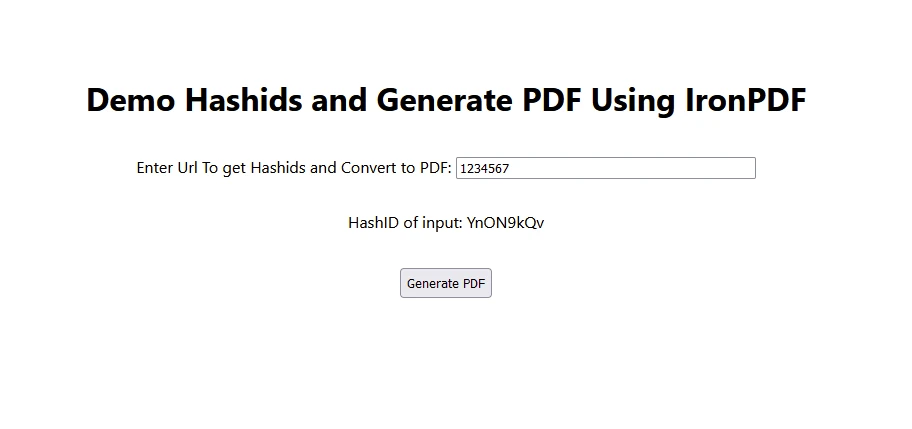
- ユーザーは入力テキストボックスを使用して入力番号を入力します。
- ハッシュIDを使用して入力番号をエンコードし、表示します。
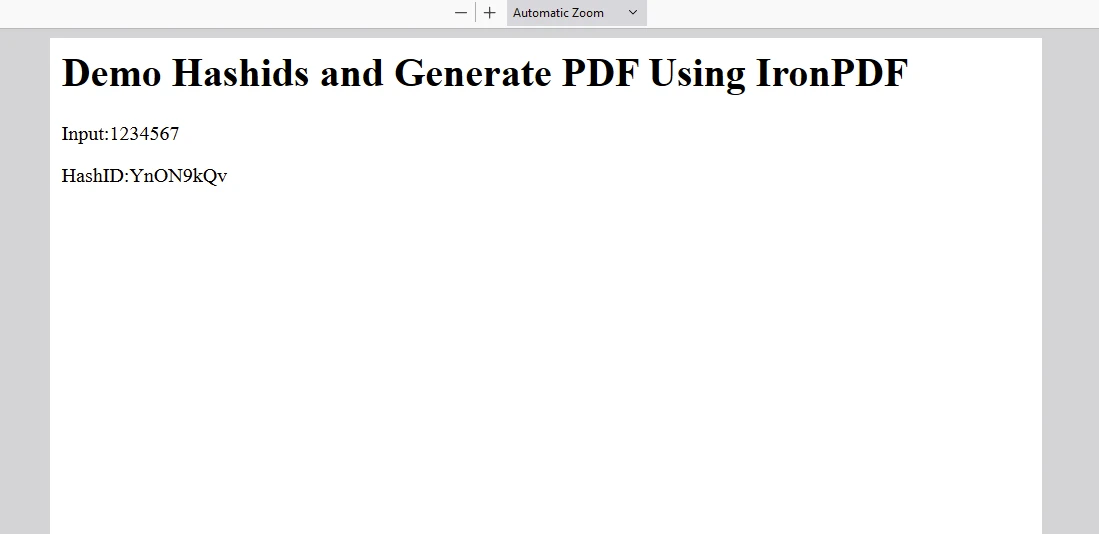
- ユーザーが"Generate PDF"をクリックすると、入力テキストがバックエンドAPIに送信され、エンコードされてPDFドキュメントが生成されます。
出力
IronPDFライセンス
ライセンスキーをここに配置します:
import { IronPdfGlobalConfig, PdfDocument } from "@ironsoftware/ironpdf";
// Apply your IronPDF license key
IronPdfGlobalConfig.getConfig().licenseKey = "Add Your key here";
import { IronPdfGlobalConfig, PdfDocument } from "@ironsoftware/ironpdf";
// Apply your IronPDF license key
IronPdfGlobalConfig.getConfig().licenseKey = "Add Your key here";結論
ReactアプリケーションにHashidsを統合することは、データベースIDやURLなどの機密データを保護するための実用的なアプローチです。 Hashidsを使用することで、識別子を安全に保ちながら、必要に応じて元のデータを取得することができます。
小規模なアプリケーションを構築している場合でも、複雑なエンタープライズシステムを構築している場合でも、HashidsはReactプロジェクトのデータプライバシーとセキュリティを強化する信頼性のあるソリューションを提供し、インクリメントされた数値をユニークなハッシュにエンコードする際に優れた効果を発揮します。 Hashidsは、入力数値の繰り返しパターンでも独自の非繰り返しのハッシュを生成し、アプリケーションのデータの整合性とセキュリティを維持します。
IronPDFは、アプリケーション内で包括的なPDF生成、操作、管理機能を求めるnode.js開発者にとって堅牢で多用途のライブラリとして際立っています。 Whether you're building web applications, desktop software, or integrating PDF functionality into enterprise solutions.








 無料で始めましょう
 無料で始めましょう
 無料ライブデモを予約



 クレジットカードやアカウントの作成は不要です。










