

Hashids NPM(開發者的使用方法)

在現代網頁應用程式中,確保資料安全和隱私是至關重要的。 保護資料庫ID或URL等敏感資訊的一個有效方法是使用 Hashids,這是一個JavaScript加密程式庫,可以將數值資料轉換為獨特且可逆的加密雜湊。 本文探討如何將Hashids無縫整合到您的React應用程式中,以模糊化和解碼標識符。
什麼是Hashids?
Hashids是一個小而強大的程式庫,可以將數值資料轉換為雜湊字串。 主要目的是模糊化數值標識符,以防止敏感資訊的暴露。 這種轉換是可逆的,允許在需要時檢索原始數值資料。 Hashids是一個JavaScript程式庫,用於從數字生成類似YouTube的ID,編碼敏感資料或安全地將您的資料庫ID暴露給使用者,或者僅僅是從數字模糊化ID。
在您的React應用程式中整合Hashids
將Hashids整合到React應用程式中,請遵循以下步驟:
步驟1:安裝Hashids npm
首先,在您的React專案中透過npm安裝Hashids:
npm install hashids
# or
yarn add hashids
npm install hashids
# or
yarn add hashids步驟2:初始化Hashids實例
在您的React元件或實用工具檔案中,用一個鹽和可選的最小雜湊長度初始化一個新的Hashids實例:
import { useState, useEffect } from 'react';
import Hashids from 'hashids';

// React component demonstrating Hashids integration
const MyComponent = () => {
  const [hashids, setHashids] = useState(null);

  useEffect(() => {
    // Initialize the Hashids library with a custom salt string and minimum hash length of 8
    const initHashids = new Hashids('your_salt_here', 8); // Replace 'your_salt_here' with your actual salt or configure custom alphabet
    setHashids(initHashids);
  }, []);

  // Other component logic here
  return (
    <div>
      {/* Your JSX content */}
    </div>
  );
};

export default MyComponent;
import { useState, useEffect } from 'react';
import Hashids from 'hashids';
// React component demonstrating Hashids integration
const MyComponent = () => {
const [hashids, setHashids] = useState(null);
useEffect(() => {
// Initialize the Hashids library with a custom salt string and minimum hash length of 8
const initHashids = new Hashids('your_salt_here', 8); // Replace 'your_salt_here' with your actual salt or configure custom alphabet
setHashids(initHashids);
}, []);
// Other component logic here
return (
<div>
{/* Your JSX content */}
</div>
);
};
export default MyComponent;將'your_salt_here'替換為您用來自訂雜湊輸出的唯一字串(鹽)。
步驟3:編碼和解碼資料
初始化後,您可以使用Hashids對數值資料進行編碼和解碼。 例如,編碼一個資料庫ID:
const encodedId = hashids.encode(12345); // Example: 'B0zGbvA9' non-sequential IDsconst encodedId = hashids.encode(12345); // Example: 'B0zGbvA9' non-sequential IDs並將其解碼回原始ID:
const decodedIds = hashids.decode('B0zGbvA9'); // Example: [12345]const decodedIds = hashids.decode('B0zGbvA9'); // Example: [12345]步驟4:在元件中使用Hashids
在需要的地方將Hashids整合到React元件中。 例如,將雜湊后的ID作為參數傳遞:
const MyComponent = ({ id }) => {
  // Encode ID using Hashids if the hashids instance is initialized
  const encodedId = hashids ? hashids.encode(id) : '';

  return (
    <div>
      <p>Encoded ID: {encodedId}</p>
      {/* Other JSX content */}
    </div>
  );
};
const MyComponent = ({ id }) => {
// Encode ID using Hashids if the hashids instance is initialized
const encodedId = hashids ? hashids.encode(id) : '';
return (
<div>
<p>Encoded ID: {encodedId}</p>
{/* Other JSX content */}
</div>
);
};在React中使用Hashids的好處
- 安全性: Hashids模糊化數字ID,通過防止與敏感資訊的直接映射來增強資料隱私和安全性。
- 易於整合: 簡單的npm安裝和簡單的API使Hashids易於在React應用程式中實現。
- 靈活性: 自訂的雜湊長度和鹽提供靈活性,使雜湊適應您的應用程式的安全需求。
介紹IronPDF
IronPDF for Node.js 是Iron Software推出的強大Node.js PDF程式庫,允許開發者在其.NET專案中生成和編輯PDF。 無論您需要從 HTML 建立 PDF,修改現有 PDF,或將網頁轉換為 PDF 格式,IronPDF 都能滿足您的需求。
主要功能
HTML到PDF轉換
輕鬆將 HTML 內容轉換為 PDF 文件。 此功能特別適合從網頁內容生成動態 PDF。
URL到PDF轉換
直接從 URL 生成 PDF,允許您程式化地捕捉網頁內容並將其儲存為 PDF 檔案。
PDF 操作
輕鬆合併、分割和操作現有的 PDF 文件。 IronPDF 提供如新增頁面、分割文件等功能。
PDF 安全
通過密碼加密或應用數位簽名來保護您的 PDF 文件。 IronPDF 提供選項來保護您的敏感文件免受未經授權的存取。
高品質輸出
生產高品質的 PDF 文件,以精確的文字、圖像和格式渲染。 IronPDF 確保您生成的 PDF 保持原始內容的忠實度。
跨平台相容性
IronPDF與多個平台相容,包括 Windows、Linux 和 macOS,使其適用於廣泛的開發環境。
簡單整合
using npm 套件輕鬆將 IronPDF 整合到您的 Node.js 應用中。 API 文件完善,便於在您的專案中加入 PDF 生成功能。
安裝
要安裝 IronPDF NPM 套件,請使用以下命令:
yarn add @ironsoftware/ironpdf @ironsoftware/ironpdf-engine-windows-x64yarn add @ironsoftware/ironpdf @ironsoftware/ironpdf-engine-windows-x64使用IronPDF生成PDF文件以及使用HashIDs NPM程式包
安裝相依性:首先,建立新的 Next.js 專案(如果您尚未建立),使用以下命令:參考這裡
npx create-next-app@latest hashids-pdf --use-npm --example "https://github.com/vercel/next-learn/tree/main/basics/learn-starter"npx create-next-app@latest hashids-pdf --use-npm --example "https://github.com/vercel/next-learn/tree/main/basics/learn-starter"接下來,導航至您的專案目錄:
cd hashids-pdfcd hashids-pdf安裝所需的套件:
yarn add @ironsoftware/ironpdf @ironsoftware/ironpdf-engine-windows-x64
yarn add hashids
yarn add @ironsoftware/ironpdf @ironsoftware/ironpdf-engine-windows-x64
yarn add hashids建立 PDF
現在,讓我們建立一個簡單的範例來使用 IronPDF 生成 PDF。 在您的Next.js元件中(例如,pages/index.tsx),新增以下程式碼:
PDF 生成 API:第一步是建立後端 API 以生成 PDF 文件。 由於IronPDF僅運行在伺服器端,我們需要建立一個使用者在需要生成PDF時調用的API。 在路徑pages/api/pdf.js中建立一個檔案並新增以下內容。
IronPDF需要授權金鑰,您可以從授權頁面獲取並將其放入以下程式碼中。
// pages/api/pdf.js
import { IronPdfGlobalConfig, PdfDocument } from "@ironsoftware/ironpdf";
import Hashids from 'hashids';

// Apply your IronPDF license key
IronPdfGlobalConfig.getConfig().licenseKey = "Your license key";

export default async function handler(req, res) {
  try {
    const initHashids = new Hashids('IronPDF Is Awesome and this is the salt', 8);
    const f = req.query.f;
    const l = initHashids.encode(f);

    let content = "<h1>Demo Hashids and Generate PDF Using IronPDF</h1>";
    content += "<p>Input:" + f + "</p>";
    content += "<p>HashID:" + l + "</p>";

    const pdf = await PdfDocument.fromHtml(content);
    const data = await pdf.saveAsBuffer();

    res.setHeader("Content-Type", "application/pdf");
    res.setHeader(
      "Content-Disposition",
      "attachment; filename=awesomeIron.pdf"
    );
    res.send(data);
  } catch (error) {
    console.error("Error generating PDF:", error);
    res.status(500).end();
  }
}
// pages/api/pdf.js
import { IronPdfGlobalConfig, PdfDocument } from "@ironsoftware/ironpdf";
import Hashids from 'hashids';
// Apply your IronPDF license key
IronPdfGlobalConfig.getConfig().licenseKey = "Your license key";
export default async function handler(req, res) {
try {
const initHashids = new Hashids('IronPDF Is Awesome and this is the salt', 8);
const f = req.query.f;
const l = initHashids.encode(f);
let content = "<h1>Demo Hashids and Generate PDF Using IronPDF</h1>";
content += "<p>Input:" + f + "</p>";
content += "<p>HashID:" + l + "</p>";
const pdf = await PdfDocument.fromHtml(content);
const data = await pdf.saveAsBuffer();
res.setHeader("Content-Type", "application/pdf");
res.setHeader(
"Content-Disposition",
"attachment; filename=awesomeIron.pdf"
);
res.send(data);
} catch (error) {
console.error("Error generating PDF:", error);
res.status(500).end();
}
}現在修改index.js程式碼如下,以使用hashID和IronPDF
import Head from "next/head";
import styles from "../styles/Home.module.css";
import React, { useState, useEffect } from "react";
import Hashids from 'hashids';

export default function Home() {
  const [text, setText] = useState("");
  const [etext, seteText] = useState("");
  const [hashids, setHashids] = useState(null);

  // Initialize Hashids on component mount
  useEffect(() => {
    const initHashids = new Hashids('IronPDF Is Awesome and this is the salt', 8);
    setHashids(initHashids);
  }, []);

  // Generate PDF by calling backend API
  const generatePdf = async () => {
    try {
      const response = await fetch("/api/pdf?f=" + text);
      const blob = await response.blob();
      const url = window.URL.createObjectURL(new Blob([blob]));
      const link = document.createElement("a");
      link.href = url;
      link.setAttribute("download", "awesomeIron.pdf");
      document.body.appendChild(link);
      link.click();
      link.parentNode.removeChild(link);
    } catch (error) {
      console.error("Error generating PDF:", error);
    }
  };

  // Handle text change and encode input number
  const handleChange = (event) => {
    seteText(hashids ? hashids.encode(event.target.value) : '');
    setText(event.target.value);
  };

  return (
    <div className={styles.container}>
      <Head>
        <title>Generate PDF Using IronPDF</title>
        <link rel="icon" href="/favicon.ico" />
      </Head>
      <main>
        <h1>Demo Hashids and Generate PDF Using IronPDF</h1>
        <p>
          <span>Enter Url To get Hashids and Convert to PDF:</span>{" "}
        </p>
        <input type="number" value={text} onChange={handleChange} />
        <p>
          HashID of input: {etext}
        </p>
        <button style={{margin: 20, padding: 5}} onClick={generatePdf}>
          Generate PDF
        </button>
      </main>
      <style jsx>{`
        main {
          padding: 5rem 0;
          flex: 1;
          display: flex;
          flex-direction: column;
          justify-content: center;
          align-items: center;
        }
        footer {
          width: 100%;
          height: 100px;
          border-top: 1px solid #eaeaea;
          display: flex;
          justify-content: center;
          align-items: center;
        }
        footer img {
          margin-left: 0.5rem;
        }
        footer a {
          display: flex;
          justify-content: center;
          align-items: center;
          text-decoration: none;
          color: inherit;
        }
        code {
          background: #fafafa;
          border-radius: 5px;
          padding: 0.75rem;
          font-size: 1.1rem;
          font-family:
            Menlo,
            Monaco,
            Lucida Console,
            Liberation Mono,
            DejaVu Sans Mono,
            Bitstream Vera Sans Mono,
            Courier New,
            monospace;
        }
      `}</style>
      <style jsx global>{`
        html,
        body {
          padding: 0;
          margin: 0;
          font-family:
            -apple-system,
            BlinkMacSystemFont,
            Segoe UI,
            Roboto,
            Oxygen,
            Ubuntu,
            Cantarell,
            Fira Sans,
            Droid Sans,
            Helvetica Neue,
            sans-serif;
        }
        * {
          box-sizing: border-box;
        }
      `}</style>
    </div>
  );
}
import Head from "next/head";
import styles from "../styles/Home.module.css";
import React, { useState, useEffect } from "react";
import Hashids from 'hashids';
export default function Home() {
const [text, setText] = useState("");
const [etext, seteText] = useState("");
const [hashids, setHashids] = useState(null);
// Initialize Hashids on component mount
useEffect(() => {
const initHashids = new Hashids('IronPDF Is Awesome and this is the salt', 8);
setHashids(initHashids);
}, []);
// Generate PDF by calling backend API
const generatePdf = async () => {
try {
const response = await fetch("/api/pdf?f=" + text);
const blob = await response.blob();
const url = window.URL.createObjectURL(new Blob([blob]));
const link = document.createElement("a");
link.href = url;
link.setAttribute("download", "awesomeIron.pdf");
document.body.appendChild(link);
link.click();
link.parentNode.removeChild(link);
} catch (error) {
console.error("Error generating PDF:", error);
}
};
// Handle text change and encode input number
const handleChange = (event) => {
seteText(hashids ? hashids.encode(event.target.value) : '');
setText(event.target.value);
};
return (
<div className={styles.container}>
<Head>
<title>Generate PDF Using IronPDF</title>
<link rel="icon" href="/favicon.ico" />
</Head>
<main>
<h1>Demo Hashids and Generate PDF Using IronPDF</h1>
<p>
<span>Enter Url To get Hashids and Convert to PDF:</span>{" "}
</p>
<input type="number" value={text} onChange={handleChange} />
<p>
HashID of input: {etext}
</p>
<button style={{margin: 20, padding: 5}} onClick={generatePdf}>
Generate PDF
</button>
</main>
<style jsx>{`
main {
padding: 5rem 0;
flex: 1;
display: flex;
flex-direction: column;
justify-content: center;
align-items: center;
}
footer {
width: 100%;
height: 100px;
border-top: 1px solid #eaeaea;
display: flex;
justify-content: center;
align-items: center;
}
footer img {
margin-left: 0.5rem;
}
footer a {
display: flex;
justify-content: center;
align-items: center;
text-decoration: none;
color: inherit;
}
code {
background: #fafafa;
border-radius: 5px;
padding: 0.75rem;
font-size: 1.1rem;
font-family:
Menlo,
Monaco,
Lucida Console,
Liberation Mono,
DejaVu Sans Mono,
Bitstream Vera Sans Mono,
Courier New,
monospace;
}
`}</style>
<style jsx global>{`
html,
body {
padding: 0;
margin: 0;
font-family:
-apple-system,
BlinkMacSystemFont,
Segoe UI,
Roboto,
Oxygen,
Ubuntu,
Cantarell,
Fira Sans,
Droid Sans,
Helvetica Neue,
sans-serif;
}
* {
box-sizing: border-box;
}
`}</style>
</div>
);
}程式碼說明
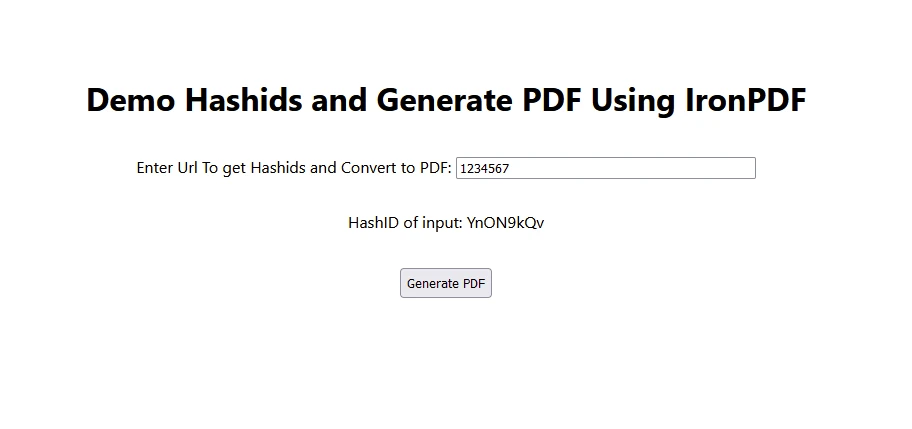
- 使用者通過輸入文字框輸入數字。
- 使用HashID編碼輸入數字並顯示。
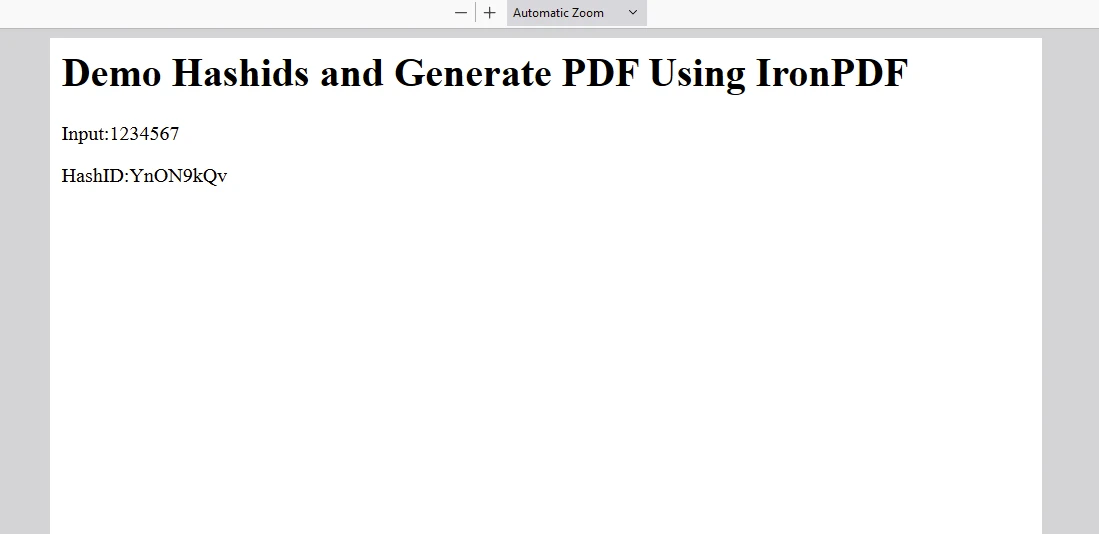
- 當使用者點擊"生成PDF"後,輸入文字被發送到後端API,該API編碼並生成PDF文件。
輸出
IronPDF 授權
請在此處放置授權金鑰:
import { IronPdfGlobalConfig, PdfDocument } from "@ironsoftware/ironpdf";
// Apply your IronPDF license key
IronPdfGlobalConfig.getConfig().licenseKey = "Add Your key here";
import { IronPdfGlobalConfig, PdfDocument } from "@ironsoftware/ironpdf";
// Apply your IronPDF license key
IronPdfGlobalConfig.getConfig().licenseKey = "Add Your key here";結論
將Hashids整合到您的React應用程式中是一種實用的方法,以保護像資料庫ID或URL這樣的敏感資料。 通過使用Hashids,您可以確保標識符保持安全,同時在需要時能夠檢索原始資料。
無論您是在構建一個小型應用程式還是一個複雜的企業系統,Hashids都提供了可靠的解決方案,以提高React專案中的資料隱私和安全性,並在將遞增數字編碼為獨特雜湊時表現出色。 Hashids確保即使輸入數字中的重複模式也能生成不同的、不重複的雜湊,從而在應用程式中保持資料完整性和安全性。
IronPDF 作為一個強大且多功能的程式庫,為node.js開發者提供全面的PDF生成、操作和管理能力,是一個突出的選擇。 無論您是在構建網頁應用程式、桌面軟體,還是將PDF功能整合到企業解決方案中。








 免費開始
免費開始 免費開始
免費開始 預訂免費直播演示
















