

Hashids NPM (개발자를 위한 작동 방식)

최신 웹 애플리케이션에서 데이터 보안 및 개인정보 보호는 매우 중요합니다. 데이터베이스 ID나 URL과 같은 민감한 정보를 보호하는 효과적인 방법 중 하나는 숫자 데이터를 고유하고, 되돌릴 수 있으며, 암호화된 해시로 변환하는 JavaScript 암호화 라이브러리인 Hashids를 사용하는 것입니다. 이 글에서는 Hashids를 React 애플리케이션에 원활하게 통합하여 식별자를 난독화하고 디코딩하는 방법을 살펴봅니다.
하쉬드란 무엇인가요?
Hashids는 숫자 데이터를 해시 문자열로 변환하는 작지만 강력한 라이브러리입니다. 주된 목표는 민감한 정보의 노출을 방지하기 위해 숫자 식별자를 가리는 것입니다. 이 변환은 되돌릴 수 있으므로 필요할 때 원래의 숫자 데이터를 불러올 수 있습니다. Hashids는 숫자에서 YouTube와 유사한 ID를 생성하거나, 민감한 데이터를 암호화하거나, 데이터베이스 ID를 사용자에게 안전하게 노출하거나, 단순히 숫자에서 ID를 난독화하는 데 사용할 수 있는 JavaScript 라이브러리입니다.
React 앱에 Hashids 통합하기
React 애플리케이션에 Hashids를 통합하려면 다음 단계를 따르세요.
1단계: Hashids npm을 설치합니다.
먼저 React 프로젝트에서 npm을 통해 Hashids를 설치하세요.
npm install hashids
# or
yarn add hashids
npm install hashids
# or
yarn add hashids2단계: Hashids 인스턴스 초기화
React 컴포넌트 또는 유틸리티 파일에서 솔트와 선택적으로 최소 해시 길이를 사용하여 새로운 Hashids 인스턴스를 초기화합니다.
import { useState, useEffect } from 'react';
import Hashids from 'hashids';

// React component demonstrating Hashids integration
const MyComponent = () => {
  const [hashids, setHashids] = useState(null);

  useEffect(() => {
    // Initialize the Hashids library with a custom salt string and minimum hash length of 8
    const initHashids = new Hashids('your_salt_here', 8); // Replace 'your_salt_here' with your actual salt or configure custom alphabet
    setHashids(initHashids);
  }, []);

  // Other component logic here
  return (
    <div>
      {/* Your JSX content */}
    </div>
  );
};

export default MyComponent;
import { useState, useEffect } from 'react';
import Hashids from 'hashids';
// React component demonstrating Hashids integration
const MyComponent = () => {
const [hashids, setHashids] = useState(null);
useEffect(() => {
// Initialize the Hashids library with a custom salt string and minimum hash length of 8
const initHashids = new Hashids('your_salt_here', 8); // Replace 'your_salt_here' with your actual salt or configure custom alphabet
setHashids(initHashids);
}, []);
// Other component logic here
return (
<div>
{/* Your JSX content */}
</div>
);
};
export default MyComponent;해시 출력 사용자 정의에 사용하는 고유한 문자열(소금)을 사용하여 'your_salt_here'를 대체하십시오.
3단계: 데이터 인코딩 및 디코딩
일단 초기화되면 Hashids를 사용하여 숫자 데이터를 인코딩하고 디코딩할 수 있습니다. 예를 들어 데이터베이스 ID를 인코딩하는 경우:
const encodedId = hashids.encode(12345); // Example: 'B0zGbvA9' non-sequential IDsconst encodedId = hashids.encode(12345); // Example: 'B0zGbvA9' non-sequential IDs그리고 이를 다시 원래 ID로 해독하면 다음과 같습니다.
const decodedIds = hashids.decode('B0zGbvA9'); // Example: [12345]const decodedIds = hashids.decode('B0zGbvA9'); // Example: [12345]4단계: 구성 요소에서 해시를 활용합니다.
필요에 따라 React 컴포넌트 내에 Hashid를 통합하세요. 예를 들어, 해시된 ID를 props로 전달하는 경우:
const MyComponent = ({ id }) => {
  // Encode ID using Hashids if the hashids instance is initialized
  const encodedId = hashids ? hashids.encode(id) : '';

  return (
    <div>
      <p>Encoded ID: {encodedId}</p>
      {/* Other JSX content */}
    </div>
  );
};
const MyComponent = ({ id }) => {
// Encode ID using Hashids if the hashids instance is initialized
const encodedId = hashids ? hashids.encode(id) : '';
return (
<div>
<p>Encoded ID: {encodedId}</p>
{/* Other JSX content */}
</div>
);
};React에서 Hashid를 사용하는 이점
- 보안: 해시값은 숫자 ID를 숨겨 민감한 정보와의 직접적인 연결을 방지함으로써 데이터 개인 정보 보호 및 보안을 강화합니다.
- 손쉬운 통합: 간단한 npm 설치와 직관적인 API 덕분에 Hashids는 React 애플리케이션에 쉽게 구현할 수 있습니다.
- 유연성: 사용자 정의 가능한 해시 길이와 솔트는 애플리케이션의 보안 요구 사항에 맞게 해시를 조정할 수 있는 유연성을 제공합니다.
IronPDF 소개합니다
IronPDF Node.js용 는 Iron Software 에서 개발한 강력한 Node.js PDF 라이브러리로, 개발자가 .NET 프로젝트에서 PDF를 생성하고 편집할 수 있도록 해줍니다. HTML에서 PDF를 생성하거나, 기존 PDF를 수정하거나, 웹 페이지를 PDF 형식으로 변환해야 하는 경우 IronPDF 모든 것을 해결해 드립니다.
주요 특징
HTML을 PDF로 변환
HTML 콘텐츠를 PDF 문서로 손쉽게 변환하세요. 이 기능은 웹 콘텐츠에서 동적 PDF를 생성하는 데 특히 유용합니다.
URL을 PDF로 변환
URL에서 직접 PDF를 생성하여 웹 페이지의 콘텐츠를 캡처하고 프로그램 방식으로 PDF 파일로 저장할 수 있습니다.
PDF 조작
기존 PDF 문서를 손쉽게 병합, 분할 및 편집하세요. IronPDF 페이지 추가, 문서 분할 등의 기능을 제공합니다.
PDF 보안
PDF 문서를 암호로 암호화하거나 디지털 서명을 적용하여 보안을 강화하세요. IronPDF 무단 접근으로부터 중요한 문서를 보호할 수 있는 다양한 옵션을 제공합니다.
고품질 출력
텍스트, 이미지 및 서식이 정확하게 표현된 고품질 PDF 문서를 제작하세요. IronPDF 생성된 PDF 파일이 원본 콘텐츠와 동일한 품질을 유지하도록 보장합니다.
크로스 플랫폼 호환성
IronPDF 는 Windows, Linux, macOS를 비롯한 다양한 플랫폼과 호환되므로 폭넓은 개발 환경에 적합합니다.
간단한 통합
IronPDF의 npm 패키지를 사용하면 IronPDF Node.js 애플리케이션에 쉽게 통합할 수 있습니다. API 문서가 잘 되어 있어 프로젝트에 PDF 생성 기능을 쉽게 통합할 수 있습니다.
설치
IronPDF NPM 패키지를 설치하려면 다음 명령어를 사용하십시오.
yarn add @ironsoftware/ironpdf @ironsoftware/ironpdf-engine-windows-x64yarn add @ironsoftware/ironpdf @ironsoftware/ironpdf-engine-windows-x64IronPDF 사용하여 PDF 문서를 생성하고 HashIDs NPM 패키지를 사용하세요.
필수 구성 요소 설치: 먼저 다음 명령어를 사용하여 새 Next.js 프로젝트를 생성합니다(아직 생성하지 않았다면). 자세한 내용은 여기를 참조하세요.
npx create-next-app@latest hashids-pdf --use-npm --example "https://github.com/vercel/next-learn/tree/main/basics/learn-starter"npx create-next-app@latest hashids-pdf --use-npm --example "https://github.com/vercel/next-learn/tree/main/basics/learn-starter"다음으로 프로젝트 디렉토리로 이동하세요.
cd hashids-pdfcd hashids-pdf필요한 패키지를 설치하세요:
yarn add @ironsoftware/ironpdf @ironsoftware/ironpdf-engine-windows-x64
yarn add hashids
yarn add @ironsoftware/ironpdf @ironsoftware/ironpdf-engine-windows-x64
yarn add hashidsPDF 생성
이제 IronPDF 사용하여 간단한 PDF 생성 예제를 만들어 보겠습니다. Next.js 구성 요소(예: pages/index.tsx)에 다음 코드를 추가하십시오:
PDF 생성 API: 첫 번째 단계는 PDF 문서를 생성하는 백엔드 API를 만드는 것입니다. IronPDF 서버 측에서만 실행되므로 사용자가 PDF를 생성하고자 할 때 호출할 API를 만들어야 합니다. 경로 pages/api/pdf.js에 파일을 생성하고 아래 내용을 추가하십시오.
IronPDF 사용하려면 라이선스 키가 필요합니다. 라이선스 페이지 에서 라이선스 키를 받아 아래 코드에 붙여넣으세요.
// pages/api/pdf.js
import { IronPdfGlobalConfig, PdfDocument } from "@ironsoftware/ironpdf";
import Hashids from 'hashids';

// Apply your IronPDF license key
IronPdfGlobalConfig.getConfig().licenseKey = "Your license key";

export default async function handler(req, res) {
  try {
    const initHashids = new Hashids('IronPDF Is Awesome and this is the salt', 8);
    const f = req.query.f;
    const l = initHashids.encode(f);

    let content = "<h1>Demo Hashids and Generate PDF Using IronPDF</h1>";
    content += "<p>Input:" + f + "</p>";
    content += "<p>HashID:" + l + "</p>";

    const pdf = await PdfDocument.fromHtml(content);
    const data = await pdf.saveAsBuffer();

    res.setHeader("Content-Type", "application/pdf");
    res.setHeader(
      "Content-Disposition",
      "attachment; filename=awesomeIron.pdf"
    );
    res.send(data);
  } catch (error) {
    console.error("Error generating PDF:", error);
    res.status(500).end();
  }
}
// pages/api/pdf.js
import { IronPdfGlobalConfig, PdfDocument } from "@ironsoftware/ironpdf";
import Hashids from 'hashids';
// Apply your IronPDF license key
IronPdfGlobalConfig.getConfig().licenseKey = "Your license key";
export default async function handler(req, res) {
try {
const initHashids = new Hashids('IronPDF Is Awesome and this is the salt', 8);
const f = req.query.f;
const l = initHashids.encode(f);
let content = "<h1>Demo Hashids and Generate PDF Using IronPDF</h1>";
content += "<p>Input:" + f + "</p>";
content += "<p>HashID:" + l + "</p>";
const pdf = await PdfDocument.fromHtml(content);
const data = await pdf.saveAsBuffer();
res.setHeader("Content-Type", "application/pdf");
res.setHeader(
"Content-Disposition",
"attachment; filename=awesomeIron.pdf"
);
res.send(data);
} catch (error) {
console.error("Error generating PDF:", error);
res.status(500).end();
}
}이제 해시ID와 IronPDF를 사용하도록 index.js 코드를 아래와 같이 수정하십시오
import Head from "next/head";
import styles from "../styles/Home.module.css";
import React, { useState, useEffect } from "react";
import Hashids from 'hashids';

export default function Home() {
  const [text, setText] = useState("");
  const [etext, seteText] = useState("");
  const [hashids, setHashids] = useState(null);

  // Initialize Hashids on component mount
  useEffect(() => {
    const initHashids = new Hashids('IronPDF Is Awesome and this is the salt', 8);
    setHashids(initHashids);
  }, []);

  // Generate PDF by calling backend API
  const generatePdf = async () => {
    try {
      const response = await fetch("/api/pdf?f=" + text);
      const blob = await response.blob();
      const url = window.URL.createObjectURL(new Blob([blob]));
      const link = document.createElement("a");
      link.href = url;
      link.setAttribute("download", "awesomeIron.pdf");
      document.body.appendChild(link);
      link.click();
      link.parentNode.removeChild(link);
    } catch (error) {
      console.error("Error generating PDF:", error);
    }
  };

  // Handle text change and encode input number
  const handleChange = (event) => {
    seteText(hashids ? hashids.encode(event.target.value) : '');
    setText(event.target.value);
  };

  return (
    <div className={styles.container}>
      <Head>
        <title>Generate PDF Using IronPDF</title>
        <link rel="icon" href="/favicon.ico" />
      </Head>
      <main>
        <h1>Demo Hashids and Generate PDF Using IronPDF</h1>
        <p>
          <span>Enter Url To get Hashids and Convert to PDF:</span>{" "}
        </p>
        <input type="number" value={text} onChange={handleChange} />
        <p>
          HashID of input: {etext}
        </p>
        <button style={{margin: 20, padding: 5}} onClick={generatePdf}>
          Generate PDF
        </button>
      </main>
      <style jsx>{`
        main {
          padding: 5rem 0;
          flex: 1;
          display: flex;
          flex-direction: column;
          justify-content: center;
          align-items: center;
        }
        footer {
          width: 100%;
          height: 100px;
          border-top: 1px solid #eaeaea;
          display: flex;
          justify-content: center;
          align-items: center;
        }
        footer img {
          margin-left: 0.5rem;
        }
        footer a {
          display: flex;
          justify-content: center;
          align-items: center;
          text-decoration: none;
          color: inherit;
        }
        code {
          background: #fafafa;
          border-radius: 5px;
          padding: 0.75rem;
          font-size: 1.1rem;
          font-family:
            Menlo,
            Monaco,
            Lucida Console,
            Liberation Mono,
            DejaVu Sans Mono,
            Bitstream Vera Sans Mono,
            Courier New,
            monospace;
        }
      `}</style>
      <style jsx global>{`
        html,
        body {
          padding: 0;
          margin: 0;
          font-family:
            -apple-system,
            BlinkMacSystemFont,
            Segoe UI,
            Roboto,
            Oxygen,
            Ubuntu,
            Cantarell,
            Fira Sans,
            Droid Sans,
            Helvetica Neue,
            sans-serif;
        }
        * {
          box-sizing: border-box;
        }
      `}</style>
    </div>
  );
}
import Head from "next/head";
import styles from "../styles/Home.module.css";
import React, { useState, useEffect } from "react";
import Hashids from 'hashids';
export default function Home() {
const [text, setText] = useState("");
const [etext, seteText] = useState("");
const [hashids, setHashids] = useState(null);
// Initialize Hashids on component mount
useEffect(() => {
const initHashids = new Hashids('IronPDF Is Awesome and this is the salt', 8);
setHashids(initHashids);
}, []);
// Generate PDF by calling backend API
const generatePdf = async () => {
try {
const response = await fetch("/api/pdf?f=" + text);
const blob = await response.blob();
const url = window.URL.createObjectURL(new Blob([blob]));
const link = document.createElement("a");
link.href = url;
link.setAttribute("download", "awesomeIron.pdf");
document.body.appendChild(link);
link.click();
link.parentNode.removeChild(link);
} catch (error) {
console.error("Error generating PDF:", error);
}
};
// Handle text change and encode input number
const handleChange = (event) => {
seteText(hashids ? hashids.encode(event.target.value) : '');
setText(event.target.value);
};
return (
<div className={styles.container}>
<Head>
<title>Generate PDF Using IronPDF</title>
<link rel="icon" href="/favicon.ico" />
</Head>
<main>
<h1>Demo Hashids and Generate PDF Using IronPDF</h1>
<p>
<span>Enter Url To get Hashids and Convert to PDF:</span>{" "}
</p>
<input type="number" value={text} onChange={handleChange} />
<p>
HashID of input: {etext}
</p>
<button style={{margin: 20, padding: 5}} onClick={generatePdf}>
Generate PDF
</button>
</main>
<style jsx>{`
main {
padding: 5rem 0;
flex: 1;
display: flex;
flex-direction: column;
justify-content: center;
align-items: center;
}
footer {
width: 100%;
height: 100px;
border-top: 1px solid #eaeaea;
display: flex;
justify-content: center;
align-items: center;
}
footer img {
margin-left: 0.5rem;
}
footer a {
display: flex;
justify-content: center;
align-items: center;
text-decoration: none;
color: inherit;
}
code {
background: #fafafa;
border-radius: 5px;
padding: 0.75rem;
font-size: 1.1rem;
font-family:
Menlo,
Monaco,
Lucida Console,
Liberation Mono,
DejaVu Sans Mono,
Bitstream Vera Sans Mono,
Courier New,
monospace;
}
`}</style>
<style jsx global>{`
html,
body {
padding: 0;
margin: 0;
font-family:
-apple-system,
BlinkMacSystemFont,
Segoe UI,
Roboto,
Oxygen,
Ubuntu,
Cantarell,
Fira Sans,
Droid Sans,
Helvetica Neue,
sans-serif;
}
* {
box-sizing: border-box;
}
`}</style>
</div>
);
}코드 설명
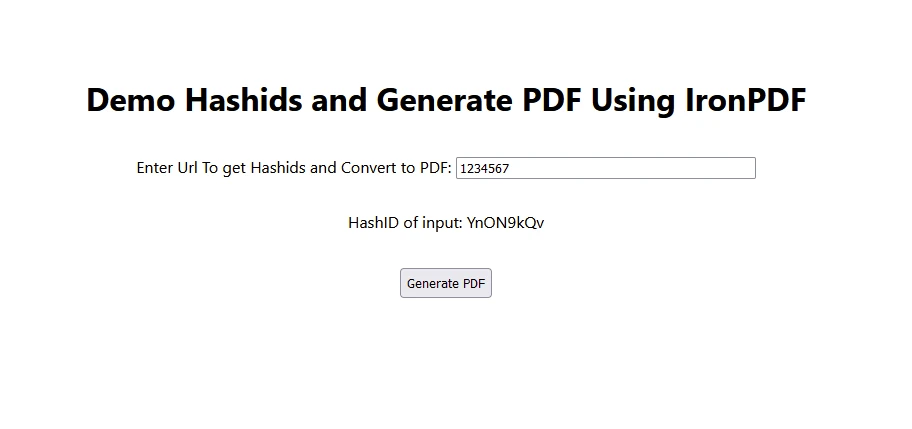
- 사용자는 입력 텍스트 상자를 통해 숫자를 입력합니다.
- 입력된 숫자는 HashID를 사용하여 인코딩된 후 표시됩니다.
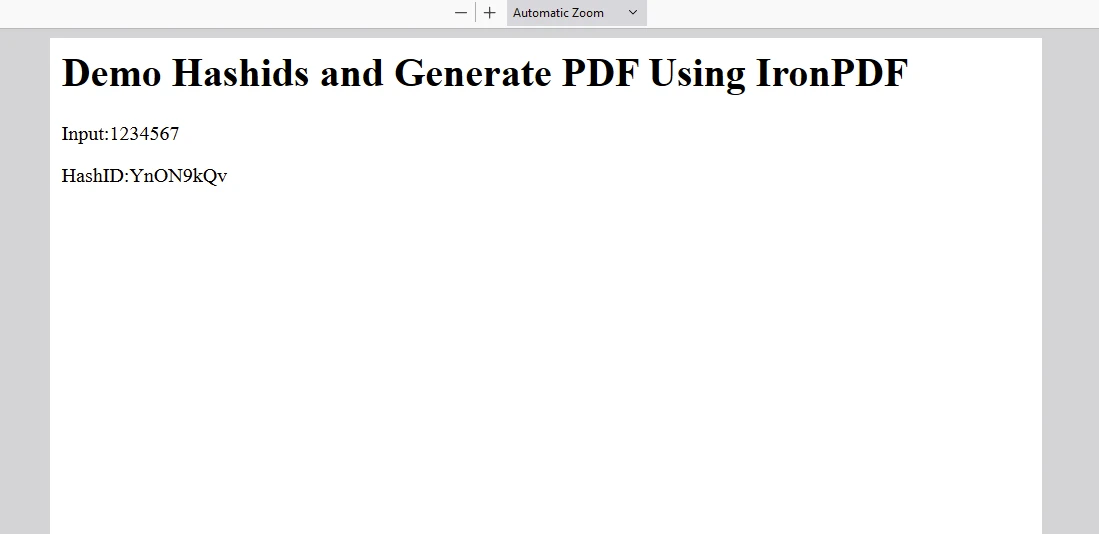
- 사용자가 "PDF 생성"을 클릭하면 입력 텍스트가 백엔드 API로 전송되어 인코딩 후 PDF 문서를 생성합니다.
산출
IronPDF 라이선스
IronPDF .
라이선스 키를 여기에 입력하세요:
import { IronPdfGlobalConfig, PdfDocument } from "@ironsoftware/ironpdf";
// Apply your IronPDF license key
IronPdfGlobalConfig.getConfig().licenseKey = "Add Your key here";
import { IronPdfGlobalConfig, PdfDocument } from "@ironsoftware/ironpdf";
// Apply your IronPDF license key
IronPdfGlobalConfig.getConfig().licenseKey = "Add Your key here";결론
React 애플리케이션에 Hashids를 통합하는 것은 데이터베이스 ID나 URL과 같은 민감한 데이터를 보호하는 실용적인 방법입니다. 해시값을 사용하면 식별자를 안전하게 보호하는 동시에 필요할 때 원본 데이터를 검색할 수 있는 기능을 유지할 수 있습니다.
소규모 애플리케이션을 개발하든 복잡한 Enterprise 시스템을 개발하든, Hashids는 React 프로젝트에서 데이터 개인 정보 보호 및 보안을 강화하는 신뢰할 수 있는 솔루션을 제공하며, 증가하는 숫자를 고유한 해시로 인코딩하는 데 탁월합니다. Hashids는 입력 숫자에 반복되는 패턴이 있더라도 서로 다른 비반복적인 해시값을 생성하여 애플리케이션의 데이터 무결성과 보안을 유지합니다.
IronPDF Node.js 개발자가 애플리케이션 내에서 포괄적인 PDF 생성, 조작 및 관리 기능을 활용할 수 있도록 지원하는 강력하고 다재다능한 라이브러리입니다. 웹 애플리케이션을 개발하든, 데스크톱 소프트웨어를 개발하든, 또는 기업 솔루션에 PDF 기능을 통합하든 상관없이.








 무료로 시작하세요
 무료로 시작하세요
 무료 라이브 데모 예약하기





 신용카드나 계정 생성은 필요하지 않습니다.










