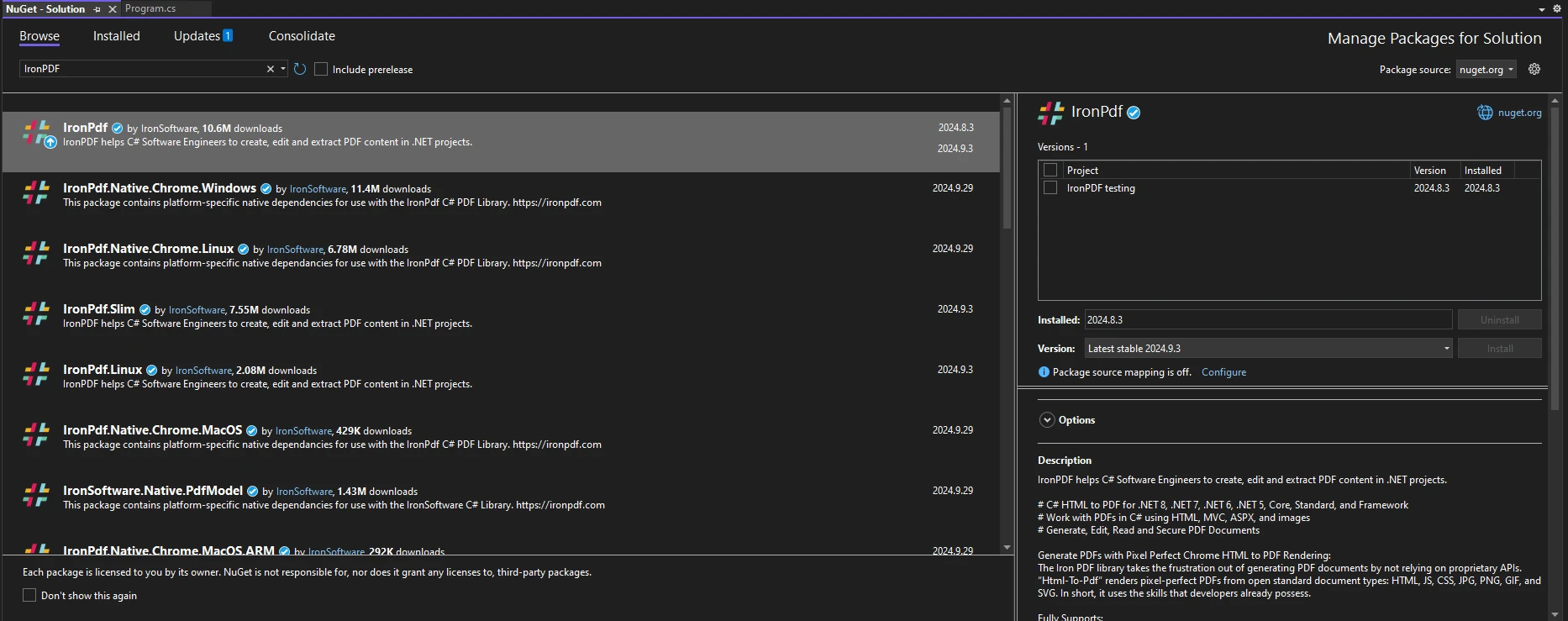
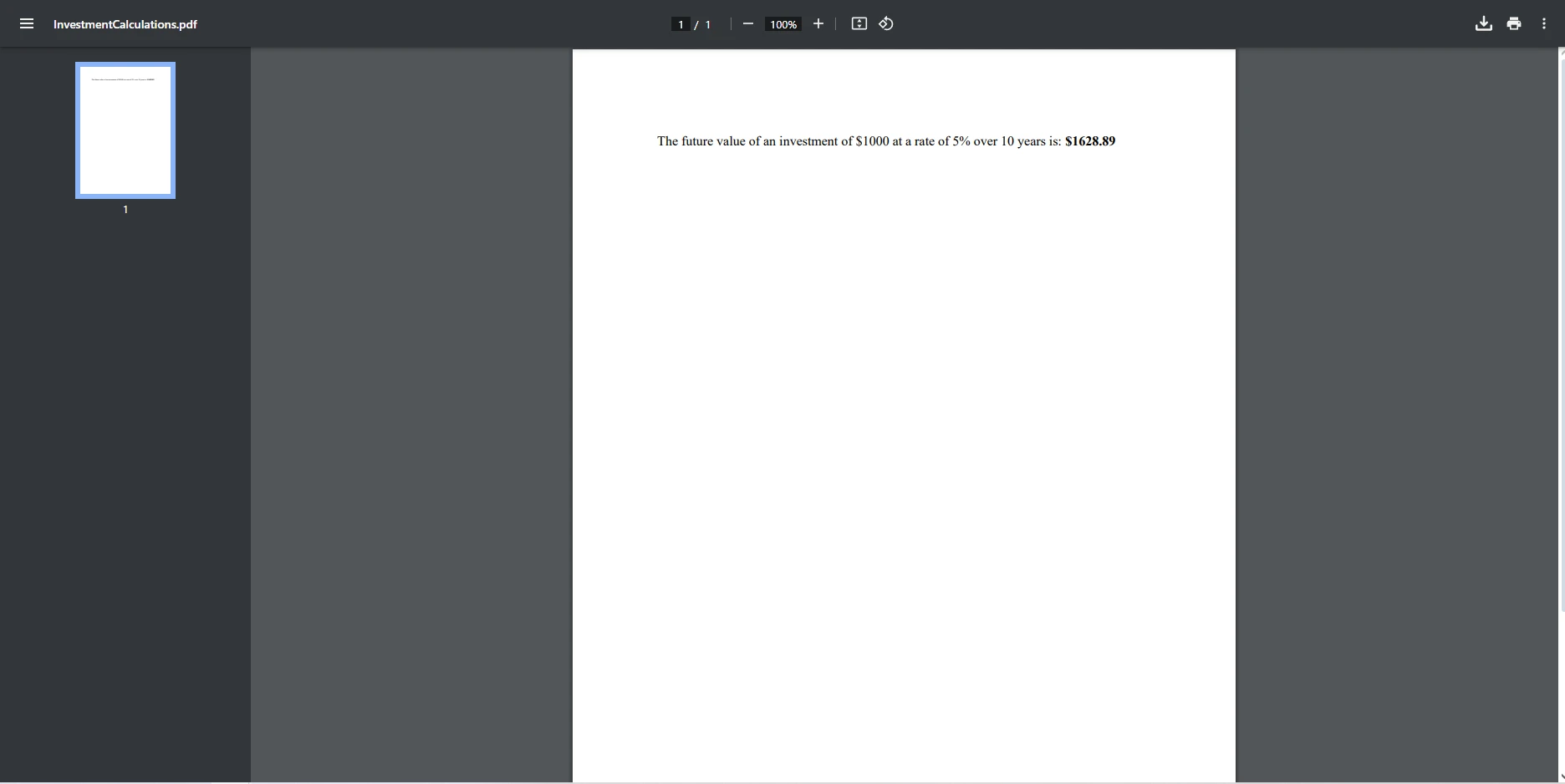
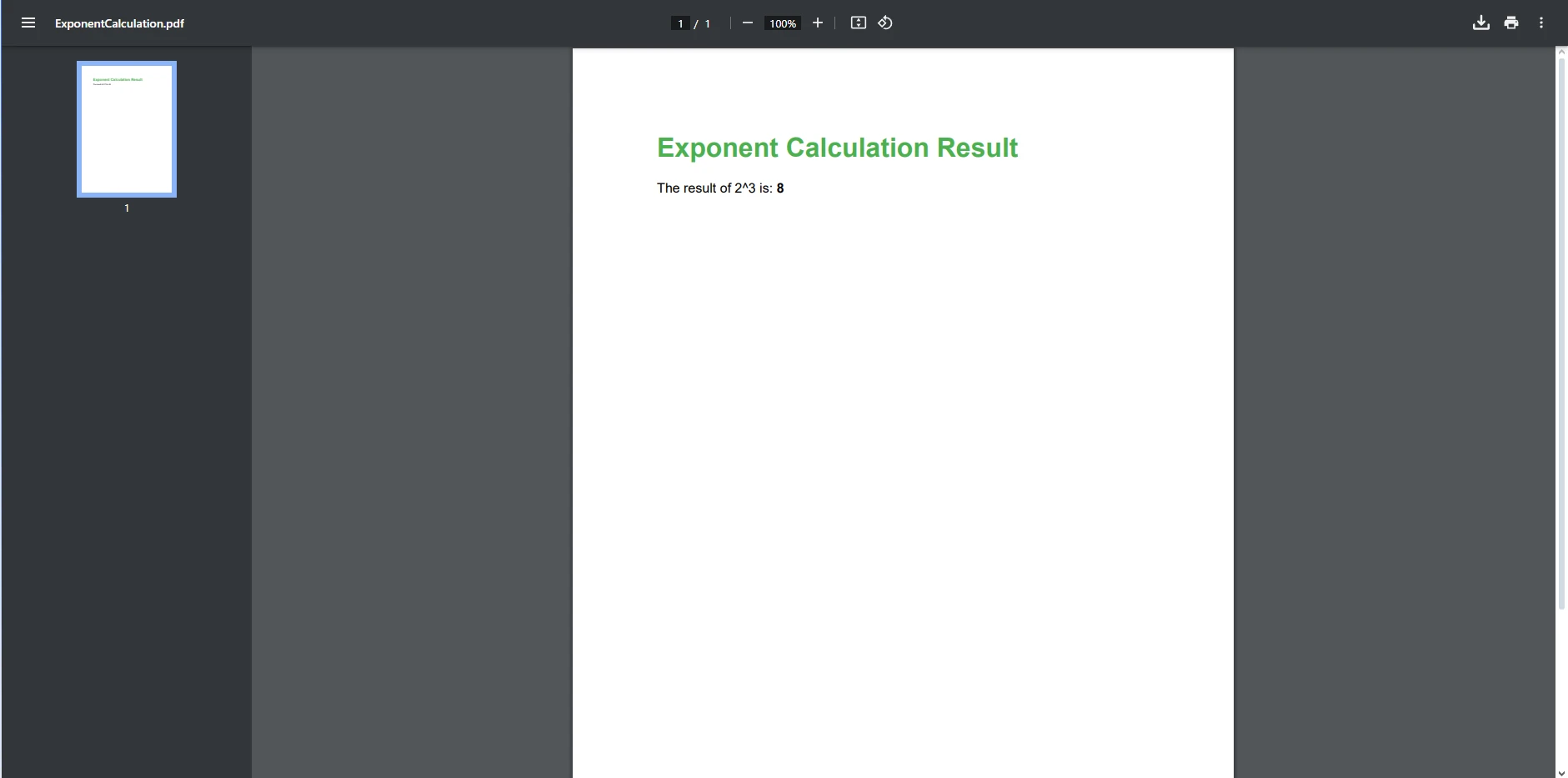
.NET 도움말 C# Exponent (How It Works For Developers) 커티스 차우 업데이트됨:6월 20, 2025 다운로드 IronPDF NuGet 다운로드 DLL 다운로드 윈도우 설치 프로그램 무료 체험 시작하기 LLM용 사본 LLM용 사본 LLM용 마크다운 형식으로 페이지를 복사하세요 ChatGPT에서 열기 ChatGPT에 이 페이지에 대해 문의하세요 제미니에서 열기 제미니에게 이 페이지에 대해 문의하세요 Grok에서 열기 Grok에게 이 페이지에 대해 문의하세요 혼란 속에서 열기 Perplexity에게 이 페이지에 대해 문의하세요 공유하다 페이스북에 공유하기 트위터에 공유하기 LinkedIn에 공유하기 URL 복사 이메일로 기사 보내기 In today’s data-driven world, generating dynamic content for reports, invoices, and various documents is crucial for businesses and developers. Among the many tools available for this purpose, IronPDF stands out as a powerful library for creating and manipulating PDF documents in .NET applications. Mathematical operations, particularly exponentiation, can be essential when generating content that requires calculations, such as financial reports or scientific documentation. This article will explore how to leverage the C# exponent method (Math.Pow) to perform exponentiation and integrate these calculations into your PDF generation workflow using IronPDF. By the end, you will understand how to utilize this functionality and be encouraged to try IronPDF’s free trial for your projects. Understanding Exponents in C# What Are Exponents? Exponents are a fundamental concept in mathematics that represent the number of times a base number is multiplied by itself. In the expression aⁿ, a is the base, and n is the exponent. For example, 2³ means 2×2×2=8. In C#, you can perform this calculation using the public static Math.Pow method, which is part of the System namespace. This method takes two parameters: the base (the specified number) and the exponent (the specified power). Here’s how you can use it: double result = Math.Pow(2, 3); // result is 8.0 double result = Math.Pow(2, 3); // result is 8.0 $vbLabelText $csharpLabel This operation returns a double, which is important to note for precision, especially when working with non-integer results. Why Use Exponents in PDF Generation? Using exponents in PDF generation can significantly enhance the data representation and readability of your documents. Here are a few scenarios where exponentiation might be particularly useful: Financial Reports: When calculating compound interest or growth rates, using exponents can simplify complex financial formulas. Scientific Documentation: In scientific fields, equations often involve squares, cubes, or higher powers, making exponentiation essential for accuracy. Data Visualization: Charts or graphs that display exponential growth patterns, such as population growth or sales projections, can benefit from exponentiation to present accurate data. By integrating mathematical operations like exponentiation into your PDF generation, you provide richer, more informative content to your users. Implementing Exponents with IronPDF Setting Up IronPDF in Your Project To start using IronPDF you can explore all the features it has to offer for yourself before purchase. If it's already installed, then you can skip to the next section, otherwise, the following steps cover how to install the IronPDF library. Via the NuGet Package Manager Console To install IronPDF using the NuGet Package Manager Console, open Visual Studio and navigate to the Package Manager Console. Then run the following command: Install-Package IronPdf Via the NuGet Package Manager for Solution Opening Visual Studio, go to "Tools -> NuGet Package Manager -> Manage NuGet Packages for Solution" and search for IronPDF. From here, all you need to do is select your project and click "Install" and IronPDF will be added to your project. Once you have installed IronPDF, all you need to add to start using IronPDF is the correct using statement at the top of your code: using IronPdf; using IronPdf; $vbLabelText $csharpLabel Generating PDFs with Exponent Calculations Creating a Sample PDF With IronPDF set up, you can start creating a simple PDF that demonstrates the use of Math.Pow. Below is a code snippet that shows how to generate a PDF document that includes an exponent calculation: // Create a PDF renderer ChromePdfRenderer renderer = new ChromePdfRenderer(); // Define the base and exponent double baseNumber = 2; double exponent = 3; // Calculate the result using Math.Pow double result = Math.Pow(baseNumber, exponent); // Create HTML content with the calculation result string htmlContent = $@" <html> <head> <style> body {{ font-family: Arial, sans-serif; }} h1 {{ color: #4CAF50; }} p {{ font-size: 16px; }} </style> </head> <body> <h1>Exponent Calculation Result</h1> <p>The result of {baseNumber}^{exponent} is: <strong>{result}</strong></p> </body> </html>"; // Convert HTML content into a PDF document PdfDocument pdf = renderer.RenderHtmlAsPdf(htmlContent); // Save the PDF to a file pdf.SaveAs("ExponentCalculation.pdf"); // Create a PDF renderer ChromePdfRenderer renderer = new ChromePdfRenderer(); // Define the base and exponent double baseNumber = 2; double exponent = 3; // Calculate the result using Math.Pow double result = Math.Pow(baseNumber, exponent); // Create HTML content with the calculation result string htmlContent = $@" <html> <head> <style> body {{ font-family: Arial, sans-serif; }} h1 {{ color: #4CAF50; }} p {{ font-size: 16px; }} </style> </head> <body> <h1>Exponent Calculation Result</h1> <p>The result of {baseNumber}^{exponent} is: <strong>{result}</strong></p> </body> </html>"; // Convert HTML content into a PDF document PdfDocument pdf = renderer.RenderHtmlAsPdf(htmlContent); // Save the PDF to a file pdf.SaveAs("ExponentCalculation.pdf"); $vbLabelText $csharpLabel In this example: We create an instance of ChromePdfRenderer, which is the main class for rendering HTML content into a PDF. We define a base and an exponent, calculate the result using Math.Pow, and then construct an HTML string that displays this return value. The RenderHtmlAsPdf method takes the HTML content and converts it into a PDF document. Finally, we save the generated PDF to a file named "ExponentCalculation.pdf". Formatting the Output When generating PDFs, proper formatting is crucial for making the content readable and engaging. The HTML content can be styled using CSS to improve its visual appeal. Here are some tips for formatting your PDF output: Use Different Font Sizes and Colors: Highlight important information with bold text or different colors. For example, using larger font sizes for headings can help distinguish sections. Structure Content with Headings and Paragraphs: Organize your information logically to guide the reader through the document. Incorporate Tables or Lists: For data that requires organization, using tables or bullet points can enhance clarity and comprehension. Advanced Usage Once you’re comfortable with basic exponent calculations, you can explore more complex scenarios. For instance, calculating the future value of an investment can be an excellent use case for exponentiation. Consider the following example that calculates the future value of an investment using the formula for compound interest: public static void Main(string[] args) { // Create a PDF renderer ChromePdfRenderer renderer = new ChromePdfRenderer(); // Define principal, rate, and time double principal = 1000; // Initial investment double rate = 0.05; // Interest rate (5%) int time = 10; // Number of years // Calculate future value using the formula: FV = P * (1 + r)^t double futureValue = principal * Math.Pow((1 + rate), time); // Create HTML content for the future value string investmentHtml = $@" <html> <body> <p>The future value of an investment of ${principal} at a rate of {rate * 100}% over {time} years is: <strong>${futureValue:F2}</strong></p> </body> </html>"; // Render the HTML as a PDF document PdfDocument pdf = renderer.RenderHtmlAsPdf(investmentHtml); // Save the document pdf.SaveAs("InvestmentCalculations.pdf"); } public static void Main(string[] args) { // Create a PDF renderer ChromePdfRenderer renderer = new ChromePdfRenderer(); // Define principal, rate, and time double principal = 1000; // Initial investment double rate = 0.05; // Interest rate (5%) int time = 10; // Number of years // Calculate future value using the formula: FV = P * (1 + r)^t double futureValue = principal * Math.Pow((1 + rate), time); // Create HTML content for the future value string investmentHtml = $@" <html> <body> <p>The future value of an investment of ${principal} at a rate of {rate * 100}% over {time} years is: <strong>${futureValue:F2}</strong></p> </body> </html>"; // Render the HTML as a PDF document PdfDocument pdf = renderer.RenderHtmlAsPdf(investmentHtml); // Save the document pdf.SaveAs("InvestmentCalculations.pdf"); } $vbLabelText $csharpLabel In this example: We define the principal amount, interest rate, and time period. Using the formula for compound interest FV=P×(1+r)ᵗ, we calculate the future value. The resulting information can be seamlessly integrated into the PDF, providing valuable insights into investment growth. By expanding on these concepts, you can create dynamic and responsive reports that meet various user needs. Conclusion In this article, we explored the significance of using C# exponentiation with IronPDF for generating dynamic and informative PDFs. The Math.Pow power exponent value allows you to perform complex calculations and display the results in a user-friendly format. The exponentiation operator is a powerful tool for representing how a number raised to a specific power can transform data. By understanding how to integrate these mathematical operations into your PDF generation process, you can significantly enhance the value of your documents. As you consider incorporating these features into your projects, we highly encourage you to download and try the IronPDF free trial, with which you can explore the rich set of features IronPDF has to offer before committing to a paid license. With its powerful capabilities and intuitive interface, IronPDF can elevate your PDF generation experience, making it easier to create documents that stand out. 자주 묻는 질문 C# Math.Pow 메서드란 무엇인가요? C# `Math.Pow` 메서드는 시스템 네임스페이스 내에서 개발자가 지수를 수행하여 지정된 지수로 올라간 기본 숫자의 거듭 제곱을 계산할 수 있는 함수입니다. 이 메서드는 이중 유형을 반환하며 과학, 금융 및 데이터 시각화 시나리오에서 일반적으로 사용됩니다. PDF 문서에서 지수를 사용하려면 어떻게 해야 하나요? C#에서 `Math.Pow` 메서드로 계산을 수행한 다음 IronPDF를 사용하여 이러한 결과를 PDF에 통합하면 PDF 문서에서 지수를 사용할 수 있습니다. 계산된 데이터를 HTML 콘텐츠로 렌더링하고 PDF 형식으로 변환하면 됩니다. PDF 생성을 위해 C# 프로젝트에 `Math.Pow` 계산을 통합하려면 어떻게 해야 하나요? 먼저 코드에서 필요한 지수 계산을 수행하여 `Math.Pow` 계산을 C# 프로젝트에 통합한 다음, IronPDF를 사용하여 계산된 결과가 포함된 HTML 콘텐츠를 렌더링하기 위해 `ChromePdfRenderer`를 사용하여 결과를 PDF로 변환합니다. 문서 생성에 IronPDF를 사용하면 어떤 이점이 있나요? IronPDF는 HTML 콘텐츠를 PDF로 변환하는 기능, 지수화와 같은 수학적 연산 지원, 문서 모양과 가독성을 향상시키는 광범위한 서식 옵션 등 문서 생성을 위한 여러 가지 이점을 제공합니다. PDF로 된 재무 보고서의 복리 이자를 계산하려면 어떻게 해야 하나요? PDF에서 재무 보고서의 복리를 계산하려면 `FV = P * (1 + r)^t` 공식을 사용하세요. 여기서 `FV`는 미래 가치, `P`는 원금, `r`은 이자율, `t`는 기간입니다. C#을 사용하여 계산을 수행하고 결과를 IronPDF로 PDF로 표시합니다. .NET 프로젝트에서 IronPDF를 사용하려면 어떤 설정이 필요하나요? .NET 프로젝트에서 IronPDF를 사용하려면 Visual Studio의 NuGet 패키지 관리자를 통해 IronPDF를 설치해야 합니다. 패키지 관리자 콘솔에서 `Install-Package IronPdf`를 실행하거나 NuGet 패키지 관리 기능을 사용하여 프로젝트에 IronPDF를 추가할 수 있습니다. 라이선스를 구매하기 전에 IronPDF를 사용해 볼 수 있나요? 예, IronPDF는 구매 결정을 내리기 전에 기능을 살펴볼 수 있는 무료 평가판을 제공합니다. 이 평가판을 통해 IronPDF를 문서 생성 프로세스에 어떻게 통합할 수 있는지 평가할 수 있습니다. 지수를 사용하여 PDF에서 정확한 데이터 표현을 보장하려면 어떻게 해야 하나요? 정확한 지수 계산을 위해 C#의 `Math.Pow` 메서드를 사용한 다음 이를 IronPDF로 PDF에 통합하여 PDF에서 정확한 데이터 표현을 보장합니다. 이를 통해 문서에서 복잡한 수식과 데이터를 동적이고 정확하게 표현할 수 있습니다. 커티스 차우 지금 바로 엔지니어링 팀과 채팅하세요 기술 문서 작성자 커티스 차우는 칼턴 대학교에서 컴퓨터 과학 학사 학위를 취득했으며, Node.js, TypeScript, JavaScript, React를 전문으로 하는 프론트엔드 개발자입니다. 직관적이고 미적으로 뛰어난 사용자 인터페이스를 만드는 데 열정을 가진 그는 최신 프레임워크를 활용하고, 잘 구성되고 시각적으로 매력적인 매뉴얼을 제작하는 것을 즐깁니다. 커티스는 개발 분야 외에도 사물 인터넷(IoT)에 깊은 관심을 가지고 있으며, 하드웨어와 소프트웨어를 통합하는 혁신적인 방법을 연구합니다. 여가 시간에는 게임을 즐기거나 디스코드 봇을 만들면서 기술에 대한 애정과 창의성을 결합합니다. 관련 기사 업데이트됨 12월 11, 2025 Bridging CLI Simplicity & .NET : Using Curl DotNet with IronPDF Jacob Mellor has bridged this gap with CurlDotNet, a library created to bring the familiarity of cURL to the .NET ecosystem. 더 읽어보기 업데이트됨 12월 20, 2025 RandomNumberGenerator C# Using the RandomNumberGenerator C# class can help take your PDF generation and editing projects to the next level 더 읽어보기 업데이트됨 12월 20, 2025 C# String Equals (How it Works for Developers) When combined with a powerful PDF library like IronPDF, switch pattern matching allows you to build smarter, cleaner logic for document processing 더 읽어보기 C# Use of Unassigned Local Variable (Example)C# Casting (How It Works For Developers)
업데이트됨 12월 11, 2025 Bridging CLI Simplicity & .NET : Using Curl DotNet with IronPDF Jacob Mellor has bridged this gap with CurlDotNet, a library created to bring the familiarity of cURL to the .NET ecosystem. 더 읽어보기
업데이트됨 12월 20, 2025 RandomNumberGenerator C# Using the RandomNumberGenerator C# class can help take your PDF generation and editing projects to the next level 더 읽어보기
업데이트됨 12월 20, 2025 C# String Equals (How it Works for Developers) When combined with a powerful PDF library like IronPDF, switch pattern matching allows you to build smarter, cleaner logic for document processing 더 읽어보기