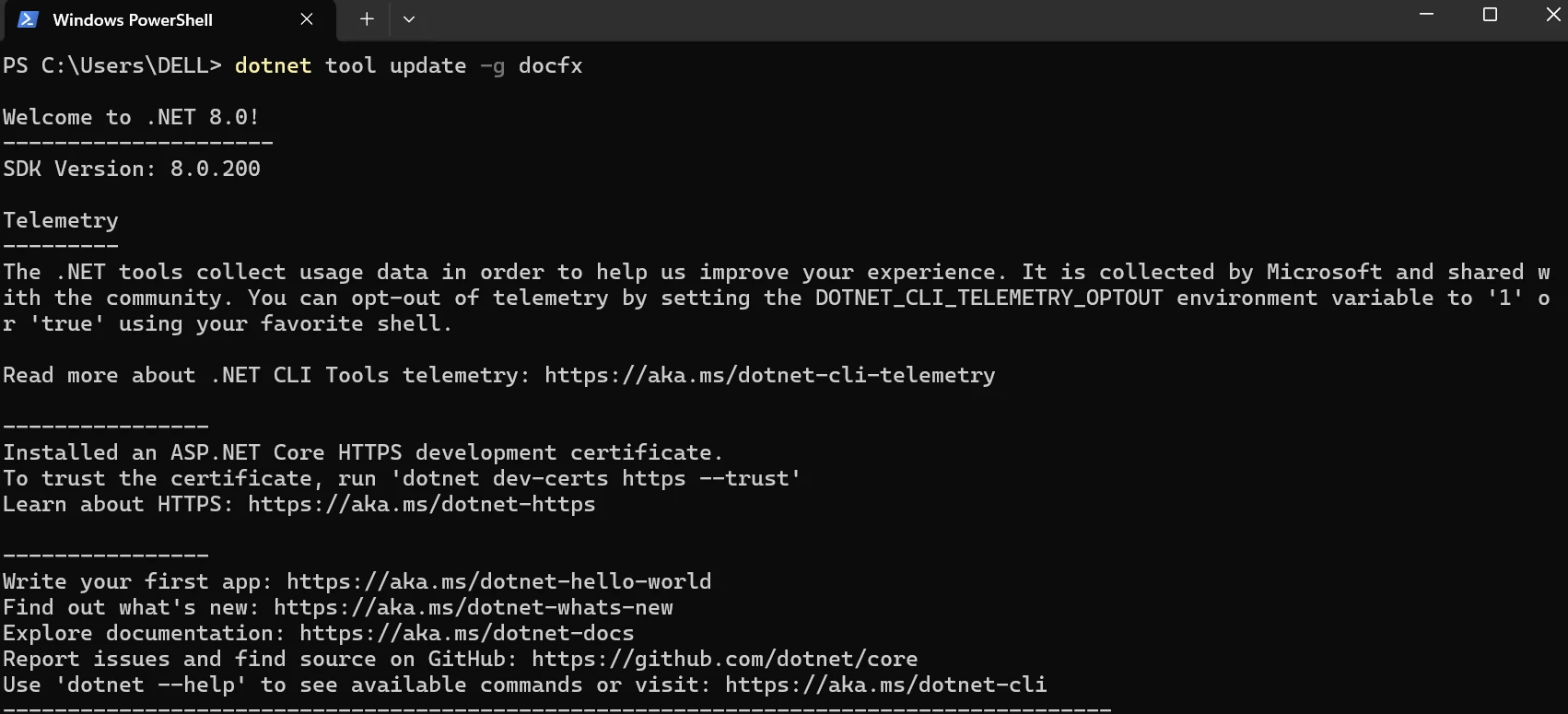
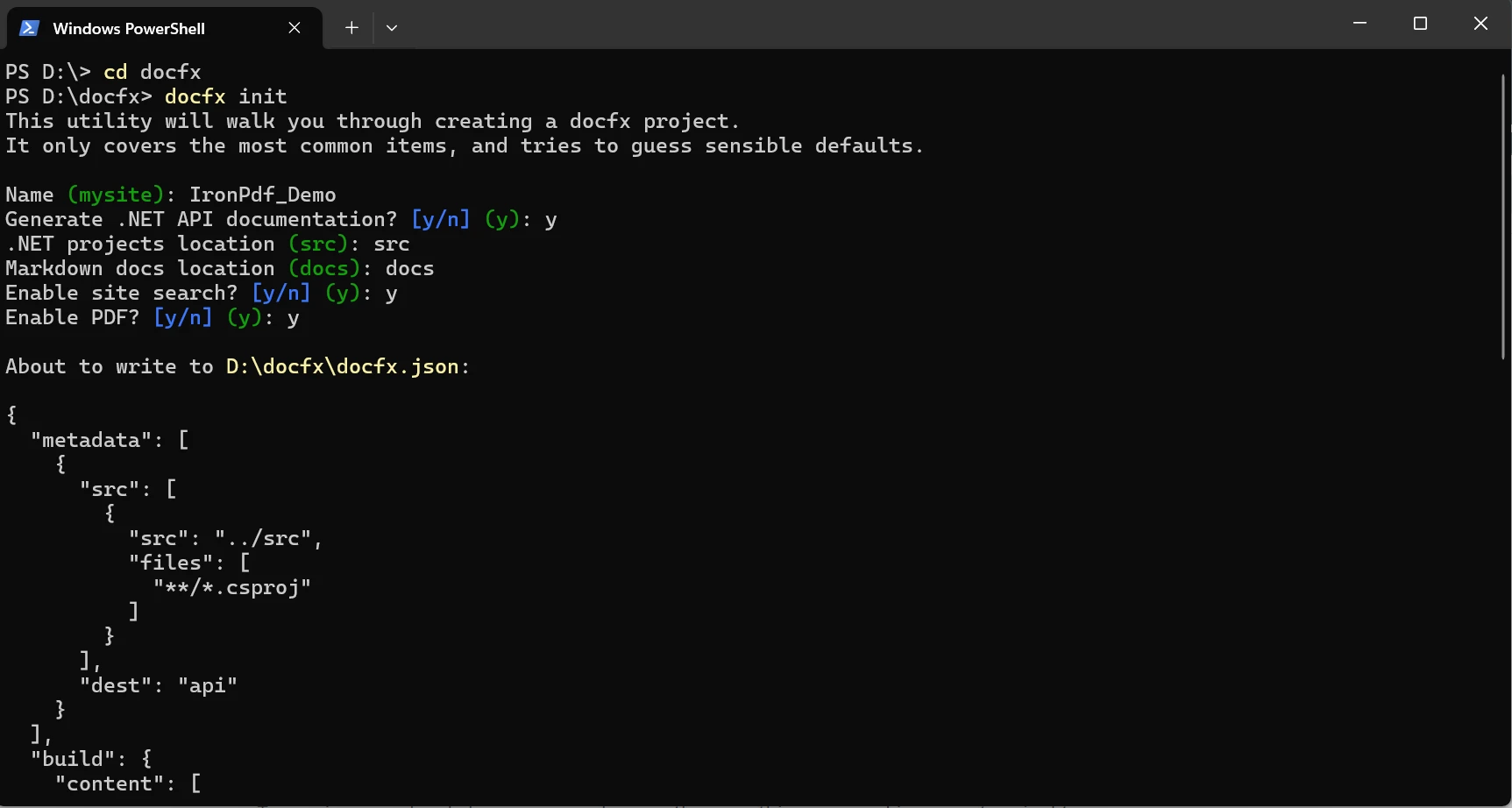
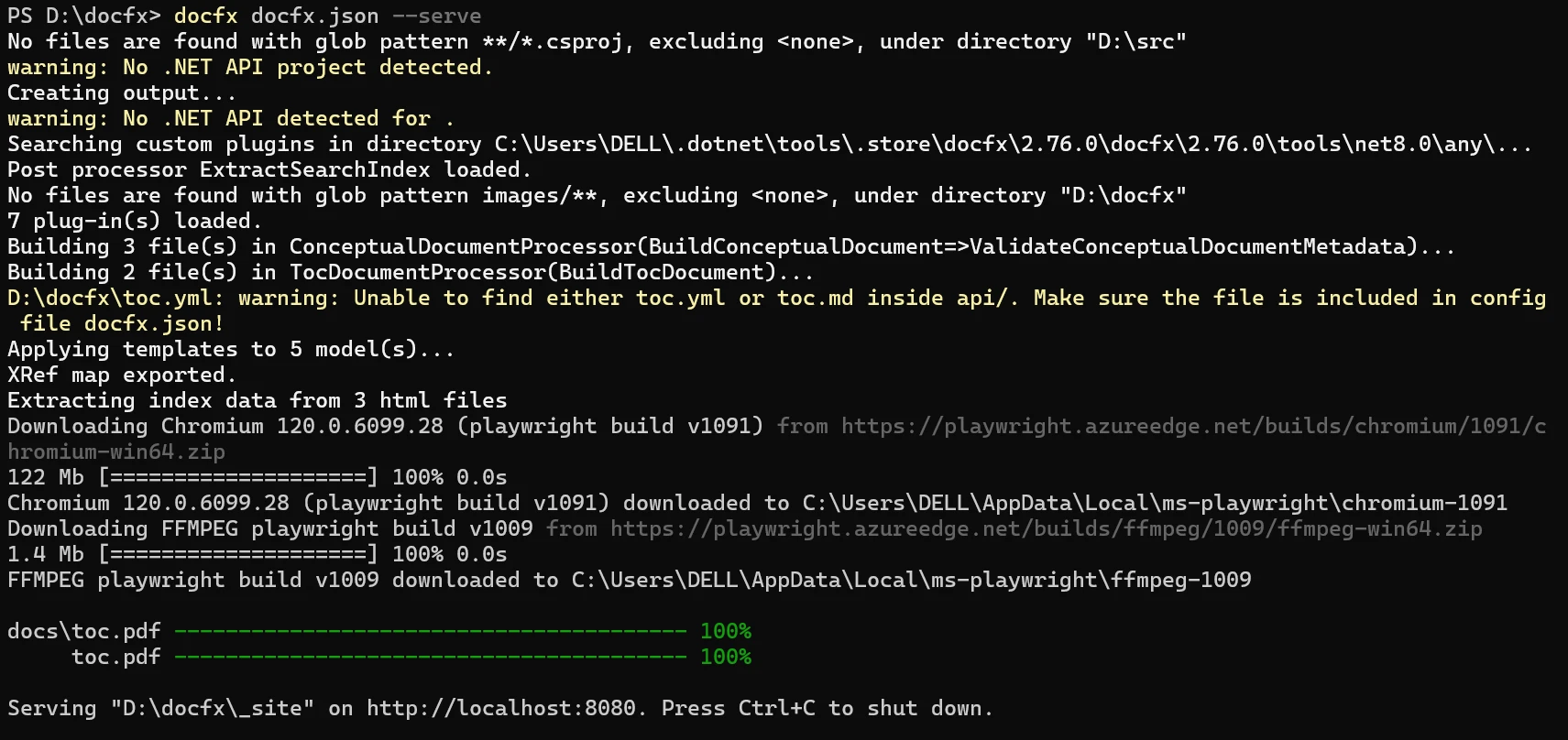
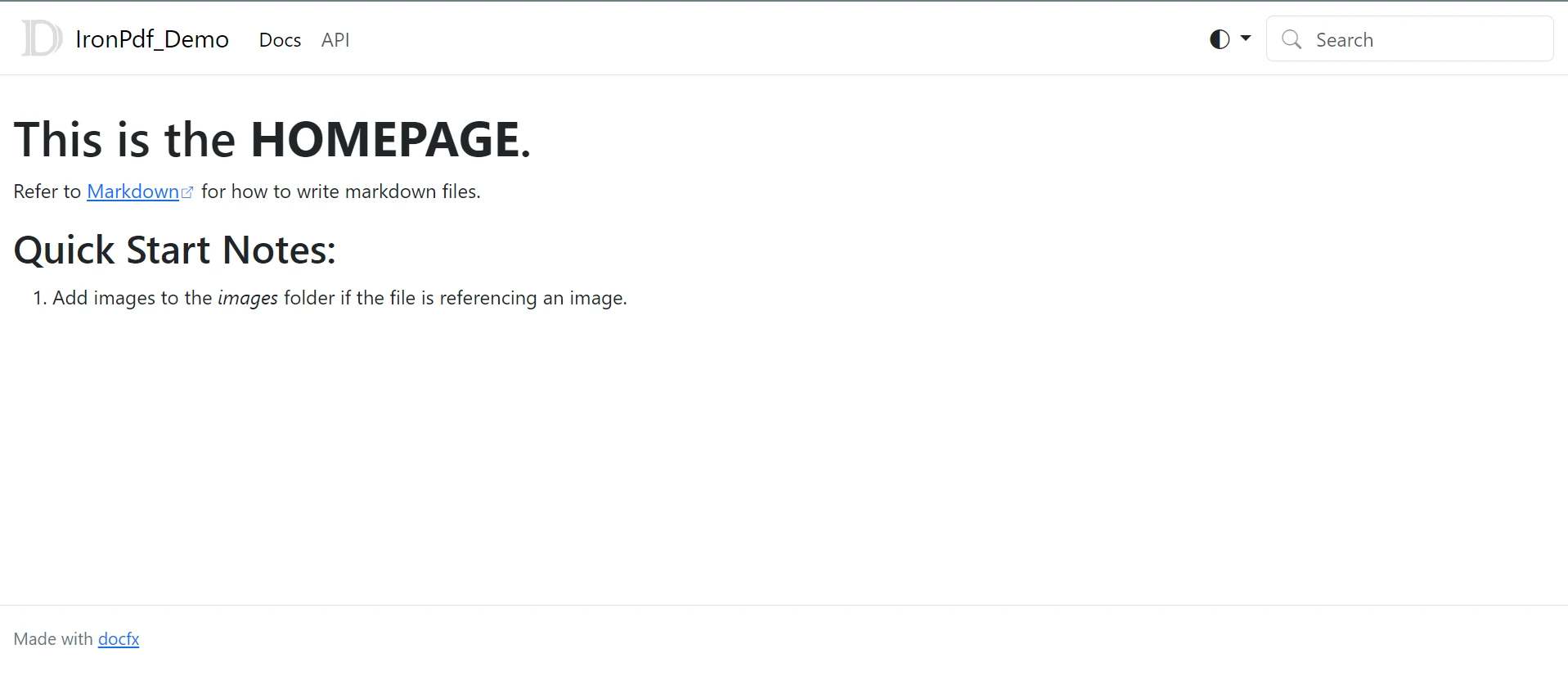
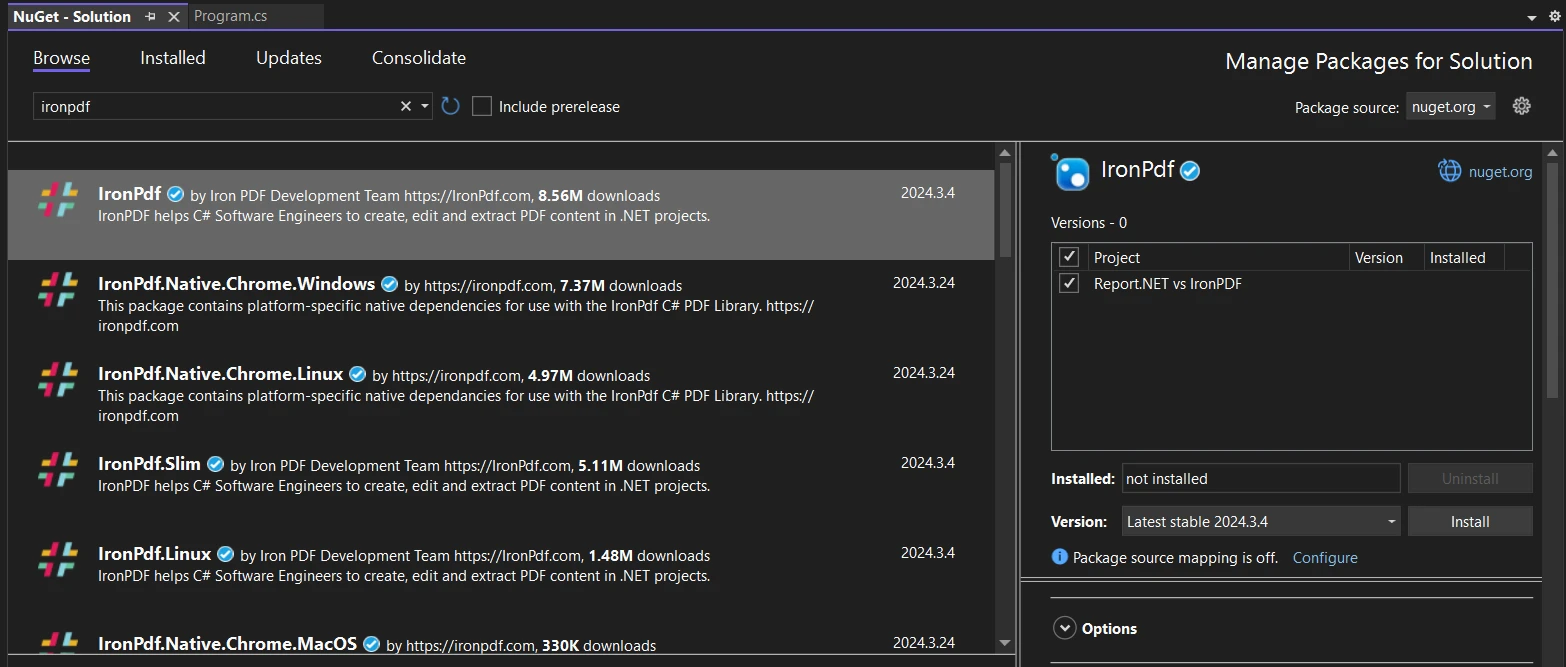
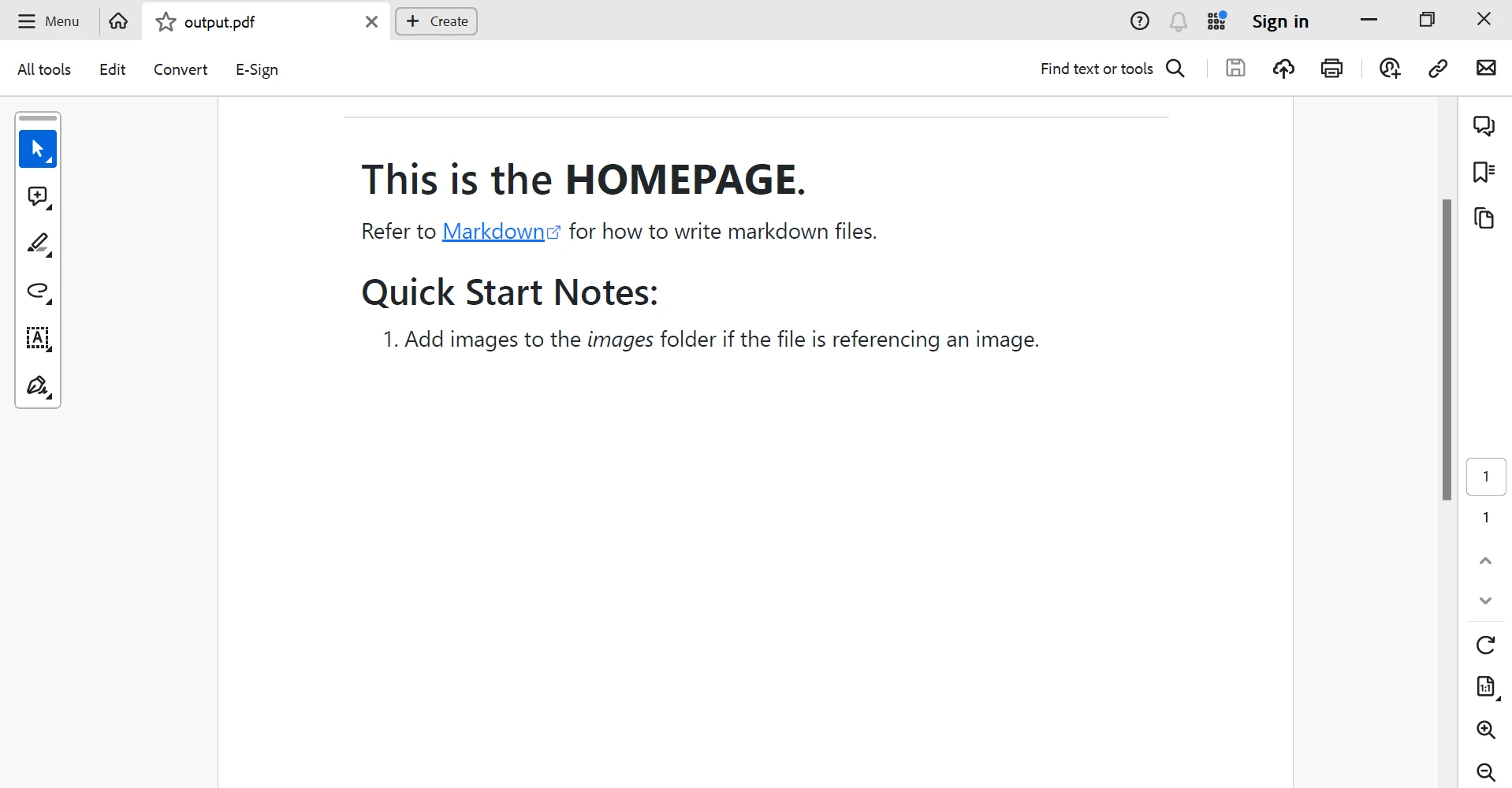
.NET 도움말 docfx C# (How It Works For Developers) 커티스 차우 업데이트됨:6월 22, 2025 다운로드 IronPDF NuGet 다운로드 DLL 다운로드 윈도우 설치 프로그램 무료 체험 시작하기 LLM용 사본 LLM용 사본 LLM용 마크다운 형식으로 페이지를 복사하세요 ChatGPT에서 열기 ChatGPT에 이 페이지에 대해 문의하세요 제미니에서 열기 제미니에게 이 페이지에 대해 문의하세요 Grok에서 열기 Grok에게 이 페이지에 대해 문의하세요 혼란 속에서 열기 Perplexity에게 이 페이지에 대해 문의하세요 공유하다 페이스북에 공유하기 트위터에 공유하기 LinkedIn에 공유하기 URL 복사 이메일로 기사 보내기 Clear and thorough documentation is crucial in today's software development environment to guarantee project success. DocFX C# and IronPDF are two effective tools that generate documentation and improve the readability and accessibility of project documentation while streamlining documentation workflows. This post will explain how to combine IronPDF, a C# library for creating PDF documents, with DocFX, an API documentation generator that generates API reference documentation. Developers can quickly produce excellent documentation and share it in PDF format by using these tools. How to use DocFX Install .NET SDK 6.0+ Open PowerShell. Run the script one by one to install the DocFX Library. After installation, run the JSON file. This opens the documentation site on port 8080. Introduction to DocFX Microsoft created the open-source static site generator and documentation generation tool DocFX. With the help of Markdown files and source code, developers can produce documentation websites that look professional. DocFX is adaptable and widely applicable across a variety of projects because it supports a multitude of markup formats and programming languages. Developers can create tutorials, conceptual articles, and API references in their documentation by using DocFX. Because of its adaptable architecture, teams can customize and extend it to meet their unique requirements. DocFX also offers features like cross-referencing, editable templates, and support for several output formats, including HTML and Markdown. For a more detailed description of the inner workings and methods of DocFX, please visit the DocFX Documentation. Getting started with DocFX Setting Up DocFX It is quite easy to use DocFX. It involves adding the DocFX SDK using Microsoft's .NET package manager, NuGet. The libraries and tools required to incorporate web content into your applications using DocFX are included in this SDK. Create a DocFX New Website We will create a basic documentation website on your local computer in this phase. A basic understanding of command line operations is necessary. A version of .NET SDK 6.0 or later is required. To install the most recent version of DocFX, ensure you have the .NET SDK installed, then open a terminal command line tool and type the following command: dotnet tool update -g docfx To start a fresh docset, execute: docfx init docfx init SHELL It creates a JSON file of all the configurations. With the help of this command, you can create a new DocFX project in the current working directory. To create the docset, execute: docfx docfx.json --serve docfx docfx.json --serve SHELL The webpage can now be previewed on http://localhost:8080. Save your changes. DocFX is configured using the JSON Configuration file. Now, we are using a new terminal to execute this command to rebuild the website and preview your local changes: docfx docfx.json docfx docfx.json SHELL Features of DocFX Flexible and extensible DocFX is compatible with several markup formats and programming languages, such as JSON files, YAML, and Markdown. Teams can select the format that best fits their requirements and tastes because of this flexibility. Furthermore, DocFX's extensible architecture allows programmers to add to and modify its features via plugins and templates, meeting a variety of documentation needs. API Documentation Generation DocFX is an excellent tool that helps to write API documentation from comments found in source code. DocFX automatically creates API reference documentation, including namespaces, classes, methods, parameters, and return types, by parsing code comments in widely used formats like XML and YAML. This feature saves developers a great deal of time and effort by streamlining the documentation process for code APIs. Cross-Platform Compatibility Because DocFX is cross-platform, it can operate in Linux, macOS, and Windows systems. Regardless of the operating system that the development team uses, this cross-platform compatibility guarantees that documentation generation may be easily incorporated into a variety of development workflows and settings. Built-in Search and Navigation DocFX comes with integrated support for navigation and search within the generated documentation. Quick access to pertinent information is made possible by users' ability to search the documentation for subjects, APIs, or keywords with ease. To further enhance usability and user experience, DocFX also creates a Table of Contents (TOC) that makes it easier for users to browse the documentation hierarchy. Integrating DocFX with IronPDF By combining DocFX with IronPDF, developers may make use of each tool's advantages and improve their documentation process. Developers can ensure consistent rendering across devices, create offline-ready documentation, and make sharing and distribution easier by utilizing IronPDF to convert DocFX-generated HTML documentation to PDF format. To learn more about IronPDF, please refer to the IronPDF Documentation. Install IronPDF Start the Visual Studio project. Choose "Tools" > "NuGet Package Manager" > "Package Manager Console". In the Visual Studio Package Manager Console, type the following command (correct this line to a proper package installation command): Install-Package IronPdf Alternatively, you can install IronPDF by using NuGet Package Manager for Solutions. You can select the IronPDF package from the search results, and then click the "Install" option. Visual Studio will handle the download and installation on your behalf. NuGet will install the IronPDF package along with any dependencies required for your project. After installation, IronPDF can be utilized in your project. Install Through the NuGet Website For additional information regarding IronPDF's features, compatibility, and available downloads, visit its NuGet package page on the NuGet website. Utilize DLL to Install Alternatively, you can directly integrate IronPDF into your project by utilizing its DLL file. To download the ZIP file containing the DLL, click this DLL download page. Unzip the file and add the DLL to your project. Implementing Logic The following logic is involved in the integration process: Create Documentation with DocFX: To get started, use DocFX to create your documentation. To generate HTML documentation, this entails executing the DocFX build process on the source code and Markdown files for your project. Use IronPDF to Convert HTML Documentation to PDF: After the HTML documentation has been created, utilize IronPDF to programmatically convert it to PDF format. Converting HTML text to printable PDF documents is easy using IronPDF's HTML-to-PDF conversion features. Automate the Process of Conversion: Use C# code or scripts to automate the conversion process to optimize workflow. This guarantees that the documentation may be readily updated and regenerated if manual intervention is not required. using IronPdf; class Program { static void Main() { // Create a new HtmlToPdf Renderer var Renderer = new HtmlToPdf(); // Render the webpage as PDF var PDF = Renderer.RenderUrlAsPdf("http://localhost:8080/index.html"); // Save PDF to a file PDF.SaveAs("output.pdf"); // Inform the user of successful PDF creation Console.WriteLine("PDF generated successfully!"); Console.ReadKey(); } } using IronPdf; class Program { static void Main() { // Create a new HtmlToPdf Renderer var Renderer = new HtmlToPdf(); // Render the webpage as PDF var PDF = Renderer.RenderUrlAsPdf("http://localhost:8080/index.html"); // Save PDF to a file PDF.SaveAs("output.pdf"); // Inform the user of successful PDF creation Console.WriteLine("PDF generated successfully!"); Console.ReadKey(); } } $vbLabelText $csharpLabel To read more about the code example, see this example usage guide. The execution output is shown below: Conclusion Finally, developers have a strong option for creating and disseminating excellent documentation in PDF format by integrating DocFX with IronPDF in C#. Developers can produce extensive, offline-ready documentation that is easily accessible and shared by combining the DocFX and IronPDF PDF production capabilities for documentation generation. This integration enhances the documentation workflow, improves the readability and accessibility of project documentation, and increases the likelihood of software project success. Developers can optimize their documentation procedures, improve teamwork and communication, and provide better documentation experiences for users and stakeholders by implementing the recommendations in this article and making use of DocFX and IronPDF's capabilities. The $799 Lite bundle includes a perpetual license, one year of software maintenance, and an upgrade to the library. IronPDF offers free licensing with restrictions on redistribution and time. Users can assess the solution during the trial period without having to see a watermark. For additional information on the price and license, please see IronPDF's licensing details. 자주 묻는 질문 C#을 사용하여 HTML 문서를 PDF로 변환하려면 어떻게 해야 하나요? C#에서 IronPDF를 사용하여 HTML 문서를 PDF로 변환할 수 있습니다. HtmlToPdf 클래스를 사용하여 HTML 파일을 PDF 형식으로 렌더링하면 오프라인에서 문서에 액세스할 수 있고 쉽게 배포할 수 있습니다. DocFX란 무엇이며 개발자에게 어떤 이점이 있나요? DocFX는 Microsoft에서 만든 오픈 소스 문서 생성기입니다. 이 도구는 개발자가 마크다운 파일과 소스 코드를 사용하여 상세한 문서 웹사이트를 만들 수 있게 해주며 HTML 및 마크다운과 같은 여러 출력 형식을 지원하여 개발자에게 도움이 됩니다. 문서를 생성하도록 DocFX를 설정하려면 어떻게 해야 하나요? DocFX를 설정하려면 먼저 .NET SDK 6.0 이상이 설치되어 있는지 확인하세요. 명령줄에서 dotnet tool update -g docfx를 사용하여 DocFX를 설치한 다음, docfx init로 새 문서 프로젝트를 초기화합니다. DocFX HTML 출력을 PDF로 변환하는 데는 어떤 단계가 포함되나요? 먼저 DocFX를 사용하여 HTML 문서를 생성합니다. 그런 다음, 문서 배포 프로세스를 개선하는 RenderHtmlFileAsPdf 메서드를 사용하여 IronPDF를 사용하여 HTML 파일을 PDF로 변환합니다. 개발자가 DocFX와 함께 IronPDF를 사용해야 하는 이유는 무엇인가요? 개발자는 DocFX와 함께 IronPDF를 사용하면 HTML 문서를 PDF 형식으로 변환하여 일관된 렌더링과 오프라인 접근성을 보장할 수 있습니다. 이 조합은 다재다능하고 포괄적인 문서 솔루션을 제공하여 문서 워크플로우를 향상시킵니다. C# 프로젝트에서 PDF 생성 라이브러리를 통합하려면 어떻게 해야 하나요? C# 프로젝트에서 NuGet 패키지 관리자를 사용하여 IronPDF와 같은 PDF 생성 라이브러리를 통합합니다. 패키지 관리자 콘솔에서 Install-Package IronPdf를 실행하거나 NuGet 패키지 관리자 UI에서 IronPDF를 검색합니다. 문서를 PDF 형식으로 변환하면 어떤 이점이 있나요? 문서를 PDF 형식으로 변환하면 가독성 향상, 오프라인 접근성, 배포 용이성 등의 이점이 있습니다. 문서가 일관된 레이아웃을 유지하고 다양한 기기에서 액세스할 수 있도록 보장합니다. IronPDF를 사용하는 데 사용할 수 있는 라이선스 옵션에는 어떤 것이 있나요? IronPDF는 평가를 위한 평가판 기간을 제공합니다. 평가판 종료 후 개발자는 다양한 라이선스 옵션 중에서 선택하여 프로젝트에서 IronPDF를 계속 사용할 수 있으며, 모든 기능과 지원을 이용할 수 있습니다. IronPDF는 문서 워크플로우를 어떻게 개선하나요? IronPDF는 문서 워크플로우를 개선하여 개발자가 DocFX에서 생성된 HTML 문서를 C#을 사용하여 PDF 형식으로 자동 변환할 수 있도록 함으로써 프로세스를 간소화하고 생산성을 향상시킵니다. API 문서에 DocFX를 사용하려면 무엇이 필요하나요? API 문서에 DocFX를 사용하려면 .NET SDK 6.0 이상, DocFX 도구가 설치되어 있고 적절한 주석이 포함된 소스 코드가 필요합니다. DocFX는 주석을 파싱하고 API 참조를 생성하여 소프트웨어 프로젝트를 더 쉽게 문서화할 수 있도록 도와줍니다. 커티스 차우 지금 바로 엔지니어링 팀과 채팅하세요 기술 문서 작성자 커티스 차우는 칼턴 대학교에서 컴퓨터 과학 학사 학위를 취득했으며, Node.js, TypeScript, JavaScript, React를 전문으로 하는 프론트엔드 개발자입니다. 직관적이고 미적으로 뛰어난 사용자 인터페이스를 만드는 데 열정을 가진 그는 최신 프레임워크를 활용하고, 잘 구성되고 시각적으로 매력적인 매뉴얼을 제작하는 것을 즐깁니다. 커티스는 개발 분야 외에도 사물 인터넷(IoT)에 깊은 관심을 가지고 있으며, 하드웨어와 소프트웨어를 통합하는 혁신적인 방법을 연구합니다. 여가 시간에는 게임을 즐기거나 디스코드 봇을 만들면서 기술에 대한 애정과 창의성을 결합합니다. 관련 기사 업데이트됨 12월 11, 2025 Bridging CLI Simplicity & .NET : Using Curl DotNet with IronPDF Jacob Mellor has bridged this gap with CurlDotNet, a library created to bring the familiarity of cURL to the .NET ecosystem. 더 읽어보기 업데이트됨 12월 20, 2025 RandomNumberGenerator C# Using the RandomNumberGenerator C# class can help take your PDF generation and editing projects to the next level 더 읽어보기 업데이트됨 12월 20, 2025 C# String Equals (How it Works for Developers) When combined with a powerful PDF library like IronPDF, switch pattern matching allows you to build smarter, cleaner logic for document processing 더 읽어보기 Flunt C# (How It Works For Developers)Html Agility Pack C# (How It Works ...
업데이트됨 12월 11, 2025 Bridging CLI Simplicity & .NET : Using Curl DotNet with IronPDF Jacob Mellor has bridged this gap with CurlDotNet, a library created to bring the familiarity of cURL to the .NET ecosystem. 더 읽어보기
업데이트됨 12월 20, 2025 RandomNumberGenerator C# Using the RandomNumberGenerator C# class can help take your PDF generation and editing projects to the next level 더 읽어보기
업데이트됨 12월 20, 2025 C# String Equals (How it Works for Developers) When combined with a powerful PDF library like IronPDF, switch pattern matching allows you to build smarter, cleaner logic for document processing 더 읽어보기