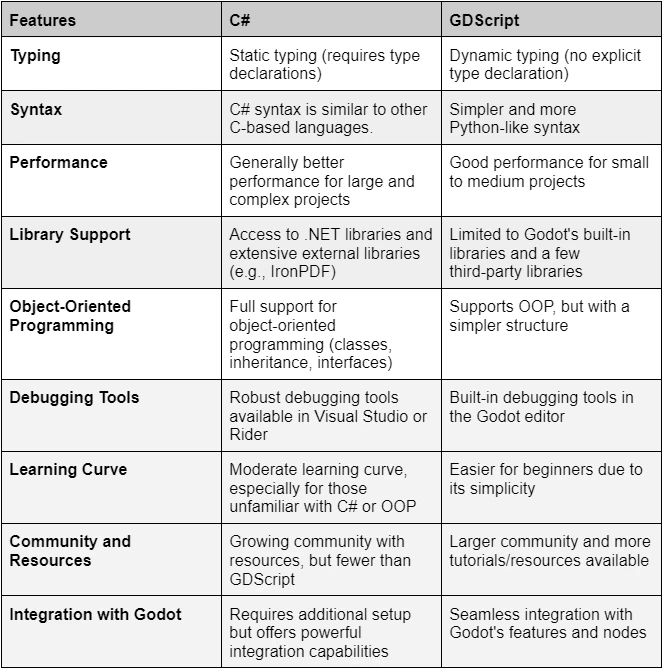
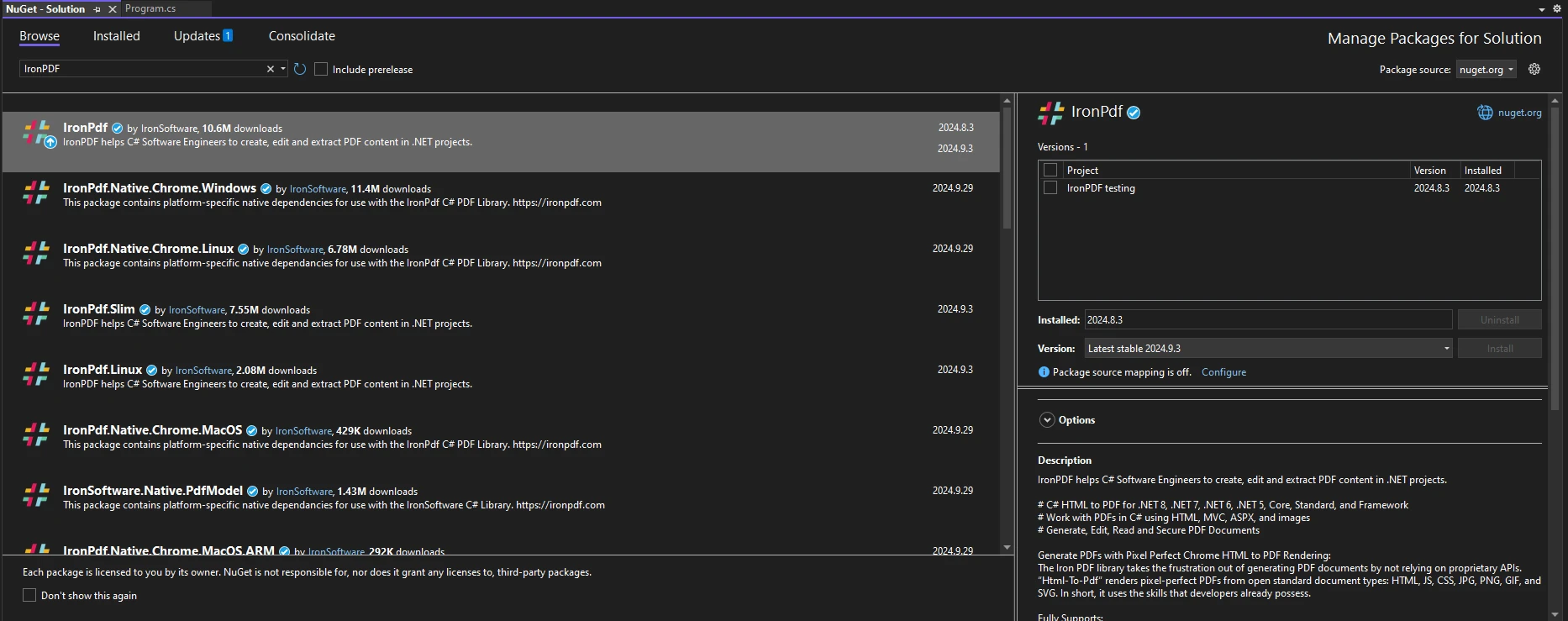
.NET 도움말 Godot C# vs Gdscript (How it Works for Developers) 커티스 차우 업데이트됨:6월 22, 2025 다운로드 IronPDF NuGet 다운로드 DLL 다운로드 윈도우 설치 프로그램 무료 체험 시작하기 LLM용 사본 LLM용 사본 LLM용 마크다운 형식으로 페이지를 복사하세요 ChatGPT에서 열기 ChatGPT에 이 페이지에 대해 문의하세요 제미니에서 열기 제미니에게 이 페이지에 대해 문의하세요 Grok에서 열기 Grok에게 이 페이지에 대해 문의하세요 혼란 속에서 열기 Perplexity에게 이 페이지에 대해 문의하세요 공유하다 페이스북에 공유하기 트위터에 공유하기 LinkedIn에 공유하기 URL 복사 이메일로 기사 보내기 The Godot Engine has seen a surge in popularity among indie developers and larger studios alike due to its versatility, open-source nature, and robust features. As game development continues to evolve, choosing the right scripting language becomes crucial for optimizing workflow and project outcomes. Godot primarily supports two scripting languages: GDScript, which is native to the engine, and C#, a powerful programming language favored by many developers for its performance and versatility. This article will delve into the strengths and weaknesses of both GDScript and C# in the context of Godot game development, with a particular focus on how IronPDF can enhance projects by enabling seamless PDF generation. Understanding the Godot Scripting Languages: C# vs GDScript What is GDScript? GDScript is Godot's native scripting language, designed specifically for the engine. It features dynamic typing, simplicity, an auto-complete feature, and an easy learning curve that appeals to both novice and experienced developers looking to build Godot games. Key Features of GDScript: Dynamic Typing: Variables do not require explicit type definitions, allowing for quick changes and flexibility during development. Simplicity: The syntax is clean and straightforward, making it easy to write and read code. Engine Integration: GDScript is tightly integrated with Godot, providing seamless access to the engine's features and nodes. Advantages for Rapid Prototyping: GDScript is ideal for rapid prototyping and lightweight game development, enabling developers to iterate quickly and efficiently. What is C# in Godot? C# integration in Godot allows developers familiar with the .NET ecosystem to leverage their existing skills, and with it, you can utilize an external editor such as Visual Studio. With C#, developers gain access to a more extensive range of libraries and tools, making it a robust choice for more complex projects. Features of C#: Static Typing: C# requires explicit type definitions, which can lead to fewer runtime errors and more optimized performance than other engines. Access to .NET Libraries: Developers can utilize a vast array of libraries, enhancing functionality and reducing development time. Familiarity for .NET Developers: C# is a well-established language, making it easier for those with prior experience to adapt to Godot. Key Differences Between C# and GDScript When choosing between C# and GDScript, consider the following differences: Syntax and Typing: GDScript's dynamic typing allows for flexibility, while C#’s static typing promotes stability and performance. Performance Considerations: C# often outperforms GDScript in complex calculations or larger projects due to better optimization opportunities. Developer Experience: GDScript may have a gentler learning curve, while C# offers a richer set of features for experienced developers. Comparison Table C# is ideal for larger, more complex projects requiring robust performance and extensive library support. It is particularly suited for developers familiar with .NET and object-oriented programming principles. GDScript excels in rapid prototyping and lightweight game development, making it a great choice for smaller projects and developers looking for ease of use and quick iterations. Using C# in Godot with IronPDF Setting Up IronPDF in a Godot C# Project To start using IronPDF, you will first need to install it. If it's already installed, then you can skip to the next section; otherwise, the following steps cover how to install the IronPDF library. Via the NuGet Package Manager Console To install IronPDF using the NuGet Package Manager Console, open Visual Studio and navigate to the Package Manager Console. Then run the following command: Install-Package IronPdf Via the NuGet Package Manager for Solution Opening Visual Studio, go to "Tools -> NuGet Package Manager -> Manage NuGet Packages for Solution" and search for IronPDF. From here, all you need to do is select your project and click "Install" and IronPDF will be added to your project. Once you have installed IronPDF, all you need to add to start using IronPDF is the correct using statement at the top of your code: using IronPdf; using IronPdf; $vbLabelText $csharpLabel Example: Generating PDFs from In-Game Data with IronPDF Here’s a simple example demonstrating how to generate a PDF report project based from in-game data: using Godot; using IronPdf; // Define a class that inherits from Godot's Node class public class PDFGenerator : Node { // Method to generate a PDF using player's data public void GeneratePDF(string playerName, int score) { // Create a new HtmlToPdf object var pdf = new HtmlToPdf(); // Define HTML content with player's information string htmlContent = $"<h1>Player Report</h1><p>Name: {playerName}</p><p>Score: {score}</p>"; // Render the HTML content to a PDF document var pdfDocument = pdf.RenderHtmlAsPdf(htmlContent); // Save the PDF document to a file pdfDocument.SaveAs("PlayerReport.pdf"); } } using Godot; using IronPdf; // Define a class that inherits from Godot's Node class public class PDFGenerator : Node { // Method to generate a PDF using player's data public void GeneratePDF(string playerName, int score) { // Create a new HtmlToPdf object var pdf = new HtmlToPdf(); // Define HTML content with player's information string htmlContent = $"<h1>Player Report</h1><p>Name: {playerName}</p><p>Score: {score}</p>"; // Render the HTML content to a PDF document var pdfDocument = pdf.RenderHtmlAsPdf(htmlContent); // Save the PDF document to a file pdfDocument.SaveAs("PlayerReport.pdf"); } } $vbLabelText $csharpLabel This code snippet creates an HTML string with player data and uses IronPDF to render it into a PDF file. C#’s ability to easily integrate with libraries like IronPDF enhances the game's functionality and user experience. Advantages of Using C# for Godot Projects with IronPDF Better Library Support with C# and IronPDF C# allows developers to access powerful external libraries, like IronPDF, that can significantly enhance game projects. Examples of PDF Generation Benefits: Score Reports: Automatically generate and save player score reports. Export Game Data: Allow players to export achievements, stats, and more in a professional format. Object-Oriented Programming and Performance C#'s static typing and object-oriented structure make it ideal for larger, more complex game projects. Its performance is particularly beneficial when using libraries like IronPDF, especially for: Complex Systems: C# handles larger projects with modular designs more effectively than GDScript. Enhanced Performance: C# can lead to better performance in compute-heavy tasks. When to Use GDScript and Its Strengths Rapid Prototyping and Lightweight Games GDScript excels in quick game development, making it a perfect choice for small to medium-sized projects where time is of the essence. Its simplicity and integration with the Godot editor allow for rapid iteration and testing. Community Support and Resources for GDScript GDScript has a robust Godot community with numerous tutorials and resources available, facilitating learning and onboarding for new developers. Compared to C#, GDScript may have a slight edge in community-driven support, official documentation, and accessibility. The learning curve to learn GDScript may be easier due to its simplicity. Choosing the Right Language for Your Godot Project Factors to Consider for Your Game’s Needs When deciding between C# and GDScript, consider: Project Size and Complexity: C# may be better suited for large, modular projects, while GDScript is ideal for simpler games. Developer Background: Your prior experience with programming languages can influence your choice; C# may be more intuitive for developers with a .NET background. Combining C# and GDScript in the Same Project Developers can leverage both languages within a single Godot project to maximize strengths. For instance, using GDScript for rapid prototyping while employing C# for performance-critical components can lead to an optimized workflow. Conclusion Both C# and GDScript offer unique strengths and weaknesses for game development in Godot. GDScript is excellent for rapid prototyping and smaller projects, while C# shines in larger, more complex systems, particularly when leveraging external libraries like IronPDF for added functionality. Ultimately, however, there's no one correct choice, it comes down to your personal preference and needs of the project you're working on. You don't even have to choose just one language, you can use both if that's what you require. Check out the Godot documentation for more on how Godot works, and the IronPDF documentation to see more of IronPDF's robust features in action. Explore the capabilities of IronPDF by downloading its free trial and see how you can enhance your Godot C# projects with powerful PDF generation features. 자주 묻는 질문 C#에서 HTML을 PDF로 변환하려면 어떻게 해야 하나요? IronPDF의 RenderHtmlAsPdf 메서드를 사용하여 HTML 문자열을 PDF로 변환할 수 있습니다. 또한 RenderHtmlFileAsPdf를 사용하여 HTML 파일을 PDF로 변환할 수도 있습니다. Godot에서 GDScript보다 C#을 사용하면 어떤 이점이 있나요? C#은 정적 타이핑, 광범위한 .NET 라이브러리에 대한 액세스, 강력한 성능을 제공합니다. 특히 더 크고 복잡한 프로젝트와 .NET 에코시스템에 익숙한 개발자에게 적합합니다. Godot 프로젝트에서 PDF 생성 라이브러리를 사용할 수 있나요? 예, IronPDF와 같은 라이브러리를 사용하여 게임 내 데이터에서 PDF를 생성할 수 있습니다. 이를 통해 점수 보고서를 생성하고 게임 데이터를 내보낼 수 있어 게임 기능이 향상됩니다. 고닷 프로젝트에서 IronPDF를 사용하면 어떤 이점이 있나요? IronPDF는 원활한 PDF 생성을 지원하여 Godot 프로젝트를 향상시킵니다. 이를 통해 개발자는 플레이어 점수 보고서를 생성 및 저장하고 게임 데이터를 전문적인 형식으로 내보낼 수 있습니다. Godot 프로젝트에서 GDScript와 C#을 함께 사용할 수 있나요? 예, 개발자는 동일한 프로젝트에서 GDScript와 C#을 모두 사용할 수 있습니다. GDScript는 신속한 프로토타이핑에 적합하며, C#은 성능에 중요한 구성 요소를 처리하여 워크플로우를 최적화할 수 있습니다. 고닷 초보자에게 GDScript가 더 쉬운 이유는 무엇인가요? GDScript는 단순성, 동적 타이핑, Godot 편집기와의 통합으로 인해 학습 곡선이 완만하여 신규 개발자도 쉽게 접근할 수 있습니다. Godot에서 C#과 GDScript 중 어떤 요소를 선택해야 하나요? 프로젝트의 규모, 복잡성 및 개발자의 .NET 에코시스템에 대한 친숙도를 고려하세요. 대규모 모듈식 프로젝트에는 C#이 더 적합하며, 단순한 게임에는 GDScript가 이상적입니다. IronPDF를 사용하면 C#에 익숙한 개발자에게 어떤 이점이 있나요? C#에 익숙한 개발자는 .NET 라이브러리에 대한 기존 지식을 활용하여 IronPDF를 Godot 프로젝트에 원활하게 통합하여 PDF 생성을 효율적으로 관리할 수 있습니다. 고닷에서 게임 개발에 GDScript를 사용하면 어떤 이점이 있나요? GDScript는 단순성, 동적 타이핑, 엔진 통합 덕분에 신속한 프로토타이핑과 경량 게임 개발에 탁월하여 소규모 프로젝트에 적합합니다. GDScript를 배우는 데 사용할 수 있는 커뮤니티 리소스에는 어떤 것이 있나요? GDScript에는 수많은 튜토리얼과 리소스를 갖춘 강력한 Godot 커뮤니티가 있어 신규 개발자의 학습과 온보딩을 용이하게 합니다. 이러한 커뮤니티 중심의 지원 덕분에 누구나 쉽게 접근하고 배울 수 있습니다. 커티스 차우 지금 바로 엔지니어링 팀과 채팅하세요 기술 문서 작성자 커티스 차우는 칼턴 대학교에서 컴퓨터 과학 학사 학위를 취득했으며, Node.js, TypeScript, JavaScript, React를 전문으로 하는 프론트엔드 개발자입니다. 직관적이고 미적으로 뛰어난 사용자 인터페이스를 만드는 데 열정을 가진 그는 최신 프레임워크를 활용하고, 잘 구성되고 시각적으로 매력적인 매뉴얼을 제작하는 것을 즐깁니다. 커티스는 개발 분야 외에도 사물 인터넷(IoT)에 깊은 관심을 가지고 있으며, 하드웨어와 소프트웨어를 통합하는 혁신적인 방법을 연구합니다. 여가 시간에는 게임을 즐기거나 디스코드 봇을 만들면서 기술에 대한 애정과 창의성을 결합합니다. 관련 기사 업데이트됨 12월 11, 2025 Bridging CLI Simplicity & .NET : Using Curl DotNet with IronPDF Jacob Mellor has bridged this gap with CurlDotNet, a library created to bring the familiarity of cURL to the .NET ecosystem. 더 읽어보기 업데이트됨 12월 20, 2025 RandomNumberGenerator C# Using the RandomNumberGenerator C# class can help take your PDF generation and editing projects to the next level 더 읽어보기 업데이트됨 12월 20, 2025 C# String Equals (How it Works for Developers) When combined with a powerful PDF library like IronPDF, switch pattern matching allows you to build smarter, cleaner logic for document processing 더 읽어보기 C# Global Variable (How it Works for Developers)C# Hashmap (How it Works for Developers)
업데이트됨 12월 11, 2025 Bridging CLI Simplicity & .NET : Using Curl DotNet with IronPDF Jacob Mellor has bridged this gap with CurlDotNet, a library created to bring the familiarity of cURL to the .NET ecosystem. 더 읽어보기
업데이트됨 12월 20, 2025 RandomNumberGenerator C# Using the RandomNumberGenerator C# class can help take your PDF generation and editing projects to the next level 더 읽어보기
업데이트됨 12월 20, 2025 C# String Equals (How it Works for Developers) When combined with a powerful PDF library like IronPDF, switch pattern matching allows you to build smarter, cleaner logic for document processing 더 읽어보기