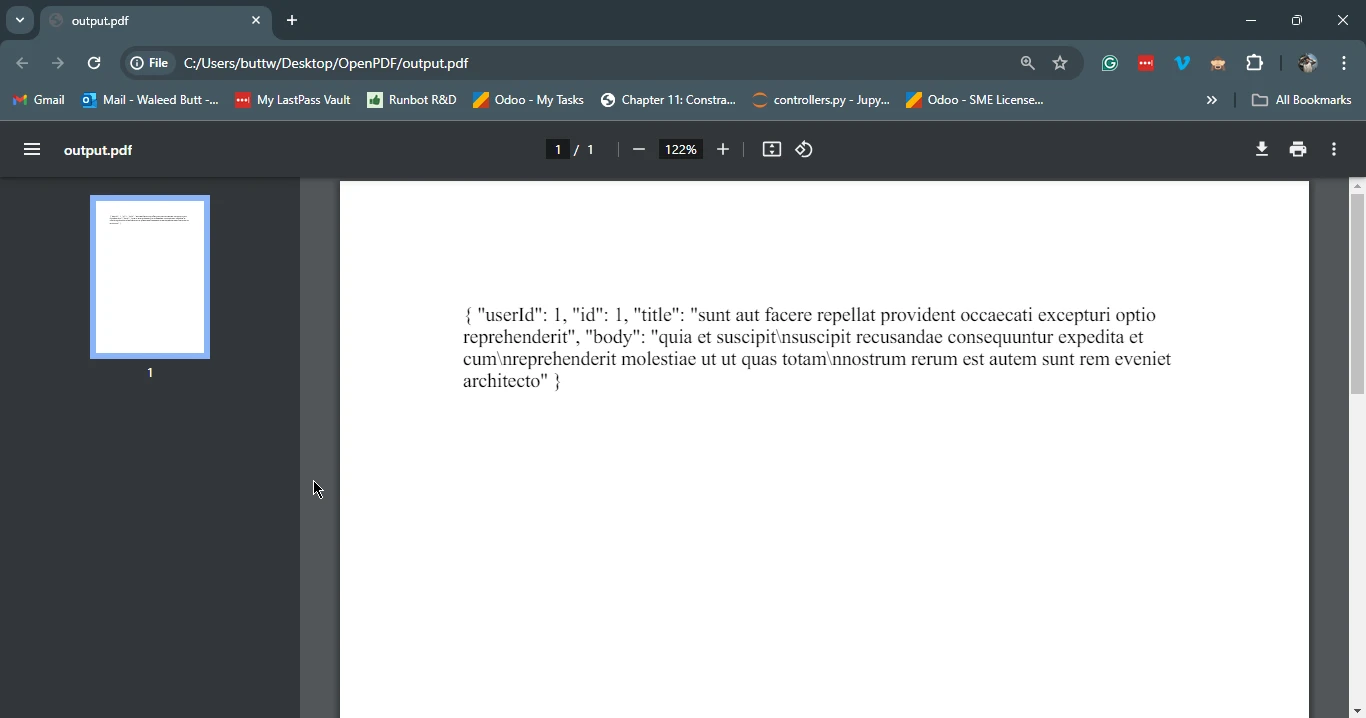
JAVA 도움말 Java용 Google HTTP 클라이언트 라이브러리(개발자를 위한 작동 방식) 커티스 차우 업데이트됨:6월 22, 2025 다운로드 IronPDF 메이븐 다운로드 JAR 다운로드 무료 체험 시작하기 LLM용 사본 LLM용 사본 LLM용 마크다운 형식으로 페이지를 복사하세요 ChatGPT에서 열기 ChatGPT에 이 페이지에 대해 문의하세요 제미니에서 열기 제미니에게 이 페이지에 대해 문의하세요 Grok에서 열기 Grok에게 이 페이지에 대해 문의하세요 혼란 속에서 열기 Perplexity에게 이 페이지에 대해 문의하세요 공유하다 페이스북에 공유하기 트위터에 공유하기 LinkedIn에 공유하기 URL 복사 이메일로 기사 보내기 The Google HTTP Client Library for Java is a robust library designed to simplify the process of making HTTP requests and handling responses in Java applications. It is a part of the Google app engine and Google API client as part of the Google Apis. Developed and maintained by Google, this powerful Java library supports a wide range of HTTP methods and integrates seamlessly with JSON data models and XML data models, making it an excellent choice for developers looking to interact with web services. Additionally, we'll explore IronPDF for Java and demonstrate how to integrate it with Google HTTP Client Library to generate PDF documents from HTTP Response data. Key Features Simplified HTTP Requests: The library abstracts much of the complexity of creating and sending HTTP requests, making it easier for developers to work with. Support for Various Authentication Methods: It supports OAuth 2.0 and other authentication schemes, which is essential for interacting with modern APIs. JSON and XML Parsing: The library can automatically parse JSON and XML responses into Java objects, reducing boilerplate code. Asynchronous Requests: It supports asynchronous requests, which can improve application performance by offloading network operations to background threads. Built-in Retry Mechanism: The library includes a built-in retry mechanism for handling transient network errors, which can help improve applications' robustness. Stability and maintenance: The library offers stable and non-beta features, ensuring reliable performance in production environments. Setting Up Google HTTP Client Library for Java To use the Google HTTP Client Library for Java, you must add the full client library and necessary dependencies to your project. If you are using Maven, you can add the following dependencies to your pom.xml file: <dependencies> <dependency> <groupId>com.google.http-client</groupId> <artifactId>google-http-client</artifactId> <version>1.39.2</version> </dependency> <dependency> <groupId>com.google.http-client</groupId> <artifactId>google-http-client-jackson2</artifactId> <version>1.39.2</version> </dependency> </dependencies> <dependencies> <dependency> <groupId>com.google.http-client</groupId> <artifactId>google-http-client</artifactId> <version>1.39.2</version> </dependency> <dependency> <groupId>com.google.http-client</groupId> <artifactId>google-http-client-jackson2</artifactId> <version>1.39.2</version> </dependency> </dependencies> XML Basic Usage Let's explore the basic usage of the Google HTTP Client Library for Java through various examples. 1. Making a Simple GET Request The following code demonstrates how to make a simple GET request using the Google HTTP Client Library: import com.google.api.client.http.HttpRequest; import com.google.api.client.http.HttpRequestFactory; import com.google.api.client.http.HttpResponse; import com.google.api.client.http.javanet.NetHttpTransport; import com.google.api.client.http.GenericUrl; public class HttpClientExample { public static void main(String[] args) { try { // Create a request factory using NetHttpTransport HttpRequestFactory requestFactory = new NetHttpTransport().createRequestFactory(); // Define the URL for the GET request GenericUrl url = new GenericUrl("https://jsonplaceholder.typicode.com/posts/1"); // Build the GET request HttpRequest request = requestFactory.buildGetRequest(url); // Execute the request and get the response HttpResponse response = request.execute(); // Parse the response as a String and print it System.out.println(response.parseAsString()); } catch (Exception e) { // Print the stack trace if an exception occurs e.printStackTrace(); } } } import com.google.api.client.http.HttpRequest; import com.google.api.client.http.HttpRequestFactory; import com.google.api.client.http.HttpResponse; import com.google.api.client.http.javanet.NetHttpTransport; import com.google.api.client.http.GenericUrl; public class HttpClientExample { public static void main(String[] args) { try { // Create a request factory using NetHttpTransport HttpRequestFactory requestFactory = new NetHttpTransport().createRequestFactory(); // Define the URL for the GET request GenericUrl url = new GenericUrl("https://jsonplaceholder.typicode.com/posts/1"); // Build the GET request HttpRequest request = requestFactory.buildGetRequest(url); // Execute the request and get the response HttpResponse response = request.execute(); // Parse the response as a String and print it System.out.println(response.parseAsString()); } catch (Exception e) { // Print the stack trace if an exception occurs e.printStackTrace(); } } } JAVA In this example, we create an HttpRequestFactory and use it to build and execute a GET request to a placeholder API. We use a try-catch block here to handle exceptions that may occur when the request fails. We then print the response to the console. 2. Making a POST Request with JSON Data The following code demonstrates how to make a POST request with JSON data: import com.google.api.client.http.HttpRequest; import com.google.api.client.http.HttpRequestFactory; import com.google.api.client.http.HttpResponse; import com.google.api.client.http.javanet.NetHttpTransport; import com.google.api.client.http.GenericUrl; import com.google.api.client.http.json.JsonHttpContent; import com.google.api.client.json.JsonFactory; import com.google.api.client.json.jackson2.JacksonFactory; import java.util.HashMap; import java.util.Map; public class HttpClientExample { public static void main(String[] args) { try { // Create a request factory using NetHttpTransport HttpRequestFactory requestFactory = new NetHttpTransport().createRequestFactory(); // Define the URL for the POST request GenericUrl url = new GenericUrl("https://jsonplaceholder.typicode.com/posts"); // Create a map to hold JSON data Map<String, Object> jsonMap = new HashMap<>(); jsonMap.put("title", "foo"); jsonMap.put("body", "bar"); jsonMap.put("userId", 1); // Create a JSON content using the map JsonFactory jsonFactory = new JacksonFactory(); JsonHttpContent content = new JsonHttpContent(jsonFactory, jsonMap); // Build the POST request HttpRequest request = requestFactory.buildPostRequest(url, content); // Execute the request and get the response HttpResponse response = request.execute(); // Parse the response as a String and print it System.out.println(response.parseAsString()); } catch (Exception e) { // Print the stack trace if an exception occurs e.printStackTrace(); } } } import com.google.api.client.http.HttpRequest; import com.google.api.client.http.HttpRequestFactory; import com.google.api.client.http.HttpResponse; import com.google.api.client.http.javanet.NetHttpTransport; import com.google.api.client.http.GenericUrl; import com.google.api.client.http.json.JsonHttpContent; import com.google.api.client.json.JsonFactory; import com.google.api.client.json.jackson2.JacksonFactory; import java.util.HashMap; import java.util.Map; public class HttpClientExample { public static void main(String[] args) { try { // Create a request factory using NetHttpTransport HttpRequestFactory requestFactory = new NetHttpTransport().createRequestFactory(); // Define the URL for the POST request GenericUrl url = new GenericUrl("https://jsonplaceholder.typicode.com/posts"); // Create a map to hold JSON data Map<String, Object> jsonMap = new HashMap<>(); jsonMap.put("title", "foo"); jsonMap.put("body", "bar"); jsonMap.put("userId", 1); // Create a JSON content using the map JsonFactory jsonFactory = new JacksonFactory(); JsonHttpContent content = new JsonHttpContent(jsonFactory, jsonMap); // Build the POST request HttpRequest request = requestFactory.buildPostRequest(url, content); // Execute the request and get the response HttpResponse response = request.execute(); // Parse the response as a String and print it System.out.println(response.parseAsString()); } catch (Exception e) { // Print the stack trace if an exception occurs e.printStackTrace(); } } } JAVA In this example, we create a JSON object and use JsonHttpContent to send it in a POST request. The response is then printed to the console. Introduction to IronPDF for Java IronPDF is a powerful library for Java developers that simplifies creating, editing, and managing PDF documents. It provides a wide range of features, including converting HTML to PDF, manipulating existing PDF files, and extracting text and images from PDFs. Key Features of IronPDF HTML to PDF Conversion: Convert HTML content to PDF with high fidelity. Manipulating Existing PDFs: Merge, split, and modify existing PDF documents. Text and Image Extraction: Extract text and images from PDF documents for further processing. Watermarking and Annotations: Add watermarks, annotations, and other enhancements to PDF files. Security Features: Add passwords and permissions to secure PDF documents. Setting Up IronPDF for Java To use IronPDF in your Java project, you need to include the IronPDF library. You can download the JAR file from the IronPDF website or use a build tool like Maven to include it in your project. For users using Maven, add the following code to your pom.xml: <dependency> <groupId>com.ironsoftware</groupId> <artifactId>ironpdf</artifactId> <version>2023.12.1</version> </dependency> <dependency> <groupId>org.slf4j</groupId> <artifactId>slf4j-simple</artifactId> <version>2.0.3</version> </dependency> <dependency> <groupId>com.ironsoftware</groupId> <artifactId>ironpdf</artifactId> <version>2023.12.1</version> </dependency> <dependency> <groupId>org.slf4j</groupId> <artifactId>slf4j-simple</artifactId> <version>2.0.3</version> </dependency> XML Using Google HTTP Client Library with IronPDF In this section, we will demonstrate how to use the Google HTTP Client Library to fetch HTML content from a web service and then use IronPDF to convert that HTML content into a PDF document. Example: Fetching HTML and Converting to PDF import com.google.api.client.http.HttpRequest; import com.google.api.client.http.HttpRequestFactory; import com.google.api.client.http.HttpResponse; import com.google.api.client.http.javanet.NetHttpTransport; import com.google.api.client.http.GenericUrl; import com.ironsoftware.ironpdf.PdfDocument; public class HtmlToPdfExample { public static void main(String[] args) { try { // Fetch HTML content using Google HTTP Client Library HttpRequestFactory requestFactory = new NetHttpTransport().createRequestFactory(); GenericUrl url = new GenericUrl("https://jsonplaceholder.typicode.com/posts/1"); HttpRequest request = requestFactory.buildGetRequest(url); HttpResponse response = request.execute(); String htmlContent = response.parseAsString(); // Convert HTML content to PDF using IronPDF PdfDocument pdf = PdfDocument.renderHtmlAsPdf(htmlContent); pdf.saveAs("output.pdf"); System.out.println("PDF created successfully!"); } catch (Exception e) { // Print the stack trace if an exception occurs e.printStackTrace(); } } } import com.google.api.client.http.HttpRequest; import com.google.api.client.http.HttpRequestFactory; import com.google.api.client.http.HttpResponse; import com.google.api.client.http.javanet.NetHttpTransport; import com.google.api.client.http.GenericUrl; import com.ironsoftware.ironpdf.PdfDocument; public class HtmlToPdfExample { public static void main(String[] args) { try { // Fetch HTML content using Google HTTP Client Library HttpRequestFactory requestFactory = new NetHttpTransport().createRequestFactory(); GenericUrl url = new GenericUrl("https://jsonplaceholder.typicode.com/posts/1"); HttpRequest request = requestFactory.buildGetRequest(url); HttpResponse response = request.execute(); String htmlContent = response.parseAsString(); // Convert HTML content to PDF using IronPDF PdfDocument pdf = PdfDocument.renderHtmlAsPdf(htmlContent); pdf.saveAs("output.pdf"); System.out.println("PDF created successfully!"); } catch (Exception e) { // Print the stack trace if an exception occurs e.printStackTrace(); } } } JAVA In this example, we first fetch HTML content from a placeholder API using the Google HTTP Client Library. We then use IronPDF to convert the fetched HTML content into a PDF document and save it as output.pdf. Conclusion The Google HTTP Client Library for Java is a powerful tool for interacting with web services, offering simplified HTTP requests, support for various authentication methods, seamless integration with JSON and XML parsing, and compatibility for various Java environments. Combined with IronPDF, developers can easily fetch HTML content from web services and convert it into PDF documents, enabling a full library for various applications, from generating reports to creating downloadable content for web applications. By leveraging these two libraries, Java developers can significantly enhance the capabilities of their applications while reducing the complexity of code. Please refer to the following link. 커티스 차우 지금 바로 엔지니어링 팀과 채팅하세요 기술 문서 작성자 커티스 차우는 칼턴 대학교에서 컴퓨터 과학 학사 학위를 취득했으며, Node.js, TypeScript, JavaScript, React를 전문으로 하는 프론트엔드 개발자입니다. 직관적이고 미적으로 뛰어난 사용자 인터페이스를 만드는 데 열정을 가진 그는 최신 프레임워크를 활용하고, 잘 구성되고 시각적으로 매력적인 매뉴얼을 제작하는 것을 즐깁니다. 커티스는 개발 분야 외에도 사물 인터넷(IoT)에 깊은 관심을 가지고 있으며, 하드웨어와 소프트웨어를 통합하는 혁신적인 방법을 연구합니다. 여가 시간에는 게임을 즐기거나 디스코드 봇을 만들면서 기술에 대한 애정과 창의성을 결합합니다. 관련 기사 업데이트됨 10월 26, 2025 참조를 통한 Java 패스(개발자를 위한 작동 방식) Java 프로그래밍 언어에서 매개변수 전달은 항상 값으로 전달됩니다. 객체를 다룰 때 참조 변수는 값으로 전달됩니다 더 읽어보기 업데이트됨 10월 26, 2025 Java 스캐너(개발자를 위한 작동 방식) 이 문서에서는 Java Scanner 클래스의 작동 방식을 자세히 살펴보고 예제를 통해 그 사용법을 살펴봅니다 더 읽어보기 업데이트됨 8월 31, 2025 Java Printf(개발자를 위한 작동 방식) IronPDF와 Java의 printf 기능을 통합하면 정확한 텍스트 서식으로 PDF 출력을 향상시킬 수 있습니다 더 읽어보기 Java Printf(개발자를 위한 작동 방식)잭슨 자바(개발자를 위한 ...

업데이트됨 10월 26, 2025 참조를 통한 Java 패스(개발자를 위한 작동 방식) Java 프로그래밍 언어에서 매개변수 전달은 항상 값으로 전달됩니다. 객체를 다룰 때 참조 변수는 값으로 전달됩니다 더 읽어보기
업데이트됨 10월 26, 2025 Java 스캐너(개발자를 위한 작동 방식) 이 문서에서는 Java Scanner 클래스의 작동 방식을 자세히 살펴보고 예제를 통해 그 사용법을 살펴봅니다 더 읽어보기
업데이트됨 8월 31, 2025 Java Printf(개발자를 위한 작동 방식) IronPDF와 Java의 printf 기능을 통합하면 정확한 텍스트 서식으로 PDF 출력을 향상시킬 수 있습니다 더 읽어보기