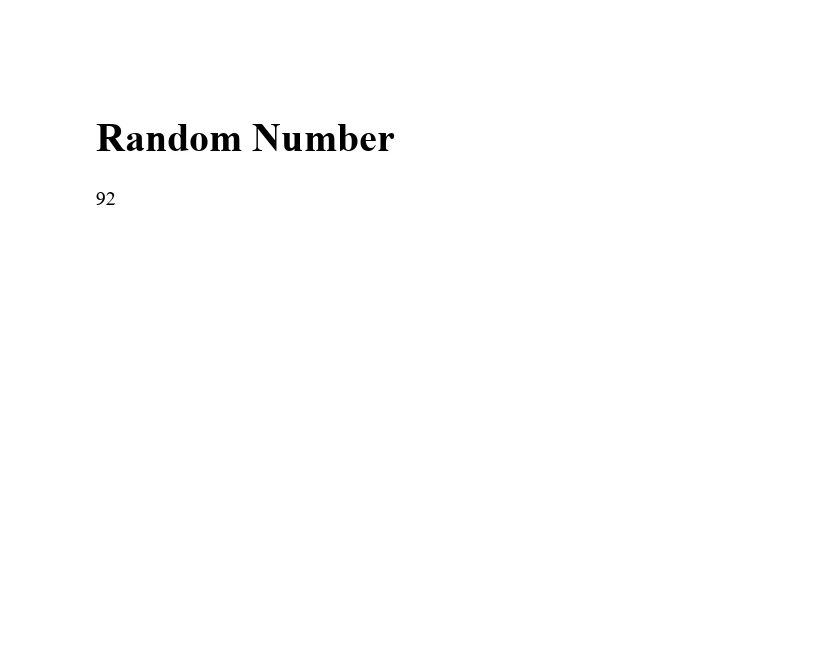
JAVA 도움말 Java에서 Math.random 사용 커티스 차우 업데이트됨:6월 20, 2025 다운로드 IronPDF 메이븐 다운로드 JAR 다운로드 무료 체험 시작하기 LLM용 사본 LLM용 사본 LLM용 마크다운 형식으로 페이지를 복사하세요 ChatGPT에서 열기 ChatGPT에 이 페이지에 대해 문의하세요 제미니에서 열기 제미니에게 이 페이지에 대해 문의하세요 Grok에서 열기 Grok에게 이 페이지에 대해 문의하세요 혼란 속에서 열기 Perplexity에게 이 페이지에 대해 문의하세요 공유하다 페이스북에 공유하기 트위터에 공유하기 LinkedIn에 공유하기 URL 복사 이메일로 기사 보내기 Generating random numbers in Java is a fundamental operation in many programming scenarios, from game development and simulations to security and machine learning. Java offers two main ways to generate these numbers: through the Math.random() method for quick and simple tasks, and the Random class for more specialized needs. Understanding how to use these tools effectively is crucial for beginners looking to add an element of unpredictability to their programs. We'll also talk about the IronPDF for Java library and how random numbers can be utilized in PDF generation. Basic Syntax of Math.random() and the Random Class Math.random() The Math.random() method is a static method that generates a pseudorandom double value greater than or equal to 0.0 and less than 1.0. It's part of the Math class, which provides various methods for performing basic numeric operations such as exponentiation, logarithms, and trigonometric operations. The simplicity of Math.random() makes it highly accessible to generate pseudo-random numbers quickly. public class Main { public static void main(String[] args) { // Generate a random double value between 0.0 and 1.0 double value = Math.random(); System.out.println("Random double value: " + value); } } public class Main { public static void main(String[] args) { // Generate a random double value between 0.0 and 1.0 double value = Math.random(); System.out.println("Random double value: " + value); } } JAVA This example demonstrates how to generate random double values and print them to the console. The Random Class For more diverse requirements, such as generating random integers, booleans, or floating-point numbers within a specified range, the Random class in the java.util package is more suitable. It requires creating an instance of the Random class, followed by calling one of its methods to generate a random number. import java.util.Random; public class Main { public static void main(String[] args) { // Create a Random object Random random = new Random(); // Generates a random integer from 0 to 9 int randomInt = random.nextInt(10); System.out.println("Random integer: " + randomInt); } } import java.util.Random; public class Main { public static void main(String[] args) { // Create a Random object Random random = new Random(); // Generates a random integer from 0 to 9 int randomInt = random.nextInt(10); System.out.println("Random integer: " + randomInt); } } JAVA This code snippet creates a Random object and uses it to generate a random integer between 0 and 9. Benefits of Math.random() and the Random Class Simplicity and Ease of Use Math.random() is incredibly straightforward, requiring no object instantiation or complex setup, making it ideal for beginners or for use cases where only a single random double value is needed. Flexibility and Control The Random class offers a broader range of methods for generating random numbers, including nextInt(), nextDouble(), nextFloat(), nextLong(), and nextBoolean(), providing greater flexibility and control over the random numbers generated. Reproducibility By using a seed value with the Random class, it's possible to produce a predictable sequence of pseudo-random numbers, which can be extremely useful for debugging or for applications where a certain degree of predictability is desirable. Practical Use Cases of Random Number Generation Game Development: Rolling a Die public class Main { public static void main(String[] args) { int max = 6; // Maximum face value of the die // Generate a random integer between 1 and 6 int roll = (int) (Math.random() * max) + 1; System.out.println("You rolled a: " + roll); } } public class Main { public static void main(String[] args) { int max = 6; // Maximum face value of the die // Generate a random integer between 1 and 6 int roll = (int) (Math.random() * max) + 1; System.out.println("You rolled a: " + roll); } } JAVA Output in Console Example: You rolled a: 6 This example simulates rolling a six-sided die by generating a random integer between 1 and 6. It showcases how to use Math.random() to generate numbers within a specific range by multiplying the result by the maximum value and adding one to shift the range from 0-5 to 1-6. Simulation: Generating Weather Conditions import java.util.Random; public class Main { public static void main(String[] args) { Random random = new Random(); // Generate a random temperature from -10 to 20 degrees Celsius int temp = random.nextInt(31) - 10; // Generate a random boolean to indicate raining condition boolean raining = random.nextBoolean(); System.out.println("Today's temperature is: " + temp + "C, and it is " + (raining ? "raining" : "not raining")); } } import java.util.Random; public class Main { public static void main(String[] args) { Random random = new Random(); // Generate a random temperature from -10 to 20 degrees Celsius int temp = random.nextInt(31) - 10; // Generate a random boolean to indicate raining condition boolean raining = random.nextBoolean(); System.out.println("Today's temperature is: " + temp + "C, and it is " + (raining ? "raining" : "not raining")); } } JAVA Output in Console Example: Today's temperature is: 8C, and it is raining This snippet simulates weather conditions by generating a random temperature within a specified range and a boolean value to indicate whether it is raining. It illustrates the use of the Random class for generating both integer and boolean values. Machine Learning: Shuffling Data import java.util.Collections; import java.util.ArrayList; import java.util.Arrays; public class Main { public static void main(String[] args) { // Initialize an ArrayList with integers ArrayList<Integer> data = new ArrayList<>(Arrays.asList(1, 2, 3, 4, 5)); // Shuffle the list to randomize element order Collections.shuffle(data); System.out.println("Shuffled data: " + data); } } import java.util.Collections; import java.util.ArrayList; import java.util.Arrays; public class Main { public static void main(String[] args) { // Initialize an ArrayList with integers ArrayList<Integer> data = new ArrayList<>(Arrays.asList(1, 2, 3, 4, 5)); // Shuffle the list to randomize element order Collections.shuffle(data); System.out.println("Shuffled data: " + data); } } JAVA Output in Console Example: Shuffled data: [5, 3, 1, 4, 2] While not directly using Math.random() or the Random class, this example demonstrates shuffling a list of integers, a common operation in preparing data for machine learning algorithms. Collections.shuffle() internally uses Random for shuffling elements. Introduction of IronPDF for Java IronPDF for Java is a library that allows Java developers to generate, edit, and read PDF documents in their applications. It supports converting HTML to PDF, ensuring that the formatting of the HTML source is accurately maintained in the PDF output. IronPDF is designed for Java 8 and newer versions, and it can be used in various JVM languages including Kotlin and Scala. It provides a broad set of features for PDF manipulation, including editing content, merging, splitting PDFs, and working with forms and metadata. To use IronPDF in a Java project, you can include it via Maven dependency. Example Integrating Math.random() in the context of using IronPDF for Java, you can dynamically generate content for the PDF based on random numbers. For example, you might want to include a random number within the Java PDF Generation from HTML that gets converted to PDF. Here's how you could do it: package ironpdf; import com.ironsoftware.ironpdf.*; import java.awt.print.PrinterException; import java.io.IOException; import java.nio.file.Paths; public class App { public static void main(String[] args) throws IOException, PrinterException { // Set license key for IronPDF License.setLicenseKey("Key"); // Generate a random number between 0 and 99 int randomNumber = (int) (Math.random() * 100); // Create HTML content, embedding the random number String htmlContent = "<html><body><h1>Random Number</h1><p>" + randomNumber + "</p></body></html>"; // Render HTML content to PDF PdfDocument pdf = PdfDocument.renderHtmlAsPdf(htmlContent); // Save the PDF to a specified path pdf.saveAs(Paths.get("f:\\IronPdf\\random.pdf")); } } package ironpdf; import com.ironsoftware.ironpdf.*; import java.awt.print.PrinterException; import java.io.IOException; import java.nio.file.Paths; public class App { public static void main(String[] args) throws IOException, PrinterException { // Set license key for IronPDF License.setLicenseKey("Key"); // Generate a random number between 0 and 99 int randomNumber = (int) (Math.random() * 100); // Create HTML content, embedding the random number String htmlContent = "<html><body><h1>Random Number</h1><p>" + randomNumber + "</p></body></html>"; // Render HTML content to PDF PdfDocument pdf = PdfDocument.renderHtmlAsPdf(htmlContent); // Save the PDF to a specified path pdf.saveAs(Paths.get("f:\\IronPdf\\random.pdf")); } } JAVA This example creates a simple HTML string that includes a heading and a paragraph displaying a randomly generated number. The Math.random() function generates a double value greater than or equal to 0.0 and less than 1.0, which is then multiplied by 100 and cast to an integer to obtain a random number between 0 and 99. This HTML string is then converted to a PDF document using IronPDF's renderHtmlAsPdf method, and the resulting PDF is saved with the name "random.pdf". Output Conclusion The generation of random numbers in Java, using both the Math.random() method and the Random class, is a powerful tool in a programmer's arsenal. From adding elements of unpredictability in games to simulating real-world phenomena and preparing data for machine learning, understanding how to generate random numbers is essential. By exploring the examples provided and experimenting on your own, you'll gain the proficiency needed to incorporate random number generation into your Java applications effectively. IronPDF offers a free trial for users to explore its features before committing to a purchase. IronPDF's licensing starts from $799. 커티스 차우 지금 바로 엔지니어링 팀과 채팅하세요 기술 문서 작성자 커티스 차우는 칼턴 대학교에서 컴퓨터 과학 학사 학위를 취득했으며, Node.js, TypeScript, JavaScript, React를 전문으로 하는 프론트엔드 개발자입니다. 직관적이고 미적으로 뛰어난 사용자 인터페이스를 만드는 데 열정을 가진 그는 최신 프레임워크를 활용하고, 잘 구성되고 시각적으로 매력적인 매뉴얼을 제작하는 것을 즐깁니다. 커티스는 개발 분야 외에도 사물 인터넷(IoT)에 깊은 관심을 가지고 있으며, 하드웨어와 소프트웨어를 통합하는 혁신적인 방법을 연구합니다. 여가 시간에는 게임을 즐기거나 디스코드 봇을 만들면서 기술에 대한 애정과 창의성을 결합합니다. 관련 기사 업데이트됨 10월 26, 2025 참조를 통한 Java 패스(개발자를 위한 작동 방식) Java 프로그래밍 언어에서 매개변수 전달은 항상 값으로 전달됩니다. 객체를 다룰 때 참조 변수는 값으로 전달됩니다 더 읽어보기 업데이트됨 10월 26, 2025 Java 스캐너(개발자를 위한 작동 방식) 이 문서에서는 Java Scanner 클래스의 작동 방식을 자세히 살펴보고 예제를 통해 그 사용법을 살펴봅니다 더 읽어보기 업데이트됨 8월 31, 2025 Java Printf(개발자를 위한 작동 방식) IronPDF와 Java의 printf 기능을 통합하면 정확한 텍스트 서식으로 PDF 출력을 향상시킬 수 있습니다 더 읽어보기 Java에서 서브스트링을 사용하는 방법

업데이트됨 10월 26, 2025 참조를 통한 Java 패스(개발자를 위한 작동 방식) Java 프로그래밍 언어에서 매개변수 전달은 항상 값으로 전달됩니다. 객체를 다룰 때 참조 변수는 값으로 전달됩니다 더 읽어보기
업데이트됨 10월 26, 2025 Java 스캐너(개발자를 위한 작동 방식) 이 문서에서는 Java Scanner 클래스의 작동 방식을 자세히 살펴보고 예제를 통해 그 사용법을 살펴봅니다 더 읽어보기
업데이트됨 8월 31, 2025 Java Printf(개발자를 위한 작동 방식) IronPDF와 Java의 printf 기능을 통합하면 정확한 텍스트 서식으로 PDF 출력을 향상시킬 수 있습니다 더 읽어보기