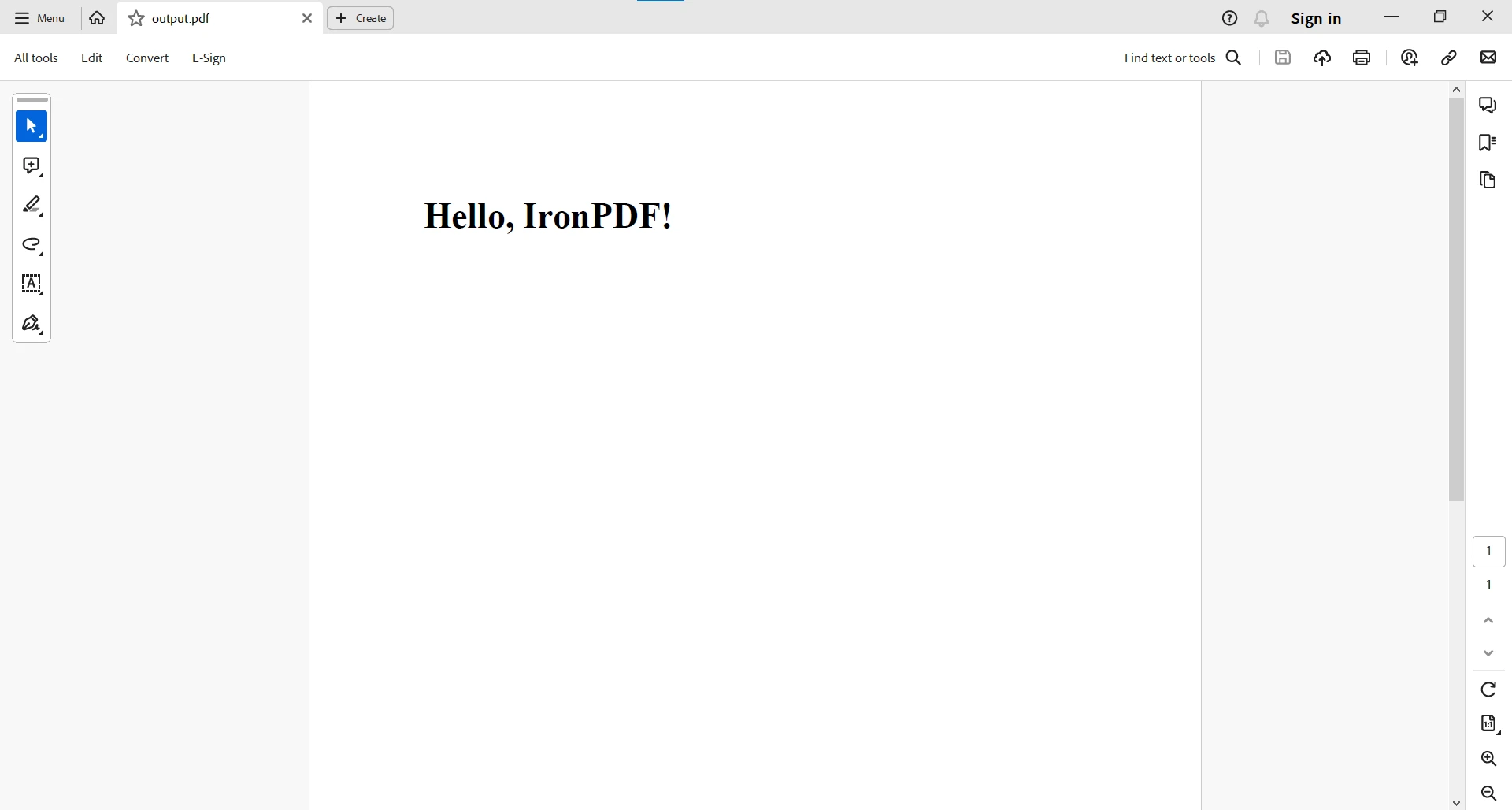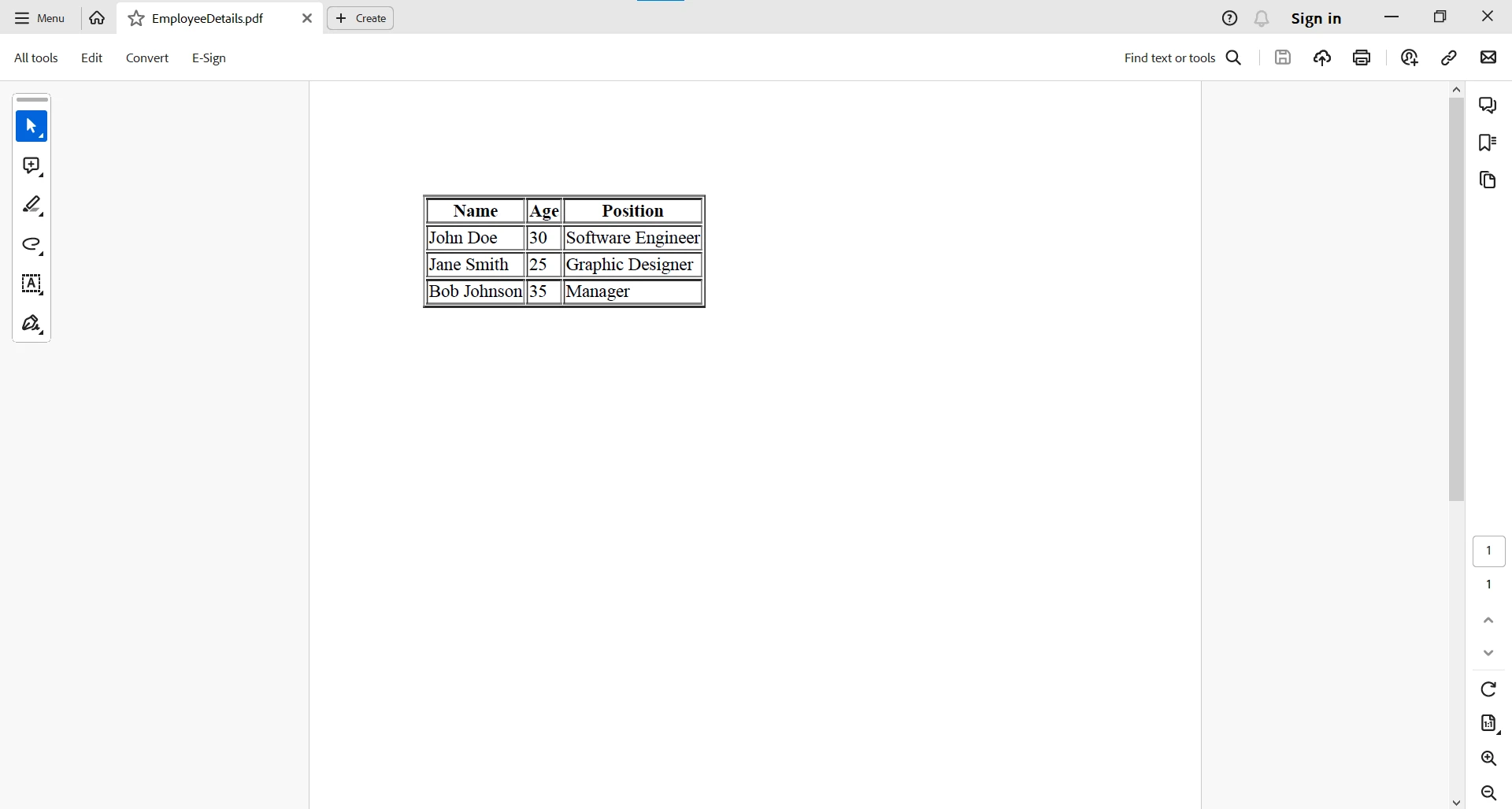
JAVA PDF 도구 Java에서 String.split을 사용하는 방법 커티스 차우 업데이트됨:6월 22, 2025 다운로드 IronPDF 메이븐 다운로드 JAR 다운로드 무료 체험 시작하기 LLM용 사본 LLM용 사본 LLM용 마크다운 형식으로 페이지를 복사하세요 ChatGPT에서 열기 ChatGPT에 이 페이지에 대해 문의하세요 제미니에서 열기 제미니에게 이 페이지에 대해 문의하세요 Grok에서 열기 Grok에게 이 페이지에 대해 문의하세요 혼란 속에서 열기 Perplexity에게 이 페이지에 대해 문의하세요 공유하다 페이스북에 공유하기 트위터에 공유하기 LinkedIn에 공유하기 URL 복사 이메일로 기사 보내기 In the dynamic world of Java programming, string manipulation is a fundamental skill that developers frequently employ for various tasks. The split() method, nestled within the java.lang.String class, stands out as a powerful tool for breaking down strings into substrings based on a specified delimiter. This article takes a deep dive into the split() method, understanding its syntax, applications, and providing illustrative examples to empower Java developers in mastering string manipulation. Understanding the basics of String.split() The String.split() method in Java is a powerful tool that is used to split a string based on the string delimiters provided as parameters. When utilizing this method, developers can define a regular expression pattern using string regex or a simple character as the delimiter to split a given string. Java String split() method is public and static, often found within the main method of a Java program, where the string args parameter can be employed for command-line input. The outcome of the method is a string array containing all the substrings resulting from the split operation. Developers must be mindful of the limit parameter, as it can influence the number of empty strings included in the array, especially when using regular expressions as delimiters. Careful consideration of the regular expression pattern and the choice of delimiters ensures that the split() method accurately segments the original string, providing a comprehensive array of substrings for further processing. Syntax of split method In its syntax, the method signature includes a string str representing the entire string str to be split and an optional int limit parameter that governs the maximum number of substrings in the resulting array. The split() method offers a straightforward syntax: public String[] split(String regex) public String[] split(String regex) JAVA regex: A regular expression serving as the delimiter for splitting the string. The method returns an array of strings, representing the substrings obtained by splitting the original string based on the specified regular expression. Practical Applications of String.split() Tokenization and Data Parsing split() is invaluable for tokenizing strings, especially when dealing with data formats like CSV (Comma-Separated Values) or TSV (Tab-Separated Values). It allows developers to break down a string into distinct data elements. String csvData = "John,Doe,30,New York"; String[] tokens = csvData.split(","); String csvData = "John,Doe,30,New York"; String[] tokens = csvData.split(","); JAVA The following tokens are generated based on the regular expression provided to the split method: tokens: ["John", "Doe", "30", "New York"] Extracting Words from Sentences For natural language processing tasks, split() is handy for extracting individual words from sentences. String sentence = "Java programming is fascinating"; String[] words = sentence.split(" "); String sentence = "Java programming is fascinating"; String[] words = sentence.split(" "); JAVA Here, the Java string split method splits the sentence words on space: words: ["Java", "programming", "is", "fascinating"] Parsing URL Components When working with URLs, split() can be used to extract components like the protocol, domain, and path. String url = "https://www.example.com/page/index.html"; String[] urlComponents = url.split(":|/|\\."); // urlComponents: ["https", "https", "www", "example", "com", "page", "index", "html"] String url = "https://www.example.com/page/index.html"; String[] urlComponents = url.split(":|/|\\."); // urlComponents: ["https", "https", "www", "example", "com", "page", "index", "html"] JAVA Java Code Examples to Illustrate String.split() Usage Example 1: Basic Tokenization String array = "Apple,Orange,Banana"; String[] fruits = array.split(","); for (String fruit : fruits) { System.out.println(fruit); } String array = "Apple,Orange,Banana"; String[] fruits = array.split(","); for (String fruit : fruits) { System.out.println(fruit); } JAVA Output Apple Orange Banana Example 2: Extracting Words String str = "Java programming is versatile"; String[] words = str.split(" "); for (String word : words) { System.out.println(word); } String str = "Java programming is versatile"; String[] words = str.split(" "); for (String word : words) { System.out.println(word); } JAVA Output Java programming is versatile Example 3: Parsing URL Components String url = "https://www.example.com/page/index.html"; String[] urlComponents = url.split(":|/|\\."); for (String component : urlComponents) { System.out.println(component); } String url = "https://www.example.com/page/index.html"; String[] urlComponents = url.split(":|/|\\."); for (String component : urlComponents) { System.out.println(component); } JAVA Output https www example com page index html Introducing IronPDF for Java and Compatibility with String.split() Introducing IronPDF for Java IronPDF for Java stands as a robust library, offering developers a suite of functionalities for effortless PDF generation and manipulation. From rendering HTML to PDF to converting existing files, IronPDF streamlines intricate PDF-related tasks, making it an invaluable asset for Java applications requiring document handling. Define IronPDF as a Java Dependency To start using IronPDF in your Java project, you need to define it as a dependency in your project's configuration. The following steps demonstrate how to do this using Maven. pom.xml Dependency Add the following dependencies to your pom.xml file: <dependencies> <dependency> <groupId>com.ironsoftware</groupId> <artifactId>ironpdf</artifactId> <version>20xx.xx.xxxx</version> </dependency> <dependency> <groupId>org.slf4j</groupId> <artifactId>slf4j-simple</artifactId> <version>2.0.3</version> </dependency> </dependencies> <dependencies> <dependency> <groupId>com.ironsoftware</groupId> <artifactId>ironpdf</artifactId> <version>20xx.xx.xxxx</version> </dependency> <dependency> <groupId>org.slf4j</groupId> <artifactId>slf4j-simple</artifactId> <version>2.0.3</version> </dependency> </dependencies> XML Download JAR File Alternatively, you can download the JAR file manually from Sonatype. Create PDF Document using IronPDF Here's a simple example demonstrating how to use IronPDF to generate a PDF document from an HTML string in Java: import com.ironsoftware.ironpdf.*; public class IronPDFExample { public static void main(String[] args) { // Create a PDF document PdfDocument myPdf = PdfDocument.renderHtmlAsPdf("<h1>Hello, IronPDF!</h1>"); // Save the PdfDocument to a file myPdf.saveAs("output.pdf"); System.out.println("PDF created successfully."); } } import com.ironsoftware.ironpdf.*; public class IronPDFExample { public static void main(String[] args) { // Create a PDF document PdfDocument myPdf = PdfDocument.renderHtmlAsPdf("<h1>Hello, IronPDF!</h1>"); // Save the PdfDocument to a file myPdf.saveAs("output.pdf"); System.out.println("PDF created successfully."); } } JAVA The code example generates a PDF created from an HTML string. Here is the output: For more complex PDF tasks, you can visit this code examples page. Compatibility with String.split() Now, let's address the compatibility of IronPDF with the standard Java string operation, String.split(). Let’s create an example where we fetch data, convert it into an HTML table stored in a string variable, and then use IronPDF's renderHtmlAsPdf method to generate a PDF from the HTML table. Assuming we have a list of employee data, here's how we can create an HTML table and generate a PDF: import com.ironsoftware.ironpdf.*; public class EmployeeDataToPDF { // Sample list of employee data (comma-separated values: Name, Age, Position) public static String employeeData = "John Doe,30,Software Engineer\nJane Smith,25,Graphic Designer\nBob Johnson,35,Manager"; public static void main(String[] args) { // Split the employeeData into individual records based on newline character String[] employeeRecords = employeeData.split("\n"); // Create HTML table string StringBuilder htmlTable = new StringBuilder("<table border='1'><tr><th>Name</th><th>Age</th><th>Position</th></tr>"); // Iterate through each employee record for (String record : employeeRecords) { // Split the record into individual details based on the comma character String[] details = record.split(","); // Assuming we want to display Name, Age, and Position in the table String name = details[0]; String age = details[1]; String position = details[2]; // Add a row to the HTML table htmlTable.append("<tr><td>").append(name).append("</td><td>").append(age).append("</td><td>").append(position).append("</td></tr>"); } // Close the HTML table htmlTable.append("</table>"); // Create a PDF document using IronPDF PdfDocument pdfDocument = PdfDocument.renderHtmlAsPdf(htmlTable.toString()); // Save the PDF to a file pdfDocument.saveAs("EmployeeDetails.pdf"); } } import com.ironsoftware.ironpdf.*; public class EmployeeDataToPDF { // Sample list of employee data (comma-separated values: Name, Age, Position) public static String employeeData = "John Doe,30,Software Engineer\nJane Smith,25,Graphic Designer\nBob Johnson,35,Manager"; public static void main(String[] args) { // Split the employeeData into individual records based on newline character String[] employeeRecords = employeeData.split("\n"); // Create HTML table string StringBuilder htmlTable = new StringBuilder("<table border='1'><tr><th>Name</th><th>Age</th><th>Position</th></tr>"); // Iterate through each employee record for (String record : employeeRecords) { // Split the record into individual details based on the comma character String[] details = record.split(","); // Assuming we want to display Name, Age, and Position in the table String name = details[0]; String age = details[1]; String position = details[2]; // Add a row to the HTML table htmlTable.append("<tr><td>").append(name).append("</td><td>").append(age).append("</td><td>").append(position).append("</td></tr>"); } // Close the HTML table htmlTable.append("</table>"); // Create a PDF document using IronPDF PdfDocument pdfDocument = PdfDocument.renderHtmlAsPdf(htmlTable.toString()); // Save the PDF to a file pdfDocument.saveAs("EmployeeDetails.pdf"); } } JAVA In this example, we dynamically generate an HTML table string using a StringBuilder, encapsulating each row with employee details. This HTML table incorporates headers such as Name, Age, and Position, ensuring a structured representation of the employee data. Leveraging IronPDF's renderHtmlAsPdf method, we seamlessly convert the HTML table into a PDF document, seamlessly merging the world of HTML and PDF in Java. The generated PDF encapsulates the tabular employee details in a visually appealing format. Lastly, the program saves the resultant PDF as "EmployeeDetails.pdf," providing a convenient and shareable format for storing and presenting employee data. Conclusion The method split() in Java's String class empowers developers to dissect and manipulate strings with ease. Its flexibility and applicability in various scenarios, from data parsing to URL component extraction, make it a valuable tool in the Java developer's toolkit. By mastering the split() strings method, developers can efficiently handle and process all the strings, contributing to the development of robust and versatile Java applications. Whether it's breaking down data, extracting meaningful information, splitting characters, or tokenizing text, the split() method provides a powerful mechanism for string manipulation in the ever-evolving landscape of Java programming. The detailed compatibility scenario allows developers to confidently leverage the capabilities of IronPDF alongside standard Java string operations, enhancing the overall functionality and versatility of their applications. Whether you are manipulating PDF documents or processing strings, the synergy between IronPDF and standard Java operations allows for the creation of comprehensive and feature-rich Java applications. For more information on working with PDF-related tasks, please visit the documentation page. IronPDF offers a free-trial for commercial use. 커티스 차우 지금 바로 엔지니어링 팀과 채팅하세요 기술 문서 작성자 커티스 차우는 칼턴 대학교에서 컴퓨터 과학 학사 학위를 취득했으며, Node.js, TypeScript, JavaScript, React를 전문으로 하는 프론트엔드 개발자입니다. 직관적이고 미적으로 뛰어난 사용자 인터페이스를 만드는 데 열정을 가진 그는 최신 프레임워크를 활용하고, 잘 구성되고 시각적으로 매력적인 매뉴얼을 제작하는 것을 즐깁니다. 커티스는 개발 분야 외에도 사물 인터넷(IoT)에 깊은 관심을 가지고 있으며, 하드웨어와 소프트웨어를 통합하는 혁신적인 방법을 연구합니다. 여가 시간에는 게임을 즐기거나 디스코드 봇을 만들면서 기술에 대한 애정과 창의성을 결합합니다. 관련 기사 업데이트됨 7월 28, 2025 Java의 Math.pow() 이해하기 이 문서에서는 Math.pow() 메서드의 구문과 실제 사용법을 설명하고 그 기능을 강조하기 위한 예시를 제공하여 복잡한 메서드를 이해하는 데 도움이 될 것입니다. 더 읽어보기 업데이트됨 6월 22, 2025 Java에서 Try Catch Block을 사용하는 방법 이 문서에서는 Java의 try-catch 블록의 기본 사항과 구문, 그리고 이 블록이 탄력적이고 오류에 강한 애플리케이션을 구축하는 데 어떻게 기여하는지에 대해 살펴봅니다. 더 읽어보기 업데이트됨 7월 28, 2025 Maven을 사용한 Log4j: Java용 로깅 Log4j는 Apache Software Foundation에서 개발한 매우 효율적인 로깅 프레임워크입니다. 강력한 로깅 기능으로 인해 Java 애플리케이션에서 널리 사용되고 있습니다 더 읽어보기 Java의 Math.pow() 이해하기
업데이트됨 7월 28, 2025 Java의 Math.pow() 이해하기 이 문서에서는 Math.pow() 메서드의 구문과 실제 사용법을 설명하고 그 기능을 강조하기 위한 예시를 제공하여 복잡한 메서드를 이해하는 데 도움이 될 것입니다. 더 읽어보기
업데이트됨 6월 22, 2025 Java에서 Try Catch Block을 사용하는 방법 이 문서에서는 Java의 try-catch 블록의 기본 사항과 구문, 그리고 이 블록이 탄력적이고 오류에 강한 애플리케이션을 구축하는 데 어떻게 기여하는지에 대해 살펴봅니다. 더 읽어보기
업데이트됨 7월 28, 2025 Maven을 사용한 Log4j: Java용 로깅 Log4j는 Apache Software Foundation에서 개발한 매우 효율적인 로깅 프레임워크입니다. 강력한 로깅 기능으로 인해 Java 애플리케이션에서 널리 사용되고 있습니다 더 읽어보기