

如何在 Java 中使用 String.split

在Java编程的动态世界中,字符串操作是一项基本技能,开发人员经常用于各种任务。 在split()方法,作为一种强大的工具,能够基于指定的分隔符将字符串拆分为子字符串。
本文深入探讨split() method,理解其语法、应用,并提供生动的例子,帮助Java开发者掌握字符串操作。
理解String.split()的基础知识
Java中的String.split()方法是一种强大的工具,用于根据提供为参数的字符串分隔符拆分字符串。 使用此方法时,开发人员可以定义一个字符串正则表达式或简单字符作为分隔符来拆分给定的字符串。
Java String string args参数进行命令行输入。 该方法的结果是一个字符串数组,其中包含拆分操作生成的所有子字符串。
开发者必须注意limit参数,因为它可能会影响数组中包含的空字符串数量,尤其是在使用正则表达式作为分隔符时。 仔细考虑正则表达式模式和分隔符的选择确保split()方法准确分割原始字符串,提供全面的子字符串数组以供进一步处理。
split方法的语法
在其语法中,方法签名包含一个int limit参数,控制结果数组中的最大子字符串数。 split()方法提供了简单明了的语法:
public String[] split(String regex)public String[] split(String regex)regex:作为分隔符的正则表达式,用于拆分字符串。
该方法返回一个字符串数组,表示通过基于指定的正则表达式拆分原始字符串获得的子字符串。
String.split()的实际应用
标记化和数据解析
split()在对字符串进行标记时非常有价值,尤其是在处理诸如CSV(逗号分隔值)或TSV(制表符分隔值)等数据格式时。 它允许开发人员将字符串拆分成不同的数据元素。
String csvData = "John,Doe,30,New York";
String[] tokens = csvData.split(",");
String csvData = "John,Doe,30,New York";
String[] tokens = csvData.split(",");以下令牌是基于提供给split方法的正则表达式生成的:
tokens: ["John", "Doe", "30", "New York"]从句子中提取单词
对于自然语言处理任务,split()非常方便,可以从句子中提取单个单词。
String sentence = "Java programming is fascinating";
String[] words = sentence.split(" ");
String sentence = "Java programming is fascinating";
String[] words = sentence.split(" ");在这里,Java字符串split方法在空格上拆分句子单词:
words: ["Java", "programming", "is", "fascinating"]解析URL组件
当处理URL时,split()可用于提取协议、域名和路径等组件。
String url = "https://www.example.com/page/index.html";
String[] urlComponents = url.split(":|/|\\.");
// urlComponents: ["https", "https", "www", "example", "com", "page", "index", "html"]
String url = "https://www.example.com/page/index.html";
String[] urlComponents = url.split(":|/|\\.");
// urlComponents: ["https", "https", "www", "example", "com", "page", "index", "html"]Java代码示例演示String.split()的用法
示例1:基本标记化
String array = "Apple,Orange,Banana";
String[] fruits = array.split(",");
for (String fruit : fruits) {
    System.out.println(fruit);
}
String array = "Apple,Orange,Banana";
String[] fruits = array.split(",");
for (String fruit : fruits) {
System.out.println(fruit);
}输出
Apple
Orange
Banana
示例2:提取单词
String str = "Java programming is versatile";
String[] words = str.split(" ");
for (String word : words) {
    System.out.println(word);
}
String str = "Java programming is versatile";
String[] words = str.split(" ");
for (String word : words) {
System.out.println(word);
}输出
Java
programming
is
versatile
示例3:解析URL组件
String url = "https://www.example.com/page/index.html";
String[] urlComponents = url.split(":|/|\\.");
for (String component : urlComponents) {
    System.out.println(component);
}
String url = "https://www.example.com/page/index.html";
String[] urlComponents = url.split(":|/|\\.");
for (String component : urlComponents) {
System.out.println(component);
}输出
https
www
example
com
page
index
html
介绍IronPDF for Java与String.split()的兼容性
介绍IronPDF 适用于 Java
IronPDF for Java是一个强大的库,为开发人员提供了一套功能,以便轻松生成和操作PDF。 从将HTML渲染为PDF到转换现有文件,IronPDF简化了复杂的PDF相关任务,使其成为Java应用程序处理文档所需的重要资产。
将IronPDF定义为Java依赖项
要在Java项目中开始使用IronPDF,您需要在项目的配置中将其定义为依赖项。 以下步骤演示了如何使用Maven进行此操作。
pom.xml依赖项
将以下依赖项添加到您的pom.xml文件中:
<dependencies>

    <dependency>
        <groupId>com.ironsoftware</groupId>
        <artifactId>ironpdf</artifactId>
        <version>20xx.xx.xxxx</version>
    </dependency>

    <dependency>
        <groupId>org.slf4j</groupId>
        <artifactId>slf4j-simple</artifactId>
        <version>2.0.3</version>
    </dependency>
</dependencies>
<dependencies>
<dependency>
<groupId>com.ironsoftware</groupId>
<artifactId>ironpdf</artifactId>
<version>20xx.xx.xxxx</version>
</dependency>
<dependency>
<groupId>org.slf4j</groupId>
<artifactId>slf4j-simple</artifactId>
<version>2.0.3</version>
</dependency>
</dependencies>下载JAR文件
或者,您可以从Sonatype手动下载JAR文件。
使用IronPDF创建PDF文档
这里有一个简单的例子,展示如何使用IronPDF从HTML字符串在Java中生成PDF文档:
import com.ironsoftware.ironpdf.*;

public class IronPDFExample {
    public static void main(String[] args) {
        // Create a PDF document
        PdfDocument myPdf = PdfDocument.renderHtmlAsPdf("<h1>Hello, IronPDF!</h1>");
        // Save the PdfDocument to a file
        myPdf.saveAs("output.pdf");
        System.out.println("PDF created successfully.");
    }
}
import com.ironsoftware.ironpdf.*;
public class IronPDFExample {
public static void main(String[] args) {
// Create a PDF document
PdfDocument myPdf = PdfDocument.renderHtmlAsPdf("<h1>Hello, IronPDF!</h1>");
// Save the PdfDocument to a file
myPdf.saveAs("output.pdf");
System.out.println("PDF created successfully.");
}
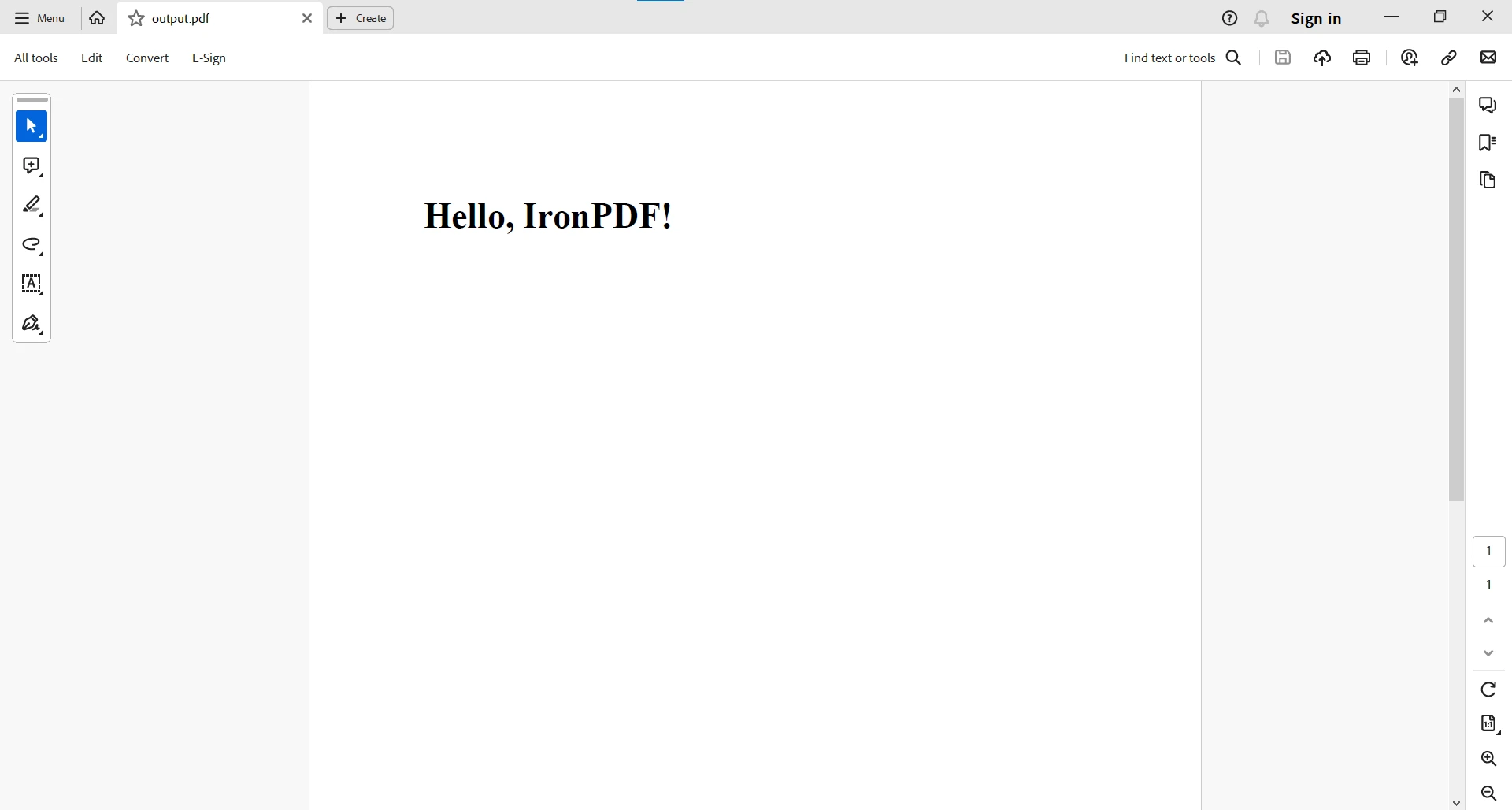
}代码示例生成从HTML字符串创建的PDF。 以下是输出结果:
对于更复杂的PDF任务,您可以访问此代码示例页面。
与String.split()的兼容性
现在,让我们探讨IronPDF与标准Java字符串操作String.split()的兼容性。 让我们创建一个例子,获取数据,将其转换为存储在字符串变量中的HTML表格,然后使用IronPDF的renderHtmlAsPdf方法从HTML表格生成PDF。
假设我们有一个员工数据列表,下面是如何创建HTML表格并生成PDF的方法:
import com.ironsoftware.ironpdf.*;

public class EmployeeDataToPDF {
    // Sample list of employee data (comma-separated values: Name, Age, Position)
    public static String employeeData = "John Doe,30,Software Engineer\nJane Smith,25,Graphic Designer\nBob Johnson,35,Manager";

    public static void main(String[] args) {
        // Split the employeeData into individual records based on newline character
        String[] employeeRecords = employeeData.split("\n");
        // Create HTML table string
        StringBuilder htmlTable = new StringBuilder("<table border='1'><tr><th>Name</th><th>Age</th><th>Position</th></tr>");
        // Iterate through each employee record
        for (String record : employeeRecords) {
            // Split the record into individual details based on the comma character
            String[] details = record.split(",");
            // Assuming we want to display Name, Age, and Position in the table
            String name = details[0];
            String age = details[1];
            String position = details[2];
            // Add a row to the HTML table
            htmlTable.append("<tr><td>").append(name).append("</td><td>").append(age).append("</td><td>").append(position).append("</td></tr>");
        }
        // Close the HTML table
        htmlTable.append("</table>");
        // Create a PDF document using IronPDF
        PdfDocument pdfDocument = PdfDocument.renderHtmlAsPdf(htmlTable.toString());
        // Save the PDF to a file
        pdfDocument.saveAs("EmployeeDetails.pdf");
    }
}
import com.ironsoftware.ironpdf.*;
public class EmployeeDataToPDF {
// Sample list of employee data (comma-separated values: Name, Age, Position)
public static String employeeData = "John Doe,30,Software Engineer\nJane Smith,25,Graphic Designer\nBob Johnson,35,Manager";
public static void main(String[] args) {
// Split the employeeData into individual records based on newline character
String[] employeeRecords = employeeData.split("\n");
// Create HTML table string
StringBuilder htmlTable = new StringBuilder("<table border='1'><tr><th>Name</th><th>Age</th><th>Position</th></tr>");
// Iterate through each employee record
for (String record : employeeRecords) {
// Split the record into individual details based on the comma character
String[] details = record.split(",");
// Assuming we want to display Name, Age, and Position in the table
String name = details[0];
String age = details[1];
String position = details[2];
// Add a row to the HTML table
htmlTable.append("<tr><td>").append(name).append("</td><td>").append(age).append("</td><td>").append(position).append("</td></tr>");
}
// Close the HTML table
htmlTable.append("</table>");
// Create a PDF document using IronPDF
PdfDocument pdfDocument = PdfDocument.renderHtmlAsPdf(htmlTable.toString());
// Save the PDF to a file
pdfDocument.saveAs("EmployeeDetails.pdf");
}
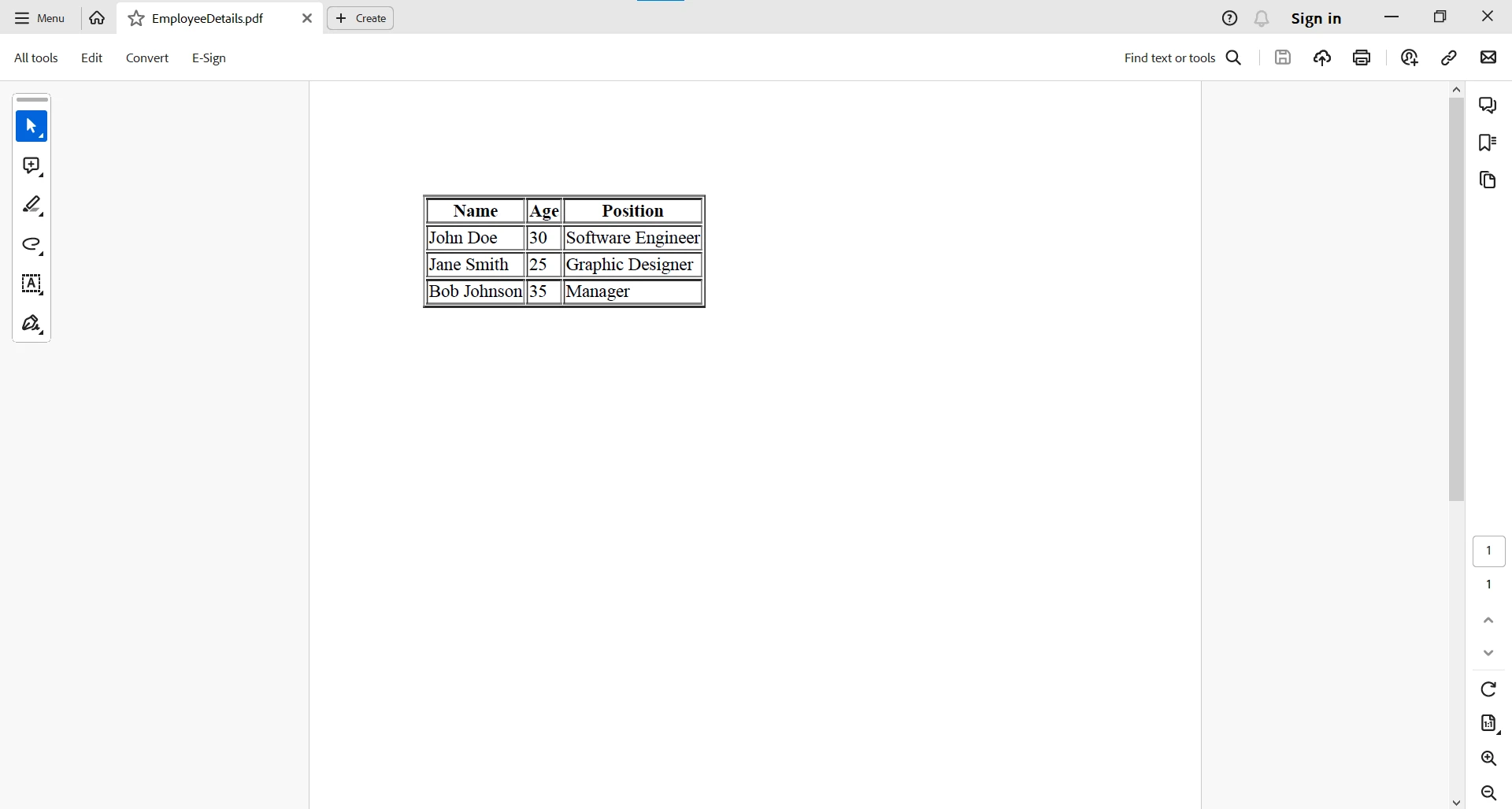
}在此示例中,我们使用StringBuilder动态生成一个HTML表格字符串,包裹每一行的员工详细信息。 这个HTML表格包含姓名、年龄和职位等标题,确保员工数据的结构化表示。 利用IronPDF的renderHtmlAsPdf方法,我们将HTML表格无缝转换为PDF文档,在Java中完美结合HTML和PDF的世界。 生成的PDF以视觉上吸引人的格式封装了表格化的员工详细信息。 最后,程序将生成的PDF保存为"EmployeeDetails.pdf",提供了一种方便和可共享的格式来存储和展示员工数据。
结论
Java的String类中的方法split()使开发者能够轻松解构和操作字符串。 它在各种场景中的灵活性和实用性,从数据解析到URL组件提取,使其成为Java开发人员工具包中的一个有价值的工具。 通过掌握split()字符串方法,开发者可以有效地处理和处理所有字符串,从而有助于开发健壮且灵活的Java应用程序。 无论是拆解数据,提取有意义的信息,拆分字符,还是对文本进行标记,split()方法为不断发展的Java编程领域中的字符串操作提供了强大的机制。
详细的兼容性情景使开发人员能够自信地利用IronPDF的功能以及标准Java字符串操作,提高其应用程序的整体功能性和多样性。 无论是操作PDF文档还是处理字符串,IronPDF与标准Java操作的协同作用都可以创建全面和功能丰富的Java应用程序。
有关处理PDF相关任务的更多信息,请访问文档页面。
IronPDF提供免费试用供商业使用。







 免费开始
免费开始 免费开始
免费开始 预定免费现场演示
















