푸터 콘텐츠로 바로가기
JAVA용 IRONPDF 사용

Java에서 PDF 파일을 평평하게 만드는 방법

This article will discuss how you can flatten a PDF document, PDF form, and PDF form field using a state-of-the-art PDF library for Java named IronPDF for Java. This process essentially locks the content into place, preventing any further changes or edits to be made to the PDF document.

1. IronPDF for Java

IronPDF for Java is a powerful library that enables developers to work with PDF documents in their Java applications. With IronPDF, developers can easily create, manipulate, and convert PDF files programmatically, saving valuable time and effort.

This library provides a range of features, including the ability t add images, text, and annotations to PDF documents, merge multiple PDFs into a single PDF file, extract content from PDFs, and even convert HTML to PDF.

IronPDF is designed to be user-friendly, with intuitive APIs that make it easy to integrate PDF functionality into existing Java applications. It is also highly customizable, allowing developers to fine-tune the appearance and behavior of their PDF documents to meet specific requirements. Whether you're building a web application, a desktop application, or a mobile app, IronPDF for Java can simplify your PDF-related development tasks and help you deliver high-quality PDF documents to your users.

2. Prerequisites

In order to flatten a PDF using IronPDF, there are certain prerequisites that need to be met. These prerequisites include:

  1. Java must be installed on your system, and its path must be set in the environment variables. If you haven't installed Java yet, you can download and install it from the official Java download page.
  2. An Integrated Development Environment (IDE) such as Eclipse or IntelliJ IDEA is required to write and execute your code.
  3. Maven, a build automation tool, should be integrated with your IDE to manage dependencies and build the project. If you're not familiar with Maven or need help integrating it with your IDE, you can refer to the Maven Installation Guide for guidance.

Once these prerequisites are met, you can proceed with setting up your project and using IronPDF to load and flatten PDF files in your Java application.

3. IronPDF for Java Installation

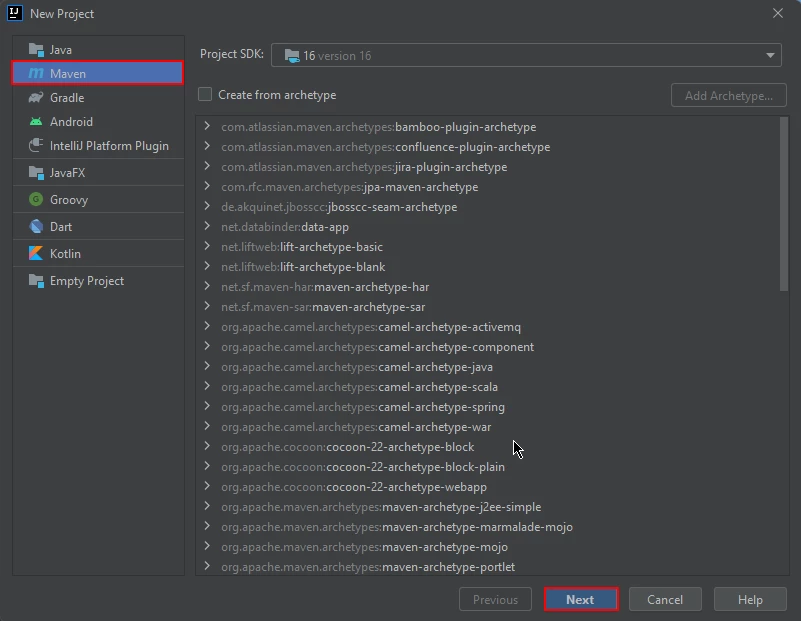
To get started, open JetBrains IntelliJ IDEA and create a new Maven project.

How to Flatten PDF File in Java, Figure 1: Create a new Maven project Create a new Maven project

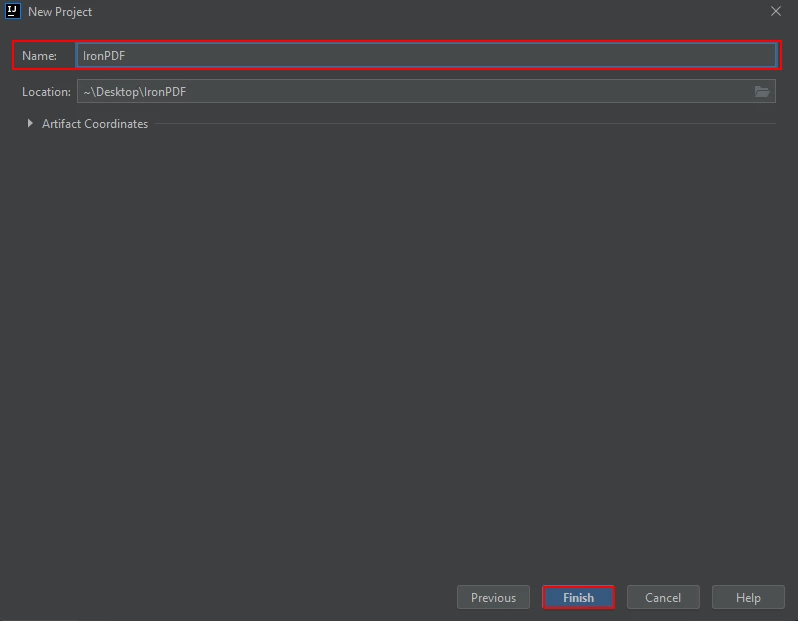
Upon starting a new project in JetBrains IntelliJ IDEA, a prompt will appear in a new window, asking for the project's name. After entering a suitable name, you may proceed by clicking the "Finish" button.

How to Flatten PDF File in Java, Figure 2: Naming the project Naming the project

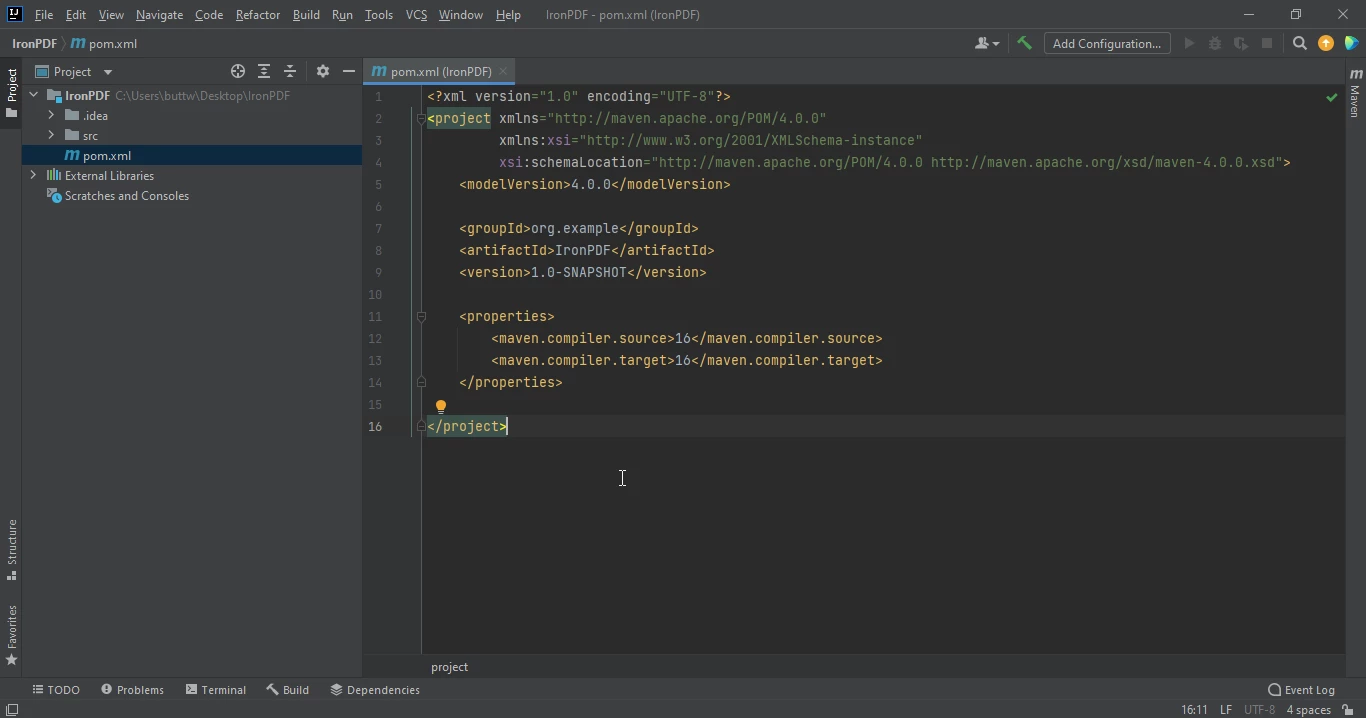
Once you have clicked the "Finish" button, a new project will be opened in JetBrains IntelliJ IDEA, and you will be presented with the pom.xml file. This file will be used to add dependencies required for the Maven project.

How to Flatten PDF File in Java, Figure 3: The pom.xml file The pom.xml file

Add the relevant dependencies for IronPDF in the pom.xml file. Adding these dependencies will ensure that all the necessary libraries and packages are available for the project to run smoothly. Unfortunately, the dependencies are not explicitly listed in this guide, but ensure that you include IronPDF's Maven repository.


<dependency>
    <groupId>com.ironsoftware</groupId>
    <artifactId>ironpdf</artifactId>
    <version>YOUR_IRONPDF_VERSION</version>
</dependency>

<dependency>
    <groupId>com.ironsoftware</groupId>
    <artifactId>ironpdf</artifactId>
    <version>YOUR_IRONPDF_VERSION</version>
</dependency>
XML

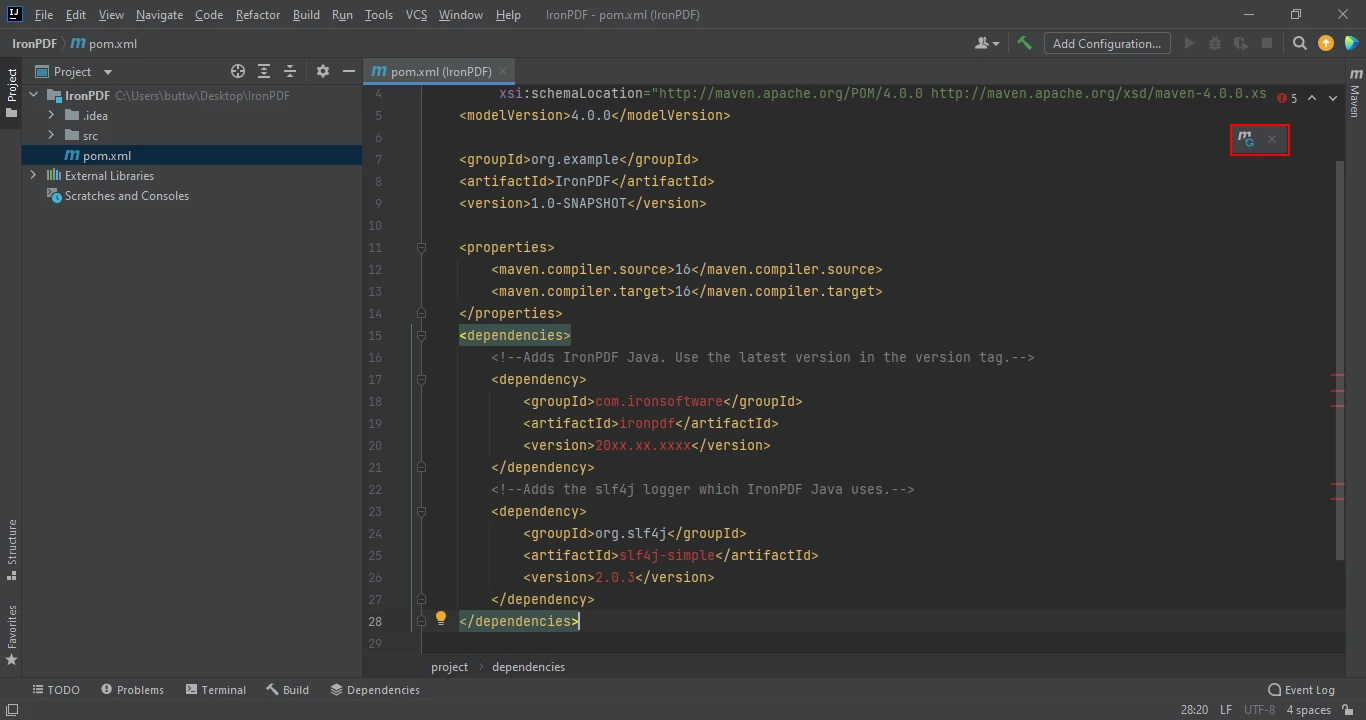
After you have successfully added the above dependencies to the pom.xml file, click on the refresh icon that appears in the top right corner of the file to install dependencies.

How to Flatten PDF File in Java, Figure 4: Install dependencies from the pom.xml file Install dependencies from the pom.xml file

This process should only take a few minutes, depending on the speed of your internet connection.

4. Flatten PDF Document Using IronPDF

IronPDF can be used to flatten a PDF document, which means that all interactive form fields and annotations will be merged into the document itself. This process makes it impossible to edit or change the content of the fields or annotations.

To flatten a PDF document using IronPDF, you can use the following sample code:

import com.ironsoftware.ironpdf.PdfDocument;
import java.io.IOException;
import java.nio.file.Paths;

public class Main {
    public static void main(String[] args) throws IOException {
        // Load the PDF document from a file
        PdfDocument pdfDoc = PdfDocument.fromFile(Paths.get("business plan.pdf"));

        // Flatten all form fields and annotations in the PDF
        pdfDoc.getForm().flatten();

        // Save the flattened PDF document
        pdfDoc.saveAs("output.pdf");
    }
}
import com.ironsoftware.ironpdf.PdfDocument;
import java.io.IOException;
import java.nio.file.Paths;

public class Main {
    public static void main(String[] args) throws IOException {
        // Load the PDF document from a file
        PdfDocument pdfDoc = PdfDocument.fromFile(Paths.get("business plan.pdf"));

        // Flatten all form fields and annotations in the PDF
        pdfDoc.getForm().flatten();

        // Save the flattened PDF document
        pdfDoc.saveAs("output.pdf");
    }
}
JAVA

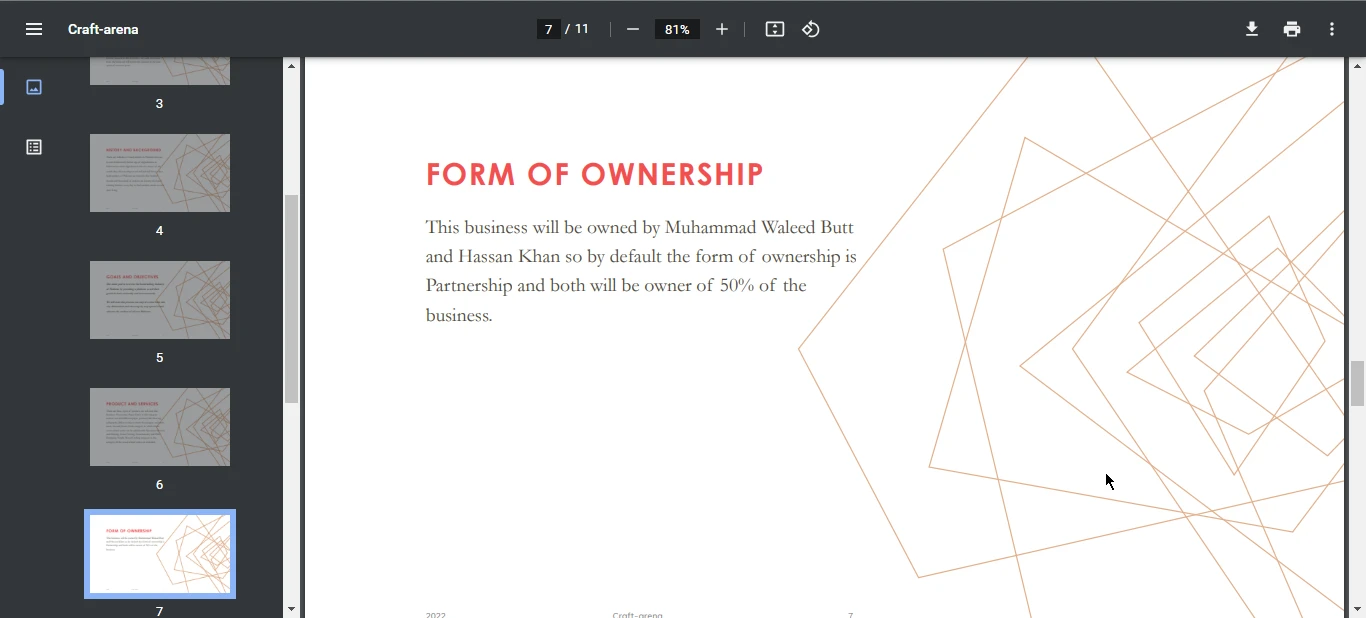
Using the above sample code, you can flatten any input document and form fields into static documents. Flattened documents cannot be edited, as the fields and annotations become part of the page content.

How to Flatten PDF File in Java, Figure 5: The output PDF file The output PDF file

4.1. Flatten PDF directly from URL

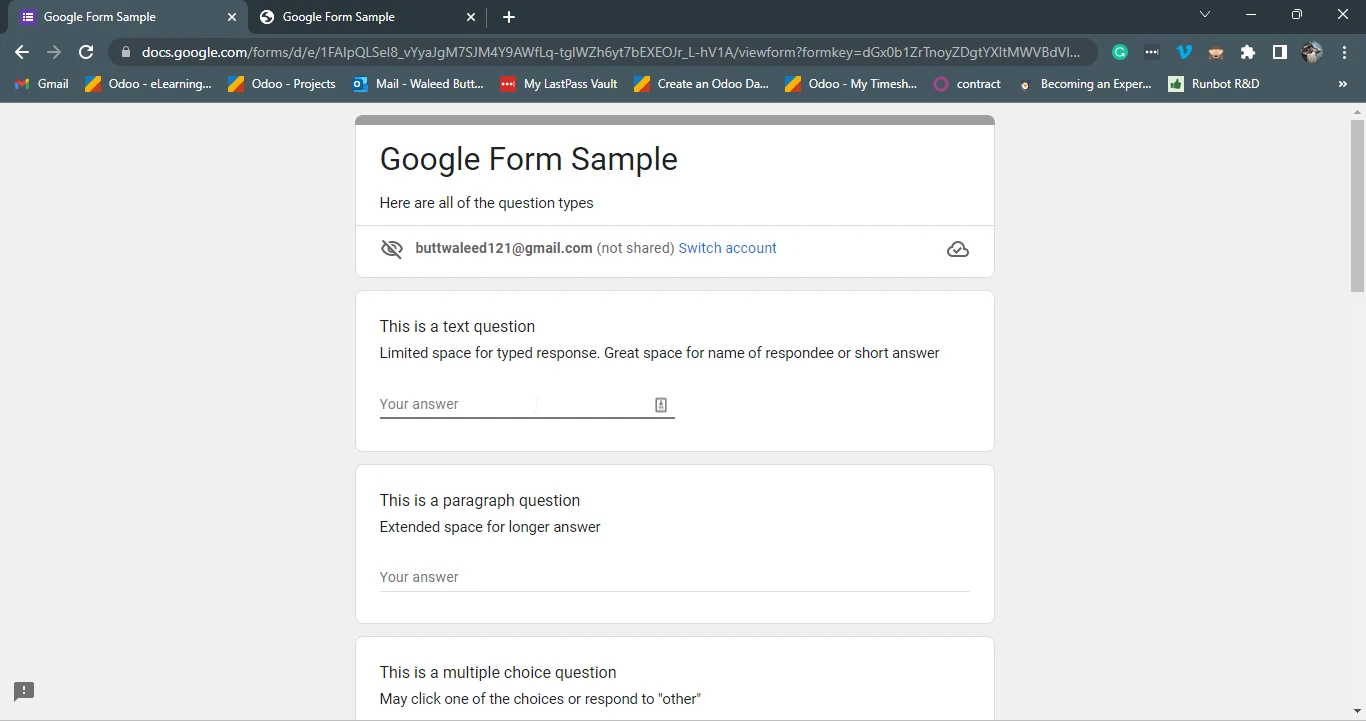
You can also directly perform Flatten PDF form fields using IronPDF for Java by providing the URL of a web page or an online form. The flattening process converts the form into a static document, disabling any interactive elements or links.

Input Form Fields

How to Flatten PDF File in Java, Figure 6: The sample Google Forms The sample Google Forms

import com.ironsoftware.ironpdf.PdfDocument;
import java.io.IOException;

public class Main {
    public static void main(String[] args) throws IOException {
        // Render the PDF directly from a URL
        PdfDocument pdfDoc = PdfDocument.renderUrlAsPdf("https://docs.google.com/forms/d/e/1FAIpQLSeI8_vYyaJgM7SJM4Y9AWfLq-tglWZh6yt7bEXEOJr_L-hV1A/viewform?formkey=dGx0b1ZrTnoyZDgtYXItMWVBdVlQQWc6MQ");

        // Flatten form fields and annotations in the PDF
        pdfDoc.getForm().flatten();

        // Save the flattened PDF document
        pdfDoc.saveAs("output.pdf");
    }
}
import com.ironsoftware.ironpdf.PdfDocument;
import java.io.IOException;

public class Main {
    public static void main(String[] args) throws IOException {
        // Render the PDF directly from a URL
        PdfDocument pdfDoc = PdfDocument.renderUrlAsPdf("https://docs.google.com/forms/d/e/1FAIpQLSeI8_vYyaJgM7SJM4Y9AWfLq-tglWZh6yt7bEXEOJr_L-hV1A/viewform?formkey=dGx0b1ZrTnoyZDgtYXItMWVBdVlQQWc6MQ");

        // Flatten form fields and annotations in the PDF
        pdfDoc.getForm().flatten();

        // Save the flattened PDF document
        pdfDoc.saveAs("output.pdf");
    }
}
JAVA

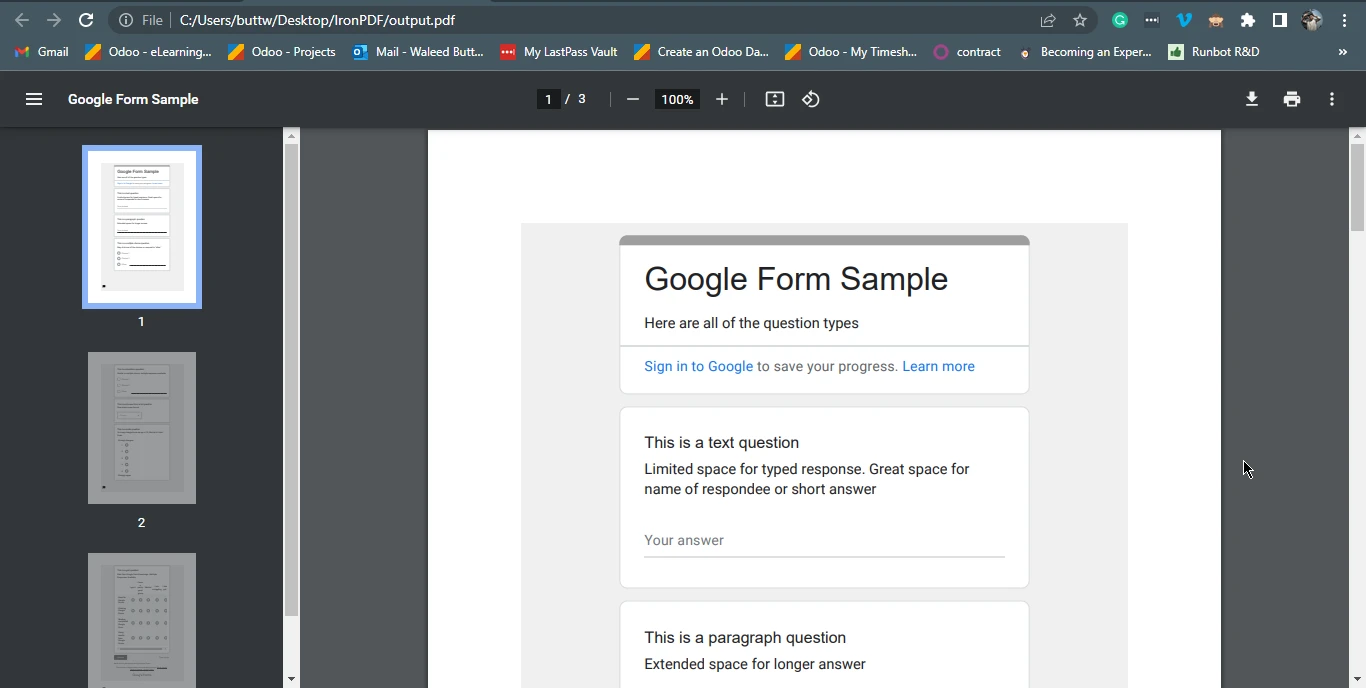
The above code will make the form static, making it easier to use as a template for future references.

How to Flatten PDF File in Java, Figure 7: The output PDF file from the Google Forms website The output PDF file from the Google Forms website

5. Conclusion

PDF Form-flattening, Flattened PDF file can be an essential step to preserve the layout and formatting of a document, prevent unauthorized modifications, and make it easier to share and display across different platforms. IronPDF for Java is a powerful library that simplifies PDF-related development tasks, allowing developers to create, manipulate, and convert PDF files programmatically. With its intuitive APIs and customization options, developers can fine-tune the appearance and behavior of their PDF documents to meet specific requirements. By following the steps outlined in this article, developers can easily flatten PDF documents using IronPDF for Java, making their documents static and uneditable.

For more tutorials and code examples please visit this Java HTML to PDF samples page. For more coded examples on URL to PDF document please refer to this URL to PDF Conversion Tutorial.

IronPDF for Java is available for free for development purposes, but a license is required for commercial use. However, you can get a free 30-day trial license to try out IronPDF. For more information on licensing, please visit the IronPDF for Java Licensing Information.

자주 묻는 질문

Java에서 PDF를 플랫화한다는 것은 무엇을 의미하나요?

Java로 PDF를 플랫화하려면 IronPDF와 같은 라이브러리를 사용하여 양식과 주석을 포함한 PDF 콘텐츠를 정적 상태로 고정하여 더 이상 편집하거나 변경하지 못하도록 해야 합니다.

문서 관리에서 PDF 플랫화가 중요한 이유는 무엇인가요?

문서 레이아웃을 보존하고 무단 수정을 방지하며 다양한 플랫폼에서 일관된 표시를 보장하려면 PDF를 플랫화하는 것이 중요합니다. IronPDF와 같은 라이브러리는 Java에서 이를 달성하는 데 도움이 될 수 있습니다.

Java용 IronPDF를 사용하여 PDF 문서를 플랫화하려면 어떻게 해야 하나요?

Java용 IronPDF를 사용하여 PDF를 플랫화하려면 PDF를 로드하고 양식 필드에 플랫화 메서드를 적용한 다음 saveAs와 같은 방법을 사용하여 출력물을 플랫화된 PDF 파일로 저장해야 합니다.

Java에서 IronPDF를 사용하기 위한 시스템 요구 사항은 무엇인가요?

Java용 IronPDF를 사용하려면 종속성 관리 및 프로젝트 빌드를 위해 Java, Eclipse 또는 IntelliJ IDEA와 같은 IDE, Maven이 설치되어 있는지 확인하세요.

Java용 IronPDF는 웹 URL에서 직접 PDF를 플랫화할 수 있나요?

예, Java용 IronPDF를 사용하면 URL에서 PDF를 로드한 후 양식 필드에서 플랫화 메서드를 실행하여 웹 URL에서 PDF를 렌더링하고 플랫화할 수 있습니다.

Java용 IronPDF 사용과 관련된 비용이 있나요?

Java용 IronPDF는 개발 목적으로는 무료이지만 상업적 용도로 사용하려면 라이선스가 필요합니다. 평가를 위해 30일 무료 평가판 라이선스를 사용할 수 있습니다.

Java용 IronPDF는 PDF 조작을 위해 어떤 기능을 제공하나요?

Java용 IronPDF는 PDF를 생성, 조작 및 변환하는 기능을 제공합니다. 이미지, 텍스트, 주석을 추가하고, PDF를 병합하고, HTML을 PDF로 변환하는 등 다양한 기능을 사용할 수 있습니다.

내 Java 프로젝트에 IronPDF를 통합하려면 어떻게 해야 하나요?

IronPDF를 Java 프로젝트에 통합하려면 IDE에서 Maven 프로젝트를 생성하고 pom.xml 파일에 IronPDF 종속성을 추가한 다음 Maven을 사용하여 관리하세요.

Java용 IronPDF를 사용할 때 Maven은 어떤 역할을 하나요?

Maven은 프로젝트 종속성을 관리하고 프로세스를 빌드하는 데 사용되며, Java용 IronPDF와 같은 모든 필수 라이브러리가 포함되어 있고 최신 상태인지 확인합니다.

Java에서 IronPDF를 사용하기 위한 튜토리얼은 어디에서 볼 수 있나요?

공식 웹사이트에서 PDF를 평평하게 만들고 HTML을 PDF로 변환하는 등의 주제를 다루는 Java용 IronPDF의 튜토리얼과 코드 예제를 찾을 수 있습니다.

커티스 차우
기술 문서 작성자

커티스 차우는 칼턴 대학교에서 컴퓨터 과학 학사 학위를 취득했으며, Node.js, TypeScript, JavaScript, React를 전문으로 하는 프론트엔드 개발자입니다. 직관적이고 미적으로 뛰어난 사용자 인터페이스를 만드는 데 열정을 가진 그는 최신 프레임워크를 활용하고, 잘 구성되고 시각적으로 매력적인 매뉴얼을 제작하는 것을 즐깁니다.


커티스는 개발 분야 외에도 사물 인터넷(IoT)에 깊은 관심을 가지고 있으며, 하드웨어와 소프트웨어를 통합하는 혁신적인 방법을 연구합니다. 여가 시간에는 게임을 즐기거나 디스코드 봇을 만들면서 기술에 대한 애정과 창의성을 결합합니다.