



업데이트됨 2026년 4월 21일
Java를 이용하여 TIFF 파일을 PDF로 변환하는 방법
이 종합 가이드는 IronPDF를 사용하여 Java 환경에서 TIFF 이미지를 PDF로 원활하게 변환하는 단계를 안내합니다.
더 읽어보기

이 글에서는 자바를 이용해 PDF를 생성하는 데 유용한 도구인 IronPDF 라이브러리에 대해 살펴보겠습니다.
IronPDF 는 개발자가 PDF 문서, PDF 양식을 쉽게 생성하고, PDF 파일에 디지털 서명을 하는 등 다양한 작업을 수행할 수 있도록 해주는 인기 있는 Java PDF 라이브러리 입니다. IronPDF 사용하면 기존 PDF 문서를 템플릿으로 활용하여 새 PDF 파일을 생성하고 , PDF 데이터를 데이터베이스에 저장하여 나중에 사용할 수 있으며, PDF를 HTML과 같은 다른 형식으로 변환하고, 여러 PDF 파일을 하나로 병합할 수도 있습니다.
IronPDF 사용하면 사용자가 PDF에 텍스트 주석을 추가하여 자신이 만든 파일을 개인화할 수 있습니다. 또한 IronPDF 사용하면 PDF에 암호나 워터마크와 같은 보안 설정을 포함할 수 있습니다. PDF 기능을 자바 프로그램에 통합하는 데 도움이 됩니다. IronPDF PDF를 빠르고 안전하게 생성할 수 있는 매우 다재다능하고 강력한 도구입니다. IronPDF 사용하여 PDF 파일을 만드는 방법을 살펴보겠습니다.
IronPDF 는 PDF 파일을 생성하는 데 매우 유용한 도구입니다. 이 프로그램은 문서, 웹페이지, 이미지를 빠르고 안정적이며 안전한 PDF 파일로 변환하여 쉽게 공유할 수 있도록 필요한 모든 기능을 갖추고 있습니다. 이 데모 프로그램에 IronPDF 설치해 보겠습니다.
IronPDF Java를 Maven 프로젝트에 설치하려면, 프로젝트의 pom.xml 파일에 다음과 같은 종속성을 추가할 수 있습니다:
<dependencies>
    <!-- Add IronPDF dependency -->
    <dependency>
        <groupId>com.ironsoftware</groupId>
        <artifactId>ironpdf</artifactId>
        <version>YOUR-VERSION-HERE</version>
    </dependency>
    <!-- Add SLF4J logging dependency -->
    <dependency>
        <groupId>org.slf4j</groupId>
        <artifactId>slf4j-api</artifactId>
        <version>YOUR-VERSION-HERE</version>
    </dependency>
</dependencies>이렇게 하면 IronPDF for Java 라이브러리와 해당 라이브러리에서 사용하는 SLF4J 로거가 추가됩니다. Java용 IronPDF 의 최신 버전을 사용하는 것이 좋습니다. 종속성을 추가한 후에는 mvn install을 실행하여 로컬 저장소에 종속성을 설치할 수 있으며, 프로젝트는 IronPDF for Java를 사용할 준비가 됩니다.
이 코드는 Java로 작성되었으며 IronPDF 라이브러리를 사용하여 HTML을 PDF 문서로 변환합니다 .
// Import statement for IronPDF Java
import com.ironsoftware.ironpdf.*;

import java.io.IOException;
import java.nio.file.Paths;

public class Main {
    public static void main(String[] args) throws IOException {
        // Apply your license key
        License.setLicenseKey("YOUR-LICENSE-KEY");

        // Set a log path to store log files generated by IronPDF
        Settings.setLogPath(Paths.get("C:/tmp/IronPdfEngine.log"));

        // Define the HTML content to convert into a PDF
        String html = "<!DOCTYPE html>\r\n"
                + "<html>\r\n"
                + "  <head>\r\n"
                + "    <link href='https://fonts.googleapis.com/css2?family=Popin&display=swap' rel='stylesheet'>\r\n"
                + "    <style>\r\n"
                + "      /* Add CSS styles for the invoice here */\r\n"
                + "      body {\r\n"
                + "        font-family: 'Popin', cursive;\r\n"
                + "      }\r\n"
                + "      .invoice {\r\n"
                + "        width: 80%;\r\n"
                + "        margin: 0 auto;\r\n"
                + "        border: 1px solid #ccc;\r\n"
                + "        padding: 20px;\r\n"
                + "        background-color: #f5f5f5;\r\n"
                + "        color: #333;\r\n"
                + "      }\r\n"
                + "      .invoice h1 {\r\n"
                + "        text-align: center;\r\n"
                + "      }\r\n"
                + "      .invoice .invoice-info {\r\n"
                + "        display: flex;\r\n"
                + "        justify-content: space-between;\r\n"
                + "        margin-bottom: 20px;\r\n"
                + "      }\r\n"
                + "      .invoice .invoice-info div {\r\n"
                + "        width: 45%;\r\n"
                + "      }\r\n"
                + "      .invoice table {\r\n"
                + "        width: 100%;\r\n"
                + "        border-collapse: collapse;\r\n"
                + "      }\r\n"
                + "      .invoice table th, .invoice table td {\r\n"
                + "        border: 1px solid #ccc;\r\n"
                + "        padding: 10px;\r\n"
                + "      }\r\n"
                + "      .invoice table th {\r\n"
                + "        text-align: left;\r\n"
                + "        background-color: #f5f5f5;\r\n"
                + "      }\r\n"
                + "      .invoice table td {\r\n"
                + "        text-align: right;\r\n"
                + "      }\r\n"
                + "      .invoice table td.total {\r\n"
                + "        font-weight: bold;\r\n"
                + "      }\r\n"
                + "    </style>\r\n"
                + "  </head>\r\n"
                + "  <body>\r\n"
                + "    <div class=\"invoice\">\r\n"
                + "      <h1>Invoice</h1>\r\n"
                + "      <div class=\"invoice-info\">\r\n"
                + "        <div>\r\n"
                + "          <p><strong>From:</strong></p>\r\n"
                + "          <p>Your Company Name</p>\r\n"
                + "          <p>123 Main St</p>\r\n"
                + "          <p>City, State ZIP</p>\r\n"
                + "        </div>\r\n"
                + "        <div>\r\n"
                + "          <p><strong>To:</strong></p>\r\n"
                + "          <p>Customer Name</p>\r\n"
                + "          <p>456 Park Ave</p>\r\n"
                + "          <p>City, State ZIP</p>\r\n"
                + "        </div>\r\n"
                + "      </div>\r\n"
                + "      <table>\r\n"
                + "        <thead>\r\n"
                + "          <tr>\r\n"
                + "            <th>Product</th>\r\n"
                + "            <th>Quantity</th>\r\n"
                + "            <th>Price</th>\r\n"
                + "            <th>Total</th>\r\n"
                + "          </tr>\r\n"
                + "        </thead>\r\n"
                + "        <tbody>\r\n"
                + "          <tr>\r\n"
                + "            <td>Product 1</td>\r\n"
                + "            <td>1</td>\r\n"
                + "            <td>$10.00</td>\r\n"
                + "            <td>$10.00</td>\r\n"
                + "          </tr>\r\n"
                + "          <tr>\r\n"
                + "            <td>Product 2</td>\r\n"
                + "            <td>2</td>\r\n"
                + "            <td>$5.00</td>\r\n"
                + "            <td>$10.00</td>\r\n"
                + "          </tr>\r\n"
                + "          <tr>\r\n"
                + "            <td colspan=\"3\" class=\"total\">Total:</td>\r\n"
                + "            <td class=\"total\">$20.00</td>\r\n"
                + "          </tr>\r\n"
                + "        </tbody>\r\n"
                + "      </table>\r\n"
                + "    </div>\r\n"
                + "  </body>\r\n"
                + "</html>";

        // Convert HTML to PDF document
        PdfDocument myPdf = PdfDocument.renderHtmlAsPdf(html);

        // Save the PDF document to a specified path
        myPdf.saveAs(Paths.get("C://HTMLtoPDF.pdf"));
    }
}setLicenseKey 메소드를 사용하여 라이선스 키를 적용하는 것입니다. 키는 문자열 인수로 전달됩니다. 이 경우 " YOUR-LICENSE-KEY "는 실제 라이선스 키로 바꿔야 합니다.setLogPath 메소드를 사용하여 로그 경로를 설정하는 것입니다. IronPDF 엔진의 로그 파일은 여기에 저장됩니다. 이 경우 경로는 " C:/tmp/IronPdfEngine.log "로 설정됩니다.PdfDocument 객체는 HTML 문자열을 인수로 전달하여 [renderHtmlAsPdf](/java/object-reference/api/com/ironsoftware/ironpdf/PdfDocument.html#renderHtmlAsPdf(java.lang.String) 메소드를 호출하여 생성됩니다. 이렇게 하면 HTML이 PDF로 변환되며 myPdf 객체에 저장됩니다.myPdf 객체를 파일로 저장하기 위해 [saveAs](/java/object-reference/api/com/ironsoftware/ironpdf/PdfDocument.html#saveAs(java.lang.String) 메소드를 사용하는 것입니다. 파일 위치는 Paths 객체 형태로 인수로 전달되며, 이 경우 "HTMLtoPDF.pdf"입니다.아래는 IronPDF Java PDF 라이브러리를 사용하여 PDF 파일을 생성한 위 프로그램의 출력 결과입니다.
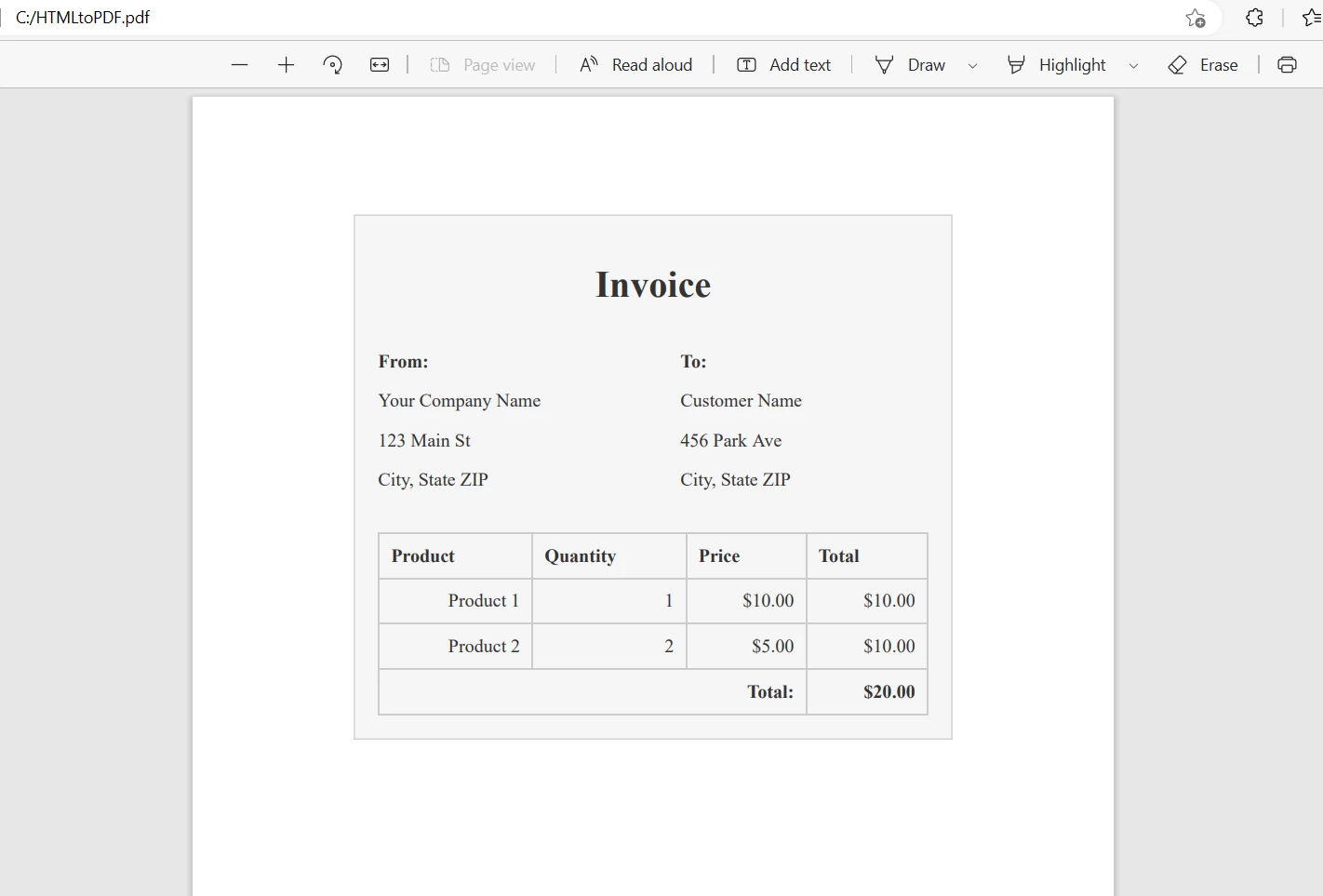 HTML 문자열에서 생성된 PDF 파일
IronPDF 로컬 네트워크 및 외부 서버를 포함한 다양한 소스에서 웹 페이지를 PDF로 변환 할 수 있습니다.
import com.ironsoftware.ironpdf.*;

import java.io.IOException;
import java.nio.file.Paths;

public class UrlToPdfExample {
    public static void main(String[] args) throws IOException {
        // Apply your license key
        License.setLicenseKey("YOUR-LICENSE-KEY");

        // Set a log path to store log files generated by IronPDF
        Settings.setLogPath(Paths.get("C:/tmp/IronPdfEngine.log"));

        // Convert a webpage to a PDF by specifying the URL
        PdfDocument myPdf = PdfDocument.renderUrlAsPdf("https://ironpdf.com");

        // Save the PdfDocument to a file
        myPdf.saveAs(Paths.get("url.pdf"));
    }
}PdfDocument.renderUrlAsPdf](/java/object-reference/api/com/ironsoftware/ironpdf/PdfDocument.html#renderUrlAsPdf(java.lang.String) 메소드는 이 목적에 특화되어 있으며 변환할 웹 페이지의 URL을 포함하는 문자열을 인수로 받습니다. 이 메서드는 웹 페이지의 HTML 콘텐츠를 가져와 PDF 문서로 변환합니다. IronPDF 모든 웹 구성 요소의 모양을 유지하면서 상호 작용 기능(링크, 양식 필드 등)을 작동 가능하게 만듭니다.결과는 다음과 같습니다.
 URL에서 생성된 PDF 파일
결론적으로 IronPDF PDF 파일을 생성하고 조작하는 데 필요한 다양한 기능을 갖춘 유용한 Java 라이브러리입니다. PDF 문서에 디지털 서명을 하거나, PDF 양식을 작성하거나 , 기타 작업을 수행해야 하는 경우 IronPDF 사용하면 최소한의 코딩으로 쉽게 이러한 작업을 수행할 수 있습니다.
무료 체험판 제공과 $999부터 시작하는 유연한 가격 옵션으로, IronPDF는 개발자가 프로젝트에 PDF 기능을 추가하려 할 때 비용 효과적인 솔루션입니다.

커티스 차우는 칼턴 대학교에서 컴퓨터 과학 학사 학위를 취득했으며, Node.js, TypeScript, JavaScript, React를 전문으로 하는 프론트엔드 개발자입니다. 직관적이고 미적으로 뛰어난 사용자 인터페이스를 만드는 데 열정을 가진 그는 최신 프레임워크를 활용하고, 잘 구성되고 시각적으로 매력적인 매뉴얼을 제작하는 것을 즐깁니다.



IronPDF는 IRON SUITE 의 일부입니다.
10개의 .NET API 제품, 당신의 사무 문서를 위해

PDF 파일을 HTML처럼 빠르게 변환해야 할 때.

