

Java 라이브러리를 이용한 PDF 생성 (전체 코드 예제)

이 글에서는 자바를 이용해 PDF를 생성하는 데 유용한 도구인 IronPDF 라이브러리에 대해 살펴보겠습니다.
IronPDF: 자바 PDF 라이브러리
IronPDF 는 개발자가 PDF 문서, PDF 양식을 쉽게 생성하고, PDF 파일에 디지털 서명을 하는 등 다양한 작업을 수행할 수 있도록 해주는 인기 있는 Java PDF 라이브러리 입니다. IronPDF 사용하면 기존 PDF 문서를 템플릿으로 활용하여 새 PDF 파일을 생성하고 , PDF 데이터를 데이터베이스에 저장하여 나중에 사용할 수 있으며, PDF를 HTML과 같은 다른 형식으로 변환하고, 여러 PDF 파일을 하나로 병합할 수도 있습니다.
IronPDF 사용하면 사용자가 PDF에 텍스트 주석을 추가하여 자신이 만든 파일을 개인화할 수 있습니다. 또한 IronPDF 사용하면 PDF에 암호나 워터마크와 같은 보안 설정을 포함할 수 있습니다. PDF 기능을 자바 프로그램에 통합하는 데 도움이 됩니다. IronPDF PDF를 빠르고 안전하게 생성할 수 있는 매우 다재다능하고 강력한 도구입니다. IronPDF 사용하여 PDF 파일을 만드는 방법을 살펴보겠습니다.
IronPDF 사용하여 PDF 파일을 생성합니다.
IronPDF 는 PDF 파일을 생성하는 데 매우 유용한 도구입니다. 이 프로그램은 문서, 웹페이지, 이미지를 빠르고 안정적이며 안전한 PDF 파일로 변환하여 쉽게 공유할 수 있도록 필요한 모든 기능을 갖추고 있습니다. 이 데모 프로그램에 IronPDF 설치해 보겠습니다.
IronPDF Java PDF 라이브러리를 설치하세요.
IronPDF Java를 Maven 프로젝트에 설치하려면, 프로젝트의 pom.xml 파일에 다음과 같은 종속성을 추가할 수 있습니다:
<dependencies>

    <dependency>
        <groupId>com.ironsoftware</groupId>
        <artifactId>ironpdf</artifactId>
        <version>YOUR-VERSION-HERE</version>
    </dependency>

    <dependency>
        <groupId>org.slf4j</groupId>
        <artifactId>slf4j-api</artifactId>
        <version>YOUR-VERSION-HERE</version>
    </dependency>
</dependencies>
<dependencies>
<dependency>
<groupId>com.ironsoftware</groupId>
<artifactId>ironpdf</artifactId>
<version>YOUR-VERSION-HERE</version>
</dependency>
<dependency>
<groupId>org.slf4j</groupId>
<artifactId>slf4j-api</artifactId>
<version>YOUR-VERSION-HERE</version>
</dependency>
</dependencies>이렇게 하면 IronPDF for Java 라이브러리와 해당 라이브러리에서 사용하는 SLF4J 로거가 추가됩니다. Java용 IronPDF 의 최신 버전을 사용하는 것이 좋습니다. 종속성을 추가한 후에는 mvn install을 실행하여 로컬 저장소에 종속성을 설치할 수 있으며, 프로젝트는 IronPDF for Java를 사용할 준비가 됩니다.
PDF 문서를 생성하는 자바 코드
이 코드는 Java로 작성되었으며 IronPDF 라이브러리를 사용하여 HTML을 PDF 문서로 변환합니다 .
// Import statement for IronPDF Java
import com.ironsoftware.ironpdf.*;

import java.io.IOException;
import java.nio.file.Paths;

public class Main {
    public static void main(String[] args) throws IOException {
        // Apply your license key
        License.setLicenseKey("YOUR-LICENSE-KEY");

        // Set a log path to store log files generated by IronPDF
        Settings.setLogPath(Paths.get("C:/tmp/IronPdfEngine.log"));

        // Define the HTML content to convert into a PDF
        String html = "<!DOCTYPE html>\r\n"
                + "<html>\r\n"
                + "  <head>\r\n"
                + "    <link href='https://fonts.googleapis.com/css2?family=Popin&display=swap' rel='stylesheet'>\r\n"
                + "    <style>\r\n"
                + "      /* Add CSS styles for the invoice here */\r\n"
                + "      body {\r\n"
                + "        font-family: 'Popin', cursive;\r\n"
                + "      }\r\n"
                + "      .invoice {\r\n"
                + "        width: 80%;\r\n"
                + "        margin: 0 auto;\r\n"
                + "        border: 1px solid #ccc;\r\n"
                + "        padding: 20px;\r\n"
                + "        background-color: #f5f5f5;\r\n"
                + "        color: #333;\r\n"
                + "      }\r\n"
                + "      .invoice h1 {\r\n"
                + "        text-align: center;\r\n"
                + "      }\r\n"
                + "      .invoice .invoice-info {\r\n"
                + "        display: flex;\r\n"
                + "        justify-content: space-between;\r\n"
                + "        margin-bottom: 20px;\r\n"
                + "      }\r\n"
                + "      .invoice .invoice-info div {\r\n"
                + "        width: 45%;\r\n"
                + "      }\r\n"
                + "      .invoice table {\r\n"
                + "        width: 100%;\r\n"
                + "        border-collapse: collapse;\r\n"
                + "      }\r\n"
                + "      .invoice table th, .invoice table td {\r\n"
                + "        border: 1px solid #ccc;\r\n"
                + "        padding: 10px;\r\n"
                + "      }\r\n"
                + "      .invoice table th {\r\n"
                + "        text-align: left;\r\n"
                + "        background-color: #f5f5f5;\r\n"
                + "      }\r\n"
                + "      .invoice table td {\r\n"
                + "        text-align: right;\r\n"
                + "      }\r\n"
                + "      .invoice table td.total {\r\n"
                + "        font-weight: bold;\r\n"
                + "      }\r\n"
                + "    </style>\r\n"
                + "  </head>\r\n"
                + "  <body>\r\n"
                + "    <div class=\"invoice\">\r\n"
                + "      <h1>Invoice</h1>\r\n"
                + "      <div class=\"invoice-info\">\r\n"
                + "        <div>\r\n"
                + "          <p><strong>From:</strong></p>\r\n"
                + "          <p>Your Company Name</p>\r\n"
                + "          <p>123 Main St</p>\r\n"
                + "          <p>City, State ZIP</p>\r\n"
                + "        </div>\r\n"
                + "        <div>\r\n"
                + "          <p><strong>To:</strong></p>\r\n"
                + "          <p>Customer Name</p>\r\n"
                + "          <p>456 Park Ave</p>\r\n"
                + "          <p>City, State ZIP</p>\r\n"
                + "        </div>\r\n"
                + "      </div>\r\n"
                + "      <table>\r\n"
                + "        <thead>\r\n"
                + "          <tr>\r\n"
                + "            <th>Product</th>\r\n"
                + "            <th>Quantity</th>\r\n"
                + "            <th>Price</th>\r\n"
                + "            <th>Total</th>\r\n"
                + "          </tr>\r\n"
                + "        </thead>\r\n"
                + "        <tbody>\r\n"
                + "          <tr>\r\n"
                + "            <td>Product 1</td>\r\n"
                + "            <td>1</td>\r\n"
                + "            <td>$10.00</td>\r\n"
                + "            <td>$10.00</td>\r\n"
                + "          </tr>\r\n"
                + "          <tr>\r\n"
                + "            <td>Product 2</td>\r\n"
                + "            <td>2</td>\r\n"
                + "            <td>$5.00</td>\r\n"
                + "            <td>$10.00</td>\r\n"
                + "          </tr>\r\n"
                + "          <tr>\r\n"
                + "            <td colspan=\"3\" class=\"total\">Total:</td>\r\n"
                + "            <td class=\"total\">$20.00</td>\r\n"
                + "          </tr>\r\n"
                + "        </tbody>\r\n"
                + "      </table>\r\n"
                + "    </div>\r\n"
                + "  </body>\r\n"
                + "</html>";

        // Convert HTML to PDF document
        PdfDocument myPdf = PdfDocument.renderHtmlAsPdf(html);

        // Save the PDF document to a specified path
        myPdf.saveAs(Paths.get("C://HTMLtoPDF.pdf"));
    }
}
// Import statement for IronPDF Java
import com.ironsoftware.ironpdf.*;
import java.io.IOException;
import java.nio.file.Paths;
public class Main {
public static void main(String[] args) throws IOException {
// Apply your license key
License.setLicenseKey("YOUR-LICENSE-KEY");
// Set a log path to store log files generated by IronPDF
Settings.setLogPath(Paths.get("C:/tmp/IronPdfEngine.log"));
// Define the HTML content to convert into a PDF
String html = "<!DOCTYPE html>\r\n"
+ "<html>\r\n"
+ " <head>\r\n"
+ " <link href='https://fonts.googleapis.com/css2?family=Popin&display=swap' rel='stylesheet'>\r\n"
+ " <style>\r\n"
+ " /* Add CSS styles for the invoice here */\r\n"
+ " body {\r\n"
+ " font-family: 'Popin', cursive;\r\n"
+ " }\r\n"
+ " .invoice {\r\n"
+ " width: 80%;\r\n"
+ " margin: 0 auto;\r\n"
+ " border: 1px solid #ccc;\r\n"
+ " padding: 20px;\r\n"
+ " background-color: #f5f5f5;\r\n"
+ " color: #333;\r\n"
+ " }\r\n"
+ " .invoice h1 {\r\n"
+ " text-align: center;\r\n"
+ " }\r\n"
+ " .invoice .invoice-info {\r\n"
+ " display: flex;\r\n"
+ " justify-content: space-between;\r\n"
+ " margin-bottom: 20px;\r\n"
+ " }\r\n"
+ " .invoice .invoice-info div {\r\n"
+ " width: 45%;\r\n"
+ " }\r\n"
+ " .invoice table {\r\n"
+ " width: 100%;\r\n"
+ " border-collapse: collapse;\r\n"
+ " }\r\n"
+ " .invoice table th, .invoice table td {\r\n"
+ " border: 1px solid #ccc;\r\n"
+ " padding: 10px;\r\n"
+ " }\r\n"
+ " .invoice table th {\r\n"
+ " text-align: left;\r\n"
+ " background-color: #f5f5f5;\r\n"
+ " }\r\n"
+ " .invoice table td {\r\n"
+ " text-align: right;\r\n"
+ " }\r\n"
+ " .invoice table td.total {\r\n"
+ " font-weight: bold;\r\n"
+ " }\r\n"
+ " </style>\r\n"
+ " </head>\r\n"
+ " <body>\r\n"
+ " <div class=\"invoice\">\r\n"
+ " <h1>Invoice</h1>\r\n"
+ " <div class=\"invoice-info\">\r\n"
+ " <div>\r\n"
+ " <p><strong>From:</strong></p>\r\n"
+ " <p>Your Company Name</p>\r\n"
+ " <p>123 Main St</p>\r\n"
+ " <p>City, State ZIP</p>\r\n"
+ " </div>\r\n"
+ " <div>\r\n"
+ " <p><strong>To:</strong></p>\r\n"
+ " <p>Customer Name</p>\r\n"
+ " <p>456 Park Ave</p>\r\n"
+ " <p>City, State ZIP</p>\r\n"
+ " </div>\r\n"
+ " </div>\r\n"
+ " <table>\r\n"
+ " <thead>\r\n"
+ " <tr>\r\n"
+ " <th>Product</th>\r\n"
+ " <th>Quantity</th>\r\n"
+ " <th>Price</th>\r\n"
+ " <th>Total</th>\r\n"
+ " </tr>\r\n"
+ " </thead>\r\n"
+ " <tbody>\r\n"
+ " <tr>\r\n"
+ " <td>Product 1</td>\r\n"
+ " <td>1</td>\r\n"
+ " <td>$10.00</td>\r\n"
+ " <td>$10.00</td>\r\n"
+ " </tr>\r\n"
+ " <tr>\r\n"
+ " <td>Product 2</td>\r\n"
+ " <td>2</td>\r\n"
+ " <td>$5.00</td>\r\n"
+ " <td>$10.00</td>\r\n"
+ " </tr>\r\n"
+ " <tr>\r\n"
+ " <td colspan=\"3\" class=\"total\">Total:</td>\r\n"
+ " <td class=\"total\">$20.00</td>\r\n"
+ " </tr>\r\n"
+ " </tbody>\r\n"
+ " </table>\r\n"
+ " </div>\r\n"
+ " </body>\r\n"
+ "</html>";
// Convert HTML to PDF document
PdfDocument myPdf = PdfDocument.renderHtmlAsPdf(html);
// Save the PDF document to a specified path
myPdf.saveAs(Paths.get("C://HTMLtoPDF.pdf"));
}
}- 첫 번째 단계는
setLicenseKey메소드를 사용하여 라이선스 키를 적용하는 것입니다. 키는 문자열 인수로 전달됩니다. 이 경우 " YOUR-LICENSE-KEY "는 실제 라이선스 키로 바꿔야 합니다. - 다음 단계는
setLogPath메소드를 사용하여 로그 경로를 설정하는 것입니다. IronPDF 엔진의 로그 파일은 여기에 저장됩니다. 이 경우 경로는 " C:/tmp/IronPdfEngine.log "로 설정됩니다. - 주 메서드가 정의되고,
PdfDocument객체는 HTML 문자열을 인수로 전달하여 [renderHtmlAsPdf](/java/object-reference/api/com/ironsoftware/ironpdf/PdfDocument.html#renderHtmlAsPdf(java.lang.String) 메소드를 호출하여 생성됩니다. 이렇게 하면 HTML이 PDF로 변환되며myPdf객체에 저장됩니다. - 마지막 단계는
myPdf객체를 파일로 저장하기 위해 [saveAs](/java/object-reference/api/com/ironsoftware/ironpdf/PdfDocument.html#saveAs(java.lang.String) 메소드를 사용하는 것입니다. 파일 위치는 Paths 객체 형태로 인수로 전달되며, 이 경우 "HTMLtoPDF.pdf"입니다.
아래는 IronPDF Java PDF 라이브러리를 사용하여 PDF 파일을 생성한 위 프로그램의 출력 결과입니다.
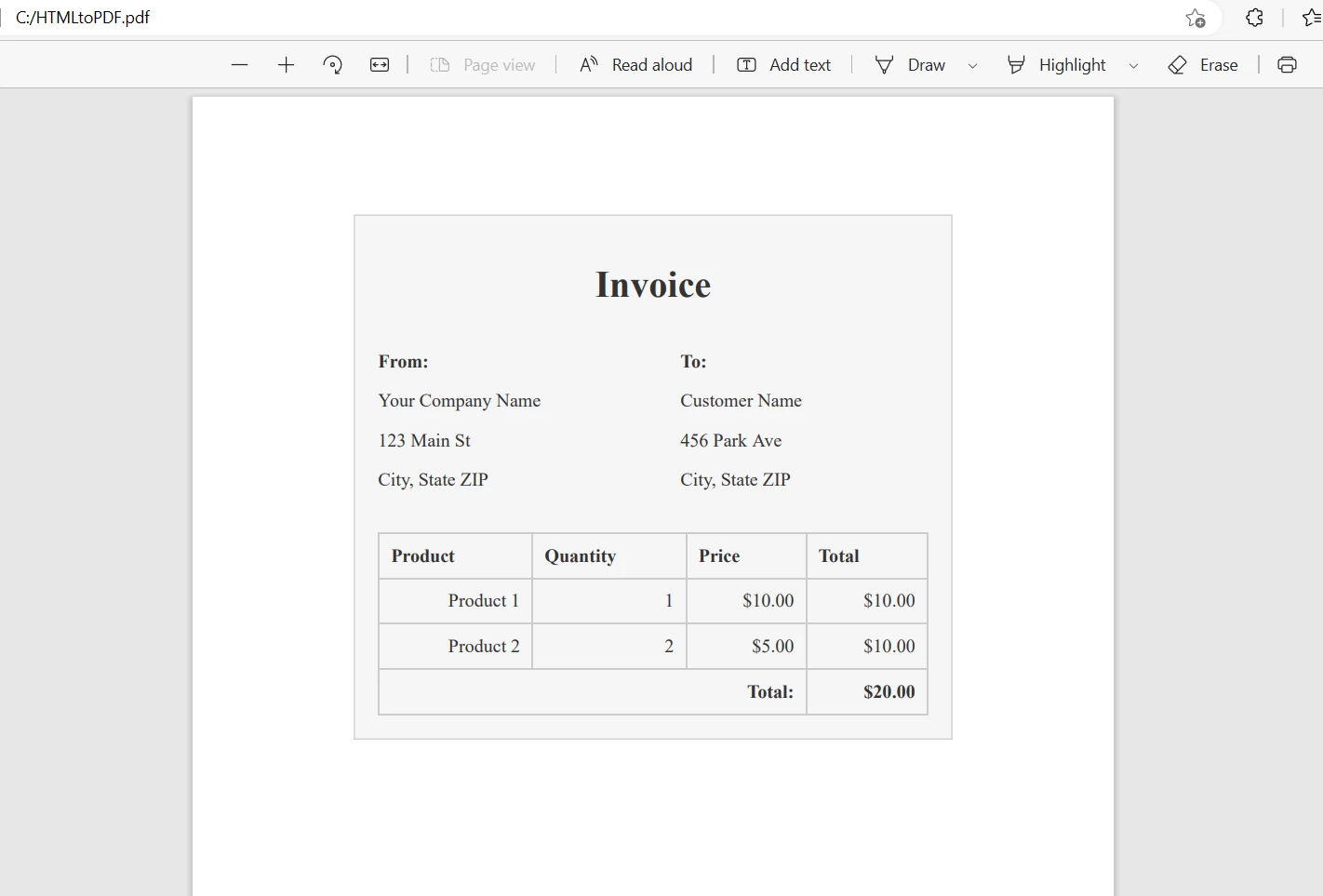 HTML 문자열에서 생성된 PDF 파일
URL에서 PDF 파일 생성
IronPDF 로컬 네트워크 및 외부 서버를 포함한 다양한 소스에서 웹 페이지를 PDF로 변환 할 수 있습니다.
import com.ironsoftware.ironpdf.*;

import java.io.IOException;
import java.nio.file.Paths;

public class UrlToPdfExample {
    public static void main(String[] args) throws IOException {
        // Apply your license key
        License.setLicenseKey("YOUR-LICENSE-KEY");

        // Set a log path to store log files generated by IronPDF
        Settings.setLogPath(Paths.get("C:/tmp/IronPdfEngine.log"));

        // Convert a webpage to a PDF by specifying the URL
        PdfDocument myPdf = PdfDocument.renderUrlAsPdf("https://ironpdf.com");

        // Save the PdfDocument to a file
        myPdf.saveAs(Paths.get("url.pdf"));
    }
}
import com.ironsoftware.ironpdf.*;
import java.io.IOException;
import java.nio.file.Paths;
public class UrlToPdfExample {
public static void main(String[] args) throws IOException {
// Apply your license key
License.setLicenseKey("YOUR-LICENSE-KEY");
// Set a log path to store log files generated by IronPDF
Settings.setLogPath(Paths.get("C:/tmp/IronPdfEngine.log"));
// Convert a webpage to a PDF by specifying the URL
PdfDocument myPdf = PdfDocument.renderUrlAsPdf("https://ironpdf.com");
// Save the PdfDocument to a file
myPdf.saveAs(Paths.get("url.pdf"));
}
}- [
PdfDocument.renderUrlAsPdf](/java/object-reference/api/com/ironsoftware/ironpdf/PdfDocument.html#renderUrlAsPdf(java.lang.String) 메소드는 이 목적에 특화되어 있으며 변환할 웹 페이지의 URL을 포함하는 문자열을 인수로 받습니다. 이 메서드는 웹 페이지의 HTML 콘텐츠를 가져와 PDF 문서로 변환합니다. IronPDF 모든 웹 구성 요소의 모양을 유지하면서 상호 작용 기능(링크, 양식 필드 등)을 작동 가능하게 만듭니다.
결과는 다음과 같습니다.
 URL에서 생성된 PDF 파일
요약
결론적으로 IronPDF PDF 파일을 생성하고 조작하는 데 필요한 다양한 기능을 갖춘 유용한 Java 라이브러리입니다. PDF 문서에 디지털 서명을 하거나, PDF 양식을 작성하거나 , 기타 작업을 수행해야 하는 경우 IronPDF 사용하면 최소한의 코딩으로 쉽게 이러한 작업을 수행할 수 있습니다.
무료 체험판 제공과 $999부터 시작하는 유연한 가격 옵션으로, IronPDF는 개발자가 프로젝트에 PDF 기능을 추가하려 할 때 비용 효과적인 솔루션입니다.
자주 묻는 질문
자바로 PDF 문서를 어떻게 만들 수 있나요?
IronPDF를 사용하면 포괄적인 API를 활용하여 처음부터 새 PDF 문서를 생성하거나 기존 문서를 PDF 형식으로 변환함으로써 Java에서 PDF 문서를 만들 수 있습니다.
자바를 사용하여 HTML을 PDF로 변환하는 과정은 무엇인가요?
Java에서 HTML을 PDF로 변환하기 위해 IronPDF는 renderHtmlAsPdf 메서드를 제공합니다. 이 메서드를 사용하면 HTML 문자열을 입력받아 PDF 문서를 출력으로 받을 수 있습니다.
자바 애플리케이션에서 웹페이지 URL을 PDF로 변환하는 방법은 무엇인가요?
IronPDF는 renderUrlAsPdf 메서드를 사용하여 웹페이지 URL을 PDF로 변환할 수 있습니다. 이 메서드는 URL에서 HTML 콘텐츠를 가져와 PDF 문서로 변환합니다.
자바 라이브러리를 사용하여 PDF 문서에 디지털 서명을 할 수 있나요?
네, IronPDF는 PDF 문서에 디지털 서명을 할 수 있는 기능을 제공하여 문서의 진위성과 무결성을 보장합니다.
Java를 사용하여 PDF에 보안 기능을 추가하는 방법은 무엇입니까?
IronPDF는 비밀번호 보호 및 워터마크와 같은 보안 기능을 제공하며, 이러한 기능을 PDF에 적용하여 보안을 강화할 수 있습니다.
Maven 프로젝트에 PDF 라이브러리를 설치하는 데에는 어떤 단계가 포함되나요?
Maven 프로젝트에 IronPDF를 설치하려면 pom.xml 파일에 IronPDF 종속성과 SLF4J 로깅 종속성을 추가한 다음 mvn install 명령을 실행해야 합니다.
자바를 사용하여 기존 PDF 파일을 조작하려면 어떻게 해야 하나요?
IronPDF를 사용하면 텍스트 편집, 문서 병합, 주석 추가 및 디지털 서명 적용과 같은 방법을 제공하여 기존 PDF 파일을 조작할 수 있습니다.
IronPDF를 구매하기 전에 기능을 테스트해 볼 수 있는 방법이 있나요?
네, IronPDF는 개발자들이 구매 결정을 내리기 전에 기능을 테스트해 볼 수 있도록 무료 체험판을 제공합니다.
Java에서 PDF 라이브러리를 사용하면 어떤 이점이 있나요?
Java에서 IronPDF와 같은 PDF 라이브러리를 사용하면 PDF 생성, 편집 및 변환 프로세스가 간소화되어 광범위한 코딩 필요성이 줄어들고 효율성이 향상됩니다.
자바를 사용하여 여러 PDF 파일을 하나로 병합하려면 어떻게 해야 할까요?
IronPDF는 여러 PDF 파일을 하나의 문서로 병합하는 기능을 포함하고 있어 여러 PDF 파일을 하나의 파일로 쉽게 통합할 수 있습니다.










 무료로 시작하세요
 무료로 시작하세요
 무료 라이브 데모 예약하기





 신용카드나 계정 생성은 필요하지 않습니다.










