푸터 콘텐츠로 바로가기
JAVA용 IRONPDF 사용

Java PDF 렌더러 라이브러리(개발자 튜토리얼)

An Introduction to the Java PDF Library, IronPDF

If you're working on a Java project and need to generate PDF documents from HTML or extract text from a PDF, you should search for a reliable and efficient Java PDF Library. You may stumble upon IronPDF - The Java PDF Library, which simplifies PDF generation and manipulation of PDF documents, making your life as a developer much more manageable. There are multiple PDF libraries in the market, like PDF Clown or iText, but this article will dive into the world of IronPDF and explore how it can help you in your Java projects.

Getting Started with IronPDF

IronPDF is a Java Library that allows you to create, read, and edit PDF documents in Java applications. This versatile library supports generating PDFs from HTML with IronPDF, existing PDF files, and URLs. You can extract text from PDFs using IronPDF, making it a must-have tool for any Java developer working with PDF documents.

Installing IronPDF in a Maven Project

Maven is a popular build automation and dependency management tool for Java projects. To install IronPDF in your Maven project, you'll need to add the necessary dependencies to your pom.xml file.

Here's how you can add IronPDF and its required logger dependency, SLF4J, to your Maven project:

  1. Open your project's pom.xml file.
  2. Locate the dependencies section. If it doesn't exist, create one.
  3. Add the following dependency entries for IronPDF and SLF4J:

    <dependencies>
    
        <dependency>
            <groupId>com.ironsoftware</groupId>
            <artifactId>ironpdf</artifactId>
            <version>2023.10.1</version>
        </dependency>
    
        <dependency>
            <groupId>org.slf4j</groupId>
            <artifactId>slf4j-api</artifactId>
            <version>2.0.7</version>
        </dependency>
    </dependencies>
    <dependencies>
    
        <dependency>
            <groupId>com.ironsoftware</groupId>
            <artifactId>ironpdf</artifactId>
            <version>2023.10.1</version>
        </dependency>
    
        <dependency>
            <groupId>org.slf4j</groupId>
            <artifactId>slf4j-api</artifactId>
            <version>2.0.7</version>
        </dependency>
    </dependencies>
    XML
  4. Save the pom.xml file.
  5. Run your Maven project, either through your IDE or by executing the mvn install command in your project's root directory. Maven will automatically download and add the IronPDF and SLF4J dependencies to your project.

Now, you have successfully added IronPDF to your Maven project, and you can start using this powerful Java PDF Library to create, edit, and manipulate PDF documents in your Java applications. Don't forget to check the IronPDF documentation for more examples and detailed information about the library's features and capabilities. Let's explore a few functionalities here.

Rendering HTML to PDF

One of the most common tasks when working with PDFs is converting HTML to PDF using IronPDF. IronPDF makes this a breeze with just a few lines of code. Here's an example that demonstrates how to convert a simple HTML string into a PDF document:

import com.ironsoftware.ironpdf.*;

import java.io.IOException;
import java.nio.file.Paths;

public class HtmlToPdfExample {
    public static void main(String[] args) {
        try {
            // Apply your license key
            License.setLicenseKey("YOUR-LICENSE-KEY");

            // Set a log path
            Settings.setLogPath(Paths.get("C:/tmp/IronPdfEngine.log"));

            // Render the HTML as a PDF, stored in myPdf as type PdfDocument
            PdfDocument myPdf = PdfDocument.renderHtmlAsPdf("<h1>Hello World</h1> Made with IronPDF!");

            // Save the PdfDocument to a file
            myPdf.saveAs(Paths.get("html_saved.pdf"));
        } catch (IOException e) {
            System.out.println("An error occurred: " + e.getMessage());
        }
    }
}
import com.ironsoftware.ironpdf.*;

import java.io.IOException;
import java.nio.file.Paths;

public class HtmlToPdfExample {
    public static void main(String[] args) {
        try {
            // Apply your license key
            License.setLicenseKey("YOUR-LICENSE-KEY");

            // Set a log path
            Settings.setLogPath(Paths.get("C:/tmp/IronPdfEngine.log"));

            // Render the HTML as a PDF, stored in myPdf as type PdfDocument
            PdfDocument myPdf = PdfDocument.renderHtmlAsPdf("<h1>Hello World</h1> Made with IronPDF!");

            // Save the PdfDocument to a file
            myPdf.saveAs(Paths.get("html_saved.pdf"));
        } catch (IOException e) {
            System.out.println("An error occurred: " + e.getMessage());
        }
    }
}
JAVA

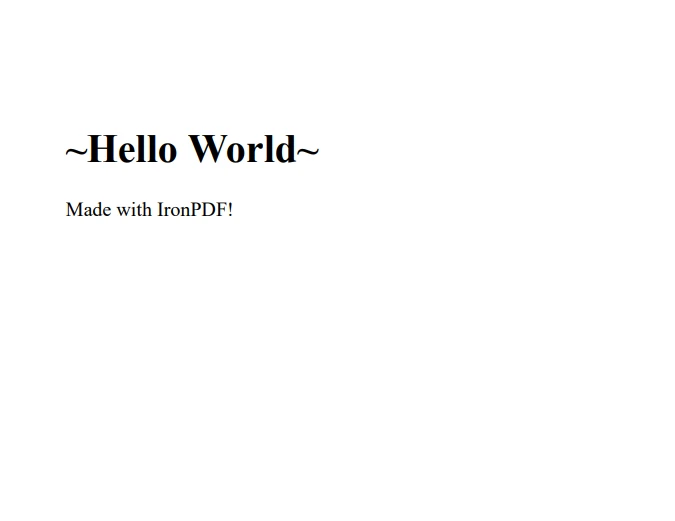
This code snippet imports the necessary IronPDF classes and applies a license key. Next, it sets a log path for debugging purposes. The renderHtmlAsPdf method takes an HTML string as input and converts it to a PDF document, which you can then save to a file.

Java PDF Renderer Library (Developer Tutorial), Figure 1: The output PDF file
The output PDF file

Converting HTML Files to PDF

IronPDF also supports converting HTML files to PDF documents. The process is quite similar to the previous example, with a minor change in the method used:

import com.ironsoftware.ironpdf.*;

import java.io.IOException;
import java.nio.file.Paths;

public class HtmlFileToPdfExample {
    public static void main(String[] args) {
        try {
            // Apply your license key
            License.setLicenseKey("YOUR-LICENSE-KEY");

            // Set a log path
            Settings.setLogPath(Paths.get("C:/tmp/IronPdfEngine.log"));

            // Render the HTML file as a PDF, stored in myPdf as type PdfDocument
            PdfDocument myPdf = PdfDocument.renderHtmlFileAsPdf("example.html");

            // Save the PdfDocument to a file
            myPdf.saveAs(Paths.get("html_file_saved.pdf"));
        } catch (IOException e) {
            System.out.println("An error occurred: " + e.getMessage());
        }
    }
}
import com.ironsoftware.ironpdf.*;

import java.io.IOException;
import java.nio.file.Paths;

public class HtmlFileToPdfExample {
    public static void main(String[] args) {
        try {
            // Apply your license key
            License.setLicenseKey("YOUR-LICENSE-KEY");

            // Set a log path
            Settings.setLogPath(Paths.get("C:/tmp/IronPdfEngine.log"));

            // Render the HTML file as a PDF, stored in myPdf as type PdfDocument
            PdfDocument myPdf = PdfDocument.renderHtmlFileAsPdf("example.html");

            // Save the PdfDocument to a file
            myPdf.saveAs(Paths.get("html_file_saved.pdf"));
        } catch (IOException e) {
            System.out.println("An error occurred: " + e.getMessage());
        }
    }
}
JAVA

In this case, the renderHtmlFileAsPdf method is used instead of renderHtmlAsPdf, taking the path to the HTML file as input and creating PDF documents.

Turning URLs into PDFs

IronPDF is capable of converting web pages into PDF documents. This is particularly helpful when you want to generate a PDF report from a dynamic web page. The following code snippet demonstrates how to do this:

import com.ironsoftware.ironpdf.*;

import java.io.IOException;
import java.nio.file.Paths;

public class UrlToPdfExample {
    public static void main(String[] args) {
        try {
            // Apply your license key
            License.setLicenseKey("YOUR-LICENSE-KEY");

            // Set a log path
            Settings.setLogPath(Paths.get("C:/tmp/IronPdfEngine.log"));

            // Render the URL as a PDF, stored in myPdf as type PdfDocument
            PdfDocument myPdf = PdfDocument.renderUrlAsPdf("https://ironpdf.com");

            // Save the PdfDocument to a file
            myPdf.saveAs(Paths.get("url.pdf"));
        } catch (IOException e) {
            System.out.println("An error occurred: " + e.getMessage());
        }
    }
}
import com.ironsoftware.ironpdf.*;

import java.io.IOException;
import java.nio.file.Paths;

public class UrlToPdfExample {
    public static void main(String[] args) {
        try {
            // Apply your license key
            License.setLicenseKey("YOUR-LICENSE-KEY");

            // Set a log path
            Settings.setLogPath(Paths.get("C:/tmp/IronPdfEngine.log"));

            // Render the URL as a PDF, stored in myPdf as type PdfDocument
            PdfDocument myPdf = PdfDocument.renderUrlAsPdf("https://ironpdf.com");

            // Save the PdfDocument to a file
            myPdf.saveAs(Paths.get("url.pdf"));
        } catch (IOException e) {
            System.out.println("An error occurred: " + e.getMessage());
        }
    }
}
JAVA

The renderUrlAsPdf method takes a URL as input and creates PDF files from the web page's content. This method can handle complex pages, including those with JavaScript and CSS.

Java PDF Renderer Library (Developer Tutorial), Figure 2: The output PDF file from a URL
The output PDF file from a URL

Extracting Text from PDFs

In addition to creating PDFs, IronPDF also provides functionality for extracting text from existing PDF documents. This feature can be useful when you need to search, index, or analyze the content of a PDF file. The following code snippet shows how to extract text from a PDF document:

import com.ironsoftware.ironpdf.*;

public class ExtractTextFromPdfExample {
    public static void main(String[] args) {
        // Render PDF from a URL
        PdfDocument pdf = PdfDocument.renderUrlAsPdf("https://unsplash.com/");

        // Extract all text from the PDF document
        String text = pdf.extractAllText();

        // Output the extracted text
        System.out.println("Text extracted from the PDF: " + text);
    }
}
import com.ironsoftware.ironpdf.*;

public class ExtractTextFromPdfExample {
    public static void main(String[] args) {
        // Render PDF from a URL
        PdfDocument pdf = PdfDocument.renderUrlAsPdf("https://unsplash.com/");

        // Extract all text from the PDF document
        String text = pdf.extractAllText();

        // Output the extracted text
        System.out.println("Text extracted from the PDF: " + text);
    }
}
JAVA

In this example, a PDF is rendered from a URL, and the extractAllText method is used to obtain the text content of the PDF document. The extracted text can then be printed to the console or manipulated as needed.

Converting Images to PDF with IronPDF

IronPDF can also convert images to a PDF document. This can come in handy when you need to create a PDF portfolio or combine multiple images into a single file. The following code snippet demonstrates how to convert a set of images in a directory into a single PDF document:

import com.ironsoftware.ironpdf.*;

import java.io.IOException;
import java.nio.file.*;
import java.util.ArrayList;
import java.util.List;

public class ImagesToPdfExample {
    public static void main(String[] args) {
        Path imageDirectory = Paths.get("assets/images");

        List<Path> imageFiles = new ArrayList<>();

        // Use DirectoryStream to iterate over image files
        try (DirectoryStream<Path> stream = Files.newDirectoryStream(imageDirectory, "*.{png,jpg}")) {
            for (Path entry : stream) {
                imageFiles.add(entry);
            }

            // Convert images to a PDF document and save it
            PdfDocument.fromImage(imageFiles).saveAs(Paths.get("assets/composite.pdf"));
        } catch (IOException exception) {
            throw new RuntimeException(String.format("Error converting images to PDF from directory: %s: %s",
                    imageDirectory,
                    exception.getMessage()),
                    exception);
        }
    }
}
import com.ironsoftware.ironpdf.*;

import java.io.IOException;
import java.nio.file.*;
import java.util.ArrayList;
import java.util.List;

public class ImagesToPdfExample {
    public static void main(String[] args) {
        Path imageDirectory = Paths.get("assets/images");

        List<Path> imageFiles = new ArrayList<>();

        // Use DirectoryStream to iterate over image files
        try (DirectoryStream<Path> stream = Files.newDirectoryStream(imageDirectory, "*.{png,jpg}")) {
            for (Path entry : stream) {
                imageFiles.add(entry);
            }

            // Convert images to a PDF document and save it
            PdfDocument.fromImage(imageFiles).saveAs(Paths.get("assets/composite.pdf"));
        } catch (IOException exception) {
            throw new RuntimeException(String.format("Error converting images to PDF from directory: %s: %s",
                    imageDirectory,
                    exception.getMessage()),
                    exception);
        }
    }
}
JAVA

With just this one code snippet, IronPDF makes it easy to convert multiple images into a single PDF document, further demonstrating the library's versatility and usefulness in various PDF-related tasks.

Conclusion

IronPDF is a powerful and versatile Java PDF Library that simplifies PDF generation and manipulation in Java applications. With its easy-to-use API, you can effortlessly convert HTML, HTML files, and URLs into PDF documents using IronPDF, as well as extract text from PDFs from existing PDF files. By integrating IronPDF into your Java projects, you can streamline your workflow and create high-quality PDFs with ease.

Additionally, IronPDF is also capable of rendering charts in PDFs, watermarking PDF documents, working with PDF forms and digital signatures programmatically.

IronPDF offers a free trial, giving you ample time to evaluate its features and determine if it's the right fit for your project. If you decide to continue using IronPDF after the trial period, licensing starts at $799.

자주 묻는 질문

Java PDF 라이브러리 IronPDF는 어떤 용도로 사용되나요?

IronPDF는 Java 애플리케이션 내에서 PDF 문서를 쉽게 만들고, 읽고, 편집할 수 있도록 설계된 Java 라이브러리입니다. 최소한의 코딩 작업으로 HTML, HTML 파일 및 URL을 PDF로 변환하는 데 탁월합니다.

PDF 라이브러리를 Maven 프로젝트에 통합하려면 어떻게 해야 하나요?

IronPDF를 Maven 프로젝트에 통합하려면 `<종속성>` 섹션의 `

Java를 사용하여 HTML을 PDF로 변환하려면 어떻게 해야 하나요?

HTML은 IronPDF의 renderHtmlAsPdf 메서드를 사용하여 Java에서 PDF로 변환할 수 있습니다. 이 메서드는 HTML 문자열을 처리하여 PDF 문서를 생성합니다.

HTML 파일을 PDF 문서로 변환할 수 있나요?

예, IronPDF를 사용하면 HTML 파일을 읽고 PDF 문서를 출력하는 renderHtmlFileAsPdf 메서드를 사용하여 HTML 파일을 PDF로 변환할 수 있습니다.

Java에서 웹페이지를 PDF로 변환할 수 있나요?

예, IronPDF를 사용하면 renderUrlAsPdf 메서드를 사용하여 웹페이지를 PDF로 변환할 수 있습니다. 이 메서드는 URL을 가져와 웹페이지 콘텐츠로부터 PDF를 생성합니다.

Java에서 프로그래밍 방식으로 PDF 문서에서 텍스트를 추출하려면 어떻게 해야 하나요?

PDF 문서에서 텍스트 콘텐츠를 검색하여 출력하는 IronPDF의 extractAllText 메서드를 사용하여 PDF에서 텍스트를 추출할 수 있습니다.

Java 라이브러리를 사용하여 이미지를 PDF로 변환할 수 있나요?

예, IronPDF를 사용하면 이미지를 PDF로 변환할 수 있습니다. 에서 이미지로 메서드를 사용하여 개별 또는 여러 이미지를 단일 PDF 문서로 변환할 수 있습니다.

IronPDF는 PDF 조작을 위해 어떤 추가 기능을 제공하나요?

IronPDF는 PDF에서 차트 렌더링, 워터마크 추가, PDF 양식 및 디지털 서명 처리와 같은 추가 기능을 제공하며 프로그래밍 방식으로 관리할 수 있습니다.

IronPDF를 테스트할 수 있는 무료 평가판이 있나요?

예, IronPDF는 평가용 무료 평가판을 제공하여 구매를 결정하기 전에 기능을 테스트할 수 있습니다.

Java에서 IronPDF를 사용하기 위한 자세한 정보와 예제는 어디에서 찾을 수 있나요?

IronPDF 사용에 대한 자세한 정보와 예제는 포괄적인 가이드와 코드 스니펫을 제공하는 IronPDF 공식 문서에서 확인할 수 있습니다.

커티스 차우
기술 문서 작성자

커티스 차우는 칼턴 대학교에서 컴퓨터 과학 학사 학위를 취득했으며, Node.js, TypeScript, JavaScript, React를 전문으로 하는 프론트엔드 개발자입니다. 직관적이고 미적으로 뛰어난 사용자 인터페이스를 만드는 데 열정을 가진 그는 최신 프레임워크를 활용하고, 잘 구성되고 시각적으로 매력적인 매뉴얼을 제작하는 것을 즐깁니다.


커티스는 개발 분야 외에도 사물 인터넷(IoT)에 깊은 관심을 가지고 있으며, 하드웨어와 소프트웨어를 통합하는 혁신적인 방법을 연구합니다. 여가 시간에는 게임을 즐기거나 디스코드 봇을 만들면서 기술에 대한 애정과 창의성을 결합합니다.