푸터 콘텐츠로 바로가기
JAVA용 IRONPDF 사용

Java로 PDF 보고서를 생성하는 방법

This article will use IronPDF to create PDF reports. This can save a significant amount of time and effort compared to manually creating reports from scratch. Overall, a PDF report generator is an efficient and effective tool for creating professional-grade reports quickly and easily.

1. IronPDF for Java PDF library

IronPDF for Java PDF Library is a Java PDF library that allows developers to easily create, manipulate, and render PDF documents in their Java applications. With IronPDF, developers can generate high-quality PDFs from HTML, CSS, and JavaScript, as well as from other file formats such as images, Word documents, and Excel spreadsheets.

IronPDF is designed with simplicity and flexibility in mind, making it easy for developers to integrate PDF functionality into their Java applications. It provides a rich set of features, including support for adding text, images, and other media to PDF files, as well as the ability to add digital signatures, watermarks, and other security features. Additionally, IronPDF provides advanced PDF manipulation capabilities such as merging, splitting, and extracting pages from existing PDF documents.

2. Prerequisites

In order to generate a PDF report using IronPDF, there are certain prerequisites that need to be met. These prerequisites include:

  1. Java must be installed on your system, and its path must be set in the environment variables. If you haven't installed Java yet, you can download and install it from the official Java download page.
  2. An Integrated Development Environment (IDE) such as Eclipse or IntelliJ is required to write and execute your code.
  3. Maven, a build automation tool, should be integrated with your IDE to manage dependencies and build the project. If you're not familiar with Maven or need help integrating it with your IDE, you can refer to the official Maven integration guide for guidance.

Once these prerequisites are met, you can proceed with setting up your project and using IronPDF to generate PDF in your Java application.

3. IronPDF for Java Installation

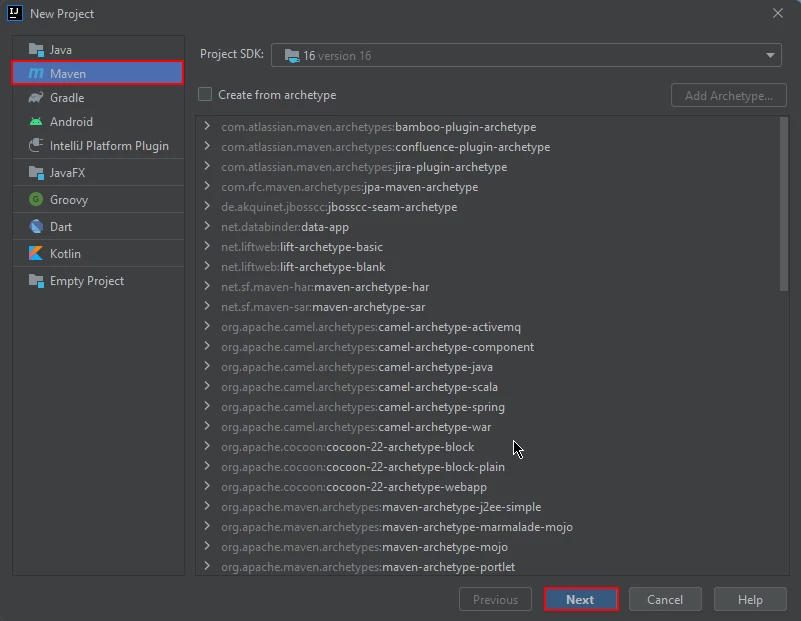
To get started, open JetBrains IntelliJ IDEA and create a new Maven Java project.

How to Generate PDF Report in Java, Figure 1: Create a Maven project Create a Maven project

Upon starting a new project in JetBrains IntelliJ IDEA, a prompt will appear in a new window, asking for the project's name and location. After entering a suitable name and location, you may proceed by clicking the "Finish" button.

How to Generate PDF Report in Java, Figure 2: Configure the project Configure the project

Once you have clicked the "Finish" button, a new project will be opened in JetBrains IntelliJ IDEA, and you will be presented with the pom.xml file. This file will be used to add dependencies required for the Maven project.

How to Generate PDF Report in Java, Figure 3: The pom.xml file The pom.xml file

Add the following dependencies in the pom.xml file:


<dependency>
    <groupId>com.ironsoftware</groupId>
    <artifactId>ironpdf</artifactId>
    <version>YOUR_IRONPDF_VERSION</version>
</dependency>

<dependency>
    <groupId>com.ironsoftware</groupId>
    <artifactId>ironpdf</artifactId>
    <version>YOUR_IRONPDF_VERSION</version>
</dependency>
XML

After you have successfully added the above dependencies to the pom.xml file, you will notice a small icon appears in the top right corner of the file.

How to Generate PDF Report in Java, Figure 4: Install dependencies from the pom.xml file Install dependencies from the pom.xml file

Simply click on this icon to install dependencies. This process should only take a few minutes, depending on the speed of your internet connection. After that, create a new Java file or Java class files and start writing your code.

4. Create PDF Reports using IronPDF

With IronPDF, developers can quickly and easily create customized reports from a wide range of data sources, including databases, APIs, and other sources. One of the key benefits of using IronPDF for report generation is its ability to generate PDF reports from HTML. This means that developers can use familiar HTML and CSS markup to design their reports.

4.1. Create PDF Report from HTML

You can directly create a PDF report from HTML and save it as PDF files using the renderHtmlAsPdf method. This method takes HTML code as input and generates a PDF instance as output. It uses the saveAs method to save data as a new document at a specified location.

The source code is given below:

import com.ironsoftware.ironpdf.PdfDocument;

import java.io.IOException;
import java.nio.file.Paths;

public class Main {
    public static void main(String[] args) throws IOException {
        // Creating a PDF document from HTML content
        PdfDocument myPdf = PdfDocument.renderHtmlAsPdf(
            "<html>" +
                "<head>" +
                    "<style>" +
                        "body {font-family: Arial, sans-serif; font-size: 14px;}" +
                        "table {border-collapse: collapse; width: 100%;}" +
                        "th, td {padding: 8px; text-align: left; border-bottom: 1px solid #ddd;}" +
                        "th {background-color: #f2f2f2;}" +
                        "h1 {font-size: 24px; margin-bottom: 16px;}" +
                        "p {margin-bottom: 8px;}" +
                    "</style>" +
                "</head>" +
                "<body>" +
                    "<h1>Sample Report</h1>" +
                    "<p>This is a sample report generated with HTML.</p>" +
                    "<table>" +
                        "<tr><th>ID</th><th>Name</th><th>Age</th><th>Email</th></tr>" +
                        "<tr><td>1</td><td>John Doe</td><td>30</td><td>john.doe@example.com</td></tr>" +
                        "<tr><td>2</td><td>Jane Smith</td><td>25</td><td>jane.smith@example.com</td></tr>" +
                        "<tr><td>3</td><td>Mike Johnson</td><td>40</td><td>mike.johnson@example.com</td></tr>" +
                    "</table>" +
                "</body>" +
            "</html>"
        );

        // Saving the PDF document to a file
        myPdf.saveAs(Paths.get("html_saved.pdf"));
    }
}
import com.ironsoftware.ironpdf.PdfDocument;

import java.io.IOException;
import java.nio.file.Paths;

public class Main {
    public static void main(String[] args) throws IOException {
        // Creating a PDF document from HTML content
        PdfDocument myPdf = PdfDocument.renderHtmlAsPdf(
            "<html>" +
                "<head>" +
                    "<style>" +
                        "body {font-family: Arial, sans-serif; font-size: 14px;}" +
                        "table {border-collapse: collapse; width: 100%;}" +
                        "th, td {padding: 8px; text-align: left; border-bottom: 1px solid #ddd;}" +
                        "th {background-color: #f2f2f2;}" +
                        "h1 {font-size: 24px; margin-bottom: 16px;}" +
                        "p {margin-bottom: 8px;}" +
                    "</style>" +
                "</head>" +
                "<body>" +
                    "<h1>Sample Report</h1>" +
                    "<p>This is a sample report generated with HTML.</p>" +
                    "<table>" +
                        "<tr><th>ID</th><th>Name</th><th>Age</th><th>Email</th></tr>" +
                        "<tr><td>1</td><td>John Doe</td><td>30</td><td>john.doe@example.com</td></tr>" +
                        "<tr><td>2</td><td>Jane Smith</td><td>25</td><td>jane.smith@example.com</td></tr>" +
                        "<tr><td>3</td><td>Mike Johnson</td><td>40</td><td>mike.johnson@example.com</td></tr>" +
                    "</table>" +
                "</body>" +
            "</html>"
        );

        // Saving the PDF document to a file
        myPdf.saveAs(Paths.get("html_saved.pdf"));
    }
}
JAVA

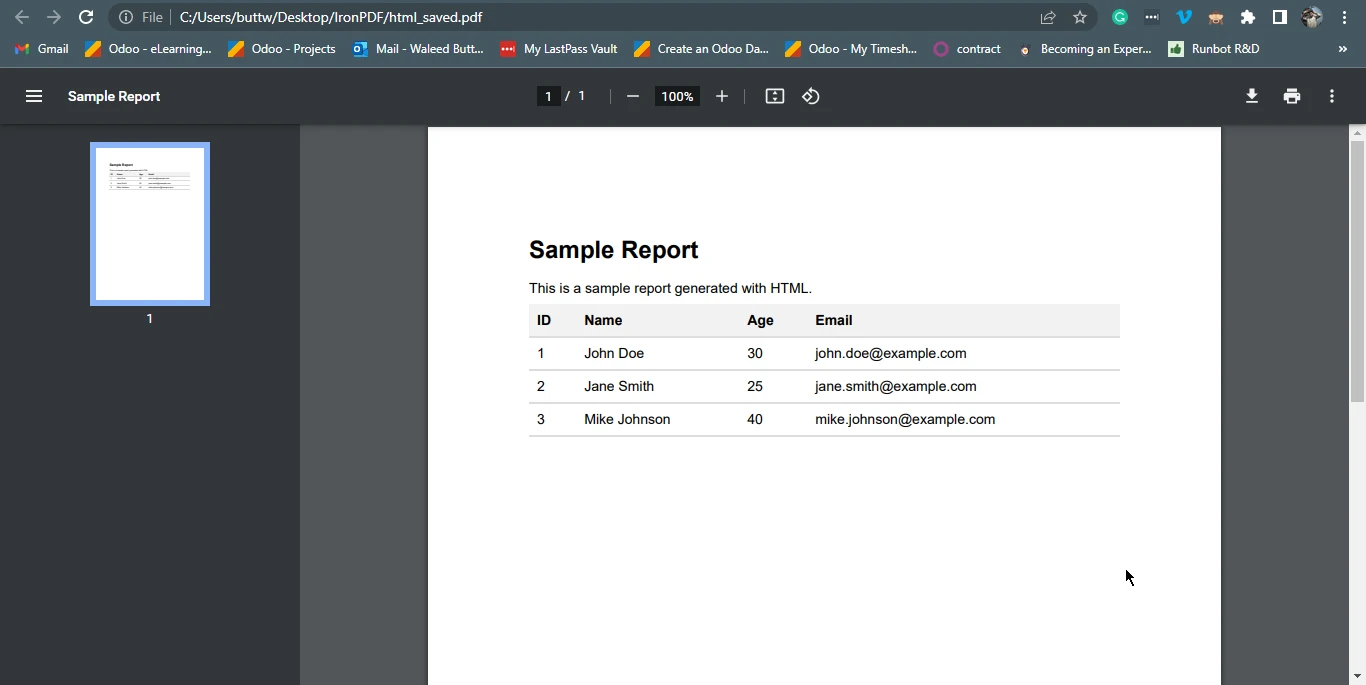
Just simply write HTML code directly in your project, and it will generate a PDF file from it in an instant.

How to Generate PDF Report in Java, Figure 5: The output PDF file The output PDF file

4.2. Create PDF Documents Report from RTF Code

Using IronPDF, you can also render RTF code using a Java program. Below is the sample code for converting RTF into a PDF report. This example will use the renderRtfAsPdf method to render RTF code as a PDF instance and in the end use the saveAs method to save PDFs.

import com.ironsoftware.ironpdf.PdfDocument;

import java.io.IOException;
import java.nio.file.Paths;

public class Main {
    public static void main(String[] args) throws IOException {
        // Creating a PDF document from RTF content
        PdfDocument myPdf = PdfDocument.renderRtfAsPdf("{\\rtf1\\ansi\\deff0" +
            "{\\fonttbl{\\f0 Arial;}}" +
            "{\\colortbl;\\red0\\green0\\blue0;\\red255\\green0\\blue0;}" +
            "\\pard\\plain\\fs24\\cf1" +
            "\\cbpat8" +
            "\\qc\\ul\\i\\cf2\\expndtw2\\charscalex120 Sample Report\\line" +
            "\\ulnone\\i0\\cf1\\charscalex100\\expndtw0\\par" +
            "\\pard\\plain\\fs18\\cf1" +
            "This is a sample report generated with RTF.\\par" +
            "\\par" +
            "\\pard\\plain\\fs16\\cf1" +
            "\\cbpat0" +
            "\\qc" +
            "{\\b Table 1: Sample Data}\\par" +
            "\\par" +
            "{\\pard\\plain\\fs16\\cf1" +
            "\\qc}");

        // Saving the PDF document to a file
        myPdf.saveAs(Paths.get("rtf_saved.pdf"));
    }
}
import com.ironsoftware.ironpdf.PdfDocument;

import java.io.IOException;
import java.nio.file.Paths;

public class Main {
    public static void main(String[] args) throws IOException {
        // Creating a PDF document from RTF content
        PdfDocument myPdf = PdfDocument.renderRtfAsPdf("{\\rtf1\\ansi\\deff0" +
            "{\\fonttbl{\\f0 Arial;}}" +
            "{\\colortbl;\\red0\\green0\\blue0;\\red255\\green0\\blue0;}" +
            "\\pard\\plain\\fs24\\cf1" +
            "\\cbpat8" +
            "\\qc\\ul\\i\\cf2\\expndtw2\\charscalex120 Sample Report\\line" +
            "\\ulnone\\i0\\cf1\\charscalex100\\expndtw0\\par" +
            "\\pard\\plain\\fs18\\cf1" +
            "This is a sample report generated with RTF.\\par" +
            "\\par" +
            "\\pard\\plain\\fs16\\cf1" +
            "\\cbpat0" +
            "\\qc" +
            "{\\b Table 1: Sample Data}\\par" +
            "\\par" +
            "{\\pard\\plain\\fs16\\cf1" +
            "\\qc}");

        // Saving the PDF document to a file
        myPdf.saveAs(Paths.get("rtf_saved.pdf"));
    }
}
JAVA

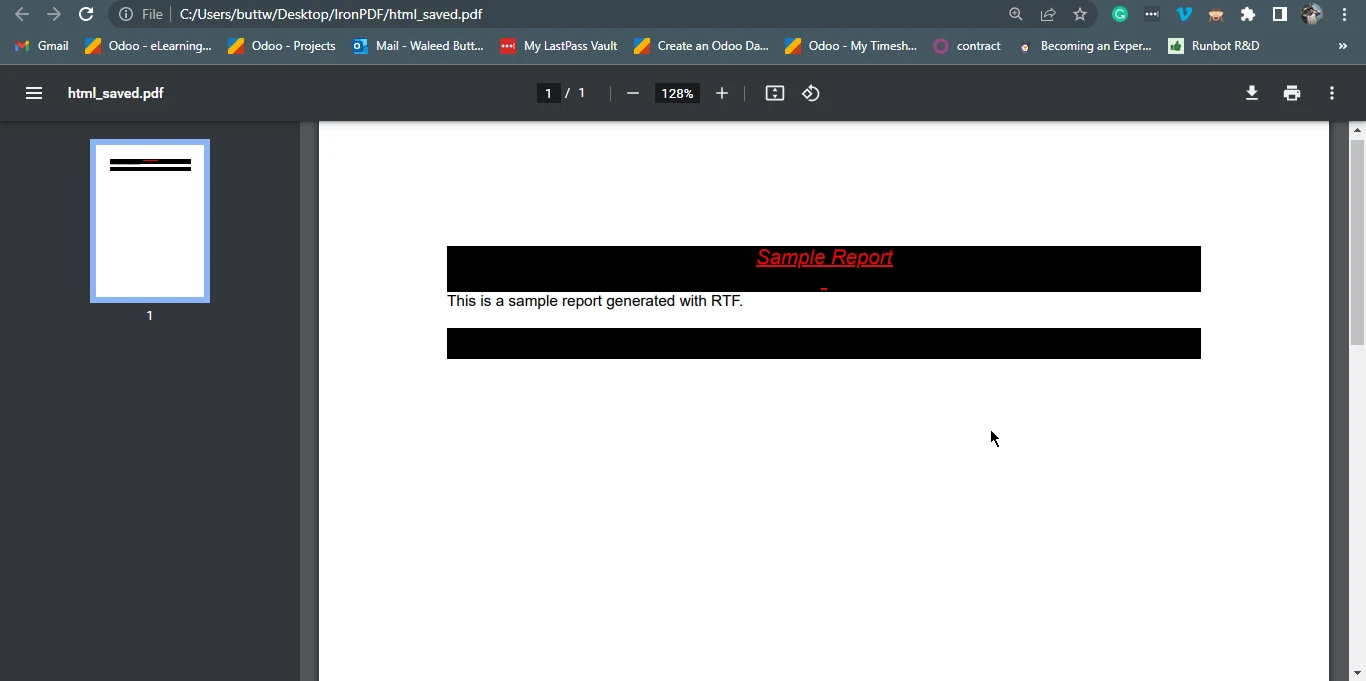
How to Generate PDF Report in Java, Figure 6: The output PDF file from RTF code The output PDF file from RTF code

5. Conclusion

In conclusion, using a PDF report generator like IronPDF for Java PDF API can save businesses and organizations significant amounts of time and effort in creating professional reports.

For more tutorials and code examples, please visit the Java PDF creation examples. To know how to use IronPDF to generate PDFs, please visit the Java PDF creation tutorial.

IronPDF for Java is available for free for development purposes, but a commercial license is required for commercial use. However, you can get a free trial license for IronPDF to test IronPDF for Java's functionalities. For more information on licensing, please visit the IronPDF licensing guidelines.

자주 묻는 질문

Java에서 HTML을 사용하여 PDF 보고서를 생성하려면 어떻게 해야 하나요?

IronPDF의 renderHtmlAsPdf 메서드를 사용하여 HTML 콘텐츠를 PDF 보고서로 변환할 수 있습니다. 이 메서드는 HTML 문자열 또는 파일을 가져와서 고품질 PDF 문서로 렌더링합니다.

보고서 생성에 Java PDF 라이브러리를 사용하면 어떤 이점이 있나요?

IronPDF와 같은 Java PDF 라이브러리를 사용하면 서식과 품질을 유지하면서 HTML, 이미지, Word 문서, Excel 스프레드시트를 PDF로 변환하여 PDF 보고서 생성을 간소화할 수 있습니다.

PDF 라이브러리를 Java 프로젝트에 통합하려면 어떻게 해야 하나요?

IronPDF를 Java 프로젝트에 통합하려면 Maven 프로젝트의 pom.xml 파일에 해당 종속성을 추가하고 Maven을 통해 종속성을 설치해야 합니다.

Java에서 RTF 문서를 PDF로 변환할 수 있나요?

예, RTF 콘텐츠를 PDF 문서로 렌더링할 수 있는 IronPDF의 renderRtfAsPdf 메서드를 사용하여 Java에서 RTF 문서를 PDF로 변환할 수 있습니다.

Java에서 IronPDF를 사용하기 위한 전제 조건은 무엇인가요?

IronPDF를 사용하려면 시스템에 Java가 설치되어 있어야 하며, 종속성 관리를 위해 Eclipse 또는 IntelliJ와 같은 적절한 IDE와 Maven이 설치되어 있어야 합니다.

Java PDF 라이브러리에 대한 평가판이 있나요?

IronPDF는 개발 목적으로 무료 평가판 라이선스를 제공합니다. 상업적으로 사용하려면 상업용 라이선스를 취득해야 합니다.

IronPDF를 사용하여 PDF로 변환할 수 있는 파일 형식은 무엇인가요?

IronPDF는 HTML, 이미지, Word 문서, Excel 스프레드시트를 PDF 문서로 변환하여 고품질 출력을 보장합니다.

IronPDF는 어떤 PDF 조작 기능을 제공하나요?

IronPDF는 텍스트, 이미지, 디지털 서명, 워터마크 추가, PDF 페이지 병합, 분할, 추출과 같은 고급 기능 등 다양한 PDF 조작 기능을 제공합니다.

Java의 데이터베이스 데이터로 PDF 보고서를 만들려면 어떻게 해야 하나요?

IronPDF를 사용하면 데이터베이스 또는 API의 데이터를 통합하여 PDF 보고서를 생성할 수 있으므로 사용자 지정 및 동적 보고서를 만들 수 있습니다.

Java용 IronPDF 사용에 대한 더 많은 리소스는 어디에서 찾을 수 있나요?

추가 튜토리얼과 코드 예제는 Java에서 PDF 기능을 학습하고 구현하기 위한 광범위한 리소스를 제공하는 IronPDF 웹사이트에서 확인할 수 있습니다.

커티스 차우
기술 문서 작성자

커티스 차우는 칼턴 대학교에서 컴퓨터 과학 학사 학위를 취득했으며, Node.js, TypeScript, JavaScript, React를 전문으로 하는 프론트엔드 개발자입니다. 직관적이고 미적으로 뛰어난 사용자 인터페이스를 만드는 데 열정을 가진 그는 최신 프레임워크를 활용하고, 잘 구성되고 시각적으로 매력적인 매뉴얼을 제작하는 것을 즐깁니다.


커티스는 개발 분야 외에도 사물 인터넷(IoT)에 깊은 관심을 가지고 있으며, 하드웨어와 소프트웨어를 통합하는 혁신적인 방법을 연구합니다. 여가 시간에는 게임을 즐기거나 디스코드 봇을 만들면서 기술에 대한 애정과 창의성을 결합합니다.