


Czym jest iText? (Alternatywy biblioteki PDF C# i Java przy użyciu IronPDF)

Full Comparison
Looking for a detailed feature-by-feature breakdown? See how IronPDF stacks up against Itext on pricing, HTML support, and licensing.
IronPDF vs iTextSharp / iText7
Comprehensive .NET PDF library comparison — feature-by-feature with evidence-based context
| Funkcja | iTextSharp / iText7 | IronPDF ✦ |
|---|---|---|
| PDF Creation & Conversion | ||
| HTML/CSS to PDF |
$ Paid Add-on
HTML→PDF via
pdfHTML add-on (separate package; AGPL/commercial model). |
✓ Yes
Chromium-based engine with pixel-perfect CSS3, Flexbox, and Grid rendering built-in.
|
| Wykonanie JavaScript |
? Unknown
pdfHTML describes HTML/CSS→PDF conversion, but JS execution support is not stated in docs.
|
✓ Yes
Fully executes JS during rendering — dynamic charts, SPAs, and interactive content.
|
| Programmatic Generation |
✓ Yes
Positioned as a programmable PDF SDK for .NET — create, edit, and enhance.
|
✓ Yes
Generate from HTML templates, strings, ASPX views, or images. Chromium handles layout.
|
| URL do pliku PDF |
$ Paid Add-on
Possible via pdfHTML add-on with URL fetching, but not a core feature.
|
✓ Yes
RenderUrlAsPdf() captures any live URL with full CSS/JS rendering. |
| DOCX do PDF |
✕ No
No native Word conversion — iText is a PDF-native SDK.
|
✓ Yes
DocxToPdfRenderer converts Word docs preserving structure and formatting. |
| Reading & Extraction | ||
| Wyodrębnianie tekstu |
✓ Yes
PdfTextExtractor.GetTextFromPage() with multiple extraction strategies. |
✓ Yes
Extracts text with layout awareness. Combines with IronOCR for scanned docs.
|
| Render Pages to Images |
? Unknown
OCR workflows mention rendering, but a primary-source "PDF→image renderer" module isn't
evidenced in cited iText docs.
|
✓ Built-in
Native rasterization to PNG, JPEG, BMP with configurable DPI.
|
| Built-in OCR |
$ Paid Add-on
pdfOCR add-on available; install notes mention platform-specific/native dependencies (e.g.,
Linux/macOS runtime requirements).
|
✓ Via IronOCR
Native integration with IronOCR for 127+ language OCR on scanned PDFs.
|
| Editing & Manipulation | ||
| Merging & Splitting |
✓ Yes
PdfMerger class in .NET API; official examples discuss merging via PdfMerger.
|
✓ Yes
One-line merge, split, append, prepend, and page reordering with intuitive API.
|
| Headers, Footers & Page Numbers |
✓ Yes
PDF Association listing confirms ability to add "page numbers" and similar features to
existing PDFs.
|
✓ Yes
HTML-based headers/footers with auto page numbers, dates, and custom content.
|
| Znaki wodne |
✓ Yes
PDF Association listing explicitly includes "watermarks … to existing PDF documents."
|
✓ Yes
ApplyWatermark() accepts HTML/CSS — full control over opacity, rotation,
position. |
| Stamp Text & Images |
✓ Yes
Programmatic content placement available via iText's canvas and layout APIs.
|
✓ Yes
TextStamper & ImageStamper with Google Fonts, positioning,
per-page control. |
| Redact Content |
✓ Yes
iText provides redaction annotation support via the cleanup module.
|
✓ Yes
RedactTextOnAllPages() removes sensitive text permanently in a single line.
|
| Security & Compliance | ||
| Encryption & Passwords |
✓ Yes
Full encryption and permission controls via iText's security API.
|
✓ Yes
AES encryption, owner/user passwords, granular permissions (print, copy, annotate).
|
| Podpisy cyfrowe |
✓ Yes
Dedicated digital signing documentation and signing API (
PdfSigner). |
✓ Yes
PdfSignature with X509/PFX certificate support. |
| PDF/A & PDF/UA Compliance |
✓ Yes
Dokumentacja covers creating PDF/A and explains constraints (conversion from existing isn't
automatic).
|
✓ Yes
Native PDF/A archival and PDF/UA accessibility compliance for enterprise use.
|
| Platform & Deployment | ||
| Obsługa wielu platform |
✓ Yes
.NET Standard 2.0 / .NET Framework 4.6.1 — runs on .NET 6+ across OSes.
|
✓ Yes
Windows, Linux, macOS, x64, x86, ARM. .NET 6–10, Core, Standard 2.0+, Framework 4.6.2+.
|
| Server / Docker / Cloud |
~ Complex
Core install requires multiple packages (iText + Bouncy Castle adapter); add-ons
(pdfHTML/pdfOCR) add further dependency/compliance steps.
|
✓ Yes
Docker, Azure, AWS, IIS. Official Docker images and deployment guides.
|
| Ease of Setup |
~ Complex
Core install requires multiple packages (Bouncy Castle adapter); HTML/OCR require additional
add-ons and sometimes native deps.
|
✓ Simple
Single
Install-Package IronPdf NuGet command. Ready in minutes. |
| Licensing & Support | ||
| Licensing Model |
~ Complex
Dual-license: AGPLv3 (source-disclosure obligations for network use) or commercial. AGPL can
be restrictive for proprietary apps.
|
✓ Commercial
Perpetual licenses. 30-day fully functional free trial, no watermarks.
|
| Commercial Support & SLA |
✓ Yes
iText site includes commercial licensing + support agreements as part of its licensing model.
|
✓ 24/5 Support
Dedicated engineering support with guaranteed SLA — email, live chat, phone.
|
| Dokumentacja |
✓ Yes
Installation guides, knowledge base articles, and API references available (core + add-ons).
|
✓ Extensive
Full API reference, 100+ how-tos, tutorials, code examples, troubleshooting, videos.
|
Data sourced from official iText documentation, PDF Association listing, and NuGet package references.
iText7 is powerful but carries AGPL licensing complexity and multi-package setup overhead.
IronPDF delivers full coverage with simpler setup — try free for 30
days.
Biblioteka iText PDF to biblioteka Java i .NET służąca do tworzenia i edycji plików PDF. iText 7 to zaawansowana wersja iText 5 i iTextSharp. Jest to prostsza, wydajniejsza i rozszerzalna biblioteka, która odpowiada na rosnące wyzwania związane z dzisiejszymi procesami przetwarzania dokumentów PDF i potrzebami w tym zakresie, dodając kolejne dodatki.
iText Group NV
Grupa iText jest światowym pionierem w dziedzinie technologii PDF (Portable Document Format), oferującym takie produkty jak iText 7 Suite, iText pdf2Data oraz oprogramowanie aplikacyjne iText DITO.
iText 7 Core to biblioteka PDF typu open source, którą można włączyć do własnych aplikacji w celu tworzenia interaktywnych formularzy. Jest to nowe podejście do sprawdzonego silnika używanego w iText 5, z modułową strukturą kodu, która pozwala na przyszłe ulepszenia i rozbudowę, a także ułatwia tworzenie skryptów.
Funkcje biblioteki oprogramowania iText
Biblioteka iText oferuje wiele funkcji dla użytkowników biznesowych:
- Tworzenie, odczytywanie i edycja dokumentów PDF
- Dodawanie podpisów cyfrowych do dokumentów PDF
- Wypełnianie i spłaszczanie interaktywnych formularzy PDF
- Dodawanie tagów do dokumentów PDF
- Tworzenie map i książek
- Dodawanie zakładek, numerów stron, znaków wodnych i innych funkcji do istniejących dokumentów PDF
- Obsługuje dokumenty PDF zgodne z:
- Specyfikacje PDF, w tym PDF 2.0 (ISO 32000-2)
- PDF/A (ISO 19005; PDF/A-1a/b, PDF/A-2a/b/u, PDF/A-3a/b/u)
- PDF/UA (ISO 14289)
O iText
iText to firma technologiczna działająca w branży dokumentów cyfrowych. Flagowym produktem firmy jest biblioteka Java typu open source oraz biblioteka .NET służąca do tworzenia i edycji dokumentów PDF w środowiskach Java i C#.
Tworzenie dokumentów PDF przy użyciu iText 7
Przyjrzyjmy się przykładowemu kodowi źródłowemu "hello world" służącemu do generowania dokumentów PDF za pomocą iText.
// Import iText7 libraries
using iText.Kernel.Pdf;
using iText.Layout;
using iText.Layout.Element;

// Create a writer instance with the destination file path
var writer = new PdfWriter("destination.pdf");

// Create a PdfDocument instance which uses the writer
var pdf = new PdfDocument(writer);

// Create a Document instance for high-level manipulation
var document = new Document(pdf);

// Add a paragraph with "Hello World!" text
document.Add(new Paragraph("Hello World!"));

// Close the document to ensure changes are saved
document.Close();
// Import iText7 libraries
using iText.Kernel.Pdf;
using iText.Layout;
using iText.Layout.Element;
// Create a writer instance with the destination file path
var writer = new PdfWriter("destination.pdf");
// Create a PdfDocument instance which uses the writer
var pdf = new PdfDocument(writer);
// Create a Document instance for high-level manipulation
var document = new Document(pdf);
// Add a paragraph with "Hello World!" text
document.Add(new Paragraph("Hello World!"));
// Close the document to ensure changes are saved
document.Close();' Import iText7 libraries
Imports iText.Kernel.Pdf
Imports iText.Layout
Imports iText.Layout.Element
' Create a writer instance with the destination file path
Private writer = New PdfWriter("destination.pdf")
' Create a PdfDocument instance which uses the writer
Private pdf = New PdfDocument(writer)
' Create a Document instance for high-level manipulation
Private document = New Document(pdf)
' Add a paragraph with "Hello World!" text
document.Add(New Paragraph("Hello World!"))
' Close the document to ensure changes are saved
document.Close()Wyjaśnienie:
- PdfWriter: Ten obiekt odpowiada za zapis pliku PDF. Działa na ścieżce pliku i zapisuje struktury wymagane dla prawidłowego dokumentu PDF.
- PdfDocument: Communicates with the
PdfWriterand manages the content and data structure in accordance with PDF standards. - Dokument: Zapewnia abstrakcyjny poziom do obsługi dodawania treści. Umożliwia dodawanie różnych elementów PDF, takich jak akapity, tabele itp.
- Akapit: reprezentuje obszar tekstowy, który ma zostać wstawiony do dokumentu.
- The
Close()method is crucial as it ensures all content is flushed and the file is correctly completed.
Ograniczenia
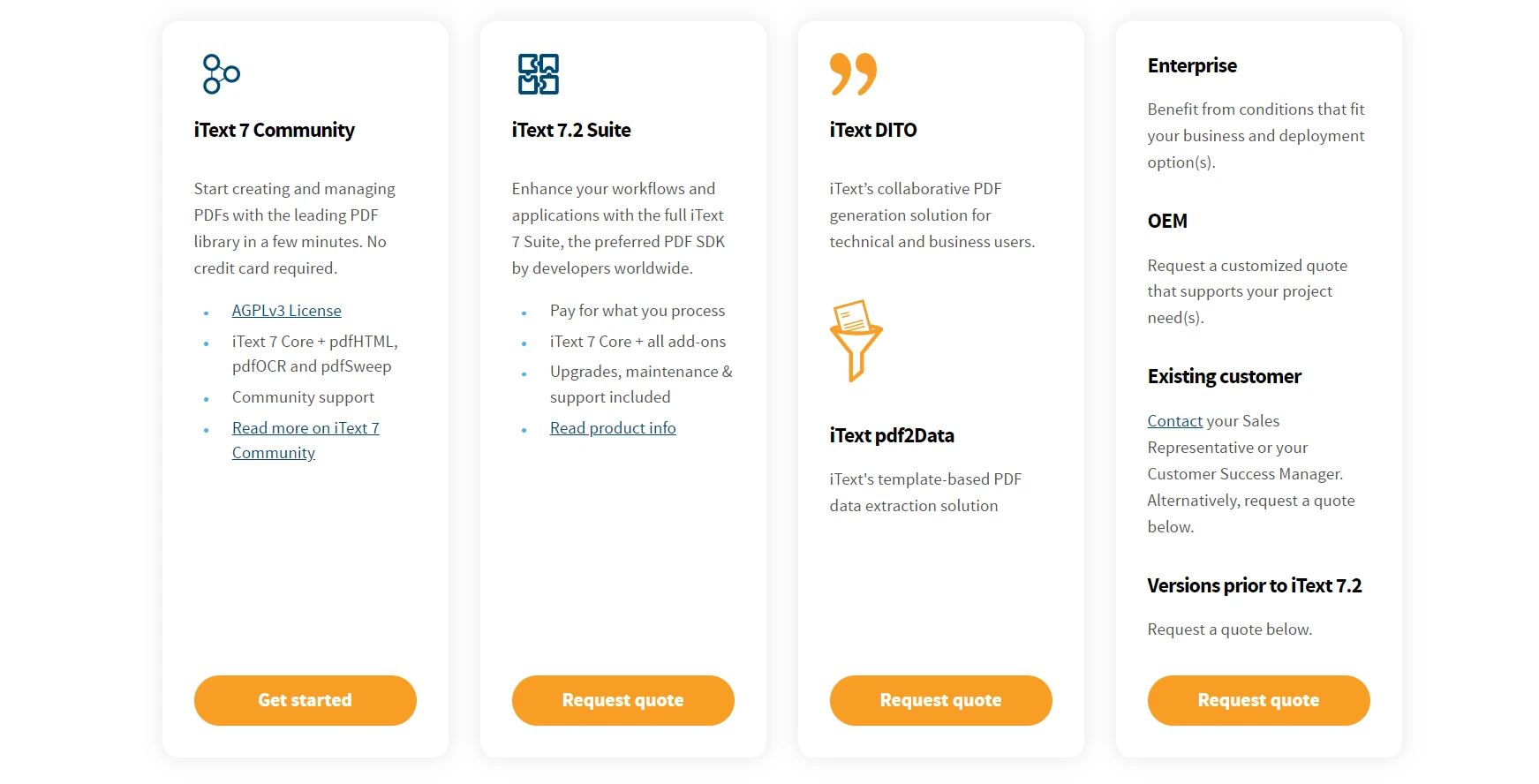
iText 7 jest płatny i ma ograniczoną funkcjonalność. Nie zapewniają one wszystkich funkcji w jednym pakiecie. Musimy używać różnych bibliotek do różnych celów. Na przykład:
Tworzenie i generowanie plików PDF jest obsługiwane przez iText 7, natomiast konwersja HTML na PDF jest obsługiwana przez pdfHTML. Z drugiej strony, pliki PDF, w tym usuwanie poufnych danych z plików PDF, są obsługiwane przez pdfSweep.
Data extraction such as extraction of images, tables, and text from PDF documents is provided by the pdf2Data library. RUPS supports PDF debugging to manipulate PDF documents.
Similarly, other features have libraries to support them, which are part of the iText 7 Suite. So, it is very difficult for the developer to manage so many DLLs.
Its commercial license is also very expensive. They have not mentioned the price on their iText 7 license and pricing page. We need to contact their sales department for the quotation, which will cost us time.
Let's suppose, if we are working on generating PDF documents, and at the same time we need to extract images, tables, or text from the existing PDF. In this case, we need to buy iText 7 Suite as well as iText pdf2Data which will cost us more.
Is there any alternative to iText software with comprehensive features which provides all the mentioned features in a single library with a reasonable commercial license? The answer is Yes.
IronPDF
Explore IronPDF Funkcjas and Capabilities is a .NET and Java Library developed and maintained by Iron Software. IronPDF is the most popular C# and Java PDF library for creating and editing PDFs. Its simple API enables developers to quickly generate professional, high-quality PDFs from HTML in .NET projects. It prioritizes accuracy, ease of use, and speed.
The features of the IronPDF include:
- Generate PDF from HTML, String, URL, Razor, ASPX, and MVC view
- Extract images, tables, and text without using any other library
- Convert images such as scanned documents into PDF and vice versa
- It provides functions for adding page numbers, custom headers and footers, digital signatures, file attachments, password protection and security measures
- It provides high performance by providing full multithreading capabilities and async processing support
- Other 50+ features which we cannot list here
- Compatible with all .NET languages such as C#, VB.NET, and F#.
- Compatible with all .NET versions including .NET Standard, .NET Core, .NET 5, 6, & 7.
- Discover IronPDF for Java which also provides all the above-mentioned features and is compatible with Java, Kotlin, and Scala.
- Supports every operating system including Windows, Linux, and Mac operating systems.
- Supports every app type such as Web, Mobile, and desktop.
Let's discuss a bit about its licensing.
Licencja IronPDF
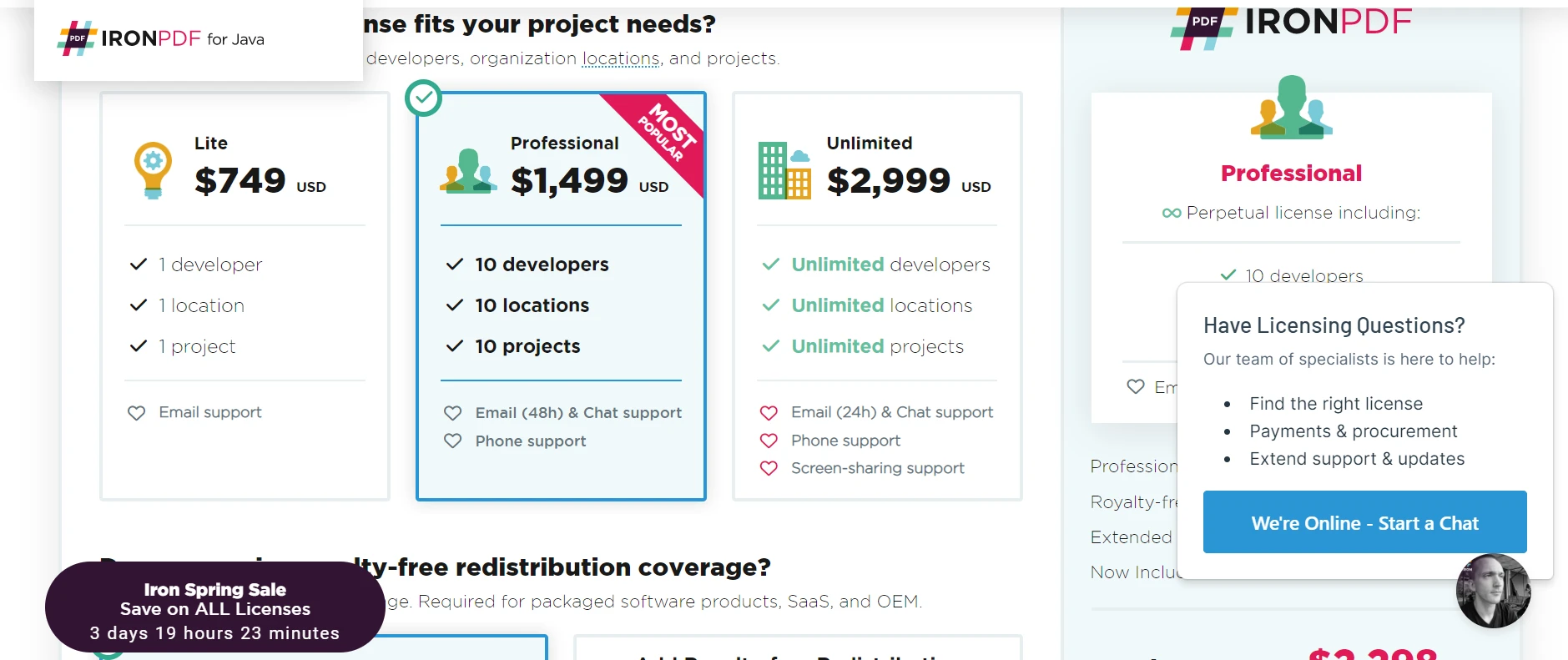
IronPDF is free for development and does not require any license. However, its commercial license is required for using it in production. You can always avail free trial of IronPDF at any time. Its commercial license varies from 749 USD to 2999 USD. You can select the package as per your need and start working. You don't have to contact their sales which saves time. Moreover, their commercial license includes 24/7 support.
Wnioski
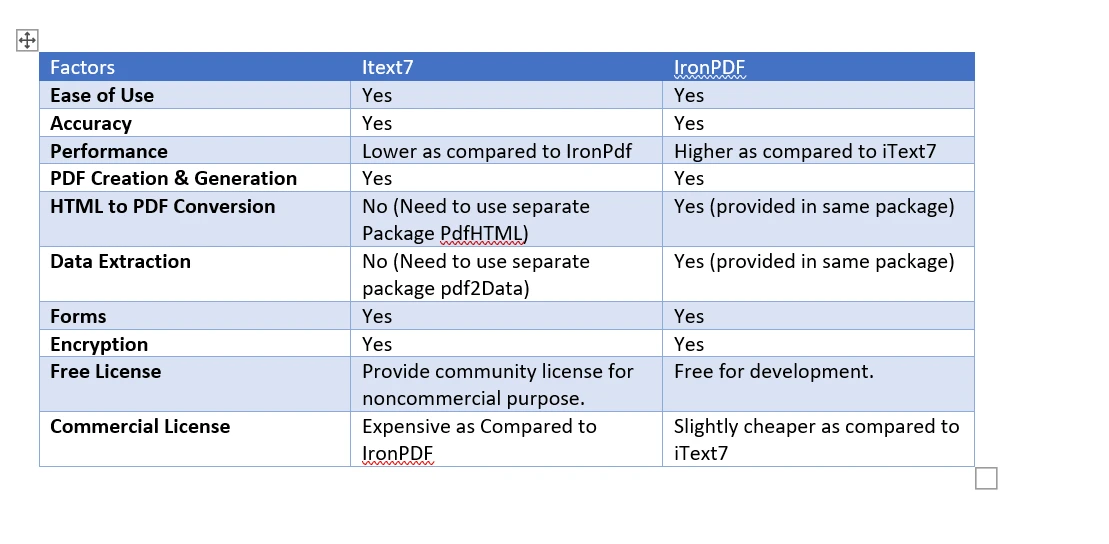
IronPDF provides all the functionalities in a single package. It is like an all-in-one solution. We need to use different packages for the different features in the case of iText 7. IronPDF's commercial license can easily be purchased with full support without contacting sales. On the other hand, we need to contact sales to request a quote to use iText 7 for commercial purposes.
We have kept this article simple and comprehensive. Feel free to ask any questions in the comment section.
Często Zadawane Pytania
Czym jest biblioteka iText PDF?
Biblioteka iText PDF to biblioteka Java i .NET przeznaczona do tworzenia i edycji plików PDF. Oferuje różne funkcje, takie jak podpisy cyfrowe i zgodność z PDF/A, i jest znana z produktów takich jak iText 7 Suite.
Dlaczego programista miałby wybrać IronPDF zamiast iText?
Programista może wybrać IronPDF zamiast iText ze względu na jego uproszczoną obsługę, która integruje kompleksowe funkcje PDF w jednej bibliotece. IronPDF oferuje prosty proces licencjonowania i jest opłacalny w porównaniu z iText.
Jak mogę przekonwertować HTML na PDF w języku C# lub Java?
Możesz użyć metody RenderHtmlAsPdf biblioteki IronPDF do konwersji ciągów HTML na pliki PDF. Biblioteka ta upraszcza ten proces, umożliwiając konwersję HTML na PDF bez konieczności korzystania z dodatkowych bibliotek.
Jakie są zalety używania IronPDF do manipulacji PDF?
IronPDF zapewnia kompleksowe rozwiązanie do obróbki plików PDF, obsługujące takie funkcje, jak konwersja HTML do PDF, wyodrębnianie obrazów i tekstu oraz obsługa wielowątkowości. Jest kompatybilny ze wszystkimi językami i wersjami .NET, a także z Javą.
Czy do korzystania z IronPDF wymagana jest licencja komercyjna?
Tak, do użytkowania produkcyjnego IronPDF wymagana jest licencja komercyjna. Ceny wahają się od 749 USD do 2999 USD i obejmują wsparcie techniczne 24/7, co czyni tę opcję przystępną dla firm.
W jaki sposób IronPDF upraszcza proces tworzenia plików PDF?
IronPDF upraszcza proces tworzenia plików PDF, udostępniając wszystkie niezbędne funkcje w ramach jednej biblioteki. Eliminuje to potrzebę korzystania z wielu bibliotek, zmniejszając złożoność i zwiększając wydajność.
Jakie są różnice w licencjonowaniu między IronPDF a iText?
IronPDF oferuje przejrzyste ceny i łatwy proces zakupu, podczas gdy w przypadku iText konieczne jest skontaktowanie się z działem sprzedaży w celu uzyskania wyceny. Licencja IronPDF obejmuje również pełne wsparcie techniczne, podczas gdy licencje komercyjne iText mogą być kosztowne.








 Rozpocznij za DARMO
 Rozpocznij za DARMO
 Zarezerwuj darmowe Demo na żywo





 Nie wymaga karty kredytowej ani tworzenia konta










