Instrukcja switch w języku C# stanowi bardziej uproszczoną i czytelniejszą alternatywę dla wielu bloków if-else. Jest to przydatne, gdy masz zmienną, która może przyjmować jedną z kilku różnych wartości, a musisz wykonać inny kod w zależności od tej wartości. Instrukcja switch ocenia wyrażenie i wykonuje kod w oparciu o pasującą wartość, co czyni ją integralną częścią procesu podejmowania decyzji w kodzie.
Podczas gdy konstrukcje if-else są przydatne w przypadku prostych warunków lub sprawdzeń, instrukcje switch case sprawdzają się doskonale przy bardziej złożonych sprawdzaniach warunków, zwłaszcza tych opartych na pojedynczej zmiennej lub wyrażeniu dopasowującym wzorzec. Zapewniają one bardziej przejrzystą i zrozumiałą składnię w porównaniu z instrukcjami if, co ma kluczowe znaczenie zarówno dla pisania, jak i utrzymywania kodu.
Podstawy instrukcji switch
Czym jest instrukcja switch?
Instrukcja switch w języku C# to struktura kontrolna służąca do wyboru jednej z wielu ścieżek kodu do wykonania. Wybór opiera się na wartości lub wyrażeniu. Jest to wydajna alternatywa dla stosowania wielu warunków if-else, zwłaszcza w przypadku zmiennej, która może przyjmować kilka różnych wartości.
Składnia
Podstawowa składnia instrukcji switch jest prosta:
// Switch statement
switch (variable)
{
    case value1:
        // Code to execute if variable equals value1
        break;
    case value2:
        // Code to execute if variable equals value2
        break;
    // More cases as needed
    default:
        // Code to execute if variable doesn't match any case
        break;
}
// Switch statement
switch (variable)
{
    case value1:
        // Code to execute if variable equals value1
        break;
    case value2:
        // Code to execute if variable equals value2
        break;
    // More cases as needed
    default:
        // Code to execute if variable doesn't match any case
        break;
}
' Switch statement
Select Case variable
Case value1
' Code to execute if variable equals value1
Case value2
' Code to execute if variable equals value2
' More cases as needed
Case Else
' Code to execute if variable doesn't match any case
End Select
' Switch statement
Select Case variable
	Case value1
		' Code to execute if variable equals value1
	Case value2
		' Code to execute if variable equals value2
	' More cases as needed
	Case Else
		' Code to execute if variable doesn't match any case
End Select
switch (variable): Określa zmienną lub wyrażenie do oceny.case value1: Są to różne wartości lub warunki, które sprawdzasz w odniesieniu do zmiennej.break: Słowo kluczowe używane do opuszczenia bloku 'switch' po wykonaniu pasującego przypadku.default instrukcja: Ten blok wykonuje się, jeśli żaden z określonych przypadków nie pasuje do zmiennej.
Zrozumienie instrukcji Break
Instrukcja break w switch jest kluczowa. Uniemożliwia ona "przechodzenie" do następnej instrukcji, nawet jeśli już został spełniony warunek. Każdy blok case zazwyczaj kończy się instrukcją break, aby zapewnić, że wykonana zostanie tylko instrukcja pod pasującym case'em.
Porównanie instrukcji Switch i instrukcji If-Else
Podczas gdy struktura instrukcji if-else polega na sprawdzeniu warunku i wykonaniu bloku kodu, gdy warunek jest prawdziwy, instrukcja switch porównuje pojedynczą zmienną lub wyrażenie z wieloma potencjalnymi wartościami. Dzięki temu instrukcja switch jest bardziej zwięzła i łatwiejsza do odczytania, gdy masz wiele warunków lub wzorców case do sprawdzenia.
Przykład: Wykorzystanie instrukcji Switch
int number = 3;
switch (number)
{
    case 1:
        Console.WriteLine("One");
        break;
    case 2:
        Console.WriteLine("Two");
        break;
    case 3:
        Console.WriteLine("Three");
        break;
    default:
        Console.WriteLine("Other Number"); // Print to console
        break;
}
int number = 3;
switch (number)
{
    case 1:
        Console.WriteLine("One");
        break;
    case 2:
        Console.WriteLine("Two");
        break;
    case 3:
        Console.WriteLine("Three");
        break;
    default:
        Console.WriteLine("Other Number"); // Print to console
        break;
}
Dim number As Integer = 3
Select Case number
Case 1
Console.WriteLine("One")
Case 2
Console.WriteLine("Two")
Case 3
Console.WriteLine("Three")
Case Else
Console.WriteLine("Other Number") ' Print to console
End Select
Dim number As Integer = 3
Select Case number
	Case 1
		Console.WriteLine("One")
	Case 2
		Console.WriteLine("Two")
	Case 3
		Console.WriteLine("Three")
	Case Else
		Console.WriteLine("Other Number") ' Print to console
End Select
W tym przykładzie program wyświetli "Trzy" jako wynik, ponieważ liczba pasuje do case 3.
Rola domyślnego przypadku
Zrozumienie domyślnego przypadku w bloku Switch
W instrukcji switch przypadek domyślny odgrywa kluczową rolę. Służy jako opcja wychwytująca, która wykonuje się, gdy żadna z określonych etykiet case nie pasuje do wartości wyrażenia switch. Chociaż jest opcjonalny, włączenie przypadku domyślnego to dobra praktyka, aby obsługiwać nieoczekiwane lub nieznane wartości.
Jak i kiedy używać instrukcji domyślnej
Przypadek domyślny jest używany, gdy chcesz wykonać blok kodu, jeśli żadna z konkretnych instrukcji nie pasuje. Zapewnia, że instrukcja switch zawsze ma zdefiniowane zachowanie, niezależnie od danych wejściowych. Domyślny przypadek jest deklarowany używając słowa kluczowego default, a następnie dwukropka.
default:
    // Code to execute if no case matches
    break;
default:
    // Code to execute if no case matches
    break;
Case Else
' Code to execute if no case matches
break
Case Else
	' Code to execute if no case matches
	break
Przypadek domyślny można umieścić w dowolnym miejscu w bloku switch, ale zazwyczaj umieszcza się go na końcu dla czytelności.
Przykład: Instrukcja Switch z przypadkiem domyślnym
Rozważ scenariusz, w którym oceniasz dzień tygodnia:
int day = 5;
string dayName;
switch (day)
{
    case 1:
        dayName = "Monday";
        break;
    case 2:
        dayName = "Tuesday";
        break;
    case 3:
        dayName = "Wednesday";
        break;
    case 4:
        dayName = "Thursday";
        break;
    case 5:
        dayName = "Friday";
        break;
    case 6:
        dayName = "Saturday";
        break;
    case 7:
        dayName = "Sunday";
        break;
    default:
        dayName = "Invalid day";
        break;
}
Console.WriteLine(dayName);
int day = 5;
string dayName;
switch (day)
{
    case 1:
        dayName = "Monday";
        break;
    case 2:
        dayName = "Tuesday";
        break;
    case 3:
        dayName = "Wednesday";
        break;
    case 4:
        dayName = "Thursday";
        break;
    case 5:
        dayName = "Friday";
        break;
    case 6:
        dayName = "Saturday";
        break;
    case 7:
        dayName = "Sunday";
        break;
    default:
        dayName = "Invalid day";
        break;
}
Console.WriteLine(dayName);
Dim day As Integer = 5
Dim dayName As String
Select Case day
Case 1
dayName = "Monday"
Case 2
dayName = "Tuesday"
Case 3
dayName = "Wednesday"
Case 4
dayName = "Thursday"
Case 5
dayName = "Friday"
Case 6
dayName = "Saturday"
Case 7
dayName = "Sunday"
Case Else
dayName = "Invalid day"
End Select
Console.WriteLine(dayName)
Dim day As Integer = 5
Dim dayName As String
Select Case day
	Case 1
		dayName = "Monday"
	Case 2
		dayName = "Tuesday"
	Case 3
		dayName = "Wednesday"
	Case 4
		dayName = "Thursday"
	Case 5
		dayName = "Friday"
	Case 6
		dayName = "Saturday"
	Case 7
		dayName = "Sunday"
	Case Else
		dayName = "Invalid day"
End Select
Console.WriteLine(dayName)
W tym przykładzie, jeśli day ma wartość inną niż od 1 do 7, zostanie wykonany domyślny przypadek, ustawiając dayName na 'Niepoprawny dzień'.
Najlepsze praktyki dla przypadku domyślnego
- Zawsze włącz przypadek domyślny: Nawet jeśli uważasz, że pokryłeś wszystkie możliwe przypadki, włącz przypadek domyślny, aby obsłużyć nieprzewidziane wartości.
- Sensowne działania: Użyj przypadku domyślnego do wykonania sensownych działań, takich jak rejestrowanie błędów, ustawianie wartości domyślnej czy powiadamianie użytkownika o nieznanej wartości.
Zaawansowane funkcje Switch
Introduction to Switch Expressions in C#
Wraz z ewolucją C#, wprowadzone zostały switch expressions jako bardziej zwięzły i wyrazisty sposób obsługi wielu gałęzi warunkowych. W przeciwieństwie do tradycyjnych instrukcji switch, switch expressions zwracają wartość i są bardziej zoptymalizowane, dzięki czemu stanowią potężne narzędzie w nowoczesnym programowaniu w C#.
Składnia Switch Expressions
Składnia switch expression w C# to bardziej zwarta forma instrukcji case switch. Oto podstawowa struktura:
var result = variable switch
{
    value1 => result1,
    value2 => result2,
    _ => defaultResult
};
var result = variable switch
{
    value1 => result1,
    value2 => result2,
    _ => defaultResult
};
'INSTANT VB TODO TASK: The following 'switch expression' was not converted by Instant VB:
'var result = variable switch
'{
' value1 => result1,
' value2 => result2,
' _ => defaultResult
'};
'INSTANT VB TODO TASK: The following 'switch expression' was not converted by Instant VB:
'var result = variable switch
'{
'	value1 => result1,
'	value2 => result2,
'	_ => defaultResult
'};
Symbol podkreślenia (_) reprezentuje przypadek domyślny w switch expressions, funkcjonując podobnie do bloku domyślnego w tradycyjnych instrukcjach switch.
Przykład: Wykorzystanie switch expressions
Rozważ scenariusz, w którym musisz skategoryzować odczyt temperatury:
int temperature = 25;
string weatherDescription = temperature switch
{
    <= 0 => "Freezing",
    < 20 => "Cold",
    < 30 => "Mild",
    _ => "Hot"
};
Console.WriteLine(weatherDescription);
int temperature = 25;
string weatherDescription = temperature switch
{
    <= 0 => "Freezing",
    < 20 => "Cold",
    < 30 => "Mild",
    _ => "Hot"
};
Console.WriteLine(weatherDescription);
Dim temperature As Integer = 25
'INSTANT VB TODO TASK: The following 'switch expression' was not converted by Instant VB:
'string weatherDescription = temperature switch
'{
' <= 0 => "Freezing",
' < 20 => "Cold",
' < 30 => "Mild",
' _ => "Hot"
'};
Console.WriteLine(weatherDescription)
Dim temperature As Integer = 25
'INSTANT VB TODO TASK: The following 'switch expression' was not converted by Instant VB:
'string weatherDescription = temperature switch
'{
'	<= 0 => "Freezing",
'	< 20 => "Cold",
'	< 30 => "Mild",
'	_ => "Hot"
'};
Console.WriteLine(weatherDescription)
W tym przykładzie, switch expression zwięźle kategoryzuje temperaturę, z przypadkiem domyślnym (_) obejmującym każde scenariusz, który nie jest dopasowany przez inne przypadki.
Dopasowywanie wzorców z switch expressions
Switch expressions w C# umożliwiają dopasowywanie wzorców, co czyni je jeszcze bardziej wszechstronnymi. Możesz dopasowywać typy, wartości, a nawet wzorce:
object obj = // some object;
string description = obj switch
{
    int i => $"Integer: {i}",
    string s => $"String: {s}",
    _ => "Unknown type"
};
object obj = // some object;
string description = obj switch
{
    int i => $"Integer: {i}",
    string s => $"String: {s}",
    _ => "Unknown type"
};
'INSTANT VB TODO TASK: The following 'switch expression' was not converted by Instant VB:
'object obj = string description = obj switch
'{
' int i => $"Integer: {i}",
' string s => $"String: {s}",
' _ => "Unknown type"
'};
'INSTANT VB TODO TASK: The following 'switch expression' was not converted by Instant VB:
'object obj = string description = obj switch
'{
'	int i => $"Integer: {i}",
'	string s => $"String: {s}",
'	_ => "Unknown type"
'};
Instrukcja C# 'switch' kontra 'switch expression'
- C# Switch Statement: Tradycyjnie używane do wykonywania różnych bloków kodu w oparciu o wartość zmiennej. Wymaga instrukcji break dla każdego przypadku.
- Switch Expression: Wprowadzone w C# 8.0, oferuje bardziej zwięzłą składnię i jest zwykle używane, gdy konieczne jest zwrócenie wartości w oparciu o warunek.
Integrating Switch Statements with IronPDF in C#
Odkryj funkcje IronPDF to .NET biblioteka PDF do tworzenia, edytowania i pracy z dokumentami PDF. Po połączeniu z instrukcjami lub wyrażeniami switch w C#, staje się potężnym narzędziem do obsługi różnych operacji związanych z PDF na podstawie określonych warunków. Ta integracja jest szczególnie użyteczna dla zadań, które wymagają podejmowania decyzji w oparciu o zawartość PDF lub metadane.
Kluczową funkcją IronPDF jest konwertowanie HTML do PDF przy zachowaniu układów i stylów. Jest to idealne do tworzenia PDF z treści internetowych, w tym raportów, faktur i dokumentacji. Pliki HTML, adresy URL i ciągi HTML można łatwo konwertować na pliki PDF.
using IronPdf;

class Program
{
    static void Main(string[] args)
    {
        var renderer = new ChromePdfRenderer();

        // 1. Convert HTML String to PDF
        var htmlContent = "<h1>Hello, IronPDF!</h1><p>This is a PDF from an HTML string.</p>";
        var pdfFromHtmlString = renderer.RenderHtmlAsPdf(htmlContent);
        pdfFromHtmlString.SaveAs("HTMLStringToPDF.pdf");

        // 2. Convert HTML File to PDF
        var htmlFilePath = "path_to_your_html_file.html"; // Specify the path to your HTML file
        var pdfFromHtmlFile = renderer.RenderHtmlFileAsPdf(htmlFilePath);
        pdfFromHtmlFile.SaveAs("HTMLFileToPDF.pdf");

        // 3. Convert URL to PDF
        var url = "http://ironpdf.com"; // Specify the URL
        var pdfFromUrl = renderer.RenderUrlAsPdf(url);
        pdfFromUrl.SaveAs("URLToPDF.pdf");
    }
}
using IronPdf;

class Program
{
    static void Main(string[] args)
    {
        var renderer = new ChromePdfRenderer();

        // 1. Convert HTML String to PDF
        var htmlContent = "<h1>Hello, IronPDF!</h1><p>This is a PDF from an HTML string.</p>";
        var pdfFromHtmlString = renderer.RenderHtmlAsPdf(htmlContent);
        pdfFromHtmlString.SaveAs("HTMLStringToPDF.pdf");

        // 2. Convert HTML File to PDF
        var htmlFilePath = "path_to_your_html_file.html"; // Specify the path to your HTML file
        var pdfFromHtmlFile = renderer.RenderHtmlFileAsPdf(htmlFilePath);
        pdfFromHtmlFile.SaveAs("HTMLFileToPDF.pdf");

        // 3. Convert URL to PDF
        var url = "http://ironpdf.com"; // Specify the URL
        var pdfFromUrl = renderer.RenderUrlAsPdf(url);
        pdfFromUrl.SaveAs("URLToPDF.pdf");
    }
}
Imports IronPdf
Module Program
Sub Main(args As String())
Dim renderer = New ChromePdfRenderer()
' 1. Convert HTML String to PDF
Dim htmlContent = "<h1>Hello, IronPDF!</h1><p>This is a PDF from an HTML string.</p>"
Dim pdfFromHtmlString = renderer.RenderHtmlAsPdf(htmlContent)
pdfFromHtmlString.SaveAs("HTMLStringToPDF.pdf")
' 2. Convert HTML File to PDF
Dim htmlFilePath = "path_to_your_html_file.html" ' Specify the path to your HTML file
Dim pdfFromHtmlFile = renderer.RenderHtmlFileAsPdf(htmlFilePath)
pdfFromHtmlFile.SaveAs("HTMLFileToPDF.pdf")
' 3. Convert URL to PDF
Dim url = "http://ironpdf.com" ' Specify the URL
Dim pdfFromUrl = renderer.RenderUrlAsPdf(url)
pdfFromUrl.SaveAs("URLToPDF.pdf")
End Sub
End Module
Imports IronPdf

Module Program
    Sub Main(args As String())
        Dim renderer = New ChromePdfRenderer()

        ' 1. Convert HTML String to PDF
        Dim htmlContent = "<h1>Hello, IronPDF!</h1><p>This is a PDF from an HTML string.</p>"
        Dim pdfFromHtmlString = renderer.RenderHtmlAsPdf(htmlContent)
        pdfFromHtmlString.SaveAs("HTMLStringToPDF.pdf")

        ' 2. Convert HTML File to PDF
        Dim htmlFilePath = "path_to_your_html_file.html" ' Specify the path to your HTML file
        Dim pdfFromHtmlFile = renderer.RenderHtmlFileAsPdf(htmlFilePath)
        pdfFromHtmlFile.SaveAs("HTMLFileToPDF.pdf")

        ' 3. Convert URL to PDF
        Dim url = "http://ironpdf.com" ' Specify the URL
        Dim pdfFromUrl = renderer.RenderUrlAsPdf(url)
        pdfFromUrl.SaveAs("URLToPDF.pdf")
    End Sub
End Module
Przykład: Warunkowe znakowanie wodne z IronPDF and Switch Statements
Rozważmy scenariusz, w którym posiadasz dokument PDF, i chcesz zastosować różne znaki wodne w zależności od liczby stron w dokumencie. Oto, jak możesz to osiągnąć, używając IronPDF w połączeniu z instrukcją switch w C#:
using IronPdf;

class Program
{
    static void Main(string[] args)
    {
        IronPdf.License.LicenseKey = "Your-License-Code";
        PdfDocument pdf = PdfDocument.FromFile("sample.pdf");
        // Define different watermark HTML for each case
        string watermarkHtmlOnePage = "<div style='color:red;'>One Page Document</div>";
        string watermarkHtmlTwoPage = "<div style='color:blue;'>Two Page Document</div>";
        switch (pdf.PageCount)
        {
            case 1:
                // Apply watermark for one-page document
                pdf.ApplyWatermark(watermarkHtmlOnePage);
                break;
            case 2:
                // Apply watermark for two-page documents
                pdf.ApplyWatermark(watermarkHtmlTwoPage);
                break;
            default:
                // Apply a default watermark for other cases
                pdf.ApplyWatermark("<div style='color:green;'>Multiple Page Document</div>");
                break;
        }
        // Save the watermarked PDF
        pdf.SaveAs("watermarked.pdf");
    }
}
using IronPdf;

class Program
{
    static void Main(string[] args)
    {
        IronPdf.License.LicenseKey = "Your-License-Code";
        PdfDocument pdf = PdfDocument.FromFile("sample.pdf");
        // Define different watermark HTML for each case
        string watermarkHtmlOnePage = "<div style='color:red;'>One Page Document</div>";
        string watermarkHtmlTwoPage = "<div style='color:blue;'>Two Page Document</div>";
        switch (pdf.PageCount)
        {
            case 1:
                // Apply watermark for one-page document
                pdf.ApplyWatermark(watermarkHtmlOnePage);
                break;
            case 2:
                // Apply watermark for two-page documents
                pdf.ApplyWatermark(watermarkHtmlTwoPage);
                break;
            default:
                // Apply a default watermark for other cases
                pdf.ApplyWatermark("<div style='color:green;'>Multiple Page Document</div>");
                break;
        }
        // Save the watermarked PDF
        pdf.SaveAs("watermarked.pdf");
    }
}
Imports IronPdf
Friend Class Program
Shared Sub Main(ByVal args() As String)
IronPdf.License.LicenseKey = "Your-License-Code"
Dim pdf As PdfDocument = PdfDocument.FromFile("sample.pdf")
' Define different watermark HTML for each case
Dim watermarkHtmlOnePage As String = "<div style='color:red;'>One Page Document</div>"
Dim watermarkHtmlTwoPage As String = "<div style='color:blue;'>Two Page Document</div>"
Select Case pdf.PageCount
Case 1
' Apply watermark for one-page document
pdf.ApplyWatermark(watermarkHtmlOnePage)
Case 2
' Apply watermark for two-page documents
pdf.ApplyWatermark(watermarkHtmlTwoPage)
Case Else
' Apply a default watermark for other cases
pdf.ApplyWatermark("<div style='color:green;'>Multiple Page Document</div>")
End Select
' Save the watermarked PDF
pdf.SaveAs("watermarked.pdf")
End Sub
End Class
Imports IronPdf

Friend Class Program
	Shared Sub Main(ByVal args() As String)
		IronPdf.License.LicenseKey = "Your-License-Code"
		Dim pdf As PdfDocument = PdfDocument.FromFile("sample.pdf")
		' Define different watermark HTML for each case
		Dim watermarkHtmlOnePage As String = "<div style='color:red;'>One Page Document</div>"
		Dim watermarkHtmlTwoPage As String = "<div style='color:blue;'>Two Page Document</div>"
		Select Case pdf.PageCount
			Case 1
				' Apply watermark for one-page document
				pdf.ApplyWatermark(watermarkHtmlOnePage)
			Case 2
				' Apply watermark for two-page documents
				pdf.ApplyWatermark(watermarkHtmlTwoPage)
			Case Else
				' Apply a default watermark for other cases
				pdf.ApplyWatermark("<div style='color:green;'>Multiple Page Document</div>")
		End Select
		' Save the watermarked PDF
		pdf.SaveAs("watermarked.pdf")
	End Sub
End Class
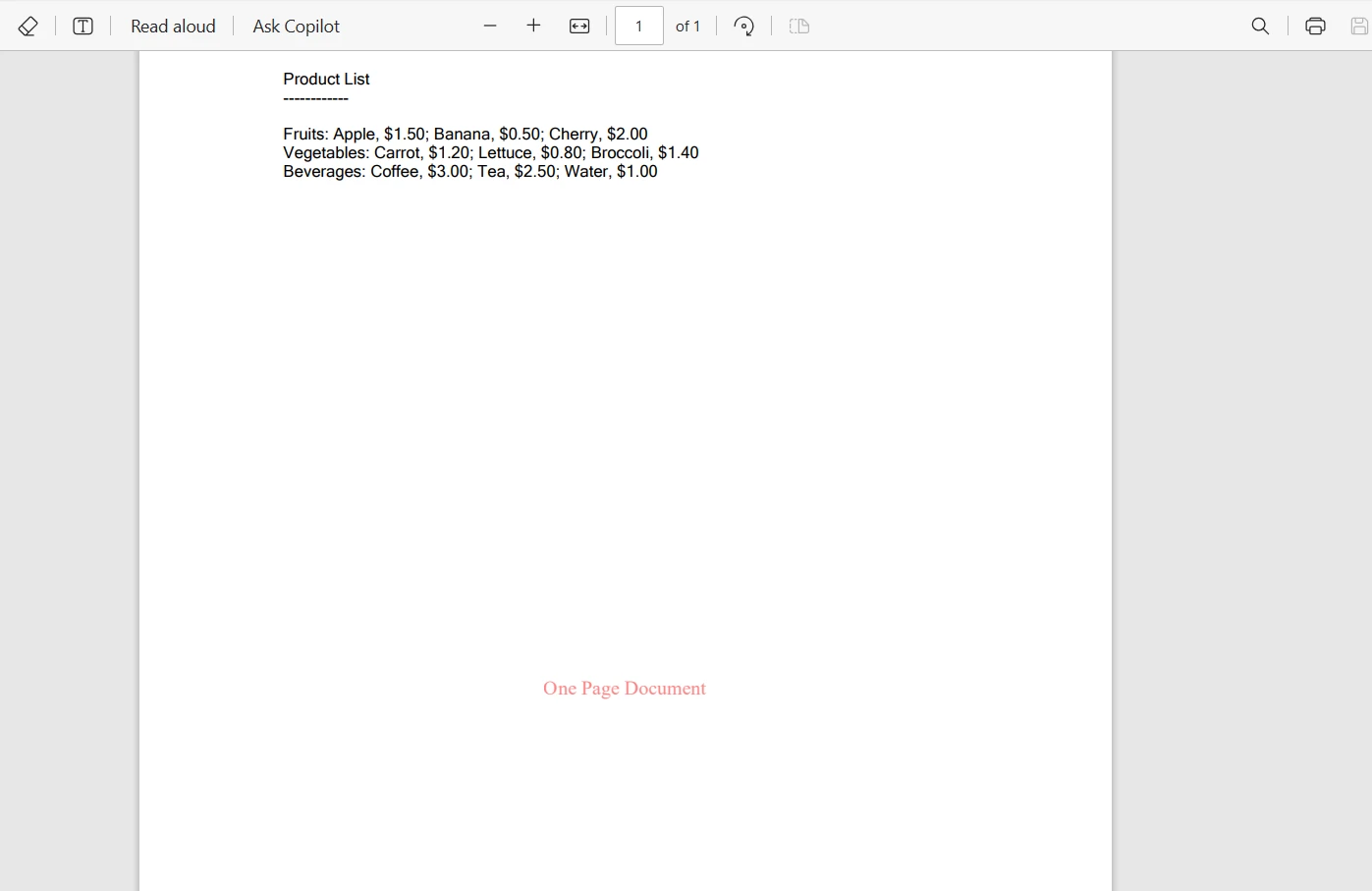
Oto wyjściowy plik PDF jednej strony:
Wnioski
W tym samouczku zbadaliśmy instrukcję switch case w C#, podstawową formę podejmowania decyzji w programowaniu. Zaczynaliśmy od zrozumienia jej podstawowej struktury i porównaliśmy ją z tradycyjnymi instrukcjami if-else, podkreślając jej zalety w czytelności i prostocie przy obsłudze wielu warunków.
Utworzyliśmy proste case switch, obsłużyliśmy różne scenariusze z przypadkiem domyślnym i eksplorowaliśmy zaawansowane funkcje, takie jak switch expressions. Rzeczywiste zastosowanie instrukcji switch zostało zaprezentowane poprzez przykład integracji z IronPDF do dynamicznego przetwarzania PDF, pokazując, jak instrukcje switch mogą być cennym narzędziem w zestawie narzędzi programisty.
IronPDF oferuje bezpłatną wersję próbną do eksploracji funkcji, umożliwiając wypróbowanie jego funkcji i funkcjonalności. Aby kontynuować korzystanie i uzyskać dostęp do pełnego zestawu narzędzi, licencje IronPDF zaczynają się od konkurencyjnego modelu cenowego, oferując kompleksowe rozwiązanie dla wszystkich Twoich potrzeb przetwarzania PDF w C#.













