Wprowadzenie do IList
IList jest częścią przestrzeni nazw Collections .NET Framework. Jest to niegeneryczny interfejs kolekcji, który zapewnia schemat kolekcji obiektów, do których można uzyskać indywidualny dostęp za pomocą ich indeksu. W przeciwieństwie do tablic, IList pozwala na dynamiczną liczbę elementów wartości obiektów, co oznacza, że można dodawać lub usuwać elementy z kolekcji według potrzeb. Służy jako podstawowy interfejs dla wszystkich list niegenerycznych w .NET Framework, oferując sposób zarządzania zbiorem obiektów w sposób bardziej elastyczny niż tablice. W tym samouczku poznamy interfejs IList oraz bibliotekę IronPDF C# PDF.
Zrozumienie interfejsu IList
Deklaracja public interface IList jest fundamentalną częścią tworzenia niestandardowych kolekcji w C#, które przestrzegają kontraktu IList określonego przez przestrzeń nazw Collections .NET Framework. IList zawiera właściwości i metody umożliwiające dostęp do elementów kolekcji, ich zliczanie oraz modyfikowanie kolekcji poprzez dodawanie, wstawianie lub usuwanie elementów. Oto niektóre z kluczowych właściwości i metod zdefiniowanych w interfejsie IList:
- Właściwości takie jak
IsFixedSize i IsReadOnly informują, czy kolekcja ma stały rozmiar czy jest tylko do odczytu.
- Metody takie jak
Add, Insert, Remove i RemoveAt służą do modyfikowania elementów w kolekcji. Możesz dodawać, wstawiać i usuwać elementy.
- Metoda
IndexOf służy do lokalizowania elementów, a właściwość Item (lub indeksator w C#) umożliwia pobieranie i ustawianie elementów na podstawie ich indeksu.
Praktyczne zastosowanie interfejsu IList
Aby pokazać, jak działa IList, stwórzmy prosty przykład. Ten przykład pokaże, jak zadeklarować IList, dodać do niego elementy i przeiterować jego zawartość.
Tworzenie i modyfikowanie IList
Najpierw zobaczmy, jak zadeklarować IList i dodać do niego elementy:
using System;
using System.Collections;

class Program
{
    static void Main(string[] args)
    {
        // Creating an IList instance
        IList myIList = new ArrayList();

        // Adding elements to the IList
        myIList.Add("Hello");
        myIList.Add(10);
        myIList.Add(new object());

        // Displaying the number of values in the IList using the Count property
        Console.WriteLine($"Number of elements: {myIList.Count}");

        // Accessing elements using a loop
        foreach (var element in myIList)
        {
            Console.WriteLine(element);
        }
    }
}
using System;
using System.Collections;

class Program
{
    static void Main(string[] args)
    {
        // Creating an IList instance
        IList myIList = new ArrayList();

        // Adding elements to the IList
        myIList.Add("Hello");
        myIList.Add(10);
        myIList.Add(new object());

        // Displaying the number of values in the IList using the Count property
        Console.WriteLine($"Number of elements: {myIList.Count}");

        // Accessing elements using a loop
        foreach (var element in myIList)
        {
            Console.WriteLine(element);
        }
    }
}
Imports System
Imports System.Collections
Friend Class Program
Shared Sub Main(ByVal args() As String)
' Creating an IList instance
Dim myIList As IList = New ArrayList()
' Adding elements to the IList
myIList.Add("Hello")
myIList.Add(10)
myIList.Add(New Object())
' Displaying the number of values in the IList using the Count property
Console.WriteLine($"Number of elements: {myIList.Count}")
' Accessing elements using a loop
For Each element In myIList
Console.WriteLine(element)
Next element
End Sub
End Class
Imports System
Imports System.Collections

Friend Class Program
	Shared Sub Main(ByVal args() As String)
		' Creating an IList instance
		Dim myIList As IList = New ArrayList()

		' Adding elements to the IList
		myIList.Add("Hello")
		myIList.Add(10)
		myIList.Add(New Object())

		' Displaying the number of values in the IList using the Count property
		Console.WriteLine($"Number of elements: {myIList.Count}")

		' Accessing elements using a loop
		For Each element In myIList
			Console.WriteLine(element)
		Next element
	End Sub
End Class
W powyższym przykładzie utworzyliśmy instancję IList przy użyciu ArrayList, klasy, która implementuje IList. Dodaliśmy mieszankę różnych typów obiektów, aby pokazać, że IList może przechowywać dowolny obiekt. Na koniec przeszliśmy przez kolekcję, wyświetlając każdy element za pomocą funkcji PRINT.
Dostęp i modyfikacja oparte na indeksie
Dostęp do elementów i ich modyfikacja poprzez indeks to kluczowa cecha IList. Poniższy przykład pokazuje, jak można to zrobić:
using System;
using System.Collections;

class Program
{
    static void Main(string[] args)
    {
        IList myIList = new ArrayList { "Hello", 10, new object() };

        // Accessing an element by index
        object value = myIList[1];
        Console.WriteLine($"Element at index 1: {value}");

        // Modifying an element by index
        myIList[1] = 20;
        Console.WriteLine($"Modified element at index 1: {myIList[1]}");
    }
}
using System;
using System.Collections;

class Program
{
    static void Main(string[] args)
    {
        IList myIList = new ArrayList { "Hello", 10, new object() };

        // Accessing an element by index
        object value = myIList[1];
        Console.WriteLine($"Element at index 1: {value}");

        // Modifying an element by index
        myIList[1] = 20;
        Console.WriteLine($"Modified element at index 1: {myIList[1]}");
    }
}
Imports System
Imports System.Collections
Friend Class Program
Shared Sub Main(ByVal args() As String)
Dim myIList As IList = New ArrayList From { "Hello", 10, New Object() }
' Accessing an element by index
Dim value As Object = myIList(1)
Console.WriteLine($"Element at index 1: {value}")
' Modifying an element by index
myIList(1) = 20
Console.WriteLine($"Modified element at index 1: {myIList(1)}")
End Sub
End Class
Imports System
Imports System.Collections

Friend Class Program
	Shared Sub Main(ByVal args() As String)
		Dim myIList As IList = New ArrayList From { "Hello", 10, New Object() }

		' Accessing an element by index
		Dim value As Object = myIList(1)
		Console.WriteLine($"Element at index 1: {value}")

		' Modifying an element by index
		myIList(1) = 20
		Console.WriteLine($"Modified element at index 1: {myIList(1)}")
	End Sub
End Class
Implementacja niestandardowego IList
Czasami możesz potrzebować dostosowanej kolekcji, która dziedziczy IList. Pozwala to na większą kontrolę nad sposobem przechowywania, uzyskiwania dostępu i modyfikowania elementów. Poniżej znajduje się przykład prostej niestandardowej kolekcji implementującej IList:
using System;
using System.Collections;

public class CustomCollection : IList
{
    private ArrayList _innerList = new ArrayList();

    public object this[int index]
    {
        get => _innerList[index];
        set => _innerList[index] = value;
    }

    public bool IsFixedSize => _innerList.IsFixedSize;
    public bool IsReadOnly => _innerList.IsReadOnly;
    public int Count => _innerList.Count;
    public bool IsSynchronized => _innerList.IsSynchronized;
    public object SyncRoot => _innerList.SyncRoot;

    public int Add(object value)
    {
        return _innerList.Add(value);
    }

    public void Clear()
    {
        _innerList.Clear();
    }

    public bool Contains(object value)
    {
        return _innerList.Contains(value);
    }

    public int IndexOf(object value)
    {
        return _innerList.IndexOf(value);
    }

    public void Insert(int index, object value)
    {
        _innerList.Insert(index, value);
    }

    public void Remove(object value)
    {
        _innerList.Remove(value);
    }

    public void RemoveAt(int index)
    {
        _innerList.RemoveAt(index);
    }

    public void CopyTo(Array array, int index)
    {
        _innerList.CopyTo(array, index);
    }

    public IEnumerator GetEnumerator()
    {
        return _innerList.GetEnumerator();
    }
}
using System;
using System.Collections;

public class CustomCollection : IList
{
    private ArrayList _innerList = new ArrayList();

    public object this[int index]
    {
        get => _innerList[index];
        set => _innerList[index] = value;
    }

    public bool IsFixedSize => _innerList.IsFixedSize;
    public bool IsReadOnly => _innerList.IsReadOnly;
    public int Count => _innerList.Count;
    public bool IsSynchronized => _innerList.IsSynchronized;
    public object SyncRoot => _innerList.SyncRoot;

    public int Add(object value)
    {
        return _innerList.Add(value);
    }

    public void Clear()
    {
        _innerList.Clear();
    }

    public bool Contains(object value)
    {
        return _innerList.Contains(value);
    }

    public int IndexOf(object value)
    {
        return _innerList.IndexOf(value);
    }

    public void Insert(int index, object value)
    {
        _innerList.Insert(index, value);
    }

    public void Remove(object value)
    {
        _innerList.Remove(value);
    }

    public void RemoveAt(int index)
    {
        _innerList.RemoveAt(index);
    }

    public void CopyTo(Array array, int index)
    {
        _innerList.CopyTo(array, index);
    }

    public IEnumerator GetEnumerator()
    {
        return _innerList.GetEnumerator();
    }
}
Imports System
Imports System.Collections
Public Class CustomCollection
Implements IList
Private _innerList As New ArrayList()
Default Public Property Item(ByVal index As Integer) As Object Implements IList.Item
Get
Return _innerList(index)
End Get
Set(ByVal value As Object)
_innerList(index) = value
End Set
End Property
Public ReadOnly Property IsFixedSize() As Boolean Implements IList.IsFixedSize
Get
Return _innerList.IsFixedSize
End Get
End Property
Public ReadOnly Property IsReadOnly() As Boolean Implements IList.IsReadOnly
Get
Return _innerList.IsReadOnly
End Get
End Property
Public ReadOnly Property Count() As Integer Implements System.Collections.ICollection.Count
Get
Return _innerList.Count
End Get
End Property
Public ReadOnly Property IsSynchronized() As Boolean Implements System.Collections.ICollection.IsSynchronized
Get
Return _innerList.IsSynchronized
End Get
End Property
Public ReadOnly Property SyncRoot() As Object Implements System.Collections.ICollection.SyncRoot
Get
Return _innerList.SyncRoot
End Get
End Property
Public Function Add(ByVal value As Object) As Integer Implements IList.Add
Return _innerList.Add(value)
End Function
Public Sub Clear() Implements IList.Clear
_innerList.Clear()
End Sub
Public Function Contains(ByVal value As Object) As Boolean Implements IList.Contains
Return _innerList.Contains(value)
End Function
Public Function IndexOf(ByVal value As Object) As Integer Implements IList.IndexOf
Return _innerList.IndexOf(value)
End Function
Public Sub Insert(ByVal index As Integer, ByVal value As Object) Implements IList.Insert
_innerList.Insert(index, value)
End Sub
Public Sub Remove(ByVal value As Object) Implements IList.Remove
_innerList.Remove(value)
End Sub
Public Sub RemoveAt(ByVal index As Integer) Implements IList.RemoveAt
_innerList.RemoveAt(index)
End Sub
Public Sub CopyTo(ByVal array As Array, ByVal index As Integer) Implements System.Collections.ICollection.CopyTo
_innerList.CopyTo(array, index)
End Sub
Public Function GetEnumerator() As IEnumerator Implements System.Collections.IEnumerable.GetEnumerator
Return _innerList.GetEnumerator()
End Function
End Class
Imports System
Imports System.Collections

Public Class CustomCollection
	Implements IList

	Private _innerList As New ArrayList()

	Default Public Property Item(ByVal index As Integer) As Object Implements IList.Item
		Get
			Return _innerList(index)
		End Get
		Set(ByVal value As Object)
			_innerList(index) = value
		End Set
	End Property

	Public ReadOnly Property IsFixedSize() As Boolean Implements IList.IsFixedSize
		Get
			Return _innerList.IsFixedSize
		End Get
	End Property
	Public ReadOnly Property IsReadOnly() As Boolean Implements IList.IsReadOnly
		Get
			Return _innerList.IsReadOnly
		End Get
	End Property
	Public ReadOnly Property Count() As Integer Implements System.Collections.ICollection.Count
		Get
			Return _innerList.Count
		End Get
	End Property
	Public ReadOnly Property IsSynchronized() As Boolean Implements System.Collections.ICollection.IsSynchronized
		Get
			Return _innerList.IsSynchronized
		End Get
	End Property
	Public ReadOnly Property SyncRoot() As Object Implements System.Collections.ICollection.SyncRoot
		Get
			Return _innerList.SyncRoot
		End Get
	End Property

	Public Function Add(ByVal value As Object) As Integer Implements IList.Add
		Return _innerList.Add(value)
	End Function

	Public Sub Clear() Implements IList.Clear
		_innerList.Clear()
	End Sub

	Public Function Contains(ByVal value As Object) As Boolean Implements IList.Contains
		Return _innerList.Contains(value)
	End Function

	Public Function IndexOf(ByVal value As Object) As Integer Implements IList.IndexOf
		Return _innerList.IndexOf(value)
	End Function

	Public Sub Insert(ByVal index As Integer, ByVal value As Object) Implements IList.Insert
		_innerList.Insert(index, value)
	End Sub

	Public Sub Remove(ByVal value As Object) Implements IList.Remove
		_innerList.Remove(value)
	End Sub

	Public Sub RemoveAt(ByVal index As Integer) Implements IList.RemoveAt
		_innerList.RemoveAt(index)
	End Sub

	Public Sub CopyTo(ByVal array As Array, ByVal index As Integer) Implements System.Collections.ICollection.CopyTo
		_innerList.CopyTo(array, index)
	End Sub

	Public Function GetEnumerator() As IEnumerator Implements System.Collections.IEnumerable.GetEnumerator
		Return _innerList.GetEnumerator()
	End Function
End Class
Ta klasa CustomCollection kapsułkuje ArrayList, klasę, która sama implementuje IList. Nasz CustomCollection przekazuje wywołania do podstawowego ArrayList, pozwalając mu zachowywać się jak każda inna kolekcja implementująca IList. Ten przykład demonstruje tworzenie kolekcji, która może być dostępna przez indeks, modyfikowana (dodawanie, wstawianie lub usuwanie elementów) i przeiterowana, podobnie jak każda wbudowana kolekcja .NET implementująca IList.
Zaawansowane operacje z IList
Poza podstawowymi operacjami dodawania, usuwania i dostępu, IList pozwala na bardziej skomplikowane manipulacje i zapytania. Na przykład sprawdzenie, czy kolekcja zawiera określony obiekt, lub znalezienie indeksu obiektu w kolekcji to operacje, które mogą być niezbędne w niektórych aplikacjach:
using System;
using System.Collections;

class Program
{
    static void Main(string[] args)
    {
        IList myIList = new ArrayList { "Hello", 10, new object() };

        // Check if the IList contains a specific object
        bool contains = myIList.Contains(10); // Assuming 10 was added previously
        Console.WriteLine($"Contains 10: {contains}");

        // Find the index of a specific object
        int index = myIList.IndexOf(10);
        Console.WriteLine($"Index of 10: {index}");
    }
}
using System;
using System.Collections;

class Program
{
    static void Main(string[] args)
    {
        IList myIList = new ArrayList { "Hello", 10, new object() };

        // Check if the IList contains a specific object
        bool contains = myIList.Contains(10); // Assuming 10 was added previously
        Console.WriteLine($"Contains 10: {contains}");

        // Find the index of a specific object
        int index = myIList.IndexOf(10);
        Console.WriteLine($"Index of 10: {index}");
    }
}
Imports System
Imports System.Collections
Friend Class Program
Shared Sub Main(ByVal args() As String)
Dim myIList As IList = New ArrayList From { "Hello", 10, New Object() }
' Check if the IList contains a specific object
Dim contains As Boolean = myIList.Contains(10) ' Assuming 10 was added previously
Console.WriteLine($"Contains 10: {contains}")
' Find the index of a specific object
Dim index As Integer = myIList.IndexOf(10)
Console.WriteLine($"Index of 10: {index}")
End Sub
End Class
Imports System
Imports System.Collections

Friend Class Program
	Shared Sub Main(ByVal args() As String)
		Dim myIList As IList = New ArrayList From { "Hello", 10, New Object() }

		' Check if the IList contains a specific object
		Dim contains As Boolean = myIList.Contains(10) ' Assuming 10 was added previously
		Console.WriteLine($"Contains 10: {contains}")

		' Find the index of a specific object
		Dim index As Integer = myIList.IndexOf(10)
		Console.WriteLine($"Index of 10: {index}")
	End Sub
End Class
Operacje te mogą być szczególnie przydatne w przypadku zbiorów obiektów, w których trzeba określić obecność lub pozycję konkretnych elementów bez konieczności iteracji przez cały zbiór.
IronPDF: biblioteka PDF dla języka C#
IronPDF for .NET to biblioteka PDF dla programistów .NET, która umożliwia tworzenie i edycję dokumentów PDF bezpośrednio w aplikacjach .NET. Obsługuje konwersję dokumentów HTML do formatu PDF, obrazów oraz stron internetowych do formatu PDF. Dzięki tej bibliotece programiści mogą w prosty sposób dodawać funkcje obsługi plików PDF do swoich aplikacji. IronPDF zawiera również funkcje edycji, scałania i dzielenia plików PDF, które zapewniają kompleksową kontrolę nad manipulacją plikami PDF.
IronPDF wyróżnia się w konwersji HTML do PDF, zapewniając precyzyjne zachowanie oryginalnych układów i stylów. Idealnie nadaje się do tworzenia plików PDF z treści internetowych, takich jak raporty, faktury i dokumentacja. Dzięki obsłudze plików HTML, adresów URL i surowych ciągów znaków HTML, IronPDF z łatwością tworzy wysokiej jakości dokumenty PDF.
using IronPdf;

class Program
{
    static void Main(string[] args)
    {
        var renderer = new ChromePdfRenderer();

        // 1. Convert HTML String to PDF
        var htmlContent = "<h1>Hello, IronPDF!</h1><p>This is a PDF from an HTML string.</p>";
        var pdfFromHtmlString = renderer.RenderHtmlAsPdf(htmlContent);
        pdfFromHtmlString.SaveAs("HTMLStringToPDF.pdf");

        // 2. Convert HTML File to PDF
        var htmlFilePath = "path_to_your_html_file.html"; // Specify the path to your HTML file
        var pdfFromHtmlFile = renderer.RenderHtmlFileAsPdf(htmlFilePath);
        pdfFromHtmlFile.SaveAs("HTMLFileToPDF.pdf");

        // 3. Convert URL to PDF
        var url = "http://ironpdf.com"; // Specify the URL
        var pdfFromUrl = renderer.RenderUrlAsPdf(url);
        pdfFromUrl.SaveAs("URLToPDF.pdf");
    }
}
using IronPdf;

class Program
{
    static void Main(string[] args)
    {
        var renderer = new ChromePdfRenderer();

        // 1. Convert HTML String to PDF
        var htmlContent = "<h1>Hello, IronPDF!</h1><p>This is a PDF from an HTML string.</p>";
        var pdfFromHtmlString = renderer.RenderHtmlAsPdf(htmlContent);
        pdfFromHtmlString.SaveAs("HTMLStringToPDF.pdf");

        // 2. Convert HTML File to PDF
        var htmlFilePath = "path_to_your_html_file.html"; // Specify the path to your HTML file
        var pdfFromHtmlFile = renderer.RenderHtmlFileAsPdf(htmlFilePath);
        pdfFromHtmlFile.SaveAs("HTMLFileToPDF.pdf");

        // 3. Convert URL to PDF
        var url = "http://ironpdf.com"; // Specify the URL
        var pdfFromUrl = renderer.RenderUrlAsPdf(url);
        pdfFromUrl.SaveAs("URLToPDF.pdf");
    }
}
Imports IronPdf
Friend Class Program
Shared Sub Main(ByVal args() As String)
Dim renderer = New ChromePdfRenderer()
' 1. Convert HTML String to PDF
Dim htmlContent = "<h1>Hello, IronPDF!</h1><p>This is a PDF from an HTML string.</p>"
Dim pdfFromHtmlString = renderer.RenderHtmlAsPdf(htmlContent)
pdfFromHtmlString.SaveAs("HTMLStringToPDF.pdf")
' 2. Convert HTML File to PDF
Dim htmlFilePath = "path_to_your_html_file.html" ' Specify the path to your HTML file
Dim pdfFromHtmlFile = renderer.RenderHtmlFileAsPdf(htmlFilePath)
pdfFromHtmlFile.SaveAs("HTMLFileToPDF.pdf")
' 3. Convert URL to PDF
Dim url = "http://ironpdf.com" ' Specify the URL
Dim pdfFromUrl = renderer.RenderUrlAsPdf(url)
pdfFromUrl.SaveAs("URLToPDF.pdf")
End Sub
End Class
Imports IronPdf

Friend Class Program
	Shared Sub Main(ByVal args() As String)
		Dim renderer = New ChromePdfRenderer()

		' 1. Convert HTML String to PDF
		Dim htmlContent = "<h1>Hello, IronPDF!</h1><p>This is a PDF from an HTML string.</p>"
		Dim pdfFromHtmlString = renderer.RenderHtmlAsPdf(htmlContent)
		pdfFromHtmlString.SaveAs("HTMLStringToPDF.pdf")

		' 2. Convert HTML File to PDF
		Dim htmlFilePath = "path_to_your_html_file.html" ' Specify the path to your HTML file
		Dim pdfFromHtmlFile = renderer.RenderHtmlFileAsPdf(htmlFilePath)
		pdfFromHtmlFile.SaveAs("HTMLFileToPDF.pdf")

		' 3. Convert URL to PDF
		Dim url = "http://ironpdf.com" ' Specify the URL
		Dim pdfFromUrl = renderer.RenderUrlAsPdf(url)
		pdfFromUrl.SaveAs("URLToPDF.pdf")
	End Sub
End Class
Przykład kodu
Oto prosty przykład pokazujący generowanie prostego dokumentu PDF z listy ciągów znakowych przy użyciu IronPDF i interfejsu IList:
using IronPdf;
using System.Collections.Generic;

public class PDFGenerator
{
    public static void GeneratePDFFromList(IList<string> dataList)
    {
        // Initialize the HtmlToPdf renderer
        var renderer = new ChromePdfRenderer();

        // Start building HTML content from the dataList
        var htmlContent = "<h1>My Data List</h1><ul>";
        foreach (var item in dataList)
        {
            htmlContent += $"<li>{item}</li>";
        }
        htmlContent += "</ul>";

        // Convert HTML string to PDF
        var pdfDocument = renderer.RenderHtmlAsPdf(htmlContent);

        // Save the PDF to a file
        pdfDocument.SaveAs("DataList.pdf");
    }
}

// Example usage
class Program
{
    static void Main(string[] args)
    {
        License.LicenseKey = "License-Key";
        IList<string> myDataList = new List<string> { "Apple", "Banana", "Cherry" };
        PDFGenerator.GeneratePDFFromList(myDataList);
    }
}
using IronPdf;
using System.Collections.Generic;

public class PDFGenerator
{
    public static void GeneratePDFFromList(IList<string> dataList)
    {
        // Initialize the HtmlToPdf renderer
        var renderer = new ChromePdfRenderer();

        // Start building HTML content from the dataList
        var htmlContent = "<h1>My Data List</h1><ul>";
        foreach (var item in dataList)
        {
            htmlContent += $"<li>{item}</li>";
        }
        htmlContent += "</ul>";

        // Convert HTML string to PDF
        var pdfDocument = renderer.RenderHtmlAsPdf(htmlContent);

        // Save the PDF to a file
        pdfDocument.SaveAs("DataList.pdf");
    }
}

// Example usage
class Program
{
    static void Main(string[] args)
    {
        License.LicenseKey = "License-Key";
        IList<string> myDataList = new List<string> { "Apple", "Banana", "Cherry" };
        PDFGenerator.GeneratePDFFromList(myDataList);
    }
}
Imports IronPdf
Imports System.Collections.Generic
Public Class PDFGenerator
Public Shared Sub GeneratePDFFromList(ByVal dataList As IList(Of String))
' Initialize the HtmlToPdf renderer
Dim renderer = New ChromePdfRenderer()
' Start building HTML content from the dataList
Dim htmlContent = "<h1>My Data List</h1><ul>"
For Each item In dataList
htmlContent &= $"<li>{item}</li>"
Next item
htmlContent &= "</ul>"
' Convert HTML string to PDF
Dim pdfDocument = renderer.RenderHtmlAsPdf(htmlContent)
' Save the PDF to a file
pdfDocument.SaveAs("DataList.pdf")
End Sub
End Class
' Example usage
Friend Class Program
Shared Sub Main(ByVal args() As String)
License.LicenseKey = "License-Key"
Dim myDataList As IList(Of String) = New List(Of String) From {"Apple", "Banana", "Cherry"}
PDFGenerator.GeneratePDFFromList(myDataList)
End Sub
End Class
Imports IronPdf
Imports System.Collections.Generic

Public Class PDFGenerator
	Public Shared Sub GeneratePDFFromList(ByVal dataList As IList(Of String))
		' Initialize the HtmlToPdf renderer
		Dim renderer = New ChromePdfRenderer()

		' Start building HTML content from the dataList
		Dim htmlContent = "<h1>My Data List</h1><ul>"
		For Each item In dataList
			htmlContent &= $"<li>{item}</li>"
		Next item
		htmlContent &= "</ul>"

		' Convert HTML string to PDF
		Dim pdfDocument = renderer.RenderHtmlAsPdf(htmlContent)

		' Save the PDF to a file
		pdfDocument.SaveAs("DataList.pdf")
	End Sub
End Class

' Example usage
Friend Class Program
	Shared Sub Main(ByVal args() As String)
		License.LicenseKey = "License-Key"
		Dim myDataList As IList(Of String) = New List(Of String) From {"Apple", "Banana", "Cherry"}
		PDFGenerator.GeneratePDFFromList(myDataList)
	End Sub
End Class
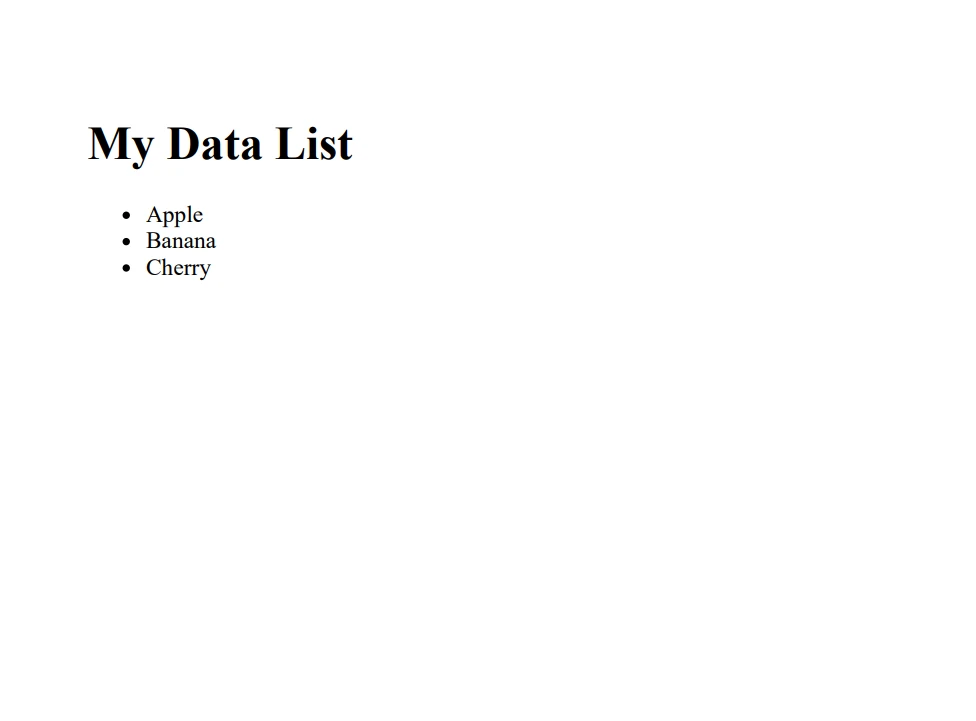
W tym przykładzie użyto IList<string> do przechowywania kolekcji nazw owoców. Metoda GeneratePDFFromList następnie iteruje przez tę listę, budując ciąg HTML zawierający każdy element w nieuporządkowanej liście. IronPDF ChromePdfRenderer konwertuje tę zawartość HTML na dokument PDF, który następnie jest zapisywany do pliku.
Wnioski
Ten przewodnik dla początkujących miał na celu omówienie podstaw i praktycznych zastosowań IList w C#. Dzięki przykładom sięgającym od prostego użycia do niestandardowej implementacji, jest jasne, że IList to potężne narzędzie w zestawie narzędzi programisty C#. Niezależnie od tego, czy manipulujesz kolekcjami danych, czy tworzysz własne typy kolekcji, IList oferuje funkcjonalność i elastyczność niezbędne do efektywnego rozwoju oprogramowania. IronPDF oferuje bezpłatną wersję próbną swojej biblioteki PDF dla zainteresowanych użytkowników, z licencjami dostępnymi w cenie od $999.













