using IronPdf;

// Disable local disk access or cross-origin requests
Installation.EnableWebSecurity = true;

// Instantiate Renderer
var renderer = new ChromePdfRenderer();

// Create a PDF from a HTML string using C#
var pdf = renderer.RenderHtmlAsPdf("<h1>Hello World</h1>");

// Export to a file or Stream
pdf.SaveAs("output.pdf");

// Advanced Example with HTML Assets
// Load external html assets: Images, CSS and JavaScript.
// An optional BasePath 'C:\site\assets\' is set as the file location to load assets from
var myAdvancedPdf = renderer.RenderHtmlAsPdf("<img src='icons/iron.png'>", @"C:\site\assets\");
myAdvancedPdf.SaveAs("html-with-assets.pdf");
using IronPdf;// Disable local disk access or cross-origin requestsInstallation.EnableWebSecurity = true;// Instantiate Renderervar renderer = new ChromePdfRenderer();// Create a PDF from a HTML string using C#var pdf = renderer.RenderHtmlAsPdf("<h1>Hello World</h1>");// Export to a file or Streampdf.SaveAs("output.pdf");// Advanced Example with HTML Assets// Load external html assets: Images, CSS and JavaScript.// An optional BasePath 'C:\site\assets\' is set as the file location to load assets fromvar myAdvancedPdf = renderer.RenderHtmlAsPdf("<img src='icons/iron.png'>", @"C:\site\assets\");myAdvancedPdf.SaveAs("html-with-assets.pdf");
PM >Install-Package IronPdf
Install-Package IronPdf
AKTUALNOŚCI DLA PROGRAMISTÓW
Klasa Pair w języku C# (jak działa dla programistów)
Para jest prostą strukturą danych, która przechowuje dwie powiązane wartości. Zapewnia wygodny sposób na połączenie dwóch odrębnych kawałków danych razem. Pary są często używane, gdy metoda musi zwrócić dwie wartości lub podczas pracy z powiązaniami klucz-wartość.
W C#, programiści często sięgają po krotki (`Tuple<T1, T2>`) do parowania wartości. Jednak krotki są niezmienne, a ich elementy są uzyskiwane przez właściwości takie jak Item1 i Item2, co może prowadzić do mniej czytelnego kodu, gdy są używane obszernie. W tym miejscu przydaje się niestandardowa klasa Pair.
Jeśli potrzebujesz struktury do przechowywania dwóch powiązanych obiektów, a ukrywanie danych nie jest priorytetem, możesz użyć klasy Pair w swoim kodzie. Klasa Pair nie kapsułkuje swoich referencji obiektowych. Zamiast tego udostępnia je bezpośrednio wszystkim wywołującym kodom jako publiczne pola klasy.
Ten wybór projektowy umożliwia bezpośredni dostęp do zawartych obiektów bez narzutu związanego z kapsułkowaniem. Również na końcu artykułu zbadamy, jak [IronPDF for PDF Generation](/) z [Iron Software Overview](https://ironsoftware.com/) może być używany do generowania dokumentu PDF.
## Krotki
C# 7.0 wprowadziło ulepszenia składni krotek, co ułatwia pracę z nimi. Oto jak można zadeklarować i zainicjalizować krotki:
```csharp
// Tuple declaration
var person = (name: "John", age: 30);

// Accessing tuple elements using named properties
Console.WriteLine($"Name: {person.name}, Age: {person.age}");

// Tuple deconstruction
var (name, age) = person;
Console.WriteLine($"Name: {name}, Age: {age}");
```
## Zalety krotek
#### Zwięzła składnia
Krotki pozwalają wyrazić złożone struktury danych przy użyciu zwięzłej składni, bez potrzeby definiowania niestandardowych klas lub struktur.
#### Lekkie
Krotki są lekkimi strukturami danych, co czyni je odpowiednimi w sytuacjach, gdy potrzebujesz tymczasowego lub pośredniego przechowywania danych.
#### Niejawne nazewnictwo
Dzięki składni krotek można automatycznie nazwać ich elementy, co poprawia czytelność kodu i zmniejsza potrzebę komentarzy.
#### Zwracanie wielu wartości z metod
```csharp
public (int Quotient, int Remainder) Divide(int dividend, int divisor)
{
int quotient = dividend / divisor;
int remainder = dividend % divisor;
return (quotient, remainder);
}
var result = Divide(10, 3);
Console.WriteLine($"Quotient: {result.Quotient}, Remainder: {result.Remainder}");
```
#### Uproszczenie sygnatur metod
```csharp
public (string Name, string Surname) GetNameAndSurname()
{
// Retrieve name and surname from a data source
return ("John", "Doe");
}
var (name, surname) = GetNameAndSurname();
Console.WriteLine($"Name: {name}, Surname: {surname}");
```
#### Grupowanie powiązanych danych
```csharp
var point = (x: 10, y: 20);
var color = (r: 255, g: 0, b: 0);
var person = (name: "Alice", age: 25);
```
### Ograniczenia i rozważania
Chociaż krotki C# 7.0 oferują znaczące korzyści, istnieją pewne ograniczenia i kwestie do rozważenia:
* Krotki są ograniczone pod względem wygody w porównaniu do niestandardowych klas czy struktur.
* Elementy krotek są uzyskiwane za pomocą Item1, Item2 itp., gdy nie są podane jawne nazwy, co może zmniejszyć czytelność kodu.
## Niestandardowa klasa Pair
```csharp
public class Pair<T1, T2>
{
public T1 First { get; set; }
public T2 Second { get; set; }
// Constructor to initialize the pair
public Pair(T1 first, T2 second)
{
First = first;
Second = second;
}
}
```
W tej klasie typy są definiowane w momencie użycia, a dwie właściwości są ujawniane jako właściwości publiczne.
### Korzyści z używania klasy Pair
Teraz przyjrzyjmy się niektórym typowym przypadkom użycia, w których klasa Pair może być przydatna:
#### 1. Przechowywanie współrzędnych
```csharp
// Creating a new instance of the Pair class to store coordinates
Pair<int, int> coordinates = new Pair<int, int>(10, 20);
Console.WriteLine($"X: {coordinates.First}, Y: {coordinates.Second}");
```
#### 2. Zwracanie wielu wartości z metody
```csharp
// Method returning a Pair, representing both quotient and remainder
public Pair<int, int> Divide(int dividend, int divisor)
{
int quotient = dividend / divisor;
int remainder = dividend % divisor;
return new Pair<int, int>(quotient, remainder);
}
// Usage
Pair<int, int> result = Divide(10, 3);
Console.WriteLine($"Quotient: {result.First}, Remainder: {result.Second}");
```
#### 3. Przechowywanie par klucz-wartość
```csharp
// Storing a key-value pair
Pair<string, int> keyValue = new Pair<string, int>("Age", 30);
Console.WriteLine($"Key: {keyValue.First}, Value: {keyValue.Second}");
```
## Pary klucz-wartość
Pary klucz-wartość zapewniają prosty i efektywny sposób powiązania danych. W C#, głównym narzędziem do pracy z parami klucz-wartość jest klasa `Dictionary<TKey, TValue>`, uniwersalny i potężny typ kolekcji.
### Rozumienie par klucz-wartość
Para klucz-wartość to struktura danych, która wiąże unikalny klucz z wartością. To powiązanie pozwala na efektywne wyszukiwanie i manipulowanie danymi na podstawie ich unikalnego identyfikatora. W C# pary klucz-wartość są powszechnie używane do zadań takich jak buforowanie, zarządzanie konfiguracją i przechowywanie danych.
### `Dictionary<TKey, TValue>` in C#
Klasa `Dictionary<TKey, TValue>` w C# to ogólna kolekcja, która przechowuje pary klucz-wartość. Zapewnia szybkie wyszukiwanie na podstawie kluczy i jest szeroko stosowana do zarządzania danymi asocjacyjnymi.
#### Tworzenie i wypełnianie słownika
```csharp
Dictionary<string, int> ages = new Dictionary<string, int>
{
{ "Alice", 30 },
{ "Bob", 35 },
{ "Charlie", 25 }
};
```
#### Uzyskiwanie wartości według klucza
```csharp
// Directly access a value by its key
Console.WriteLine($"Alice's age: {ages["Alice"]}");
```
#### Iterowanie po parach klucz-wartość
```csharp
// Iterate over all key-value pairs in the dictionary
foreach (var pair in ages)
{
Console.WriteLine($"Name: {pair.Key}, Age: {pair.Value}");
}
```
### Zaawansowane scenariusze
#### Obsługa brakujących kluczy
```csharp
if (ages.TryGetValue("David", out int age))
{
Console.WriteLine($"David's age: {age}");
}
else
{
Console.WriteLine("David's age is not available.");
}
```
#### Usuwanie elementów
```csharp
// Remove an entry given its key
ages.Remove("Charlie");
```
#### Inicjalizacja słownika
```csharp
// Initialize a dictionary with color codes
var colors = new Dictionary<string, string>
{
{ "red", "#FF0000" },
{ "green", "#00FF00" },
{ "blue", "#0000FF" }
};
```
### Poza słownikiem: Alternatywy i kwestie do rozważenia
Chociaż `Dictionary<TKey, TValue>` jest potężnym narzędziem, alternatywne podejścia i rozważania zależą od specyficznych wymagań Twojej aplikacji:
* `ConcurrentDictionary<TKey, TValue>`: Jeśli Twoja aplikacja wymaga bezpiecznego dostępu do słownika z wielu wątków, rozważ użycie `ConcurrentDictionary<TKey, TValue>`.
* `ImmutableDictionary<TKey, TValue>`: W scenariuszach, gdzie pożądana jest niemutowalność, `ImmutableDictionary<TKey, TValue>` z przestrzeni nazw `System.Collections.Immutable` zapewnia niemutowalne kolekcje klucz-wartość.
* Własne klasy par klucz-wartość: W sytuacjach, gdy potrzebujesz dodatkowej funkcjonalności lub specyficznego działania, rozważ stworzenie własnych klas par klucz-wartość dostosowanych do twoich wymagań.
## Biblioteka IronPDF
[IronPDF by Iron Software Products](/) jest doskonałą biblioteką do generowania dokumentów PDF. Jej łatwość użytkowania i skuteczność są nieporównywalne.
IronPDF wyróżnia się w konwersji [HTML do PDF](/tutorials/html-to-pdf/), zapewniając precyzyjne zachowanie oryginalnych układów i stylów. Idealnie nadaje się do tworzenia plików PDF z treści internetowych, takich jak raporty, faktury i dokumentacja. Dzięki obsłudze plików HTML, adresów URL i surowych ciągów znaków HTML, IronPDF z łatwością tworzy wysokiej jakości dokumenty PDF.
```csharp
using IronPdf;
class Program
{
static void Main(string[] args)
{
var renderer = new ChromePdfRenderer();
// 1. Convert HTML String to PDF
var htmlContent = "<h1>Hello, IronPDF!</h1><p>This is a PDF from an HTML string.</p>";
var pdfFromHtmlString = renderer.RenderHtmlAsPdf(htmlContent);
pdfFromHtmlString.SaveAs("HTMLStringToPDF.pdf");
// 2. Convert HTML File to PDF
var htmlFilePath = "path_to_your_html_file.html"; // Specify the path to your HTML file
var pdfFromHtmlFile = renderer.RenderHtmlFileAsPdf(htmlFilePath);
pdfFromHtmlFile.SaveAs("HTMLFileToPDF.pdf");
// 3. Convert URL to PDF
var url = "http://ironpdf.com"; // Specify the URL
var pdfFromUrl = renderer.RenderUrlAsPdf(url);
pdfFromUrl.SaveAs("URLToPDF.pdf");
}
}
```
IronPDF można zainstalować za pomocą menedżera pakietów NuGet:
```shell
:ProductInstall
```
Lub z Visual Studio w ten sposób:

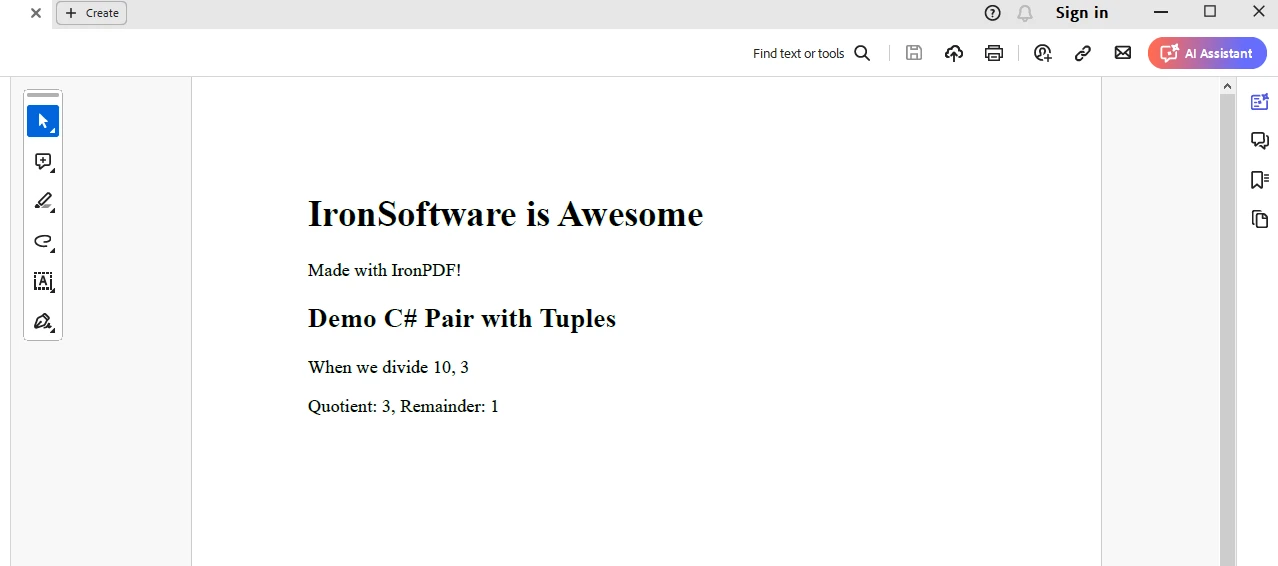
Aby wygenerować dokument z przykładem krotki, możemy użyć następującego kodu:
```csharp
using IronPdf;
namespace IronPatterns
{
class Program
{
static void Main()
{
Console.WriteLine("-----------Iron Software-------------");
var renderer = new ChromePdfRenderer(); // var pattern
var content = "<h1>Iron Software is Awesome</h1> Made with IronPDF!";
content += "<h2>Demo C# Pair with Tuples</h2>";
var result = Divide(10, 3);
Console.WriteLine($"Quotient: {result.Item1}, Remainder: {result.Item2}");
content += $"<p>When we divide 10 by 3:</p>";
content += $"<p>Quotient: {result.Item1}, Remainder: {result.Item2}</p>";
var pdf = renderer.RenderHtmlAsPdf(content);
pdf.SaveAs("output.pdf"); // Saves PDF
}
// Method to demonstrate division using tuples
public static (int Quotient, int Remainder) Divide(int dividend, int divisor)
{
int quotient = dividend / divisor;
int remainder = dividend % divisor;
return (quotient, remainder);
}
}
}
```
## Wynik
## Licencja Trial dla IronPDF
Pobierz swoją [bezpłatną licencję IronPDF](trial-license) i umieść ją w `appsettings.json`.
```json
{
"IronPdf.LicenseKey": "<Your Key>"
}
```
### Wnioski
W tym artykule zbadaliśmy koncepcję par i znaczenie posiadania klasy `Pair` w C#. Przedstawiliśmy prostą implementację niestandardowej klasy `Pair` wraz z różnymi przypadkami użycia, które pokazują jej wszechstronność i użyteczność w codziennych zadaniach programistycznych.
Niezależnie od tego, czy pracujesz z współrzędnymi, zwracasz wiele wartości z metody, czy przechowujesz skojarzenia klucz-wartość, klasa Pair może być cennym dodatkiem do twojego zestawu umiejętności programistycznych.
Oprócz tego, [funkcjonalność biblioteki IronPDF](/docs/) to doskonały zestaw umiejętności do posiadania dla programistów, aby generować dokumenty PDF natychmiast, w aplikacjach, według potrzeby.
Para jest prostą strukturą danych, która przechowuje dwie powiązane wartości. Zapewnia wygodny sposób na połączenie dwóch odrębnych kawałków danych razem. Pary są często używane, gdy metoda musi zwrócić dwie wartości lub podczas pracy z powiązaniami klucz-wartość.
W C#, programiści często sięgają po krotki (Tuple<T1, T2>) do parowania wartości. Jednak krotki są niezmienne, a ich elementy są uzyskiwane przez właściwości takie jak Item1 i Item2, co może prowadzić do mniej czytelnego kodu, gdy są używane obszernie. W tym miejscu przydaje się niestandardowa klasa Pair.
Jeśli potrzebujesz struktury do przechowywania dwóch powiązanych obiektów, a ukrywanie danych nie jest priorytetem, możesz użyć klasy Pair w swoim kodzie. Klasa Pair nie kapsułkuje swoich referencji obiektowych. Zamiast tego udostępnia je bezpośrednio wszystkim wywołującym kodom jako publiczne pola klasy.
Ten wybór projektowy umożliwia bezpośredni dostęp do zawartych obiektów bez narzutu związanego z kapsułkowaniem. Również na końcu artykułu zbadamy, jak IronPDF for PDF Generation z Iron Software Overview może być używany do generowania dokumentu PDF.
Krotki
C# 7.0 wprowadziło ulepszenia składni krotek, co ułatwia pracę z nimi. Oto jak można zadeklarować i zainicjalizować krotki:
// Tuple declarationvar person = (name: "John", age: 30);// Accessing tuple elements using named propertiesConsole.WriteLine($"Name: {person.name}, Age: {person.age}");// Tuple deconstructionvar (name, age) = person;Console.WriteLine($"Name: {name}, Age: {age}");
// Tuple declaration
var person = (name: "John", age: 30);

// Accessing tuple elements using named properties
Console.WriteLine($"Name: {person.name}, Age: {person.age}");

// Tuple deconstruction
var (name, age) = person;
Console.WriteLine($"Name: {name}, Age: {age}");
' Tuple declarationDim person = (name:= "John", age:= 30)' Accessing tuple elements using named propertiesConsole.WriteLine($"Name: {person.name}, Age: {person.age}")' Tuple deconstruction'INSTANT VB TODO TASK: VB has no equivalent to C# deconstruction declarations:var(name, age) = personConsole.WriteLine($"Name: {name}, Age: {age}")
' Tuple declaration
Dim person = (name:= "John", age:= 30)

' Accessing tuple elements using named properties
Console.WriteLine($"Name: {person.name}, Age: {person.age}")

' Tuple deconstruction
'INSTANT VB TODO TASK: VB has no equivalent to C# deconstruction declarations:
var(name, age) = person
Console.WriteLine($"Name: {name}, Age: {age}")
Zalety krotek
Zwięzła składnia
Krotki pozwalają wyrazić złożone struktury danych przy użyciu zwięzłej składni, bez potrzeby definiowania niestandardowych klas lub struktur.
Lekkie
Krotki są lekkimi strukturami danych, co czyni je odpowiednimi w sytuacjach, gdy potrzebujesz tymczasowego lub pośredniego przechowywania danych.
Niejawne nazewnictwo
Dzięki składni krotek można automatycznie nazwać ich elementy, co poprawia czytelność kodu i zmniejsza potrzebę komentarzy.
Zwracanie wielu wartości z metod
public (intQuotient, intRemainder) Divide(int dividend, int divisor){ int quotient = dividend / divisor; int remainder = dividend % divisor; return (quotient, remainder);}var result = Divide(10, 3);Console.WriteLine($"Quotient: {result.Quotient}, Remainder: {result.Remainder}");
public (int Quotient, int Remainder) Divide(int dividend, int divisor)
{
    int quotient = dividend / divisor;
    int remainder = dividend % divisor;
    return (quotient, remainder);
}

var result = Divide(10, 3);
Console.WriteLine($"Quotient: {result.Quotient}, Remainder: {result.Remainder}");
Public Function Divide(ByVal dividend AsInteger, ByVal divisor AsInteger) As (QuotientAsInteger, RemainderAsInteger) Dim quotient AsInteger = dividend \ divisor Dim remainder AsInteger = dividend Mod divisor Return (quotient, remainder)End FunctionPrivate result = Divide(10, 3)Console.WriteLine($"Quotient: {result.Quotient}, Remainder: {result.Remainder}")
Public Function Divide(ByVal dividend As Integer, ByVal divisor As Integer) As (Quotient As Integer, Remainder As Integer)
	Dim quotient As Integer = dividend \ divisor
	Dim remainder As Integer = dividend Mod divisor
	Return (quotient, remainder)
End Function

Private result = Divide(10, 3)
Console.WriteLine($"Quotient: {result.Quotient}, Remainder: {result.Remainder}")
Uproszczenie sygnatur metod
public (stringName, stringSurname) GetNameAndSurname(){ // Retrieve name and surname from a data source return ("John", "Doe");}var (name, surname) = GetNameAndSurname();Console.WriteLine($"Name: {name}, Surname: {surname}");
public (string Name, string Surname) GetNameAndSurname()
{
    // Retrieve name and surname from a data source
    return ("John", "Doe");
}

var (name, surname) = GetNameAndSurname();
Console.WriteLine($"Name: {name}, Surname: {surname}");
Public Function GetNameAndSurname() As (NameAsString, SurnameAsString) ' Retrieve name and surname from a data source Return ("John", "Doe")End Function'INSTANT VB TODO TASK: VB has no equivalent to C# deconstruction declarations:var(name, surname) = GetNameAndSurname()Console.WriteLine($"Name: {name}, Surname: {surname}")
Public Function GetNameAndSurname() As (Name As String, Surname As String)
	' Retrieve name and surname from a data source
	Return ("John", "Doe")
End Function

'INSTANT VB TODO TASK: VB has no equivalent to C# deconstruction declarations:
var(name, surname) = GetNameAndSurname()
Console.WriteLine($"Name: {name}, Surname: {surname}")
Grupowanie powiązanych danych
var point = (x: 10, y: 20);var color = (r: 255, g: 0, b: 0);var person = (name: "Alice", age: 25);
var point = (x: 10, y: 20);
var color = (r: 255, g: 0, b: 0);
var person = (name: "Alice", age: 25);
Dim point = (x:= 10, y:= 20)Dim color = (r:= 255, g:= 0, b:= 0)Dim person = (name:= "Alice", age:= 25)
Dim point = (x:= 10, y:= 20)
Dim color = (r:= 255, g:= 0, b:= 0)
Dim person = (name:= "Alice", age:= 25)
Ograniczenia i rozważania
Chociaż krotki C# 7.0 oferują znaczące korzyści, istnieją pewne ograniczenia i kwestie do rozważenia:
Krotki są ograniczone pod względem wygody w porównaniu do niestandardowych klas czy struktur.
Elementy krotek są uzyskiwane za pomocą Item1, Item2 itp., gdy nie są podane jawne nazwy, co może zmniejszyć czytelność kodu.
Niestandardowa klasa Pair
public class Pair<T1, T2>{ public T1First { get; set; } public T2Second { get; set; } // Constructor to initialize the pair publicPair(T1 first, T2 second) {First = first;Second = second; }}
public class Pair<T1, T2>
{
    public T1 First { get; set; }
    public T2 Second { get; set; }

    // Constructor to initialize the pair
    public Pair(T1 first, T2 second)
    {
        First = first;
        Second = second;
    }
}
Public Class Pair(OfT1, T2) Public Property First() AsT1 Public Property Second() AsT2 ' Constructor to initialize the pair Public Sub New(ByVal first AsT1, ByVal second AsT2)Me.First = firstMe.Second = second End SubEnd Class
Public Class Pair(Of T1, T2)
	Public Property First() As T1
	Public Property Second() As T2

	' Constructor to initialize the pair
	Public Sub New(ByVal first As T1, ByVal second As T2)
		Me.First = first
		Me.Second = second
	End Sub
End Class
W tej klasie typy są definiowane w momencie użycia, a dwie właściwości są ujawniane jako właściwości publiczne.
Korzyści z używania klasy Pair
Teraz przyjrzyjmy się niektórym typowym przypadkom użycia, w których klasa Pair może być przydatna:
1. Przechowywanie współrzędnych
// Creating a new instance of the Pair class to store coordinatesPair<int, int> coordinates = new Pair<int, int>(10, 20);Console.WriteLine($"X: {coordinates.First}, Y: {coordinates.Second}");
// Creating a new instance of the Pair class to store coordinates
Pair<int, int> coordinates = new Pair<int, int>(10, 20);
Console.WriteLine($"X: {coordinates.First}, Y: {coordinates.Second}");
' Creating a new instance of the Pair class to store coordinatesDim coordinates As New Pair(OfInteger, Integer)(10, 20)Console.WriteLine($"X: {coordinates.First}, Y: {coordinates.Second}")
' Creating a new instance of the Pair class to store coordinates
Dim coordinates As New Pair(Of Integer, Integer)(10, 20)
Console.WriteLine($"X: {coordinates.First}, Y: {coordinates.Second}")
2. Zwracanie wielu wartości z metody
// Method returning a Pair, representing both quotient and remainderpublic Pair<int, int> Divide(int dividend, int divisor){ int quotient = dividend / divisor; int remainder = dividend % divisor; return new Pair<int, int>(quotient, remainder);}// UsagePair<int, int> result = Divide(10, 3);Console.WriteLine($"Quotient: {result.First}, Remainder: {result.Second}");
// Method returning a Pair, representing both quotient and remainder
public Pair<int, int> Divide(int dividend, int divisor)
{
    int quotient = dividend / divisor;
    int remainder = dividend % divisor;
    return new Pair<int, int>(quotient, remainder);
}

// Usage
Pair<int, int> result = Divide(10, 3);
Console.WriteLine($"Quotient: {result.First}, Remainder: {result.Second}");
' Method returning a Pair, representing both quotient and remainderPublic Function Divide(ByVal dividend AsInteger, ByVal divisor AsInteger) AsPair(OfInteger, Integer) Dim quotient AsInteger = dividend \ divisor Dim remainder AsInteger = dividend Mod divisor Return New Pair(OfInteger, Integer)(quotient, remainder)End Function' UsagePrivate result AsPair(OfInteger, Integer) = Divide(10, 3)Console.WriteLine($"Quotient: {result.First}, Remainder: {result.Second}")
' Method returning a Pair, representing both quotient and remainder
Public Function Divide(ByVal dividend As Integer, ByVal divisor As Integer) As Pair(Of Integer, Integer)
	Dim quotient As Integer = dividend \ divisor
	Dim remainder As Integer = dividend Mod divisor
	Return New Pair(Of Integer, Integer)(quotient, remainder)
End Function

' Usage
Private result As Pair(Of Integer, Integer) = Divide(10, 3)
Console.WriteLine($"Quotient: {result.First}, Remainder: {result.Second}")
3. Przechowywanie par klucz-wartość
// Storing a key-value pairPair<string, int> keyValue = new Pair<string, int>("Age", 30);Console.WriteLine($"Key: {keyValue.First}, Value: {keyValue.Second}");
// Storing a key-value pair
Pair<string, int> keyValue = new Pair<string, int>("Age", 30);
Console.WriteLine($"Key: {keyValue.First}, Value: {keyValue.Second}");
' Storing a key-value pairDim keyValue As New Pair(OfString, Integer)("Age", 30)Console.WriteLine($"Key: {keyValue.First}, Value: {keyValue.Second}")
' Storing a key-value pair
Dim keyValue As New Pair(Of String, Integer)("Age", 30)
Console.WriteLine($"Key: {keyValue.First}, Value: {keyValue.Second}")
Pary klucz-wartość
Pary klucz-wartość zapewniają prosty i efektywny sposób powiązania danych. W C#, głównym narzędziem do pracy z parami klucz-wartość jest klasa Dictionary<TKey, TValue>, uniwersalny i potężny typ kolekcji.
Rozumienie par klucz-wartość
Para klucz-wartość to struktura danych, która wiąże unikalny klucz z wartością. To powiązanie pozwala na efektywne wyszukiwanie i manipulowanie danymi na podstawie ich unikalnego identyfikatora. W C# pary klucz-wartość są powszechnie używane do zadań takich jak buforowanie, zarządzanie konfiguracją i przechowywanie danych.
Dictionary<TKey, TValue> in C#
Klasa Dictionary<TKey, TValue> w C# to ogólna kolekcja, która przechowuje pary klucz-wartość. Zapewnia szybkie wyszukiwanie na podstawie kluczy i jest szeroko stosowana do zarządzania danymi asocjacyjnymi.
Dim ages As New Dictionary(OfString, Integer) From { {"Alice", 30}, {"Bob", 35}, {"Charlie", 25}}
Dim ages As New Dictionary(Of String, Integer) From {
	{"Alice", 30},
	{"Bob", 35},
	{"Charlie", 25}
}
Uzyskiwanie wartości według klucza
// Directly access a value by its keyConsole.WriteLine($"Alice's age: {ages["Alice"]}");
// Directly access a value by its key
Console.WriteLine($"Alice's age: {ages["Alice"]}");
' Directly access a value by its keyConsole.WriteLine($"Alice's age: {ages("Alice")}")
' Directly access a value by its key
Console.WriteLine($"Alice's age: {ages("Alice")}")
Iterowanie po parach klucz-wartość
// Iterate over all key-value pairs in the dictionaryforeach (var pair in ages){Console.WriteLine($"Name: {pair.Key}, Age: {pair.Value}");}
// Iterate over all key-value pairs in the dictionary
foreach (var pair in ages)
{
    Console.WriteLine($"Name: {pair.Key}, Age: {pair.Value}");
}
' Iterate over all key-value pairs in the dictionaryFor Each pair In agesConsole.WriteLine($"Name: {pair.Key}, Age: {pair.Value}")Next pair
' Iterate over all key-value pairs in the dictionary
For Each pair In ages
	Console.WriteLine($"Name: {pair.Key}, Age: {pair.Value}")
Next pair
Zaawansowane scenariusze
Obsługa brakujących kluczy
if (ages.TryGetValue("David", out int age)){Console.WriteLine($"David's age: {age}");}else{Console.WriteLine("David's age is not available.");}
if (ages.TryGetValue("David", out int age))
{
    Console.WriteLine($"David's age: {age}");
}
else
{
    Console.WriteLine("David's age is not available.");
}
Dim age AsIntegerIf ages.TryGetValue("David", age) ThenConsole.WriteLine($"David's age: {age}")ElseConsole.WriteLine("David's age is not available.")End If
Dim age As Integer
If ages.TryGetValue("David", age) Then
	Console.WriteLine($"David's age: {age}")
Else
	Console.WriteLine("David's age is not available.")
End If
Usuwanie elementów
// Remove an entry given its keyages.Remove("Charlie");
// Remove an entry given its key
ages.Remove("Charlie");
' Remove an entry given its keyages.Remove("Charlie")
' Remove an entry given its key
ages.Remove("Charlie")
Inicjalizacja słownika
// Initialize a dictionary with color codesvar colors = new Dictionary<string, string>{ { "red", "#FF0000" }, { "green", "#00FF00" }, { "blue", "#0000FF" }};
// Initialize a dictionary with color codes
var colors = new Dictionary<string, string>
{
    { "red", "#FF0000" },
    { "green", "#00FF00" },
    { "blue", "#0000FF" }
};
' Initialize a dictionary with color codesDim colors = New Dictionary(OfString, String) From { {"red", "#FF0000"}, {"green", "#00FF00"}, {"blue", "#0000FF"}}
' Initialize a dictionary with color codes
Dim colors = New Dictionary(Of String, String) From {
	{"red", "#FF0000"},
	{"green", "#00FF00"},
	{"blue", "#0000FF"}
}
Poza słownikiem: Alternatywy i kwestie do rozważenia
Chociaż Dictionary<TKey, TValue> jest potężnym narzędziem, alternatywne podejścia i rozważania zależą od specyficznych wymagań Twojej aplikacji:
ConcurrentDictionary<TKey, TValue>: Jeśli Twoja aplikacja wymaga bezpiecznego dostępu do słownika z wielu wątków, rozważ użycie ConcurrentDictionary<TKey, TValue>.
ImmutableDictionary<TKey, TValue>: W scenariuszach, gdzie pożądana jest niemutowalność, ImmutableDictionary<TKey, TValue> z przestrzeni nazw System.Collections.Immutable zapewnia niemutowalne kolekcje klucz-wartość.
Własne klasy par klucz-wartość: W sytuacjach, gdy potrzebujesz dodatkowej funkcjonalności lub specyficznego działania, rozważ stworzenie własnych klas par klucz-wartość dostosowanych do twoich wymagań.
Biblioteka IronPDF
IronPDF by Iron Software Products jest doskonałą biblioteką do generowania dokumentów PDF. Jej łatwość użytkowania i skuteczność są nieporównywalne.
IronPDF wyróżnia się w konwersji HTML do PDF, zapewniając precyzyjne zachowanie oryginalnych układów i stylów. Idealnie nadaje się do tworzenia plików PDF z treści internetowych, takich jak raporty, faktury i dokumentacja. Dzięki obsłudze plików HTML, adresów URL i surowych ciągów znaków HTML, IronPDF z łatwością tworzy wysokiej jakości dokumenty PDF.
using IronPdf;class Program{ static voidMain(string[] args) { var renderer = new ChromePdfRenderer(); // 1. Convert HTML String to PDF var htmlContent = "<h1>Hello, IronPDF!</h1><p>This is a PDF from an HTML string.</p>"; var pdfFromHtmlString = renderer.RenderHtmlAsPdf(htmlContent); pdfFromHtmlString.SaveAs("HTMLStringToPDF.pdf"); // 2. Convert HTML File to PDF var htmlFilePath = "path_to_your_html_file.html"; // Specify the path to your HTML file var pdfFromHtmlFile = renderer.RenderHtmlFileAsPdf(htmlFilePath); pdfFromHtmlFile.SaveAs("HTMLFileToPDF.pdf"); // 3. Convert URL to PDF var url = "http://ironpdf.com"; // Specify the URL var pdfFromUrl = renderer.RenderUrlAsPdf(url); pdfFromUrl.SaveAs("URLToPDF.pdf"); }}
using IronPdf;

class Program
{
    static void Main(string[] args)
    {
        var renderer = new ChromePdfRenderer();

        // 1. Convert HTML String to PDF
        var htmlContent = "<h1>Hello, IronPDF!</h1><p>This is a PDF from an HTML string.</p>";
        var pdfFromHtmlString = renderer.RenderHtmlAsPdf(htmlContent);
        pdfFromHtmlString.SaveAs("HTMLStringToPDF.pdf");

        // 2. Convert HTML File to PDF
        var htmlFilePath = "path_to_your_html_file.html"; // Specify the path to your HTML file
        var pdfFromHtmlFile = renderer.RenderHtmlFileAsPdf(htmlFilePath);
        pdfFromHtmlFile.SaveAs("HTMLFileToPDF.pdf");

        // 3. Convert URL to PDF
        var url = "http://ironpdf.com"; // Specify the URL
        var pdfFromUrl = renderer.RenderUrlAsPdf(url);
        pdfFromUrl.SaveAs("URLToPDF.pdf");
    }
}
ImportsIronPdfFriend Class ProgramShared Sub Main(ByVal args() AsString) Dim renderer = New ChromePdfRenderer() ' 1. Convert HTML String to PDF Dim htmlContent = "<h1>Hello, IronPDF!</h1><p>This is a PDF from an HTML string.</p>" Dim pdfFromHtmlString = renderer.RenderHtmlAsPdf(htmlContent) pdfFromHtmlString.SaveAs("HTMLStringToPDF.pdf") ' 2. Convert HTML File to PDF Dim htmlFilePath = "path_to_your_html_file.html" ' Specify the path to your HTML file Dim pdfFromHtmlFile = renderer.RenderHtmlFileAsPdf(htmlFilePath) pdfFromHtmlFile.SaveAs("HTMLFileToPDF.pdf") ' 3. Convert URL to PDF Dim url = "http://ironpdf.com" ' Specify the URL Dim pdfFromUrl = renderer.RenderUrlAsPdf(url) pdfFromUrl.SaveAs("URLToPDF.pdf") End SubEnd Class
Imports IronPdf

Friend Class Program
	Shared Sub Main(ByVal args() As String)
		Dim renderer = New ChromePdfRenderer()

		' 1. Convert HTML String to PDF
		Dim htmlContent = "<h1>Hello, IronPDF!</h1><p>This is a PDF from an HTML string.</p>"
		Dim pdfFromHtmlString = renderer.RenderHtmlAsPdf(htmlContent)
		pdfFromHtmlString.SaveAs("HTMLStringToPDF.pdf")

		' 2. Convert HTML File to PDF
		Dim htmlFilePath = "path_to_your_html_file.html" ' Specify the path to your HTML file
		Dim pdfFromHtmlFile = renderer.RenderHtmlFileAsPdf(htmlFilePath)
		pdfFromHtmlFile.SaveAs("HTMLFileToPDF.pdf")

		' 3. Convert URL to PDF
		Dim url = "http://ironpdf.com" ' Specify the URL
		Dim pdfFromUrl = renderer.RenderUrlAsPdf(url)
		pdfFromUrl.SaveAs("URLToPDF.pdf")
	End Sub
End Class
IronPDF można zainstalować za pomocą menedżera pakietów NuGet:
PM > Install-Package IronPdf
Install-Package IronPdf
Lub z Visual Studio w ten sposób:
Aby wygenerować dokument z przykładem krotki, możemy użyć następującego kodu:
using IronPdf;namespace IronPatterns{ class Program { static voidMain() {Console.WriteLine("-----------Iron Software-------------"); var renderer = new ChromePdfRenderer(); // var pattern var content = "<h1>Iron Software is Awesome</h1> Made with IronPDF!"; content += "<h2>Demo C# Pair with Tuples</h2>"; var result = Divide(10, 3);Console.WriteLine($"Quotient: {result.Item1}, Remainder: {result.Item2}"); content += $"<p>When we divide 10 by 3:</p>"; content += $"<p>Quotient: {result.Item1}, Remainder: {result.Item2}</p>"; var pdf = renderer.RenderHtmlAsPdf(content); pdf.SaveAs("output.pdf"); // Saves PDF } // Method to demonstrate division using tuples public static (intQuotient, intRemainder) Divide(int dividend, int divisor) { int quotient = dividend / divisor; int remainder = dividend % divisor; return (quotient, remainder); } }}
using IronPdf;

namespace IronPatterns
{
    class Program
    {
        static void Main()
        {
            Console.WriteLine("-----------Iron Software-------------");
            var renderer = new ChromePdfRenderer(); // var pattern
            var content = "<h1>Iron Software is Awesome</h1> Made with IronPDF!";
            content += "<h2>Demo C# Pair with Tuples</h2>";

            var result = Divide(10, 3);
            Console.WriteLine($"Quotient: {result.Item1}, Remainder: {result.Item2}");
            content += $"<p>When we divide 10 by 3:</p>";
            content += $"<p>Quotient: {result.Item1}, Remainder: {result.Item2}</p>";

            var pdf = renderer.RenderHtmlAsPdf(content);
            pdf.SaveAs("output.pdf"); // Saves PDF
        }

        // Method to demonstrate division using tuples
        public static (int Quotient, int Remainder) Divide(int dividend, int divisor)
        {
            int quotient = dividend / divisor;
            int remainder = dividend % divisor;
            return (quotient, remainder);
        }
    }
}
ImportsIronPdfNamespaceIronPatternsFriend Class ProgramShared Sub Main()Console.WriteLine("-----------Iron Software-------------") Dim renderer = New ChromePdfRenderer() ' var pattern Dim content = "<h1>Iron Software is Awesome</h1> Made with IronPDF!" content &= "<h2>Demo C# Pair with Tuples</h2>" Dim result = Divide(10, 3)Console.WriteLine($"Quotient: {result.Item1}, Remainder: {result.Item2}") content &= $"<p>When we divide 10 by 3:</p>" content &= $"<p>Quotient: {result.Item1}, Remainder: {result.Item2}</p>" Dim pdf = renderer.RenderHtmlAsPdf(content) pdf.SaveAs("output.pdf") ' Saves PDF End Sub ' Method to demonstrate division using tuples PublicShared Function Divide(ByVal dividend AsInteger, ByVal divisor AsInteger) As (QuotientAsInteger, RemainderAsInteger) Dim quotient AsInteger = dividend \ divisor Dim remainder AsInteger = dividend Mod divisor Return (quotient, remainder) End Function End ClassEndNamespace
Imports IronPdf

Namespace IronPatterns
	Friend Class Program
		Shared Sub Main()
			Console.WriteLine("-----------Iron Software-------------")
			Dim renderer = New ChromePdfRenderer() ' var pattern
			Dim content = "<h1>Iron Software is Awesome</h1> Made with IronPDF!"
			content &= "<h2>Demo C# Pair with Tuples</h2>"

			Dim result = Divide(10, 3)
			Console.WriteLine($"Quotient: {result.Item1}, Remainder: {result.Item2}")
			content &= $"<p>When we divide 10 by 3:</p>"
			content &= $"<p>Quotient: {result.Item1}, Remainder: {result.Item2}</p>"

			Dim pdf = renderer.RenderHtmlAsPdf(content)
			pdf.SaveAs("output.pdf") ' Saves PDF
		End Sub

		' Method to demonstrate division using tuples
		Public Shared Function Divide(ByVal dividend As Integer, ByVal divisor As Integer) As (Quotient As Integer, Remainder As Integer)
			Dim quotient As Integer = dividend \ divisor
			Dim remainder As Integer = dividend Mod divisor
			Return (quotient, remainder)
		End Function
	End Class
End Namespace
W tym artykule zbadaliśmy koncepcję par i znaczenie posiadania klasy Pair w C#. Przedstawiliśmy prostą implementację niestandardowej klasy Pair wraz z różnymi przypadkami użycia, które pokazują jej wszechstronność i użyteczność w codziennych zadaniach programistycznych.
Niezależnie od tego, czy pracujesz z współrzędnymi, zwracasz wiele wartości z metody, czy przechowujesz skojarzenia klucz-wartość, klasa Pair może być cennym dodatkiem do twojego zestawu umiejętności programistycznych.
Oprócz tego, funkcjonalność biblioteki IronPDF to doskonały zestaw umiejętności do posiadania dla programistów, aby generować dokumenty PDF natychmiast, w aplikacjach, według potrzeby.
Jacob Mellor jest Chief Technology Officer w Iron Software i wizjonerskim inżynierem, pionierem technologii C# PDF. Jako pierwotny deweloper głównej bazy kodowej Iron Software, kształtuje architekturę produktów firmy od jej początku, przekształcając ją wspólnie z CEO Cameron Rimington w firmę liczącą ponad 50 osób, obsługującą NASA, Teslę i światowe agencje rządowe.















