




업데이트됨 2026년 4월 23일
.NET에서 Microsoft.Extensions.AI로 LLM 통합 간소화
AI는 소프트웨어 개발을 변혁하고 있으나, 대규모 언어 모델(LLM)을 .NET에 통합하는 것은 지금까지 복잡했습니다. 현대에는 OpenAI 기반 PDF 파싱, 데이터 추출 및 콘텐츠 요약을 .NET 애플리케이션에 가져오는 IronPdf.AI로 AI 통합을 더욱 확장하세요.
더 읽어보기

쌍(pair)은 두 개의 관련 값을 보유하는 간단한 데이터 구조입니다. 두 개의 서로 다른 데이터 조각을 묶는 편리한 방법을 제공합니다. 쌍은 메서드가 두 개의 값을 반환해야 하거나 키-값 연관 작업을 할 때 흔히 사용됩니다.
C#에서 개발자들은 값 쌍을 짝짓기 위해 종종 튜플(Tuple<T1, T2>)을 사용합니다. 하지만 튜플은 불변이며, 요소는 Item1 및 Item2와 같은 속성을 통해 접근되므로 광범위하게 사용될 경우 가독성이 떨어질 수 있습니다. 이때 사용자 정의 Pair 클래스가 유용하게 사용됩니다.
관련된 두 객체를 보유할 구조가 필요하고 데이터 은닉이 우선이 아닐 경우 Pair 클래스를 코드에서 활용할 수 있습니다. Pair 클래스는 객체 참조를 캡슐화하지 않습니다. 대신에 이를 모든 호출 코드에 공용 클래스 필드로 직접 노출합니다.
이러한 디자인 선택은 캡슐화의 오버헤드 없이 포함된 객체에 대한 직관적 접근을 허용합니다. 또한, 기사 끝 부분에서는 IronPDF for PDF Generation이 Iron Software Overview에서 PDF 문서를 생성하는 데 어떻게 사용될 수 있는지 탐구할 것입니다.
C# 7.0은 튜플 문법 개선을 도입하여 튜플 작업을 더욱 쉽게 만들었습니다. 다음은 튜플을 선언하고 초기화하는 방법입니다:
// Tuple declaration
var person = (name: "John", age: 30);

// Accessing tuple elements using named properties
Console.WriteLine($"Name: {person.name}, Age: {person.age}");

// Tuple deconstruction
var (name, age) = person;
Console.WriteLine($"Name: {name}, Age: {age}");' Tuple declaration
Dim person = (name:= "John", age:= 30)
' Accessing tuple elements using named properties
Console.WriteLine($"Name: {person.name}, Age: {person.age}")
' Tuple deconstruction
'INSTANT VB TODO TASK: VB has no equivalent to C# deconstruction declarations:
var(name, age) = person
Console.WriteLine($"Name: {name}, Age: {age}")튜플은 사용자 정의 클래스나 구조체를 정의할 필요 없이 간결한 문법으로 복잡한 데이터 구조를 표현할 수 있게 해줍니다.
튜플은 경량 데이터 구조로, 데이터의 임시 또는 중간 저장이 필요한 상황에 적합합니다.
튜플 문법을 사용하면 튜플 요소의 이름을 암시적으로 지정할 수 있어 코드 읽기 능력을 향상하고 주석의 필요성을 줄입니다.
public (int Quotient, int Remainder) Divide(int dividend, int divisor)
{
    int quotient = dividend / divisor;
    int remainder = dividend % divisor;
    return (quotient, remainder);
}

var result = Divide(10, 3);
Console.WriteLine($"Quotient: {result.Quotient}, Remainder: {result.Remainder}");Public Function Divide(ByVal dividend As Integer, ByVal divisor As Integer) As (Quotient As Integer, Remainder As Integer)
Dim quotient As Integer = dividend \ divisor
Dim remainder As Integer = dividend Mod divisor
Return (quotient, remainder)
End Function
Private result = Divide(10, 3)
Console.WriteLine($"Quotient: {result.Quotient}, Remainder: {result.Remainder}")public (string Name, string Surname) GetNameAndSurname()
{
// Retrieve name and surname from a data source
return ("John", "Doe");
}
var (name, surname) = GetNameAndSurname();
Console.WriteLine($"Name: {name}, Surname: {surname}");Public Function GetNameAndSurname() As (Name As String, Surname As String)
' Retrieve name and surname from a data source
Return ("John", "Doe")
End Function
'INSTANT VB TODO TASK: VB has no equivalent to C# deconstruction declarations:
var(name, surname) = GetNameAndSurname()
Console.WriteLine($"Name: {name}, Surname: {surname}")var point = (x: 10, y: 20);
var color = (r: 255, g: 0, b: 0);
var person = (name: "Alice", age: 25);Dim point = (x:= 10, y:= 20)
Dim color = (r:= 255, g:= 0, b:= 0)
Dim person = (name:= "Alice", age:= 25)C# 7.0 튜플은 상당한 장점을 제공하지만, 염두에 두어야 할 몇 가지 제한 사항과 고려 사항이 있습니다:
public class Pair<T1, T2>
{
    public T1 First { get; set; }
    public T2 Second { get; set; }

    // Constructor to initialize the pair
    public Pair(T1 first, T2 second)
    {
        First = first;
        Second = second;
    }
}Public Class Pair(Of T1, T2)
Public Property First() As T1
Public Property Second() As T2
' Constructor to initialize the pair
Public Sub New(ByVal first As T1, ByVal second As T2)
Me.First = first
Me.Second = second
End Sub
End Class이 클래스에서는 사용 시점에 유형이 정의되며, 두 속성이 공개 속성으로 노출됩니다.
이제 Pair 클래스가 유익할 수 있는 몇 가지 일반적인 사용 사례를 탐구해 보겠습니다:
// Creating a new instance of the Pair class to store coordinates
Pair<int, int> coordinates = new Pair<int, int>(10, 20);
Console.WriteLine($"X: {coordinates.First}, Y: {coordinates.Second}");' Creating a new instance of the Pair class to store coordinates
Dim coordinates As New Pair(Of Integer, Integer)(10, 20)
Console.WriteLine($"X: {coordinates.First}, Y: {coordinates.Second}")// Method returning a Pair, representing both quotient and remainder
public Pair<int, int> Divide(int dividend, int divisor)
{
int quotient = dividend / divisor;
int remainder = dividend % divisor;
return new Pair<int, int>(quotient, remainder);
}
// Usage
Pair<int, int> result = Divide(10, 3);
Console.WriteLine($"Quotient: {result.First}, Remainder: {result.Second}");' Method returning a Pair, representing both quotient and remainder
Public Function Divide(ByVal dividend As Integer, ByVal divisor As Integer) As Pair(Of Integer, Integer)
Dim quotient As Integer = dividend \ divisor
Dim remainder As Integer = dividend Mod divisor
Return New Pair(Of Integer, Integer)(quotient, remainder)
End Function
' Usage
Private result As Pair(Of Integer, Integer) = Divide(10, 3)
Console.WriteLine($"Quotient: {result.First}, Remainder: {result.Second}")// Storing a key-value pair
Pair<string, int> keyValue = new Pair<string, int>("Age", 30);
Console.WriteLine($"Key: {keyValue.First}, Value: {keyValue.Second}");' Storing a key-value pair
Dim keyValue As New Pair(Of String, Integer)("Age", 30)
Console.WriteLine($"Key: {keyValue.First}, Value: {keyValue.Second}")키-값 쌍은 데이터를 연결하는 간단하고 효율적인 방법을 제공합니다. C#에서 키-값 쌍으로 작업하는 주요 도구는 Dictionary<TKey, TValue> 클래스이며, 다용도이고 강력한 컬렉션 유형입니다.
키-값 쌍은 고유한 키와 값을 연결하는 데이터 구조입니다. 이 연결 덕분에 고유 식별자 기반의 데이터 검색과 조작이 효율적입니다. C#에서 키-값 쌍은 캐싱, 구성 관리, 데이터 저장 등의 작업에 일반적으로 사용됩니다.
Dictionary<TKey, TValue> in C#C#의 Dictionary<TKey, TValue> 클래스는 키-값 쌍을 저장하는 제네릭 컬렉션입니다. 키를 기반으로 한 빠른 조회를 제공하며 연관 데이터를 관리하는 데 널리 사용됩니다.
Dictionary<string, int> ages = new Dictionary<string, int>
{
    { "Alice", 30 },
    { "Bob", 35 },
    { "Charlie", 25 }
};Dim ages As New Dictionary(Of String, Integer) From {
{"Alice", 30},
{"Bob", 35},
{"Charlie", 25}
}// Directly access a value by its key
Console.WriteLine($"Alice's age: {ages["Alice"]}");' Directly access a value by its key
Console.WriteLine($"Alice's age: {ages("Alice")}")// Iterate over all key-value pairs in the dictionary
foreach (var pair in ages)
{
Console.WriteLine($"Name: {pair.Key}, Age: {pair.Value}");
}' Iterate over all key-value pairs in the dictionary
For Each pair In ages
Console.WriteLine($"Name: {pair.Key}, Age: {pair.Value}")
Next pairif (ages.TryGetValue("David", out int age))
{
Console.WriteLine($"David's age: {age}");
}
else
{
Console.WriteLine("David's age is not available.");
}Dim age As Integer
If ages.TryGetValue("David", age) Then
Console.WriteLine($"David's age: {age}")
Else
Console.WriteLine("David's age is not available.")
End If// Remove an entry given its key
ages.Remove("Charlie");' Remove an entry given its key
ages.Remove("Charlie")// Initialize a dictionary with color codes
var colors = new Dictionary<string, string>
{
{ "red", "#FF0000" },
{ "green", "#00FF00" },
{ "blue", "#0000FF" }
};' Initialize a dictionary with color codes
Dim colors = New Dictionary(Of String, String) From {
{"red", "#FF0000"},
{"green", "#00FF00"},
{"blue", "#0000FF"}
}Dictionary<TKey, TValue>은 강력한 도구이지만, 대체 접근법과 고려사항은 귀하의 애플리케이션의 특정 요구사항에 따라 다릅니다:
ConcurrentDictionary<TKey, TValue>: 애플리케이션이 여러 스레드에서 사전에 대한 스레드 안전한 접근을 요구하는 경우, ConcurrentDictionary<TKey, TValue>의 사용을 고려하세요.ImmutableDictionary<TKey, TValue>: 불변성을 원하는 시나리오의 경우, System.Collections.Immutable 네임스페이스의 ImmutableDictionary<TKey, TValue>는 불변 키-값 컬렉션을 제공합니다.Iron Software Products의 IronPDF는 PDF 문서를 생성하는 훌륭한 라이브러리입니다. 사용 용이성과 효율성은 타의 추종을 불허합니다.
IronPDF는 원래 레이아웃과 스타일을 정확히 보존하여 HTML을 PDF로 변환하는 데 탁월합니다. 보고서, 송장 및 설명서와 같은 웹 기반 콘텐츠에서 PDF를 생성하는 데 완벽합니다. HTML 파일, URL 및 원시 HTML 문자열에 대한 지원으로 IronPDF는 고품질의 PDF 문서를 쉽게 생성합니다.
using IronPdf;

class Program
{
    static void Main(string[] args)
    {
        var renderer = new ChromePdfRenderer();

        // 1. Convert HTML String to PDF
        var htmlContent = "<h1>Hello, IronPDF!</h1><p>This is a PDF from an HTML string.</p>";
        var pdfFromHtmlString = renderer.RenderHtmlAsPdf(htmlContent);
        pdfFromHtmlString.SaveAs("HTMLStringToPDF.pdf");

        // 2. Convert HTML File to PDF
        var htmlFilePath = "path_to_your_html_file.html"; // Specify the path to your HTML file
        var pdfFromHtmlFile = renderer.RenderHtmlFileAsPdf(htmlFilePath);
        pdfFromHtmlFile.SaveAs("HTMLFileToPDF.pdf");

        // 3. Convert URL to PDF
        var url = "http://ironpdf.com"; // Specify the URL
        var pdfFromUrl = renderer.RenderUrlAsPdf(url);
        pdfFromUrl.SaveAs("URLToPDF.pdf");
    }
}Imports IronPdf
Friend Class Program
Shared Sub Main(ByVal args() As String)
Dim renderer = New ChromePdfRenderer()
' 1. Convert HTML String to PDF
Dim htmlContent = "<h1>Hello, IronPDF!</h1><p>This is a PDF from an HTML string.</p>"
Dim pdfFromHtmlString = renderer.RenderHtmlAsPdf(htmlContent)
pdfFromHtmlString.SaveAs("HTMLStringToPDF.pdf")
' 2. Convert HTML File to PDF
Dim htmlFilePath = "path_to_your_html_file.html" ' Specify the path to your HTML file
Dim pdfFromHtmlFile = renderer.RenderHtmlFileAsPdf(htmlFilePath)
pdfFromHtmlFile.SaveAs("HTMLFileToPDF.pdf")
' 3. Convert URL to PDF
Dim url = "http://ironpdf.com" ' Specify the URL
Dim pdfFromUrl = renderer.RenderUrlAsPdf(url)
pdfFromUrl.SaveAs("URLToPDF.pdf")
End Sub
End ClassIronPDF는 NuGet 패키지 관리자에서 설치할 수 있습니다:
또는 Visual Studio에서 다음과 같이 설치할 수 있습니다:

튜플 예제를 사용하여 문서를 생성하기 위해 다음 코드를 사용할 수 있습니다:
using IronPdf;

namespace IronPatterns
{
    class Program
    {
        static void Main()
        {
            Console.WriteLine("-----------Iron Software-------------");
            var renderer = new ChromePdfRenderer(); // var pattern
            var content = "<h1>Iron Software is Awesome</h1> Made with IronPDF!";
            content += "<h2>Demo C# Pair with Tuples</h2>";

            var result = Divide(10, 3);
            Console.WriteLine($"Quotient: {result.Item1}, Remainder: {result.Item2}");
            content += $"<p>When we divide 10 by 3:</p>";
            content += $"<p>Quotient: {result.Item1}, Remainder: {result.Item2}</p>";

            var pdf = renderer.RenderHtmlAsPdf(content);
            pdf.SaveAs("output.pdf"); // Saves PDF
        }

        // Method to demonstrate division using tuples
        public static (int Quotient, int Remainder) Divide(int dividend, int divisor)
        {
            int quotient = dividend / divisor;
            int remainder = dividend % divisor;
            return (quotient, remainder);
        }
    }
}Imports IronPdf
Namespace IronPatterns
Friend Class Program
Shared Sub Main()
Console.WriteLine("-----------Iron Software-------------")
Dim renderer = New ChromePdfRenderer() ' var pattern
Dim content = "<h1>Iron Software is Awesome</h1> Made with IronPDF!"
content &= "<h2>Demo C# Pair with Tuples</h2>"
Dim result = Divide(10, 3)
Console.WriteLine($"Quotient: {result.Item1}, Remainder: {result.Item2}")
content &= $"<p>When we divide 10 by 3:</p>"
content &= $"<p>Quotient: {result.Item1}, Remainder: {result.Item2}</p>"
Dim pdf = renderer.RenderHtmlAsPdf(content)
pdf.SaveAs("output.pdf") ' Saves PDF
End Sub
' Method to demonstrate division using tuples
Public Shared Function Divide(ByVal dividend As Integer, ByVal divisor As Integer) As (Quotient As Integer, Remainder As Integer)
Dim quotient As Integer = dividend \ divisor
Dim remainder As Integer = dividend Mod divisor
Return (quotient, remainder)
End Function
End Class
End Namespace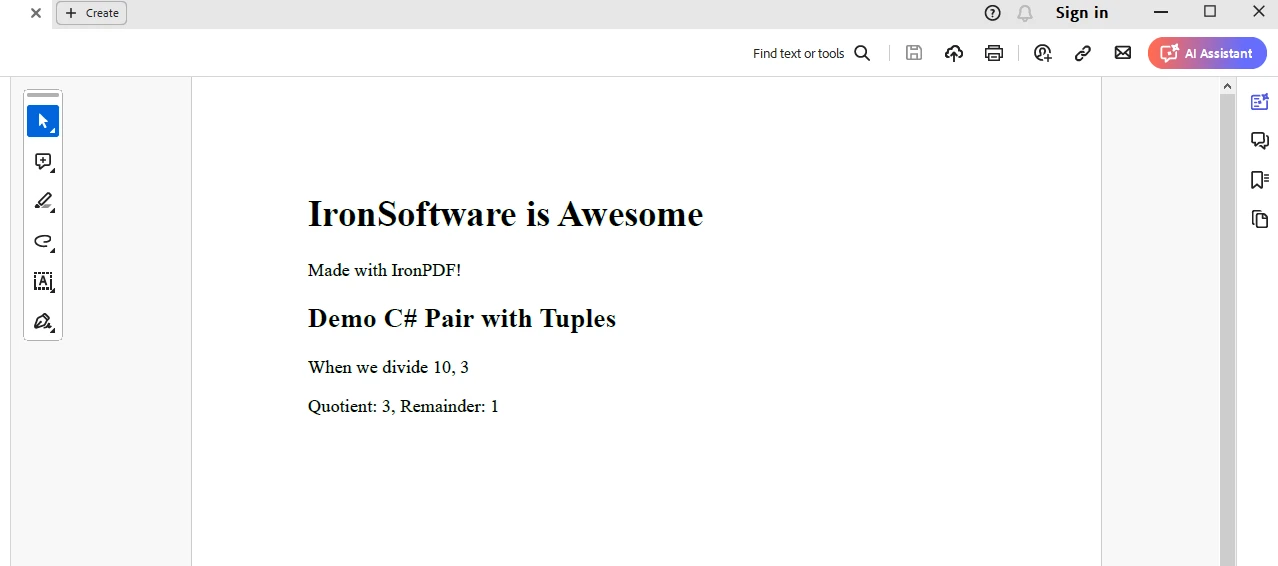
IronPDF 체험판 라이선스를 받아 appsettings.json에 라이선스를 배치하세요.
{
    "IronPdf.LicenseKey": "<Your Key>"
}이 기사에서는 C#에서 페어와 Pair 클래스의 중요성 개념을 탐구했습니다. 일상적인 프로그래밍 작업에서 그 유용성과 다목성을 입증하는 다양한 사용 사례와 함께 Pair 커스텀 클래스의 간단한 구현을 제공했습니다.
좌표 작업, 메서드에서 여러 값을 반환, 키-값 연결 저장 등 작업을 할 때 Pair 클래스는 프로그래밍 기술에 큰 도움이 될 수 있습니다.
이 외에도 IronPDF 라이브러리 기능성은 개발자가 애플리케이션에서 필요에 따라 PDF 문서를 즉시 생성하기에 좋은 추가 기술입니다.

제이콥 멜러는 Iron Software의 최고 기술 책임자(CTO)이자 C# PDF 기술을 개척한 선구적인 엔지니어입니다. Iron Software의 핵심 코드베이스를 최초로 개발한 그는 창립 초기부터 회사의 제품 아키텍처를 설계해 왔으며, CEO인 캐머런 리밍턴과 함께 회사를 NASA, 테슬라, 그리고 전 세계 정부 기관에 서비스를 제공하는 50명 이상의 직원을 보유한 기업으로 성장시켰습니다.



IronPDF는 IRON SUITE 의 일부입니다.
10개의 .NET API 제품, 당신의 사무 문서를 위해

PDF 파일을 HTML처럼 빠르게 변환해야 할 때.


