


C# Pair Class(開発者向けの動作方法)

ペアは、2つの関連した値を保持する単純なデータ構造です。 この構造は、2つの異なるデータを一緒にまとめるための便利な方法を提供します。 ペアは、メソッドが2つの値を返す必要がある場合や、キーと値の組み合わせを扱う場合によく使用されます。
C# では、開発者は値のペアリングにタプル (Tuple<T1, T2>) を使用することが多いです。 しかし、タプルは不変であり、その要素に Item1 や Item2 のようなプロパティを介してアクセスするため、頻繁に使用されるとコードの可読性が低下する可能性があります。 このような場合には、カスタムのペアクラスが便利です。
もし、2つの関連するオブジェクトを保持するための構造が必要であり、データの隠蔽が優先されない場合は、コード内でペアクラスを利用できます。 ペアクラスは、オブジェクトの参照をカプセル化しません。 代わりに、呼び出しコードすべてに対して、公開クラスフィールドとして直接それらを公開します。
この設計選択により、カプセル化のオーバーヘッドなしに格納されたオブジェクトへの直接的なアクセスが可能になります。 また、記事の終わりで、IronPDF for PDF GenerationがどのようにしてPDFドキュメントを生成するために使用できるかを探ります。
タプル
C# 7.0では、タプル構文が改善され、タプルをより扱いやすくしました。 こちらがタプルを宣言し、初期化する方法です:
// Tuple declaration
var person = (name: "John", age: 30);

// Accessing tuple elements using named properties
Console.WriteLine($"Name: {person.name}, Age: {person.age}");

// Tuple deconstruction
var (name, age) = person;
Console.WriteLine($"Name: {name}, Age: {age}");
// Tuple declaration
var person = (name: "John", age: 30);
// Accessing tuple elements using named properties
Console.WriteLine($"Name: {person.name}, Age: {person.age}");
// Tuple deconstruction
var (name, age) = person;
Console.WriteLine($"Name: {name}, Age: {age}");' Tuple declaration
Dim person = (name:= "John", age:= 30)
' Accessing tuple elements using named properties
Console.WriteLine($"Name: {person.name}, Age: {person.age}")
' Tuple deconstruction
'INSTANT VB TODO TASK: VB has no equivalent to C# deconstruction declarations:
var(name, age) = person
Console.WriteLine($"Name: {name}, Age: {age}")タプルの利点
簡潔な構文
タプルは、カスタムクラスや構造体を定義することなく、簡潔な構文を使用して複雑なデータ構造を表現できます。
軽量
タプルは軽量なデータ構造であり、一時的または中間的なデータストレージが必要なシナリオに適しています。
暗黙的な命名
タプル構文を使用すると、タプル要素を暗黙的に命名でき、コードの可読性を高め、コメントの必要性を減らします。
メソッドからの複数の値の返却
public (int Quotient, int Remainder) Divide(int dividend, int divisor)
{
    int quotient = dividend / divisor;
    int remainder = dividend % divisor;
    return (quotient, remainder);
}

var result = Divide(10, 3);
Console.WriteLine($"Quotient: {result.Quotient}, Remainder: {result.Remainder}");
public (int Quotient, int Remainder) Divide(int dividend, int divisor)
{
int quotient = dividend / divisor;
int remainder = dividend % divisor;
return (quotient, remainder);
}
var result = Divide(10, 3);
Console.WriteLine($"Quotient: {result.Quotient}, Remainder: {result.Remainder}");Public Function Divide(ByVal dividend As Integer, ByVal divisor As Integer) As (Quotient As Integer, Remainder As Integer)
Dim quotient As Integer = dividend \ divisor
Dim remainder As Integer = dividend Mod divisor
Return (quotient, remainder)
End Function
Private result = Divide(10, 3)
Console.WriteLine($"Quotient: {result.Quotient}, Remainder: {result.Remainder}")メソッドシグネチャの簡素化
public (string Name, string Surname) GetNameAndSurname()
{
    // Retrieve name and surname from a data source
    return ("John", "Doe");
}

var (name, surname) = GetNameAndSurname();
Console.WriteLine($"Name: {name}, Surname: {surname}");
public (string Name, string Surname) GetNameAndSurname()
{
// Retrieve name and surname from a data source
return ("John", "Doe");
}
var (name, surname) = GetNameAndSurname();
Console.WriteLine($"Name: {name}, Surname: {surname}");Public Function GetNameAndSurname() As (Name As String, Surname As String)
' Retrieve name and surname from a data source
Return ("John", "Doe")
End Function
'INSTANT VB TODO TASK: VB has no equivalent to C# deconstruction declarations:
var(name, surname) = GetNameAndSurname()
Console.WriteLine($"Name: {name}, Surname: {surname}")関連データのグループ化
var point = (x: 10, y: 20);
var color = (r: 255, g: 0, b: 0);
var person = (name: "Alice", age: 25);
var point = (x: 10, y: 20);
var color = (r: 255, g: 0, b: 0);
var person = (name: "Alice", age: 25);Dim point = (x:= 10, y:= 20)
Dim color = (r:= 255, g:= 0, b:= 0)
Dim person = (name:= "Alice", age:= 25)制限と考慮事項
C# 7.0のタプルは重要な利点を提供しますが、考慮すべき制限と注意点があります:
- カスタムクラスや構造体と比べて、タプルは表現力に制限があります。
- 明示的な名前が提供されていない場合、タプル要素はItem1、Item2などを使用してアクセスされ、コードの可読性が低下する可能性があります。
カスタムペアクラス
public class Pair<T1, T2>
{
    public T1 First { get; set; }
    public T2 Second { get; set; }

    // Constructor to initialize the pair
    public Pair(T1 first, T2 second)
    {
        First = first;
        Second = second;
    }
}
public class Pair<T1, T2>
{
public T1 First { get; set; }
public T2 Second { get; set; }
// Constructor to initialize the pair
public Pair(T1 first, T2 second)
{
First = first;
Second = second;
}
}Public Class Pair(Of T1, T2)
Public Property First() As T1
Public Property Second() As T2
' Constructor to initialize the pair
Public Sub New(ByVal first As T1, ByVal second As T2)
Me.First = first
Me.Second = second
End Sub
End Classこのクラスでは、使用時に型が定義され、2つのプロパティは公開プロパティとして公開されます。
ペアクラスの使用
次に、ペアクラスが有益であるいくつかの一般的な使用例を探索しましょう:
1. 座標の保管
// Creating a new instance of the Pair class to store coordinates
Pair<int, int> coordinates = new Pair<int, int>(10, 20);
Console.WriteLine($"X: {coordinates.First}, Y: {coordinates.Second}");
// Creating a new instance of the Pair class to store coordinates
Pair<int, int> coordinates = new Pair<int, int>(10, 20);
Console.WriteLine($"X: {coordinates.First}, Y: {coordinates.Second}");' Creating a new instance of the Pair class to store coordinates
Dim coordinates As New Pair(Of Integer, Integer)(10, 20)
Console.WriteLine($"X: {coordinates.First}, Y: {coordinates.Second}")2. メソッドからの複数の値の返却
// Method returning a Pair, representing both quotient and remainder
public Pair<int, int> Divide(int dividend, int divisor)
{
    int quotient = dividend / divisor;
    int remainder = dividend % divisor;
    return new Pair<int, int>(quotient, remainder);
}

// Usage
Pair<int, int> result = Divide(10, 3);
Console.WriteLine($"Quotient: {result.First}, Remainder: {result.Second}");
// Method returning a Pair, representing both quotient and remainder
public Pair<int, int> Divide(int dividend, int divisor)
{
int quotient = dividend / divisor;
int remainder = dividend % divisor;
return new Pair<int, int>(quotient, remainder);
}
// Usage
Pair<int, int> result = Divide(10, 3);
Console.WriteLine($"Quotient: {result.First}, Remainder: {result.Second}");' Method returning a Pair, representing both quotient and remainder
Public Function Divide(ByVal dividend As Integer, ByVal divisor As Integer) As Pair(Of Integer, Integer)
Dim quotient As Integer = dividend \ divisor
Dim remainder As Integer = dividend Mod divisor
Return New Pair(Of Integer, Integer)(quotient, remainder)
End Function
' Usage
Private result As Pair(Of Integer, Integer) = Divide(10, 3)
Console.WriteLine($"Quotient: {result.First}, Remainder: {result.Second}")3. キーと値のペアの保管
// Storing a key-value pair
Pair<string, int> keyValue = new Pair<string, int>("Age", 30);
Console.WriteLine($"Key: {keyValue.First}, Value: {keyValue.Second}");
// Storing a key-value pair
Pair<string, int> keyValue = new Pair<string, int>("Age", 30);
Console.WriteLine($"Key: {keyValue.First}, Value: {keyValue.Second}");' Storing a key-value pair
Dim keyValue As New Pair(Of String, Integer)("Age", 30)
Console.WriteLine($"Key: {keyValue.First}, Value: {keyValue.Second}")キーと値のペア
キーと値のペアは、データを関連付けるための簡単で効率的な方法を提供します。 C# では、キーと値のペアを操作するための主なツールは、多用途で強力なコレクション型である Dictionary<TKey, TValue> クラスです。
キーと値のペアの理解
キーと値のペアは、一意なキーと値を関連付けるデータ構造です。 この関連付けにより、ユニークな識別子に基づいてデータを効率的に取得および操作できます。 C#では、キーと値のペアがキャッシング、設定管理、データストレージなどのタスクによく使用されます。
Dictionary<TKey, TValue> in C
C# の Dictionary<TKey, TValue> クラスは、キーと値のペアを格納する汎用コレクションです。 キーに基づく高速な検索を提供し、関連データの管理に広く使用されています。
辞書の作成と充填
Dictionary<string, int> ages = new Dictionary<string, int>
{
    { "Alice", 30 },
    { "Bob", 35 },
    { "Charlie", 25 }
};
Dictionary<string, int> ages = new Dictionary<string, int>
{
{ "Alice", 30 },
{ "Bob", 35 },
{ "Charlie", 25 }
};Dim ages As New Dictionary(Of String, Integer) From {
{"Alice", 30},
{"Bob", 35},
{"Charlie", 25}
}キーによる値へのアクセス
// Directly access a value by its key
Console.WriteLine($"Alice's age: {ages["Alice"]}");
// Directly access a value by its key
Console.WriteLine($"Alice's age: {ages["Alice"]}");' Directly access a value by its key
Console.WriteLine($"Alice's age: {ages("Alice")}")キーと値のペアの反復処理
// Iterate over all key-value pairs in the dictionary
foreach (var pair in ages)
{
    Console.WriteLine($"Name: {pair.Key}, Age: {pair.Value}");
}
// Iterate over all key-value pairs in the dictionary
foreach (var pair in ages)
{
Console.WriteLine($"Name: {pair.Key}, Age: {pair.Value}");
}' Iterate over all key-value pairs in the dictionary
For Each pair In ages
Console.WriteLine($"Name: {pair.Key}, Age: {pair.Value}")
Next pair高度なシナリオ
不足したキーの処理
if (ages.TryGetValue("David", out int age))
{
    Console.WriteLine($"David's age: {age}");
}
else
{
    Console.WriteLine("David's age is not available.");
}
if (ages.TryGetValue("David", out int age))
{
Console.WriteLine($"David's age: {age}");
}
else
{
Console.WriteLine("David's age is not available.");
}Dim age As Integer
If ages.TryGetValue("David", age) Then
Console.WriteLine($"David's age: {age}")
Else
Console.WriteLine("David's age is not available.")
End Ifエントリの削除
// Remove an entry given its key
ages.Remove("Charlie");
// Remove an entry given its key
ages.Remove("Charlie");' Remove an entry given its key
ages.Remove("Charlie")辞書の初期化
// Initialize a dictionary with color codes
var colors = new Dictionary<string, string>
{
    { "red", "#FF0000" },
    { "green", "#00FF00" },
    { "blue", "#0000FF" }
};
// Initialize a dictionary with color codes
var colors = new Dictionary<string, string>
{
{ "red", "#FF0000" },
{ "green", "#00FF00" },
{ "blue", "#0000FF" }
};' Initialize a dictionary with color codes
Dim colors = New Dictionary(Of String, String) From {
{"red", "#FF0000"},
{"green", "#00FF00"},
{"blue", "#0000FF"}
}辞書を超えて:代替案と考慮事項
Dictionary<TKey, TValue> は強力なツールですが、代替のアプローチや考慮事項はアプリケーションの特定の要件によって異なります。
ConcurrentDictionary<TKey, TValue>: アプリケーションで複数のスレッドからディクショナリへのスレッドセーフなアクセスが必要な場合は、ConcurrentDictionary<TKey, TValue>の使用を検討してください。ImmutableDictionary<TKey, TValue>: 不変性が求められるシナリオでは、System.Collections.Immutable名前空間のImmutableDictionary<TKey, TValue>が不変のキーと値のコレクションを提供します。- カスタムキーと値のペアクラス:追加の機能または特定の動作が必要な場合、特定の要件に合わせたカスタムキーと値のペアクラスを作成することを検討してください。
IronPDFライブラリ
Iron Software ProductsによるIronPDFは、PDFドキュメントを生成するための実用的なライブラリです。 使いやすく効率的なAPIを提供します。
IronPDF は HTML から PDF への変換に秀でており、元のレイアウトとスタイルを正確に保存します。 これは、レポート、請求書、ドキュメントなどの Web ベースのコンテンツから PDF を作成するのに最適です。 HTML ファイル、URL、または生の HTML 文字列のサポートにより、IronPDF は高品質な PDF ドキュメントを簡単に生成します。
using IronPdf;

class Program
{
    static void Main(string[] args)
    {
        var renderer = new ChromePdfRenderer();

        // 1. Convert HTML String to PDF
        var htmlContent = "<h1>Hello, IronPDF!</h1><p>This is a PDF from an HTML string.</p>";
        var pdfFromHtmlString = renderer.RenderHtmlAsPdf(htmlContent);
        pdfFromHtmlString.SaveAs("HTMLStringToPDF.pdf");

        // 2. Convert HTML File to PDF
        var htmlFilePath = "path_to_your_html_file.html"; // Specify the path to your HTML file
        var pdfFromHtmlFile = renderer.RenderHtmlFileAsPdf(htmlFilePath);
        pdfFromHtmlFile.SaveAs("HTMLFileToPDF.pdf");

        // 3. Convert URL to PDF
        var url = "http://ironpdf.com"; // Specify the URL
        var pdfFromUrl = renderer.RenderUrlAsPdf(url);
        pdfFromUrl.SaveAs("URLToPDF.pdf");
    }
}
using IronPdf;
class Program
{
static void Main(string[] args)
{
var renderer = new ChromePdfRenderer();
// 1. Convert HTML String to PDF
var htmlContent = "<h1>Hello, IronPDF!</h1><p>This is a PDF from an HTML string.</p>";
var pdfFromHtmlString = renderer.RenderHtmlAsPdf(htmlContent);
pdfFromHtmlString.SaveAs("HTMLStringToPDF.pdf");
// 2. Convert HTML File to PDF
var htmlFilePath = "path_to_your_html_file.html"; // Specify the path to your HTML file
var pdfFromHtmlFile = renderer.RenderHtmlFileAsPdf(htmlFilePath);
pdfFromHtmlFile.SaveAs("HTMLFileToPDF.pdf");
// 3. Convert URL to PDF
var url = "http://ironpdf.com"; // Specify the URL
var pdfFromUrl = renderer.RenderUrlAsPdf(url);
pdfFromUrl.SaveAs("URLToPDF.pdf");
}
}Imports IronPdf
Friend Class Program
Shared Sub Main(ByVal args() As String)
Dim renderer = New ChromePdfRenderer()
' 1. Convert HTML String to PDF
Dim htmlContent = "<h1>Hello, IronPDF!</h1><p>This is a PDF from an HTML string.</p>"
Dim pdfFromHtmlString = renderer.RenderHtmlAsPdf(htmlContent)
pdfFromHtmlString.SaveAs("HTMLStringToPDF.pdf")
' 2. Convert HTML File to PDF
Dim htmlFilePath = "path_to_your_html_file.html" ' Specify the path to your HTML file
Dim pdfFromHtmlFile = renderer.RenderHtmlFileAsPdf(htmlFilePath)
pdfFromHtmlFile.SaveAs("HTMLFileToPDF.pdf")
' 3. Convert URL to PDF
Dim url = "http://ironpdf.com" ' Specify the URL
Dim pdfFromUrl = renderer.RenderUrlAsPdf(url)
pdfFromUrl.SaveAs("URLToPDF.pdf")
End Sub
End ClassIronPDFはNuGetパッケージマネージャからインストールできます。
Install-Package IronPdf
またはVisual Studioから次のようにインストールできます。

タプルの例でドキュメントを生成するには、次のコードを使用できます。
using IronPdf;

namespace IronPatterns
{
    class Program
    {
        static void Main()
        {
            Console.WriteLine("-----------Iron Software-------------");
            var renderer = new ChromePdfRenderer(); // var pattern
            var content = "<h1>Iron Software is Awesome</h1> Made with IronPDF!";
            content += "<h2>Demo C# Pair with Tuples</h2>";

            var result = Divide(10, 3);
            Console.WriteLine($"Quotient: {result.Item1}, Remainder: {result.Item2}");
            content += $"<p>When we divide 10 by 3:</p>";
            content += $"<p>Quotient: {result.Item1}, Remainder: {result.Item2}</p>";

            var pdf = renderer.RenderHtmlAsPdf(content);
            pdf.SaveAs("output.pdf"); // Saves PDF
        }

        // Method to demonstrate division using tuples
        public static (int Quotient, int Remainder) Divide(int dividend, int divisor)
        {
            int quotient = dividend / divisor;
            int remainder = dividend % divisor;
            return (quotient, remainder);
        }
    }
}
using IronPdf;
namespace IronPatterns
{
class Program
{
static void Main()
{
Console.WriteLine("-----------Iron Software-------------");
var renderer = new ChromePdfRenderer(); // var pattern
var content = "<h1>Iron Software is Awesome</h1> Made with IronPDF!";
content += "<h2>Demo C# Pair with Tuples</h2>";
var result = Divide(10, 3);
Console.WriteLine($"Quotient: {result.Item1}, Remainder: {result.Item2}");
content += $"<p>When we divide 10 by 3:</p>";
content += $"<p>Quotient: {result.Item1}, Remainder: {result.Item2}</p>";
var pdf = renderer.RenderHtmlAsPdf(content);
pdf.SaveAs("output.pdf"); // Saves PDF
}
// Method to demonstrate division using tuples
public static (int Quotient, int Remainder) Divide(int dividend, int divisor)
{
int quotient = dividend / divisor;
int remainder = dividend % divisor;
return (quotient, remainder);
}
}
}Imports IronPdf
Namespace IronPatterns
Friend Class Program
Shared Sub Main()
Console.WriteLine("-----------Iron Software-------------")
Dim renderer = New ChromePdfRenderer() ' var pattern
Dim content = "<h1>Iron Software is Awesome</h1> Made with IronPDF!"
content &= "<h2>Demo C# Pair with Tuples</h2>"
Dim result = Divide(10, 3)
Console.WriteLine($"Quotient: {result.Item1}, Remainder: {result.Item2}")
content &= $"<p>When we divide 10 by 3:</p>"
content &= $"<p>Quotient: {result.Item1}, Remainder: {result.Item2}</p>"
Dim pdf = renderer.RenderHtmlAsPdf(content)
pdf.SaveAs("output.pdf") ' Saves PDF
End Sub
' Method to demonstrate division using tuples
Public Shared Function Divide(ByVal dividend As Integer, ByVal divisor As Integer) As (Quotient As Integer, Remainder As Integer)
Dim quotient As Integer = dividend \ divisor
Dim remainder As Integer = dividend Mod divisor
Return (quotient, remainder)
End Function
End Class
End Namespace出力
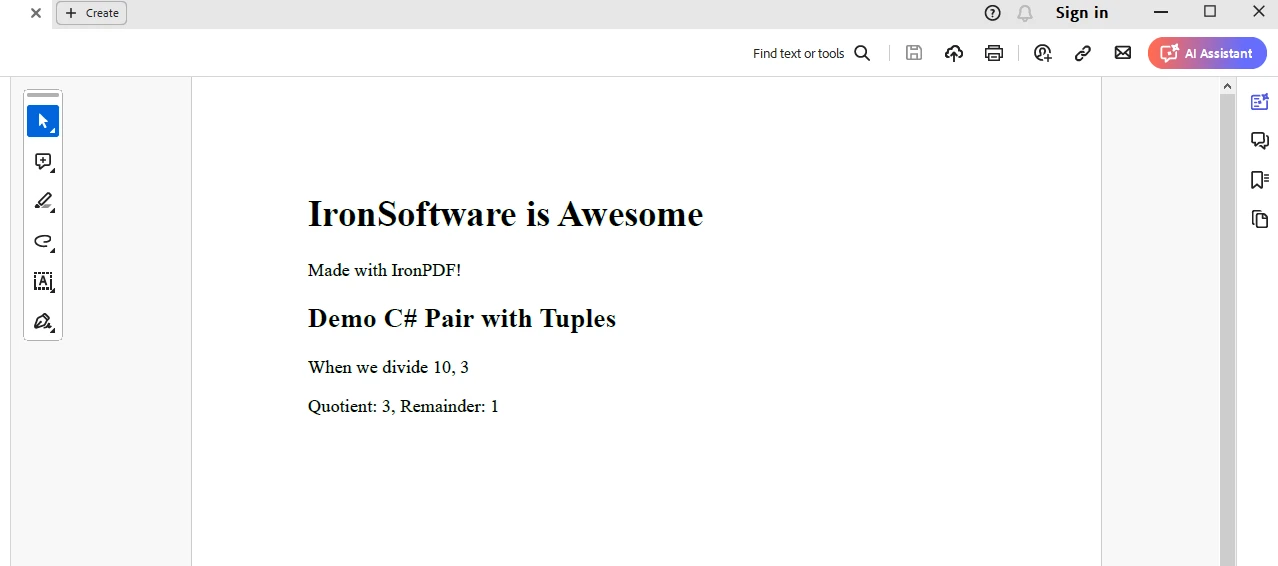
IronPDFのトライアルライセンス
IronPDF試用ライセンスを取得し、ライセンスを appsettings.json に配置します。
{
    "IronPdf.LicenseKey": "<Your Key>"
}
結論
この記事では、ペアの概念と、C# で Pair クラスを持つことの重要性について説明しました。Pair カスタムクラスのシンプルな実装と、日常のプログラミングタスクにおけるその汎用性と有用性を示すさまざまな使用例を示しました。
座標の作業、メソッドからの複数の値の返却、キーと値の関連付けの保管であれ、ペアクラスは貴重な追加になります。
加えて、IronPDFライブラリの機能は、アプリケーションで必要に応じてPDFドキュメントを生成するための開発者のための優れた組み合わせのスキルセットです。
よくある質問
C#のペアクラスとは何ですか?
C#のペアクラスは、2つの関連する値を保持するように設計されたシンプルなデータ構造です。そのプロパティを公開フィールドとして簡単にアクセスすることができ、カプセル化が優先されない場合には、タプルの便利な代替手段となります。
PairクラスはC#のTupleとどのように異なりますか?
ペアクラスは、オブジェクト参照を公開フィールドを通じて直接公開し、可読性と柔軟性を高めます。一方、タプルは不変であり、Item1やItem2のようなプロパティを通じて要素にアクセスします。
ペアクラスを使用する利点はタプルと比べて何ですか?
ペアクラスを使用する利点には、Item1やItem2ではなく記述的なプロパティ名を使用することでコードの可読性が向上し、ペアは変更可能であるために値を変更できる点があります。
ペアクラスを使ってキーと値のペアを保存できますか?
はい、ペアクラスはキーと値のペアをタプルと比較してより可読性の高い方法で保存する場合に特に有用です。
C#でペアクラスを使用する一般的なシナリオは何ですか?
ペアクラスを使用する一般的なシナリオには、座標の保存、メソッドからの複数の値の返却、および可読形式でのキーと値のペアの管理が含まれます。
開発者がIronPDFライブラリを使用する理由は何ですか?
開発者は、HTMLコンテンツからPDFを生成するためにIronPDFライブラリを使用することを選ぶかもしれません。それにより、元のレイアウトとスタイルが保持され、レポートや請求書などのプロフェッショナルな文書の作成が簡素化されます。
C#でHTMLファイルからPDFを生成するにはどうすればよいですか?
C#でHTMLファイルからPDFを生成するには、IronPDFライブラリを使用します。それは、RenderHtmlAsPdfなどのメソッドを提供しており、HTML文字列やファイルを高品質のPDF文書に変換します。
PDF生成のためのライブラリを使用する利点は何ですか?
IronPDFのようなライブラリを使用することで、様々なコンテンツソースから正確なレイアウトとスタイルの保持を保証し、高品質のPDFドキュメントの作成プロセスを簡素化します。
ペアクラスとIronPDFライブラリは、開発者のツールキットでどのような役割を果たしますか?
ペアクラスとIronPDFライブラリは、ペアを使用して効率的なデータ構造管理を提供し、IronPDFにより信頼性のあるドキュメント生成機能を提供することで、複雑なデータとドキュメントワークフローを扱う上で貴重です。



















 無料で始めましょう
 無料で始めましょう
 無料ライブデモを予約





 クレジットカードやアカウントの作成は不要です。










