DuckDB.NET to dostawca open source powiązań .NET dla biblioteki natywnej DuckDB, zaprojektowany w celu płynnej integracji z C#. Zapewnia dostawcę ADO.NET, ułatwiając korzystanie z DuckDB, biblioteki powiązań niskiego poziomu, w aplikacjach .NET. Ten pakiet jest idealny dla programistów, którzy chcą wykorzystać potężne możliwości analityczne DuckDB w środowisku C#.
Instalacja
Instalacja DuckDB.NET jest prosta. Możesz dodać go do swojego projektu za pomocą .NET CLI:
dotnet add package DuckDB.NET.Data.Full
dotnet add package DuckDB.NET.Data.Full
SHELL
Alternatywnie można zainstalować go za pomocą menedżera pakietów NuGet w Visual Studio.
Podstawowe zastosowanie
Po zainstalowaniu możesz zacząć używać DuckDB.NET do wykonywania zapytań SQL w swojej aplikacji C#. Oto prosty przykład:
using System;
using DuckDB.NET.Data;

class Program
{
    static void Main()
    {
        // Create and open a connection to an in-memory DuckDB database
        using var duckdbconnection = new DuckDBConnection("Data Source=:memory:");
        duckdbconnection.Open();

        // Create a command associated with the connection
        using var command = duckdbconnection.CreateCommand();
        // Create a table named 'integers'
        command.CommandText = "CREATE TABLE integers(foo INTEGER, bar INTEGER);";
        command.ExecuteNonQuery();

        // Insert some data into the 'integers' table
        command.CommandText = "INSERT INTO integers VALUES (3, 4), (5, 6), (7, 8);";
        command.ExecuteNonQuery();

        // Retrieve the count of rows in the 'integers' table
        command.CommandText = "SELECT count(*) FROM integers";
        var executeScalar = command.ExecuteScalar();

        // Select all values from the 'integers' table
        command.CommandText = "SELECT foo, bar FROM integers;";

        // Execute the query and process the results
        using var reader = command.ExecuteReader();
        while (reader.Read())
        {
            Console.WriteLine($"{reader.GetInt32(0)}, {reader.GetInt32(1)}");
        }
    }
}
using System;
using DuckDB.NET.Data;

class Program
{
    static void Main()
    {
        // Create and open a connection to an in-memory DuckDB database
        using var duckdbconnection = new DuckDBConnection("Data Source=:memory:");
        duckdbconnection.Open();

        // Create a command associated with the connection
        using var command = duckdbconnection.CreateCommand();
        // Create a table named 'integers'
        command.CommandText = "CREATE TABLE integers(foo INTEGER, bar INTEGER);";
        command.ExecuteNonQuery();

        // Insert some data into the 'integers' table
        command.CommandText = "INSERT INTO integers VALUES (3, 4), (5, 6), (7, 8);";
        command.ExecuteNonQuery();

        // Retrieve the count of rows in the 'integers' table
        command.CommandText = "SELECT count(*) FROM integers";
        var executeScalar = command.ExecuteScalar();

        // Select all values from the 'integers' table
        command.CommandText = "SELECT foo, bar FROM integers;";

        // Execute the query and process the results
        using var reader = command.ExecuteReader();
        while (reader.Read())
        {
            Console.WriteLine($"{reader.GetInt32(0)}, {reader.GetInt32(1)}");
        }
    }
}
Imports System
Imports DuckDB.NET.Data
Module Program
Sub Main()
' Create and open a connection to an in-memory DuckDB database
Using duckdbconnection As New DuckDBConnection("Data Source=:memory:")
duckdbconnection.Open()
' Create a command associated with the connection
Using command = duckdbconnection.CreateCommand()
' Create a table named 'integers'
command.CommandText = "CREATE TABLE integers(foo INTEGER, bar INTEGER);"
command.ExecuteNonQuery()
' Insert some data into the 'integers' table
command.CommandText = "INSERT INTO integers VALUES (3, 4), (5, 6), (7, 8);"
command.ExecuteNonQuery()
' Retrieve the count of rows in the 'integers' table
command.CommandText = "SELECT count(*) FROM integers"
Dim executeScalar = command.ExecuteScalar()
' Select all values from the 'integers' table
command.CommandText = "SELECT foo, bar FROM integers;"
' Execute the query and process the results
Using reader = command.ExecuteReader()
While reader.Read()
Console.WriteLine($"{reader.GetInt32(0)}, {reader.GetInt32(1)}")
End While
End Using
End Using
End Using
End Sub
End Module
Imports System
Imports DuckDB.NET.Data

Module Program
    Sub Main()
        ' Create and open a connection to an in-memory DuckDB database
        Using duckdbconnection As New DuckDBConnection("Data Source=:memory:")
            duckdbconnection.Open()

            ' Create a command associated with the connection
            Using command = duckdbconnection.CreateCommand()
                ' Create a table named 'integers'
                command.CommandText = "CREATE TABLE integers(foo INTEGER, bar INTEGER);"
                command.ExecuteNonQuery()

                ' Insert some data into the 'integers' table
                command.CommandText = "INSERT INTO integers VALUES (3, 4), (5, 6), (7, 8);"
                command.ExecuteNonQuery()

                ' Retrieve the count of rows in the 'integers' table
                command.CommandText = "SELECT count(*) FROM integers"
                Dim executeScalar = command.ExecuteScalar()

                ' Select all values from the 'integers' table
                command.CommandText = "SELECT foo, bar FROM integers;"

                ' Execute the query and process the results
                Using reader = command.ExecuteReader()
                    While reader.Read()
                        Console.WriteLine($"{reader.GetInt32(0)}, {reader.GetInt32(1)}")
                    End While
                End Using
            End Using
        End Using
    End Sub
End Module
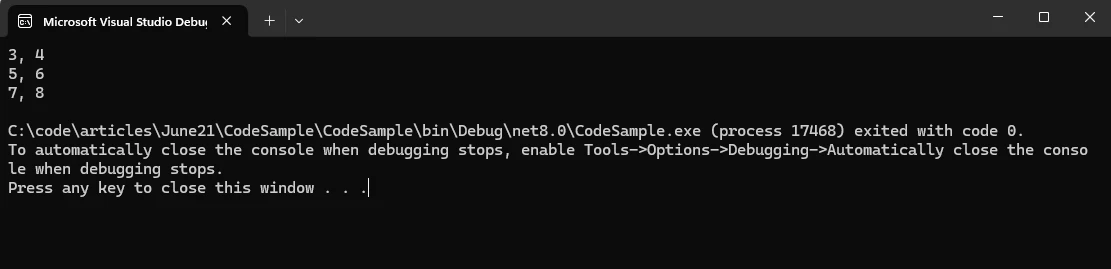
Ten przykład pokazuje, jak utworzyć tabelę, wstawić dane i wyszukiwać dane przy użyciu DuckDB.NET.
Wynik
Pobieranie danych
DuckDB.NET obsługuje odczyt danych z różnych formatów, w tym plików CSV i Parquet. Oto jak można odczytać dane z pliku CSV:
command.CommandText = "COPY integers FROM 'example.csv' (FORMAT CSV);";
command.ExecuteNonQuery();
command.CommandText = "COPY integers FROM 'example.csv' (FORMAT CSV);";
command.ExecuteNonQuery();
command.CommandText = "COPY integers FROM 'example.csv' (FORMAT CSV)"
command.ExecuteNonQuery()
command.CommandText = "COPY integers FROM 'example.csv' (FORMAT CSV)"
command.ExecuteNonQuery()
Integracja z DataFrames
DuckDB.NET może również integrować się z ramkami danych, umożliwiając manipulowanie danymi przy użyciu znanej składni SQL. Jest to szczególnie przydatne w zadaniach związanych z analizą danych.
Konwersja wyników
Wyniki zapytań można konwertować do różnych formatów, takich jak listy lub obiekty niestandardowe, co ułatwia pracę z danymi w aplikacji:
var results = new List<(int foo, int bar)>();

// Read and store results to a List
while (reader.Read())
{
    results.Add((reader.GetInt32(0), reader.GetInt32(1)));
    // You can also use a loop with an index to iterate the results
}
var results = new List<(int foo, int bar)>();

// Read and store results to a List
while (reader.Read())
{
    results.Add((reader.GetInt32(0), reader.GetInt32(1)));
    // You can also use a loop with an index to iterate the results
}
Dim results = New List(Of (foo As Integer, bar As Integer))()
' Read and store results to a List
Do While reader.Read()
results.Add((reader.GetInt32(0), reader.GetInt32(1)))
' You can also use a loop with an index to iterate the results
Loop
Dim results = New List(Of (foo As Integer, bar As Integer))()

' Read and store results to a List
Do While reader.Read()
	results.Add((reader.GetInt32(0), reader.GetInt32(1)))
	' You can also use a loop with an index to iterate the results
Loop
Zapisywanie danych na dysku
DuckDB.NET obsługuje zapis danych na dysku w różnych formatach. Możesz użyć instrukcji COPY, aby wyeksportować dane do pliku CSV:
command.CommandText = "COPY integers TO 'output.csv' (FORMAT CSV);";
command.ExecuteNonQuery();
command.CommandText = "COPY integers TO 'output.csv' (FORMAT CSV);";
command.ExecuteNonQuery();
command.CommandText = "COPY integers TO 'output.csv' (FORMAT CSV)"
command.ExecuteNonQuery()
command.CommandText = "COPY integers TO 'output.csv' (FORMAT CSV)"
command.ExecuteNonQuery()
Wprowadzenie do IronPDF
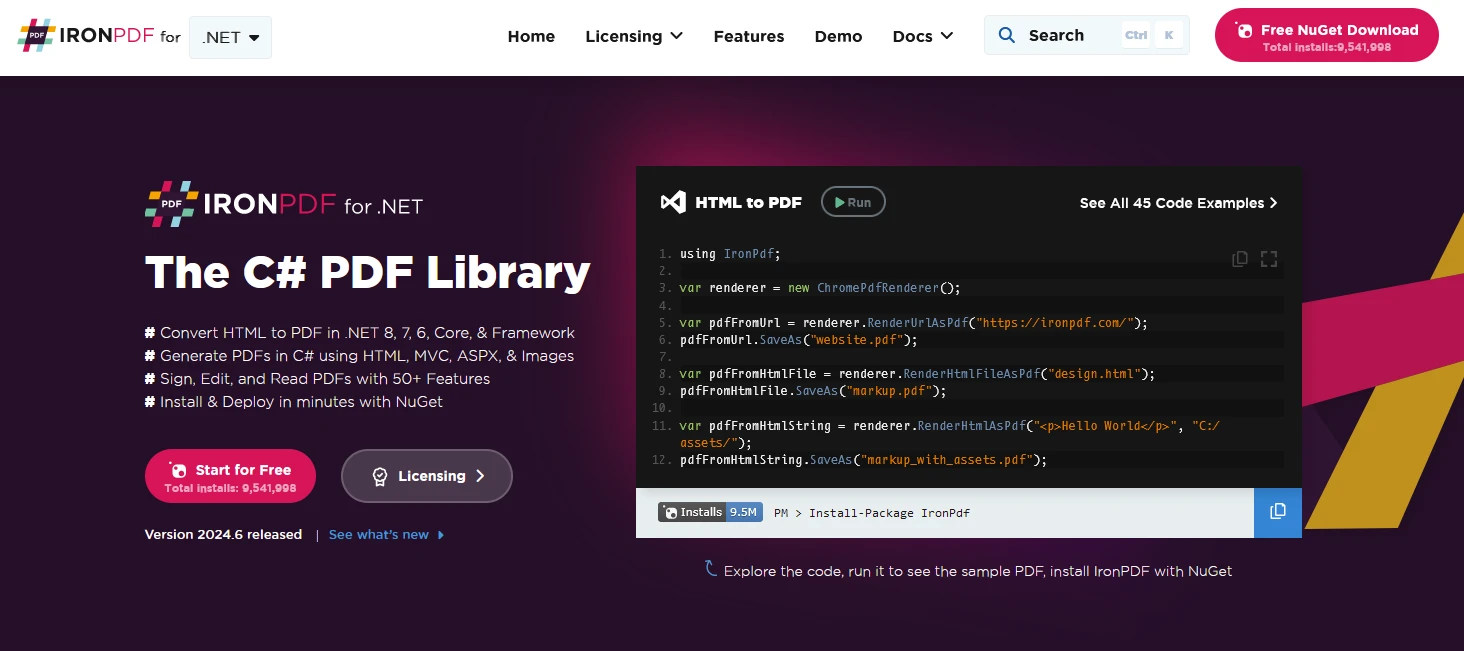
IronPDF to biblioteka PDF w języku C#, która umożliwia generowanie, zarządzanie i wyodrębnianie treści z dokumentów PDF w projektach .NET. Oto kilka kluczowych funkcji:
IronPDF to przydatne narzędzie, które pozwala konwertować strony internetowe, adresy URL i kod HTML do formatu PDF. A co najlepsze? Pliki PDF wyglądają dokładnie tak samo jak oryginalne strony internetowe – zachowują całe formatowanie i styl. Jeśli więc chcesz utworzyć plik PDF na podstawie treści internetowej, takiej jak raport lub faktura, IronPDF jest idealnym rozwiązaniem.
using IronPdf;

class Program
{
    static void Main(string[] args)
    {
        var renderer = new ChromePdfRenderer();

        // 1. Convert HTML String to PDF
        var htmlContent = "<h1>Hello, IronPDF!</h1><p>This is a PDF from an HTML string.</p>";
        var pdfFromHtmlString = renderer.RenderHtmlAsPdf(htmlContent);
        pdfFromHtmlString.SaveAs("HTMLStringToPDF.pdf");

        // 2. Convert HTML File to PDF
        var htmlFilePath = "path_to_your_html_file.html"; // Specify the path to your HTML file
        var pdfFromHtmlFile = renderer.RenderHtmlFileAsPdf(htmlFilePath);
        pdfFromHtmlFile.SaveAs("HTMLFileToPDF.pdf");

        // 3. Convert URL to PDF
        var url = "http://ironpdf.com"; // Specify the URL
        var pdfFromUrl = renderer.RenderUrlAsPdf(url);
        pdfFromUrl.SaveAs("URLToPDF.pdf");
    }
}
using IronPdf;

class Program
{
    static void Main(string[] args)
    {
        var renderer = new ChromePdfRenderer();

        // 1. Convert HTML String to PDF
        var htmlContent = "<h1>Hello, IronPDF!</h1><p>This is a PDF from an HTML string.</p>";
        var pdfFromHtmlString = renderer.RenderHtmlAsPdf(htmlContent);
        pdfFromHtmlString.SaveAs("HTMLStringToPDF.pdf");

        // 2. Convert HTML File to PDF
        var htmlFilePath = "path_to_your_html_file.html"; // Specify the path to your HTML file
        var pdfFromHtmlFile = renderer.RenderHtmlFileAsPdf(htmlFilePath);
        pdfFromHtmlFile.SaveAs("HTMLFileToPDF.pdf");

        // 3. Convert URL to PDF
        var url = "http://ironpdf.com"; // Specify the URL
        var pdfFromUrl = renderer.RenderUrlAsPdf(url);
        pdfFromUrl.SaveAs("URLToPDF.pdf");
    }
}
Imports IronPdf
Friend Class Program
Shared Sub Main(ByVal args() As String)
Dim renderer = New ChromePdfRenderer()
' 1. Convert HTML String to PDF
Dim htmlContent = "<h1>Hello, IronPDF!</h1><p>This is a PDF from an HTML string.</p>"
Dim pdfFromHtmlString = renderer.RenderHtmlAsPdf(htmlContent)
pdfFromHtmlString.SaveAs("HTMLStringToPDF.pdf")
' 2. Convert HTML File to PDF
Dim htmlFilePath = "path_to_your_html_file.html" ' Specify the path to your HTML file
Dim pdfFromHtmlFile = renderer.RenderHtmlFileAsPdf(htmlFilePath)
pdfFromHtmlFile.SaveAs("HTMLFileToPDF.pdf")
' 3. Convert URL to PDF
Dim url = "http://ironpdf.com" ' Specify the URL
Dim pdfFromUrl = renderer.RenderUrlAsPdf(url)
pdfFromUrl.SaveAs("URLToPDF.pdf")
End Sub
End Class
Imports IronPdf

Friend Class Program
	Shared Sub Main(ByVal args() As String)
		Dim renderer = New ChromePdfRenderer()

		' 1. Convert HTML String to PDF
		Dim htmlContent = "<h1>Hello, IronPDF!</h1><p>This is a PDF from an HTML string.</p>"
		Dim pdfFromHtmlString = renderer.RenderHtmlAsPdf(htmlContent)
		pdfFromHtmlString.SaveAs("HTMLStringToPDF.pdf")

		' 2. Convert HTML File to PDF
		Dim htmlFilePath = "path_to_your_html_file.html" ' Specify the path to your HTML file
		Dim pdfFromHtmlFile = renderer.RenderHtmlFileAsPdf(htmlFilePath)
		pdfFromHtmlFile.SaveAs("HTMLFileToPDF.pdf")

		' 3. Convert URL to PDF
		Dim url = "http://ironpdf.com" ' Specify the URL
		Dim pdfFromUrl = renderer.RenderUrlAsPdf(url)
		pdfFromUrl.SaveAs("URLToPDF.pdf")
	End Sub
End Class
-
Konwersja HTML do PDF:
- Konwertuj treści HTML, CSS i JavaScript na pliki PDF.
- Silnik renderujący Chrome zapewniający dokumenty PDF o idealnej rozdzielczości.
- Generuj pliki PDF z adresów URL, plików HTML lub ciągów znaków HTML.
-
Konwersja obrazów i treści:
- Konwertuj obrazy do i z dokumentów PDF.
- Wyodrębnij tekst i obrazy z istniejących dokumentów PDF.
- Obsługa różnych formatów obrazów, takich jak JPG, PNG itp.
-
Edycja i obróbka:
- Ustawianie właściwości, zabezpieczeń i uprawnień dla dokumentów PDF.
- Dodawaj podpisy cyfrowe do plików PDF.
- Edytuj metadane i historię zmian.
-
Obsługa wielu platform:
- Działa z .NET Core (8, 7, 6, 5 i 3.1+), .NET Standard (2.0+) oraz .NET Framework (4.6.2+).
- Kompatybilny z systemami Windows, Linux i macOS.
- Dostępne w serwisie NuGet, co ułatwia instalację.
Generowanie dokumentów PDF przy użyciu IronPDF i DuckDB .NET
Na początek utwórz aplikację konsolową za pomocą programu Visual Studio, jak pokazano poniżej.
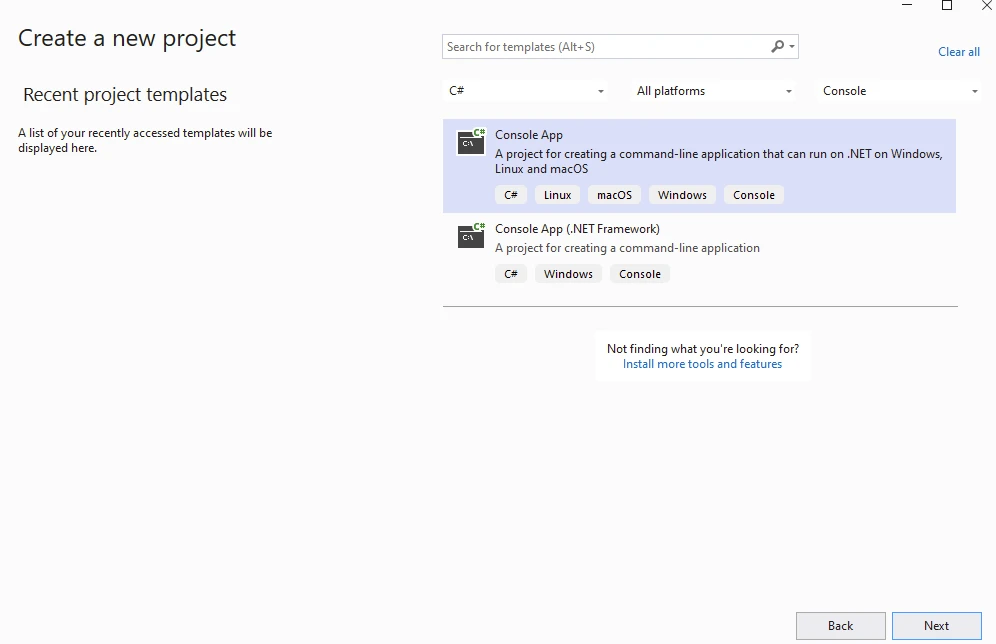
Podaj nazwę projektu.
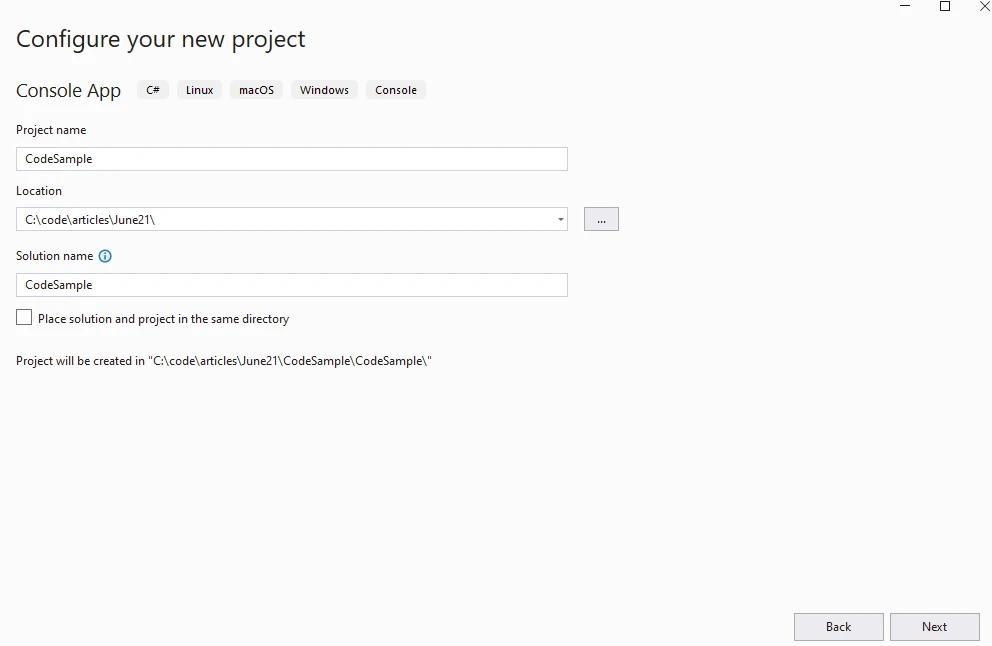
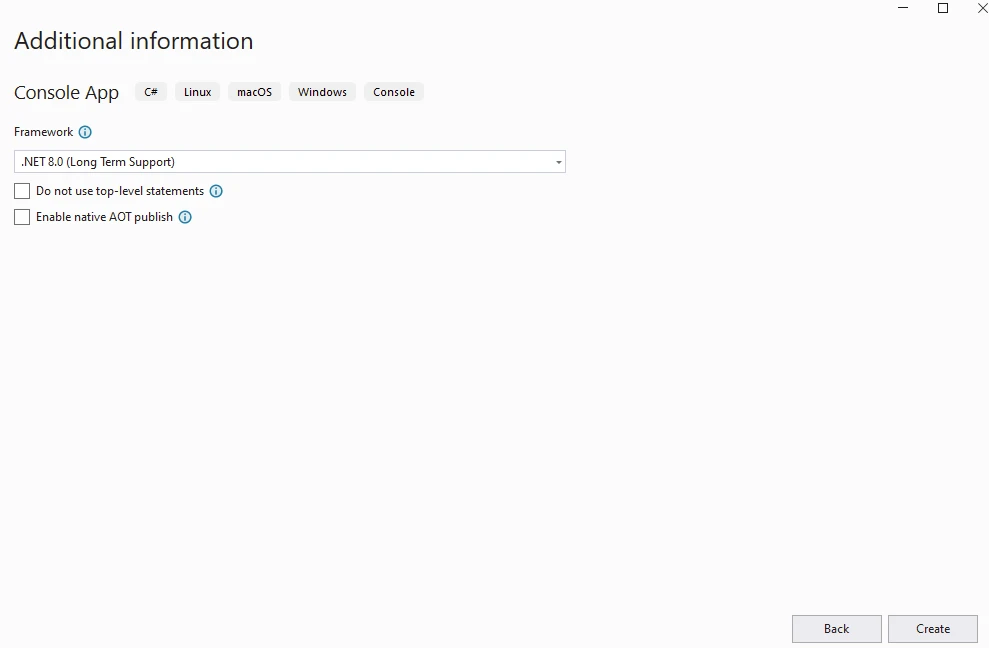
Podaj wersję .NET.
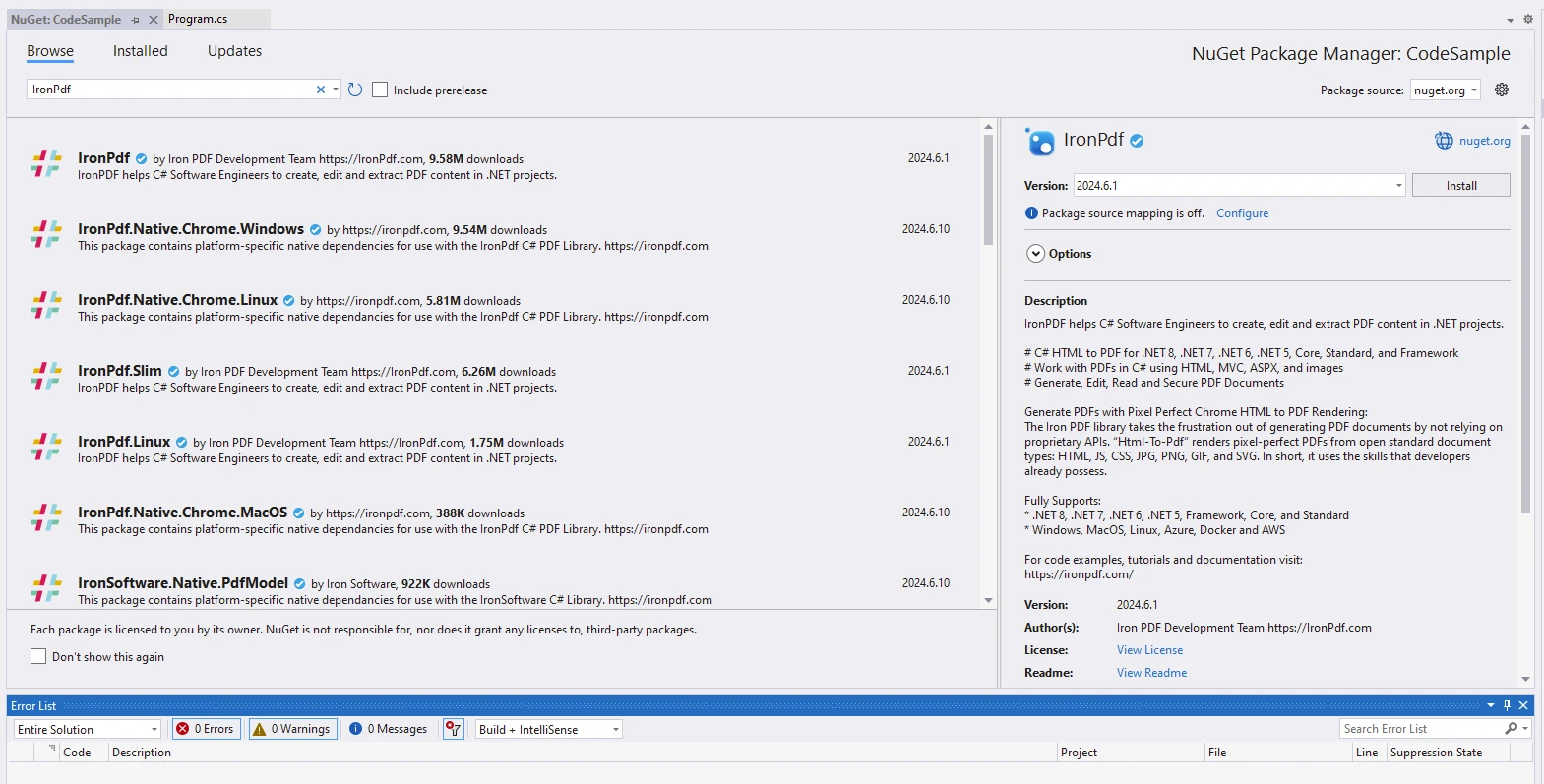
Zainstaluj pakiet IronPDF.
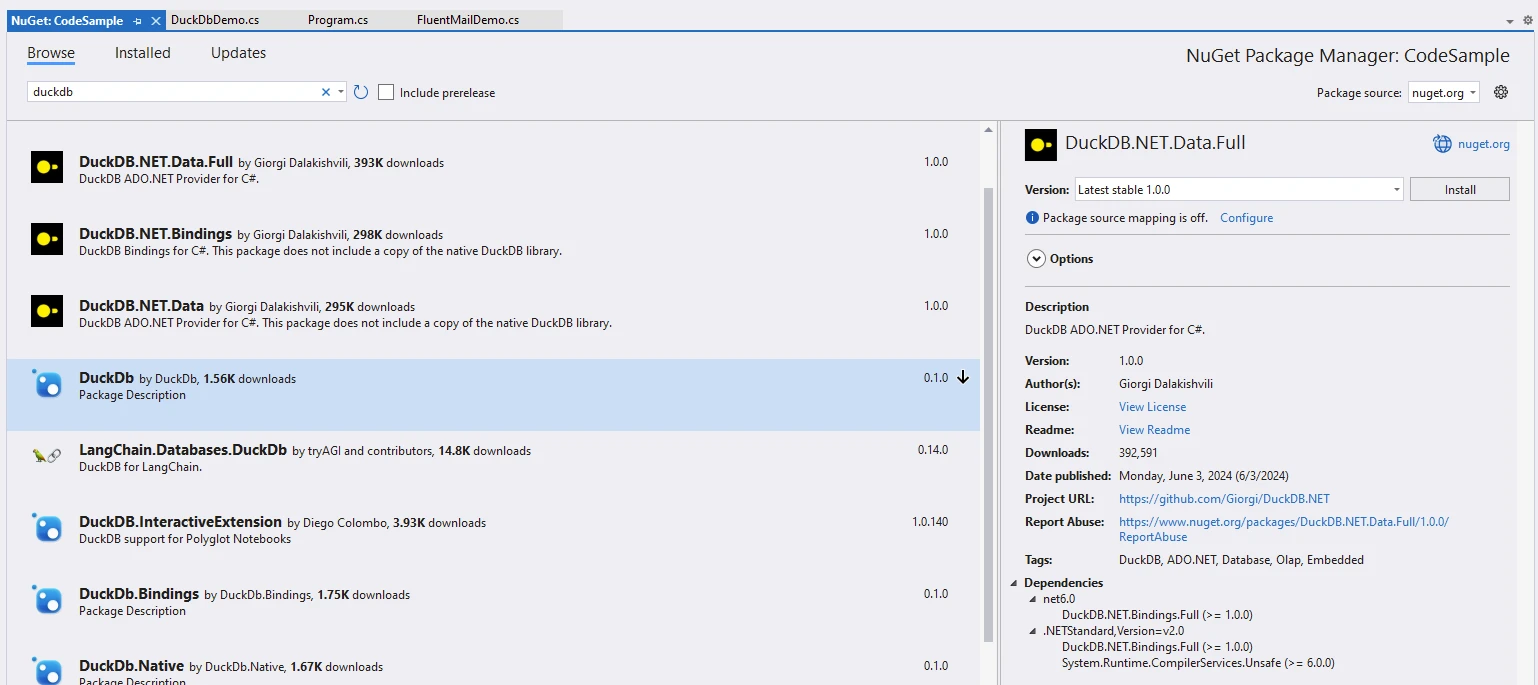
Zainstaluj pakiet DuckDB.NET.
using DuckDB.NET.Data;
using IronPdf;

namespace CodeSample
{
    public static class DuckDbDemo
    {
        public static void Execute()
        {
            // Instantiate Renderer
            var renderer = new ChromePdfRenderer();
            var content = "<h1>Demo DuckDb and IronPDF</h1>";
            content += "<h2>Create DuckDBConnection</h2>";
            content += "<p>new DuckDBConnection(\"Data Source=:memory:\");</p>";
            content += "<p></p>";

            // Create and open a connection to an in-memory DuckDB database
            using var connection = new DuckDBConnection("Data Source=:memory:");
            connection.Open();
            using var command = connection.CreateCommand();

            // Create a table named 'integers'
            command.CommandText = "CREATE TABLE integers(book STRING, cost INTEGER);";
            command.ExecuteNonQuery();
            content += "<p>CREATE TABLE integers(book STRING, cost INTEGER);</p>";

            // Insert some data into the 'integers' table
            command.CommandText = "INSERT INTO integers VALUES ('book1', 25), ('book2', 30), ('book3', 10);";
            command.ExecuteNonQuery();
            content += "<p>INSERT INTO integers VALUES ('book1', 25), ('book2', 30), ('book3', 10);</p>";

            // Select all values from the 'integers' table
            command.CommandText = "SELECT book, cost FROM integers;";
            using var reader = command.ExecuteReader();
            content += "<p>SELECT book, cost FROM integers;</p>";

            // Execute the query and process the results, appending them to the HTML content
            while (reader.Read())
            {
                content += $"<p>{reader.GetString(0)}, {reader.GetInt32(1)}</p>";
                Console.WriteLine($"{reader.GetString(0)}, {reader.GetInt32(1)}");
            }

            // Save data to CSV
            content += "<p>Save data to CSV with COPY integers TO 'output.csv' (FORMAT CSV);</p>";
            command.CommandText = "COPY integers TO 'output.csv' (FORMAT CSV);";
            command.ExecuteNonQuery();

            // Generate and save PDF
            var pdf = renderer.RenderHtmlAsPdf(content);
            pdf.SaveAs("AwesomeDuckDbNet.pdf");
        }
    }
}
using DuckDB.NET.Data;
using IronPdf;

namespace CodeSample
{
    public static class DuckDbDemo
    {
        public static void Execute()
        {
            // Instantiate Renderer
            var renderer = new ChromePdfRenderer();
            var content = "<h1>Demo DuckDb and IronPDF</h1>";
            content += "<h2>Create DuckDBConnection</h2>";
            content += "<p>new DuckDBConnection(\"Data Source=:memory:\");</p>";
            content += "<p></p>";

            // Create and open a connection to an in-memory DuckDB database
            using var connection = new DuckDBConnection("Data Source=:memory:");
            connection.Open();
            using var command = connection.CreateCommand();

            // Create a table named 'integers'
            command.CommandText = "CREATE TABLE integers(book STRING, cost INTEGER);";
            command.ExecuteNonQuery();
            content += "<p>CREATE TABLE integers(book STRING, cost INTEGER);</p>";

            // Insert some data into the 'integers' table
            command.CommandText = "INSERT INTO integers VALUES ('book1', 25), ('book2', 30), ('book3', 10);";
            command.ExecuteNonQuery();
            content += "<p>INSERT INTO integers VALUES ('book1', 25), ('book2', 30), ('book3', 10);</p>";

            // Select all values from the 'integers' table
            command.CommandText = "SELECT book, cost FROM integers;";
            using var reader = command.ExecuteReader();
            content += "<p>SELECT book, cost FROM integers;</p>";

            // Execute the query and process the results, appending them to the HTML content
            while (reader.Read())
            {
                content += $"<p>{reader.GetString(0)}, {reader.GetInt32(1)}</p>";
                Console.WriteLine($"{reader.GetString(0)}, {reader.GetInt32(1)}");
            }

            // Save data to CSV
            content += "<p>Save data to CSV with COPY integers TO 'output.csv' (FORMAT CSV);</p>";
            command.CommandText = "COPY integers TO 'output.csv' (FORMAT CSV);";
            command.ExecuteNonQuery();

            // Generate and save PDF
            var pdf = renderer.RenderHtmlAsPdf(content);
            pdf.SaveAs("AwesomeDuckDbNet.pdf");
        }
    }
}
Imports DuckDB.NET.Data
Imports IronPdf
Namespace CodeSample
Public Module DuckDbDemo
Public Sub Execute()
' Instantiate Renderer
Dim renderer = New ChromePdfRenderer()
Dim content = "<h1>Demo DuckDb and IronPDF</h1>"
content += "<h2>Create DuckDBConnection</h2>"
content += "<p>new DuckDBConnection(""Data Source=:memory:"");</p>"
content += "<p></p>"
' Create and open a connection to an in-memory DuckDB database
Using connection = New DuckDBConnection("Data Source=:memory:")
connection.Open()
Using command = connection.CreateCommand()
' Create a table named 'integers'
command.CommandText = "CREATE TABLE integers(book STRING, cost INTEGER);"
command.ExecuteNonQuery()
content += "<p>CREATE TABLE integers(book STRING, cost INTEGER);</p>"
' Insert some data into the 'integers' table
command.CommandText = "INSERT INTO integers VALUES ('book1', 25), ('book2', 30), ('book3', 10);"
command.ExecuteNonQuery()
content += "<p>INSERT INTO integers VALUES ('book1', 25), ('book2', 30), ('book3', 10);</p>"
' Select all values from the 'integers' table
command.CommandText = "SELECT book, cost FROM integers;"
Using reader = command.ExecuteReader()
content += "<p>SELECT book, cost FROM integers;</p>"
' Execute the query and process the results, appending them to the HTML content
While reader.Read()
content += $"<p>{reader.GetString(0)}, {reader.GetInt32(1)}</p>"
Console.WriteLine($"{reader.GetString(0)}, {reader.GetInt32(1)}")
End While
End Using
' Save data to CSV
content += "<p>Save data to CSV with COPY integers TO 'output.csv' (FORMAT CSV);</p>"
command.CommandText = "COPY integers TO 'output.csv' (FORMAT CSV);"
command.ExecuteNonQuery()
End Using
End Using
' Generate and save PDF
Dim pdf = renderer.RenderHtmlAsPdf(content)
pdf.SaveAs("AwesomeDuckDbNet.pdf")
End Sub
End Module
End Namespace
Imports DuckDB.NET.Data
Imports IronPdf

Namespace CodeSample
    Public Module DuckDbDemo
        Public Sub Execute()
            ' Instantiate Renderer
            Dim renderer = New ChromePdfRenderer()
            Dim content = "<h1>Demo DuckDb and IronPDF</h1>"
            content += "<h2>Create DuckDBConnection</h2>"
            content += "<p>new DuckDBConnection(""Data Source=:memory:"");</p>"
            content += "<p></p>"

            ' Create and open a connection to an in-memory DuckDB database
            Using connection = New DuckDBConnection("Data Source=:memory:")
                connection.Open()
                Using command = connection.CreateCommand()

                    ' Create a table named 'integers'
                    command.CommandText = "CREATE TABLE integers(book STRING, cost INTEGER);"
                    command.ExecuteNonQuery()
                    content += "<p>CREATE TABLE integers(book STRING, cost INTEGER);</p>"

                    ' Insert some data into the 'integers' table
                    command.CommandText = "INSERT INTO integers VALUES ('book1', 25), ('book2', 30), ('book3', 10);"
                    command.ExecuteNonQuery()
                    content += "<p>INSERT INTO integers VALUES ('book1', 25), ('book2', 30), ('book3', 10);</p>"

                    ' Select all values from the 'integers' table
                    command.CommandText = "SELECT book, cost FROM integers;"
                    Using reader = command.ExecuteReader()
                        content += "<p>SELECT book, cost FROM integers;</p>"

                        ' Execute the query and process the results, appending them to the HTML content
                        While reader.Read()
                            content += $"<p>{reader.GetString(0)}, {reader.GetInt32(1)}</p>"
                            Console.WriteLine($"{reader.GetString(0)}, {reader.GetInt32(1)}")
                        End While
                    End Using

                    ' Save data to CSV
                    content += "<p>Save data to CSV with COPY integers TO 'output.csv' (FORMAT CSV);</p>"
                    command.CommandText = "COPY integers TO 'output.csv' (FORMAT CSV);"
                    command.ExecuteNonQuery()
                End Using
            End Using

            ' Generate and save PDF
            Dim pdf = renderer.RenderHtmlAsPdf(content)
            pdf.SaveAs("AwesomeDuckDbNet.pdf")
        End Sub
    End Module
End Namespace
Wyjaśnienie kodu
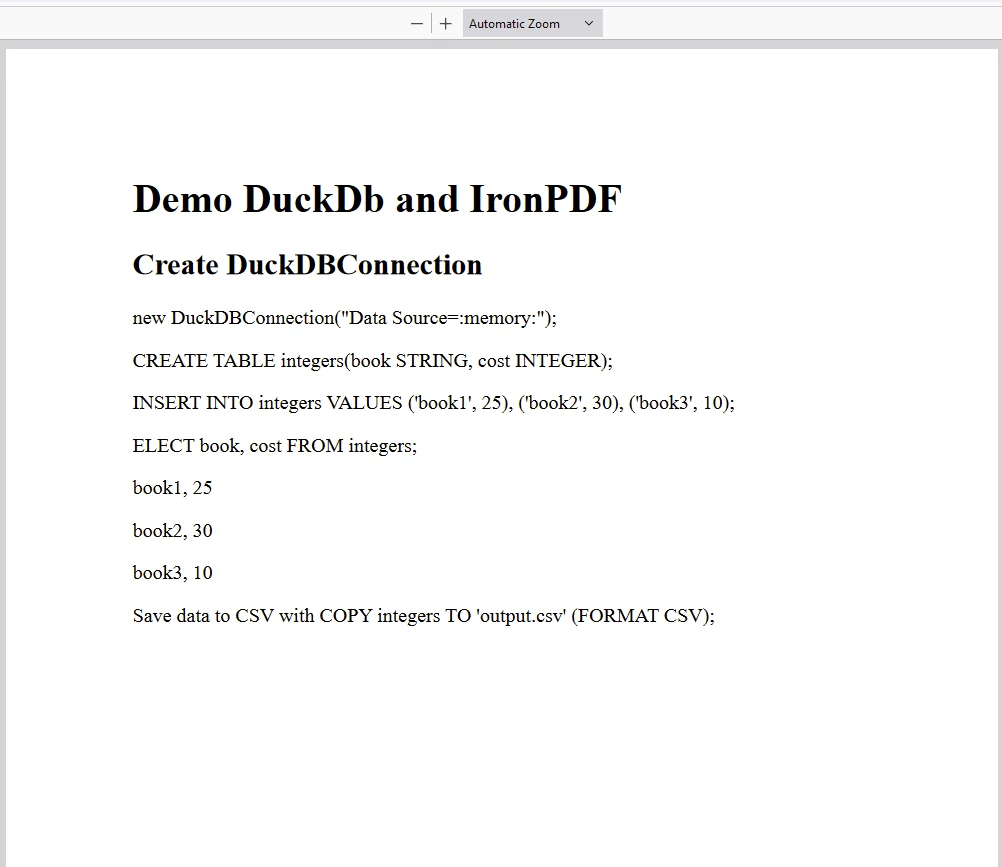
Kod ma na celu pokazanie, jak używać DuckDB.NET do operacji na bazie danych oraz IronPDF for .NET do generowania raportu PDF zawierającego wyniki zapytania do bazy danych.
Kluczowe elementy
-
DuckDB.NET:
- DuckDBConnection: Nawiązuje połączenie z plikiem bazy danych DuckDB w pamięci ("Data Source=:memory:"). To połączenie jest używane w całym kodzie do wykonywania poleceń SQL.
-
Operacje na bazach danych:
- Tworzenie tabeli: Definiuje polecenie SQL (CREATE TABLE integers(book STRING, cost INTEGER);) w celu utworzenia tabeli o nazwie integers z kolumnami book (STRING) i cost (INTEGER).
- Wstawianie danych: Wstawia wiersze do tabeli integers (INSERT INTO integers VALUES ('book1', 25), ('book2', 30), ('book3', 10);).
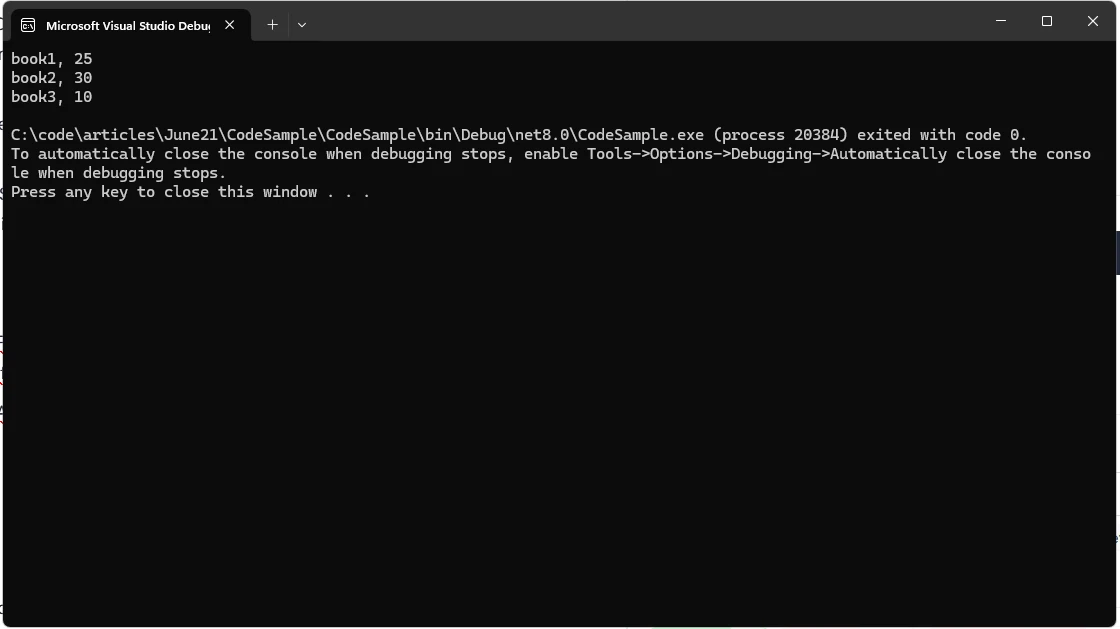
- Pobieranie danych: Wykonuje zapytanie SELECT (SELECT book, cost FROM integers;) w celu pobrania danych z tabeli integers. Pobrane dane są formatowane do postaci HTML (treści) i wyświetlane w konsoli za pomocą PRINT.
-
Generowanie plików PDF za pomocą IronPDF:
- Renderowanie HTML do PDF: Wykorzystuje ChromePdfRenderer z IronPDF do konwersji treści HTML (content) na dokument PDF (pdf).
- Zapisywanie pliku PDF: Zapisuje wygenerowany plik PDF jako "AwesomeDuckDbNet.pdf" w bieżącym katalogu.
Wynik
PDF
Licencjonowanie IronPDF
Pakiet IronPDF wymaga licencji do działania. Dodaj poniższy kod na początku aplikacji, zanim nastąpi dostęp do pakietu.
IronPdf.License.LicenseKey = "IRONPDF-KEY";
IronPdf.License.LicenseKey = "IRONPDF-KEY";
Imports IronPdf

IronPdf.License.LicenseKey = "IRONPDF-KEY"
Imports IronPdf

IronPdf.License.LicenseKey = "IRONPDF-KEY"
Licencja Trial jest dostępna na stronie licencji Trial IronPDF.
Wnioski
Pakiet DuckDB.NET C# to potężne narzędzie do integracji możliwości analitycznych DuckDB z aplikacjami .NET. Łatwość obsługi, obsługa różnych formatów danych oraz płynna integracja z językiem C# sprawiają, że jest to doskonały wybór dla programistów pracujących nad aplikacjami intensywnie przetwarzającymi dane. Niezależnie od tego, czy tworzysz narzędzia do analizy danych, potoki ETL czy inne aplikacje oparte na danych, DuckDB.NET pomoże Ci skutecznie osiągnąć Twoje cele.













