using IronPdf;

// Disable local disk access or cross-origin requests
Installation.EnableWebSecurity = true;

// Instantiate Renderer
var renderer = new ChromePdfRenderer();

// Create a PDF from a HTML string using C#
var pdf = renderer.RenderHtmlAsPdf("<h1>Hello World</h1>");

// Export to a file or Stream
pdf.SaveAs("output.pdf");

// Advanced Example with HTML Assets
// Load external html assets: Images, CSS and JavaScript.
// An optional BasePath 'C:\site\assets\' is set as the file location to load assets from
var myAdvancedPdf = renderer.RenderHtmlAsPdf("<img src='icons/iron.png'>", @"C:\site\assets\");
myAdvancedPdf.SaveAs("html-with-assets.pdf");
using IronPdf;// Disable local disk access or cross-origin requestsInstallation.EnableWebSecurity = true;// Instantiate Renderervar renderer = new ChromePdfRenderer();// Create a PDF from a HTML string using C#var pdf = renderer.RenderHtmlAsPdf("<h1>Hello World</h1>");// Export to a file or Streampdf.SaveAs("output.pdf");// Advanced Example with HTML Assets// Load external html assets: Images, CSS and JavaScript.// An optional BasePath 'C:\site\assets\' is set as the file location to load assets fromvar myAdvancedPdf = renderer.RenderHtmlAsPdf("<img src='icons/iron.png'>", @"C:\site\assets\");myAdvancedPdf.SaveAs("html-with-assets.pdf");
C# ile programlama esnektir ve çeşitli işleri etkili bir şekilde yönetmek için geniş bir dizi veri yapısı sunar. [HashSet](https://learn.microsoft.com/en-us/dotnet/api/system.collections.generic.hashset-1?view=net-8.0), temel işlemler için benzersiz bileşenler ve sabit zaman ortalaması karmaşıklığı sunan güçlü bir veri yapısıdır. Bu gönderi, HashSet'in C#'ta kullanımını ve [IronPDF](/) ile nasıl kullanılabileceğini, PDF belgeleriyle çalışmak için etkili bir kütüphaneyi inceleyecektir.
## C#'ta HashSet Nasıl Kullanılır
1. Yeni bir Konsol Uygulaması projesi oluşturun.
2. C# içinde HashSet için bir nesne oluşturun. Varsayılan değeri HashSet'e ekleyin.
3. Eklerken, HashSet, elemanın mevcut olup olmadığını kontrol ederek yinelenen öğeleri otomatik olarak kaldırır.
4. HashSet'i sadece benzersiz öğelerle tek tek işleyin.
5. Sonucu görüntüleyin ve nesneyi yok edin.
### C#'ta HashSet'i Anlama
C#'taki HashSet, yüksek performanslı set işlemleri sağlamak için tasarlanmıştır. Bir HashSet, yinelenen öğeleri önlediği için farklı bir veri kümesini saklamanız gerektiğinde kullanılmak için mükemmel bir koleksiyondur. System.Collections.Generic ad alanında bulunur ve hızlı ekleme, silme, hızlı erişim ve arama işlemleri sağlar. C#, standart küme işlemlerini kolayca gerçekleştirmenizi sağlayan HashSet set işlemleri yöntemlerini kullanın. HashSet sınıfı, set işlemleri yöntemleri sağlar.
HashSet için birkaç C# kullanım durumu şunlardır:
#### Başlatma ve Temel İşlemler
Bir HashSet oluşturma ve giriş ekleme, silme ve varlığı doğrulama gibi temel işlemleri gerçekleştirme.
```csharp
using System;
using System.Collections.Generic;

class Program
{
    static void Main()
    {
        // Initializes a HashSet of integers
        HashSet<int> numbers = new HashSet<int>();

        // Adds elements to the HashSet
        numbers.Add(1);
        numbers.Add(2);
        numbers.Add(3);

        // Removes an element from the HashSet
        numbers.Remove(2);

        // Checks for membership of an element
        bool containsThree = numbers.Contains(3);

        Console.WriteLine($"Contains 3: {containsThree}");
    }
}
```
#### Koleksiyonla Başlatma
Mevcut bir koleksiyonu bir HashSet'in başlangıç noktası olarak kullanarak, kopyalar hemen ortadan kaldırılır.
```csharp
using System;
using System.Collections.Generic;
class Program
{
static void Main()
{
// Creates a list with duplicate elements
List<int> duplicateNumbers = new List<int> { 1, 2, 2, 3, 3, 4 };
// Initializes a HashSet with the list, automatically removes duplicates
HashSet<int> uniqueNumbers = new HashSet<int>(duplicateNumbers);
Console.WriteLine("Unique numbers:");
foreach (var number in uniqueNumbers)
{
Console.WriteLine(number);
}
}
}
```
#### Başka Bir HashSet ile Birleşim
UnionWith işlevini kullanarak iki HashSet örneğini birleştirerek her iki kümedeki farklı öğeleri birleştiren yeni bir küme oluşturun.
```csharp
using System;
using System.Collections.Generic;
class Program
{
static void Main()
{
HashSet<int> set1 = new HashSet<int> { 1, 2, 3 };
HashSet<int> set2 = new HashSet<int> { 3, 4, 5 };
// Merges set2 into set1
set1.UnionWith(set2);
Console.WriteLine("Union of set1 and set2:");
foreach (var item in set1)
{
Console.WriteLine(item);
}
}
}
```
#### Başka Bir HashSet ile Kesişim
IntersectWith işlevini kullanarak iki HashSet örneği arasındaki paylaşılan bileşenleri belirleyin.
```csharp
using System;
using System.Collections.Generic;
class Program
{
static void Main()
{
HashSet<int> set1 = new HashSet<int> { 1, 2, 3 };
HashSet<int> set2 = new HashSet<int> { 3, 4, 5 };
// Keeps only elements that are present in both sets
set1.IntersectWith(set2);
Console.WriteLine("Intersection of set1 and set2:");
foreach (var item in set1)
{
Console.WriteLine(item);
}
}
}
```
#### Başka Bir HashSet ile Fark
ExceptWith işlevini kullanarak bir HashSet'te bulunan ancak diğerinde bulunmayan öğeleri bulun.
```csharp
using System;
using System.Collections.Generic;
class Program
{
static void Main()
{
HashSet<int> set1 = new HashSet<int> { 1, 2, 3 };
HashSet<int> set2 = new HashSet<int> { 3, 4, 5 };
// Removes elements from set1 that are also in set2
set1.ExceptWith(set2);
Console.WriteLine("Difference of set1 and set2:");
foreach (var item in set1)
{
Console.WriteLine(item);
}
}
}
```
**Alt Küme veya Üst Kümenin Denetlenmesi:**
IsSubsetOf ve IsSupersetOf yöntemlerini kullanarak, belirli bir HashSet örneğinin diğerinin bir alt kümesi veya üst kümesi olup olmadığını belirleyebilirsiniz.
```csharp
using System;
using System.Collections.Generic;
class Program
{
static void Main()
{
HashSet<int> set1 = new HashSet<int> { 1, 2, 3 };
HashSet<int> set2 = new HashSet<int> { 2, 3 };
// Checks if set2 is a subset of set1
bool isSubset = set2.IsSubsetOf(set1);
// Checks if set1 is a superset of set2
bool isSuperset = set1.IsSupersetOf(set2);
Console.WriteLine($"Is set2 a subset of set1: {isSubset}");
Console.WriteLine($"Is set1 a superset of set2: {isSuperset}");
}
}
```
#### Simetrik Fark
SymmetricExceptWith tekniğini kullanarak simetrik farkı (bir kümede bulunan ancak her ikisinde de bulunmayan öğeler) belirleyin.
```csharp
using System;
using System.Collections.Generic;
class Program
{
static void Main()
{
HashSet<int> set1 = new HashSet<int> { 1, 2, 3 };
HashSet<int> set2 = new HashSet<int> { 3, 4, 5 };
// Keeps elements that are in set1 or set2 but not in both
set1.SymmetricExceptWith(set2);
Console.WriteLine("Symmetric difference of set1 and set2:");
foreach (var item in set1)
{
Console.WriteLine(item);
}
}
}
```
### IronPDF
Programcılar, [IronPDF .NET kütüphanesi](/) kullanarak PDF belgeleri oluşturabilir, düzenleyebilir ve değiştirebilir. Uygulama, HTML'den yeni PDF'ler oluşturma, HTML'yi PDF'ye dönüştürme, PDF belgelerini birleştirme veya bölme ve mevcut PDF'leri metin, fotoğraf ve diğer verilerle açıklama ekleme dahil olmak üzere çeşitli işlemlerle PDF dosyaları üzerinde çalışmayı sağlayacak çeşitli araçlar ve özellikler sunar. IronPDF hakkında daha fazla bilgi için [resmi belgeler](/docs/)'e bakın.
IronPDF, [HTML'den PDF'ye](/tutorials/html-to-pdf/) dönüşümde mükemmeldir, özgün düzenler ve stillerin hassas bir şekilde korunmasını sağlar. Raporlar, faturalar ve belgeler gibi web tabanlı içeriklerden PDF oluşturmak için mükemmeldir. HTML dosyaları, URL'ler ve ham HTML dizeleri için destekle, IronPDF yüksek kaliteli PDF belgelerini kolayca üretir.
```csharp
using IronPdf;
class Program
{
static void Main(string[] args)
{
var renderer = new ChromePdfRenderer();
// 1. Convert HTML String to PDF
var htmlContent = "<h1>Hello, IronPDF!</h1><p>This is a PDF from an HTML string.</p>";
var pdfFromHtmlString = renderer.RenderHtmlAsPdf(htmlContent);
pdfFromHtmlString.SaveAs("HTMLStringToPDF.pdf");
// 2. Convert HTML File to PDF
var htmlFilePath = "path_to_your_html_file.html"; // Specify the path to your HTML file
var pdfFromHtmlFile = renderer.RenderHtmlFileAsPdf(htmlFilePath);
pdfFromHtmlFile.SaveAs("HTMLFileToPDF.pdf");
// 3. Convert URL to PDF
var url = "http://ironpdf.com"; // Specify the URL
var pdfFromUrl = renderer.RenderUrlAsPdf(url);
pdfFromUrl.SaveAs("URLToPDF.pdf");
}
}
```
### IronPDF Özellikleri
* **HTML'den PDF'ye dönüştürme:** Dosyalar, URL'ler ve HTML kodu dizgeleri de dahil olmak üzere her türlü HTML verisi, IronPDF ile PDF belgelerine dönüştürülebilir.
* **PDF Oluşturma:** C# programlama dili kullanılarak PDF belgelerine metin, resimler ve diğer nesneler programlı olarak eklenebilir.
* **PDF Manipülasyonu:** IronPDF, bir PDF dosyasını sayısız dosyaya bölebilir ve önceden var olan PDF dosyalarını düzenleyebilir. Birkaç PDF dosyasını tek bir dosyada birleştirebilir.
* **PDF Formları:** Kütüphane kullanıcıların PDF formları oluşturmasına ve doldurmasına olanak tanıdığı için form verilerinin toplanıp işlenmesi gerektiği senaryolarda kullanışlıdır.
* **Güvenlik Özellikleri:** IronPDF, PDF belgelerini şifrelemek ve parola ile izin güvenliği sağlamak için kullanılır.
### IronPDF Kurulumu
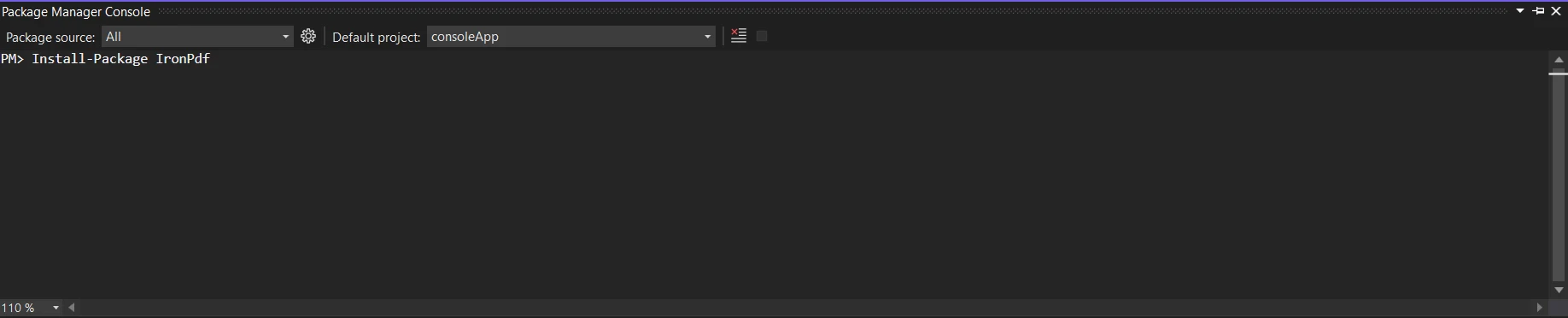
IronPDF kütüphanesini edinin; yaklaşan yama bunu gerektirir. Bunu yapmak için, Paket Yöneticisine aşağıdaki kodu girin:
```shell
:ProductInstall
```
or
```shell
:InstallCmd dotnet add package IronPdf
```
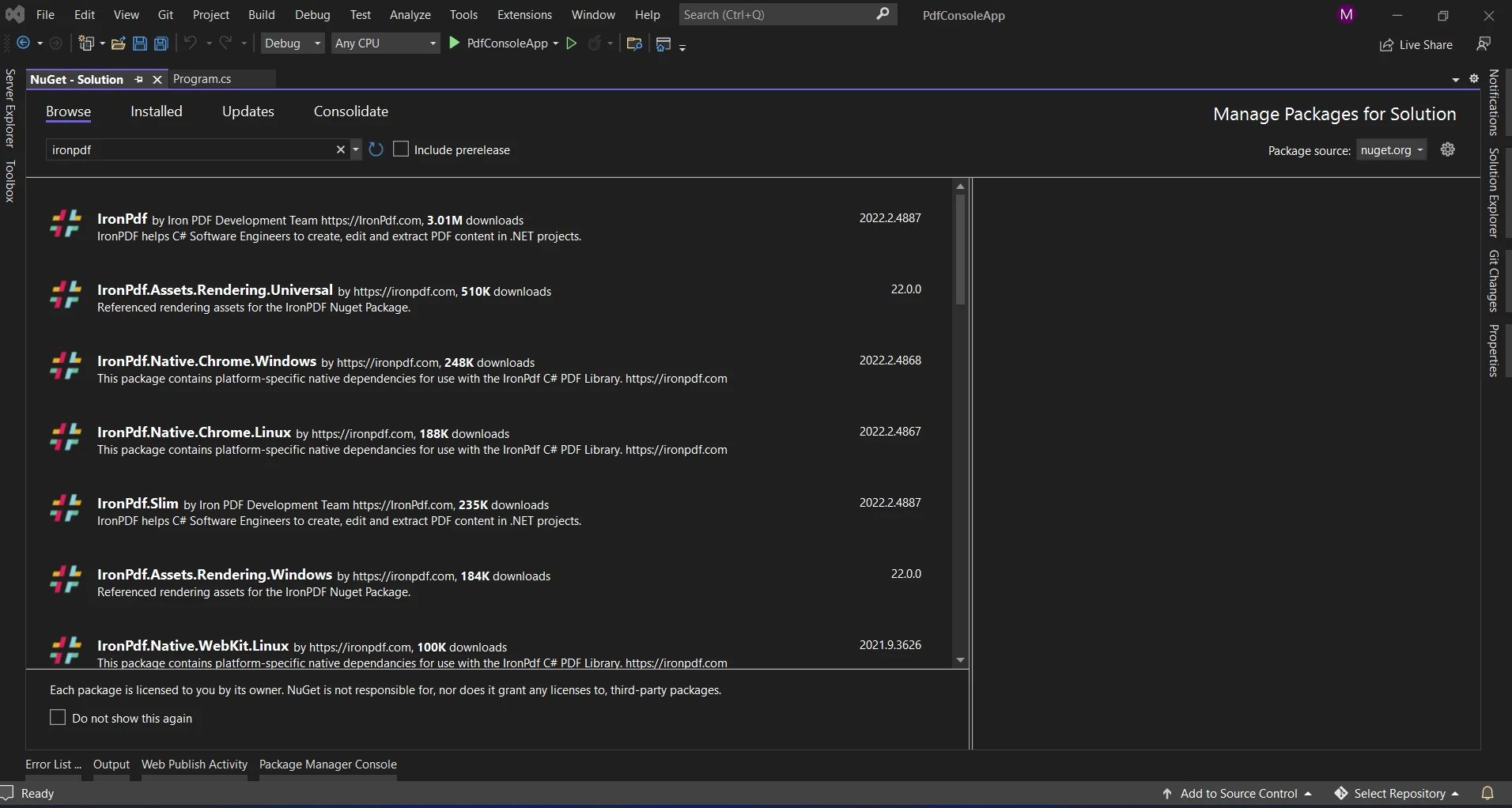
Başka bir seçenek, NuGet Package Manager kullanarak "IronPDF" paketini aramaktır. IronPDF ile ilgili tüm NuGet paketlerinden, bu listeden gerekli paketi seçip indirebiliriz.
### IronPDF ile HashSet
C# ortamında, IronPDF, PDF belgeleriyle çalışmayı kolaylaştıran güçlü bir kütüphanedir. Farklı veri temsili ve etkili belge oluşturmanın önemli olduğu durumlarda HashSet'in verimliliğini, IronPDF'nin belge manipülasyon gücüyle birleştirmek, yaratıcı çözümlerle sonuçlanabilir.
### IronPDF ile HashSet Kullanmanın Faydaları
* **Veri Tekrarını Azaltma:** Sadece benzersiz öğelerin saklanmasını sağlayarak, HashSet'ler veri tekrarlamasını önlemeye yardımcı olur. Büyük veri setleriyle çalışırken, yinelenen bilgileri kaldırmak için oldukça faydalıdır.
* **Etkili Arama:** Ekleme, silme ve arama gibi temel işlemler, HashSet ile sabit zaman ortalama karmaşıklığında gerçekleştirilebilir. Bu tür performans, farklı boyutlardaki veri setleriyle çalışırken çok önemlidir.
* **Belge Üretimini Basitleştirme:** IronPDF, C#'ta PDF belge oluşturma sürecini kolaylaştırır. HashSet'i IronPDF ile entegre ederek, PDF'leriniz için hızlı ve etkili süreçler tesis edebilirsiniz.
Şimdi, IronPDF ile HashSet kullanımının faydalı olabileceği bir gerçek dünya senaryosuna bakalım.
### Benzersiz Verilerle PDF Oluşturma
```csharp
using IronPdf;
using System;
using System.Collections.Generic;
class PdfGenerator
{
static void Main()
{
// Sample user names with duplicates
string[] userNames = { "Alice", "Bob", "Charlie", "Bob", "David", "Alice" };
// Using HashSet to ensure unique user names
HashSet<string> uniqueUserNames = new HashSet<string>(userNames);
// Generating PDF with unique user names
GeneratePdf(uniqueUserNames);
}
static void GeneratePdf(HashSet<string> uniqueUserNames)
{
// Create a new PDF document using IronPDF
HtmlToPdf renderer = new HtmlToPdf();
// Render a PDF from an HTML document consisting of unique user names
var pdf = renderer.RenderHtmlAsPdf(BuildHtmlDocument(uniqueUserNames));
// Save the PDF to a file
string pdfFilePath = "UniqueUserNames.pdf";
pdf.SaveAs(pdfFilePath);
// Display a message with the file path
Console.WriteLine($"PDF generated successfully. File saved at: {pdfFilePath}");
}
static string BuildHtmlDocument(HashSet<string> uniqueUserNames)
{
// Build an HTML document with unique user names
string htmlDocument = "<html><body><ul>";
foreach (var userName in uniqueUserNames)
{
htmlDocument += $"<li>{userName}</li>";
}
htmlDocument += "</ul></body></html>";
return htmlDocument;
}
}
```
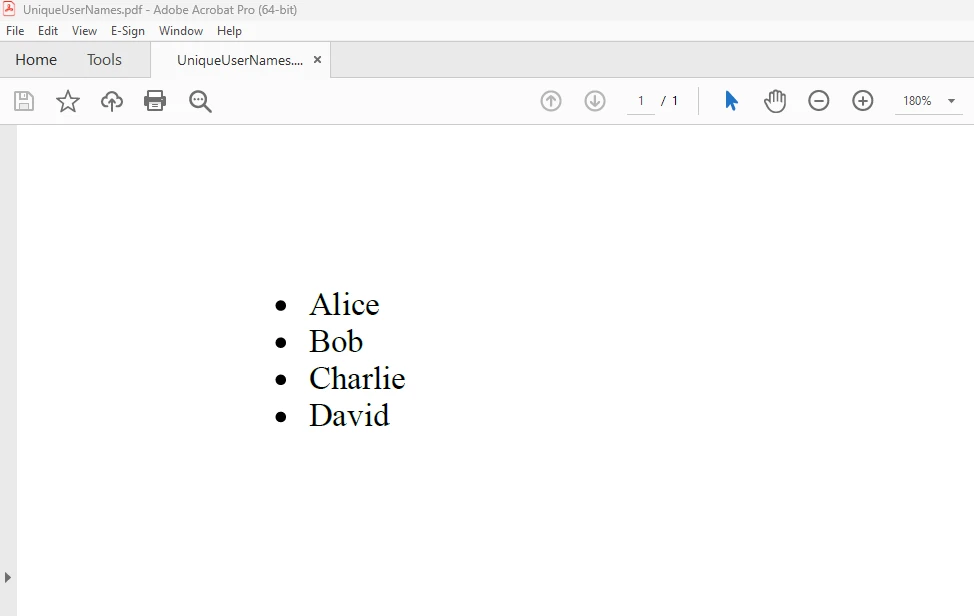
Yukarıdaki kod örneğinde, bir diziden alınan benzersiz kullanıcı adlarını **uniqueUserNames** adlı bir HashSet kullanarak kaydediyoruz. HashSet, kopyaları otomatik olarak ortadan kaldırır. Sonrasında, IronPDF kullanarak bu farklı kullanıcı adlarından oluşan sırasız bir listeyi bir PDF belgesinde oluşturuyoruz. Kod hakkında daha fazla bilgi almak için [HTML kullanarak PDF oluşturma](/examples/using-html-to-create-a-pdf/)'yı kontrol edin.
#### ÇIKTI
### Sonuç
Özetlemek gerekirse, C# HashSet veri yapısı, farklı öğe setlerini organize etmek için etkili bir araçtır. IronPDF ile birleştirildiğinde, dinamik, özgün ve performans optimize edilmiş PDF belge oluşturma için yeni fırsatlar sunar.
Veri benzersizliği sağlamanın yanı sıra, [IronPDF](/) ile PDF belgeleri oluşturmak için HashSet kullanmayı verdiğimiz örnekte gösterdik. HashSet ve IronPDF kombinasyonu, veri tekrarı önleme, raporlama veya dinamik içeriği yönetme üzerinde çalışırken C# uygulamalarınızı geliştirmeye yardımcı olabilir. Daha fazla araştırma yaparken, bu kombinasyonu uygulamalarınızın kullanılabilirliğini ve işlevselliğini artırmak için kullanabileceğiniz birçok bağlamı dikkate alın.
IronPDF'nin `$liteLicense` Lite sürümü, kalıcı bir lisans, yükseltme seçenekleri ve bir yıl yazılım desteği ile birlikte gelir. İşaretli [deneme süresi lisanslama](trial-license) üzerinde IronPDF'in fiyatlandırma, lisanslama ve ücretsiz deneme hakkında daha fazla bilgi edinin. [Iron Software web sitesini](https://ironsoftware.com/) daha fazla bilgi için ziyaret edin.
C# ile programlama esnektir ve çeşitli işleri etkili bir şekilde yönetmek için geniş bir dizi veri yapısı sunar. HashSet, temel işlemler için benzersiz bileşenler ve sabit zaman ortalaması karmaşıklığı sunan güçlü bir veri yapısıdır. Bu gönderi, HashSet'in C#'ta kullanımını ve IronPDF ile nasıl kullanılabileceğini, PDF belgeleriyle çalışmak için etkili bir kütüphaneyi inceleyecektir.
C#'ta HashSet Nasıl Kullanılır
Yeni bir Konsol Uygulaması projesi oluşturun.
C# içinde HashSet için bir nesne oluşturun. Varsayılan değeri HashSet'e ekleyin.
Eklerken, HashSet, elemanın mevcut olup olmadığını kontrol ederek yinelenen öğeleri otomatik olarak kaldırır.
HashSet'i sadece benzersiz öğelerle tek tek işleyin.
Sonucu görüntüleyin ve nesneyi yok edin.
C#'ta HashSet'i Anlama
C#'taki HashSet, yüksek performanslı set işlemleri sağlamak için tasarlanmıştır. Bir HashSet, yinelenen öğeleri önlediği için farklı bir veri kümesini saklamanız gerektiğinde kullanılmak için mükemmel bir koleksiyondur. System.Collections.Generic ad alanında bulunur ve hızlı ekleme, silme, hızlı erişim ve arama işlemleri sağlar. C#, standart küme işlemlerini kolayca gerçekleştirmenizi sağlayan HashSet set işlemleri yöntemlerini kullanın. HashSet sınıfı, set işlemleri yöntemleri sağlar.
HashSet için birkaç C# kullanım durumu şunlardır:
Başlatma ve Temel İşlemler
Bir HashSet oluşturma ve giriş ekleme, silme ve varlığı doğrulama gibi temel işlemleri gerçekleştirme.
using System;using System.Collections.Generic;class Program{ static voidMain() { // Initializes a HashSet of integers HashSet<int> numbers = new HashSet<int>(); // Adds elements to the HashSet numbers.Add(1); numbers.Add(2); numbers.Add(3); // Removes an element from the HashSet numbers.Remove(2); // Checks for membership of an element bool containsThree = numbers.Contains(3);Console.WriteLine($"Contains 3: {containsThree}"); }}
using System;
using System.Collections.Generic;

class Program
{
    static void Main()
    {
        // Initializes a HashSet of integers
        HashSet<int> numbers = new HashSet<int>();

        // Adds elements to the HashSet
        numbers.Add(1);
        numbers.Add(2);
        numbers.Add(3);

        // Removes an element from the HashSet
        numbers.Remove(2);

        // Checks for membership of an element
        bool containsThree = numbers.Contains(3);

        Console.WriteLine($"Contains 3: {containsThree}");
    }
}
ImportsSystemImportsSystem.Collections.GenericFriend Class ProgramShared Sub Main() ' Initializes a HashSet of integers Dim numbers As New HashSet(OfInteger)() ' Adds elements to the HashSet numbers.Add(1) numbers.Add(2) numbers.Add(3) ' Removes an element from the HashSet numbers.Remove(2) ' Checks for membership of an element Dim containsThree AsBoolean = numbers.Contains(3)Console.WriteLine($"Contains 3: {containsThree}") End SubEnd Class
Imports System
Imports System.Collections.Generic

Friend Class Program
	Shared Sub Main()
		' Initializes a HashSet of integers
		Dim numbers As New HashSet(Of Integer)()

		' Adds elements to the HashSet
		numbers.Add(1)
		numbers.Add(2)
		numbers.Add(3)

		' Removes an element from the HashSet
		numbers.Remove(2)

		' Checks for membership of an element
		Dim containsThree As Boolean = numbers.Contains(3)

		Console.WriteLine($"Contains 3: {containsThree}")
	End Sub
End Class
Koleksiyonla Başlatma
Mevcut bir koleksiyonu bir HashSet'in başlangıç noktası olarak kullanarak, kopyalar hemen ortadan kaldırılır.
using System;using System.Collections.Generic;class Program{ static voidMain() { // Creates a list with duplicate elements List<int> duplicateNumbers = new List<int> { 1, 2, 2, 3, 3, 4 }; // Initializes a HashSet with the list, automatically removes duplicates HashSet<int> uniqueNumbers = new HashSet<int>(duplicateNumbers);Console.WriteLine("Unique numbers:"); foreach (var number in uniqueNumbers) {Console.WriteLine(number); } }}
using System;
using System.Collections.Generic;

class Program
{
    static void Main()
    {
        // Creates a list with duplicate elements
        List<int> duplicateNumbers = new List<int> { 1, 2, 2, 3, 3, 4 };

        // Initializes a HashSet with the list, automatically removes duplicates
        HashSet<int> uniqueNumbers = new HashSet<int>(duplicateNumbers);

        Console.WriteLine("Unique numbers:");
        foreach (var number in uniqueNumbers)
        {
            Console.WriteLine(number);
        }
    }
}
ImportsSystemImportsSystem.Collections.GenericFriend Class ProgramShared Sub Main() ' Creates a list with duplicate elements Dim duplicateNumbers As New List(OfInteger) From {1, 2, 2, 3, 3, 4} ' Initializes a HashSet with the list, automatically removes duplicates Dim uniqueNumbers As New HashSet(OfInteger)(duplicateNumbers)Console.WriteLine("Unique numbers:") For Each number In uniqueNumbersConsole.WriteLine(number) Next number End SubEnd Class
Imports System
Imports System.Collections.Generic

Friend Class Program
	Shared Sub Main()
		' Creates a list with duplicate elements
		Dim duplicateNumbers As New List(Of Integer) From {1, 2, 2, 3, 3, 4}

		' Initializes a HashSet with the list, automatically removes duplicates
		Dim uniqueNumbers As New HashSet(Of Integer)(duplicateNumbers)

		Console.WriteLine("Unique numbers:")
		For Each number In uniqueNumbers
			Console.WriteLine(number)
		Next number
	End Sub
End Class
Başka Bir HashSet ile Birleşim
UnionWith işlevini kullanarak iki HashSet örneğini birleştirerek her iki kümedeki farklı öğeleri birleştiren yeni bir küme oluşturun.
using System;using System.Collections.Generic;class Program{ static voidMain() { HashSet<int> set1 = new HashSet<int> { 1, 2, 3 }; HashSet<int> set2 = new HashSet<int> { 3, 4, 5 }; // Merges set2 into set1 set1.UnionWith(set2);Console.WriteLine("Union of set1 and set2:"); foreach (var item in set1) {Console.WriteLine(item); } }}
using System;
using System.Collections.Generic;

class Program
{
    static void Main()
    {
        HashSet<int> set1 = new HashSet<int> { 1, 2, 3 };
        HashSet<int> set2 = new HashSet<int> { 3, 4, 5 };

        // Merges set2 into set1
        set1.UnionWith(set2);

        Console.WriteLine("Union of set1 and set2:");
        foreach (var item in set1)
        {
            Console.WriteLine(item);
        }
    }
}
ImportsSystemImportsSystem.Collections.GenericFriend Class ProgramShared Sub Main() Dim set1 As New HashSet(OfInteger) From {1, 2, 3} Dim set2 As New HashSet(OfInteger) From {3, 4, 5} ' Merges set2 into set1 set1.UnionWith(set2)Console.WriteLine("Union of set1 and set2:") For Each item In set1Console.WriteLine(item) Next item End SubEnd Class
Imports System
Imports System.Collections.Generic

Friend Class Program
	Shared Sub Main()
		Dim set1 As New HashSet(Of Integer) From {1, 2, 3}
		Dim set2 As New HashSet(Of Integer) From {3, 4, 5}

		' Merges set2 into set1
		set1.UnionWith(set2)

		Console.WriteLine("Union of set1 and set2:")
		For Each item In set1
			Console.WriteLine(item)
		Next item
	End Sub
End Class
Başka Bir HashSet ile Kesişim
IntersectWith işlevini kullanarak iki HashSet örneği arasındaki paylaşılan bileşenleri belirleyin.
using System;using System.Collections.Generic;class Program{ static voidMain() { HashSet<int> set1 = new HashSet<int> { 1, 2, 3 }; HashSet<int> set2 = new HashSet<int> { 3, 4, 5 }; // Keeps only elements that are present in both sets set1.IntersectWith(set2);Console.WriteLine("Intersection of set1 and set2:"); foreach (var item in set1) {Console.WriteLine(item); } }}
using System;
using System.Collections.Generic;

class Program
{
    static void Main()
    {
        HashSet<int> set1 = new HashSet<int> { 1, 2, 3 };
        HashSet<int> set2 = new HashSet<int> { 3, 4, 5 };

        // Keeps only elements that are present in both sets
        set1.IntersectWith(set2);

        Console.WriteLine("Intersection of set1 and set2:");
        foreach (var item in set1)
        {
            Console.WriteLine(item);
        }
    }
}
ImportsSystemImportsSystem.Collections.GenericFriend Class ProgramShared Sub Main() Dim set1 As New HashSet(OfInteger) From {1, 2, 3} Dim set2 As New HashSet(OfInteger) From {3, 4, 5} ' Keeps only elements that are present in both sets set1.IntersectWith(set2)Console.WriteLine("Intersection of set1 and set2:") For Each item In set1Console.WriteLine(item) Next item End SubEnd Class
Imports System
Imports System.Collections.Generic

Friend Class Program
	Shared Sub Main()
		Dim set1 As New HashSet(Of Integer) From {1, 2, 3}
		Dim set2 As New HashSet(Of Integer) From {3, 4, 5}

		' Keeps only elements that are present in both sets
		set1.IntersectWith(set2)

		Console.WriteLine("Intersection of set1 and set2:")
		For Each item In set1
			Console.WriteLine(item)
		Next item
	End Sub
End Class
Başka Bir HashSet ile Fark
ExceptWith işlevini kullanarak bir HashSet'te bulunan ancak diğerinde bulunmayan öğeleri bulun.
using System;using System.Collections.Generic;class Program{ static voidMain() { HashSet<int> set1 = new HashSet<int> { 1, 2, 3 }; HashSet<int> set2 = new HashSet<int> { 3, 4, 5 }; // Removes elements from set1 that are also in set2 set1.ExceptWith(set2);Console.WriteLine("Difference of set1 and set2:"); foreach (var item in set1) {Console.WriteLine(item); } }}
using System;
using System.Collections.Generic;

class Program
{
    static void Main()
    {
        HashSet<int> set1 = new HashSet<int> { 1, 2, 3 };
        HashSet<int> set2 = new HashSet<int> { 3, 4, 5 };

        // Removes elements from set1 that are also in set2
        set1.ExceptWith(set2);

        Console.WriteLine("Difference of set1 and set2:");
        foreach (var item in set1)
        {
            Console.WriteLine(item);
        }
    }
}
ImportsSystemImportsSystem.Collections.GenericFriend Class ProgramShared Sub Main() Dim set1 As New HashSet(OfInteger) From {1, 2, 3} Dim set2 As New HashSet(OfInteger) From {3, 4, 5} ' Removes elements from set1 that are also in set2 set1.ExceptWith(set2)Console.WriteLine("Difference of set1 and set2:") For Each item In set1Console.WriteLine(item) Next item End SubEnd Class
Imports System
Imports System.Collections.Generic

Friend Class Program
	Shared Sub Main()
		Dim set1 As New HashSet(Of Integer) From {1, 2, 3}
		Dim set2 As New HashSet(Of Integer) From {3, 4, 5}

		' Removes elements from set1 that are also in set2
		set1.ExceptWith(set2)

		Console.WriteLine("Difference of set1 and set2:")
		For Each item In set1
			Console.WriteLine(item)
		Next item
	End Sub
End Class
Alt Küme veya Üst Kümenin Denetlenmesi:
IsSubsetOf ve IsSupersetOf yöntemlerini kullanarak, belirli bir HashSet örneğinin diğerinin bir alt kümesi veya üst kümesi olup olmadığını belirleyebilirsiniz.
using System;using System.Collections.Generic;class Program{ static voidMain() { HashSet<int> set1 = new HashSet<int> { 1, 2, 3 }; HashSet<int> set2 = new HashSet<int> { 2, 3 }; // Checks if set2 is a subset of set1 bool isSubset = set2.IsSubsetOf(set1); // Checks if set1 is a superset of set2 bool isSuperset = set1.IsSupersetOf(set2);Console.WriteLine($"Is set2 a subset of set1: {isSubset}");Console.WriteLine($"Is set1 a superset of set2: {isSuperset}"); }}
using System;
using System.Collections.Generic;

class Program
{
    static void Main()
    {
        HashSet<int> set1 = new HashSet<int> { 1, 2, 3 };
        HashSet<int> set2 = new HashSet<int> { 2, 3 };

        // Checks if set2 is a subset of set1
        bool isSubset = set2.IsSubsetOf(set1);

        // Checks if set1 is a superset of set2
        bool isSuperset = set1.IsSupersetOf(set2);

        Console.WriteLine($"Is set2 a subset of set1: {isSubset}");
        Console.WriteLine($"Is set1 a superset of set2: {isSuperset}");
    }
}
ImportsSystemImportsSystem.Collections.GenericFriend Class ProgramShared Sub Main() Dim set1 As New HashSet(OfInteger) From {1, 2, 3} Dim set2 As New HashSet(OfInteger) From {2, 3} ' Checks if set2 is a subset of set1 Dim isSubset AsBoolean = set2.IsSubsetOf(set1) ' Checks if set1 is a superset of set2 Dim isSuperset AsBoolean = set1.IsSupersetOf(set2)Console.WriteLine($"Is set2 a subset of set1: {isSubset}")Console.WriteLine($"Is set1 a superset of set2: {isSuperset}") End SubEnd Class
Imports System
Imports System.Collections.Generic

Friend Class Program
	Shared Sub Main()
		Dim set1 As New HashSet(Of Integer) From {1, 2, 3}
		Dim set2 As New HashSet(Of Integer) From {2, 3}

		' Checks if set2 is a subset of set1
		Dim isSubset As Boolean = set2.IsSubsetOf(set1)

		' Checks if set1 is a superset of set2
		Dim isSuperset As Boolean = set1.IsSupersetOf(set2)

		Console.WriteLine($"Is set2 a subset of set1: {isSubset}")
		Console.WriteLine($"Is set1 a superset of set2: {isSuperset}")
	End Sub
End Class
Simetrik Fark
SymmetricExceptWith tekniğini kullanarak simetrik farkı (bir kümede bulunan ancak her ikisinde de bulunmayan öğeler) belirleyin.
using System;using System.Collections.Generic;class Program{ static voidMain() { HashSet<int> set1 = new HashSet<int> { 1, 2, 3 }; HashSet<int> set2 = new HashSet<int> { 3, 4, 5 }; // Keeps elements that are in set1 or set2 but not in both set1.SymmetricExceptWith(set2);Console.WriteLine("Symmetric difference of set1 and set2:"); foreach (var item in set1) {Console.WriteLine(item); } }}
using System;
using System.Collections.Generic;

class Program
{
    static void Main()
    {
        HashSet<int> set1 = new HashSet<int> { 1, 2, 3 };
        HashSet<int> set2 = new HashSet<int> { 3, 4, 5 };

        // Keeps elements that are in set1 or set2 but not in both
        set1.SymmetricExceptWith(set2);

        Console.WriteLine("Symmetric difference of set1 and set2:");
        foreach (var item in set1)
        {
            Console.WriteLine(item);
        }
    }
}
ImportsSystemImportsSystem.Collections.GenericFriend Class ProgramShared Sub Main() Dim set1 As New HashSet(OfInteger) From {1, 2, 3} Dim set2 As New HashSet(OfInteger) From {3, 4, 5} ' Keeps elements that are in set1 or set2 but not in both set1.SymmetricExceptWith(set2)Console.WriteLine("Symmetric difference of set1 and set2:") For Each item In set1Console.WriteLine(item) Next item End SubEnd Class
Imports System
Imports System.Collections.Generic

Friend Class Program
	Shared Sub Main()
		Dim set1 As New HashSet(Of Integer) From {1, 2, 3}
		Dim set2 As New HashSet(Of Integer) From {3, 4, 5}

		' Keeps elements that are in set1 or set2 but not in both
		set1.SymmetricExceptWith(set2)

		Console.WriteLine("Symmetric difference of set1 and set2:")
		For Each item In set1
			Console.WriteLine(item)
		Next item
	End Sub
End Class
IronPDF
Programcılar, IronPDF .NET kütüphanesi kullanarak PDF belgeleri oluşturabilir, düzenleyebilir ve değiştirebilir. Uygulama, HTML'den yeni PDF'ler oluşturma, HTML'yi PDF'ye dönüştürme, PDF belgelerini birleştirme veya bölme ve mevcut PDF'leri metin, fotoğraf ve diğer verilerle açıklama ekleme dahil olmak üzere çeşitli işlemlerle PDF dosyaları üzerinde çalışmayı sağlayacak çeşitli araçlar ve özellikler sunar. IronPDF hakkında daha fazla bilgi için resmi belgeler'e bakın.
IronPDF, HTML'den PDF'ye dönüşümde mükemmeldir, özgün düzenler ve stillerin hassas bir şekilde korunmasını sağlar. Raporlar, faturalar ve belgeler gibi web tabanlı içeriklerden PDF oluşturmak için mükemmeldir. HTML dosyaları, URL'ler ve ham HTML dizeleri için destekle, IronPDF yüksek kaliteli PDF belgelerini kolayca üretir.
using IronPdf;class Program{ static voidMain(string[] args) { var renderer = new ChromePdfRenderer(); // 1. Convert HTML String to PDF var htmlContent = "<h1>Hello, IronPDF!</h1><p>This is a PDF from an HTML string.</p>"; var pdfFromHtmlString = renderer.RenderHtmlAsPdf(htmlContent); pdfFromHtmlString.SaveAs("HTMLStringToPDF.pdf"); // 2. Convert HTML File to PDF var htmlFilePath = "path_to_your_html_file.html"; // Specify the path to your HTML file var pdfFromHtmlFile = renderer.RenderHtmlFileAsPdf(htmlFilePath); pdfFromHtmlFile.SaveAs("HTMLFileToPDF.pdf"); // 3. Convert URL to PDF var url = "http://ironpdf.com"; // Specify the URL var pdfFromUrl = renderer.RenderUrlAsPdf(url); pdfFromUrl.SaveAs("URLToPDF.pdf"); }}
using IronPdf;

class Program
{
    static void Main(string[] args)
    {
        var renderer = new ChromePdfRenderer();

        // 1. Convert HTML String to PDF
        var htmlContent = "<h1>Hello, IronPDF!</h1><p>This is a PDF from an HTML string.</p>";
        var pdfFromHtmlString = renderer.RenderHtmlAsPdf(htmlContent);
        pdfFromHtmlString.SaveAs("HTMLStringToPDF.pdf");

        // 2. Convert HTML File to PDF
        var htmlFilePath = "path_to_your_html_file.html"; // Specify the path to your HTML file
        var pdfFromHtmlFile = renderer.RenderHtmlFileAsPdf(htmlFilePath);
        pdfFromHtmlFile.SaveAs("HTMLFileToPDF.pdf");

        // 3. Convert URL to PDF
        var url = "http://ironpdf.com"; // Specify the URL
        var pdfFromUrl = renderer.RenderUrlAsPdf(url);
        pdfFromUrl.SaveAs("URLToPDF.pdf");
    }
}
ImportsIronPdfFriend Class ProgramShared Sub Main(ByVal args() AsString) Dim renderer = New ChromePdfRenderer() ' 1. Convert HTML String to PDF Dim htmlContent = "<h1>Hello, IronPDF!</h1><p>This is a PDF from an HTML string.</p>" Dim pdfFromHtmlString = renderer.RenderHtmlAsPdf(htmlContent) pdfFromHtmlString.SaveAs("HTMLStringToPDF.pdf") ' 2. Convert HTML File to PDF Dim htmlFilePath = "path_to_your_html_file.html" ' Specify the path to your HTML file Dim pdfFromHtmlFile = renderer.RenderHtmlFileAsPdf(htmlFilePath) pdfFromHtmlFile.SaveAs("HTMLFileToPDF.pdf") ' 3. Convert URL to PDF Dim url = "http://ironpdf.com" ' Specify the URL Dim pdfFromUrl = renderer.RenderUrlAsPdf(url) pdfFromUrl.SaveAs("URLToPDF.pdf") End SubEnd Class
Imports IronPdf

Friend Class Program
	Shared Sub Main(ByVal args() As String)
		Dim renderer = New ChromePdfRenderer()

		' 1. Convert HTML String to PDF
		Dim htmlContent = "<h1>Hello, IronPDF!</h1><p>This is a PDF from an HTML string.</p>"
		Dim pdfFromHtmlString = renderer.RenderHtmlAsPdf(htmlContent)
		pdfFromHtmlString.SaveAs("HTMLStringToPDF.pdf")

		' 2. Convert HTML File to PDF
		Dim htmlFilePath = "path_to_your_html_file.html" ' Specify the path to your HTML file
		Dim pdfFromHtmlFile = renderer.RenderHtmlFileAsPdf(htmlFilePath)
		pdfFromHtmlFile.SaveAs("HTMLFileToPDF.pdf")

		' 3. Convert URL to PDF
		Dim url = "http://ironpdf.com" ' Specify the URL
		Dim pdfFromUrl = renderer.RenderUrlAsPdf(url)
		pdfFromUrl.SaveAs("URLToPDF.pdf")
	End Sub
End Class
IronPDF Özellikleri
HTML'den PDF'ye dönüştürme: Dosyalar, URL'ler ve HTML kodu dizgeleri de dahil olmak üzere her türlü HTML verisi, IronPDF ile PDF belgelerine dönüştürülebilir.
PDF Oluşturma: C# programlama dili kullanılarak PDF belgelerine metin, resimler ve diğer nesneler programlı olarak eklenebilir.
PDF Manipülasyonu: IronPDF, bir PDF dosyasını sayısız dosyaya bölebilir ve önceden var olan PDF dosyalarını düzenleyebilir. Birkaç PDF dosyasını tek bir dosyada birleştirebilir.
PDF Formları: Kütüphane kullanıcıların PDF formları oluşturmasına ve doldurmasına olanak tanıdığı için form verilerinin toplanıp işlenmesi gerektiği senaryolarda kullanışlıdır.
Güvenlik Özellikleri: IronPDF, PDF belgelerini şifrelemek ve parola ile izin güvenliği sağlamak için kullanılır.
IronPDF Kurulumu
IronPDF kütüphanesini edinin; yaklaşan yama bunu gerektirir. Bunu yapmak için, Paket Yöneticisine aşağıdaki kodu girin:
PM > Install-Package IronPdf
Install-Package IronPdf
or
> dotnet add package IronPdf
dotnet add package IronPdf
Başka bir seçenek, NuGet Package Manager kullanarak "IronPDF" paketini aramaktır. IronPDF ile ilgili tüm NuGet paketlerinden, bu listeden gerekli paketi seçip indirebiliriz.
IronPDF ile HashSet
C# ortamında, IronPDF, PDF belgeleriyle çalışmayı kolaylaştıran güçlü bir kütüphanedir. Farklı veri temsili ve etkili belge oluşturmanın önemli olduğu durumlarda HashSet'in verimliliğini, IronPDF'nin belge manipülasyon gücüyle birleştirmek, yaratıcı çözümlerle sonuçlanabilir.
IronPDF ile HashSet Kullanmanın Faydaları
Veri Tekrarını Azaltma: Sadece benzersiz öğelerin saklanmasını sağlayarak, HashSet'ler veri tekrarlamasını önlemeye yardımcı olur. Büyük veri setleriyle çalışırken, yinelenen bilgileri kaldırmak için oldukça faydalıdır.
Etkili Arama: Ekleme, silme ve arama gibi temel işlemler, HashSet ile sabit zaman ortalama karmaşıklığında gerçekleştirilebilir. Bu tür performans, farklı boyutlardaki veri setleriyle çalışırken çok önemlidir.
Belge Üretimini Basitleştirme: IronPDF, C#'ta PDF belge oluşturma sürecini kolaylaştırır. HashSet'i IronPDF ile entegre ederek, PDF'leriniz için hızlı ve etkili süreçler tesis edebilirsiniz.
Şimdi, IronPDF ile HashSet kullanımının faydalı olabileceği bir gerçek dünya senaryosuna bakalım.
Benzersiz Verilerle PDF Oluşturma
using IronPdf;using System;using System.Collections.Generic;class PdfGenerator{ static voidMain() { // Sample user names with duplicates string[] userNames = { "Alice", "Bob", "Charlie", "Bob", "David", "Alice" }; // Using HashSet to ensure unique user names HashSet<string> uniqueUserNames = new HashSet<string>(userNames); // Generating PDF with unique user namesGeneratePdf(uniqueUserNames); } static voidGeneratePdf(HashSet<string> uniqueUserNames) { // Create a new PDF document using IronPDF HtmlToPdf renderer = new HtmlToPdf(); // Render a PDF from an HTML document consisting of unique user names var pdf = renderer.RenderHtmlAsPdf(BuildHtmlDocument(uniqueUserNames)); // Save the PDF to a file string pdfFilePath = "UniqueUserNames.pdf"; pdf.SaveAs(pdfFilePath); // Display a message with the file pathConsole.WriteLine($"PDF generated successfully. File saved at: {pdfFilePath}"); } static stringBuildHtmlDocument(HashSet<string> uniqueUserNames) { // Build an HTML document with unique user names string htmlDocument = "<html><body><ul>"; foreach (var userName in uniqueUserNames) { htmlDocument += $"<li>{userName}</li>"; } htmlDocument += "</ul></body></html>"; return htmlDocument; }}
using IronPdf;
using System;
using System.Collections.Generic;

class PdfGenerator
{
    static void Main()
    {
        // Sample user names with duplicates
        string[] userNames = { "Alice", "Bob", "Charlie", "Bob", "David", "Alice" };

        // Using HashSet to ensure unique user names
        HashSet<string> uniqueUserNames = new HashSet<string>(userNames);

        // Generating PDF with unique user names
        GeneratePdf(uniqueUserNames);
    }

    static void GeneratePdf(HashSet<string> uniqueUserNames)
    {
        // Create a new PDF document using IronPDF
        HtmlToPdf renderer = new HtmlToPdf();

        // Render a PDF from an HTML document consisting of unique user names
        var pdf = renderer.RenderHtmlAsPdf(BuildHtmlDocument(uniqueUserNames));

        // Save the PDF to a file
        string pdfFilePath = "UniqueUserNames.pdf";
        pdf.SaveAs(pdfFilePath);

        // Display a message with the file path
        Console.WriteLine($"PDF generated successfully. File saved at: {pdfFilePath}");
    }

    static string BuildHtmlDocument(HashSet<string> uniqueUserNames)
    {
        // Build an HTML document with unique user names
        string htmlDocument = "<html><body><ul>";
        foreach (var userName in uniqueUserNames)
        {
            htmlDocument += $"<li>{userName}</li>";
        }
        htmlDocument += "</ul></body></html>";
        return htmlDocument;
    }
}
ImportsIronPdfImportsSystemImportsSystem.Collections.GenericFriend Class PdfGeneratorShared Sub Main() ' Sample user names with duplicates Dim userNames() AsString = { "Alice", "Bob", "Charlie", "Bob", "David", "Alice" } ' Using HashSet to ensure unique user names Dim uniqueUserNames As New HashSet(OfString)(userNames) ' Generating PDF with unique user namesGeneratePdf(uniqueUserNames) End Sub PrivateShared Sub GeneratePdf(ByVal uniqueUserNames AsHashSet(OfString)) ' Create a new PDF document using IronPDF Dim renderer As New HtmlToPdf() ' Render a PDF from an HTML document consisting of unique user names Dim pdf = renderer.RenderHtmlAsPdf(BuildHtmlDocument(uniqueUserNames)) ' Save the PDF to a file Dim pdfFilePath AsString = "UniqueUserNames.pdf" pdf.SaveAs(pdfFilePath) ' Display a message with the file pathConsole.WriteLine($"PDF generated successfully. File saved at: {pdfFilePath}") End Sub PrivateShared Function BuildHtmlDocument(ByVal uniqueUserNames AsHashSet(OfString)) AsString ' Build an HTML document with unique user names Dim htmlDocument AsString = "<html><body><ul>" For Each userName In uniqueUserNames htmlDocument &= $"<li>{userName}</li>" Next userName htmlDocument &= "</ul></body></html>" Return htmlDocument End FunctionEnd Class
Imports IronPdf
Imports System
Imports System.Collections.Generic

Friend Class PdfGenerator
	Shared Sub Main()
		' Sample user names with duplicates
		Dim userNames() As String = { "Alice", "Bob", "Charlie", "Bob", "David", "Alice" }

		' Using HashSet to ensure unique user names
		Dim uniqueUserNames As New HashSet(Of String)(userNames)

		' Generating PDF with unique user names
		GeneratePdf(uniqueUserNames)
	End Sub

	Private Shared Sub GeneratePdf(ByVal uniqueUserNames As HashSet(Of String))
		' Create a new PDF document using IronPDF
		Dim renderer As New HtmlToPdf()

		' Render a PDF from an HTML document consisting of unique user names
		Dim pdf = renderer.RenderHtmlAsPdf(BuildHtmlDocument(uniqueUserNames))

		' Save the PDF to a file
		Dim pdfFilePath As String = "UniqueUserNames.pdf"
		pdf.SaveAs(pdfFilePath)

		' Display a message with the file path
		Console.WriteLine($"PDF generated successfully. File saved at: {pdfFilePath}")
	End Sub

	Private Shared Function BuildHtmlDocument(ByVal uniqueUserNames As HashSet(Of String)) As String
		' Build an HTML document with unique user names
		Dim htmlDocument As String = "<html><body><ul>"
		For Each userName In uniqueUserNames
			htmlDocument &= $"<li>{userName}</li>"
		Next userName
		htmlDocument &= "</ul></body></html>"
		Return htmlDocument
	End Function
End Class
Yukarıdaki kod örneğinde, bir diziden alınan benzersiz kullanıcı adlarını uniqueUserNames adlı bir HashSet kullanarak kaydediyoruz. HashSet, kopyaları otomatik olarak ortadan kaldırır. Sonrasında, IronPDF kullanarak bu farklı kullanıcı adlarından oluşan sırasız bir listeyi bir PDF belgesinde oluşturuyoruz. Kod hakkında daha fazla bilgi almak için HTML kullanarak PDF oluşturma'yı kontrol edin.
ÇIKTI
Sonuç
Özetlemek gerekirse, C# HashSet veri yapısı, farklı öğe setlerini organize etmek için etkili bir araçtır. IronPDF ile birleştirildiğinde, dinamik, özgün ve performans optimize edilmiş PDF belge oluşturma için yeni fırsatlar sunar.
Veri benzersizliği sağlamanın yanı sıra, IronPDF ile PDF belgeleri oluşturmak için HashSet kullanmayı verdiğimiz örnekte gösterdik. HashSet ve IronPDF kombinasyonu, veri tekrarı önleme, raporlama veya dinamik içeriği yönetme üzerinde çalışırken C# uygulamalarınızı geliştirmeye yardımcı olabilir. Daha fazla araştırma yaparken, bu kombinasyonu uygulamalarınızın kullanılabilirliğini ve işlevselliğini artırmak için kullanabileceğiniz birçok bağlamı dikkate alın.
IronPDF'nin $999 Lite sürümü, kalıcı bir lisans, yükseltme seçenekleri ve bir yıl yazılım desteği ile birlikte gelir. İşaretli deneme süresi lisanslama üzerinde IronPDF'in fiyatlandırma, lisanslama ve ücretsiz deneme hakkında daha fazla bilgi edinin. Iron Software web sitesini daha fazla bilgi için ziyaret edin.
Jacob Mellor, Iron Software'de Baş Teknoloji Yöneticisidir ve C# PDF teknolojisinde öncü bir mühendisdir. Iron Software'ın ana kod tabanının ilk geliştiricisi olarak, CEO Cameron Rimington ile birlikte şirketin ürün mimarisini 50'den fazla kişilik bir şirkete dönüştürmüştür ve NASA, Tesla ve dünya genelindeki devlet kurumlarına hizmet etmektedir.
















