




已更新 2026年4月23日
简化 .NET 与 Microsoft.Extensions.AI 的 LLM 集成
AI正在改变软件开发,但将大型语言模型(LLM)集成到.NET中直到现在一直很复杂。通过IronPdf.AI,将AI集成更进一步,该产品为.NET应用程序带来了OpenAI驱动的PDF解析、数据提取和内容摘要。
阅读更多

C#中的匿名类型提供了一种机制,将公共只读属性封装到单个匿名类型对象中,而无需显式定义正式的类声明。 它们对于创建单次使用的数据结构非常有用。 这些是直接从System.Object派生的编译器生成类型,能够有效地封装对象属性,并作为轻量级、不可变的数据容器。 这些类型是封闭类,编译器会自动推断并生成类型名称,但在源代码级别无法访问。 我们还将发现IronPDF作为.NET项目的PDF库。
匿名数据类型对象在LINQ查询表达式中表现出色,特别是在匿名类型对象的select子句中,它们能够高效地从较大对象中返回特定的属性子集。 这种方法通过创建只包含所需数据的临时对象来优化内存使用。
在创建正式类显得过于复杂的情况下,它们作为临时数据结构的高效容器非常有用。特别适用于短期数据转换或中间计算。
匿名数据类型提供了一种清晰的方式,使用只读属性来捆绑相关的对象属性。 编译器在确保类型安全的同时,保持属性访问的简洁语法。
匿名类型的创建遵循使用new操作符与对象初始化语法的特定模式。 编译器会自动生成在源代码级别无法访问的类型名称。
var person = new { FirstName = "Iron", LastName = "Dev", Age = 35 }; // public int age in this anonymous typePrivate person = New With {
Key .FirstName = "Iron",
Key .LastName = "Dev",
Key .Age = 35
}编译器在匿名类型中强制执行严格的属性初始化规则。所有属性必须在对象创建时初始化,且不能赋值为空值或指针类型。一旦初始化,属性值可以使用标准点符号访问,但由于其只读性质,不能在初始化后修改。
var person1 = new { Name = "Iron", Age = 30 };
var person2 = new { Name = "Dev", Age = 25 };Dim person1 = New With {
Key .Name = "Iron",
Key .Age = 30
}
Dim person2 = New With {
Key .Name = "Dev",
Key .Age = 25
}对于具有匹配属性名称、类型和顺序的匿名类型,编译器会生成相同的类型信息。 这允许实例之间的类型兼容性,可以在同一程序集内的集合中使用或作为方法参数传递。
匿名数据类型支持具有匿名类型对象属性的复杂嵌套结构。 这有助于创建层次数据表示:
var student = new {
    Id = 1,
    PersonalInfo = new {
        Name = "James",
        Contact = new {
            Email = "james@email.com",
            Phone = "123-456-7890"
        }
    },
    Grades = new { Math = 95, Science = 88 }
};Dim student = New With {
Key .Id = 1,
Key .PersonalInfo = New With {
Key .Name = "James",
Key .Contact = New With {
Key .Email = "james@email.com",
Key .Phone = "123-456-7890"
}
},
Key .Grades = New With {
Key .Math = 95,
Key .Science = 88
}
}在涉及集合操作和数据转换的场景中,匿名类型表现优异:
var items = new[] {
    new { ProductId = 1, Name = "Laptop", Price = 1200.00m },
    new { ProductId = 2, Name = "Mouse", Price = 25.99m },
    new { ProductId = 3, Name = "Keyboard", Price = 45.50m }
};Dim items = {
New With {
Key .ProductId = 1,
Key .Name = "Laptop",
Key .Price = 1200.00D
},
New With {
Key .ProductId = 2,
Key .Name = "Mouse",
Key .Price = 25.99D
},
New With {
Key .ProductId = 3,
Key .Name = "Keyboard",
Key .Price = 45.50D
}
}IronPDF是一个强大的库,用于在.NET应用程序中生成、编辑和管理PDF文档。 在使用C#时,开发人员经常使用匿名对象进行轻量级和即席数据结构,特别是对于不需要创建整个类的场景。 这些匿名对象可以无缝地与IronPDF一起使用,动态创建PDF文档。 它有助于创建快速数据到PDF工作流的灵活解决方案。 这里有一个示例来说明IronPDF如何与匿名对象一起工作:
假设您有一个销售数据列表,您希望将其呈现为PDF中的表格。 您可以使用匿名对象快速格式化数据进行渲染,而无需创建正式类。
using IronPdf;
using System;
using System.Linq;

class Program
{
    static void Main()
    {
        // Set your IronPDF license key here
        License.LicenseKey = "Your-Licence-Key";

        // Sample data using anonymous objects
        var salesData = new[]
        {
            new { Product = "Laptop", Quantity = 2, Price = 1200.50 },
            new { Product = "Smartphone", Quantity = 5, Price = 800.00 },
            new { Product = "Headphones", Quantity = 10, Price = 150.75 }
        };

        // Create an HTML string dynamically using the anonymous object data
        var htmlContent = @"
        <html>
        <head><style>table {border-collapse: collapse;} th, td {border: 1px solid black; padding: 5px;}</style></head>
        <body>
        <h1>Sales Report</h1>
        <table>
            <thead>
                <tr>
                    <th>Product</th>
                    <th>Quantity</th>
                    <th>Price</th>
                </tr>
            </thead>
            <tbody>
                " +
            string.Join("", salesData.Select(item =>
                $"<tr><td>{item.Product}</td><td>{item.Quantity}</td><td>{item.Price:C}</td></tr>")) +
            @"
            </tbody>
        </table>
        </body>
        </html>";

        // Generate the PDF
        var renderer = new ChromePdfRenderer();
        var pdf = renderer.RenderHtmlAsPdf(htmlContent);

        // Save the PDF
        pdf.SaveAs("SalesReport.pdf");
        Console.WriteLine("PDF generated successfully!");
    }
}Imports IronPdf
Imports System
Imports System.Linq
Friend Class Program
Shared Sub Main()
' Set your IronPDF license key here
License.LicenseKey = "Your-Licence-Key"
' Sample data using anonymous objects
Dim salesData = {
New With {
Key .Product = "Laptop",
Key .Quantity = 2,
Key .Price = 1200.50
},
New With {
Key .Product = "Smartphone",
Key .Quantity = 5,
Key .Price = 800.00
},
New With {
Key .Product = "Headphones",
Key .Quantity = 10,
Key .Price = 150.75
}
}
' Create an HTML string dynamically using the anonymous object data
Dim htmlContent = "
<html>
<head><style>table {border-collapse: collapse;} th, td {border: 1px solid black; padding: 5px;}</style></head>
<body>
<h1>Sales Report</h1>
<table>
<thead>
<tr>
<th>Product</th>
<th>Quantity</th>
<th>Price</th>
</tr>
</thead>
<tbody>
" & String.Join("", salesData.Select(Function(item) $"<tr><td>{item.Product}</td><td>{item.Quantity}</td><td>{item.Price:C}</td></tr>")) & "
</tbody>
</table>
</body>
</html>"
' Generate the PDF
Dim renderer = New ChromePdfRenderer()
Dim pdf = renderer.RenderHtmlAsPdf(htmlContent)
' Save the PDF
pdf.SaveAs("SalesReport.pdf")
Console.WriteLine("PDF generated successfully!")
End Sub
End Class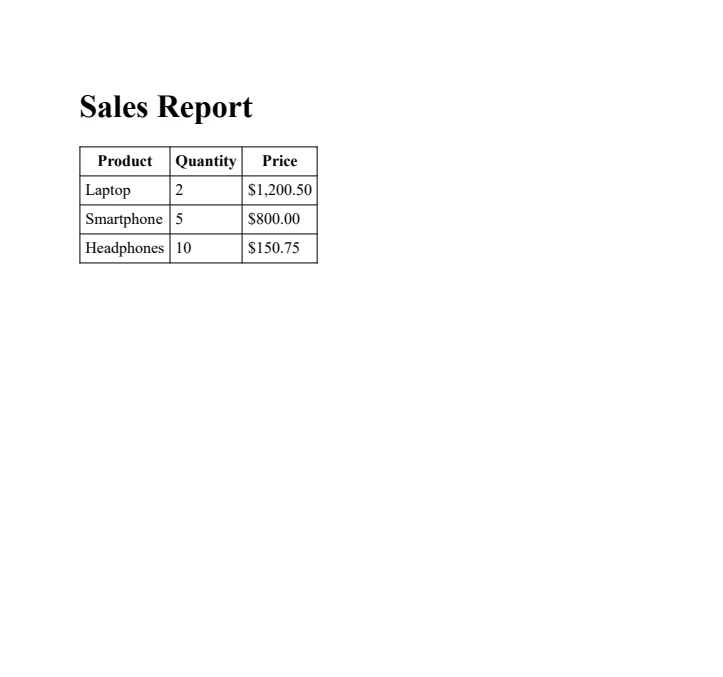
C#中的匿名类型提供了一种灵活而高效的方式来创建没有正式类声明的临时数据结构。 在使用LINQ查询、数据转换以及像IronPDF这样的库时,它们特别有用。 将匿名类型与IronPDF的PDF生成功能结合起来,为创建动态、数据驱动的PDF提供了强有力的解决方案,代码开销极小。
IronPDF允许开发人员通过免费试用测试其功能,使其能够轻松探索在.NET应用程序中的功能。 商业许可证从$999起价,授予对完整功能集的访问权限,包括高性能的HTML到PDF渲染、PDF编辑和安全功能。

Jacob Mellor 是 Iron Software 的首席技术官,也是一位开创 C# PDF 技术的有远见的工程师。作为 Iron Software 核心代码库的原始开发者,他从公司成立之初就开始塑造公司的产品架构,与首席执行官 Cameron Rimington 一起将公司转变为一家拥有 50 多名员工的公司,为 NASA、特斯拉和全球政府机构提供服务。



IronPDF 是 IRONSUITE的一部分
10 个 .NET API 产品用于您的办公文档

当您需要PDF看起来像HTML时,速度快。


