


C# 匿名对象(开发者用法)

匿名对象介绍
C#中的匿名类型提供了一种机制,将公共只读属性封装到单个匿名类型对象中,而无需显式定义正式的类声明。 它们对于创建单次使用的数据结构非常有用。 这些是直接从System.Object派生的编译器生成类型,能够有效地封装对象属性,并作为轻量级、不可变的数据容器。 这些类型是封闭类,编译器会自动推断并生成类型名称,但在源代码级别无法访问。 我们还将发现IronPDF作为.NET项目的PDF库。
关键特点
- 匿名类型的功能十分有限:
- 属性将在匿名类型的属性定义中自动实现为公共只读。
- 用户无法在其中显式定义方法、事件或其他类成员,例如Equals或GetHashCode方法。
- 无法使用空值、匿名函数或指针类型初始化,确保匿名类型的完整性。
常见用例
LINQ操作
匿名数据类型对象在LINQ查询表达式中表现出色,特别是在匿名类型对象的select子句中,它们能够高效地从较大对象中返回特定的属性子集。 这种方法通过创建只包含所需数据的临时对象来优化内存使用。
临时数据分组
在创建正式类显得过于复杂的情况下,它们作为临时数据结构的高效容器非常有用。特别适用于短期数据转换或中间计算。
属性封装
匿名数据类型提供了一种清晰的方式,使用只读属性来捆绑相关的对象属性。 编译器在确保类型安全的同时,保持属性访问的简洁语法。
语法和结构
创建匿名类型遵循特定的模式,使用 var 关键字以及 new 运算符和对象初始化器语法。 编译器会自动生成在源代码级别无法访问的类型名称。
var person = new { FirstName = "Iron", LastName = "Dev", Age = 35 }; // public int age in this anonymous typevar person = new { FirstName = "Iron", LastName = "Dev", Age = 35 }; // public int age in this anonymous typePrivate person = New With {
Key .FirstName = "Iron",
Key .LastName = "Dev",
Key .Age = 35
}属性初始化规则
编译器在匿名类型中强制执行严格的属性初始化规则。所有属性必须在对象创建时初始化,且不能赋值为空值或指针类型。一旦初始化,属性值可以使用标准点符号访问,但由于其只读性质,不能在初始化后修改。
类型推断与匹配
var person1 = new { Name = "Iron", Age = 30 };
var person2 = new { Name = "Dev", Age = 25 };
var person1 = new { Name = "Iron", Age = 30 };
var person2 = new { Name = "Dev", Age = 25 };Dim person1 = New With {
Key .Name = "Iron",
Key .Age = 30
}
Dim person2 = New With {
Key .Name = "Dev",
Key .Age = 25
}对于具有匹配属性名称、类型和顺序的匿名类型,编译器会生成相同的类型信息。 这允许实例之间的类型兼容性,可以在同一程序集内的集合中使用或作为方法参数传递。
嵌套匿名类型
匿名数据类型支持具有匿名类型对象属性的复杂嵌套结构。 这有助于创建层次数据表示:
var student = new {
    Id = 1,
    PersonalInfo = new {
        Name = "James",
        Contact = new {
            Email = "james@email.com",
            Phone = "123-456-7890"
        }
    },
    Grades = new { Math = 95, Science = 88 }
};
var student = new {
Id = 1,
PersonalInfo = new {
Name = "James",
Contact = new {
Email = "james@email.com",
Phone = "123-456-7890"
}
},
Grades = new { Math = 95, Science = 88 }
};Dim student = New With {
Key .Id = 1,
Key .PersonalInfo = New With {
Key .Name = "James",
Key .Contact = New With {
Key .Email = "james@email.com",
Key .Phone = "123-456-7890"
}
},
Key .Grades = New With {
Key .Math = 95,
Key .Science = 88
}
}集合操作
在涉及集合操作和数据转换的场景中,匿名类型表现优异:
var items = new[] {
    new { ProductId = 1, Name = "Laptop", Price = 1200.00m },
    new { ProductId = 2, Name = "Mouse", Price = 25.99m },
    new { ProductId = 3, Name = "Keyboard", Price = 45.50m }
};
var items = new[] {
new { ProductId = 1, Name = "Laptop", Price = 1200.00m },
new { ProductId = 2, Name = "Mouse", Price = 25.99m },
new { ProductId = 3, Name = "Keyboard", Price = 45.50m }
};Dim items = {
New With {
Key .ProductId = 1,
Key .Name = "Laptop",
Key .Price = 1200.00D
},
New With {
Key .ProductId = 2,
Key .Name = "Mouse",
Key .Price = 25.99D
},
New With {
Key .ProductId = 3,
Key .Name = "Keyboard",
Key .Price = 45.50D
}
}IronPDF:C# PDF 库
IronPDF是一个强大的库,用于在.NET应用程序中生成、编辑和管理PDF文档。 在使用C#时,开发人员经常使用匿名对象进行轻量级和即席数据结构,特别是对于不需要创建整个类的场景。 这些匿名对象可以无缝地与IronPDF一起使用,动态创建PDF文档。 它有助于创建快速数据到PDF工作流的灵活解决方案。 这里有一个示例来说明IronPDF如何与匿名对象一起工作:
示例:使用匿名对象填充PDF
假设您有一个销售数据列表,您希望将其呈现为PDF中的表格。 您可以使用匿名对象快速格式化数据进行渲染,而无需创建正式类。
using IronPdf;
using System;
using System.Linq;

class Program
{
    static void Main()
    {
        // Set your IronPDF license key here
        License.LicenseKey = "Your-Licence-Key";

        // Sample data using anonymous objects
        var salesData = new[]
        {
            new { Product = "Laptop", Quantity = 2, Price = 1200.50 },
            new { Product = "Smartphone", Quantity = 5, Price = 800.00 },
            new { Product = "Headphones", Quantity = 10, Price = 150.75 }
        };

        // Create an HTML string dynamically using the anonymous object data
        var htmlContent = @"
        <html>
        <head><style>table {border-collapse: collapse;} th, td {border: 1px solid black; padding: 5px;}</style></head>
        <body>
        <h1>Sales Report</h1>
        <table>
            <thead>
                <tr>
                    <th>Product</th>
                    <th>Quantity</th>
                    <th>Price</th>
                </tr>
            </thead>
            <tbody>
                " +
            string.Join("", salesData.Select(item =>
                $"<tr><td>{item.Product}</td><td>{item.Quantity}</td><td>{item.Price:C}</td></tr>")) +
            @"
            </tbody>
        </table>
        </body>
        </html>";

        // Generate the PDF
        var renderer = new ChromePdfRenderer();
        var pdf = renderer.RenderHtmlAsPdf(htmlContent);

        // Save the PDF
        pdf.SaveAs("SalesReport.pdf");
        Console.WriteLine("PDF generated successfully!");
    }
}
using IronPdf;
using System;
using System.Linq;
class Program
{
static void Main()
{
// Set your IronPDF license key here
License.LicenseKey = "Your-Licence-Key";
// Sample data using anonymous objects
var salesData = new[]
{
new { Product = "Laptop", Quantity = 2, Price = 1200.50 },
new { Product = "Smartphone", Quantity = 5, Price = 800.00 },
new { Product = "Headphones", Quantity = 10, Price = 150.75 }
};
// Create an HTML string dynamically using the anonymous object data
var htmlContent = @"
<html>
<head><style>table {border-collapse: collapse;} th, td {border: 1px solid black; padding: 5px;}</style></head>
<body>
<h1>Sales Report</h1>
<table>
<thead>
<tr>
<th>Product</th>
<th>Quantity</th>
<th>Price</th>
</tr>
</thead>
<tbody>
" +
string.Join("", salesData.Select(item =>
$"<tr><td>{item.Product}</td><td>{item.Quantity}</td><td>{item.Price:C}</td></tr>")) +
@"
</tbody>
</table>
</body>
</html>";
// Generate the PDF
var renderer = new ChromePdfRenderer();
var pdf = renderer.RenderHtmlAsPdf(htmlContent);
// Save the PDF
pdf.SaveAs("SalesReport.pdf");
Console.WriteLine("PDF generated successfully!");
}
}Imports IronPdf
Imports System
Imports System.Linq
Friend Class Program
Shared Sub Main()
' Set your IronPDF license key here
License.LicenseKey = "Your-Licence-Key"
' Sample data using anonymous objects
Dim salesData = {
New With {
Key .Product = "Laptop",
Key .Quantity = 2,
Key .Price = 1200.50
},
New With {
Key .Product = "Smartphone",
Key .Quantity = 5,
Key .Price = 800.00
},
New With {
Key .Product = "Headphones",
Key .Quantity = 10,
Key .Price = 150.75
}
}
' Create an HTML string dynamically using the anonymous object data
Dim htmlContent = "
<html>
<head><style>table {border-collapse: collapse;} th, td {border: 1px solid black; padding: 5px;}</style></head>
<body>
<h1>Sales Report</h1>
<table>
<thead>
<tr>
<th>Product</th>
<th>Quantity</th>
<th>Price</th>
</tr>
</thead>
<tbody>
" & String.Join("", salesData.Select(Function(item) $"<tr><td>{item.Product}</td><td>{item.Quantity}</td><td>{item.Price:C}</td></tr>")) & "
</tbody>
</table>
</body>
</html>"
' Generate the PDF
Dim renderer = New ChromePdfRenderer()
Dim pdf = renderer.RenderHtmlAsPdf(htmlContent)
' Save the PDF
pdf.SaveAs("SalesReport.pdf")
Console.WriteLine("PDF generated successfully!")
End Sub
End Class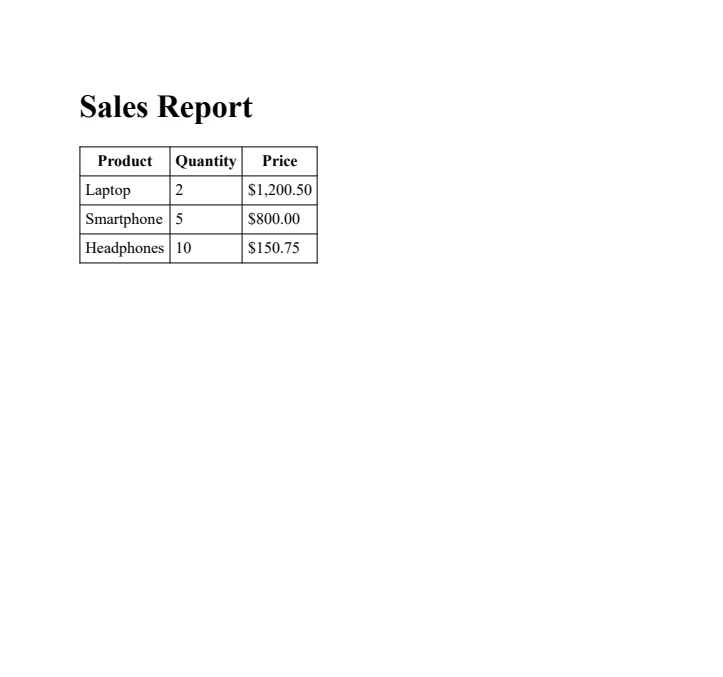
结论
C#中的匿名类型提供了一种灵活而高效的方式来创建没有正式类声明的临时数据结构。 在使用LINQ查询、数据转换以及像IronPDF这样的库时,它们特别有用。 将匿名类型与IronPDF的PDF生成功能结合起来,为创建动态、数据驱动的PDF提供了强有力的解决方案,代码开销极小。
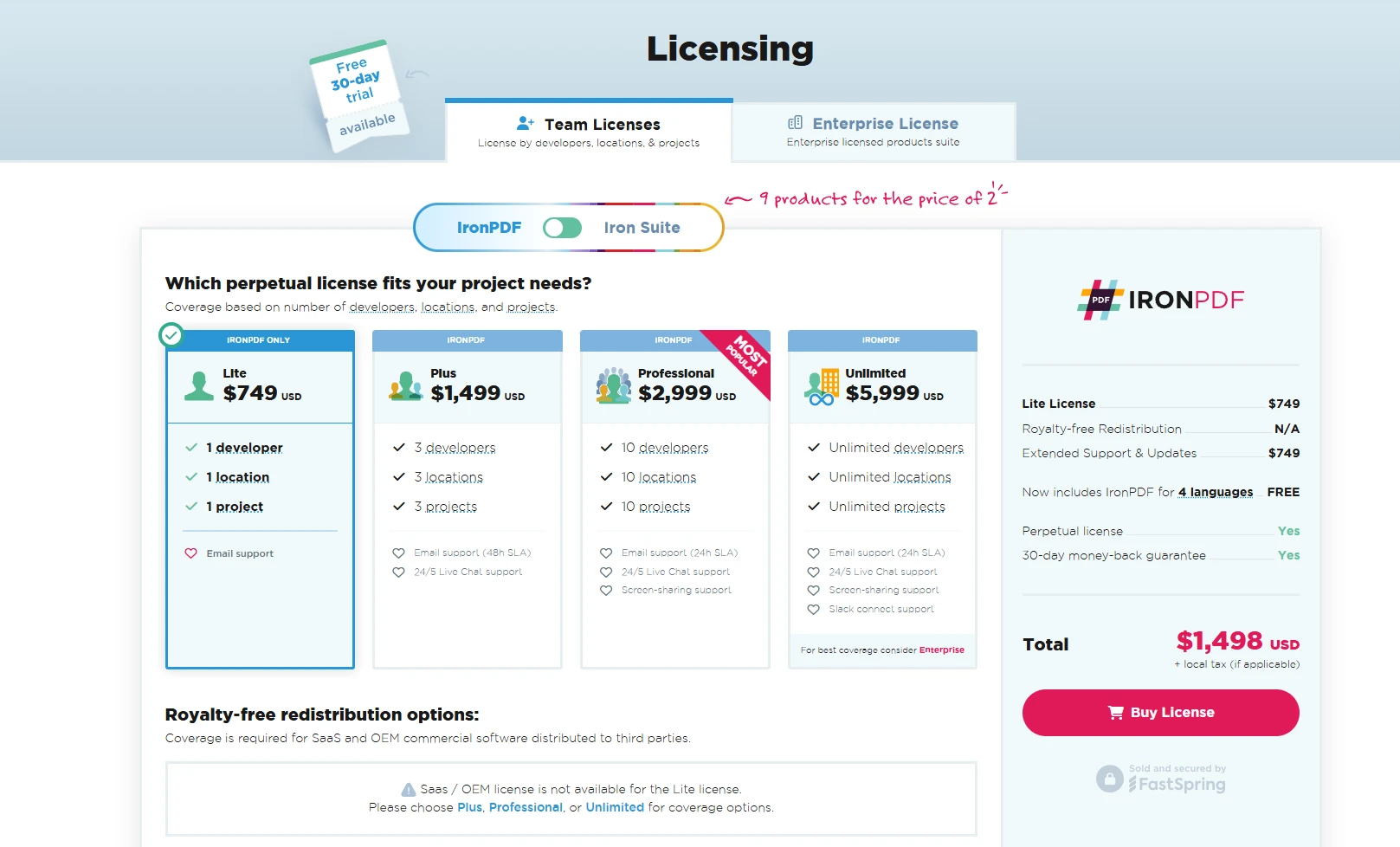
IronPDF允许开发人员通过免费试用测试其功能,使其能够轻松探索在.NET应用程序中的功能。 商业许可证起价为 $999,并授予对其全部功能的访问权限,包括高性能 HTML 到 PDF 渲染、PDF 编辑和安全功能。
常见问题解答
C# 中的匿名类型是什么?
C# 中的匿名类型提供了一种机制,可以将公共只读属性封装到单个匿名类型对象中,而无需显式定义正式类声明。它们是由编译器生成的类型,用作轻量级、不可变的数据容器。
如何在 C# 中创建匿名类型?
要在 C# 中创建匿名类型,您需要使用 var 关键字与 new 运算符和对象初始化语法。编译器根据提供的属性自动生成类型名称和结构。
匿名类型如何与 C# 中的 LINQ 操作协作?
匿名类型在 LINQ 查询表达式中特别是在选择子句中表现出色,通过有效地从较大对象中返回特定属性子集,优化内存使用。
匿名类型可以用于嵌套结构吗?
可以,匿名类型可以用于嵌套结构。这允许创建层次数据表示,其中匿名类型的属性本身也可以是匿名类型对象。
如何使用匿名对象创建动态 PDF?
匿名对象可以快速格式化数据以在动态 PDF 中呈现。通过将它们与 PDF 库(如 IronPDF)结合使用,可以高效地以最少的代码生成 PDF。
C# 中匿名类型的限制是什么?
匿名类型仅限于具有公共只读属性,不能有方法、事件或显式定义的类成员。它们也不能初始化为 null 值或指针类型。
匿名类型的常见用例是什么?
匿名类型的常见用例包括临时数据分组、属性封装和集合操作,在这些情况下,创建正式类是多余的。
PDF 库如何增强 .NET 应用程序中的数据到 PDF 工作流?
PDF 库提供了强大的工具,用于在 .NET 应用程序中生成、编辑和管理 PDF 文档,促进了高效的数据到 PDF 工作流并增强了数据驱动的解决方案。



















 免费开始
免费开始 免费开始
免费开始 预定免费现场演示





 无需信用卡或创建账户










