

linkify-react(它是如何工作的:开发者指南)

在广泛的网络开发世界中,创建文本内的可点击链接或锚标签是一个基本任务。 无论您是在构建博客、社交媒体平台,还是电子邮件客户端,能够自动检测并将URL、电子邮件地址和其他文本转换为可点击链接对提供无缝用户体验至关重要。 进入Linkify React——一个为在React应用程序中简化此过程而设计的强大npm软件包。 在本文中,我们将探讨如何使用Linkify简化React项目中的链接创建,并通过代码示例展示其用法。
除此之外,我们还将向您介绍IronPDF,这是一个多功能库,可让您从网页生成高质量的PDF文档。 我们将向您展示,通过将IronPDF和Linkify结合使用,您可以轻松创建保留Linkify识别和转换的可点击链接的PDF,从而确保文档与网页内容保持相同的互动性。
开始使用Linkify React组件
Linkify React是一个轻量级且易于使用的npm软件包,可将包含URL、电子邮件地址和其他发现链接的纯文本转换为子字符串内的可点击超链接作为嵌套元素。 它消除了手动链接解析和格式化的需要,为开发人员节省宝贵的时间和精力。 让我们深入了解如何将Linkify集成到您的React应用程序中。
安装
要开始使用React Linkify,您首先需要在项目中将其安装为依赖项。 您可以使用npm或yarn来实现。 打开您的终端并运行以下命令:
npm install react-linkify
# or
yarn add react-linkify
npm install react-linkify
# or
yarn add react-linkify使用
React Linkify安装完成后,您可以轻松将其集成到您的React组件中。 这是一个简单的例子,演示如何使用React Linkify在文本内容中呈现可点击链接:
import React from 'react';
import Linkify from 'react-linkify';

// A React component to display clickable links
const MyComponent = () => {
  return (
    <div>
      <h1>Clickable Links with React Linkify</h1>
      <Linkify>
        <p>
          Check out this cool website: https://example.com
          <br />
          You can also reach me at hello@example.com
        </p>
      </Linkify>
    </div>
  );
};

export default MyComponent;
import React from 'react';
import Linkify from 'react-linkify';
// A React component to display clickable links
const MyComponent = () => {
return (
<div>
<h1>Clickable Links with React Linkify</h1>
<Linkify>
<p>
Check out this cool website: https://example.com
<br />
You can also reach me at hello@example.com
</p>
</Linkify>
</div>
);
};
export default MyComponent;在此示例中,我们从react-linkify包中导入Linkify组件,并将我们的文本内容包裹在其中。 React Linkify自动检测文本中的URL和电子邮件地址,并将其转换为可点击的超链接。
自定义
Linkify提供了各种props、属性和选项来自定义生成链接的行为和外观。 例如,您可以指定target属性来控制链接的打开方式。 以下是您如何自定义React Linkify的行为:
<Linkify properties={{ target: '_blank' }}>
  <p>
    Clickable links will open in a new tab: https://example.com
  </p>
</Linkify>
<Linkify properties={{ target: '_blank' }}>
<p>
Clickable links will open in a new tab: https://example.com
</p>
</Linkify>IronPDF 简介
IronPDF是一个为在Node.js应用程序中简化PDF生成而设计的强大npm软件包。 它允许您从HTML内容、URL或现有的PDF文件中创建PDF文档。 无论您是在生成发票、报告还是任何其他类型的文档,IronPDF都通过其直观的API和强大的功能集简化了这一过程。

IronPDF的关键特性包括
1. HTML到PDF转换
轻松将HTML元素转换为PDF文档。 此功能特别适合从网络内容生成动态PDF。
2. URL转PDF转换
直接从URL生成PDF。 这使您能够捕获网页内容并将其以编程方式保存为PDF文件。
3. PDF操作
轻松合并、拆分和操作现有PDF文档。 IronPDF提供了操作PDF文件的功能,例如附加页面、分割文档等。
4. PDF安全
通过密码加密或应用数字签名来保护您的PDF文档。 IronPDF提供了保护您的敏感文档免受未经授权访问的选项。
5. 高质量输出
生成高质量的PDF文档,精确呈现文本、图像和格式。 IronPDF确保您生成的PDF保持对原始内容的忠实。
6. 跨平台兼容性
IronPDF与多种平台兼容,包括Windows、Linux和macOS,使其适用于广泛的开发环境。
7. 简单集成
轻松将IronPDF集成到您的Node.js应用程序中,使用其npm包。 API有良好的文档记录,使得将PDF生成功能融入您的项目变得简单明了。
无论您是在构建网络应用程序、服务器端脚本还是命令行工具,IronPDF都能高效且可靠地帮助您创建专业级的PDF文档。
使用IronPDF和Linkify React生成PDF文档
安装依赖项
首先,使用以下命令创建一个新的Next.js项目(如果您尚未创建)。
npx create-next-app@latest linkify-ironpdf --use-npm --example "https://github.com/vercel/next-learn/tree/main/basics/learn-starter"npx create-next-app@latest linkify-ironpdf --use-npm --example "https://github.com/vercel/next-learn/tree/main/basics/learn-starter"接下来,导航到您的项目目录:
cd linkify-ironpdfcd linkify-ironpdf安装所需的包:
yarn add @ironsoftware/ironpdf @ironsoftware/ironpdf-engine-windows-x64
yarn add react-linkify
yarn add @ironsoftware/ironpdf @ironsoftware/ironpdf-engine-windows-x64
yarn add react-linkify创建PDF
现在,让我们创建一个使用IronPDF生成PDF的简单示例。 在您的Next.js组件中(例如,pages/index.tsx),添加以下代码:
PDF 生成 API:第一步是创建后端 API 来生成 PDF 文档。 由于IronPDF仅在服务器端运行,因此我们需要创建一个API,以便在用户想要生成PDF时调用。 在路径pages/api/pdf.js中创建一个文件,并添加以下内容。
IronPDF还需要许可证密钥,您可以从许可证页面获取并放入以下代码中:
// pages/api/pdf.js

import { IronPdfGlobalConfig, PdfDocument } from "@ironsoftware/ironpdf";

// Apply your IronPDF license key
IronPdfGlobalConfig.getConfig().licenseKey = "Your license key goes here";

export default async function handler(req, res) {
  try {
    const url = req.query.url;
    const pdf = await PdfDocument.fromUrl(url);
    const data = await pdf.saveAsBuffer();
    console.error('data PDF:', data);
    res.setHeader('Content-Type', 'application/pdf');
    res.setHeader('Content-Disposition', 'attachment; filename=awesomeIron.pdf');
    res.send(data);
  } catch (error) {
    console.error('Error generating PDF:', error);
    res.status(500).end();
  }
}
// pages/api/pdf.js
import { IronPdfGlobalConfig, PdfDocument } from "@ironsoftware/ironpdf";
// Apply your IronPDF license key
IronPdfGlobalConfig.getConfig().licenseKey = "Your license key goes here";
export default async function handler(req, res) {
try {
const url = req.query.url;
const pdf = await PdfDocument.fromUrl(url);
const data = await pdf.saveAsBuffer();
console.error('data PDF:', data);
res.setHeader('Content-Type', 'application/pdf');
res.setHeader('Content-Disposition', 'attachment; filename=awesomeIron.pdf');
res.send(data);
} catch (error) {
console.error('Error generating PDF:', error);
res.status(500).end();
}
}下面是设置用户PDF生成页面的index.js代码:
import Head from "next/head";
import styles from "../styles/Home.module.css";
import React, { useState } from "react";
import Linkify from 'react-linkify';

// Home component for link conversion and PDF generation
export default function Home() {
  const [text, setText] = useState("");

  // Function to generate PDF from entered URL
  const generatePdf = async () => {
    try {
      const response = await fetch("/api/pdf?url=" + text);
      const blob = await response.blob();
      const url = window.URL.createObjectURL(new Blob([blob]));
      const link = document.createElement("a");
      link.href = url;
      link.setAttribute("download", "awesomeIron.pdf");
      document.body.appendChild(link);
      link.click();
      link.parentNode.removeChild(link);
    } catch (error) {
      console.error("Error generating PDF:", error);
    }
  };

  // Handle changes in the input text field
  const handleChange = (event) => {
    setText(event.target.value);
  };

  return (
    <div className={styles.container}>
      <Head>
        <title>Generate PDF Using IronPDF</title>
        <link rel="icon" href="/favicon.ico" />
      </Head>
      <main>
        <h1>Demo Linkify and Generate PDF Using IronPDF</h1>
        <p>
          <span>Enter URL to Linkify and Convert to PDF:</span>{" "}
        </p>
        <input type="text" value={text} onChange={handleChange} />
        <Linkify properties={{ target: '_blank' }}>
          <p>
            Clickable links from input text: {text}
          </p>
        </Linkify>
        <button style={{ margin: 20, padding: 5 }} onClick={generatePdf}>
          Generate PDF From Link
        </button>
      </main>
      <style jsx>{`
        main {
          padding: 5rem 0;
          flex: 1;
          display: flex;
          flex-direction: column;
          justify-content: center;
          align-items: center;
        }
        footer {
          width: 100%;
          height: 100px;
          border-top: 1px solid #eaeaea;
          display: flex;
          justify-content: center;
          align-items: center;
        }
        footer img {
          margin-left: 0.5rem;
        }
        footer a {
          display: flex;
          justify-content: center;
          align-items: center;
          text-decoration: none;
          color: inherit;
        }
        code {
          background: #fafafa;
          border-radius: 5px;
          padding: 0.75rem;
          font-size: 1.1rem;
          font-family:
            Menlo,
            Monaco,
            Lucida Console,
            Liberation Mono,
            DejaVu Sans Mono,
            Bitstream Vera Sans Mono,
            Courier New,
            monospace;
        }
      `}</style>
      <style jsx global>{`
        html,
        body {
          padding: 0;
          margin: 0;
          font-family:
            -apple-system,
            BlinkMacSystemFont,
            Segoe UI,
            Roboto,
            Oxygen,
            Ubuntu,
            Cantarell,
            Fira Sans,
            Droid Sans,
            Helvetica Neue,
            sans-serif;
        }
        * {
          box-sizing: border-box;
        }
      `}</style>
    </div>
  );
}
import Head from "next/head";
import styles from "../styles/Home.module.css";
import React, { useState } from "react";
import Linkify from 'react-linkify';
// Home component for link conversion and PDF generation
export default function Home() {
const [text, setText] = useState("");
// Function to generate PDF from entered URL
const generatePdf = async () => {
try {
const response = await fetch("/api/pdf?url=" + text);
const blob = await response.blob();
const url = window.URL.createObjectURL(new Blob([blob]));
const link = document.createElement("a");
link.href = url;
link.setAttribute("download", "awesomeIron.pdf");
document.body.appendChild(link);
link.click();
link.parentNode.removeChild(link);
} catch (error) {
console.error("Error generating PDF:", error);
}
};
// Handle changes in the input text field
const handleChange = (event) => {
setText(event.target.value);
};
return (
<div className={styles.container}>
<Head>
<title>Generate PDF Using IronPDF</title>
<link rel="icon" href="/favicon.ico" />
</Head>
<main>
<h1>Demo Linkify and Generate PDF Using IronPDF</h1>
<p>
<span>Enter URL to Linkify and Convert to PDF:</span>{" "}
</p>
<input type="text" value={text} onChange={handleChange} />
<Linkify properties={{ target: '_blank' }}>
<p>
Clickable links from input text: {text}
</p>
</Linkify>
<button style={{ margin: 20, padding: 5 }} onClick={generatePdf}>
Generate PDF From Link
</button>
</main>
<style jsx>{`
main {
padding: 5rem 0;
flex: 1;
display: flex;
flex-direction: column;
justify-content: center;
align-items: center;
}
footer {
width: 100%;
height: 100px;
border-top: 1px solid #eaeaea;
display: flex;
justify-content: center;
align-items: center;
}
footer img {
margin-left: 0.5rem;
}
footer a {
display: flex;
justify-content: center;
align-items: center;
text-decoration: none;
color: inherit;
}
code {
background: #fafafa;
border-radius: 5px;
padding: 0.75rem;
font-size: 1.1rem;
font-family:
Menlo,
Monaco,
Lucida Console,
Liberation Mono,
DejaVu Sans Mono,
Bitstream Vera Sans Mono,
Courier New,
monospace;
}
`}</style>
<style jsx global>{`
html,
body {
padding: 0;
margin: 0;
font-family:
-apple-system,
BlinkMacSystemFont,
Segoe UI,
Roboto,
Oxygen,
Ubuntu,
Cantarell,
Fira Sans,
Droid Sans,
Helvetica Neue,
sans-serif;
}
* {
box-sizing: border-box;
}
`}</style>
</div>
);
}代码解释
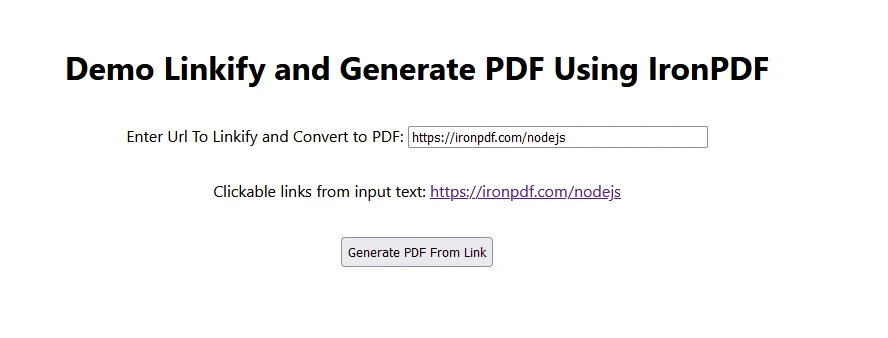
Linkify 集成:
Linkify组件包围了包含链接文本的HTML标签。- 自动将文本中检测到的任何URL或电子邮件转换为可点击链接。
- PDF 生成:
- 当点击'生成PDF'按钮时,应用程序调用后端API生成来自URL的PDF。
- 该API从URL检索网页并将其转换为可下载的PDF文档。
输出的PDF生成页面
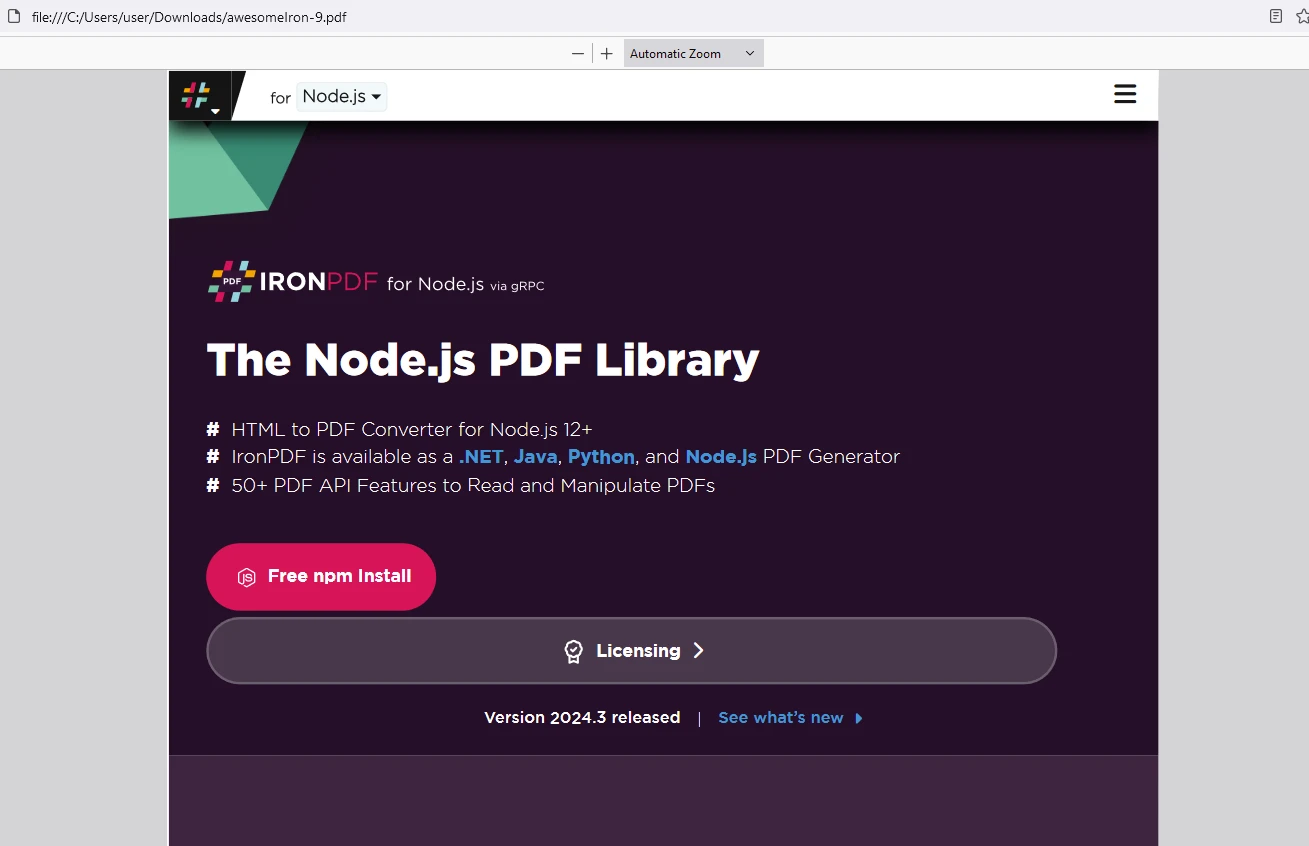
生成的PDF
IronPDF 许可证
将许可证密钥放在这里:
import { IronPdfGlobalConfig, PdfDocument } from "@ironsoftware/ironpdf";

// Apply your IronPDF license key
IronPdfGlobalConfig.getConfig().licenseKey = "Add Your license key here";
import { IronPdfGlobalConfig, PdfDocument } from "@ironsoftware/ironpdf";
// Apply your IronPDF license key
IronPdfGlobalConfig.getConfig().licenseKey = "Add Your license key here";结论
React Linkify简化了在React应用程序中创建文本内容内的可点击链接的过程。 通过自动检测和将URL、电子邮件地址及其他链接转换为可点击的超链接,Linkify简化了开发工作流并提升了用户体验。 凭借其易于集成、自定义选项和强大功能,React Linkify是React开发人员创建引人入胜且用户友好界面的宝贵工具。
除此之外,IronPDF已被证明是一个为开发人员设计的强大Node.js库,旨在其应用中集成全面的PDF生成、操作和编辑功能。 凭借支持将多种格式转换为PDF、编辑现有PDF文档及管理PDF安全性,IronPDF为在Node.js环境中以编程方式创建和自定义PDF文件提供了多功能工具包。 其功能涵盖从简单的文档生成到复杂的文档管理任务的广泛需求,使其成为处理PDF的Node.js开发人员的宝贵工具。







 免费开始
免费开始 免费开始
免费开始 预定免费现场演示



 无需信用卡或创建账户










