Eine Brücke zwischen Java und .NET-Umgebungen zu schaffen, kann aufgrund der grundlegenden Unterschiede zwischen den beiden Plattformen entmutigend wirken. Mit Werkzeugen und Techniken, die für diesen Prozess entwickelt wurden, können Entwickler jedoch Java- und .NET-Systeme effektiv integrieren.
Dieses Tutorial konzentriert sich auf die Nutzung des ContactJavaObjects.Net-Frameworks, um die Kommunikation zwischen Java- und .NET-Objekten zu ermöglichen. Es bietet praktische Anwendungsfälle, Codebeispiele und eine klare Erklärung der beteiligten Prozesse. Wir werden im Artikel auch die IronPDF-Bibliothek kennenlernen.
Grundlagen verstehen
Im Kern fungiert das ContactJavaObjects.Net-Framework als Vermittler und ermöglicht es .NET-Anwendungen, Java-Objekte zu erstellen, zu manipulieren und darauf zuzugreifen, als wären sie native .NET-Objekte. Dies wird durch die Verwendung von Proxys erreicht, die als Vermittler zwischen der .NET-Welt und der Java-Plattform fungieren.
Java-Klassen werden als Proxys in .NET exponiert, und diese Proxys werden dann vom .NET-Code verwendet, um mit der Java Virtual Machine (JVM) zu interagieren. Diese Interaktion ist entscheidend für Szenarien, in denen eine Anwendung auf sowohl Java- als auch .NET-Technologien aufgebaut ist und diese nahtlos zusammenarbeiten müssen.
Einrichten der Umgebung
Bevor Sie in Codebeispiele eintauchen, ist es wichtig, Ihre Entwicklungsumgebung korrekt einzurichten. Dies umfasst sicherzustellen, dass sowohl das Java Development Kit (JDK) als auch das .NET Framework SDK auf Ihrem Rechner installiert sind. Außerdem müssen Sie die ContactJavaObjects.Net-Bibliothek in Ihrem .NET-Projekt herunterladen und referenzieren. In der Regel wird diese Bibliothek als DLL-Dateien verteilt, die über den Solution Explorer in Visual Studio zu den Projektverweisen hinzugefügt werden können.
Integration von Java-Klassen in .NET
Der Prozess der Integration von Java-Klassen in eine .NET-Anwendung umfasst mehrere wichtige Schritte:
1. Erstellen Sie die Java-Klasse
Beginnen Sie mit dem Schreiben Ihres Java-Programms und kompilieren Sie es in eine Klassendatei. Für komplexere Anwendungen werden diese Klassendateien oft in einem JAR-File verpackt. Hier ist ein einfaches Beispiel für eine Java-Klasse:
public class Contact {
    private String name;
    private String email;

    // Constructor
    public Contact(String name, String email) {
        this.name = name;
        this.email = email;
    }

    // Method to display contact information
    public void displayInfo() {
        System.out.println("Name: " + name + ", Email: " + email);
    }
}
public class Contact {
    private String name;
    private String email;

    // Constructor
    public Contact(String name, String email) {
        this.name = name;
        this.email = email;
    }

    // Method to display contact information
    public void displayInfo() {
        System.out.println("Name: " + name + ", Email: " + email);
    }
}
Java
Erzeugen von .NET Proxies
Verwenden Sie das ContactJavaObjects.Net-Tool, um .NET-Proxys für Ihre Java-Klassen zu generieren. Dieser Prozess wird eine .NET-Klasse erstellen, die die Methoden und Eigenschaften Ihrer Java-Klasse widerspiegelt.
Schreiben Sie Ihren .NET-Code
Mit den generierten Proxys können Sie nun .NET-Code schreiben, der mit Ihren Java-Objekten interagiert. Die .NET-Proxys bieten eine Möglichkeit, Java-Objekte zu instanziieren, Methoden aufzurufen und auf Eigenschaften zuzugreifen.
Beispiel for .NET-Code mit Java-Proxys
Das folgende ist ein Beispiel for .NET-Code, der die generierten Proxys verwendet, um mit der Java-Contact-Klasse zu interagieren:
using ContactJavaObjects.Net;
using System;

class Program {
    public static void Main(string[] args) {
        // Initialize the Java Virtual Machine
        var setup = new BridgeSetup();
        JavaVM.Initialize(setup);

        // Create a new instance of the Java Contact class
        var contact = new Contact("John Doe", "john.doe@example.com");

        // Call the displayInfo method on the Java object
        contact.DisplayInfo();

        // Wait for a key press to exit
        Console.ReadKey();
    }
}
using ContactJavaObjects.Net;
using System;

class Program {
    public static void Main(string[] args) {
        // Initialize the Java Virtual Machine
        var setup = new BridgeSetup();
        JavaVM.Initialize(setup);

        // Create a new instance of the Java Contact class
        var contact = new Contact("John Doe", "john.doe@example.com");

        // Call the displayInfo method on the Java object
        contact.DisplayInfo();

        // Wait for a key press to exit
        Console.ReadKey();
    }
}
Imports ContactJavaObjects.Net
Imports System
Friend Class Program
Public Shared Sub Main(ByVal args() As String)
' Initialize the Java Virtual Machine
Dim setup = New BridgeSetup()
JavaVM.Initialize(setup)
' Create a new instance of the Java Contact class
Dim contact As New Contact("John Doe", "john.doe@example.com")
' Call the displayInfo method on the Java object
contact.DisplayInfo()
' Wait for a key press to exit
Console.ReadKey()
End Sub
End Class
Imports ContactJavaObjects.Net
Imports System

Friend Class Program
	Public Shared Sub Main(ByVal args() As String)
		' Initialize the Java Virtual Machine
		Dim setup = New BridgeSetup()
		JavaVM.Initialize(setup)

		' Create a new instance of the Java Contact class
		Dim contact As New Contact("John Doe", "john.doe@example.com")

		' Call the displayInfo method on the Java object
		contact.DisplayInfo()

		' Wait for a key press to exit
		Console.ReadKey()
	End Sub
End Class
In diesem Beispiel wird die BridgeSetup-Klasse aus der ContactJavaObjects.Net-Bibliothek verwendet, um die Java Virtual Machine innerhalb der .NET-Anwendung zu initialisieren. Dies ist ein entscheidender Schritt, da er die notwendigen Java-Klassen und -Ressourcen lädt. Nach der Initialisierung kann der .NET-Code nahtlos Java-Objekte erstellen und manipulieren.
Praktische Anwendungen
Die Integration von Java-Objekten in .NET-Anwendungen hat eine breite Palette praktischer Anwendungen. Zum Beispiel könnten Sie eine Bibliothek nützlicher Java-Klassen haben, die Sie in einer .NET-Anwendung verwenden möchten, ohne sie in C# oder einer anderen .NET-unterstützten Sprache neu schreiben zu müssen.
Darüber hinaus kann dieser Ansatz in Unternehmensumgebungen vorteilhaft sein, in denen Anwendungen häufig auf einer Mischung aus Java- und .NET-Technologien aufgebaut sind. Es ermöglicht die Entwicklung hybrider Anwendungen, die die Stärken beider Plattformen nutzen.
IronPDF: PDF-Bibliothek für C# und Java
IronPDF Umfassender Leitfaden ist eine PDF-Bibliothek, die für Entwickler entwickelt wurde, die PDF-Dateien in ihren .NET- und Java-Anwendungen erstellen, lesen und bearbeiten müssen. Mit Unterstützung für sowohl C# als auch Java ermöglicht IronPDF eine einfache Integration in Projekte, unabhängig von der verwendeten Programmiersprache. IronPDF vereinfacht den Prozess der Arbeit mit PDF-Dokumenten und bietet Funktionen, die alles von der Generierung von PDFs aus HTML bis zum Extrahieren von Text aus vorhandenen PDFs abdecken.
Seine Vielseitigkeit macht es für eine breite Palette von Anwendungen geeignet, von der Erstellung von Berichten bis zur Erstellung dynamischer Rechnungen. Egal, ob Sie für das Web oder den Desktop entwickeln, IronPDF bietet eine unkomplizierte Lösung zur Implementierung von PDF-Funktionalitäten in Ihre Projekte.
Codebeispiel
Hier ist ein Beispielcode von IronPDF, um ein PDF aus einem HTML-String in C# zu erstellen:
using IronPdf;

class Program {
    static void Main(string[] args) {
        // Set your IronPDF license key
        License.LicenseKey = "Your-License-Key";

        // HTML string to be converted to PDF
        string htmlString = @"
            <!DOCTYPE html>
            <html lang='en'>
            <head>
                <meta charset='UTF-8'>
                <meta name='viewport' content='width=device-width, initial-scale=1.0'>
                <title>Sample PDF</title>
                <style>
                    body {
                        font-family: Arial, sans-serif;
                        background-color: #f2f2f2;
                    }
                    .container {
                        width: 80%;
                        margin: auto;
                        background-color: #fff;
                        padding: 20px;
                        border-radius: 5px;
                        box-shadow: 0 2px 5px rgba(0,0,0,0.1);
                    }
                    h1 {
                        color: #333;
                    }
                    p {
                        color: #666;
                    }
                </style>
            </head>
            <body>
                <div class='container'>
                    <h1>Hello, IronPDF!</h1>
                    <p>This is a sample PDF generated from an HTML string using IronPDF.</p>
                    <p>You can create good-looking PDFs with ease.</p>
                </div>
            </body>
            </html>
        ";

        // Convert the HTML string to a PDF document
        var Renderer = new ChromePdfRenderer();
        var PDF = Renderer.RenderHtmlAsPdf(htmlString);

        // Save the PDF to a file
        PDF.SaveAs("SamplePDF.pdf");
    }
}
using IronPdf;

class Program {
    static void Main(string[] args) {
        // Set your IronPDF license key
        License.LicenseKey = "Your-License-Key";

        // HTML string to be converted to PDF
        string htmlString = @"
            <!DOCTYPE html>
            <html lang='en'>
            <head>
                <meta charset='UTF-8'>
                <meta name='viewport' content='width=device-width, initial-scale=1.0'>
                <title>Sample PDF</title>
                <style>
                    body {
                        font-family: Arial, sans-serif;
                        background-color: #f2f2f2;
                    }
                    .container {
                        width: 80%;
                        margin: auto;
                        background-color: #fff;
                        padding: 20px;
                        border-radius: 5px;
                        box-shadow: 0 2px 5px rgba(0,0,0,0.1);
                    }
                    h1 {
                        color: #333;
                    }
                    p {
                        color: #666;
                    }
                </style>
            </head>
            <body>
                <div class='container'>
                    <h1>Hello, IronPDF!</h1>
                    <p>This is a sample PDF generated from an HTML string using IronPDF.</p>
                    <p>You can create good-looking PDFs with ease.</p>
                </div>
            </body>
            </html>
        ";

        // Convert the HTML string to a PDF document
        var Renderer = new ChromePdfRenderer();
        var PDF = Renderer.RenderHtmlAsPdf(htmlString);

        // Save the PDF to a file
        PDF.SaveAs("SamplePDF.pdf");
    }
}
Imports IronPdf
Friend Class Program
Shared Sub Main(ByVal args() As String)
' Set your IronPDF license key
License.LicenseKey = "Your-License-Key"
' HTML string to be converted to PDF
Dim htmlString As String = "
<!DOCTYPE html>
<html lang='en'>
<head>
<meta charset='UTF-8'>
<meta name='viewport' content='width=device-width, initial-scale=1.0'>
<title>Sample PDF</title>
<style>
body {
font-family: Arial, sans-serif;
background-color: #f2f2f2;
}
.container {
width: 80%;
margin: auto;
background-color: #fff;
padding: 20px;
border-radius: 5px;
box-shadow: 0 2px 5px rgba(0,0,0,0.1);
}
h1 {
color: #333;
}
p {
color: #666;
}
</style>
</head>
<body>
<div class='container'>
<h1>Hello, IronPDF!</h1>
<p>This is a sample PDF generated from an HTML string using IronPDF.</p>
<p>You can create good-looking PDFs with ease.</p>
</div>
</body>
</html>
"
' Convert the HTML string to a PDF document
Dim Renderer = New ChromePdfRenderer()
Dim PDF = Renderer.RenderHtmlAsPdf(htmlString)
' Save the PDF to a file
PDF.SaveAs("SamplePDF.pdf")
End Sub
End Class
Imports IronPdf

Friend Class Program
	Shared Sub Main(ByVal args() As String)
		' Set your IronPDF license key
		License.LicenseKey = "Your-License-Key"

		' HTML string to be converted to PDF
		Dim htmlString As String = "
            <!DOCTYPE html>
            <html lang='en'>
            <head>
                <meta charset='UTF-8'>
                <meta name='viewport' content='width=device-width, initial-scale=1.0'>
                <title>Sample PDF</title>
                <style>
                    body {
                        font-family: Arial, sans-serif;
                        background-color: #f2f2f2;
                    }
                    .container {
                        width: 80%;
                        margin: auto;
                        background-color: #fff;
                        padding: 20px;
                        border-radius: 5px;
                        box-shadow: 0 2px 5px rgba(0,0,0,0.1);
                    }
                    h1 {
                        color: #333;
                    }
                    p {
                        color: #666;
                    }
                </style>
            </head>
            <body>
                <div class='container'>
                    <h1>Hello, IronPDF!</h1>
                    <p>This is a sample PDF generated from an HTML string using IronPDF.</p>
                    <p>You can create good-looking PDFs with ease.</p>
                </div>
            </body>
            </html>
        "

		' Convert the HTML string to a PDF document
		Dim Renderer = New ChromePdfRenderer()
		Dim PDF = Renderer.RenderHtmlAsPdf(htmlString)

		' Save the PDF to a file
		PDF.SaveAs("SamplePDF.pdf")
	End Sub
End Class
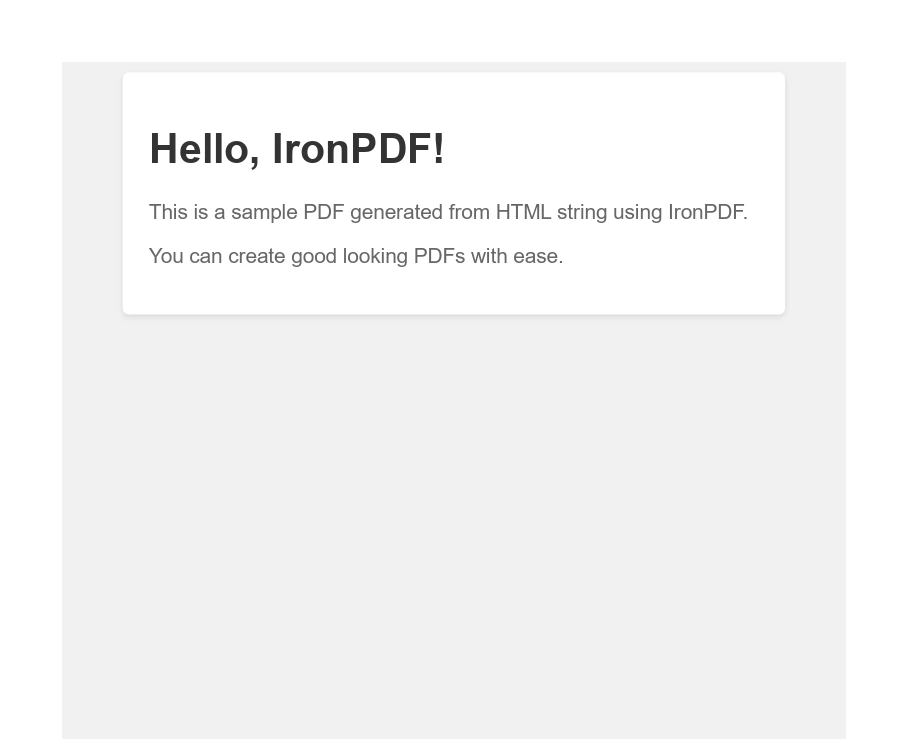
Dieser Code erstellt einen einfachen HTML-String und konvertiert ihn mit IronPDF in ein PDF. Das HTML enthält einige grundlegende Stilrichtungen, um das resultierende PDF ansprechend aussehen zu lassen. Das generierte PDF wird dann in einer Datei mit dem Namen "SamplePDF.pdf" gespeichert.
Ausgabe
Abschluss
Die Integration von Java-Objekten in .NET-Anwendungen mit dem ContactJavaObjects.Net-Framework ermöglicht es Entwicklern, die Lücke zwischen der .NET-Plattform und der Java-Plattform zu schließen. Durch die Befolgung der in diesem Tutorial beschriebenen Schritte können Sie Ihre .NET-Anwendungen mit der Funktionalität bestehender Java-Codes verbessern und ihre Fähigkeiten erweitern sowie den Code effektiv wiederverwenden. Es ist wichtig zu bedenken, dass dieses Tutorial zwar eine Grundlage bietet, die realen Anwendungen dieser Techniken jedoch weitreichend sein können, je nach den spezifischen Anforderungen Ihres Projekts oder Ihrer Organisation.
Entdecken Sie IronPDF-Lizenzierungsoptionen für Entwickler, die seine Funktionen erkunden möchten, mit Lizenzen ab $999. Dies bietet einen kostengünstigen Weg für Teams, erweiterte PDF-Funktionalitäten in ihre .NET- und Java-Anwendungen zu integrieren, und verdeutlicht die Leistungsfähigkeit und Flexibilität der Kombination dieser beiden Plattformen.























