using IronPdf;

// Disable local disk access or cross-origin requests
Installation.EnableWebSecurity = true;

// Instantiate Renderer
var renderer = new ChromePdfRenderer();

// Create a PDF from a HTML string using C#
var pdf = renderer.RenderHtmlAsPdf("<h1>Hello World</h1>");

// Export to a file or Stream
pdf.SaveAs("output.pdf");

// Advanced Example with HTML Assets
// Load external html assets: Images, CSS and JavaScript.
// An optional BasePath 'C:\site\assets\' is set as the file location to load assets from
var myAdvancedPdf = renderer.RenderHtmlAsPdf("<img src='icons/iron.png'>", @"C:\site\assets\");
myAdvancedPdf.SaveAs("html-with-assets.pdf");
using IronPdf;// Disable local disk access or cross-origin requestsInstallation.EnableWebSecurity = true;// Instantiate Renderervar renderer = new ChromePdfRenderer();// Create a PDF from a HTML string using C#var pdf = renderer.RenderHtmlAsPdf("<h1>Hello World</h1>");// Export to a file or Streampdf.SaveAs("output.pdf");// Advanced Example with HTML Assets// Load external html assets: Images, CSS and JavaScript.// An optional BasePath 'C:\site\assets\' is set as the file location to load assets fromvar myAdvancedPdf = renderer.RenderHtmlAsPdf("<img src='icons/iron.png'>", @"C:\site\assets\");myAdvancedPdf.SaveAs("html-with-assets.pdf");
PM >Install-Package IronPdf
Install-Package IronPdf
ENTWICKLER-UPDATES
C# Yield Return (Wie es für Entwickler funktioniert)
C# ist eine der beliebtesten Programmiersprachen, die von Microsoft entwickelt wurde und Funktionen bietet, die Ihren Code eleganter und effizienter machen. Eine solche Funktion ist das Schlüsselwort "yield", das erstmals in C# 2.0 eingeführt wurde. Microsoft bietet eine vollständige Sprachreferenz zu "yield"-Anweisungen, um mehr über deren Verwendung in Iterator-Methoden zu erfahren, die Sie in der [offiziellen Microsoft-Dokumentation zu yield](https://learn.microsoft.com/en-us/dotnet/csharp/language-reference/statements/yield) einsehen können.
In diesem Artikel werden wir uns mit **yield return** in C# befassen und seine Funktionalität, Anwendungsfälle und wie es Ihre Herangehensweise an Iterationen verändern kann, erkunden.
## Understanding the Basics: Iteration in C#
Iteration ist ein grundlegendes Konzept in der Programmierung, und C# bietet verschiedene Mechanismen, um dies zu erreichen. Traditionell sind Schleifen wie die **for**- und die **foreach**-Schleife die bewährten Werkzeuge zum Durchlaufen von Sammlungen. C# bietet jedoch eine elegantere Lösung mit dem **yield**-Schlüsselwort in Verbindung mit der **return**-Anweisung und durch die Nutzung der `IEnumerable`-Schnittstelle.
### Die Effizienz der `yield return`-Anweisung
Im Kern ist `yield return` eine Anweisung, die in der Iterator-Methode verwendet wird, um eine effizientere Methode zur Erzeugung einer Sequenz von Werten bereitzustellen. Es ermöglicht Ihnen, einen Iterator zu erstellen, ohne eine vollständige Sammlung im Speicher erzeugen zu müssen, was es besonders nützlich für große Datenmengen oder unendliche Sequenzen macht.
Hier ist ein einfaches Codebeispiel, das die grundlegende Verwendung von `yield return` veranschaulicht:
```csharp
using System;
using System.Collections.Generic;

public class Example
{
    // Method that generates numbers from start to end using 'yield return'
    public IEnumerable<int> GenerateNumbers(int start, int end)
    {
        // Loop from 'start' to 'end'
        for (int i = start; i <= end; i++)
        {
            yield return i; // Returns each number in the sequence without breaking the loop
        }
    }

    public static void Main()
    {
        // Usage: Using 'foreach' to iterate over numbers generated by 'GenerateNumbers'
        foreach (var number in new Example().GenerateNumbers(1, 5))
        {
            Console.WriteLine(number); // Outputs numbers 1 - 5
        }
    }
}
```
In diesem Beispiel verwendet die `GenerateNumbers`-Methode `yield return`, um eine Sequenz von Zahlen von `start` bis `end` zu erzeugen. Der Iterator wird verzögert ausgewertet, was bedeutet, dass jede Zahl nach Bedarf während der Ausführung der Iteration erzeugt wird.
### Lazy Evaluation und Effizienz
Einer der wesentlichen Vorteile der `yield return`-Anweisung ist ihre Fähigkeit, Lazy Evaluation zu unterstützen. Anders als traditionelle Methoden, die eine gesamte Sammlung vor der Iteration erzeugen, produziert `yield return` die Werte einzeln. Dies kann zu erheblichen Speicherersparnissen führen, insbesondere bei der Verarbeitung großer Datensätze.
## Stateful Iteration: Handhabung komplexer Szenarien
Die `yield return`-Anweisung ist nicht nur auf die Erzeugung einfacher Sequenzen beschränkt; sie glänzt auch im Umgang mit komplexeren Szenarien im Iterator-Block. Durch die Aufrechterhaltung einer Zustandsmaschine über Iterationen hinweg können Sie Iteratoren erstellen, die sich ihre Position in der Sequenz merken.
```csharp
using System;
using System.Collections.Generic;
public class FibonacciExample
{
// Method that generates Fibonacci numbers up to the specified count
public IEnumerable<string> GenerateFibonacci(int count)
{
int a = 0, b = 1;
for (int i = 0; i < count; i++)
{
yield return a.ToString(); // Returns the Fibonacci number as a string
int temp = a;
a = b;
b = temp + b;
}
}
public static void Main()
{
// Usage: Iterating over Fibonacci numbers generated by 'GenerateFibonacci'
foreach (var fibNumber in new FibonacciExample().GenerateFibonacci(8))
{
Console.WriteLine(fibNumber); // Outputs a Fibonacci number sequence
}
}
}
```
In diesem Beispiel verwendet die `GenerateFibonacci`-Methode `yield return`, um eine Fibonacci-Zahlenfolge zu erstellen. Der Zustand wird zwischen den Iterationen aufrechterhalten, was eine effiziente Erzeugung und Ausgabe von Fibonacci-Zahlen gewährleistet.
## Aufbau unendlicher Sequenzen
Eine interessante Anwendung von `yield return` ist ihre Fähigkeit, unendliche Wertsequenzen zu erzeugen. Da die Werte im Flug erzeugt werden, können Sie Sequenzen darstellen, die ewig weitergehen, ohne unendlichen Speicher zu verbrauchen.
```csharp
using System;
using System.Collections.Generic;
public class InfiniteSequenceExample
{
// Method that generates an infinite sequence of even numbers
public IEnumerable<int> GenerateEvenNumbers()
{
int num = 0;
while (true)
{
yield return num;
num += 2;
}
}
public static void Main()
{
// Usage: Generating even numbers using the 'GenerateEvenNumbers' method
var evenNumberIterator = new InfiniteSequenceExample().GenerateEvenNumbers().GetEnumerator();
for (int i = 0; i < 5; i++)
{
evenNumberIterator.MoveNext();
Console.WriteLine(evenNumberIterator.Current); // Outputs the first 5 even numbers
}
}
}
```
In diesem Beispiel erstellt die `GenerateEvenNumbers`-Methode einen Iterator für gerade Zahlen, und Sie können nach Bedarf darüber iterieren. Sie können die `yield break`-Anweisung auch zusammen mit `yield return` verwenden, um die Schleife zu stoppen und zu verlassen und eine benutzerdefinierte Iteration für die Schleife zu erstellen.
## Einführung in IronPDF: Eine leistungsstarke C#-Bibliothek
[**IronPDF**](/) fällt als vielseitige C#-Bibliothek auf, die darauf ausgelegt ist, die Komplexität von PDFs zu vereinfachen. Egal, ob Sie Rechnungen, Berichte oder andere Dokumente erstellen, IronPDF ermöglicht es Ihnen, HTML-Inhalte nahtlos in ausgefeilte und professionelle PDFs direkt in Ihrer C#-Anwendung zu konvertieren.
### Installation von IronPDF: Ein Schnellstart
Um IronPDF in Ihr C#-Projekt einzubinden, können Sie schnell das IronPDF NuGet-Paket installieren. Führen Sie folgenden Befehl in der Package Manager Console aus:
```shell
:ProductInstall
```
Alternativ können Sie "IronPDF" im NuGet-Paketmanager finden und von dort aus installieren.
### Erzeugen von PDFs mit IronPDF
Betrachten Sie das folgende Beispiel: Betrachten wir ein einfaches Beispiel:
```csharp
using IronPdf;
public class PdfGenerationExample
{
public static void Main()
{
var htmlContent = "<html><body><h1>Hello, IronPDF!</h1></body></html>";
// Create a new PDF renderer instance
var pdfRenderer = new ChromePdfRenderer();
// Render the HTML content as a PDF and save it to a file
pdfRenderer.RenderHtmlAsPdf(htmlContent).SaveAs("C:/GeneratedDocument.pdf");
}
}
```
Im obigen Beispiel wird IronPDF verwendet, um [HTML-Inhalte in ein PDF-Dokument](/examples/using-html-to-create-a-pdf/) zu rendern, das dann an dem angegebenen Ort gespeichert wird. Für detailliertere Informationen besuchen Sie bitte die [IronPDF-Dokumentation](/docs/).
## Die Schnittstelle von `yield return` und IronPDF
Schauen wir nun, ob die `yield return`-Anweisung, ein leistungsstarkes Werkzeug für Lazy Evaluation und effiziente Iteration, nahtlos mit IronPDF integriert werden kann.
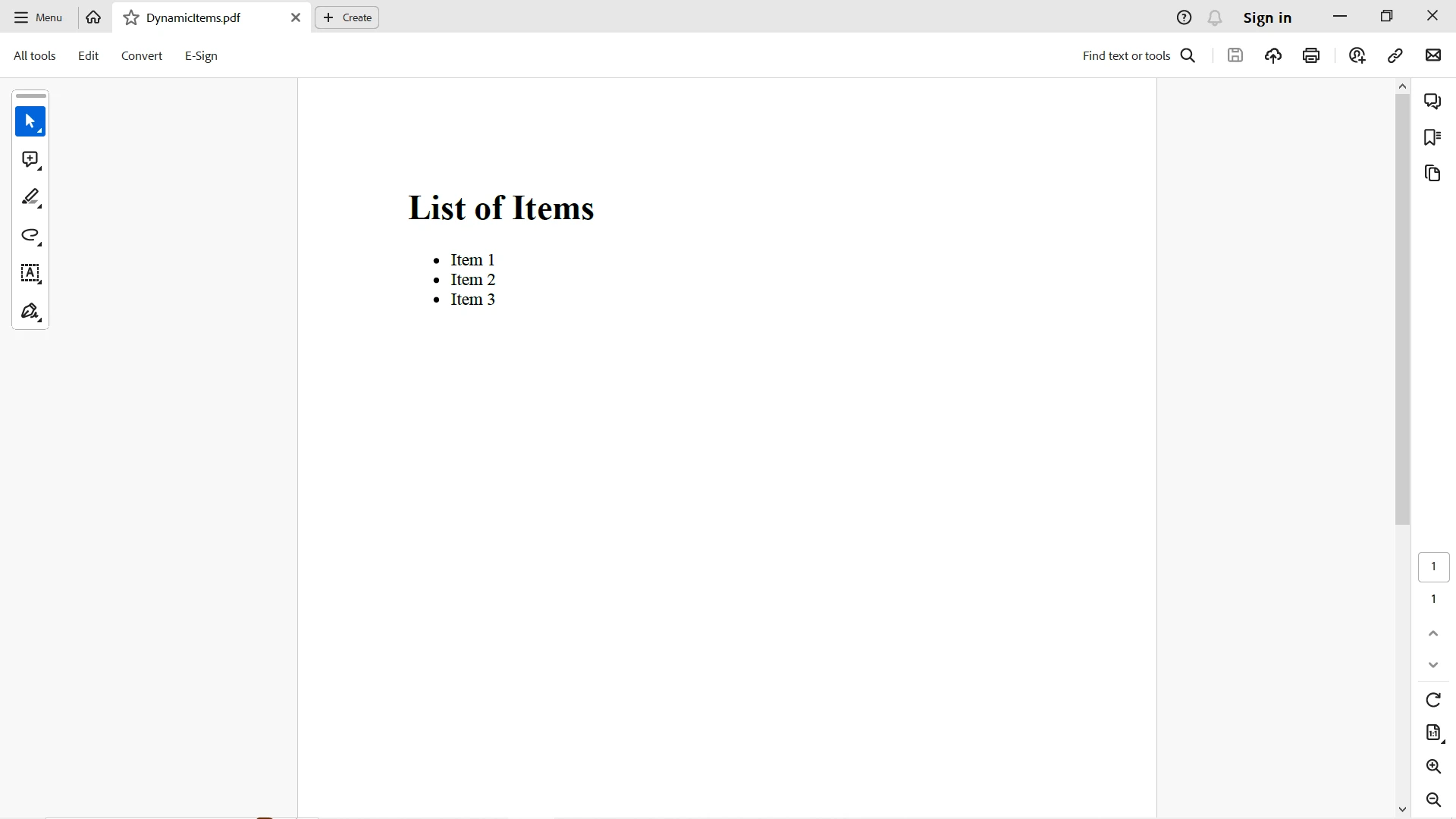
Betrachten Sie ein Szenario, in dem Sie ein PDF-Dokument mit einer Liste von Elementen mithilfe von `yield return` erzeugen müssen. Sie können die Vorteile von `yield`-Anweisungen nutzen, um Inhalte dynamisch zu erzeugen und anschließend IronPDF einsetzen, um diese Inhalte in ein PDF zu verwandeln. Der folgende Codeausschnitt erzeugt ein PDF-Dokument mit Hilfe einer `yield`-Anweisung, um dynamische Kontrolle über den PDF-Inhalt zu erhalten:
```csharp
using System;
using System.Collections.Generic;
using System.Linq;
using IronPdf;
class Program
{
// Method that dynamically generates content using 'yield return'
public static IEnumerable<string> GenerateDynamicContent()
{
yield return "Item 1";
yield return "Item 2";
yield return "Item 3";
}
public static void Main(string[] args)
{
// Generate dynamic content using the 'GenerateDynamicContent' function
var dynamicContent = GenerateDynamicContent();
// Create HTML structure for the PDF document with dynamic content
var dynamicPdfContent = $@"
<html>
<body>
<h1>List of Items</h1>
<ul>
{string.Join("", dynamicContent.Select(item => $"<li>{item}</li>"))}
</ul>
</body>
</html>
";
// Create a new PDF document with dynamically generated content
var dynamicPdfRenderer = new ChromePdfRenderer();
dynamicPdfRenderer.RenderHtmlAsPdf(dynamicPdfContent).SaveAs("C:/DynamicItems.pdf");
}
}
```
In diesem Beispiel nutzt die `GenerateDynamicContent`-Methode `yield return`, um eine Sequenz dynamischer Elemente bereitzustellen. Der erzeugte Inhalt wird dann in eine HTML-Struktur eingebettet und von IronPDF verwendet, um ein PDF-Dokument zu erstellen.
## Abschluss
Abschließend ist `yield return` ein leistungsstarkes und elegantes Feature in C#, das die Art und Weise, wie Sie Iterationen angehen, verändert. Seine Fähigkeit, verzögerte Auswertung zu unterstützen, komplexe Szenarien mit zustandsbehafteter Iteration zu bewältigen und unendliche Sequenzen zu erstellen, macht es zu einem wertvollen Werkzeug in Ihrem Programmierwerkzeugkasten. Ob Sie es mit großen Datensätzen zu tun haben oder komplexe Algorithmen implementieren, `yield return` befähigt Sie, effizienteren und ausdrucksstärkeren Code zu schreiben.
Während `yield return` die effiziente und bedarfsbezogene Generierung von Inhalten erleichtert, übernimmt IronPDF die nahtlose Umwandlung dieser Inhalte in professionelle PDF-Dokumente. Egal, ob Sie dynamisch Listen, Berichte oder andere Dokumente erstellen, diese Synergie ermöglicht es Ihnen, Ihre C#-Dokumentenerstellungsmöglichkeiten auf neue Höhen zu heben. Nutzen Sie das Potenzial dieser dynamischen Kombination und lassen Sie Ihre PDFs mit dynamischem und effizient erzeugtem Inhalt glänzen!
IronPDF bietet eine [kostenlose Testversion](trial-license), um die vollständige Funktionalität wie im kommerziellen Modus auszuprobieren. Erfahren Sie mehr über [IronPDF-Lizenzen](/licensing/) ab `$liteLicense`.
C# ist eine der beliebtesten Programmiersprachen, die von Microsoft entwickelt wurde und Funktionen bietet, die Ihren Code eleganter und effizienter machen. Eine solche Funktion ist das Schlüsselwort "yield", das erstmals in C# 2.0 eingeführt wurde. Microsoft bietet eine vollständige Sprachreferenz zu "yield"-Anweisungen, um mehr über deren Verwendung in Iterator-Methoden zu erfahren, die Sie in der offiziellen Microsoft-Dokumentation zu yield einsehen können.
In diesem Artikel werden wir uns mit yield return in C# befassen und seine Funktionalität, Anwendungsfälle und wie es Ihre Herangehensweise an Iterationen verändern kann, erkunden.
Understanding the Basics: Iteration in C#
Iteration ist ein grundlegendes Konzept in der Programmierung, und C# bietet verschiedene Mechanismen, um dies zu erreichen. Traditionell sind Schleifen wie die for- und die foreach-Schleife die bewährten Werkzeuge zum Durchlaufen von Sammlungen. C# bietet jedoch eine elegantere Lösung mit dem yield-Schlüsselwort in Verbindung mit der return-Anweisung und durch die Nutzung der IEnumerable-Schnittstelle.
Die Effizienz der yield return-Anweisung
Im Kern ist yield return eine Anweisung, die in der Iterator-Methode verwendet wird, um eine effizientere Methode zur Erzeugung einer Sequenz von Werten bereitzustellen. Es ermöglicht Ihnen, einen Iterator zu erstellen, ohne eine vollständige Sammlung im Speicher erzeugen zu müssen, was es besonders nützlich für große Datenmengen oder unendliche Sequenzen macht.
Hier ist ein einfaches Codebeispiel, das die grundlegende Verwendung von yield return veranschaulicht:
using System;using System.Collections.Generic;public class Example{ // Method that generates numbers from start to end using 'yield return' public IEnumerable<int> GenerateNumbers(int start, int end) { // Loop from 'start' to 'end' for (int i = start; i <= end; i++) { yield return i; // Returns each number in the sequence without breaking the loop } } public static voidMain() { // Usage: Using 'foreach' to iterate over numbers generated by 'GenerateNumbers' foreach (var number in new Example().GenerateNumbers(1, 5)) {Console.WriteLine(number); // Outputs numbers 1 - 5 } }}
using System;
using System.Collections.Generic;

public class Example
{
    // Method that generates numbers from start to end using 'yield return'
    public IEnumerable<int> GenerateNumbers(int start, int end)
    {
        // Loop from 'start' to 'end'
        for (int i = start; i <= end; i++)
        {
            yield return i; // Returns each number in the sequence without breaking the loop
        }
    }

    public static void Main()
    {
        // Usage: Using 'foreach' to iterate over numbers generated by 'GenerateNumbers'
        foreach (var number in new Example().GenerateNumbers(1, 5))
        {
            Console.WriteLine(number); // Outputs numbers 1 - 5
        }
    }
}
ImportsSystemImportsSystem.Collections.GenericPublic Class Example ' Method that generates numbers from start to end using 'yield return' PublicIterator Function GenerateNumbers(ByVal start AsInteger, ByVal [end] AsInteger) AsIEnumerable(OfInteger) ' Loop from 'start' to 'end' For i AsInteger = start To [end]Yield i ' Returns each number in the sequence without breaking the loop Next i End Function PublicShared Sub Main() ' Usage: Using 'foreach' to iterate over numbers generated by 'GenerateNumbers' For Each number In (New Example()).GenerateNumbers(1, 5)Console.WriteLine(number) ' Outputs numbers 1 - 5 Next number End SubEnd Class
Imports System
Imports System.Collections.Generic

Public Class Example
	' Method that generates numbers from start to end using 'yield return'
	Public Iterator Function GenerateNumbers(ByVal start As Integer, ByVal [end] As Integer) As IEnumerable(Of Integer)
		' Loop from 'start' to 'end'
		For i As Integer = start To [end]
			Yield i ' Returns each number in the sequence without breaking the loop
		Next i
	End Function

	Public Shared Sub Main()
		' Usage: Using 'foreach' to iterate over numbers generated by 'GenerateNumbers'
		For Each number In (New Example()).GenerateNumbers(1, 5)
			Console.WriteLine(number) ' Outputs numbers 1 - 5
		Next number
	End Sub
End Class
In diesem Beispiel verwendet die GenerateNumbers-Methode yield return, um eine Sequenz von Zahlen von start bis end zu erzeugen. Der Iterator wird verzögert ausgewertet, was bedeutet, dass jede Zahl nach Bedarf während der Ausführung der Iteration erzeugt wird.
Lazy Evaluation und Effizienz
Einer der wesentlichen Vorteile der yield return-Anweisung ist ihre Fähigkeit, Lazy Evaluation zu unterstützen. Anders als traditionelle Methoden, die eine gesamte Sammlung vor der Iteration erzeugen, produziert yield return die Werte einzeln. Dies kann zu erheblichen Speicherersparnissen führen, insbesondere bei der Verarbeitung großer Datensätze.
Die yield return-Anweisung ist nicht nur auf die Erzeugung einfacher Sequenzen beschränkt; sie glänzt auch im Umgang mit komplexeren Szenarien im Iterator-Block. Durch die Aufrechterhaltung einer Zustandsmaschine über Iterationen hinweg können Sie Iteratoren erstellen, die sich ihre Position in der Sequenz merken.
using System;using System.Collections.Generic;public class FibonacciExample{ // Method that generates Fibonacci numbers up to the specified count public IEnumerable<string> GenerateFibonacci(int count) { int a = 0, b = 1; for (int i = 0; i < count; i++) { yield return a.ToString(); // Returns the Fibonacci number as a string int temp = a; a = b; b = temp + b; } } public static voidMain() { // Usage: Iterating over Fibonacci numbers generated by 'GenerateFibonacci' foreach (var fibNumber in new FibonacciExample().GenerateFibonacci(8)) {Console.WriteLine(fibNumber); // Outputs a Fibonacci number sequence } }}
using System;
using System.Collections.Generic;

public class FibonacciExample
{
    // Method that generates Fibonacci numbers up to the specified count
    public IEnumerable<string> GenerateFibonacci(int count)
    {
        int a = 0, b = 1;
        for (int i = 0; i < count; i++)
        {
            yield return a.ToString(); // Returns the Fibonacci number as a string
            int temp = a;
            a = b;
            b = temp + b;
        }
    }

    public static void Main()
    {
        // Usage: Iterating over Fibonacci numbers generated by 'GenerateFibonacci'
        foreach (var fibNumber in new FibonacciExample().GenerateFibonacci(8))
        {
            Console.WriteLine(fibNumber); // Outputs a Fibonacci number sequence
        }
    }
}
ImportsSystemImportsSystem.Collections.GenericPublic Class FibonacciExample ' Method that generates Fibonacci numbers up to the specified count PublicIterator Function GenerateFibonacci(ByVal count AsInteger) AsIEnumerable(OfString) Dim a AsInteger = 0, b AsInteger = 1 For i AsInteger = 0 To count - 1Yield a.ToString() ' Returns the Fibonacci number as a string Dim temp AsInteger = a a = b b = temp + b Next i End Function PublicShared Sub Main() ' Usage: Iterating over Fibonacci numbers generated by 'GenerateFibonacci' For Each fibNumber In (New FibonacciExample()).GenerateFibonacci(8)Console.WriteLine(fibNumber) ' Outputs a Fibonacci number sequence Next fibNumber End SubEnd Class
Imports System
Imports System.Collections.Generic

Public Class FibonacciExample
	' Method that generates Fibonacci numbers up to the specified count
	Public Iterator Function GenerateFibonacci(ByVal count As Integer) As IEnumerable(Of String)
		Dim a As Integer = 0, b As Integer = 1
		For i As Integer = 0 To count - 1
			Yield a.ToString() ' Returns the Fibonacci number as a string
			Dim temp As Integer = a
			a = b
			b = temp + b
		Next i
	End Function

	Public Shared Sub Main()
		' Usage: Iterating over Fibonacci numbers generated by 'GenerateFibonacci'
		For Each fibNumber In (New FibonacciExample()).GenerateFibonacci(8)
			Console.WriteLine(fibNumber) ' Outputs a Fibonacci number sequence
		Next fibNumber
	End Sub
End Class
In diesem Beispiel verwendet die GenerateFibonacci-Methode yield return, um eine Fibonacci-Zahlenfolge zu erstellen. Der Zustand wird zwischen den Iterationen aufrechterhalten, was eine effiziente Erzeugung und Ausgabe von Fibonacci-Zahlen gewährleistet.
Aufbau unendlicher Sequenzen
Eine interessante Anwendung von yield return ist ihre Fähigkeit, unendliche Wertsequenzen zu erzeugen. Da die Werte im Flug erzeugt werden, können Sie Sequenzen darstellen, die ewig weitergehen, ohne unendlichen Speicher zu verbrauchen.
using System;using System.Collections.Generic;public class InfiniteSequenceExample{ // Method that generates an infinite sequence of even numbers public IEnumerable<int> GenerateEvenNumbers() { int num = 0; while (true) { yield return num; num += 2; } } public static voidMain() { // Usage: Generating even numbers using the 'GenerateEvenNumbers' method var evenNumberIterator = new InfiniteSequenceExample().GenerateEvenNumbers().GetEnumerator(); for (int i = 0; i < 5; i++) { evenNumberIterator.MoveNext();Console.WriteLine(evenNumberIterator.Current); // Outputs the first 5 even numbers } }}
using System;
using System.Collections.Generic;

public class InfiniteSequenceExample
{
    // Method that generates an infinite sequence of even numbers
    public IEnumerable<int> GenerateEvenNumbers()
    {
        int num = 0;
        while (true)
        {
            yield return num;
            num += 2;
        }
    }

    public static void Main()
    {
        // Usage: Generating even numbers using the 'GenerateEvenNumbers' method
        var evenNumberIterator = new InfiniteSequenceExample().GenerateEvenNumbers().GetEnumerator();
        for (int i = 0; i < 5; i++)
        {
            evenNumberIterator.MoveNext();
            Console.WriteLine(evenNumberIterator.Current); // Outputs the first 5 even numbers
        }
    }
}
ImportsSystemImportsSystem.Collections.GenericPublic Class InfiniteSequenceExample ' Method that generates an infinite sequence of even numbers PublicIterator Function GenerateEvenNumbers() AsIEnumerable(OfInteger) Dim num AsInteger = 0 DoYield num num += 2 Loop End Function PublicShared Sub Main() ' Usage: Generating even numbers using the 'GenerateEvenNumbers' method Dim evenNumberIterator = (New InfiniteSequenceExample()).GenerateEvenNumbers().GetEnumerator() For i AsInteger = 0 To 4 evenNumberIterator.MoveNext()Console.WriteLine(evenNumberIterator.Current) ' Outputs the first 5 even numbers Next i End SubEnd Class
Imports System
Imports System.Collections.Generic

Public Class InfiniteSequenceExample
	' Method that generates an infinite sequence of even numbers
	Public Iterator Function GenerateEvenNumbers() As IEnumerable(Of Integer)
		Dim num As Integer = 0
		Do
			Yield num
			num += 2
		Loop
	End Function

	Public Shared Sub Main()
		' Usage: Generating even numbers using the 'GenerateEvenNumbers' method
		Dim evenNumberIterator = (New InfiniteSequenceExample()).GenerateEvenNumbers().GetEnumerator()
		For i As Integer = 0 To 4
			evenNumberIterator.MoveNext()
			Console.WriteLine(evenNumberIterator.Current) ' Outputs the first 5 even numbers
		Next i
	End Sub
End Class
In diesem Beispiel erstellt die GenerateEvenNumbers-Methode einen Iterator für gerade Zahlen, und Sie können nach Bedarf darüber iterieren. Sie können die yield break-Anweisung auch zusammen mit yield return verwenden, um die Schleife zu stoppen und zu verlassen und eine benutzerdefinierte Iteration für die Schleife zu erstellen.
Einführung in IronPDF: Eine leistungsstarke C#-Bibliothek
IronPDF fällt als vielseitige C#-Bibliothek auf, die darauf ausgelegt ist, die Komplexität von PDFs zu vereinfachen. Egal, ob Sie Rechnungen, Berichte oder andere Dokumente erstellen, IronPDF ermöglicht es Ihnen, HTML-Inhalte nahtlos in ausgefeilte und professionelle PDFs direkt in Ihrer C#-Anwendung zu konvertieren.
Installation von IronPDF: Ein Schnellstart
Um IronPDF in Ihr C#-Projekt einzubinden, können Sie schnell das IronPDF NuGet-Paket installieren. Führen Sie folgenden Befehl in der Package Manager Console aus:
PM > Install-Package IronPdf
Install-Package IronPdf
Alternativ können Sie "IronPDF" im NuGet-Paketmanager finden und von dort aus installieren.
Erzeugen von PDFs mit IronPDF
Betrachten Sie das folgende Beispiel: Betrachten wir ein einfaches Beispiel:
using IronPdf;public class PdfGenerationExample{ public static voidMain() { var htmlContent = "<html><body><h1>Hello, IronPDF!</h1></body></html>"; // Create a new PDF renderer instance var pdfRenderer = new ChromePdfRenderer(); // Render the HTML content as a PDF and save it to a file pdfRenderer.RenderHtmlAsPdf(htmlContent).SaveAs("C:/GeneratedDocument.pdf"); }}
using IronPdf;

public class PdfGenerationExample
{
    public static void Main()
    {
        var htmlContent = "<html><body><h1>Hello, IronPDF!</h1></body></html>";

        // Create a new PDF renderer instance
        var pdfRenderer = new ChromePdfRenderer();

        // Render the HTML content as a PDF and save it to a file
        pdfRenderer.RenderHtmlAsPdf(htmlContent).SaveAs("C:/GeneratedDocument.pdf");
    }
}
ImportsIronPdfPublic Class PdfGenerationExample PublicShared Sub Main() Dim htmlContent AsString = "<html><body><h1>Hello, IronPDF!</h1></body></html>" ' Create a new PDF renderer instance Dim pdfRenderer As New ChromePdfRenderer() ' Render the HTML content as a PDF and save it to a file pdfRenderer.RenderHtmlAsPdf(htmlContent).SaveAs("C:/GeneratedDocument.pdf") End SubEnd Class
Imports IronPdf

Public Class PdfGenerationExample
    Public Shared Sub Main()
        Dim htmlContent As String = "<html><body><h1>Hello, IronPDF!</h1></body></html>"

        ' Create a new PDF renderer instance
        Dim pdfRenderer As New ChromePdfRenderer()

        ' Render the HTML content as a PDF and save it to a file
        pdfRenderer.RenderHtmlAsPdf(htmlContent).SaveAs("C:/GeneratedDocument.pdf")
    End Sub
End Class
Im obigen Beispiel wird IronPDF verwendet, um HTML-Inhalte in ein PDF-Dokument zu rendern, das dann an dem angegebenen Ort gespeichert wird. Für detailliertere Informationen besuchen Sie bitte die IronPDF-Dokumentation.
Die Schnittstelle von yield return und IronPDF
Schauen wir nun, ob die yield return-Anweisung, ein leistungsstarkes Werkzeug für Lazy Evaluation und effiziente Iteration, nahtlos mit IronPDF integriert werden kann.
Betrachten Sie ein Szenario, in dem Sie ein PDF-Dokument mit einer Liste von Elementen mithilfe von yield return erzeugen müssen. Sie können die Vorteile von yield-Anweisungen nutzen, um Inhalte dynamisch zu erzeugen und anschließend IronPDF einsetzen, um diese Inhalte in ein PDF zu verwandeln. Der folgende Codeausschnitt erzeugt ein PDF-Dokument mit Hilfe einer yield-Anweisung, um dynamische Kontrolle über den PDF-Inhalt zu erhalten:
using System;using System.Collections.Generic;using System.Linq;using IronPdf;class Program{ // Method that dynamically generates content using 'yield return' public static IEnumerable<string> GenerateDynamicContent() { yield return "Item 1"; yield return "Item 2"; yield return "Item 3"; } public static voidMain(string[] args) { // Generate dynamic content using the 'GenerateDynamicContent' function var dynamicContent = GenerateDynamicContent(); // Create HTML structure for the PDF document with dynamic content var dynamicPdfContent = $@" <html> <body> <h1>List of Items</h1> <ul> {string.Join("", dynamicContent.Select(item => $"<li>{item}</li>"))} </ul> </body> </html> "; // Create a new PDF document with dynamically generated content var dynamicPdfRenderer = new ChromePdfRenderer(); dynamicPdfRenderer.RenderHtmlAsPdf(dynamicPdfContent).SaveAs("C:/DynamicItems.pdf"); }}
using System;
using System.Collections.Generic;
using System.Linq;
using IronPdf;

class Program
{
    // Method that dynamically generates content using 'yield return'
    public static IEnumerable<string> GenerateDynamicContent()
    {
        yield return "Item 1";
        yield return "Item 2";
        yield return "Item 3";
    }

    public static void Main(string[] args)
    {
        // Generate dynamic content using the 'GenerateDynamicContent' function
        var dynamicContent = GenerateDynamicContent();

        // Create HTML structure for the PDF document with dynamic content
        var dynamicPdfContent = $@"
            <html>
            <body>
                <h1>List of Items</h1>
                <ul>
                    {string.Join("", dynamicContent.Select(item => $"<li>{item}</li>"))}
                </ul>
            </body>
            </html>
        ";

        // Create a new PDF document with dynamically generated content
        var dynamicPdfRenderer = new ChromePdfRenderer();
        dynamicPdfRenderer.RenderHtmlAsPdf(dynamicPdfContent).SaveAs("C:/DynamicItems.pdf");
    }
}
ImportsSystemImportsSystem.Collections.GenericImportsSystem.LinqImportsIronPdfFriend Class Program ' Method that dynamically generates content using 'yield return' PublicSharedIterator Function GenerateDynamicContent() AsIEnumerable(OfString)Yield"Item 1"Yield"Item 2"Yield"Item 3" End Function PublicShared Sub Main(ByVal args() AsString) ' Generate dynamic content using the 'GenerateDynamicContent' function Dim dynamicContent = GenerateDynamicContent() ' Create HTML structure for the PDF document with dynamic content, String.Join(TangibleTempVerbatstring.Format(mDoubleQuote, dynamicContent.Select(Function(item) $TangibleTempVerbatimCloseTag"<li>{item}</li>")), TangibleStringInterpolationMarker) var dynamicPdfContent = $"TangibleTempVerbatimOpenTagTangibleTempVerbatimStringLiteralLineJoin <html>TangibleTempVerbatimStringLiteralLineJoin <body>TangibleTempVerbatimStringLiteralLineJoin <h1>List of Items</h1>TangibleTempVerbatimStringLiteralLineJoin <ul>TangibleTempVerbatimStringLiteralLineJoin {0}ignoreignoreignoreignoreignore</ul></body></html>" ' Create a new PDF document with dynamically generated content Dim dynamicPdfRenderer = New ChromePdfRenderer() dynamicPdfRenderer.RenderHtmlAsPdf(dynamicPdfContent).SaveAs("C:/DynamicItems.pdf") End SubEnd Class
Imports System
Imports System.Collections.Generic
Imports System.Linq
Imports IronPdf

Friend Class Program
	' Method that dynamically generates content using 'yield return'
	Public Shared Iterator Function GenerateDynamicContent() As IEnumerable(Of String)
		Yield "Item 1"
		Yield "Item 2"
		Yield "Item 3"
	End Function

	Public Shared Sub Main(ByVal args() As String)
		' Generate dynamic content using the 'GenerateDynamicContent' function
		Dim dynamicContent = GenerateDynamicContent()

		' Create HTML structure for the PDF document with dynamic content
, String.Join(TangibleTempVerbatstring.Format(mDoubleQuote, dynamicContent.Select(Function(item) $TangibleTempVerbatimCloseTag"<li>{item}</li>")), TangibleStringInterpolationMarker) var dynamicPdfContent = $"TangibleTempVerbatimOpenTagTangibleTempVerbatimStringLiteralLineJoin            <html>TangibleTempVerbatimStringLiteralLineJoin            <body>TangibleTempVerbatimStringLiteralLineJoin                <h1>List of Items</h1>TangibleTempVerbatimStringLiteralLineJoin                <ul>TangibleTempVerbatimStringLiteralLineJoin                    {0}ignoreignoreignoreignoreignore</ul></body></html>"

		' Create a new PDF document with dynamically generated content
		Dim dynamicPdfRenderer = New ChromePdfRenderer()
		dynamicPdfRenderer.RenderHtmlAsPdf(dynamicPdfContent).SaveAs("C:/DynamicItems.pdf")
	End Sub
End Class
In diesem Beispiel nutzt die GenerateDynamicContent-Methode yield return, um eine Sequenz dynamischer Elemente bereitzustellen. Der erzeugte Inhalt wird dann in eine HTML-Struktur eingebettet und von IronPDF verwendet, um ein PDF-Dokument zu erstellen.
Abschluss
Abschließend ist yield return ein leistungsstarkes und elegantes Feature in C#, das die Art und Weise, wie Sie Iterationen angehen, verändert. Seine Fähigkeit, verzögerte Auswertung zu unterstützen, komplexe Szenarien mit zustandsbehafteter Iteration zu bewältigen und unendliche Sequenzen zu erstellen, macht es zu einem wertvollen Werkzeug in Ihrem Programmierwerkzeugkasten. Ob Sie es mit großen Datensätzen zu tun haben oder komplexe Algorithmen implementieren, yield return befähigt Sie, effizienteren und ausdrucksstärkeren Code zu schreiben.
Während yield return die effiziente und bedarfsbezogene Generierung von Inhalten erleichtert, übernimmt IronPDF die nahtlose Umwandlung dieser Inhalte in professionelle PDF-Dokumente. Egal, ob Sie dynamisch Listen, Berichte oder andere Dokumente erstellen, diese Synergie ermöglicht es Ihnen, Ihre C#-Dokumentenerstellungsmöglichkeiten auf neue Höhen zu heben. Nutzen Sie das Potenzial dieser dynamischen Kombination und lassen Sie Ihre PDFs mit dynamischem und effizient erzeugtem Inhalt glänzen!
IronPDF bietet eine kostenlose Testversion, um die vollständige Funktionalität wie im kommerziellen Modus auszuprobieren. Erfahren Sie mehr über IronPDF-Lizenzen ab $999.
Jacob Mellor ist Chief Technology Officer bei Iron Software und ein visionärer Ingenieur, der Pionierarbeit in der C# PDF-Technologie leistet. Als der ursprüngliche Entwickler hinter der Kern-Codebasis von Iron Software hat er die Produktarchitektur des Unternehmens seit seiner Gründung geprägt und es zusammen mit CEO Cameron Rimington in ein Unternehmen mit mehr als 50 Mitarbeitern verwandelt, das die NASA, Tesla und globale Regierungsbehörden beliefert.

























