using IronPdf;

// Disable local disk access or cross-origin requests
Installation.EnableWebSecurity = true;

// Instantiate Renderer
var renderer = new ChromePdfRenderer();

// Create a PDF from a HTML string using C#
var pdf = renderer.RenderHtmlAsPdf("<h1>Hello World</h1>");

// Export to a file or Stream
pdf.SaveAs("output.pdf");

// Advanced Example with HTML Assets
// Load external html assets: Images, CSS and JavaScript.
// An optional BasePath 'C:\site\assets\' is set as the file location to load assets from
var myAdvancedPdf = renderer.RenderHtmlAsPdf("<img src='icons/iron.png'>", @"C:\site\assets\");
myAdvancedPdf.SaveAs("html-with-assets.pdf");
using IronPdf;// Disable local disk access or cross-origin requestsInstallation.EnableWebSecurity = true;// Instantiate Renderervar renderer = new ChromePdfRenderer();// Create a PDF from a HTML string using C#var pdf = renderer.RenderHtmlAsPdf("<h1>Hello World</h1>");// Export to a file or Streampdf.SaveAs("output.pdf");// Advanced Example with HTML Assets// Load external html assets: Images, CSS and JavaScript.// An optional BasePath 'C:\site\assets\' is set as the file location to load assets fromvar myAdvancedPdf = renderer.RenderHtmlAsPdf("<img src='icons/iron.png'>", @"C:\site\assets\");myAdvancedPdf.SaveAs("html-with-assets.pdf");
PM >Install-Package IronPdf
Install-Package IronPdf
ACTUALIZACIONES PARA DESARROLLADORES
BouncyCastle C# (Cómo funciona para desarrolladores)
[ BouncyCastle C#](https://github.com/bcgit/bc-csharp) es una biblioteca integral que ofrece una amplia opción de algoritmos y herramientas criptográficas para desarrolladores de .NET. Esta guía tiene como objetivo introducir a los principiantes en los conceptos básicos de Bouncy Castle, destacando sus capacidades como proveedor de seguridad y ofreciendo ejemplos prácticos para el uso diario. También aprenderemos cómo podemos usarlo con la [IronPDF for .NET PDF Library](https://ironpdf.com).
## Introducción a Bouncy Castle
Bouncy Castle destaca como una biblioteca poderosa y versátil en el ámbito de la seguridad criptográfica. Es un proyecto benéfico registrado en Australia que busca proporcionar servicios de seguridad de alta calidad para Java y C#. La biblioteca se mantiene bajo una licencia basada en la MIT X Consortium License, que fomenta el uso y contribución generalizados.
### Entender el propósito de Bouncy Castle
Bouncy Castle sirve como proveedor de seguridad, ofreciendo una amplia gama de algoritmos criptográficos. Su versatilidad le permite atender diversas necesidades de seguridad, desde cifrado básico hasta firmas digitales complejas. Como principiante, entender el alcance de Bouncy Castle es clave para implementarlo efectivamente en tus proyectos.
## Getting Started with Bouncy Castle in C#
Implementar Bouncy Castle en C# comienza estableciendo el entorno y entendiendo sus componentes básicos.
### Configuración
**Descargar la biblioteca:** para comenzar, descargue la última versión del paquete Bouncy Castle desde su [sitio web oficial de Bouncy Castle](https://www.bouncycastle.org/csharp/) . Asegúrate de seleccionar la versión correcta que coincida con las necesidades de tu proyecto.
**Integrar en su proyecto:** después de descargarlo, integre Bouncy Castle en su proyecto C#. Esto generalmente implica agregar la biblioteca como una referencia en la configuración de tu proyecto.
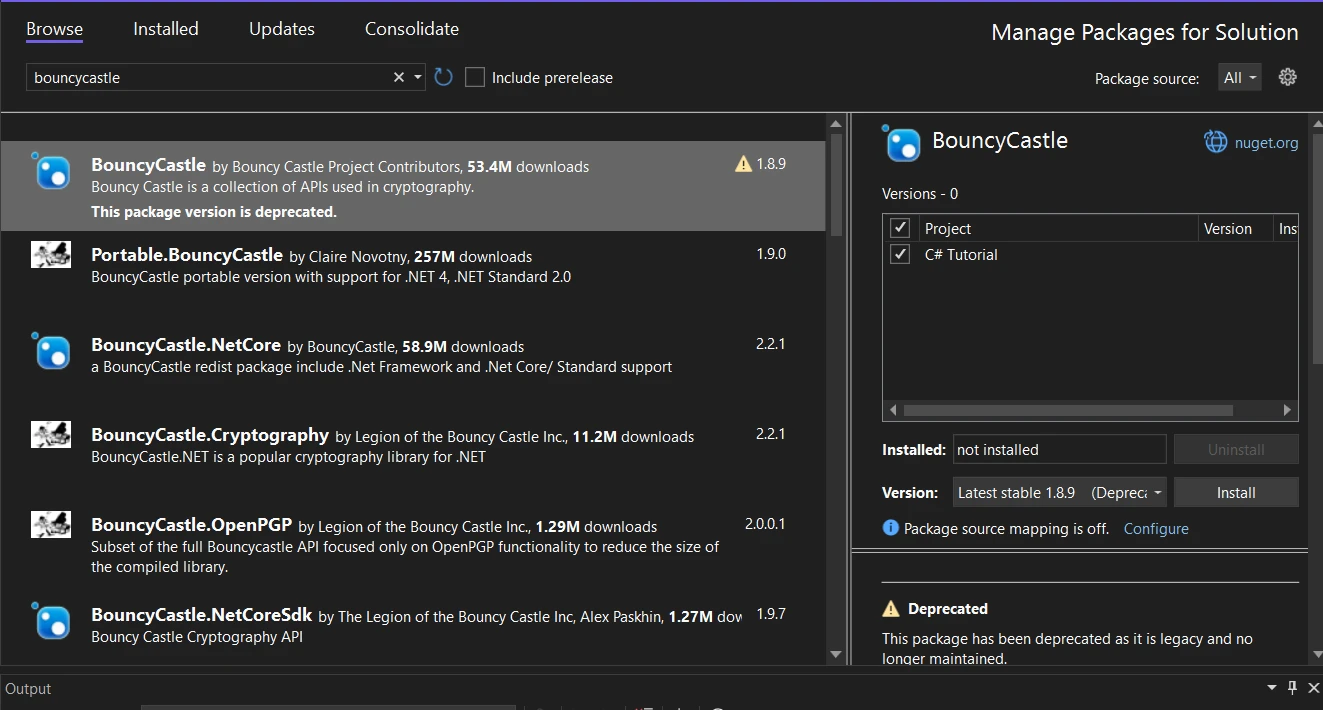
También puedes descargar e instalarlo usando el Administrador de Paquetes NuGet buscando "Bouncycastle" en la barra de búsqueda del Administrador de Paquetes NuGet.
### Ejemplo de cifrado básico
En este ejemplo, demostraré un escenario simple de cifrado usando AES (Estándar de Cifrado Avanzado) con Bouncy Castle en C#.
```csharp
using Org.BouncyCastle.Crypto;
using Org.BouncyCastle.Crypto.Engines;
using Org.BouncyCastle.Crypto.Generators;
using Org.BouncyCastle.Crypto.Modes;
using Org.BouncyCastle.Crypto.Parameters;
using Org.BouncyCastle.Security;
using System.Text;

public class SimpleEncryption
{
    /// <summary>
    /// Encrypts data using AES encryption with a given password.
    /// </summary>
    /// <param name="message">The message to encrypt.</param>
    /// <param name="password">The password for key derivation.</param>
    /// <returns>The encrypted message as a byte array.</returns>
    public static byte[] EncryptData(string message, string password)
    {
        // Generate a random salt
        var salt = new byte[8];
        new SecureRandom().NextBytes(salt);

        // Derive key and IV from the password and salt
        Pkcs5S2ParametersGenerator generator = new Pkcs5S2ParametersGenerator();
        generator.Init(PbeParametersGenerator.Pkcs5PasswordToBytes(password.ToCharArray()), salt, 1000);
        ParametersWithIV keyParam = (ParametersWithIV)generator.GenerateDerivedMacParameters(256 + 128);

        // Create AES cipher in CBC mode with PKCS7 padding
        var cipher = new PaddedBufferedBlockCipher(new CbcBlockCipher(new AesEngine()));
        cipher.Init(true, keyParam);

        // Convert message to byte array and encrypt
        byte[] inputBytes = Encoding.UTF8.GetBytes(message);
        byte[] outputBytes = new byte[cipher.GetOutputSize(inputBytes.Length)];
        int length = cipher.ProcessBytes(inputBytes, 0, inputBytes.Length, outputBytes, 0);
        cipher.DoFinal(outputBytes, length);

        return outputBytes;
    }
}
```
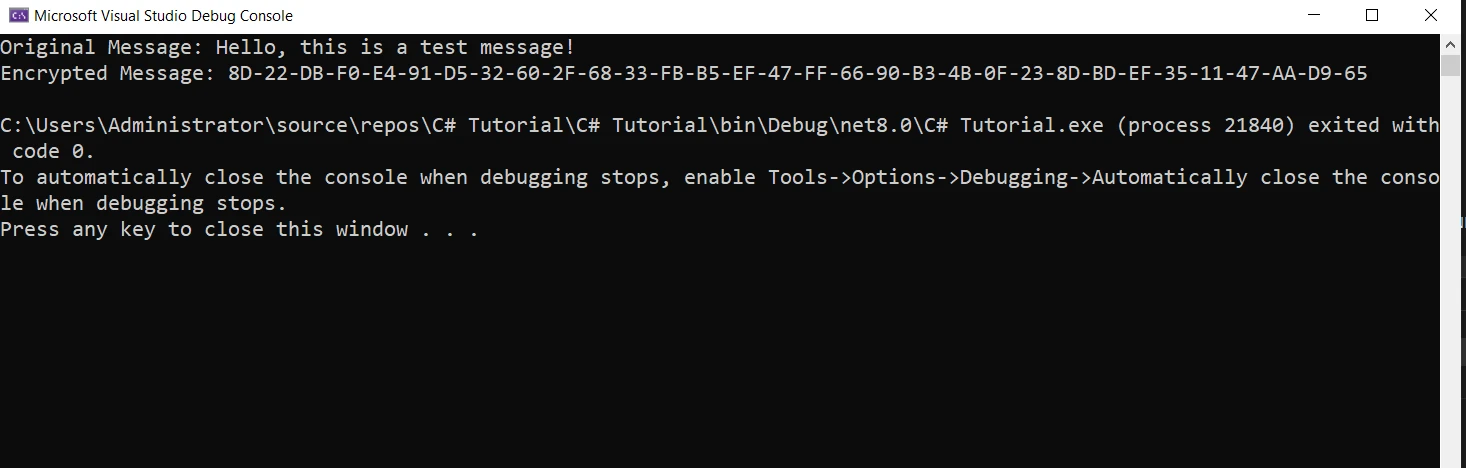
Este fragmento de código demuestra cómo crear un método de cifrado básico usando las bibliotecas criptográficas de Bouncy Castle en C#. Para usar este método, debe llamar a `EncryptData` con el mensaje que desea encriptar y una contraseña. Por ejemplo:
```csharp
string message = "Hello, this is a test message!";
string password = "StrongPassword123";
byte[] encryptedMessage = SimpleEncryption.EncryptData(message, password);
Console.WriteLine("Original Message: " + message);
Console.WriteLine("Encrypted Message: " + BitConverter.ToString(encryptedMessage));
```
Este ejemplo es bastante básico y sirve como una introducción. En aplicaciones del mundo real, deberías considerar prácticas más robustas, como almacenar la sal y el IV junto con los datos cifrados y manejar las excepciones que puedan surgir durante el proceso de cifrado.
## Uso avanzado y personalización
Bouncy Castle no se limita a funcionalidades básicas. Permite la personalización y soporta algoritmos criptográficos avanzados.
### NTRU Prime y otros algoritmos avanzados
Bouncy Castle incluye soporte para una variedad de algoritmos, incluyendo el avanzado [NTRU Prime](https://ntruprime.cr.yp.to/). Esto da a los desarrolladores la flexibilidad de elegir el algoritmo más adecuado para sus necesidades específicas.
### Manejo de excepciones y mejores prácticas de seguridad
El manejo adecuado de excepciones es crucial en aplicaciones criptográficas. Los métodos de Bouncy Castle pueden lanzar excepciones, y manejarlas correctamente asegura aplicaciones robustas y seguras.
## Incorporación de IronPDF con Bouncy Castle
[IronPDF](/) complementa a Bouncy Castle proporcionando la funcionalidad para trabajar con documentos PDF, los cuales luego pueden asegurarse usando las capacidades criptográficas de Bouncy Castle. Así es como puedes integrar estas dos poderosas bibliotecas:
La característica destacada de IronPDF es su [Capacidad de Conversión de HTML a PDF](/tutorials/html-to-pdf/), preservando todos los diseños y estilos. Convierte contenido web en PDFs, adecuado para informes, facturas y documentación. Puedes convertir archivos HTML, URLs y cadenas HTML a PDFs de manera fluida.
### Comienza con IronPDF
```csharp
using IronPdf;
class Program
{
static void Main(string[] args)
{
var renderer = new ChromePdfRenderer();
// 1. Convert HTML String to PDF
var htmlContent = "<h1>Hello, IronPDF!</h1><p>This is a PDF from an HTML string.</p>";
var pdfFromHtmlString = renderer.RenderHtmlAsPdf(htmlContent);
pdfFromHtmlString.SaveAs("HTMLStringToPDF.pdf");
// 2. Convert HTML File to PDF
var htmlFilePath = "path_to_your_html_file.html"; // Specify the path to your HTML file
var pdfFromHtmlFile = renderer.RenderHtmlFileAsPdf(htmlFilePath);
pdfFromHtmlFile.SaveAs("HTMLFileToPDF.pdf");
// 3. Convert URL to PDF
var url = "http://ironpdf.com"; // Specify the URL
var pdfFromUrl = renderer.RenderUrlAsPdf(url);
pdfFromUrl.SaveAs("URLToPDF.pdf");
}
}
```
### Instalación mediante el gestor de paquetes NuGet
Para integrar IronPDF en tu proyecto Bouncy Castle C# usando el Administrador de Paquetes NuGet, sigue estos pasos:
1. Abre Visual Studio y en el explorador de soluciones, haz clic derecho en tu proyecto.
2. Elige "Administrar paquetes NuGet…" del menú contextual.
3. Ve a la pestaña de explorar y busca IronPDF.
4. Selecciona la biblioteca IronPDF de los resultados de búsqueda y haz clic en el botón de instalar.
5. Acepta cualquier mensaje de acuerdo de licencia.
Si deseas incluir IronPDF en tu proyecto a través de la Consola del Administrador de Paquetes, ejecuta el siguiente comando en la Consola del Administrador de Paquetes:
```shell
:ProductInstall
```
Se descargará e instalará IronPDF en tu proyecto.
### Instalación mediante el sitio web de NuGet
Para una descripción detallada de IronPDF, incluyendo sus características, compatibilidad y opciones de descarga adicionales, visita la página de IronPDF en el sitio web de NuGet en [https://www.nuget.org/packages/IronPdf](https://www.nuget.org/packages/IronPdf).
### Instalación mediante DLL
Alternativamente, puedes incorporar IronPDF directamente en tu proyecto usando su archivo DLL. Descarga el archivo ZIP que contiene la DLL desde este [Descarga Directa de IronPDF](https://ironpdf.com/packages/IronPdf.zip). Descomprímelo e incluye la DLL en tu proyecto.
### Generación de un PDF con IronPDF
Primero, vamos a [Crear un Documento PDF Simple usando IronPDF](https://ironpdf.com/examples/using-html-to-create-a-pdf/):
```csharp
using IronPdf;
public class PdfGenerator
{
/// <summary>
/// Creates a simple PDF from HTML content.
/// </summary>
/// <param name="filePath">The file path to save the PDF.</param>
/// <param name="content">The HTML content to render as PDF.</param>
public static void CreateSimplePdf(string filePath, string content)
{
var renderer = new ChromePdfRenderer();
var pdf = renderer.RenderHtmlAsPdf(content);
pdf.SaveAs(filePath);
}
}
```
En este código, usamos la clase **ChromePdfRenderer** de IronPDF para renderizar contenido HTML como un PDF y guardarlo en un archivo.
### Encriptar el PDF con Bouncy Castle
Después de generar el PDF, podemos cifrarlo usando Bouncy Castle. Aquí, modificaremos el método **EncryptData** para manejar archivos PDF:
```csharp
using System.IO;
using System.Text;
// ... [Previous Bouncy Castle using statements]
public class PdfEncryption
{
/// <summary>
/// Encrypts a PDF file using AES encryption.
/// </summary>
/// <param name="inputFilePath">The path to the input PDF file.</param>
/// <param name="outputFilePath">The path to save the encrypted PDF file.</param>
/// <param name="password">The password used for encryption.</param>
public static void EncryptPdfFile(string inputFilePath, string outputFilePath, string password)
{
// Read the PDF file
byte[] pdfBytes = File.ReadAllBytes(inputFilePath);
// Encrypt the PDF bytes
byte[] encryptedBytes = SimpleEncryption.EncryptData(Encoding.UTF8.GetString(pdfBytes), password);
// Write the encrypted bytes to a new file
File.WriteAllBytes(outputFilePath, encryptedBytes);
}
}
```
En este método, leemos el archivo PDF como bytes, ciframos estos bytes usando nuestra clase **SimpleEncryption** previamente definida, y luego escribimos los bytes cifrados en un nuevo archivo.
## Conclusión
En conclusión, la combinación de Bouncy Castle C# e IronPDF ofrece una solución para crear y asegurar documentos PDF en aplicaciones .NET. Bouncy Castle proporciona las herramientas criptográficas necesarias para asegurar los datos, mientras que IronPDF ofrece la facilidad de creación y manipulación de PDFs. Esta integración es particularmente valiosa en escenarios que requieren altos niveles de seguridad y confidencialidad en documentos.
Para aquellos interesados en explorar IronPDF, la biblioteca ofrece una versión de prueba gratuita, permitiendo a los desarrolladores experimentar y evaluar sus características. Si decides integrar IronPDF en tu entorno de producción, la [información y opciones de licencia](https://ironpdf.com/licensing/) están disponibles.
BouncyCastle C# es una biblioteca integral que ofrece una amplia opción de algoritmos y herramientas criptográficas para desarrolladores de .NET. Esta guía tiene como objetivo introducir a los principiantes en los conceptos básicos de Bouncy Castle, destacando sus capacidades como proveedor de seguridad y ofreciendo ejemplos prácticos para el uso diario. También aprenderemos cómo podemos usarlo con la IronPDF for .NET PDF Library.
Introducción a Bouncy Castle
Bouncy Castle destaca como una biblioteca poderosa y versátil en el ámbito de la seguridad criptográfica. Es un proyecto benéfico registrado en Australia que busca proporcionar servicios de seguridad de alta calidad para Java y C#. La biblioteca se mantiene bajo una licencia basada en la MIT X Consortium License, que fomenta el uso y contribución generalizados.
Entender el propósito de Bouncy Castle
Bouncy Castle sirve como proveedor de seguridad, ofreciendo una amplia gama de algoritmos criptográficos. Su versatilidad le permite atender diversas necesidades de seguridad, desde cifrado básico hasta firmas digitales complejas. Como principiante, entender el alcance de Bouncy Castle es clave para implementarlo efectivamente en tus proyectos.
Getting Started with Bouncy Castle in C#
Implementar Bouncy Castle en C# comienza estableciendo el entorno y entendiendo sus componentes básicos.
Configuración
Descargar la biblioteca: para comenzar, descargue la última versión del paquete Bouncy Castle desde su sitio web oficial de Bouncy Castle . Asegúrate de seleccionar la versión correcta que coincida con las necesidades de tu proyecto.
Integrar en su proyecto: después de descargarlo, integre Bouncy Castle en su proyecto C#. Esto generalmente implica agregar la biblioteca como una referencia en la configuración de tu proyecto.
También puedes descargar e instalarlo usando el Administrador de Paquetes NuGet buscando "Bouncycastle" en la barra de búsqueda del Administrador de Paquetes NuGet.
Ejemplo de cifrado básico
En este ejemplo, demostraré un escenario simple de cifrado usando AES (Estándar de Cifrado Avanzado) con Bouncy Castle en C#.
using Org.BouncyCastle.Crypto;using Org.BouncyCastle.Crypto.Engines;using Org.BouncyCastle.Crypto.Generators;using Org.BouncyCastle.Crypto.Modes;using Org.BouncyCastle.Crypto.Parameters;using Org.BouncyCastle.Security;using System.Text;public class SimpleEncryption{ /// <summary> /// Encrypts data using AES encryption with a given password. /// </summary> /// <param name="message">The message to encrypt.</param> /// <param name="password">The password for key derivation.</param> /// <returns>The encrypted message as a byte array.</returns> public static byte[] EncryptData(string message, string password) { // Generate a random salt var salt = new byte[8]; new SecureRandom().NextBytes(salt); // Derive key and IV from the password and salt Pkcs5S2ParametersGenerator generator = new Pkcs5S2ParametersGenerator(); generator.Init(PbeParametersGenerator.Pkcs5PasswordToBytes(password.ToCharArray()), salt, 1000); ParametersWithIV keyParam = (ParametersWithIV)generator.GenerateDerivedMacParameters(256 + 128); // Create AES cipher in CBC mode with PKCS7 padding var cipher = new PaddedBufferedBlockCipher(new CbcBlockCipher(new AesEngine())); cipher.Init(true, keyParam); // Convert message to byte array and encrypt byte[] inputBytes = Encoding.UTF8.GetBytes(message); byte[] outputBytes = new byte[cipher.GetOutputSize(inputBytes.Length)]; int length = cipher.ProcessBytes(inputBytes, 0, inputBytes.Length, outputBytes, 0); cipher.DoFinal(outputBytes, length); return outputBytes; }}
using Org.BouncyCastle.Crypto;
using Org.BouncyCastle.Crypto.Engines;
using Org.BouncyCastle.Crypto.Generators;
using Org.BouncyCastle.Crypto.Modes;
using Org.BouncyCastle.Crypto.Parameters;
using Org.BouncyCastle.Security;
using System.Text;

public class SimpleEncryption
{
    /// <summary>
    /// Encrypts data using AES encryption with a given password.
    /// </summary>
    /// <param name="message">The message to encrypt.</param>
    /// <param name="password">The password for key derivation.</param>
    /// <returns>The encrypted message as a byte array.</returns>
    public static byte[] EncryptData(string message, string password)
    {
        // Generate a random salt
        var salt = new byte[8];
        new SecureRandom().NextBytes(salt);

        // Derive key and IV from the password and salt
        Pkcs5S2ParametersGenerator generator = new Pkcs5S2ParametersGenerator();
        generator.Init(PbeParametersGenerator.Pkcs5PasswordToBytes(password.ToCharArray()), salt, 1000);
        ParametersWithIV keyParam = (ParametersWithIV)generator.GenerateDerivedMacParameters(256 + 128);

        // Create AES cipher in CBC mode with PKCS7 padding
        var cipher = new PaddedBufferedBlockCipher(new CbcBlockCipher(new AesEngine()));
        cipher.Init(true, keyParam);

        // Convert message to byte array and encrypt
        byte[] inputBytes = Encoding.UTF8.GetBytes(message);
        byte[] outputBytes = new byte[cipher.GetOutputSize(inputBytes.Length)];
        int length = cipher.ProcessBytes(inputBytes, 0, inputBytes.Length, outputBytes, 0);
        cipher.DoFinal(outputBytes, length);

        return outputBytes;
    }
}
ImportsOrg.BouncyCastle.CryptoImportsOrg.BouncyCastle.Crypto.EnginesImportsOrg.BouncyCastle.Crypto.GeneratorsImportsOrg.BouncyCastle.Crypto.ModesImportsOrg.BouncyCastle.Crypto.ParametersImportsOrg.BouncyCastle.SecurityImportsSystem.TextPublic Class SimpleEncryption ''' <summary> ''' Encrypts data using AES encryption with a given password. ''' </summary> ''' <param name="message">The message to encrypt.</param> ''' <param name="password">The password for key derivation.</param> ''' <returns>The encrypted message as a byte array.</returns> PublicShared Function EncryptData(ByVal message AsString, ByVal password AsString) AsByte() ' Generate a random salt Dim salt = New Byte(7){} Call (New SecureRandom()).NextBytes(salt) ' Derive key and IV from the password and salt Dim generator As New Pkcs5S2ParametersGenerator() generator.Init(PbeParametersGenerator.Pkcs5PasswordToBytes(password.ToCharArray()), salt, 1000) Dim keyParam AsParametersWithIV = CType(generator.GenerateDerivedMacParameters(256 + 128), ParametersWithIV) ' Create AES cipher in CBC mode with PKCS7 padding Dim cipher = New PaddedBufferedBlockCipher(New CbcBlockCipher(New AesEngine())) cipher.Init(True, keyParam) ' Convert message to byte array and encrypt Dim inputBytes() AsByte = Encoding.UTF8.GetBytes(message) Dim outputBytes(cipher.GetOutputSize(inputBytes.Length) - 1) AsByte Dim length AsInteger = cipher.ProcessBytes(inputBytes, 0, inputBytes.Length, outputBytes, 0) cipher.DoFinal(outputBytes, length) Return outputBytes End FunctionEnd Class
Imports Org.BouncyCastle.Crypto
Imports Org.BouncyCastle.Crypto.Engines
Imports Org.BouncyCastle.Crypto.Generators
Imports Org.BouncyCastle.Crypto.Modes
Imports Org.BouncyCastle.Crypto.Parameters
Imports Org.BouncyCastle.Security
Imports System.Text

Public Class SimpleEncryption
	''' <summary>
	''' Encrypts data using AES encryption with a given password.
	''' </summary>
	''' <param name="message">The message to encrypt.</param>
	''' <param name="password">The password for key derivation.</param>
	''' <returns>The encrypted message as a byte array.</returns>
	Public Shared Function EncryptData(ByVal message As String, ByVal password As String) As Byte()
		' Generate a random salt
		Dim salt = New Byte(7){}
		Call (New SecureRandom()).NextBytes(salt)

		' Derive key and IV from the password and salt
		Dim generator As New Pkcs5S2ParametersGenerator()
		generator.Init(PbeParametersGenerator.Pkcs5PasswordToBytes(password.ToCharArray()), salt, 1000)
		Dim keyParam As ParametersWithIV = CType(generator.GenerateDerivedMacParameters(256 + 128), ParametersWithIV)

		' Create AES cipher in CBC mode with PKCS7 padding
		Dim cipher = New PaddedBufferedBlockCipher(New CbcBlockCipher(New AesEngine()))
		cipher.Init(True, keyParam)

		' Convert message to byte array and encrypt
		Dim inputBytes() As Byte = Encoding.UTF8.GetBytes(message)
		Dim outputBytes(cipher.GetOutputSize(inputBytes.Length) - 1) As Byte
		Dim length As Integer = cipher.ProcessBytes(inputBytes, 0, inputBytes.Length, outputBytes, 0)
		cipher.DoFinal(outputBytes, length)

		Return outputBytes
	End Function
End Class
Este fragmento de código demuestra cómo crear un método de cifrado básico usando las bibliotecas criptográficas de Bouncy Castle en C#. Para usar este método, debe llamar a EncryptData con el mensaje que desea encriptar y una contraseña. Por ejemplo:
string message = "Hello, this is a test message!";string password = "StrongPassword123";byte[] encryptedMessage = SimpleEncryption.EncryptData(message, password);Console.WriteLine("Original Message: " + message);Console.WriteLine("Encrypted Message: " + BitConverter.ToString(encryptedMessage));
string message = "Hello, this is a test message!";
string password = "StrongPassword123";
byte[] encryptedMessage = SimpleEncryption.EncryptData(message, password);
Console.WriteLine("Original Message: " + message);
Console.WriteLine("Encrypted Message: " + BitConverter.ToString(encryptedMessage));
Dim message AsString = "Hello, this is a test message!"Dim password AsString = "StrongPassword123"Dim encryptedMessage() AsByte = SimpleEncryption.EncryptData(message, password)Console.WriteLine("Original Message: " & message)Console.WriteLine("Encrypted Message: " & BitConverter.ToString(encryptedMessage))
Dim message As String = "Hello, this is a test message!"
Dim password As String = "StrongPassword123"
Dim encryptedMessage() As Byte = SimpleEncryption.EncryptData(message, password)
Console.WriteLine("Original Message: " & message)
Console.WriteLine("Encrypted Message: " & BitConverter.ToString(encryptedMessage))
Este ejemplo es bastante básico y sirve como una introducción. En aplicaciones del mundo real, deberías considerar prácticas más robustas, como almacenar la sal y el IV junto con los datos cifrados y manejar las excepciones que puedan surgir durante el proceso de cifrado.
Uso avanzado y personalización
Bouncy Castle no se limita a funcionalidades básicas. Permite la personalización y soporta algoritmos criptográficos avanzados.
NTRU Prime y otros algoritmos avanzados
Bouncy Castle incluye soporte para una variedad de algoritmos, incluyendo el avanzado NTRU Prime. Esto da a los desarrolladores la flexibilidad de elegir el algoritmo más adecuado para sus necesidades específicas.
Manejo de excepciones y mejores prácticas de seguridad
El manejo adecuado de excepciones es crucial en aplicaciones criptográficas. Los métodos de Bouncy Castle pueden lanzar excepciones, y manejarlas correctamente asegura aplicaciones robustas y seguras.
Incorporación de IronPDF con Bouncy Castle
IronPDF complementa a Bouncy Castle proporcionando la funcionalidad para trabajar con documentos PDF, los cuales luego pueden asegurarse usando las capacidades criptográficas de Bouncy Castle. Así es como puedes integrar estas dos poderosas bibliotecas:
La característica destacada de IronPDF es su Capacidad de Conversión de HTML a PDF, preservando todos los diseños y estilos. Convierte contenido web en PDFs, adecuado para informes, facturas y documentación. Puedes convertir archivos HTML, URLs y cadenas HTML a PDFs de manera fluida.
Comienza con IronPDF
using IronPdf;class Program{ static voidMain(string[] args) { var renderer = new ChromePdfRenderer(); // 1. Convert HTML String to PDF var htmlContent = "<h1>Hello, IronPDF!</h1><p>This is a PDF from an HTML string.</p>"; var pdfFromHtmlString = renderer.RenderHtmlAsPdf(htmlContent); pdfFromHtmlString.SaveAs("HTMLStringToPDF.pdf"); // 2. Convert HTML File to PDF var htmlFilePath = "path_to_your_html_file.html"; // Specify the path to your HTML file var pdfFromHtmlFile = renderer.RenderHtmlFileAsPdf(htmlFilePath); pdfFromHtmlFile.SaveAs("HTMLFileToPDF.pdf"); // 3. Convert URL to PDF var url = "http://ironpdf.com"; // Specify the URL var pdfFromUrl = renderer.RenderUrlAsPdf(url); pdfFromUrl.SaveAs("URLToPDF.pdf"); }}
using IronPdf;

class Program
{
    static void Main(string[] args)
    {
        var renderer = new ChromePdfRenderer();

        // 1. Convert HTML String to PDF
        var htmlContent = "<h1>Hello, IronPDF!</h1><p>This is a PDF from an HTML string.</p>";
        var pdfFromHtmlString = renderer.RenderHtmlAsPdf(htmlContent);
        pdfFromHtmlString.SaveAs("HTMLStringToPDF.pdf");

        // 2. Convert HTML File to PDF
        var htmlFilePath = "path_to_your_html_file.html"; // Specify the path to your HTML file
        var pdfFromHtmlFile = renderer.RenderHtmlFileAsPdf(htmlFilePath);
        pdfFromHtmlFile.SaveAs("HTMLFileToPDF.pdf");

        // 3. Convert URL to PDF
        var url = "http://ironpdf.com"; // Specify the URL
        var pdfFromUrl = renderer.RenderUrlAsPdf(url);
        pdfFromUrl.SaveAs("URLToPDF.pdf");
    }
}
ImportsIronPdfFriend Class ProgramShared Sub Main(ByVal args() AsString) Dim renderer = New ChromePdfRenderer() ' 1. Convert HTML String to PDF Dim htmlContent = "<h1>Hello, IronPDF!</h1><p>This is a PDF from an HTML string.</p>" Dim pdfFromHtmlString = renderer.RenderHtmlAsPdf(htmlContent) pdfFromHtmlString.SaveAs("HTMLStringToPDF.pdf") ' 2. Convert HTML File to PDF Dim htmlFilePath = "path_to_your_html_file.html" ' Specify the path to your HTML file Dim pdfFromHtmlFile = renderer.RenderHtmlFileAsPdf(htmlFilePath) pdfFromHtmlFile.SaveAs("HTMLFileToPDF.pdf") ' 3. Convert URL to PDF Dim url = "http://ironpdf.com" ' Specify the URL Dim pdfFromUrl = renderer.RenderUrlAsPdf(url) pdfFromUrl.SaveAs("URLToPDF.pdf") End SubEnd Class
Imports IronPdf

Friend Class Program
	Shared Sub Main(ByVal args() As String)
		Dim renderer = New ChromePdfRenderer()

		' 1. Convert HTML String to PDF
		Dim htmlContent = "<h1>Hello, IronPDF!</h1><p>This is a PDF from an HTML string.</p>"
		Dim pdfFromHtmlString = renderer.RenderHtmlAsPdf(htmlContent)
		pdfFromHtmlString.SaveAs("HTMLStringToPDF.pdf")

		' 2. Convert HTML File to PDF
		Dim htmlFilePath = "path_to_your_html_file.html" ' Specify the path to your HTML file
		Dim pdfFromHtmlFile = renderer.RenderHtmlFileAsPdf(htmlFilePath)
		pdfFromHtmlFile.SaveAs("HTMLFileToPDF.pdf")

		' 3. Convert URL to PDF
		Dim url = "http://ironpdf.com" ' Specify the URL
		Dim pdfFromUrl = renderer.RenderUrlAsPdf(url)
		pdfFromUrl.SaveAs("URLToPDF.pdf")
	End Sub
End Class
Instalación mediante el gestor de paquetes NuGet
Para integrar IronPDF en tu proyecto Bouncy Castle C# usando el Administrador de Paquetes NuGet, sigue estos pasos:
Abre Visual Studio y en el explorador de soluciones, haz clic derecho en tu proyecto.
Elige "Administrar paquetes NuGet…" del menú contextual.
Ve a la pestaña de explorar y busca IronPDF.
Selecciona la biblioteca IronPDF de los resultados de búsqueda y haz clic en el botón de instalar.
Acepta cualquier mensaje de acuerdo de licencia.
Si deseas incluir IronPDF en tu proyecto a través de la Consola del Administrador de Paquetes, ejecuta el siguiente comando en la Consola del Administrador de Paquetes:
PM > Install-Package IronPdf
Install-Package IronPdf
Se descargará e instalará IronPDF en tu proyecto.
Instalación mediante el sitio web de NuGet
Para una descripción detallada de IronPDF, incluyendo sus características, compatibilidad y opciones de descarga adicionales, visita la página de IronPDF en el sitio web de NuGet en https://www.nuget.org/packages/IronPdf.
Instalación mediante DLL
Alternativamente, puedes incorporar IronPDF directamente en tu proyecto usando su archivo DLL. Descarga el archivo ZIP que contiene la DLL desde este Descarga Directa de IronPDF. Descomprímelo e incluye la DLL en tu proyecto.
using IronPdf;public class PdfGenerator{ /// <summary> /// Creates a simple PDF from HTML content. /// </summary> /// <param name="filePath">The file path to save the PDF.</param> /// <param name="content">The HTML content to render as PDF.</param> public static voidCreateSimplePdf(string filePath, string content) { var renderer = new ChromePdfRenderer(); var pdf = renderer.RenderHtmlAsPdf(content); pdf.SaveAs(filePath); }}
using IronPdf;

public class PdfGenerator
{
    /// <summary>
    /// Creates a simple PDF from HTML content.
    /// </summary>
    /// <param name="filePath">The file path to save the PDF.</param>
    /// <param name="content">The HTML content to render as PDF.</param>
    public static void CreateSimplePdf(string filePath, string content)
    {
        var renderer = new ChromePdfRenderer();
        var pdf = renderer.RenderHtmlAsPdf(content);
        pdf.SaveAs(filePath);
    }
}
ImportsIronPdfPublic Class PdfGenerator ''' <summary> ''' Creates a simple PDF from HTML content. ''' </summary> ''' <param name="filePath">The file path to save the PDF.</param> ''' <param name="content">The HTML content to render as PDF.</param> PublicShared Sub CreateSimplePdf(ByVal filePath AsString, ByVal content AsString) Dim renderer = New ChromePdfRenderer() Dim pdf = renderer.RenderHtmlAsPdf(content) pdf.SaveAs(filePath) End SubEnd Class
Imports IronPdf

Public Class PdfGenerator
	''' <summary>
	''' Creates a simple PDF from HTML content.
	''' </summary>
	''' <param name="filePath">The file path to save the PDF.</param>
	''' <param name="content">The HTML content to render as PDF.</param>
	Public Shared Sub CreateSimplePdf(ByVal filePath As String, ByVal content As String)
		Dim renderer = New ChromePdfRenderer()
		Dim pdf = renderer.RenderHtmlAsPdf(content)
		pdf.SaveAs(filePath)
	End Sub
End Class
En este código, usamos la clase ChromePdfRenderer de IronPDF para renderizar contenido HTML como un PDF y guardarlo en un archivo.
Encriptar el PDF con Bouncy Castle
Después de generar el PDF, podemos cifrarlo usando Bouncy Castle. Aquí, modificaremos el método EncryptData para manejar archivos PDF:
using System.IO;using System.Text;// ... [Previous Bouncy Castle using statements]public class PdfEncryption{ /// <summary> /// Encrypts a PDF file using AES encryption. /// </summary> /// <param name="inputFilePath">The path to the input PDF file.</param> /// <param name="outputFilePath">The path to save the encrypted PDF file.</param> /// <param name="password">The password used for encryption.</param> public static voidEncryptPdfFile(string inputFilePath, string outputFilePath, string password) { // Read the PDF file byte[] pdfBytes = File.ReadAllBytes(inputFilePath); // Encrypt the PDF bytes byte[] encryptedBytes = SimpleEncryption.EncryptData(Encoding.UTF8.GetString(pdfBytes), password); // Write the encrypted bytes to a new fileFile.WriteAllBytes(outputFilePath, encryptedBytes); }}
using System.IO;
using System.Text;

// ... [Previous Bouncy Castle using statements]

public class PdfEncryption
{
    /// <summary>
    /// Encrypts a PDF file using AES encryption.
    /// </summary>
    /// <param name="inputFilePath">The path to the input PDF file.</param>
    /// <param name="outputFilePath">The path to save the encrypted PDF file.</param>
    /// <param name="password">The password used for encryption.</param>
    public static void EncryptPdfFile(string inputFilePath, string outputFilePath, string password)
    {
        // Read the PDF file
        byte[] pdfBytes = File.ReadAllBytes(inputFilePath);

        // Encrypt the PDF bytes
        byte[] encryptedBytes = SimpleEncryption.EncryptData(Encoding.UTF8.GetString(pdfBytes), password);

        // Write the encrypted bytes to a new file
        File.WriteAllBytes(outputFilePath, encryptedBytes);
    }
}
ImportsSystem.IOImportsSystem.Text' ... [Previous Bouncy Castle using statements]Public Class PdfEncryption ''' <summary> ''' Encrypts a PDF file using AES encryption. ''' </summary> ''' <param name="inputFilePath">The path to the input PDF file.</param> ''' <param name="outputFilePath">The path to save the encrypted PDF file.</param> ''' <param name="password">The password used for encryption.</param> PublicShared Sub EncryptPdfFile(ByVal inputFilePath AsString, ByVal outputFilePath AsString, ByVal password AsString) ' Read the PDF file Dim pdfBytes() AsByte = File.ReadAllBytes(inputFilePath) ' Encrypt the PDF bytes Dim encryptedBytes() AsByte = SimpleEncryption.EncryptData(Encoding.UTF8.GetString(pdfBytes), password) ' Write the encrypted bytes to a new fileFile.WriteAllBytes(outputFilePath, encryptedBytes) End SubEnd Class
Imports System.IO
Imports System.Text

' ... [Previous Bouncy Castle using statements]

Public Class PdfEncryption
	''' <summary>
	''' Encrypts a PDF file using AES encryption.
	''' </summary>
	''' <param name="inputFilePath">The path to the input PDF file.</param>
	''' <param name="outputFilePath">The path to save the encrypted PDF file.</param>
	''' <param name="password">The password used for encryption.</param>
	Public Shared Sub EncryptPdfFile(ByVal inputFilePath As String, ByVal outputFilePath As String, ByVal password As String)
		' Read the PDF file
		Dim pdfBytes() As Byte = File.ReadAllBytes(inputFilePath)

		' Encrypt the PDF bytes
		Dim encryptedBytes() As Byte = SimpleEncryption.EncryptData(Encoding.UTF8.GetString(pdfBytes), password)

		' Write the encrypted bytes to a new file
		File.WriteAllBytes(outputFilePath, encryptedBytes)
	End Sub
End Class
En este método, leemos el archivo PDF como bytes, ciframos estos bytes usando nuestra clase SimpleEncryption previamente definida, y luego escribimos los bytes cifrados en un nuevo archivo.
Conclusión
En conclusión, la combinación de Bouncy Castle C# e IronPDF ofrece una solución para crear y asegurar documentos PDF en aplicaciones .NET. Bouncy Castle proporciona las herramientas criptográficas necesarias para asegurar los datos, mientras que IronPDF ofrece la facilidad de creación y manipulación de PDFs. Esta integración es particularmente valiosa en escenarios que requieren altos niveles de seguridad y confidencialidad en documentos.
Para aquellos interesados en explorar IronPDF, la biblioteca ofrece una versión de prueba gratuita, permitiendo a los desarrolladores experimentar y evaluar sus características. Si decides integrar IronPDF en tu entorno de producción, la información y opciones de licencia están disponibles.
Jacob Mellor es Director de Tecnología de Iron Software y un ingeniero visionario pionero en la tecnología C# PDF. Como desarrollador original de la base de código principal de Iron Software, ha dado forma a la arquitectura de productos de la empresa desde su creación, transformándola, junto con el director ejecutivo Cameron Rimington, en una empresa de más de 50 personas que presta servicios a la NASA, Tesla y organismos gubernamentales de todo el mundo.


























