using IronPdf;

// Disable local disk access or cross-origin requests
Installation.EnableWebSecurity = true;

// Instantiate Renderer
var renderer = new ChromePdfRenderer();

// Create a PDF from a HTML string using C#
var pdf = renderer.RenderHtmlAsPdf("<h1>Hello World</h1>");

// Export to a file or Stream
pdf.SaveAs("output.pdf");

// Advanced Example with HTML Assets
// Load external html assets: Images, CSS and JavaScript.
// An optional BasePath 'C:\site\assets\' is set as the file location to load assets from
var myAdvancedPdf = renderer.RenderHtmlAsPdf("<img src='icons/iron.png'>", @"C:\site\assets\");
myAdvancedPdf.SaveAs("html-with-assets.pdf");
using IronPdf;// Disable local disk access or cross-origin requestsInstallation.EnableWebSecurity = true;// Instantiate Renderervar renderer = new ChromePdfRenderer();// Create a PDF from a HTML string using C#var pdf = renderer.RenderHtmlAsPdf("<h1>Hello World</h1>");// Export to a file or Streampdf.SaveAs("output.pdf");// Advanced Example with HTML Assets// Load external html assets: Images, CSS and JavaScript.// An optional BasePath 'C:\site\assets\' is set as the file location to load assets fromvar myAdvancedPdf = renderer.RenderHtmlAsPdf("<img src='icons/iron.png'>", @"C:\site\assets\");myAdvancedPdf.SaveAs("html-with-assets.pdf");
PM >Install-Package IronPdf
Install-Package IronPdf
ACTUALIZACIONES PARA DESARROLLADORES
CakeBuilder .NET (Cómo funciona para desarrolladores)
Con la mejora en el campo del desarrollo de software y la industria tecnológica, la automatización desempeña un papel crucial en la optimización de tareas repetitivas, asegurando consistencia y mejorando la eficiencia general, como ejecutar pruebas unitarias y crear contenido y anuncios personalizados con estadísticas del sitio para entender la calidad de esos servicios. CakeBuild, un sistema de automatización de compilación multiplataforma, es una herramienta poderosa que simplifica la gestión y ejecución de tareas de construcción en proyectos de C# y ASP.NET sin necesitar compromiso adicional y estadísticas del sitio o un ejecutor de tareas.
En este artículo, exploraremos qué es CakeBuild, por qué es beneficioso en el desarrollo de C#, y cómo se puede integrar con IronPDF para automatizar tareas de generación de documentos PDF y proteger contra el spam, fraude y abuso de la misma manera.
## Automatizando procesos de compilación con CakeBuild y mejorando la generación de PDF con IronPDF
## CakeBuild, una breve descripción
CakeBuild, a menudo referido simplemente como Cake, es un sistema de automatización de compilación de código abierto que permite a los desarrolladores definir y ejecutar tareas de construcción utilizando código C#. Proporciona un lenguaje específico de dominio (DSL) para expresar scripts de construcción, lo que facilita a los desarrolladores de C# automatizar varios aspectos de sus procesos de construcción y despliegue.
### ¿Por qué usar CakeBuild en el desarrollo C#?
1. **Familiaridad con C#:** Dado que los scripts de Cake están escritos en C#, los desarrolladores pueden beneficiarse de su conocimiento y habilidades existentes, facilitando la integración de la automatización de construcción en proyectos de C#.
2. **Soporte multiplataforma:** CakeBuild está diseñado para ser multiplataforma, soportando Windows, Linux y macOS. Esto permite procesos de construcción consistentes a través de diferentes sistemas operativos.
3. **Extensibilidad:** Cake admite el uso de complementos, que son paquetes que extienden su funcionalidad. Esta extensibilidad permite a los desarrolladores integrar Cake con varias herramientas y gestionar escenarios de construcción complejos.
4. **Flexibilidad:** Con Cake, tienes un control detallado sobre tu proceso de construcción. Ya sea compilando código, ejecutando pruebas o empaquetando aplicaciones, puedes adaptar el script de construcción para satisfacer las necesidades específicas de tu proyecto.
## Cómo empezar con CakeBuild
### Instalación
Para comenzar con CakeBuild, necesitas instalar el manifiesto de la herramienta global de Cake. Abre un terminal o símbolo del sistema y ejecuta el siguiente comando de herramienta .NET:
```shell
:InstallCmd dotnet tool install -g Cake.Tool
```
### Uso de Visual Studio
Para instalar CakeBuild, puedes usar la extensión de Cake para Visual Studio. Aquí están los pasos para instalar CakeBuild en Visual Studio:
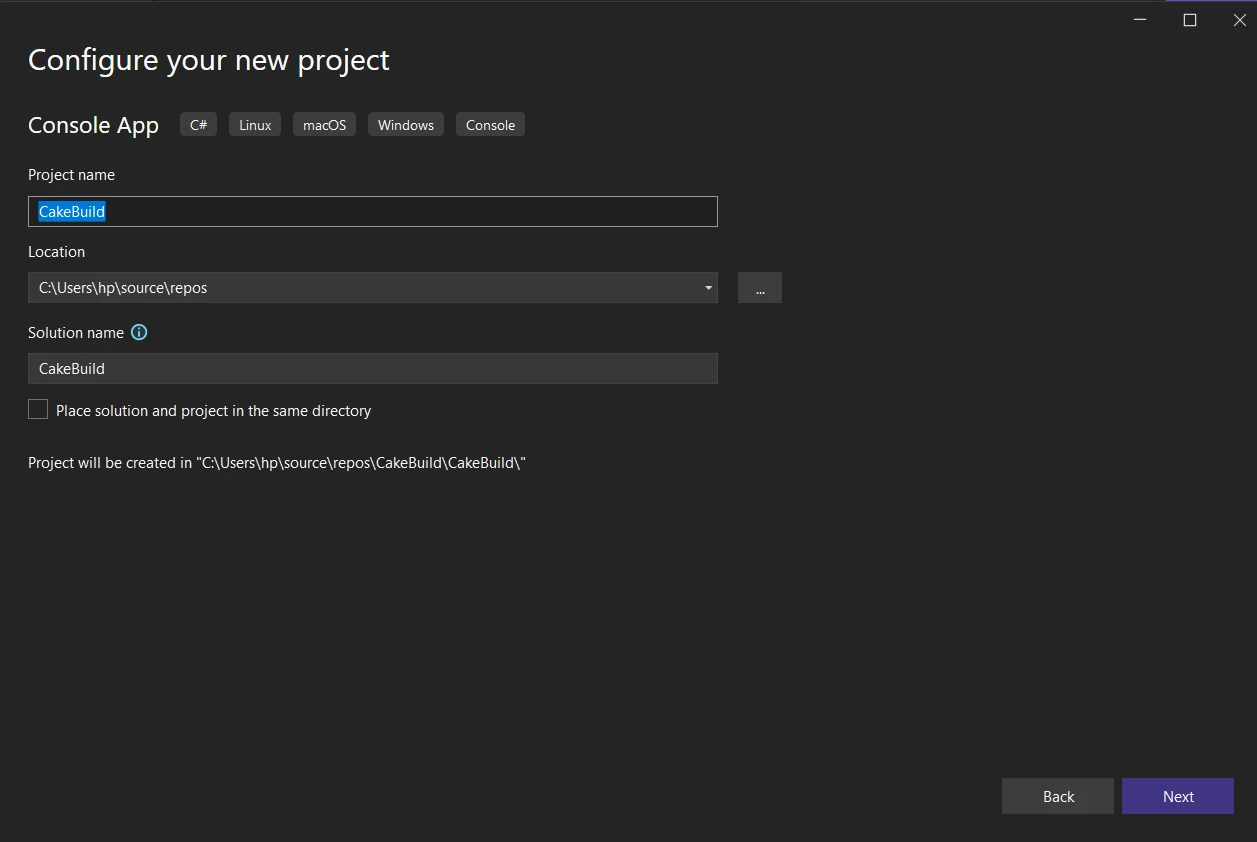
1. **Abre Visual Studio:** Inicia Visual Studio en tu máquina. Asegúrate de tener una versión de Visual Studio que soporte extensiones. Descarga la última versión 2022 desde [**Descargas de Microsoft Visual Studio**](https://visualstudio.microsoft.com/downloads/). Crea una nueva aplicación de consola.
2. **Abre el diálogo de Extensiones y Actualizaciones:**
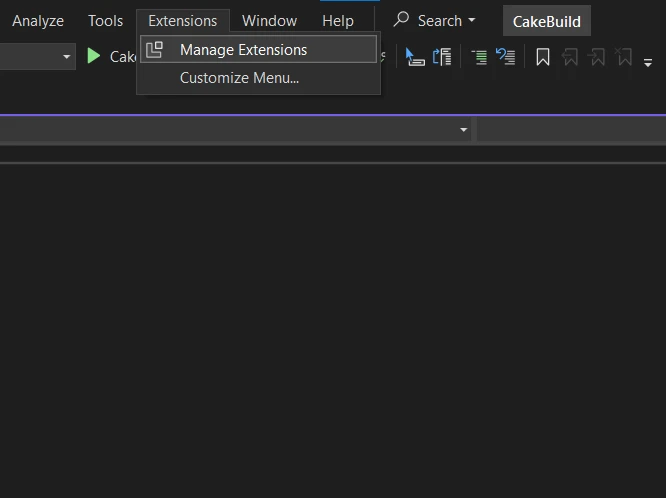
* En Visual Studio, ve al menú "Extensiones".
* Selecciona "Gestionar Extensiones" del desplegable. Esto abrirá el diálogo de Extensiones y Actualizaciones.
3. **Busca la Extensión de Cake:**
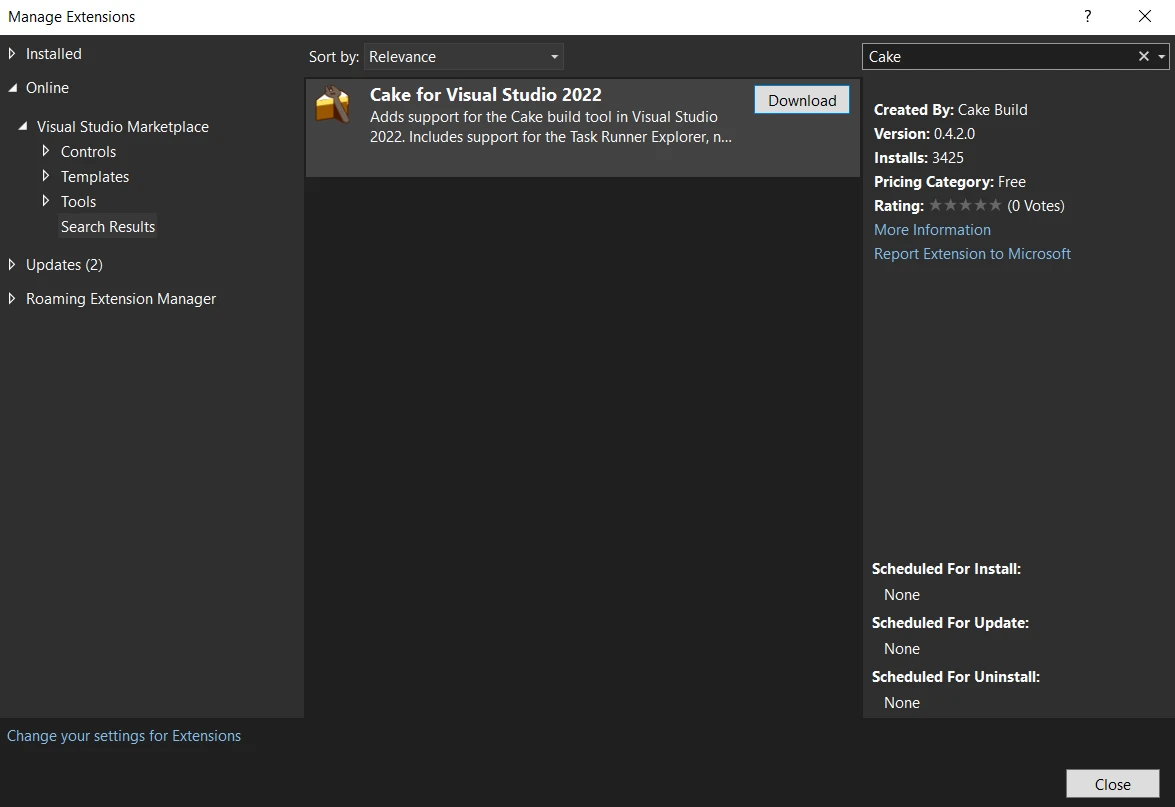
* En el diálogo de Extensiones y Actualizaciones, haz clic en la pestaña "En línea" a la izquierda.
* Usa el cuadro de búsqueda en la esquina superior derecha e introduce "Cake" para buscar la extensión Cake.
4. **Instala la Extensión Cake:**
* Busca la extensión "Cake para Visual Studio 2022" en los resultados de búsqueda.
* Haz clic en el botón "Descargar" para descargar e instalar la extensión.
5. **Reinicia Visual Studio:**
* Después de la instalación, se te pedirá que reinicies Visual Studio.
* Cierra y vuelve a abrir Visual Studio para aplicar los cambios.
6. **Verifica la Instalación:**
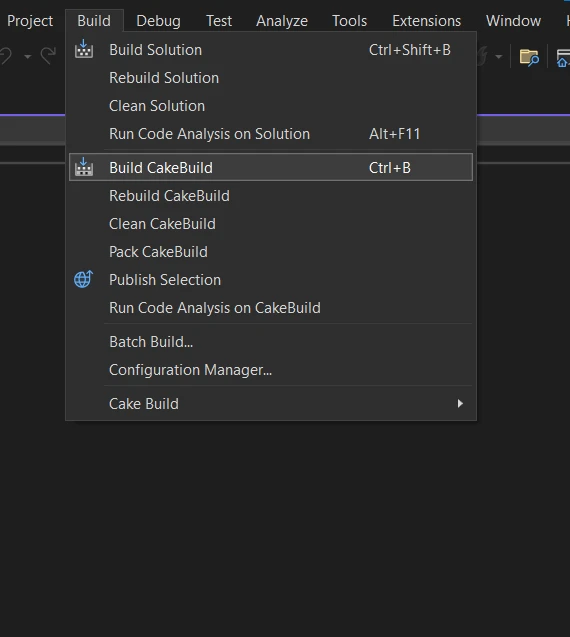
Una vez que Visual Studio se reinicie, puedes verificar que la extensión Cake está instalada.
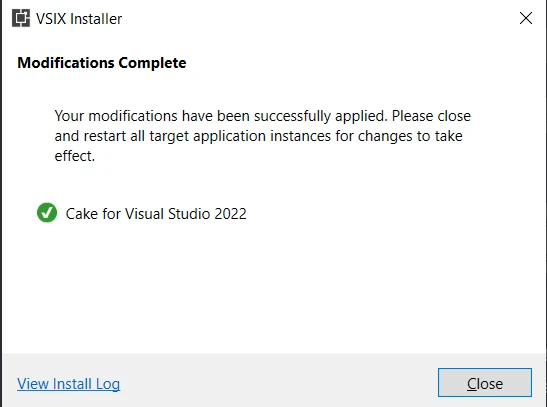
Deberías ver una nueva opción "Crear CakeBuild" en la barra de menú de Build, indicando que la extensión Cake se ha añadido correctamente.
### Creación de un Cake Script sencillo
Una vez que Cake está instalado, puedes crear scripts Cake simples dependiendo de tu configuración. Crea un archivo llamado **build.cake** con el siguiente contenido:
```csharp
var target = Argument("target", "Default");

Task("Default")
    .Does(() =>
{
    Information("Hello, Cake!");
});

RunTarget(target);
```
Este sencillo script de ejemplo define un objetivo predeterminado que imprime "Hola, Cake!" cuando se ejecuta.
### Ejecutar un script de Cake
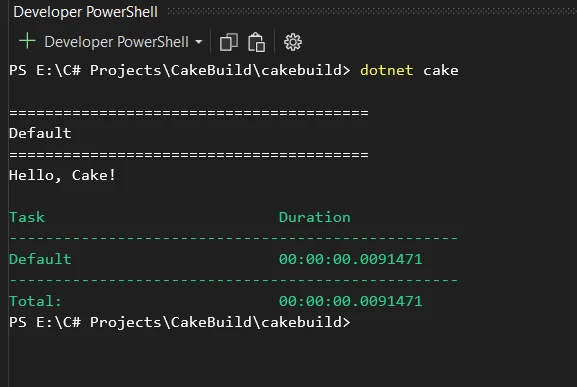
Para ejecutar el script, navegue al directorio que contiene el archivo `build.cake` y ejecute el siguiente comando:
```shell
:InstallCmd dotnet cake
```
Esto ejecutará el objetivo predeterminado en el script y mostrará el mensaje en la consola "Hola, Cake!".
## Ejemplos de uso avanzado de CakeBuild
Más allá de un simple ejemplo de "Hola, Cake!", CakeBuild se puede usar para escenarios más avanzados. Aquí hay un par de ejemplos:
### Compilación y pruebas
```csharp
Task("Compile")
    .Does(() =>
{
    // Compile C# code
    MSBuild("./src/MyProject.sln");
});

Task("RunTests")
    .IsDependentOn("Compile")
    .Does(() =>
{
    // Run tests
    DotNetTest("./src/MyProject.Tests");
});

Task("Build")
    .IsDependentOn("RunTests");
```
Este ejemplo demuestra un script de construcción que compila código C# y ejecuta pruebas unitarias usando MSBuild y el .NET Test SDK.
### Empaquetado e implementación
```csharp
Task("Package")
    .IsDependentOn("Build")
    .Does(() =>
{
    // Package application
    NuGetPack("./src/MyProject.csproj");
});

Task("Deploy")
    .IsDependentOn("Package")
    .Does(() =>
{
    // Deploy application
    // Add deployment steps here
});

Task("Release")
    .IsDependentOn("Deploy");
```
Este script demuestra tareas para empaquetar y desplegar una aplicación C# usando NuGet.
## Integración de IronPDF con CakeBuild
### IronPDF: Una biblioteca de generación de PDF
[**Descripción general de la biblioteca de IronPDF**](/) es una biblioteca .NET que permite a los desarrolladores crear, manipular y renderizar documentos PDF en C#. Proporciona una gama de características para trabajar con archivos PDF, incluyendo la capacidad de crear PDFs desde cero, modificar PDFs existentes, convertir HTML a PDF, extraer texto e imágenes de PDFs y más.
#### Características principales
Aquí hay algunas características clave de IronPDF:
1. **Creación de PDF:** Puedes crear documentos PDF desde cero usando código C#.
2. **Conversión de HTML a PDF:** IronPDF te permite convertir contenido HTML a PDF, lo cual puede ser útil para generar PDFs de páginas web o documentos HTML.
3. **Modificación de PDF:** Puedes modificar documentos PDF existentes agregando, eliminando o modificando texto e imágenes.
4. **Renderizado de PDF:** IronPDF admite el renderizado de documentos PDF, lo que puede ser útil para mostrar PDFs dentro de una aplicación .NET.
5. **Formularios PDF:** Proporciona funcionalidad para trabajar con formularios PDF, incluidas la completación y extracción de formularios.
6. **Seguridad:** IronPDF admite características de seguridad de PDF, como protección con contraseña y cifrado.
### Automatización de tareas IronPDF con CakeBuild
Consideremos un escenario en el que quieras integrar IronPDF en tu proceso de construcción para automatizar la [**generación de documentos PDF**](/examples/using-html-to-create-a-pdf/). Aquí tienes cómo puedes mejorar tu script de Cake:
```csharp
// Install IronPdf as a Cake Addin
#addin nuget:?package=IronPdf&version=2023.12.6
Task("GeneratePDF")
.Does(() =>
{
// Your HTML content to convert to PDF
var htmlContent = "<html><body><h1>Hello, IronPDF!</h1></body></html>";
// Convert HTML to PDF using IronPDF
var renderer = new IronPdf.ChromePdfRenderer();
var pdf = renderer.RenderHtmlAsPdf(htmlContent);
// Save the generated PDF
pdf.SaveAs("GeneratedDocument.pdf");
});
Task("Build")
.IsDependentOn("GeneratePDF");
```
En este ejemplo, el script de Cake incluye la biblioteca IronPDF como un complemento (`#addin "nuget:?package=IronPDF"`) y define una tarea llamada "GeneratePDF". Esta tarea utiliza `ChromePdfRenderer` de IronPDF para convertir el contenido HTML en un documento PDF.
También puedes agregar IronPDF como manifiesto de herramienta a CakeBuild:
```txt
// Install IronPdf as a Cake Tool
#tool nuget:?package=IronPdf&version=2023.12.6
```
Al incorporar IronPDF en tu script de CakeBuild, puedes automatizar la generación de PDFs como parte de tu proceso de construcción. Esto puede ser particularmente útil para crear documentación, informes o cualquier otro contenido PDF necesario en tu aplicación. Por favor, consulta la [documentación](/docs/) de IronPDF para trabajar más a fondo con PDFs.
## Conclusión
En conclusión, CakeBuild es una herramienta de automatización de compilación versátil y amigable para el desarrollador para proyectos de C#. Su DSL en C# facilita a los desarrolladores definir y ejecutar tareas de construcción, proporcionando flexibilidad y consistencia en el ciclo de vida del desarrollo de software. Cuando se combina con IronPDF, las capacidades de automatización de CakeBuild pueden extenderse para incluir tareas de generación de PDF, mejorando la eficiencia general de tu proceso de desarrollo.
Ya sea compilando código, ejecutando pruebas, empaquetando aplicaciones o generando documentos PDF, la combinación de CakeBuild e IronPDF te capacita para automatizar estas tareas sin problemas dentro de tus proyectos de C#.
IronPDF es gratuito para propósitos de desarrollo; sin embargo, debe [licenciarse para uso comercial](/licensing/) para probar su funcionalidad completa en modo comercial. Descarga la biblioteca desde el [sitio web oficial de IronPDF](download-modal).
Con la mejora en el campo del desarrollo de software y la industria tecnológica, la automatización desempeña un papel crucial en la optimización de tareas repetitivas, asegurando consistencia y mejorando la eficiencia general, como ejecutar pruebas unitarias y crear contenido y anuncios personalizados con estadísticas del sitio para entender la calidad de esos servicios. CakeBuild, un sistema de automatización de compilación multiplataforma, es una herramienta poderosa que simplifica la gestión y ejecución de tareas de construcción en proyectos de C# y ASP.NET sin necesitar compromiso adicional y estadísticas del sitio o un ejecutor de tareas.
En este artículo, exploraremos qué es CakeBuild, por qué es beneficioso en el desarrollo de C#, y cómo se puede integrar con IronPDF para automatizar tareas de generación de documentos PDF y proteger contra el spam, fraude y abuso de la misma manera.
Automatizando procesos de compilación con CakeBuild y mejorando la generación de PDF con IronPDF
CakeBuild, una breve descripción
CakeBuild, a menudo referido simplemente como Cake, es un sistema de automatización de compilación de código abierto que permite a los desarrolladores definir y ejecutar tareas de construcción utilizando código C#. Proporciona un lenguaje específico de dominio (DSL) para expresar scripts de construcción, lo que facilita a los desarrolladores de C# automatizar varios aspectos de sus procesos de construcción y despliegue.
¿Por qué usar CakeBuild en el desarrollo C#?
Familiaridad con C#: Dado que los scripts de Cake están escritos en C#, los desarrolladores pueden beneficiarse de su conocimiento y habilidades existentes, facilitando la integración de la automatización de construcción en proyectos de C#.
Soporte multiplataforma: CakeBuild está diseñado para ser multiplataforma, soportando Windows, Linux y macOS. Esto permite procesos de construcción consistentes a través de diferentes sistemas operativos.
Extensibilidad: Cake admite el uso de complementos, que son paquetes que extienden su funcionalidad. Esta extensibilidad permite a los desarrolladores integrar Cake con varias herramientas y gestionar escenarios de construcción complejos.
Flexibilidad: Con Cake, tienes un control detallado sobre tu proceso de construcción. Ya sea compilando código, ejecutando pruebas o empaquetando aplicaciones, puedes adaptar el script de construcción para satisfacer las necesidades específicas de tu proyecto.
Cómo empezar con CakeBuild
Instalación
Para comenzar con CakeBuild, necesitas instalar el manifiesto de la herramienta global de Cake. Abre un terminal o símbolo del sistema y ejecuta el siguiente comando de herramienta .NET:
> dotnet tool install -g Cake.Tool
dotnet tool install -g Cake.Tool
Uso de Visual Studio
Para instalar CakeBuild, puedes usar la extensión de Cake para Visual Studio. Aquí están los pasos para instalar CakeBuild en Visual Studio:
Abre Visual Studio: Inicia Visual Studio en tu máquina. Asegúrate de tener una versión de Visual Studio que soporte extensiones. Descarga la última versión 2022 desde Descargas de Microsoft Visual Studio. Crea una nueva aplicación de consola.
Abre el diálogo de Extensiones y Actualizaciones:
En Visual Studio, ve al menú "Extensiones".
Selecciona "Gestionar Extensiones" del desplegable. Esto abrirá el diálogo de Extensiones y Actualizaciones.
Busca la Extensión de Cake:
En el diálogo de Extensiones y Actualizaciones, haz clic en la pestaña "En línea" a la izquierda.
Usa el cuadro de búsqueda en la esquina superior derecha e introduce "Cake" para buscar la extensión Cake.
Instala la Extensión Cake:
Busca la extensión "Cake para Visual Studio 2022" en los resultados de búsqueda.
Haz clic en el botón "Descargar" para descargar e instalar la extensión.
Reinicia Visual Studio:
Después de la instalación, se te pedirá que reinicies Visual Studio.
Cierra y vuelve a abrir Visual Studio para aplicar los cambios.
Verifica la Instalación:
Una vez que Visual Studio se reinicie, puedes verificar que la extensión Cake está instalada.
Deberías ver una nueva opción "Crear CakeBuild" en la barra de menú de Build, indicando que la extensión Cake se ha añadido correctamente.
Creación de un Cake Script sencillo
Una vez que Cake está instalado, puedes crear scripts Cake simples dependiendo de tu configuración. Crea un archivo llamado build.cake con el siguiente contenido:
var target = Argument("target", "Default");Task("Default") .Does(() =>{Information("Hello, Cake!");});RunTarget(target);
Task("Package").IsDependentOn("Build").Does(Sub()
	' Package application
	NuGetPack("./src/MyProject.csproj")
End Sub)

Task("Deploy").IsDependentOn("Package").Does(Sub()
	' Deploy application
	' Add deployment steps here
End Sub)

Task("Release").IsDependentOn("Deploy")
Este script demuestra tareas para empaquetar y desplegar una aplicación C# usando NuGet.
Integración de IronPDF con CakeBuild
IronPDF: Una biblioteca de generación de PDF
Descripción general de la biblioteca de IronPDF es una biblioteca .NET que permite a los desarrolladores crear, manipular y renderizar documentos PDF en C#. Proporciona una gama de características para trabajar con archivos PDF, incluyendo la capacidad de crear PDFs desde cero, modificar PDFs existentes, convertir HTML a PDF, extraer texto e imágenes de PDFs y más.
Características principales
Aquí hay algunas características clave de IronPDF:
Creación de PDF: Puedes crear documentos PDF desde cero usando código C#.
Conversión de HTML a PDF: IronPDF te permite convertir contenido HTML a PDF, lo cual puede ser útil para generar PDFs de páginas web o documentos HTML.
Modificación de PDF: Puedes modificar documentos PDF existentes agregando, eliminando o modificando texto e imágenes.
Renderizado de PDF: IronPDF admite el renderizado de documentos PDF, lo que puede ser útil para mostrar PDFs dentro de una aplicación .NET.
Formularios PDF: Proporciona funcionalidad para trabajar con formularios PDF, incluidas la completación y extracción de formularios.
Seguridad: IronPDF admite características de seguridad de PDF, como protección con contraseña y cifrado.
Automatización de tareas IronPDF con CakeBuild
Consideremos un escenario en el que quieras integrar IronPDF en tu proceso de construcción para automatizar la generación de documentos PDF. Aquí tienes cómo puedes mejorar tu script de Cake:
// Install IronPdf as a Cake Addin#addin nuget:?package=IronPdf&version=2023.12.6Task("GeneratePDF") .Does(() =>{ // Your HTML content to convert to PDF var htmlContent = "<html><body><h1>Hello, IronPDF!</h1></body></html>"; // Convert HTML to PDF using IronPDF var renderer = new IronPdf.ChromePdfRenderer(); var pdf = renderer.RenderHtmlAsPdf(htmlContent); // Save the generated PDF pdf.SaveAs("GeneratedDocument.pdf");});Task("Build") .IsDependentOn("GeneratePDF");
// Install IronPdf as a Cake Addin
#addin nuget:?package=IronPdf&version=2023.12.6

Task("GeneratePDF")
    .Does(() =>
{
    // Your HTML content to convert to PDF
    var htmlContent = "<html><body><h1>Hello, IronPDF!</h1></body></html>";

    // Convert HTML to PDF using IronPDF
    var renderer = new IronPdf.ChromePdfRenderer();
    var pdf = renderer.RenderHtmlAsPdf(htmlContent);

    // Save the generated PDF
    pdf.SaveAs("GeneratedDocument.pdf");
});

Task("Build")
    .IsDependentOn("GeneratePDF");
' Install IronPdf as a Cake Addin#addin nuget:?package=IronPdf&version=2023.12.6Task("GeneratePDF").Does(Sub() ' Your HTML content to convert to PDF Dim htmlContent AsString = "<html><body><h1>Hello, IronPDF!</h1></body></html>" ' Convert HTML to PDF using IronPDF Dim renderer As New IronPdf.ChromePdfRenderer() Dim pdf = renderer.RenderHtmlAsPdf(htmlContent) ' Save the generated PDF pdf.SaveAs("GeneratedDocument.pdf") End Sub)Task("Build").IsDependentOn("GeneratePDF")
' Install IronPdf as a Cake Addin
#addin nuget:?package=IronPdf&version=2023.12.6

Task("GeneratePDF").
    Does(Sub()
        ' Your HTML content to convert to PDF
        Dim htmlContent As String = "<html><body><h1>Hello, IronPDF!</h1></body></html>"

        ' Convert HTML to PDF using IronPDF
        Dim renderer As New IronPdf.ChromePdfRenderer()
        Dim pdf = renderer.RenderHtmlAsPdf(htmlContent)

        ' Save the generated PDF
        pdf.SaveAs("GeneratedDocument.pdf")
    End Sub)

Task("Build").
    IsDependentOn("GeneratePDF")
En este ejemplo, el script de Cake incluye la biblioteca IronPDF como un complemento (#addin "nuget:?package=IronPDF") y define una tarea llamada "GeneratePDF". Esta tarea utiliza ChromePdfRenderer de IronPDF para convertir el contenido HTML en un documento PDF.
También puedes agregar IronPDF como manifiesto de herramienta a CakeBuild:
// Install IronPdf as a Cake Tool#tool nuget:?package=IronPdf&version=2023.12.6
// Install IronPdf as a Cake Tool
#tool nuget:?package=IronPdf&version=2023.12.6
Text
Al incorporar IronPDF en tu script de CakeBuild, puedes automatizar la generación de PDFs como parte de tu proceso de construcción. Esto puede ser particularmente útil para crear documentación, informes o cualquier otro contenido PDF necesario en tu aplicación. Por favor, consulta la documentación de IronPDF para trabajar más a fondo con PDFs.
Conclusión
En conclusión, CakeBuild es una herramienta de automatización de compilación versátil y amigable para el desarrollador para proyectos de C#. Su DSL en C# facilita a los desarrolladores definir y ejecutar tareas de construcción, proporcionando flexibilidad y consistencia en el ciclo de vida del desarrollo de software. Cuando se combina con IronPDF, las capacidades de automatización de CakeBuild pueden extenderse para incluir tareas de generación de PDF, mejorando la eficiencia general de tu proceso de desarrollo.
Ya sea compilando código, ejecutando pruebas, empaquetando aplicaciones o generando documentos PDF, la combinación de CakeBuild e IronPDF te capacita para automatizar estas tareas sin problemas dentro de tus proyectos de C#.
Jacob Mellor es Director de Tecnología de Iron Software y un ingeniero visionario pionero en la tecnología C# PDF. Como desarrollador original de la base de código principal de Iron Software, ha dado forma a la arquitectura de productos de la empresa desde su creación, transformándola, junto con el director ejecutivo Cameron Rimington, en una empresa de más de 50 personas que presta servicios a la NASA, Tesla y organismos gubernamentales de todo el mundo.





























