En C#, el método Substring es una herramienta esencial para manipular cadenas. Esta función permite a los desarrolladores extraer una parte de una cadena basada en una posición de carácter especificada. Esta guía tiene como objetivo explicar a fondo el método de cadena pública Substring y la biblioteca IronPDF, proporcionando ejemplos detallados y explicaciones para ayudar a los principiantes a comprender completamente su uso y capacidades.
Comprensión del método Substring
El método Substring en C#, un miembro de la clase String, permite la manipulación comenzando desde el primer carácter basado en los parámetros especificados. Se utiliza para recuperar una parte de la cadena comenzando desde un índice especificado y, opcionalmente, por una longitud especificada. La sintaxis de este método es sencilla, lo que facilita su implementación en cualquier escenario de codificación donde se necesite la manipulación de cadenas.
Sintaxis y parámetros
El método Substring tiene dos formas principales:
public string Substring(int startIndex);
public string Substring(int startIndex, int length);
public string Substring(int startIndex);
public string Substring(int startIndex, int length);
public String Substring(Integer startIndex)
public String Substring(Integer startIndex, Integer length)
public String Substring(Integer startIndex)
public String Substring(Integer startIndex, Integer length)
- public string Substring(int startIndex): recupera una subcadena que comienza en startIndex y continúa hasta el final de la cadena.
- public string Substring(int startIndex, int length): Esto recupera una subcadena que comienza en startIndex y tiene la longitud especificada.
Los parámetros involucrados son:
- int startIndex: este es el índice basado en cero en el que comienza la subcadena.
- int length: (opcional) Es el segundo parámetro. Este es el número de caracteres a incluir en la subcadena devuelta.
Cómo funciona el método Substring
El proceso del método Substring es sencillo. Cuando se llama, extrae caracteres de la cadena original a partir del índice dado (startIndex). Si se proporciona el parámetro length, el método devuelve el número especificado de caracteres. Sin el parámetro length, continúa hasta el final de la cadena. Usar Substring en C# asegura que ambos parámetros (startIndex y length) se traten como enteros, aplicando la seguridad de tipos y previniendo posibles errores de ejecución.
Ejemplos detallados del método Substring
Para comprender mejor cómo se implementa el método Substring, consideremos varios ejemplos que ilustren sus aplicaciones prácticas.
Supongamos que tienes una cadena y necesitas extraer una subcadena de un índice particular hasta el final de la cadena. Así es como puedes hacerlo:
// Main method demonstrating substring extraction
public static void Main(string[] args)
{
    string text = "Hello, world!";
    string substring = text.Substring(7); // Extract from index 7 to the end
    Console.WriteLine(substring);
}
// Main method demonstrating substring extraction
public static void Main(string[] args)
{
    string text = "Hello, world!";
    string substring = text.Substring(7); // Extract from index 7 to the end
    Console.WriteLine(substring);
}
' Main method demonstrating substring extraction
Public Shared Sub Main(ByVal args() As String)
Dim text As String = "Hello, world!"
Dim substring As String = text.Substring(7) ' Extract from index 7 to the end
Console.WriteLine(substring)
End Sub
' Main method demonstrating substring extraction
Public Shared Sub Main(ByVal args() As String)
	Dim text As String = "Hello, world!"
	Dim substring As String = text.Substring(7) ' Extract from index 7 to the end
	Console.WriteLine(substring)
End Sub
Salida:
En este ejemplo, el método Substring comienza en el índice 7, que corresponde a la 'w' en "world!", y recupera cada carácter hasta el final de la cadena. Esto es particularmente útil cuando la longitud de la subcadena es dinámica o no está predeterminada.
Ahora, veamos un escenario donde se especifican tanto el índice de inicio como la longitud de la subcadena:
// Main method demonstrating substring extraction with specified length
public static void Main(string[] args)
{
    string text = "Hello, world!";
    string substring = text.Substring(7, 5); // Starts at index 7, length of 5
    Console.WriteLine(substring);
}
// Main method demonstrating substring extraction with specified length
public static void Main(string[] args)
{
    string text = "Hello, world!";
    string substring = text.Substring(7, 5); // Starts at index 7, length of 5
    Console.WriteLine(substring);
}
' Main method demonstrating substring extraction with specified length
Public Shared Sub Main(ByVal args() As String)
Dim text As String = "Hello, world!"
Dim substring As String = text.Substring(7, 5) ' Starts at index 7, length of 5
Console.WriteLine(substring)
End Sub
' Main method demonstrating substring extraction with specified length
Public Shared Sub Main(ByVal args() As String)
	Dim text As String = "Hello, world!"
	Dim substring As String = text.Substring(7, 5) ' Starts at index 7, length of 5
	Console.WriteLine(substring)
End Sub
Salida:
Aquí, la subcadena comienza en el séptimo carácter y abarca cinco caracteres de longitud. Este método es muy útil cuando necesitas un control preciso sobre los límites de la subcadena.
Recuperación de subcadenas de una matriz de cadenas
Supongamos que tienes un array de cadenas y deseas extraer subcadenas de cada cadena basándote en una posición de carácter y longitud específicas. Puedes usar un bucle foreach para iterar sobre el array y aplicar el método Substring a cada cadena.
// Example of extracting substrings from an array of strings
string[] array = { "apple", "banana", "orange" };
foreach (string str in array)
{
    string substring = str.Substring(1, 3); // Substring starts from index 1
    Console.WriteLine(substring);
}
// Example of extracting substrings from an array of strings
string[] array = { "apple", "banana", "orange" };
foreach (string str in array)
{
    string substring = str.Substring(1, 3); // Substring starts from index 1
    Console.WriteLine(substring);
}
' Example of extracting substrings from an array of strings
Dim array() As String = { "apple", "banana", "orange" }
For Each str As String In array
Dim substring As String = str.Substring(1, 3) ' Substring starts from index 1
Console.WriteLine(substring)
Next str
' Example of extracting substrings from an array of strings
Dim array() As String = { "apple", "banana", "orange" }
For Each str As String In array
	Dim substring As String = str.Substring(1, 3) ' Substring starts from index 1
	Console.WriteLine(substring)
Next str
Este código imprimirá:
Manejo de casos extremos
Es importante considerar casos atípicos para evitar errores de ejecución como ArgumentOutOfRangeException. Al usar el método Substring, es esencial asegurarse de que la posición de carácter especificada y la longitud estén dentro de los límites de la cadena original. De lo contrario, puede resultar en una excepción de índice fuera de rango. Puedes verificar la longitud de la cadena original para evitar tales excepciones. Aquí hay algunos puntos clave:
- El startIndex debe estar dentro de los límites de la cadena.
- La suma de startIndex y length no debe exceder la longitud de la cadena original.
- Los valores negativos para startIndex o length no están permitidos y causarán un error.
Comprobación de la validez de los índices
Para asegurar que la extracción de subcadenas no cause un error, puedes agregar verificaciones:
// Main method with checks to avoid ArgumentOutOfRangeException
public static void Main(string[] args)
{
    string text = "Hello, world!";
    int startIndex = 7;
    int length = 5;
    if (startIndex >= 0 && startIndex < text.Length && startIndex + length <= text.Length)
    {
        string substring = text.Substring(startIndex, length);
        Console.WriteLine(substring);
    }
    else
    {
        Console.WriteLine("Invalid substring parameters.");
    }
}
// Main method with checks to avoid ArgumentOutOfRangeException
public static void Main(string[] args)
{
    string text = "Hello, world!";
    int startIndex = 7;
    int length = 5;
    if (startIndex >= 0 && startIndex < text.Length && startIndex + length <= text.Length)
    {
        string substring = text.Substring(startIndex, length);
        Console.WriteLine(substring);
    }
    else
    {
        Console.WriteLine("Invalid substring parameters.");
    }
}
' Main method with checks to avoid ArgumentOutOfRangeException
Public Shared Sub Main(ByVal args() As String)
Dim text As String = "Hello, world!"
Dim startIndex As Integer = 7
Dim length As Integer = 5
If startIndex >= 0 AndAlso startIndex < text.Length AndAlso startIndex + length <= text.Length Then
Dim substring As String = text.Substring(startIndex, length)
Console.WriteLine(substring)
Else
Console.WriteLine("Invalid substring parameters.")
End If
End Sub
' Main method with checks to avoid ArgumentOutOfRangeException
Public Shared Sub Main(ByVal args() As String)
	Dim text As String = "Hello, world!"
	Dim startIndex As Integer = 7
	Dim length As Integer = 5
	If startIndex >= 0 AndAlso startIndex < text.Length AndAlso startIndex + length <= text.Length Then
		Dim substring As String = text.Substring(startIndex, length)
		Console.WriteLine(substring)
	Else
		Console.WriteLine("Invalid substring parameters.")
	End If
End Sub
Este bloque de código asegura que los parámetros de la subcadena sean válidos antes de intentar extraer la subcadena, evitando así posibles errores de ejecución.
Integración de IronPDF con Substring en C# para Creación Dinámica de PDFs
IronPDF es una potente biblioteca para PDF que permite a los desarrolladores crear, manipular y renderizar documentos PDF directamente dentro de sus aplicaciones .NET. Permite la conversión de HTML a PDF, lo que ayuda a crear documentos PDF personalizados y hermosos. IronPDF admite una gama de operaciones en PDF, incluida la generación de PDFs desde HTML, la exportación de PDFs, la edición de PDFs existentes y mucho más, proporcionando un conjunto completo de herramientas para manejar archivos PDF en un entorno .NET.
IronPDF facilita la conversión de HTML a PDF fácil, manteniendo los diseños y estilos intactos. Es una gran herramienta para crear PDFs desde contenido basado en la web, como informes, facturas y documentación. Archivos HTML, URLs y cadenas HTML pueden ser convertidos en archivos PDF sin problemas.
using IronPdf;

class Program
{
    static void Main(string[] args)
    {
        var renderer = new ChromePdfRenderer();

        // 1. Convert HTML String to PDF
        var htmlContent = "<h1>Hello, IronPDF!</h1><p>This is a PDF from an HTML string.</p>";
        var pdfFromHtmlString = renderer.RenderHtmlAsPdf(htmlContent);
        pdfFromHtmlString.SaveAs("HTMLStringToPDF.pdf");

        // 2. Convert HTML File to PDF
        var htmlFilePath = "path_to_your_html_file.html"; // Specify the path to your HTML file
        var pdfFromHtmlFile = renderer.RenderHtmlFileAsPdf(htmlFilePath);
        pdfFromHtmlFile.SaveAs("HTMLFileToPDF.pdf");

        // 3. Convert URL to PDF
        var url = "https://ironpdf.com"; // Specify the URL
        var pdfFromUrl = renderer.RenderUrlAsPdf(url);
        pdfFromUrl.SaveAs("URLToPDF.pdf");
    }
}
using IronPdf;

class Program
{
    static void Main(string[] args)
    {
        var renderer = new ChromePdfRenderer();

        // 1. Convert HTML String to PDF
        var htmlContent = "<h1>Hello, IronPDF!</h1><p>This is a PDF from an HTML string.</p>";
        var pdfFromHtmlString = renderer.RenderHtmlAsPdf(htmlContent);
        pdfFromHtmlString.SaveAs("HTMLStringToPDF.pdf");

        // 2. Convert HTML File to PDF
        var htmlFilePath = "path_to_your_html_file.html"; // Specify the path to your HTML file
        var pdfFromHtmlFile = renderer.RenderHtmlFileAsPdf(htmlFilePath);
        pdfFromHtmlFile.SaveAs("HTMLFileToPDF.pdf");

        // 3. Convert URL to PDF
        var url = "https://ironpdf.com"; // Specify the URL
        var pdfFromUrl = renderer.RenderUrlAsPdf(url);
        pdfFromUrl.SaveAs("URLToPDF.pdf");
    }
}
Imports IronPdf
Module Program
Sub Main(args As String())
Dim renderer = New ChromePdfRenderer()
' 1. Convert HTML String to PDF
Dim htmlContent = "<h1>Hello, IronPDF!</h1><p>This is a PDF from an HTML string.</p>"
Dim pdfFromHtmlString = renderer.RenderHtmlAsPdf(htmlContent)
pdfFromHtmlString.SaveAs("HTMLStringToPDF.pdf")
' 2. Convert HTML File to PDF
Dim htmlFilePath = "path_to_your_html_file.html" ' Specify the path to your HTML file
Dim pdfFromHtmlFile = renderer.RenderHtmlFileAsPdf(htmlFilePath)
pdfFromHtmlFile.SaveAs("HTMLFileToPDF.pdf")
' 3. Convert URL to PDF
Dim url = "https://ironpdf.com" ' Specify the URL
Dim pdfFromUrl = renderer.RenderUrlAsPdf(url)
pdfFromUrl.SaveAs("URLToPDF.pdf")
End Sub
End Module
Imports IronPdf

Module Program
    Sub Main(args As String())
        Dim renderer = New ChromePdfRenderer()

        ' 1. Convert HTML String to PDF
        Dim htmlContent = "<h1>Hello, IronPDF!</h1><p>This is a PDF from an HTML string.</p>"
        Dim pdfFromHtmlString = renderer.RenderHtmlAsPdf(htmlContent)
        pdfFromHtmlString.SaveAs("HTMLStringToPDF.pdf")

        ' 2. Convert HTML File to PDF
        Dim htmlFilePath = "path_to_your_html_file.html" ' Specify the path to your HTML file
        Dim pdfFromHtmlFile = renderer.RenderHtmlFileAsPdf(htmlFilePath)
        pdfFromHtmlFile.SaveAs("HTMLFileToPDF.pdf")

        ' 3. Convert URL to PDF
        Dim url = "https://ironpdf.com" ' Specify the URL
        Dim pdfFromUrl = renderer.RenderUrlAsPdf(url)
        pdfFromUrl.SaveAs("URLToPDF.pdf")
    End Sub
End Module
Combinar IronPDF con el método Substring de C# puede ser increíblemente útil para generar documentos PDF que requieran manipulación de texto y extracción antes de la conversión a PDF. Por ejemplo, si necesitas extraer información específica de un bloque grande de texto y presentarla en formato PDF, puedes usar el método Substring para aislar el texto deseado y IronPDF para convertir este texto en un documento PDF.
Consideremos un escenario donde tienes un texto grande que contiene información importante en índices especificados y necesitas extraer esta información y generar un archivo PDF con ella. A continuación se muestra un ejemplo paso a paso de cómo se puede lograr esto usando tanto IronPDF como el método Substring de C#.
using IronPdf;
using System;

public class PdfGenerator
{
    public static void Main(string[] args)
    {
        // Applying your license for IronPDF
        License.LicenseKey = "License-Key";
        // Original large text from which we need to extract information
        string originalText = "IronPDF helps you generate PDF documents in .NET applications easily. Discover more about IronPDF at the official site.";
        // Using the Substring method to extract the part of the string that talks about IronPDF
        string importantInfo = originalText.Substring(0, 65);  // Extracts the first sentence

        // Create a PDF document with IronPDF
        var renderer = new ChromePdfRenderer();
        // Convert the extracted text to PDF
        PdfDocument pdf = renderer.RenderHtmlAsPdf($"<h1>Extracted Information</h1><p>{importantInfo}</p>");
        // Save the PDF to a file
        pdf.SaveAs("ExtractedInfo.pdf");
        // Confirmation output
        Console.WriteLine("PDF generated successfully with extracted information.");
    }
}
using IronPdf;
using System;

public class PdfGenerator
{
    public static void Main(string[] args)
    {
        // Applying your license for IronPDF
        License.LicenseKey = "License-Key";
        // Original large text from which we need to extract information
        string originalText = "IronPDF helps you generate PDF documents in .NET applications easily. Discover more about IronPDF at the official site.";
        // Using the Substring method to extract the part of the string that talks about IronPDF
        string importantInfo = originalText.Substring(0, 65);  // Extracts the first sentence

        // Create a PDF document with IronPDF
        var renderer = new ChromePdfRenderer();
        // Convert the extracted text to PDF
        PdfDocument pdf = renderer.RenderHtmlAsPdf($"<h1>Extracted Information</h1><p>{importantInfo}</p>");
        // Save the PDF to a file
        pdf.SaveAs("ExtractedInfo.pdf");
        // Confirmation output
        Console.WriteLine("PDF generated successfully with extracted information.");
    }
}
Imports IronPdf
Imports System
Public Class PdfGenerator
Public Shared Sub Main(ByVal args As String())
' Applying your license for IronPDF
License.LicenseKey = "License-Key"
' Original large text from which we need to extract information
Dim originalText As String = "IronPDF helps you generate PDF documents in .NET applications easily. Discover more about IronPDF at the official site."
' Using the Substring method to extract the part of the string that talks about IronPDF
Dim importantInfo As String = originalText.Substring(0, 65) ' Extracts the first sentence
' Create a PDF document with IronPDF
Dim renderer = New ChromePdfRenderer()
' Convert the extracted text to PDF
Dim pdf As PdfDocument = renderer.RenderHtmlAsPdf($"<h1>Extracted Information</h1><p>{importantInfo}</p>")
' Save the PDF to a file
pdf.SaveAs("ExtractedInfo.pdf")
' Confirmation output
Console.WriteLine("PDF generated successfully with extracted information.")
End Sub
End Class
Imports IronPdf
Imports System

Public Class PdfGenerator
    Public Shared Sub Main(ByVal args As String())
        ' Applying your license for IronPDF
        License.LicenseKey = "License-Key"
        ' Original large text from which we need to extract information
        Dim originalText As String = "IronPDF helps you generate PDF documents in .NET applications easily. Discover more about IronPDF at the official site."
        ' Using the Substring method to extract the part of the string that talks about IronPDF
        Dim importantInfo As String = originalText.Substring(0, 65)  ' Extracts the first sentence

        ' Create a PDF document with IronPDF
        Dim renderer = New ChromePdfRenderer()
        ' Convert the extracted text to PDF
        Dim pdf As PdfDocument = renderer.RenderHtmlAsPdf($"<h1>Extracted Information</h1><p>{importantInfo}</p>")
        ' Save the PDF to a file
        pdf.SaveAs("ExtractedInfo.pdf")
        ' Confirmation output
        Console.WriteLine("PDF generated successfully with extracted information.")
    End Sub
End Class
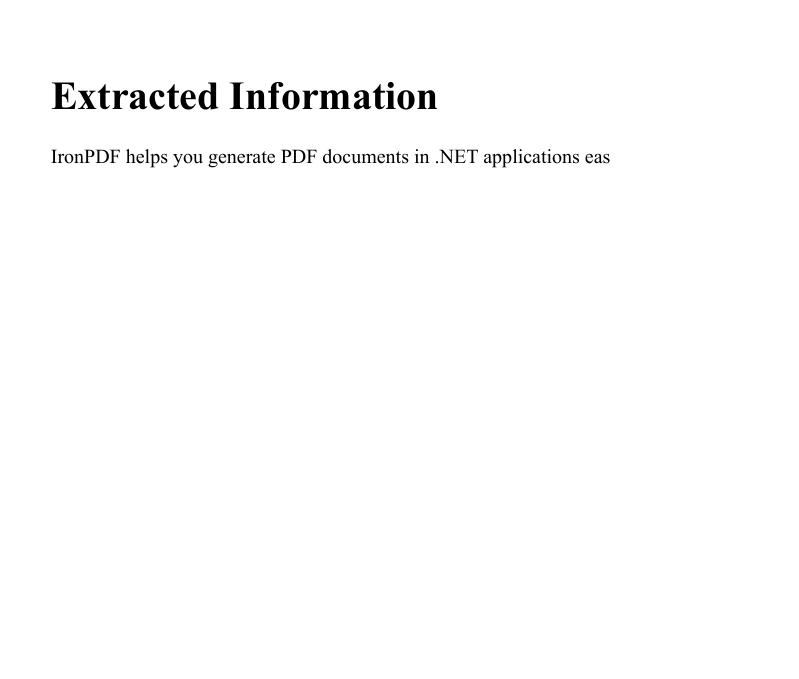
Este proceso demuestra una forma sencilla de integrar manipulación de texto y creación de PDFs, lo que puede ser particularmente útil para generar informes o documentación que requieran extraer y presentar información específica de textos más grandes.
Conclusión
El método Substring en C# es una herramienta poderosa para la manipulación de cadenas, que permite a los desarrolladores extraer fácilmente porciones de texto basadas en posiciones de caracteres especificadas. Al comprender y utilizar este método, puedes manejar una amplia gama de tareas de procesamiento de texto de manera efectiva. Recuerda considerar los casos límites y validar los índices para mantener la robustez en tus aplicaciones. IronPDF ofrece una prueba gratuita para desarrolladores para explorar sus características, y la licencia del producto comienza en $999.























