


C# Substring(對於開發者的運行原理)

在 C# 中,Substring 方法是操作字串的基本工具。 此功能可讓開發人員根據指定的字元位置抽取字串的一部分。 本指南旨在徹底解釋公共字串 Substring 方法和 IronPDF 函式庫,提供詳細的範例和說明,幫助初學者充分瞭解其用法和功能。
了解子串方法
C# 中的 Substring 方法是 String 類的成員,可根據指定的參數從第一個字元開始進行操作。 它用於擷取字串的一部分,從指定的索引開始,並可選擇指定的長度。 此方法的語法簡單直接,因此可在任何需要進行字串操作的編碼情境中輕鬆實作。
語法與參數
Substring 方法有兩種主要形式:
public string Substring(int startIndex);
public string Substring(int startIndex, int length);
public string Substring(int startIndex);
public string Substring(int startIndex, int length);public String Substring(Integer startIndex)
public String Substring(Integer startIndex, Integer length)- public string Substring(int startIndex):此函數檢索從startIndex開始到字串末尾的子字串。
- public string Substring(int startIndex, int length ):此函數檢索從startIndex開始且長度為指定值的子字串。
涉及的參數有
- int startIndex:這是子字串開始的從零開始的索引。
- int length:(可選)它是第二個參數。 這是要包含在回傳子串中的字元數。
子串方法如何運作
Substring 方法的過程很直接。 當呼叫時,它會從原始字串中抽取從指定索引 (startIndex) 開始的字元。 如果提供了 length 參數,該方法會返回指定的字元數。 如果沒有length參數,則會持續到字串的末端。 在 C# 中使用 Substring 可確保兩個參數(startIndex 和 length)都被視為整數,強制執行類型安全並防止潛在的執行時錯誤。
子串方法的詳細範例
為了更好地瞭解 Substring 方法的實作方式,讓我們考慮幾個說明其實際應用的範例。
提取到字串尾部
假設您有一個字串,您需要從特定索引到字串尾端抽取一個子串。 您可以這樣做
// Main method demonstrating substring extraction
public static void Main(string[] args)
{
    string text = "Hello, 世界!";
    string substring = text.Substring(7); // Extract from index 7 to the end
    Console.WriteLine(substring);
}
// Main method demonstrating substring extraction
public static void Main(string[] args)
{
string text = "Hello, 世界!";
string substring = text.Substring(7); // Extract from index 7 to the end
Console.WriteLine(substring);
}Option Strict On
Public Module Program
' Main method demonstrating substring extraction
Public Sub Main(args As String())
Dim text As String = "Hello, 世界!"
Dim substring As String = text.Substring(7) ' Extract from index 7 to the end
Console.WriteLine(substring)
End Sub
End Module輸出:
世界!在這個範例中,Substring 方法從索引 7 開始,對應 "世界!" 中的 'w',並擷取每個字元,直到字串結束為止。 當子字串的長度是動態或無法預先確定時,這一點尤其有用。
提取指定長度的子串
現在,讓我們來看看同時指定子串的起始索引和長度的情況:
// Main method demonstrating substring extraction with specified length
public static void Main(string[] args)
{
    string text = "Hello, 世界!";
    string substring = text.Substring(7, 5); // Starts at index 7, length of 5
    Console.WriteLine(substring);
}
// Main method demonstrating substring extraction with specified length
public static void Main(string[] args)
{
string text = "Hello, 世界!";
string substring = text.Substring(7, 5); // Starts at index 7, length of 5
Console.WriteLine(substring);
}Option Strict On
Public Module Program
' Main method demonstrating substring extraction with specified length
Public Sub Main(args As String())
Dim text As String = "Hello, 世界!"
Dim substring As String = text.Substring(7, 5) ' Starts at index 7, length of 5
Console.WriteLine(substring)
End Sub
End Module輸出:
世界在此,子串從第七個字元開始,長度橫跨五個字元。 當您需要精確控制子串的邊界時,此方法非常有用。
從字串陣列中擷取子字串
假設您有一個字串陣列,您想要根據指定的字元位置和長度從每個字串中抽取子串。 您可以使用 foreach 循環遍歷陣列,並對每個字串套用 Substring 方法。
// Example of extracting substrings from an array of strings
string[] array = { "a人e", "b厭惡性na", "o經營ge" };
foreach (string str in array)
{
    string substring = str.Substring(1, 3); // Substring starts from index 1
    Console.WriteLine(substring);
}
// Example of extracting substrings from an array of strings
string[] array = { "a人e", "b厭惡性na", "o經營ge" };
foreach (string str in array)
{
string substring = str.Substring(1, 3); // Substring starts from index 1
Console.WriteLine(substring);
}Imports System
' Example of extracting substrings from an array of strings
Dim array As String() = {"a人e", "b厭惡性na", "o經營ge"}
For Each str As String In array
Dim substring As String = str.Substring(1, 3) ' Substring starts from index 1
Console.WriteLine(substring)
Next此代碼將輸出:
人
厭惡性
經營
處理邊緣案例
重要的是要考慮邊緣情況,以避免執行時錯誤,例如 ArgumentOutOfRangeException。 使用 Substring 方法時,必須確保指定的字元位置和長度在原始字串的範圍內。 否則可能會導致索引超出範圍的異常。 您可以檢查原始字串的長度以避免此類例外。 以下是一些重點:
- startIndex 必須在字串的範圍內。
- startIndex 與 length 之和不得超過原始字串的長度。
- 不允許使用 startIndex 或 length 的負值,否則會導致錯誤。
檢查指數的有效性
為了確保您的子串抽取不會造成錯誤,您可以加入檢查:
// Main method with checks to avoid ArgumentOutOfRangeException
public static void Main(string[] args)
{
    string text = "Hello, 世界!";
    int startIndex = 7;
    int length = 5;
    if (startIndex >= 0 && startIndex < text.Length && startIndex + length <= text.Length)
    {
        string substring = text.Substring(startIndex, length);
        Console.WriteLine(substring);
    }
    else
    {
        Console.WriteLine("Invalid substring parameters.");
    }
}
// Main method with checks to avoid ArgumentOutOfRangeException
public static void Main(string[] args)
{
string text = "Hello, 世界!";
int startIndex = 7;
int length = 5;
if (startIndex >= 0 && startIndex < text.Length && startIndex + length <= text.Length)
{
string substring = text.Substring(startIndex, length);
Console.WriteLine(substring);
}
else
{
Console.WriteLine("Invalid substring parameters.");
}
}Option Strict On
Public Module Program
' Main method with checks to avoid ArgumentOutOfRangeException
Public Sub Main(args As String())
Dim text As String = "Hello, 世界!"
Dim startIndex As Integer = 7
Dim length As Integer = 5
If startIndex >= 0 AndAlso startIndex < text.Length AndAlso startIndex + length <= text.Length Then
Dim substring As String = text.Substring(startIndex, length)
Console.WriteLine(substring)
Else
Console.WriteLine("Invalid substring parameters.")
End If
End Sub
End Module此程式碼區塊在嘗試抽取子串之前,先確保子串參數有效,因此可避免潛在的執行時錯誤。
Integrating IronPDF with Substring in C# for Dynamic PDF Creation.
IronPDF 是一個功能強大的 PDF 函式庫,可讓開發人員直接在其 .NET 應用程式中建立、處理及渲染 PDF 文件。 它允許HTML轉換為PDF,有助於建立自訂且美觀的PDF文件。 IronPDF 支援一系列 PDF 作業,包括從 HTML 產生 PDF、匯出 PDF、編輯現有 PDF 等,提供在 .NET 環境中處理 PDF 檔案的全面工具包。
IronPDF 可輕鬆將 HTML 轉換為 PDF,同時保持版面和樣式不變。 它是從網頁內容(如報告、發票和文件)建立 PDF 的絕佳工具。 HTML 檔案、URL 和 HTML 字串可無縫轉換成 PDF 檔案。
using IronPdf;

class Program
{
    static void Main(string[] args)
    {
        var renderer = new ChromePdfRenderer();

        // 1. Convert HTML String to PDF
        var htmlContent = "<h1>Hello, IronPDF!</h1><p>This is a PDF from an HTML string.</p>";
        var pdfFromHtmlString = renderer.RenderHtmlAsPdf(htmlContent);
        pdfFromHtmlString.SaveAs("HTMLStringToPDF.pdf");

        // 2. Convert HTML File to PDF
        var htmlFilePath = "path_to_your_html_file.html"; // Specify the path to your HTML file
        var pdfFromHtmlFile = renderer.RenderHtmlFileAsPdf(htmlFilePath);
        pdfFromHtmlFile.SaveAs("HTMLFileToPDF.pdf");

        // 3. Convert URL to PDF
        var url = "https://ironpdf.com"; // Specify the URL
        var pdfFromUrl = renderer.RenderUrlAsPdf(url);
        pdfFromUrl.SaveAs("URLToPDF.pdf");
    }
}
using IronPdf;
class Program
{
static void Main(string[] args)
{
var renderer = new ChromePdfRenderer();
// 1. Convert HTML String to PDF
var htmlContent = "<h1>Hello, IronPDF!</h1><p>This is a PDF from an HTML string.</p>";
var pdfFromHtmlString = renderer.RenderHtmlAsPdf(htmlContent);
pdfFromHtmlString.SaveAs("HTMLStringToPDF.pdf");
// 2. Convert HTML File to PDF
var htmlFilePath = "path_to_your_html_file.html"; // Specify the path to your HTML file
var pdfFromHtmlFile = renderer.RenderHtmlFileAsPdf(htmlFilePath);
pdfFromHtmlFile.SaveAs("HTMLFileToPDF.pdf");
// 3. Convert URL to PDF
var url = "https://ironpdf.com"; // Specify the URL
var pdfFromUrl = renderer.RenderUrlAsPdf(url);
pdfFromUrl.SaveAs("URLToPDF.pdf");
}
}Imports IronPdf
Friend Class Program
Shared Sub Main(ByVal args() As String)
Dim renderer = New ChromePdfRenderer()
' 1. Convert HTML String to PDF
Dim htmlContent = "<h1>Hello, IronPDF!</h1><p>This is a PDF from an HTML string.</p>"
Dim pdfFromHtmlString = renderer.RenderHtmlAsPdf(htmlContent)
pdfFromHtmlString.SaveAs("HTMLStringToPDF.pdf")
' 2. Convert HTML File to PDF
Dim htmlFilePath = "path_to_your_html_file.html" ' Specify the path to your HTML file
Dim pdfFromHtmlFile = renderer.RenderHtmlFileAsPdf(htmlFilePath)
pdfFromHtmlFile.SaveAs("HTMLFileToPDF.pdf")
' 3. Convert URL to PDF
Dim url = "https://ironpdf.com" ' Specify the URL
Dim pdfFromUrl = renderer.RenderUrlAsPdf(url)
pdfFromUrl.SaveAs("URLToPDF.pdf")
End Sub
End Class將 IronPDF 與 C# Substring 方法相結合,對於生成需要在 PDF 轉換前進行文字處理和提取的 PDF 文件而言,可以發揮難以置信的作用。 舉例來說,如果您需要從一大塊文字中抽取特定資訊,並以 PDF 格式呈現,您可以使用 Substring 方法隔離所需的文字,並使用 IronPDF 將這些文字轉換成 PDF 文件。
程式碼範例:從擷取的字串產生 PDF
讓我們考慮一個情況:您有一大段文字,其中包含指定索引的重要資訊,您需要擷取這些資訊並將其產生 PDF 檔案。 以下是如何使用 IronPDF 和 C# Substring 方法逐步實現此目標的範例。
using IronPdf;
using System;

public class PdfGenerator
{
    public static void Main(string[] args)
    {
        // A人ying your license for IronPDF
        License.LicenseKey = "License-Key";
        // Original large text from which we need to extract information
        string originalText = "IronPDF helps you generate PDF documents in .NET a人ications easily. Discover more about IronPDF at the official site.";
        // Using the Substring method to extract the part of the string that talks about IronPDF
        string importantInfo = originalText.Substring(0, 65);  // Extracts the first sentence

        // Create a PDF document with IronPDF
        var renderer = new ChromePdfRenderer();
        // Convert the extracted text to PDF
        PdfDocument pdf = renderer.RenderHtmlAsPdf($"<h1>Extracted Information</h1><p>{importantInfo}</p>");
        // Save the PDF to a file
        pdf.SaveAs("ExtractedInfo.pdf");
        // Confirmation output
        Console.WriteLine("PDF generated successfully with extracted information.");
    }
}
using IronPdf;
using System;
public class PdfGenerator
{
public static void Main(string[] args)
{
// A人ying your license for IronPDF
License.LicenseKey = "License-Key";
// Original large text from which we need to extract information
string originalText = "IronPDF helps you generate PDF documents in .NET a人ications easily. Discover more about IronPDF at the official site.";
// Using the Substring method to extract the part of the string that talks about IronPDF
string importantInfo = originalText.Substring(0, 65); // Extracts the first sentence
// Create a PDF document with IronPDF
var renderer = new ChromePdfRenderer();
// Convert the extracted text to PDF
PdfDocument pdf = renderer.RenderHtmlAsPdf($"<h1>Extracted Information</h1><p>{importantInfo}</p>");
// Save the PDF to a file
pdf.SaveAs("ExtractedInfo.pdf");
// Confirmation output
Console.WriteLine("PDF generated successfully with extracted information.");
}
}Imports IronPdf
Imports System
Public Class PdfGenerator
Public Shared Sub Main(args As String())
' Applying your license for IronPDF
License.LicenseKey = "License-Key"
' Original large text from which we need to extract information
Dim originalText As String = "IronPDF helps you generate PDF documents in .NET applications easily. Discover more about IronPDF at the official site."
' Using the Substring method to extract the part of the string that talks about IronPDF
Dim importantInfo As String = originalText.Substring(0, 65) ' Extracts the first sentence
' Create a PDF document with IronPDF
Dim renderer As New ChromePdfRenderer()
' Convert the extracted text to PDF
Dim pdf As PdfDocument = renderer.RenderHtmlAsPdf($"<h1>Extracted Information</h1><p>{importantInfo}</p>")
' Save the PDF to a file
pdf.SaveAs("ExtractedInfo.pdf")
' Confirmation output
Console.WriteLine("PDF generated successfully with extracted information.")
End Sub
End Class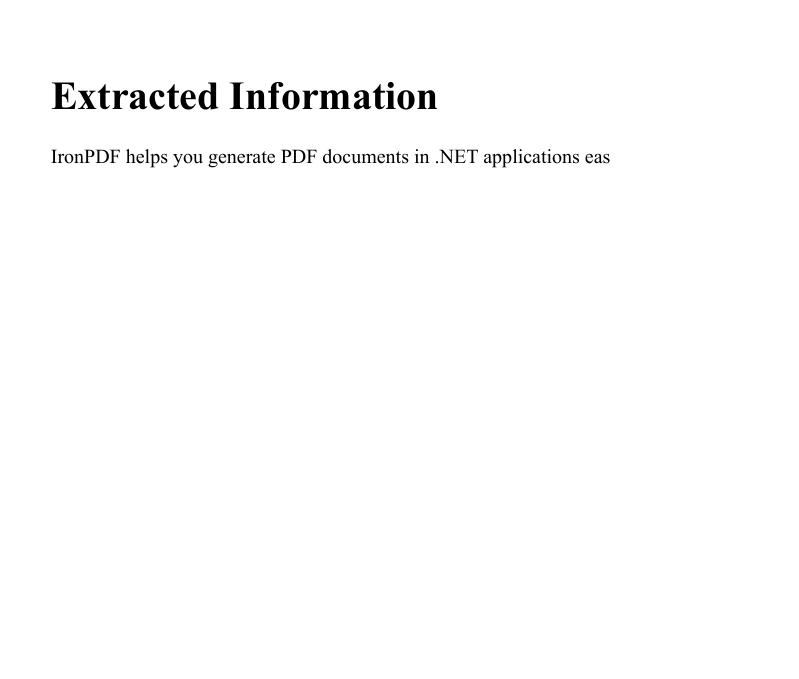
此流程展示了整合文字處理與 PDF 製作的簡單方法,對於需要從較大篇幅的文字中抽取並呈現特定資訊的報告或文件,此方法尤其有用。
結論
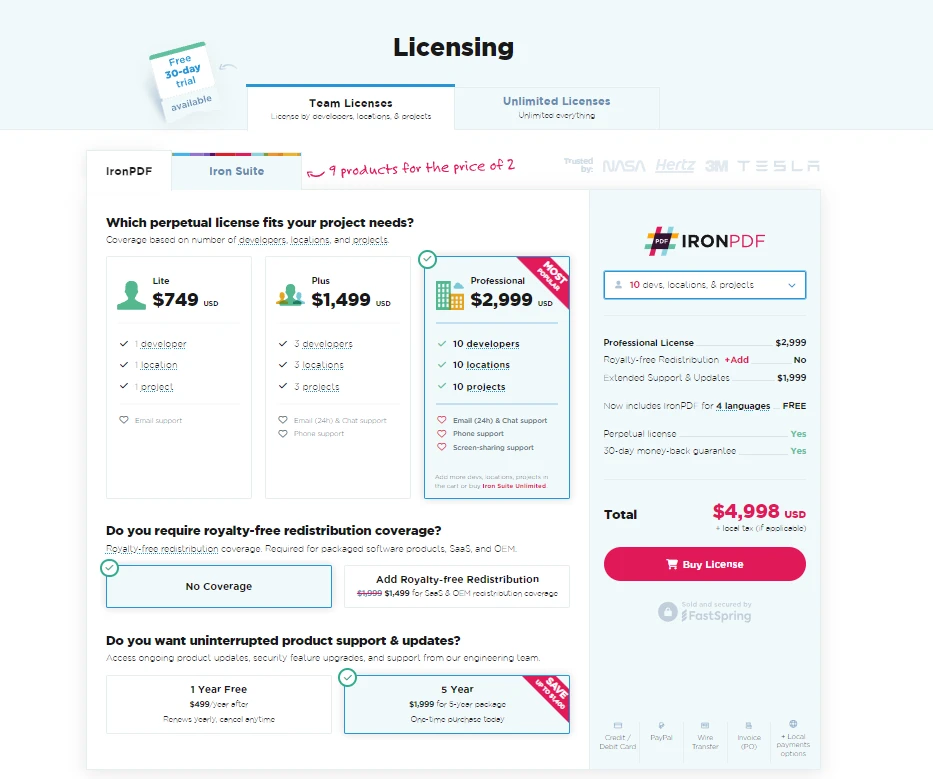
C# 中的 Substring 方法是用於字串操作的強大工具,可讓開發人員根據指定的字元位置輕鬆提取文字的部分內容。 了解並運用此方法,您就能有效處理各種文字處理工作。 切記要考慮邊緣情況並驗證指數,以維持應用程式的穩健性。 IronPDF提供開發者免費試用版,讓他們可以探索其功能,產品的許可起價為 $999。
常見問題解答
Substring 方法在 C# 中如何運作?
C# 中的 Substring 方法是 String 類的一個函數,使開發者可以根據指定的起始索引和可選的長度來提取字符串的一部分。這有助於將字符串分解成更小、更易於管理的部分以進一步操作或分析。
Substring 方法的常見用例有哪些?
Substring 方法的常見用例包括從字符串中提取特定數據,如從路徑中檢索文件名或從電子郵件地址中隔離域名。它也可以與 IronPDF 庫一起使用,將文本提取並轉換為 PDF 文檔。
如何在 C# 中將提取的文本轉換為 PDF?
您可以使用 IronPDF 庫將提取的文本轉換為 C# 中的 PDF。在使用 Substring 方法提取所需文本後,您可以使用 IronPDF 的方法,如 RenderHtmlAsPdf,來創建並保存 PDF 文檔。
Substring 方法的兩種主要形式之間有什麼區別?
Substring 方法有兩種主要形式:Substring(int startIndex),從指定的起始索引提取到字符串的末尾,以及Substring(int startIndex, int length),提取特定數量的字符從起始索引開始。
如何在 C# 中使用 Substring 方法時防止錯誤?
為防止 Substring 方法出現錯誤,確保起始索引和長度都在字符串範圍內。無效索引可能導致ArgumentOutOfRangeException。在調用方法之前,總是驗證您的索引。
我可以在陣列元素上使用 Substring 方法嗎?
是的,您可以對一個字符串陣列中的元素應用 Substring 方法。通過遍歷陣列,您可以使用 Substring 方法提取每個字符串元素的特定部分。
IronPDF 如何與 Substring 方法集成?
IronPDF 可以與 Substring 方法集成,首先使用 Substring 從字符串中提取所需文本。然後,IronPDF 可以將這些提取的文本轉換為 PDF,這對於生成格式化報告或檔案非常有用。
Substring 方法在實際場景中的一個例子是什麼?
Substring 方法的一個實際例子是從 URL 或電子郵件中提取用戶 ID。例如,使用userEmail.Substring(0, userEmail.IndexOf('@'))提取電子郵件地址的用戶名部分。
在使用 Substring 方法時,您如何驗證索引?
在使用 Substring 方法之前,驗證startIndex為非負值且小於字符串的長度。此外,確保startIndex與length的和不超過字符串的總長度以避免異常。
為什麼理解 Substring 方法對開發者來說很重要?
理解 Substring 方法對開發者來說至關重要,因為它是字符串操作的基礎,是編程中常見的任務。掌握 Substring 允許開發者高效地處理和操作文本數據,促進資料提取和轉換等任務。


















 免費開始使用
 免費開始使用
 預約免費現場演示





 無需信用卡或創建帳戶










