




已更新 2026年4月23日
在 .NET 中用 Microsoft.Extensions.AI 簡化 LLM 整合
AI 正在改變軟體開發,但將大型語言模型 (LLM) 整合到 .NET 中一直很複雜。利用 IronPdf.AI 將 AI 整合推向更遠,為 .NET 應用程式帶來由 OpenAI 驅動的 PDF 解析、資料擷取和內容總結。
閱讀更多

編程中的數字四捨五入 是一項常見任務,尤其是在處理財務資料或對精確到某個小數位數有要求的測量時。 在 C# 中,有多種方法可以將小數或雙精度數字四捨五入到小數點後兩位。 本教學將清楚地解釋這些概念,並為您提供如何使用 C# 實現此精度的全面知識。 我們將探討 IronPDF 程式庫的功能以及 C# 語言所提供的多種方法和函式,以將小數數字調整到指定精度。
在深入了解數字四捨五入技術之前,了解我們將處理的數字型別是很重要的。 在 C# 中,decimal 和 double 是用於數值的兩種不同型別。 decimal 變數通常用於需要最高精度的情況,例如財務計算。 另一方面,double 結果用於浮點計算足夠的情況,並且效能比精確度更為重要。 這兩種型別都可以使用 C# 庫中的特定方法進行四捨五入。
Math.Round 方法是將小數值或雙精度值四捨五入到指定小數位數的最簡單方法。 您也可以使用此數學函式將雙精度值四捨五入到最接近的整數。 這個 Math.Round 方法非常靈活,因為它允許您指定希望保留的小數位數,並在數字正好介於兩個間隔之間時選擇四捨五入策略。
要將小數四捨五入到小數點後兩位,您可以使用接收兩個參數的 Math.Round 方法:要四捨五入的數字和小數位數。 這是一個簡單的範例:
decimal d = 3.14519M; // decimal number
// Round the decimal value to two decimal places
decimal roundedValue = Math.Round(d, 2);
Console.WriteLine(roundedValue); // Outputs: 3.15Dim d As Decimal = 3.14519D ' decimal number
' Round the decimal value to two decimal places
Dim roundedValue As Decimal = Math.Round(d, 2)
Console.WriteLine(roundedValue) ' Outputs: 3.15在這個例子中,小數值 3.14519 被四捨五入到 3.15。 方法 Math.Round 取小數 d 並將其四捨五入到小數點後兩位。
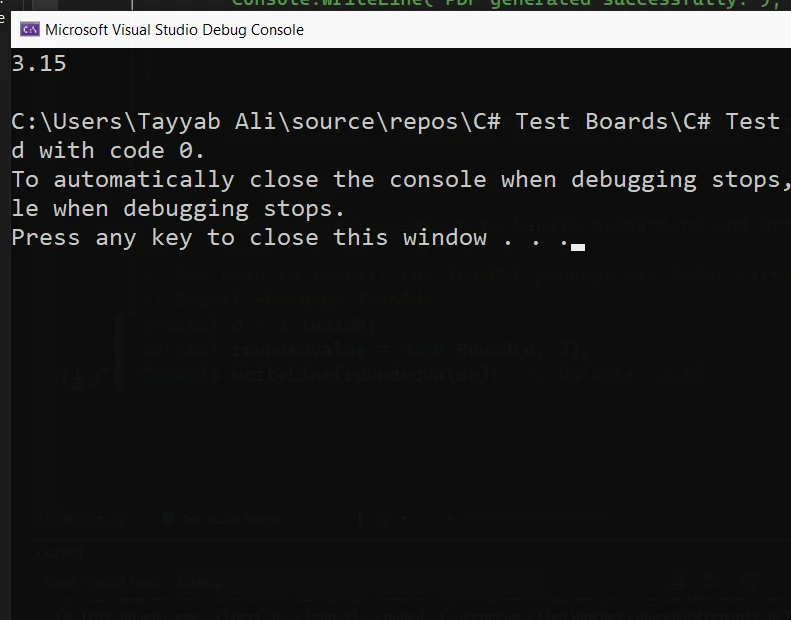
四捨五入雙精度值的方式與四捨五入小數值的方式類似。 以下是如何將雙精度數字四捨五入到小數點後兩位的程式碼:
double num = 3.14519;
// Round the double value to two decimal places
double result = Math.Round(num, 2);
Console.WriteLine(result); // Output: 3.15Dim num As Double = 3.14519
' Round the double value to two decimal places
Dim result As Double = Math.Round(num, 2)
Console.WriteLine(result) ' Output: 3.15這段程式碼有效地將雙精度數字3.14519四捨五入到小數點後兩位,得到最接近的值3.15。Math.Round 的第二個參數指定應將其四捨五入到小數點後兩位。
四捨五入的一個重要方面是如何處理數字位於兩個可能的四捨五入值的中點時的情況。 C# 提供了一個選項,可通過 MidpointRounding 枚舉指定四捨五入行為。 這允許在這些情況下控制四捨五入的方向。
double midpointNumber = 2.345; // double value
// Round with a strategy that rounds midpoints away from zero
double midpointResult = Math.Round(midpointNumber, 2, MidpointRounding.AwayFromZero);
Console.WriteLine(midpointResult); // Outputs: 2.35Dim midpointNumber As Double = 2.345 ' double value
' Round with a strategy that rounds midpoints away from zero
Dim midpointResult As Double = Math.Round(midpointNumber, 2, MidpointRounding.AwayFromZero)
Console.WriteLine(midpointResult) ' Outputs: 2.35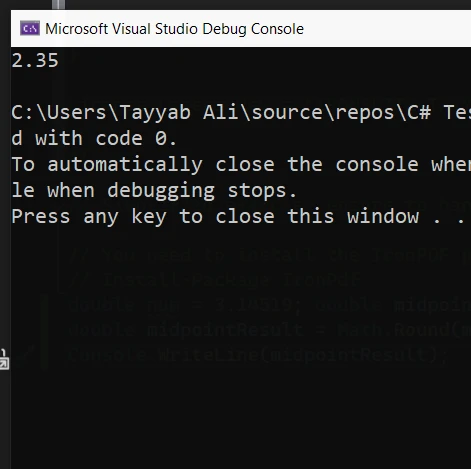
在上述範例中,MidpointRounding.AwayFromZero 指示方法將中點數字 2.345 向最接近的遠離零的數字進行四捨五入,結果是 2.35。 這在財務計算中特別有用,因為通常使用向上捨入。
IronPDF 是專門為 .NET 平台設計並用 C# 編寫的全面 PDF 生成程式庫。 它以其通過渲染 HTML、CSS 和 JavaScript 和圖片來建立高品質的 PDF 的能力而聞名。 這一功能可確保開發者可以利用現有的 web 開發技能來進行 PDF 生成。 IronPDF 使用 Chrome 渲染引擎來產生像素完美的 PDF 文件,與網頁瀏覽器中看到的佈局一致。
IronPDF 的關鍵功能是其 HTML 到 PDF 的轉換能力,確保布局和樣式得到保留。 它將網頁內容轉換為 PDF,適合報表、發票和文件。 您可以輕鬆將 HTML 文件、URL 和 HTML 字串轉換為 PDF。
using IronPdf;

class Program
{
    static void Main(string[] args)
    {
        var renderer = new ChromePdfRenderer();

        // 1. Convert HTML String to PDF
        var htmlContent = "<h1>Hello, IronPDF!</h1><p>This is a PDF from an HTML string.</p>";
        var pdfFromHtmlString = renderer.RenderHtmlAsPdf(htmlContent);
        pdfFromHtmlString.SaveAs("HTMLStringToPDF.pdf");

        // 2. Convert HTML File to PDF
        var htmlFilePath = "path_to_your_html_file.html"; // Specify the path to your HTML file
        var pdfFromHtmlFile = renderer.RenderHtmlFileAsPdf(htmlFilePath);
        pdfFromHtmlFile.SaveAs("HTMLFileToPDF.pdf");

        // 3. Convert URL to PDF
        var url = "http://ironpdf.com"; // Specify the URL
        var pdfFromUrl = renderer.RenderUrlAsPdf(url);
        pdfFromUrl.SaveAs("URLToPDF.pdf");
    }
}Imports IronPdf
Module Program
Sub Main(args As String())
Dim renderer = New ChromePdfRenderer()
' 1. Convert HTML String to PDF
Dim htmlContent = "<h1>Hello, IronPDF!</h1><p>This is a PDF from an HTML string.</p>"
Dim pdfFromHtmlString = renderer.RenderHtmlAsPdf(htmlContent)
pdfFromHtmlString.SaveAs("HTMLStringToPDF.pdf")
' 2. Convert HTML File to PDF
Dim htmlFilePath = "path_to_your_html_file.html" ' Specify the path to your HTML file
Dim pdfFromHtmlFile = renderer.RenderHtmlFileAsPdf(htmlFilePath)
pdfFromHtmlFile.SaveAs("HTMLFileToPDF.pdf")
' 3. Convert URL to PDF
Dim url = "http://ironpdf.com" ' Specify the URL
Dim pdfFromUrl = renderer.RenderUrlAsPdf(url)
pdfFromUrl.SaveAs("URLToPDF.pdf")
End Sub
End ModuleIronPDF 可以與 C# 無縫整合,以處理精確的任務,例如在嵌入 PDF 之前將小數四捨五入到小數點後兩位。 這在財務報表或發票中尤其有用,其中數值的準確性很重要。
在這個範例中,我們將使用 IronPDF 建立一個簡單的 C# 應用程式來生成包含小數點後兩位的數字列表的 PDF 文件。 這顯示了您如何能在實際情況中將數字計算與 PDF 生成結合在一起。
首先,您需要安裝 IronPDF。 您可以通過 NuGet 來完成這一步:
一旦安裝了 IronPDF,以下是如何從 HTML 內容建立 PDF,包括已經四捨五入到小數點後兩位的數字:
using IronPdf;
using System;

class Program
{
    static void Main()
    {
        // Make sure to set the license key if using a trial or licensed version
        License.LicenseKey = "License-Key";

        var Renderer = new ChromePdfRenderer();

        // Sample data that might come from a database or computation
        double initialValue = 2.345678;
        double roundedValue = Math.Round(initialValue, 2);

        // HTML content including the rounded value
        var htmlContent = $@"
            <html>
            <head>
                <title>PDF Report</title>
            </head>
            <body>
                <h1>Financial Report</h1>
                <p>Value after rounding: {roundedValue}</p>
            </body>
            </html>";

        // Convert HTML to PDF
        var pdfDocument = Renderer.RenderHtmlAsPdf(htmlContent);
        pdfDocument.SaveAs("Report.pdf");

        Console.WriteLine("PDF generated successfully.");
    }
}Imports IronPdf
Imports System
Module Program
Sub Main()
' Make sure to set the license key if using a trial or licensed version
License.LicenseKey = "License-Key"
Dim Renderer = New ChromePdfRenderer()
' Sample data that might come from a database or computation
Dim initialValue As Double = 2.345678
Dim roundedValue As Double = Math.Round(initialValue, 2)
' HTML content including the rounded value
Dim htmlContent = $"
<html>
<head>
<title>PDF Report</title>
</head>
<body>
<h1>Financial Report</h1>
<p>Value after rounding: {roundedValue}</p>
</body>
</html>"
' Convert HTML to PDF
Dim pdfDocument = Renderer.RenderHtmlAsPdf(htmlContent)
pdfDocument.SaveAs("Report.pdf")
Console.WriteLine("PDF generated successfully.")
End Sub
End Module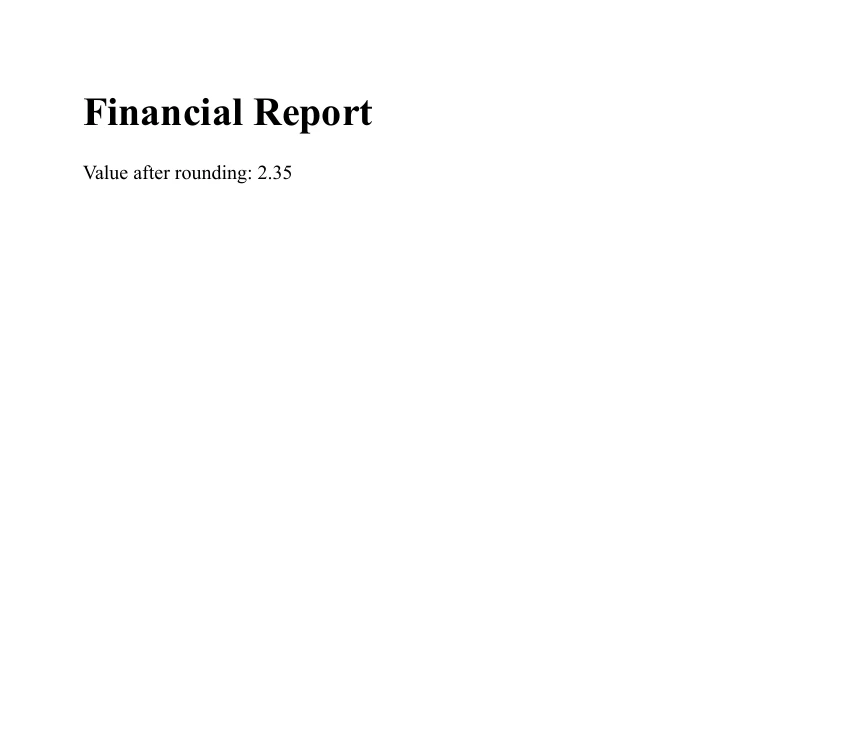
這個範例顯示了如何將 C#數學運算的精度與 IronPDF 的文件生成能力相合併以建立詳細且準確的 PDF 報告。 無論是財務摘要、技術報告或任何其他數字精確度重要的文件,此方法都將確保您的資料清楚且正確地呈現。
將數字四捨五入到指定的小數位數是處理 C# 中 Decimal 和 Double 值時的重要方面。 在本教學中,我們探討了如何使用 Math.Round 函式進行小數點後兩位的四捨五入。 我們還討論了如何處理數字正好處於兩個可四捨五入數字之間的情況。 IronPDF 在其授權頁面上提供 免費試用,讓開發者在購買前探索其功能。 如果您決定它是您的需求的合適工具,商業用途的授權起價為 $999。

Jacob Mellor是Iron Software的首席技術官,一位在C# PDF技術上開創先河的遠見工程師。作為Iron Software核心程式碼庫的原開發者,他從創立以來就一直在塑造公司的產品架構,與首席執行官Cameron Rimington一起將公司轉變為服務於NASA、特斯拉和全球政府公司的50多名人員的公司。



IronPDF 是 IRONSUITE 的一部分
10 款適用於辦公室文件的 .NET API 產品

當您需要您的PDF看起來像HTML一樣快速。












