En el vasto panorama de los lenguajes de programación, mejorar la legibilidad y eficiencia del código es primordial, y el lenguaje C# se destaca como un defensor ya que proporciona diversos constructos para ayudar en sus necesidades de codificación. Entre su arsenal de herramientas poderosas, la "Declaración Switch de C#" se destaca notablemente. Esta guía completa explorará las intrincadas sutilezas de ellas dentro del lenguaje C#. Profundizaremos en sus usos multifacéticos e iluminaremos su aplicación práctica a través de un escenario del mundo real que involucra a IronPDF, una biblioteca de C# versátil para generar PDFs. Este viaje tiene como objetivo no solo desentrañar su mecánica, sino también subrayar su importancia en el contexto más amplio del desarrollo de C#.
1. Entender la sentencia Switch
La declaración switch en C# es una instrucción de control de flujo que permite a los desarrolladores escribir un código más limpio y conciso al tratar con múltiples condiciones. Es particularmente útil cuando desea realizar acciones diferentes basadas en el valor de una variable en particular.
Esto lo convierte en una alternativa perfecta a las declaraciones if-else cuando la palabra clave/variable es el enfoque central, ya que aumenta la legibilidad y capacidad de mantenimiento del código. A diferencia de una declaración if-else, que puede llevar a estructuras anidadas y potencial complejidad de código, la declaración switch proporciona una alternativa más organizada. Es especialmente beneficiosa cuando se trabaja con una variable que necesita desencadenar acciones distintas basadas en su valor.
Ahora, echemos un vistazo más de cerca al papel de la interrupción dentro del contexto de una declaración switch. En C#, la instrucción break se usa para terminar la ejecución de un bloque de código asociado con un caso particular dentro del bloque switch. Cuando una coincidencia o un caso switch coincide, y el bloque de código correspondiente a ese caso se ejecuta, la instrucción break es crucial para evitar que los casos subsiguientes sean evaluados. Si desea incorporar comportamiento de caida dentro de su declaración, debe usar la instrucción goto en lugar de break.
Aquí hay una estructura básica de una declaración switch en C#:
switch (variable)
{
    case value1:
        // Code to be executed if variable equals value1
        break;
    case value2:
        // Code to be executed if variable equals value2
        break;
    // More cases can be added as needed
    default:
        // Default Case to be executed if none of the cases match
        break;
}
switch (variable)
{
    case value1:
        // Code to be executed if variable equals value1
        break;
    case value2:
        // Code to be executed if variable equals value2
        break;
    // More cases can be added as needed
    default:
        // Default Case to be executed if none of the cases match
        break;
}
Select Case variable
Case value1
' Code to be executed if variable equals value1
Case value2
' Code to be executed if variable equals value2
' More cases can be added as needed
Case Else
' Default Case to be executed if none of the cases match
End Select
Select Case variable
	Case value1
		' Code to be executed if variable equals value1
	Case value2
		' Code to be executed if variable equals value2
	' More cases can be added as needed
	Case Else
		' Default Case to be executed if none of the cases match
End Select
Ahora, exploremos los diferentes tipos de declaraciones switch y sus casos de uso.
2. Tipos de sentencias switch y sus usos
2.1. Sentencia Switch simple
Esta es la forma más básica de una declaración switch. Compara la variable con valores constantes y ejecuta el bloque de código asociado con el primer valor o caso coincidente. Si no se encuentra coincidencia, se ejecuta el bloque de código predeterminado.
int day = 3;
switch (day)
{
    case 1:
        Console.WriteLine("Monday");
        break;
    case 2:
        Console.WriteLine("Tuesday");
        break;
    // More cases...
    default:
        Console.WriteLine("Invalid day");
        break;
}
int day = 3;
switch (day)
{
    case 1:
        Console.WriteLine("Monday");
        break;
    case 2:
        Console.WriteLine("Tuesday");
        break;
    // More cases...
    default:
        Console.WriteLine("Invalid day");
        break;
}
Dim day As Integer = 3
Select Case day
Case 1
Console.WriteLine("Monday")
Case 2
Console.WriteLine("Tuesday")
' More cases...
Case Else
Console.WriteLine("Invalid day")
End Select
Dim day As Integer = 3
Select Case day
	Case 1
		Console.WriteLine("Monday")
	Case 2
		Console.WriteLine("Tuesday")
	' More cases...
	Case Else
		Console.WriteLine("Invalid day")
End Select
2.2. Declaración Switch con patrones (C# 7.0 y posterior)
C# 7.0 introdujo la coincidencia de patrones en caso que permitió una declaración switch más expresiva y flexible. Una expresión de coincidencia de patrones puede incluir patrones de tipo, patrones de propiedad y más, haciendo el código aún más legible.
object obj = "Hello";
switch (obj)
{
    case string s:
        Console.WriteLine($"String of length {s.Length}");
        break;
    case int i:
        Console.WriteLine($"Integer: {i}");
        break;
    // More cases...
    default:
        Console.WriteLine("Other type");
        break;
}
object obj = "Hello";
switch (obj)
{
    case string s:
        Console.WriteLine($"String of length {s.Length}");
        break;
    case int i:
        Console.WriteLine($"Integer: {i}");
        break;
    // More cases...
    default:
        Console.WriteLine("Other type");
        break;
}
Dim obj As Object = "Hello"
Select Case obj
'INSTANT VB TODO TASK: The following 'case' pattern variable is not converted by Instant VB:
'ORIGINAL LINE: case string s:
Case String s
Console.WriteLine($"String of length {s.Length}")
'INSTANT VB TODO TASK: The following 'case' pattern variable is not converted by Instant VB:
'ORIGINAL LINE: case int i:
Case Integer i
Console.WriteLine($"Integer: {i}")
' More cases...
Case Else
Console.WriteLine("Other type")
End Select
Dim obj As Object = "Hello"
Select Case obj
'INSTANT VB TODO TASK: The following 'case' pattern variable is not converted by Instant VB:
'ORIGINAL LINE: case string s:
	Case String s
		Console.WriteLine($"String of length {s.Length}")
'INSTANT VB TODO TASK: The following 'case' pattern variable is not converted by Instant VB:
'ORIGINAL LINE: case int i:
	Case Integer i
		Console.WriteLine($"Integer: {i}")
	' More cases...
	Case Else
		Console.WriteLine("Other type")
End Select
2.3. Expresión Switch (C# 8.0 y posterior)
En C# 8.0, se introduce una forma nueva y más concisa de declaración switch como expresiones switch. Pueden usarse en lugares donde se necesita una expresión constante de un valor, haciendo el código más corto y elegante.
int day = 2;
string result = day switch
{
    1 => "Monday",
    2 => "Tuesday",
    // More cases...
    _ => "Invalid day"
};
Console.WriteLine(result);
int day = 2;
string result = day switch
{
    1 => "Monday",
    2 => "Tuesday",
    // More cases...
    _ => "Invalid day"
};
Console.WriteLine(result);
Dim day As Integer = 2
Dim tempVar As String
Select Case day
Case 1
tempVar = "Monday"
Case 2
tempVar = "Tuesday"
' More cases...
Case Else
tempVar = "Invalid day"
End Select
Dim result As String = tempVar
Console.WriteLine(result)
Dim day As Integer = 2
Dim tempVar As String
Select Case day
	Case 1
		tempVar = "Monday"
	Case 2
		tempVar = "Tuesday"
	' More cases...
	Case Else
		tempVar = "Invalid day"
End Select
Dim result As String = tempVar
Console.WriteLine(result)
Ahora que tenemos un sólido entendimiento de las declaraciones switch, veamos cómo pueden aplicarse en un escenario del mundo real usando IronPDF en C#.
3. Introducing IronPDF in C#
IronPDF es una popular biblioteca de C# que permite a los desarrolladores generar y manipular documentos PDF con facilidad. Simplifica las tareas relacionadas con la creación, edición y representación de archivos PDF. Exploremos cómo se puede emplear la declaración switch con IronPDF para mejorar la funcionalidad y organización de su codificación.
3.1. Uso de la sentencia Switch con IronPDF
Supongamos que está trabajando en un sistema de gestión de documentos donde necesita generar diferentes tipos de PDFs según el caso de uso de un contenido de documento. Aquí está cómo puede aprovechar la declaración switch con IronPDF:
using IronPdf;
using System;

class GeneratePDF
{
    public static void Main(String[] args)
    {
        var renderer = new ChromePdfRenderer();
        string userInput;

        Console.WriteLine("Enter your input:");
        Console.WriteLine("Enter 'I' for Invoice");
        Console.WriteLine("Enter 'R' for Report");
        userInput = Console.ReadLine();

        switch (userInput)
        {
            case "R":
                // Render and save a PDF for a report
                var reportPdf = renderer.RenderHtmlFileAsPdf("report.html");
                reportPdf.SaveAs("Report.pdf");
                break;
            case "I":
                // Render and save a PDF for an invoice
                var invoicePdf = renderer.RenderHtmlFileAsPdf("invoice.html");
                invoicePdf.SaveAs("Invoice.pdf");
                break;
            default:
                Console.WriteLine("Invalid input");
                break;
        }
    }
}
using IronPdf;
using System;

class GeneratePDF
{
    public static void Main(String[] args)
    {
        var renderer = new ChromePdfRenderer();
        string userInput;

        Console.WriteLine("Enter your input:");
        Console.WriteLine("Enter 'I' for Invoice");
        Console.WriteLine("Enter 'R' for Report");
        userInput = Console.ReadLine();

        switch (userInput)
        {
            case "R":
                // Render and save a PDF for a report
                var reportPdf = renderer.RenderHtmlFileAsPdf("report.html");
                reportPdf.SaveAs("Report.pdf");
                break;
            case "I":
                // Render and save a PDF for an invoice
                var invoicePdf = renderer.RenderHtmlFileAsPdf("invoice.html");
                invoicePdf.SaveAs("Invoice.pdf");
                break;
            default:
                Console.WriteLine("Invalid input");
                break;
        }
    }
}
Imports IronPdf
Imports System
Class GeneratePDF
Public Shared Sub Main(ByVal args As String())
Dim renderer = New ChromePdfRenderer()
Dim userInput As String
Console.WriteLine("Enter your input:")
Console.WriteLine("Enter 'I' for Invoice")
Console.WriteLine("Enter 'R' for Report")
userInput = Console.ReadLine()
Select Case userInput
Case "R"
' Render and save a PDF for a report
Dim reportPdf = renderer.RenderHtmlFileAsPdf("report.html")
reportPdf.SaveAs("Report.pdf")
Case "I"
' Render and save a PDF for an invoice
Dim invoicePdf = renderer.RenderHtmlFileAsPdf("invoice.html")
invoicePdf.SaveAs("Invoice.pdf")
Case Else
Console.WriteLine("Invalid input")
End Select
End Sub
End Class
Imports IronPdf
Imports System

Class GeneratePDF
    Public Shared Sub Main(ByVal args As String())
        Dim renderer = New ChromePdfRenderer()
        Dim userInput As String

        Console.WriteLine("Enter your input:")
        Console.WriteLine("Enter 'I' for Invoice")
        Console.WriteLine("Enter 'R' for Report")
        userInput = Console.ReadLine()

        Select Case userInput
            Case "R"
                ' Render and save a PDF for a report
                Dim reportPdf = renderer.RenderHtmlFileAsPdf("report.html")
                reportPdf.SaveAs("Report.pdf")
            Case "I"
                ' Render and save a PDF for an invoice
                Dim invoicePdf = renderer.RenderHtmlFileAsPdf("invoice.html")
                invoicePdf.SaveAs("Invoice.pdf")
            Case Else
                Console.WriteLine("Invalid input")
        End Select
    End Sub
End Class
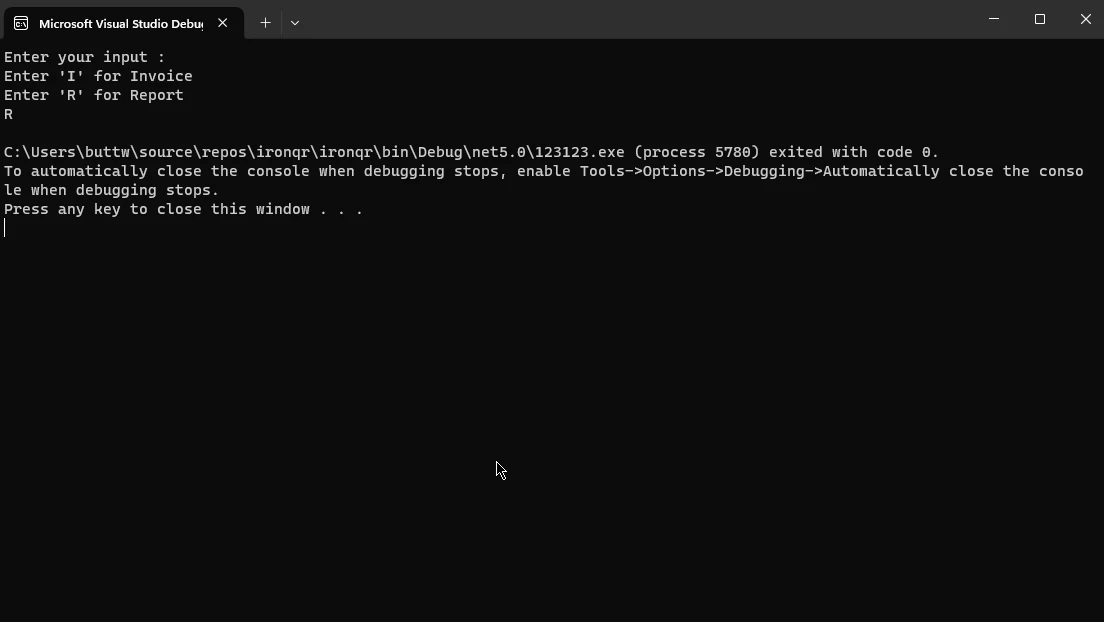
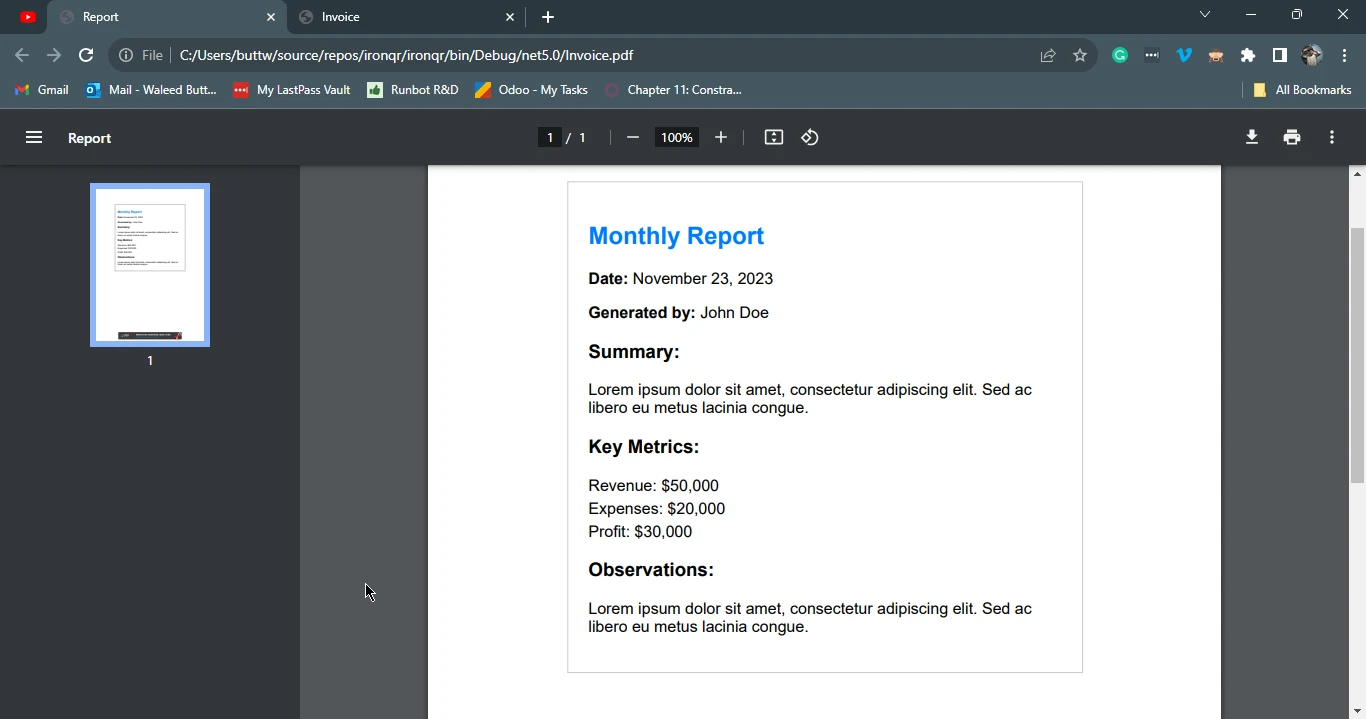
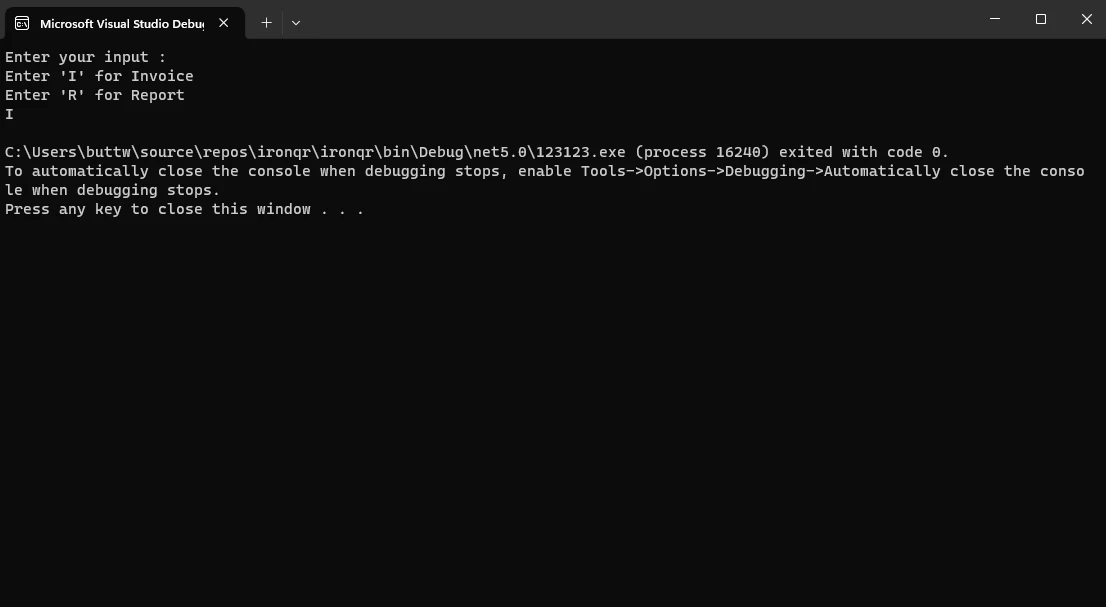
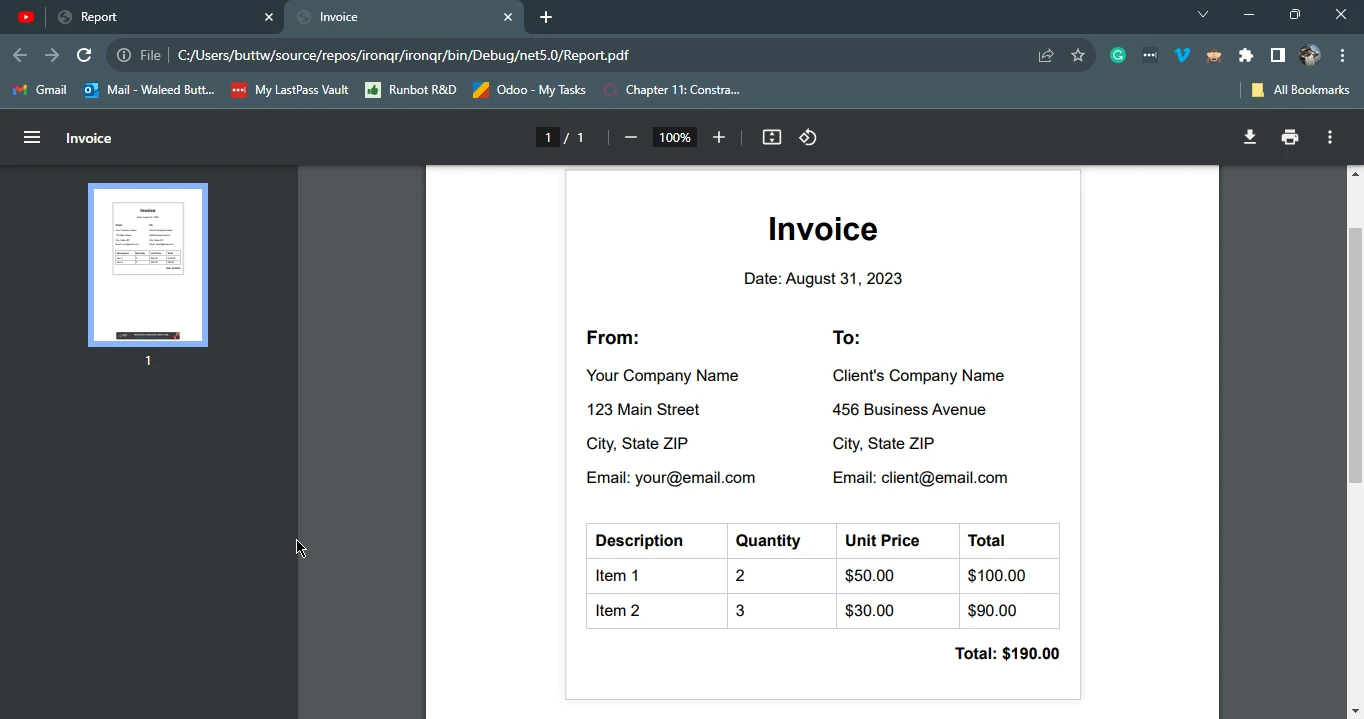
Este programa C# utiliza la biblioteca IronPDF para generar dinámicamente archivos PDF basados en la entrada del usuario. Se le solicita al usuario que ingrese 'I' para Factura o 'R' para Reporte. Dependiendo de la entrada, el programa utiliza la clase ChromePdfRenderer para renderizar el archivo HTML correspondiente ("report.html" para Reporte o "invoice.html" para Factura) en un formato PDF. El PDF generado se guarda con nombres de archivo apropiados, "Report.pdf" para el Reporte y "Invoice.pdf" para la Factura. Este enfoque proporciona una forma flexible e interactiva de generar tipos específicos de documentos PDF a través de una interfaz de consola.
En el siguiente ejemplo, crearemos un reporte usando la entrada del usuario.
Entrada de Consola:
Salida PDF:
3.3. Ejemplo de factura
En este ejemplo de declaración de caso, crearemos una Factura usando la entrada del usuario y una declaración switch.
Entrada de Consola:
Salida PDF:
4. Conclusión
En conclusión, la declaración switch de C# se destaca como una herramienta robusta de control de flujo que ofrece a los desarrolladores un enfoque más organizado y conciso para manejar múltiples condiciones en comparación con las declaraciones tradicionales if-else. Al categorizar la ejecución del código en función de los valores de las variables, las declaraciones switch pueden contribuir a su codificación mediante una mejor legibilidad y capacidad de mantenimiento.
La versatilidad de las declaraciones switch se demuestra a través de varios tipos, incluidas las conmutaciones simples, los bloques switch basados en patrones y las expresiones switch, cada una atendiendo a escenarios de codificación específicos.
La integración de la biblioteca IronPDF ejemplifica la aplicación práctica de las declaraciones switch en la generación de documentos PDF dinámicos basados en la entrada del usuario y muestra cómo esta característica puede aprovecharse en escenarios del mundo real para mejorar la flexibilidad y eficiencia de su codificación en C#.
Para explorar las capacidades de IronPDF y conocer más sobre la conversión de HTML a PDF, visite los tutoriales de IronPDF.
























