Npgsql es una tecnología clave que permite una comunicación fluida entre las aplicaciones .NET y las bases de datos de PostgreSQL a medida que los desarrolladores buscan formas sólidas de trabajar con bases de datos. El proveedor de datos .NET para el servidor de PostgreSQL, o Npgsql, es un símbolo de creatividad, eficacia y adaptabilidad en el campo de la conectividad de bases de datos. Permite a los usuarios de C#, Visual Basic y F# acceder a la base de datos. También está disponible un marco de entidad heredado 6.x para los usuarios de EF Core.
Una biblioteca .NET popular llamada IronPDF se utiliza en programas de C# y VB.NET para generar, modificar y mostrar documentos PDF. Además de realizar tareas sofisticadas como combinar varios PDFs, agregar marcas de agua y extraer texto o imágenes de archivos PDF preexistentes, permite a los desarrolladores crear archivos PDF a partir de una variedad de fuentes, incluidas HTML, fotos y texto sin formato.
Aprenderás cómo integrar IronPDF y NPGSQL en una aplicación C# siguiendo este tutorial. Investigaremos las formas en que estas herramientas se pueden combinar para mejorar la funcionalidad de tu aplicación, desde una configuración simple hasta características sofisticadas.
Cómo usar Npgsql
- Crea un nuevo proyecto C#
- Instala la biblioteca Npgsql.
- Conéctate a la base de datos Npgsql.
- Ejecute la consulta y obtenga el resultado.
- Procesa el resultado y cierra la conexión.
1. Introducción a Npgsql
Fundamentalmente, Npgsql actúa como el vínculo entre los desarrolladores .NET y PostgreSQL, un sistema de gestión de bases de datos relacional de código abierto que es bien conocido por su estabilidad, escalabilidad y extensibilidad. Npgsql brinda a los desarrolladores la capacidad de manejar transacciones, realizar consultas, recuperar datos y simplificar las operaciones de bases de datos con un nivel inigualable de conveniencia y eficiencia al ofrecer un amplio conjunto de características.
1.1 Ventajas del uso de Npgsql
Rendimiento: La velocidad y la eficiencia de Npgsql están integradas. Para garantizar la velocidad óptima al trabajar con bases de datos PostgreSQL, utiliza capacidades como comandos por lotes, entrada/salida asincrónica y tipos de datos optimizados.
Soporte Completo para PostgreSQL: El objetivo de Npgsql es ofrecer soporte completo para todas las funcionalidades de PostgreSQL, como arrays, JSONB, tipos de datos avanzados y tipos definidos por el usuario. Esto implica que los programadores pueden aprovechar todo el potencial de PostgreSQL en sus aplicaciones .NET.
1.2 Primeros pasos con Npgsql
1.2.1 Configuración de Npgsql en proyectos C#
Es simple incorporar Npgsql en un proyecto C#. Agregar el Npgsql requiere usar la gestión de paquetes de .NET de Microsoft, NuGet. Esta biblioteca ofrece las herramientas y bibliotecas necesarias para integrar una base de datos PostgreSQL con Npgsql en tus proyectos.
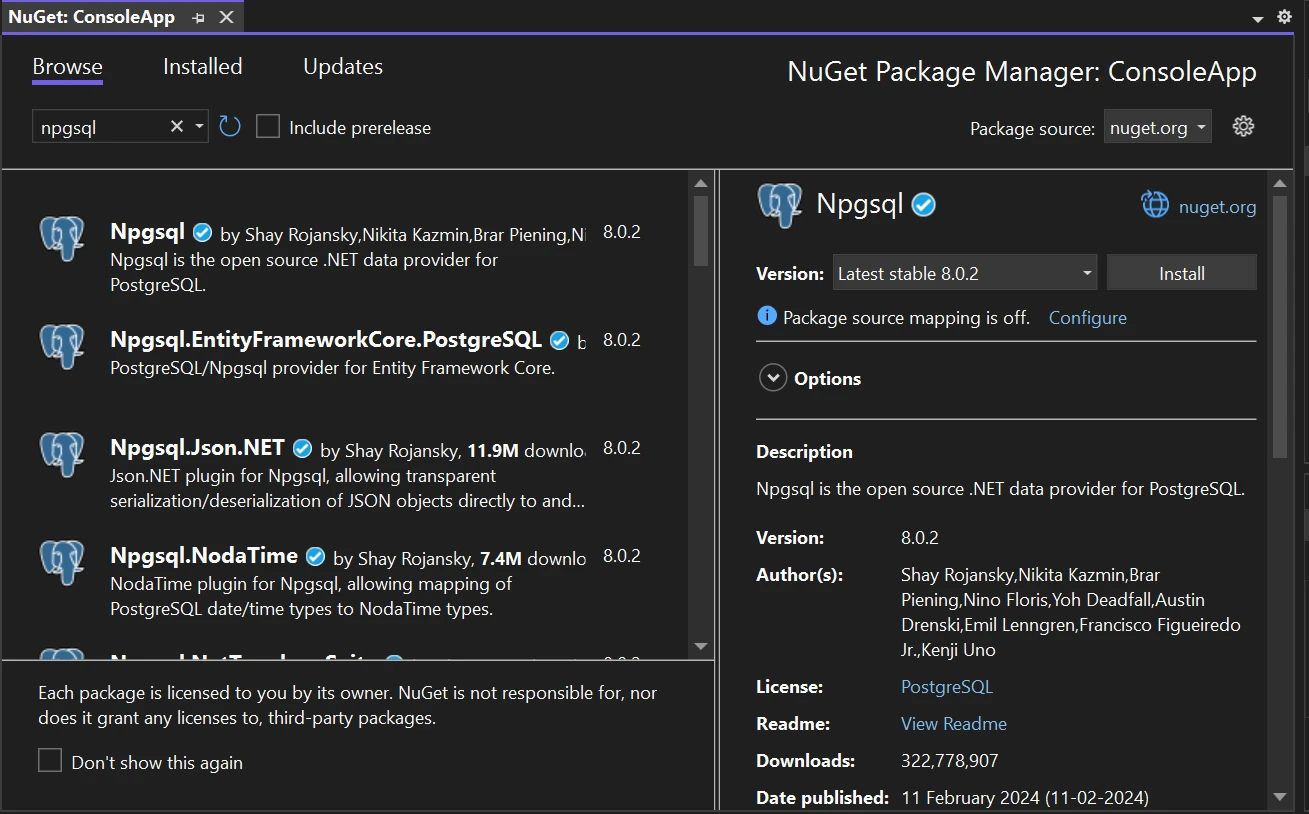
Varios tipos de aplicaciones C#, como Windows Forms (WinForms) y la consola de Windows, pueden hacer uso de Npgsql. Si bien la implementación de cada framework varía, la idea fundamental siempre es la misma: Npgsql sirve como un contenedor para bases de datos dentro de tu aplicación.
1.2.3 Un ejemplo básico de obtención de datos de Npgsql
Crea una conexión con Npgsql antes de trabajar con la base de datos PostgreSQL. Luego, ejecuta consultas SQL para obtener datos de PostgreSQL. NpgsqlCommand es una herramienta para ejecutar consultas SQL.
using Npgsql;
using System;
using System.Threading.Tasks;

class Program
{
    static async Task Main(string[] args)
    {
        // PostgreSQL connection string
        string connString = "Host=myServerAddress;Port=myPort;Username=myUsername;Password=myPassword;Database=myDatabase";

        // Create connection object
        using (var conn = new NpgsqlConnection(connString))
        {
            // Open the connection
            await conn.OpenAsync();

            // SQL query to execute
            string sql = "SELECT * FROM myTable";

            // Create NpgsqlCommand
            using (var cmd = new NpgsqlCommand(sql, conn))
            {
                // Execute the command and retrieve data
                using (var reader = await cmd.ExecuteReaderAsync())
                {
                    // Loop through the retrieved data
                    while (await reader.ReadAsync())
                    {
                        // Retrieve data from the data reader
                        string name = reader["Name"].ToString();
                        int age = Convert.ToInt32(reader["Age"]);
                        // Output retrieved data to console
                        Console.WriteLine($"Name: {name}, Age: {age}");
                    }
                }
            }
            // Connection will be automatically closed here due to the 'using' block
        }
    }
}
using Npgsql;
using System;
using System.Threading.Tasks;

class Program
{
    static async Task Main(string[] args)
    {
        // PostgreSQL connection string
        string connString = "Host=myServerAddress;Port=myPort;Username=myUsername;Password=myPassword;Database=myDatabase";

        // Create connection object
        using (var conn = new NpgsqlConnection(connString))
        {
            // Open the connection
            await conn.OpenAsync();

            // SQL query to execute
            string sql = "SELECT * FROM myTable";

            // Create NpgsqlCommand
            using (var cmd = new NpgsqlCommand(sql, conn))
            {
                // Execute the command and retrieve data
                using (var reader = await cmd.ExecuteReaderAsync())
                {
                    // Loop through the retrieved data
                    while (await reader.ReadAsync())
                    {
                        // Retrieve data from the data reader
                        string name = reader["Name"].ToString();
                        int age = Convert.ToInt32(reader["Age"]);
                        // Output retrieved data to console
                        Console.WriteLine($"Name: {name}, Age: {age}");
                    }
                }
            }
            // Connection will be automatically closed here due to the 'using' block
        }
    }
}
Imports Npgsql
Imports System
Imports System.Threading.Tasks
Friend Class Program
Shared Async Function Main(ByVal args() As String) As Task
' PostgreSQL connection string
Dim connString As String = "Host=myServerAddress;Port=myPort;Username=myUsername;Password=myPassword;Database=myDatabase"
' Create connection object
Using conn = New NpgsqlConnection(connString)
' Open the connection
Await conn.OpenAsync()
' SQL query to execute
Dim sql As String = "SELECT * FROM myTable"
' Create NpgsqlCommand
Using cmd = New NpgsqlCommand(sql, conn)
' Execute the command and retrieve data
Using reader = Await cmd.ExecuteReaderAsync()
' Loop through the retrieved data
Do While Await reader.ReadAsync()
' Retrieve data from the data reader
Dim name As String = reader("Name").ToString()
Dim age As Integer = Convert.ToInt32(reader("Age"))
' Output retrieved data to console
Console.WriteLine($"Name: {name}, Age: {age}")
Loop
End Using
End Using
' Connection will be automatically closed here due to the 'using' block
End Using
End Function
End Class
Imports Npgsql
Imports System
Imports System.Threading.Tasks

Friend Class Program
	Shared Async Function Main(ByVal args() As String) As Task
		' PostgreSQL connection string
		Dim connString As String = "Host=myServerAddress;Port=myPort;Username=myUsername;Password=myPassword;Database=myDatabase"

		' Create connection object
		Using conn = New NpgsqlConnection(connString)
			' Open the connection
			Await conn.OpenAsync()

			' SQL query to execute
			Dim sql As String = "SELECT * FROM myTable"

			' Create NpgsqlCommand
			Using cmd = New NpgsqlCommand(sql, conn)
				' Execute the command and retrieve data
				Using reader = Await cmd.ExecuteReaderAsync()
					' Loop through the retrieved data
					Do While Await reader.ReadAsync()
						' Retrieve data from the data reader
						Dim name As String = reader("Name").ToString()
						Dim age As Integer = Convert.ToInt32(reader("Age"))
						' Output retrieved data to console
						Console.WriteLine($"Name: {name}, Age: {age}")
					Loop
				End Using
			End Using
			' Connection will be automatically closed here due to the 'using' block
		End Using
	End Function
End Class
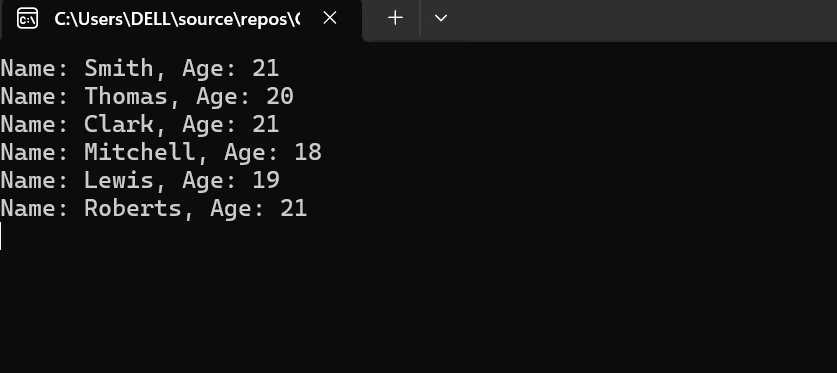
En el fragmento de código anterior, estamos obteniendo los datos de Npgsql y mostrándolos en la consola. La imagen a continuación muestra el resultado de la consulta ejecutada.
2. Operaciones Npgsql con PostgreSQL
2.1 Consultas parametrizadas con PostgreSQL
Debido a que las consultas parametrizadas permiten que el servidor de bases de datos almacene en caché los planes de consulta, mejoran el rendimiento de las consultas y ayudan a prevenir ataques de inyección SQL. Npgsql admite consultas parametrizadas. Además, trabajar con consultas SQL dinámicas de manera segura y efectiva se facilita con consultas parametrizadas.
2.2 Operaciones masivas con PostgreSQL
Al trabajar con grandes conjuntos de datos, las acciones de inserción, actualización y eliminación masivas que admite Npgsql pueden mejorar enormemente la velocidad. La sobrecarga de realizar viajes de ida y vuelta separados al servidor de la base de datos se reduce cuando varias filas pueden procesarse en una sola transacción de base de datos gracias a las operaciones masivas.
Transacciones con PostgreSQL
Npgsql admite transacciones, lo que permite agrupar varias operaciones de base de datos en una sola unidad atómica. Las transacciones proporcionan consistencia e integridad de los datos al retrasar todos los cambios en la base de datos o revertir toda la transacción en caso de un error.
2.3 Optimización del Rendimiento con PostgreSQL
Al trabajar con bases de datos PostgreSQL, Npgsql ofrece una serie de mejoras de rendimiento, que incluyen el almacenamiento en caché de planes de consulta, la transmisión de resultados y la agrupación de comandos, para reducir la latencia y aumentar el rendimiento. Las mejoras mejoran la escalabilidad y la velocidad general de la aplicación.
2.4 Conexión con la base de datos PostgreSQL
El servidor de bases de datos PostgreSQL puede conectarse fácilmente con la ayuda de Npgsql con un par de líneas de código que se detallan a continuación.
NpgsqlConnection conn = new NpgsqlConnection(connString);
NpgsqlConnection conn = new NpgsqlConnection(connString);
Dim conn As New NpgsqlConnection(connString)
Dim conn As New NpgsqlConnection(connString)
Este fragmento de código básico nos ayuda a conectarnos con el servidor de bases de datos PostgreSQL.
3. Integración de Npgsql con IronPDF
3.1 Uso conjunto de Npgsql y IronPDF
Surgen posibilidades emocionantes cuando Npgsql e IronPDF se usan juntos en un proyecto C#. Aunque Npgsql es una gran herramienta para trabajar con PostgreSQL, IronPDF es una gran herramienta para convertir este contenido en PDFs. Gracias a esta conectividad, los programadores pueden diseñar aplicaciones que pueden comunicarse con bases de datos y tienen la capacidad de convertir este contenido en PDFs.
3.2 Obtención de datos PostgreSQL con IronPDF
Los usuarios pueden interactuar con la base de datos dentro de tu aplicación creando una aplicación de consola de Windows que use Npgsql. Agrega acceso a la base de datos a tu aplicación primero. Debería haber suficiente espacio en la consola para este control, dejando mucho espacio para interacciones con la DB. Incluye mapeo de tipos de datos y operaciones masivas también.
Instalar IronPDF
-
Lanza el proyecto en Visual Studio.
-
Selecciona "Herramientas" > "Administrador de Paquetes NuGet" > "Consola del Administrador de Paquetes".
-
Alternativamente, también puedes instalar IronPDF usando el Administrador de Paquetes NuGet para Soluciones.
-
Busca el paquete IronPDF en los resultados de búsqueda, selecciónalo, luego haz clic en el botón "Instalar". Visual Studio manejará la descarga e instalación automáticamente.
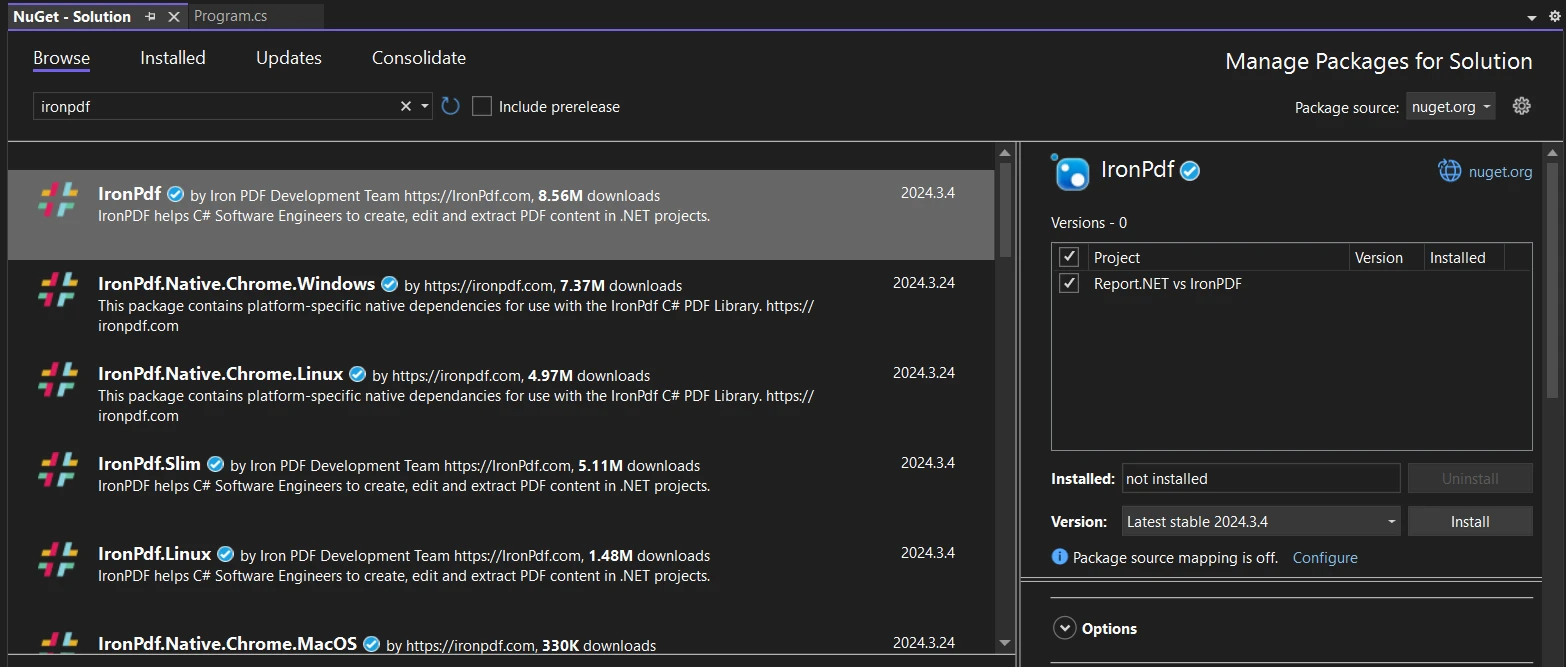
- El paquete IronPDF se descargará e instalará junto con cualquier dependencia necesaria para tu proyecto.
- Después de la instalación, puedes comenzar a utilizar IronPDF en tu proyecto.
Instalación a través del sitio web de NuGet
Para obtener más información sobre IronPDF, incluidas sus funciones, compatibilidad y otras opciones de descarga, visita la página del paquete IronPDF en NuGet.
Utilizar DLL para instalar
Como alternativa, puedes usar el archivo DLL de IronPDF para integrarlo directamente en tu proyecto. Usa este enlace Paquete ZIP de IronPDF para descargar el archivo ZIP que contiene el DLL. Después de descomprimirlo, agrega el DLL a tu proyecto.
Implementación de la lógica
Cuando comencemos a ejecutar la aplicación, esta recuperará los datos de la base de datos utilizando la biblioteca .NET de Npgsql. Con la ayuda de IronPDF, somos capaces de convertir el contenido de la base de datos en un documento PDF.
- Obtención de datos: obtenga el contenido más reciente del proveedor Npgsql .NET cuando el usuario inicia la conversión.
- Generar PDF con IronPDF: para convertir los datos de la base de datos Npgsql en un PDF, utilice IronPDF. La clase HtmlToPdf puede formatear la cadena HTML en un documento PDF.
- Guardar PDF y notificar: guarde el PDF producido en una ubicación específica o deje un mensaje visible en la consola. Notifica al usuario, posiblemente a través de un mensaje en el terminal, que la conversión fue exitosa una vez que el PDF ha sido guardado.
using Npgsql;
using IronPdf;
using System;
using System.Text;
using System.Threading.Tasks;

class Program
{
    static async Task Main(string[] args)
    {
        // StringBuilder for HTML content
        StringBuilder sb = new StringBuilder();
        var Renderer = new ChromePdfRenderer(); // Instantiates Chrome Renderer

        sb.Append("<h1>Dynamic PDF Generated from PostgreSQL Data</h1>");

        // PostgreSQL connection setup
        string connString = "Host=myServerAddress;Port=myPort;Username=myUsername;Password=myPassword;Database=myDatabase";

        using (var conn = new NpgsqlConnection(connString))
        {
            await conn.OpenAsync();

            string sql = "SELECT * FROM myTable";
            using (var cmd = new NpgsqlCommand(sql, conn))
            {
                using (var reader = await cmd.ExecuteReaderAsync())
                {
                    while (await reader.ReadAsync())
                    {
                        // Retrieve data from the data reader
                        string name = reader["Name"].ToString();
                        int age = Convert.ToInt32(reader["Age"]);

                        // Add data to the PDF
                        sb.Append($"<p>Name: {name}, Age: {age}</p>");
                    }
                }
            }

            // Generate and save the PDF document
            var pdf = Renderer.RenderHtmlAsPdf(sb.ToString());
            pdf.SaveAs("output.pdf");

            // Connection will be automatically closed here
        }

        Console.WriteLine("PDF generation completed. See output.pdf for results.");
    }
}
using Npgsql;
using IronPdf;
using System;
using System.Text;
using System.Threading.Tasks;

class Program
{
    static async Task Main(string[] args)
    {
        // StringBuilder for HTML content
        StringBuilder sb = new StringBuilder();
        var Renderer = new ChromePdfRenderer(); // Instantiates Chrome Renderer

        sb.Append("<h1>Dynamic PDF Generated from PostgreSQL Data</h1>");

        // PostgreSQL connection setup
        string connString = "Host=myServerAddress;Port=myPort;Username=myUsername;Password=myPassword;Database=myDatabase";

        using (var conn = new NpgsqlConnection(connString))
        {
            await conn.OpenAsync();

            string sql = "SELECT * FROM myTable";
            using (var cmd = new NpgsqlCommand(sql, conn))
            {
                using (var reader = await cmd.ExecuteReaderAsync())
                {
                    while (await reader.ReadAsync())
                    {
                        // Retrieve data from the data reader
                        string name = reader["Name"].ToString();
                        int age = Convert.ToInt32(reader["Age"]);

                        // Add data to the PDF
                        sb.Append($"<p>Name: {name}, Age: {age}</p>");
                    }
                }
            }

            // Generate and save the PDF document
            var pdf = Renderer.RenderHtmlAsPdf(sb.ToString());
            pdf.SaveAs("output.pdf");

            // Connection will be automatically closed here
        }

        Console.WriteLine("PDF generation completed. See output.pdf for results.");
    }
}
Imports Npgsql
Imports IronPdf
Imports System
Imports System.Text
Imports System.Threading.Tasks
Friend Class Program
Shared Async Function Main(ByVal args() As String) As Task
' StringBuilder for HTML content
Dim sb As New StringBuilder()
Dim Renderer = New ChromePdfRenderer() ' Instantiates Chrome Renderer
sb.Append("<h1>Dynamic PDF Generated from PostgreSQL Data</h1>")
' PostgreSQL connection setup
Dim connString As String = "Host=myServerAddress;Port=myPort;Username=myUsername;Password=myPassword;Database=myDatabase"
Using conn = New NpgsqlConnection(connString)
Await conn.OpenAsync()
Dim sql As String = "SELECT * FROM myTable"
Using cmd = New NpgsqlCommand(sql, conn)
Using reader = Await cmd.ExecuteReaderAsync()
Do While Await reader.ReadAsync()
' Retrieve data from the data reader
Dim name As String = reader("Name").ToString()
Dim age As Integer = Convert.ToInt32(reader("Age"))
' Add data to the PDF
sb.Append($"<p>Name: {name}, Age: {age}</p>")
Loop
End Using
End Using
' Generate and save the PDF document
Dim pdf = Renderer.RenderHtmlAsPdf(sb.ToString())
pdf.SaveAs("output.pdf")
' Connection will be automatically closed here
End Using
Console.WriteLine("PDF generation completed. See output.pdf for results.")
End Function
End Class
Imports Npgsql
Imports IronPdf
Imports System
Imports System.Text
Imports System.Threading.Tasks

Friend Class Program
	Shared Async Function Main(ByVal args() As String) As Task
		' StringBuilder for HTML content
		Dim sb As New StringBuilder()
		Dim Renderer = New ChromePdfRenderer() ' Instantiates Chrome Renderer

		sb.Append("<h1>Dynamic PDF Generated from PostgreSQL Data</h1>")

		' PostgreSQL connection setup
		Dim connString As String = "Host=myServerAddress;Port=myPort;Username=myUsername;Password=myPassword;Database=myDatabase"

		Using conn = New NpgsqlConnection(connString)
			Await conn.OpenAsync()

			Dim sql As String = "SELECT * FROM myTable"
			Using cmd = New NpgsqlCommand(sql, conn)
				Using reader = Await cmd.ExecuteReaderAsync()
					Do While Await reader.ReadAsync()
						' Retrieve data from the data reader
						Dim name As String = reader("Name").ToString()
						Dim age As Integer = Convert.ToInt32(reader("Age"))

						' Add data to the PDF
						sb.Append($"<p>Name: {name}, Age: {age}</p>")
					Loop
				End Using
			End Using

			' Generate and save the PDF document
			Dim pdf = Renderer.RenderHtmlAsPdf(sb.ToString())
			pdf.SaveAs("output.pdf")

			' Connection will be automatically closed here
		End Using

		Console.WriteLine("PDF generation completed. See output.pdf for results.")
	End Function
End Class
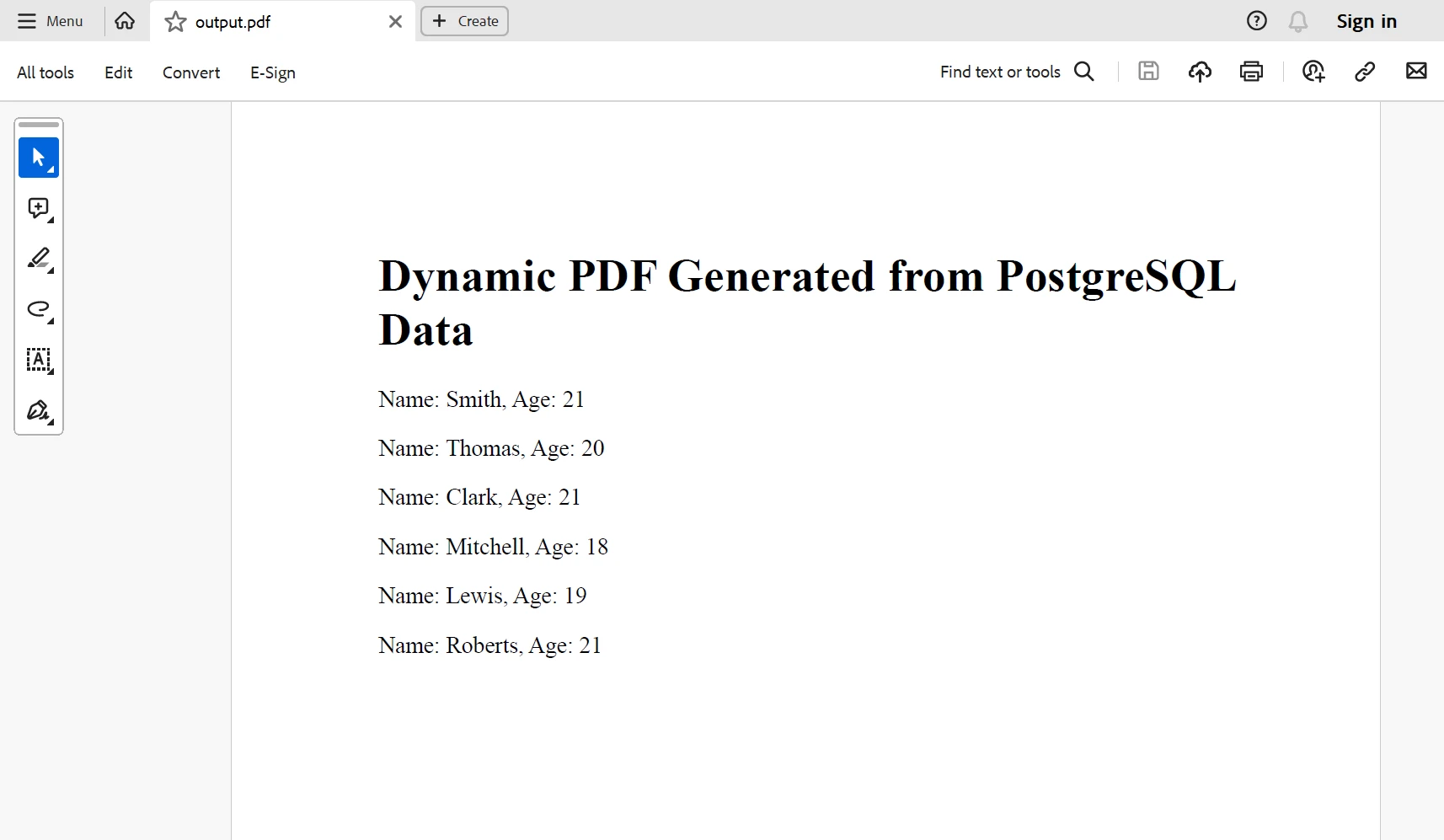
A continuación se muestra el resultado generado del código anterior. Para saber más sobre la documentación de IronPDF consulta la guía.
Conclusión
A través de la excelente integración de las capacidades de generación de PDFs de IronPDF y la conectividad de base de datos PostgreSQL de Npgsql, los desarrolladores pueden diseñar soluciones adaptables y robustas para crear documentos PDF dinámicos que satisfagan sus necesidades específicas.
El $999 paquete Lite incluye opciones de actualización además de una licencia permanente y un año de soporte de software. IronPDF ofrece una opción de licencia gratuita. Para obtener más información sobre otros productos de Iron Software, explora su página de productos.
IronPDF también ofrece documentación completa y ejemplos de código activamente mantenidos para la generación y manipulación de PDFs para utilizar las diversas características de IronPDF.























