フッターコンテンツにスキップ
IRONPDFの使用

C#でiTextSharpとIronPDFを使用してPDFにヘッダーとフッターを追加する(例付き)

Full Comparison

Looking for a detailed feature-by-feature breakdown? See how IronPDF stacks up against Itext on pricing, HTML support, and licensing.

View Full Comparison

C# で PDF ドキュメントにヘッダーとフッターを追加する

PDF文書にヘッダーとフッターを追加することは、プロフェッショナルなレポート、請求書、ビジネス文書を作成するために不可欠です。 PdfPageEventHelper および OnEndPage メソッドを使用して iTextSharp ソリューションを探している開発者は、最新 for .NETライブラリが、同じ結果を達成するためのはるかにシンプルなアプローチを提供していることに気づくでしょう。

このガイドでは、従来の iText 7 アプローチとIronPDFの簡潔な API を比較しながら、C# を使用して PDF ファイルにヘッダーとフッターを追加する方法を説明します。 最終的には、新しい Document の作成から最終的な PDF ファイルの生成まで、両方の実装方法を理解し、プロジェクトの要件に最適なアプローチを選択できるようになります。

C# で iTextSharp とIronPDFを使用して PDF にヘッダーとフッターを追加する方法 (例付き): 画像 1 - IronPDF

プロフェッショナル文書において PDF ヘッダーとフッターが重要なのはなぜですか?

ヘッダーとフッターは、ProfessionalなPDF文書において重要な役割を果たします。 また、画像ロゴによる一貫したブランディング、ページ番号によるページナビゲーション、日付や文書タイトルなどの重要なメタデータの表示、タイムスタンプやバージョン情報による文書の信頼性の確立などが求められます。

企業環境では、ヘッダーとフッターはしばしば法的な意味を持ちます。 財務報告書には、監査証跡としてタイムスタンプが必要です。 契約書には、完全性を保証するためにページ番号が必要です。 社内文書では、各ページに機密保持の表記が必要な場合があります。 これらの要件をプログラムで満たすには、ページレベルのコンテンツインジェクションを確実に処理するPDFライブラリが必要です。

プログラムでヘッダーとフッターを追加する主な理由は次のとおりです。

-監査コンプライアンス- 各ページのタイムスタンプとバージョン番号が規制要件を満たしている -ブランドの一貫性- 生成されたすべてのドキュメントに会社のロゴとスタイルが均一に適用されます -ナビゲーション- ページ番号とセクションタイトルは読者が情報を素早く見つけるのに役立ちます -真正性- 著者名、作成日、文書IDにより、文書の完全性に関する紛争を防止します。
iTextSharpとIronPDFを使用してC#でPDFにヘッダーとフッターを追加する方法(例付き):画像2 - 機能

C# でテキスト ヘッダーとフッターを追加するにはどうすればよいですか?

IronPDF は、 .NETアプリケーションで PDF ドキュメントにヘッダーとフッターを追加するための最も直接的なアプローチを提供します。 ChromePdfRenderer クラスを TextHeaderFooter または HtmlHeaderFooter と組み合わせて使用​​すると、最小限のコードでヘッダーとフッターを生成できます。個別のセルを作成したり、contentbyte オブジェクトを手動で管理したりする必要はありません。

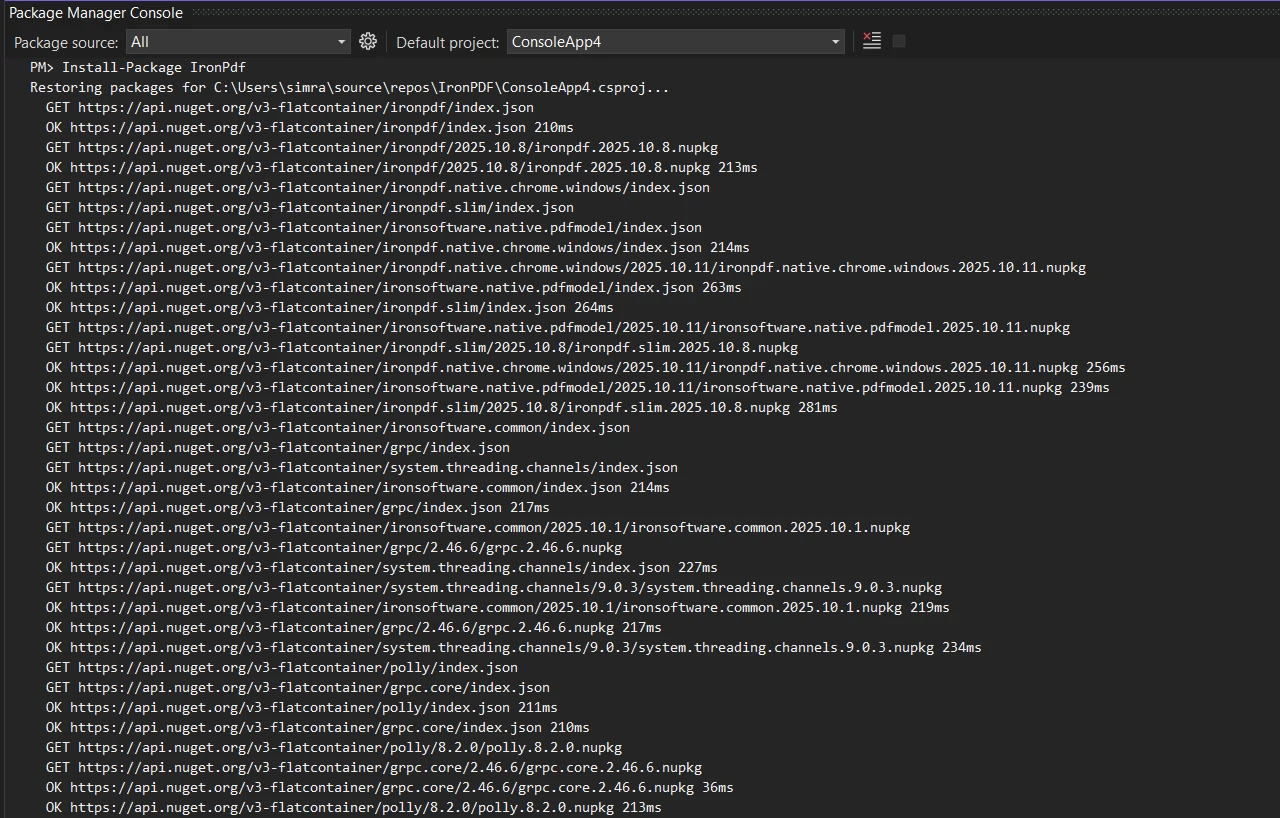
コードを書く前に、 NuGetを使用してIronPDF をプロジェクトに追加します。

Install-Package IronPdf
dotnet add package IronPdf
Install-Package IronPdf
dotnet add package IronPdf
SHELL

ライブラリは外部依存を必要とせず、インストール後すぐに動作します。 .NET 5、6、7、8、10 を対象としており、プラットフォーム固有の構成なしで Windows、Linux、macOS 上で実行されます。

以前の iTextSharp パターンでは、開発者は private static void AddContent() のようなヘルパー メソッドを作成して、ヘッダーとフッターのロジックを手動で挿入していました。 IronPDFはそのような定型文を完全に排除します。

以下は、PDF ファイルにテキスト ヘッダーとフッターの両方を追加する完全な例です。

using IronPdf;

// Initialize the PDF renderer
var renderer = new ChromePdfRenderer();

// Configure the text header
renderer.RenderingOptions.TextHeader = new TextHeaderFooter
{
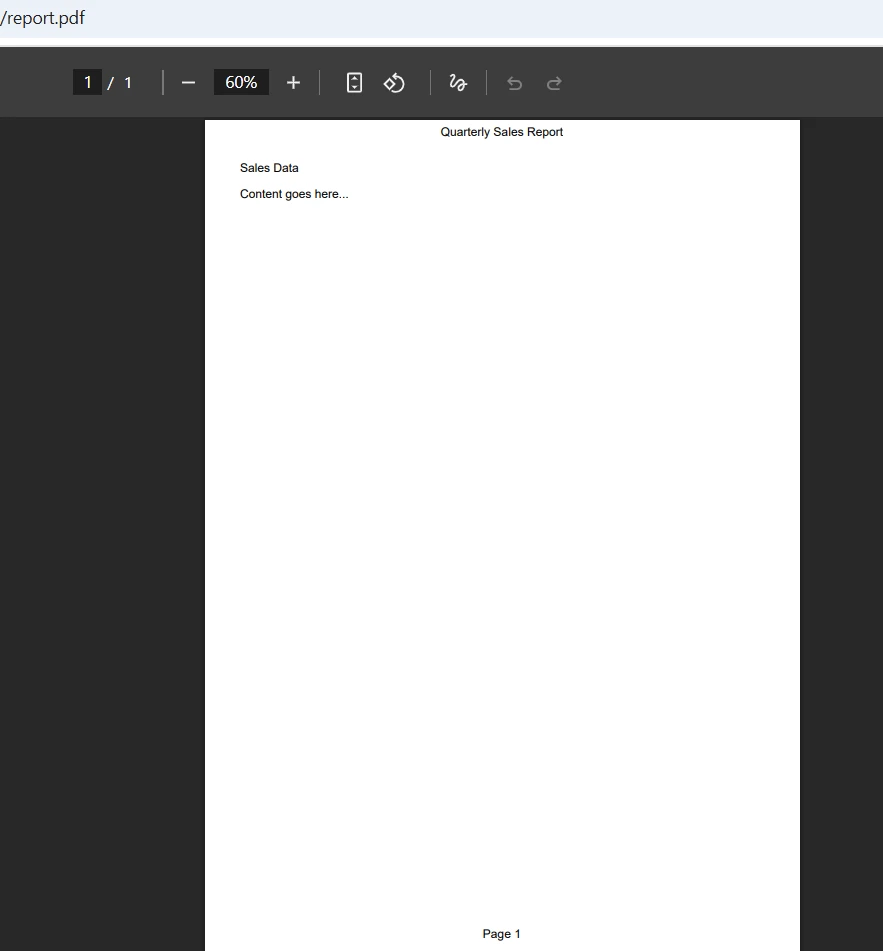
    CenterText = "Quarterly Sales Report",
    DrawDividerLine = true,
    FontSize = 14
};

// Configure the text footer with page number and date
renderer.RenderingOptions.TextFooter = new TextHeaderFooter
{
    LeftText = "{date}",
    RightText = "Page {page} of {total-pages}",
    DrawDividerLine = true,
    FontSize = 10
};

// Set margins to accommodate header and footer
renderer.RenderingOptions.MarginTop = 25;
renderer.RenderingOptions.MarginBottom = 25;

// Generate PDF from HTML content
var pdf = renderer.RenderHtmlAsPdf("<h1>Sales Data</h1><p>Content goes here...</p>");
pdf.SaveAs("report-with-headers.pdf");
using IronPdf;

// Initialize the PDF renderer
var renderer = new ChromePdfRenderer();

// Configure the text header
renderer.RenderingOptions.TextHeader = new TextHeaderFooter
{
    CenterText = "Quarterly Sales Report",
    DrawDividerLine = true,
    FontSize = 14
};

// Configure the text footer with page number and date
renderer.RenderingOptions.TextFooter = new TextHeaderFooter
{
    LeftText = "{date}",
    RightText = "Page {page} of {total-pages}",
    DrawDividerLine = true,
    FontSize = 10
};

// Set margins to accommodate header and footer
renderer.RenderingOptions.MarginTop = 25;
renderer.RenderingOptions.MarginBottom = 25;

// Generate PDF from HTML content
var pdf = renderer.RenderHtmlAsPdf("<h1>Sales Data</h1><p>Content goes here...</p>");
pdf.SaveAs("report-with-headers.pdf");
Imports IronPdf

' Initialize the PDF renderer
Dim renderer = New ChromePdfRenderer()

' Configure the text header
renderer.RenderingOptions.TextHeader = New TextHeaderFooter With {
    .CenterText = "Quarterly Sales Report",
    .DrawDividerLine = True,
    .FontSize = 14
}

' Configure the text footer with page number and date
renderer.RenderingOptions.TextFooter = New TextHeaderFooter With {
    .LeftText = "{date}",
    .RightText = "Page {page} of {total-pages}",
    .DrawDividerLine = True,
    .FontSize = 10
}

' Set margins to accommodate header and footer
renderer.RenderingOptions.MarginTop = 25
renderer.RenderingOptions.MarginBottom = 25

' Generate PDF from HTML content
Dim pdf = renderer.RenderHtmlAsPdf("<h1>Sales Data</h1><p>Content goes here...</p>")
pdf.SaveAs("report-with-headers.pdf")
$vbLabelText   $csharpLabel

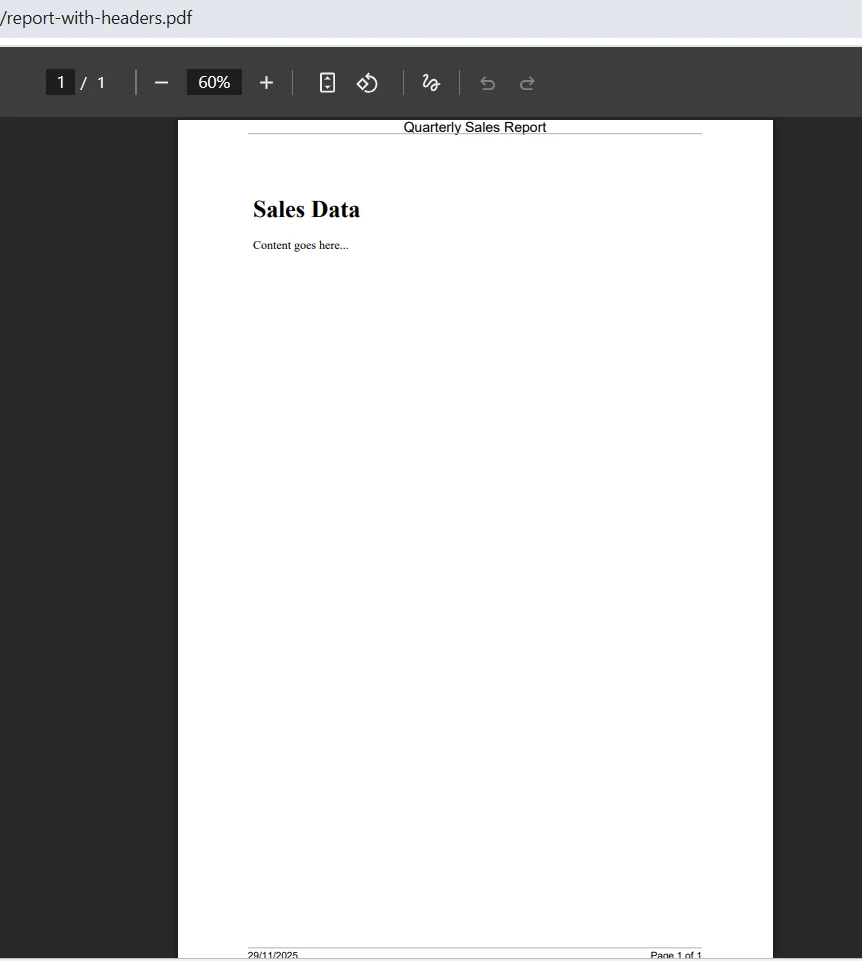
TextHeaderFooter クラスは、ヘッダーまたはフッター領域の左、中央、または右にテキストを配置するためのプロパティを提供します。 DrawDividerLine プロパティは、ヘッダーまたはフッターと本文の間にProfessional区切り線を追加します。 {date} のような結合可能なフィールドは、PDF 生成時に動的な値で自動的に入力されます。

IronPDF は余白の計算を自動的に処理し、ヘッダーとフッターがドキュメントの内容と重ならないようにしています。 TextHeaderFooter クラスはIronSoftware.Drawing.FontTypes のフォントタイプをサポートしており、外部依存関係なしにタイポグラフィを制御できます。

出力

iTextSharpとIronPDFを使用してC#でPDFにヘッダーとフッターを追加する方法(例付き):画像4 - PDF出力

実装全体が、明確で読みやすいプロパティ割り当てを持つ1つのコードブロックに収まっていることに注目してください。 個別のクラス ファイルを作成したり、ピクセル位置を計算したり、キャンバス オブジェクトを管理したりする必要はありません。 ライブラリはこれらの複雑さを抽象化し、PDF 生成の仕組みではなくコンテンツに集中できるようにします。

HTMLスタイルのヘッダーとフッターはどのように作成しますか?

より洗練されたデザインの場合、IronPDF のHtmlHeaderFooter クラスを使用すると、完全な HTML および CSS スタイル設定が可能になります。 このアプローチは、ヘッダーに画像ロゴ、複雑なレイアウト、またはブランド固有のスタイルを含める必要がある場合に特に有効です。手動でオブジェクトを作成したり、コンストラクタを使用したりすることなく実現できます。

using IronPdf;
using System;

var renderer = new ChromePdfRenderer();

// Create an HTML header with logo and styling
renderer.RenderingOptions.HtmlHeader = new HtmlHeaderFooter
{
    HtmlFragment = @"
        <div style='width: 100%; font-family: Arial, sans-serif;'>
            <img src='logo.png' style='height: 30px; float: left;' />
            <span style='float: right; font-size: 12px; color: #666;'>
                Confidential Document
            </span>
        </div>",
    MaxHeight = 25,
    DrawDividerLine = true,
    BaseUrl = new Uri(@"C:\assets\").AbsoluteUri
};

// Create an HTML footer with page numbering
renderer.RenderingOptions.HtmlFooter = new HtmlHeaderFooter
{
    HtmlFragment = @"
        <div style='text-align: center; font-size: 10px; color: #999;'>
            <span>Generated on {date} at {time}</span>
            <br/>
            <span>Page {page} of {total-pages}</span>
        </div>",
    MaxHeight = 20
};

renderer.RenderingOptions.MarginTop = 30;
renderer.RenderingOptions.MarginBottom = 25;

var pdf = renderer.RenderHtmlAsPdf("<h1>Project Proposal</h1><p>Document content...</p>");
pdf.SaveAs("styled-document.pdf");
using IronPdf;
using System;

var renderer = new ChromePdfRenderer();

// Create an HTML header with logo and styling
renderer.RenderingOptions.HtmlHeader = new HtmlHeaderFooter
{
    HtmlFragment = @"
        <div style='width: 100%; font-family: Arial, sans-serif;'>
            <img src='logo.png' style='height: 30px; float: left;' />
            <span style='float: right; font-size: 12px; color: #666;'>
                Confidential Document
            </span>
        </div>",
    MaxHeight = 25,
    DrawDividerLine = true,
    BaseUrl = new Uri(@"C:\assets\").AbsoluteUri
};

// Create an HTML footer with page numbering
renderer.RenderingOptions.HtmlFooter = new HtmlHeaderFooter
{
    HtmlFragment = @"
        <div style='text-align: center; font-size: 10px; color: #999;'>
            <span>Generated on {date} at {time}</span>
            <br/>
            <span>Page {page} of {total-pages}</span>
        </div>",
    MaxHeight = 20
};

renderer.RenderingOptions.MarginTop = 30;
renderer.RenderingOptions.MarginBottom = 25;

var pdf = renderer.RenderHtmlAsPdf("<h1>Project Proposal</h1><p>Document content...</p>");
pdf.SaveAs("styled-document.pdf");
Imports IronPdf
Imports System

Dim renderer As New ChromePdfRenderer()

' Create an HTML header with logo and styling
renderer.RenderingOptions.HtmlHeader = New HtmlHeaderFooter With {
    .HtmlFragment = "
        <div style='width: 100%; font-family: Arial, sans-serif;'>
            <img src='logo.png' style='height: 30px; float: left;' />
            <span style='float: right; font-size: 12px; color: #666;'>
                Confidential Document
            </span>
        </div>",
    .MaxHeight = 25,
    .DrawDividerLine = True,
    .BaseUrl = New Uri("C:\assets\").AbsoluteUri
}

' Create an HTML footer with page numbering
renderer.RenderingOptions.HtmlFooter = New HtmlHeaderFooter With {
    .HtmlFragment = "
        <div style='text-align: center; font-size: 10px; color: #999;'>
            <span>Generated on {date} at {time}</span>
            <br/>
            <span>Page {page} of {total-pages}</span>
        </div>",
    .MaxHeight = 20
}

renderer.RenderingOptions.MarginTop = 30
renderer.RenderingOptions.MarginBottom = 25

Dim pdf = renderer.RenderHtmlAsPdf("<h1>Project Proposal</h1><p>Document content...</p>")
pdf.SaveAs("styled-document.pdf")
$vbLabelText   $csharpLabel

このサンプルコードでは、HTMLヘッダーにテキストと一緒に画像を組み込む方法を紹介しています。 BaseUrl プロパティは、相対画像 URL を解決するためのルート パスを確立し、会社のロゴやその他のグラフィックを簡単に含めることができるようにします。 MaxHeight プロパティは、ヘッダーが指定された寸法を超えないようにし、一貫したドキュメントレイアウトを維持します。

マージ可能なフィールド({pdf-title})は、HTML ヘッダーとフッターで同じように機能し、追加のコードなしで動的なコンテンツを挿入できます。 さまざまなヘッダー スタイルの実装に関するガイダンスについては、 "ヘッダーとフッターの使い方ガイド"を参照してください。

ブランド化されたドキュメントを作成するときは、HTML アプローチが効果的です。 マーケティングチームは、開発者が直接統合できるHTMLテンプレートを提供し、承認されたデザインをピクセル単位で完璧に再現することができます。 border などの CSS プロパティは期待どおりに動作し、他のライブラリでは広範な低レベル コードが必要となるような高度な視覚処理を可能にします。

C# で iTextSharp とIronPDFを使用して PDF にヘッダーとフッターを追加する方法 (例付き): 画像 3 - PDF にヘッダーとフッターを追加する方法 - IronPDF

既存の PDF ドキュメントにヘッダーを追加するにはどうすればよいですか?

一般的な要件として、アップロードされたドキュメント、結合されたファイル、または他のシステムによって生成された PDF など、既存の PDF ファイルにヘッダーとフッターを追加することが挙げられます。 IronPDF はこのシナリオを AddHtmlHeaders および AddHtmlFooters メソッドで処理します。

using IronPdf;

// Load an existing PDF document
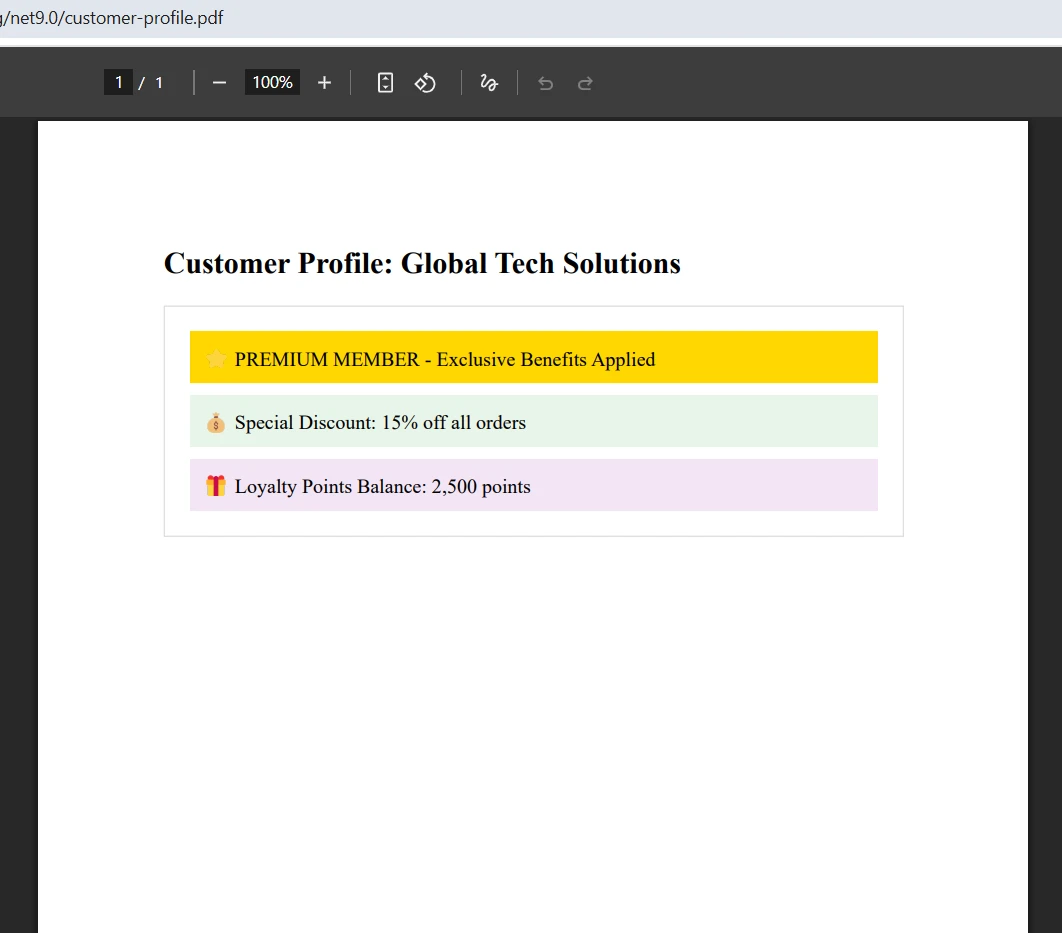
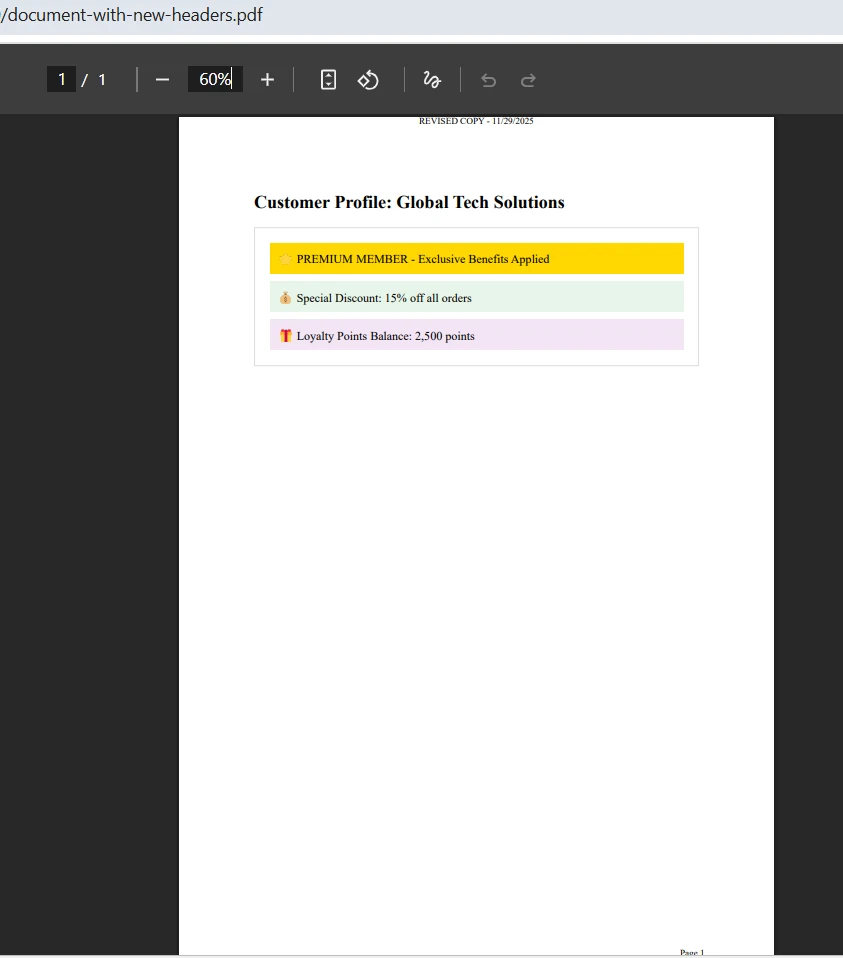
var pdf = PdfDocument.FromFile("customer-profile.pdf");

// Define the header to add
var header = new HtmlHeaderFooter
{
    HtmlFragment = "<div style='text-align: center;'>REVISED COPY - {date}</div>",
    MaxHeight = 20
};

// Define the footer to add
var footer = new HtmlHeaderFooter
{
    HtmlFragment = "<div style='text-align: right;'>Page {page}</div>",
    MaxHeight = 15
};

// Apply headers and footers to all pages
pdf.AddHtmlHeaders(header);
pdf.AddHtmlFooters(footer);
pdf.SaveAs("document-with-new-headers.pdf");
using IronPdf;

// Load an existing PDF document
var pdf = PdfDocument.FromFile("customer-profile.pdf");

// Define the header to add
var header = new HtmlHeaderFooter
{
    HtmlFragment = "<div style='text-align: center;'>REVISED COPY - {date}</div>",
    MaxHeight = 20
};

// Define the footer to add
var footer = new HtmlHeaderFooter
{
    HtmlFragment = "<div style='text-align: right;'>Page {page}</div>",
    MaxHeight = 15
};

// Apply headers and footers to all pages
pdf.AddHtmlHeaders(header);
pdf.AddHtmlFooters(footer);
pdf.SaveAs("document-with-new-headers.pdf");
Imports IronPdf

' Load an existing PDF document
Dim pdf = PdfDocument.FromFile("customer-profile.pdf")

' Define the header to add
Dim header As New HtmlHeaderFooter With {
    .HtmlFragment = "<div style='text-align: center;'>REVISED COPY - {date}</div>",
    .MaxHeight = 20
}

' Define the footer to add
Dim footer As New HtmlHeaderFooter With {
    .HtmlFragment = "<div style='text-align: right;'>Page {page}</div>",
    .MaxHeight = 15
}

' Apply headers and footers to all pages
pdf.AddHtmlHeaders(header)
pdf.AddHtmlFooters(footer)
pdf.SaveAs("document-with-new-headers.pdf")
$vbLabelText   $csharpLabel

PdfDocument クラスは、読み込まれた、またはレンダリングされた PDF を表し、レンダリング後の変更を行うためのメソッドを提供します。 このようにレンダリングと修正を分離することで、PDF文書が複数の処理段階を通過するワークフローが可能になります。 AddHtmlHeaders メソッドは、すべてのページにヘッダーを自動的に適用しますが、ページインデックスのコレクションを渡すことで特定のページを対象とすることもできます。

入力

C# で iTextSharp とIronPDFを使用して PDF にヘッダーとフッターを追加する方法 (例付き): 画像 6 - サンプル入力

出力

iTextSharpとIronPDFを使用してC#でPDFにヘッダーとフッターを追加する方法(例:画像7 - 既存のPDFヘッダー出力)

この機能は、スキャンした文書、ユーザーのアップロード、サードパーティのAPIレスポンスなど、さまざまなソースからPDFファイルを受け取る文書管理システムで非常に有用です。 IronPDFは配布やアーカイブの前にブランディングやページ番号を標準化します。

異なるページに異なるヘッダーを追加するにはどうすればよいですか?

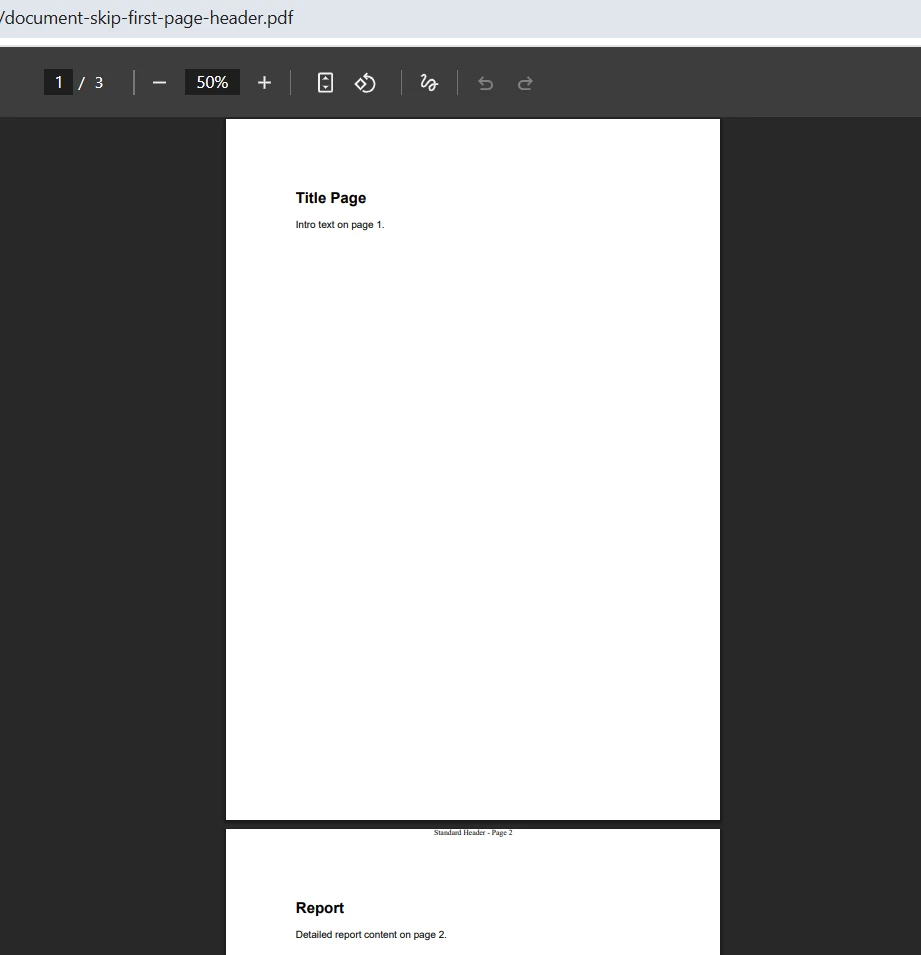
一部のドキュメントでは、最初のページに異なるヘッダー(またはヘッダーなし)が必要であり、後続のページでは標準形式が使用されます。 IronPDF はページインデックスベースのヘッダー適用によってこれをサポートしています。void OnEndPage ハンドラ内で条件をチェックしたり、ループカウンタを手動で管理したりする必要はありません。

using IronPdf;
using System.Collections.Generic;
using System.Linq;
using System.Text;

var renderer = new ChromePdfRenderer();

// Build multi-page HTML with print page-breaks between pages
var pages = new List<string>
{
    "<section><h1>Title Page</h1><p>Intro text on page 1.</p></section>",
    "<section><h2>Report</h2><p>Detailed report content on page 2.</p></section>",
    "<section><h2>Appendix</h2><p>Appendix content on page 3.</p></section>"
};

var sb = new StringBuilder();
sb.AppendLine("<!doctype html><html><head><meta charset='utf-8'>");
sb.AppendLine("<style>");
sb.AppendLine("  body { font-family: Arial, sans-serif; margin: 20px; }");
sb.AppendLine("  .page-break { page-break-after: always; }");
sb.AppendLine("</style>");
sb.AppendLine("</head><body>");

for (int i = 0; i < pages.Count; i++)
{
    sb.AppendLine(pages[i]);
    if (i < pages.Count - 1)
        sb.AppendLine("<div class='page-break'></div>");
}
sb.AppendLine("</body></html>");

var pdf = renderer.RenderHtmlAsPdf(sb.ToString());

// Create the standard header for pages 2 onwards
var standardHeader = new HtmlHeaderFooter
{
    HtmlFragment = "<div style='text-align: center;'>Standard Header - Page {page}</div>",
    MaxHeight = 20
};

// Apply to all pages except the first (index 0)
var pageIndices = Enumerable.Range(1, pdf.PageCount - 1).ToList();
pdf.AddHtmlHeaders(standardHeader, 1, pageIndices);
pdf.SaveAs("document-skip-first-page-header.pdf");
using IronPdf;
using System.Collections.Generic;
using System.Linq;
using System.Text;

var renderer = new ChromePdfRenderer();

// Build multi-page HTML with print page-breaks between pages
var pages = new List<string>
{
    "<section><h1>Title Page</h1><p>Intro text on page 1.</p></section>",
    "<section><h2>Report</h2><p>Detailed report content on page 2.</p></section>",
    "<section><h2>Appendix</h2><p>Appendix content on page 3.</p></section>"
};

var sb = new StringBuilder();
sb.AppendLine("<!doctype html><html><head><meta charset='utf-8'>");
sb.AppendLine("<style>");
sb.AppendLine("  body { font-family: Arial, sans-serif; margin: 20px; }");
sb.AppendLine("  .page-break { page-break-after: always; }");
sb.AppendLine("</style>");
sb.AppendLine("</head><body>");

for (int i = 0; i < pages.Count; i++)
{
    sb.AppendLine(pages[i]);
    if (i < pages.Count - 1)
        sb.AppendLine("<div class='page-break'></div>");
}
sb.AppendLine("</body></html>");

var pdf = renderer.RenderHtmlAsPdf(sb.ToString());

// Create the standard header for pages 2 onwards
var standardHeader = new HtmlHeaderFooter
{
    HtmlFragment = "<div style='text-align: center;'>Standard Header - Page {page}</div>",
    MaxHeight = 20
};

// Apply to all pages except the first (index 0)
var pageIndices = Enumerable.Range(1, pdf.PageCount - 1).ToList();
pdf.AddHtmlHeaders(standardHeader, 1, pageIndices);
pdf.SaveAs("document-skip-first-page-header.pdf");
Imports IronPdf
Imports System.Collections.Generic
Imports System.Linq
Imports System.Text

Dim renderer As New ChromePdfRenderer()

' Build multi-page HTML with print page-breaks between pages
Dim pages As New List(Of String) From {
    "<section><h1>Title Page</h1><p>Intro text on page 1.</p></section>",
    "<section><h2>Report</h2><p>Detailed report content on page 2.</p></section>",
    "<section><h2>Appendix</h2><p>Appendix content on page 3.</p></section>"
}

Dim sb As New StringBuilder()
sb.AppendLine("<!doctype html><html><head><meta charset='utf-8'>")
sb.AppendLine("<style>")
sb.AppendLine("  body { font-family: Arial, sans-serif; margin: 20px; }")
sb.AppendLine("  .page-break { page-break-after: always; }")
sb.AppendLine("</style>")
sb.AppendLine("</head><body>")

For i As Integer = 0 To pages.Count - 1
    sb.AppendLine(pages(i))
    If i < pages.Count - 1 Then
        sb.AppendLine("<div class='page-break'></div>")
    End If
Next
sb.AppendLine("</body></html>")

Dim pdf = renderer.RenderHtmlAsPdf(sb.ToString())

' Create the standard header for pages 2 onwards
Dim standardHeader As New HtmlHeaderFooter With {
    .HtmlFragment = "<div style='text-align: center;'>Standard Header - Page {page}</div>",
    .MaxHeight = 20
}

' Apply to all pages except the first (index 0)
Dim pageIndices = Enumerable.Range(1, pdf.PageCount - 1).ToList()
pdf.AddHtmlHeaders(standardHeader, 1, pageIndices)
pdf.SaveAs("document-skip-first-page-header.pdf")
$vbLabelText   $csharpLabel

AddHtmlHeaders の 2 番目のパラメータは、{page} マージ可能フィールドの開始ページ番号を指定し、3 番目のパラメータは、ヘッダーを受け取るページ インデックスのコレクションを受け入れます。 このきめ細かなコントロールにより、複雑な条件ロジックを使用せずに、複雑なドキュメントレイアウトが可能になります。 高度なヘッダーとフッターの例では、奇数ページと偶数ページの区別を含む追加のシナリオについて説明します。
出力

iTextSharpとIronPDFを使用してC#でPDFにヘッダーとフッターを追加する方法(例:画像9 - 異なるページに対する異なるヘッダー出力)

ページ番号を超える動的コンテンツをどのように実装しますか?

マージ可能なフィールド システムは、レンダリング中に自動的に入力されるいくつかの動的な値をサポートしています。 次の表に、使用可能なすべてのフィールドとその意味を示します。

IronPDF のヘッダーとフッターで結合可能なフィールドがサポートされる
フィールド 挿入された値 一般的な用途
`{page}` 現在のページ番号 "ページ 3"と表示されているフッター
`{total-pages}` 総ページ数 フッターに"10 ページ中 3 ページ"と表示
`{date}` 現在の日付(ローカル形式) 監査タイムスタンプ、レポートの日付
`{time}` 現地時間の現在時刻 規制コンプライアンスフッター
`{html-title}` HTML ``タグの内容</td> <td>ページタイトルを表示するドキュメントヘッダー</td> </tr> <tr> <td>`{pdf-title}`</td> <td>PDFドキュメントのメタデータタイトル</td> <td>ドキュメント名付きのブランドフッター</td> </tr> <tr> <td>`{url}`</td> <td>ウェブアドレスからレンダリングする場合のソース URL</td> <td>ウェブコンテンツのアーカイブフッター</td> </tr> </tbody> </table> <p>真に動的なコンテンツ(実行時に値が決定されるコンテンツ)の場合は、補間された値を使用して HTML フラグメント文字列を構築してから、それを <code>HtmlFragment</code> プロパティに割り当てることができます。 このアプローチでは、データベースから取得した値、ユーザー情報、または計算データを含むヘッダーを使用できます:</p> <pre class='naked-code'><code class="language-csharp">using IronPdf; string userName = GetCurrentUserName(); string documentVersion = "v2.3.1"; var renderer = new ChromePdfRenderer(); renderer.RenderingOptions.HtmlHeader = new HtmlHeaderFooter { HtmlFragment = $"<div style='font-size:10px;'>Prepared by: {userName} " + $"| Version: {documentVersion} " + "| Page {page} of {total-pages}</div>", MaxHeight = 20 }; var pdf = renderer.RenderHtmlAsPdf("<h1>Annual Report</h1><p>Body content here.</p>"); pdf.SaveAs("dynamic-header-report.pdf");</code></pre> <div class="code-content code-content-inner"> <div class="code_window" > <div class="language-selection__content-page-wrapper"> </div> <div class="code_window_content"> <div class="code-window__action-buttons-wrapper code-window__action-buttons-wrapper--content-page"> <button title="クリックしてコピー" class="code-window__action-button code-window__action-button--copy copy-clipboard" data-copy-text="クリックしてコピー" data-copied-text="クリップボードにコピーされました" data-clipboard-id="code-explorer" data-placement="bottom" > <i class="fa-kit fa-copy-example"></i> </button> <button title="フルスクリーンモード" class="code-window__action-button code-window__action-button--full-screen js-full-screen-code-example-modal" > <i class="fas fa-expand"></i> </button> <button title="フルスクリーンを終了" class="code-window__action-button code-window__action-button--exit-full-screen js-exit-full-screen-code-example-modal" > <i class="fas fa-compress"></i> </button> </div> <pre class="prettyprint linenums lang-cs"><code>using IronPdf; string userName = GetCurrentUserName(); string documentVersion = "v2.3.1"; var renderer = new ChromePdfRenderer(); renderer.RenderingOptions.HtmlHeader = new HtmlHeaderFooter { HtmlFragment = $"<div style='font-size:10px;'>Prepared by: {userName} " + $"| Version: {documentVersion} " + "| Page {page} of {total-pages}</div>", MaxHeight = 20 }; var pdf = renderer.RenderHtmlAsPdf("<h1>Annual Report</h1><p>Body content here.</p>"); pdf.SaveAs("dynamic-header-report.pdf");</code></pre> <pre class="prettyprint linenums lang-vb"><code>Imports IronPdf Dim userName As String = GetCurrentUserName() Dim documentVersion As String = "v2.3.1" Dim renderer As New ChromePdfRenderer() renderer.RenderingOptions.HtmlHeader = New HtmlHeaderFooter With { .HtmlFragment = $"<div style='font-size:10px;'>Prepared by: {userName} " & $"| Version: {documentVersion} " & "| Page {page} of {total-pages}</div>", .MaxHeight = 20 } Dim pdf = renderer.RenderHtmlAsPdf("<h1>Annual Report</h1><p>Body content here.</p>") pdf.SaveAs("dynamic-header-report.pdf")</code></pre> </div> <div class="code_window_bottom"> <span class="language_selection"> <span class="ls-span">$vbLabelText  </span> <span> <label class="switch"> <input type="checkbox" checked="checked"> <span class="slider round"></span> </label> </span> <span class="ls-span">$csharpLabel</span> </span> </div> </div> </div> <p>C# 文字列連結では、<code>{page}</code> および <code>{total-pages}</code> トークンは、補間された部分ではなく、プレーンな文字列としてそのまま残されることに注意してください。 PDF レンダリング中に、 IronPDF はこれらのトークンを自動的に置き換えます。 このパターンは、Active Directory のユーザー名、データベースのドキュメント ID、ビルド パイプラインのバージョン文字列、レポート エンジンからの計算された合計など、あらゆるランタイム値に機能します。</p> <p>結合可能なフィールドと文字列補間を組み合わせることで、ビジネス ドキュメントでよく見られる洗練されたフッター デザインが可能になります。 法務部門では、文書のタイトル、日付、ページ数を示すフッターを必要とすることがよくあります。 財務報告書には、法令遵守のためタイムスタンプが必要な場合があります。 これらの要件は、ドキュメント タイプごとにカスタム コードを追加しなくても満たされます。</p> </section> <section class="md__article-chunk md__article-chunk__level-2" aria-labelledby="anchor-itext-7-36-49" data-heading-level="2" data-heading-text="iText 7 のアプローチはどのようなものですか?"> <h2 id="anchor-itext-7-36-49">iText 7 のアプローチはどのようなものですか?</h2> <p>iText 7(iTextSharpの後継)に詳しい開発者は、ヘッダーとフッターを追加するにはイベントハンドラを実装する必要があることを知っています。 このライブラリはページイベントシステムを使用しており、<code>OnEndPage</code> や <code>OnCloseDocument</code> のようなドキュメントライフサイクルイベントに応答するクラスを作成します。</p> <p>iText 7 で <code>ITextEvents</code> パターンを使用した場合、同じヘッダーとフッターの実装は次のようになります。</p> <pre class='naked-code'><code class="language-csharp">using iText.Kernel.Pdf; using iText.Layout; using iText.Layout.Element; using iText.Kernel.Events; using iText.Kernel.Geom; using iText.Layout.Properties; // Event handler class for headers and footers -- similar to PdfPageEventHelper public class ITextEvents : IEventHandler { private string _header; public string Header { get { return _header; } set { _header = value; } } public void HandleEvent(Event currentEvent) { PdfDocumentEvent docEvent = (PdfDocumentEvent)currentEvent; PdfDocument pdfDoc = docEvent.GetDocument(); PdfPage page = docEvent.GetPage(); Rectangle pageSize = page.GetPageSize(); // Create a new PdfCanvas for the contentbyte object PdfCanvas pdfCanvas = new PdfCanvas( page.NewContentStreamBefore(), page.GetResources(), pdfDoc); Canvas canvas = new Canvas(pdfCanvas, pageSize); // Add header text at calculated position canvas.ShowTextAligned( new Paragraph("Quarterly Sales Report"), pageSize.GetWidth() / 2, pageSize.GetTop() - 20, TextAlignment.CENTER); // Add footer with page number int pageNumber = pdfDoc.GetPageNumber(page); canvas.ShowTextAligned( new Paragraph($"Page {pageNumber}"), pageSize.GetWidth() / 2, pageSize.GetBottom() + 20, TextAlignment.CENTER); canvas.Close(); } } // Usage in main code var writer = new PdfWriter("report.pdf"); var pdfDoc = new PdfDocument(writer); var document = new Document(pdfDoc); // Register the event handler for END_PAGE pdfDoc.AddEventHandler(PdfDocumentEvent.END_PAGE, new ITextEvents()); document.Add(new Paragraph("Sales Data")); document.Add(new Paragraph("Content goes here...")); document.Close();</code></pre> <div class="code-content code-content-inner"> <div class="code_window" > <div class="language-selection__content-page-wrapper"> </div> <div class="code_window_content"> <div class="code-window__action-buttons-wrapper code-window__action-buttons-wrapper--content-page"> <button title="クリックしてコピー" class="code-window__action-button code-window__action-button--copy copy-clipboard" data-copy-text="クリックしてコピー" data-copied-text="クリップボードにコピーされました" data-clipboard-id="code-explorer" data-placement="bottom" > <i class="fa-kit fa-copy-example"></i> </button> <button title="フルスクリーンモード" class="code-window__action-button code-window__action-button--full-screen js-full-screen-code-example-modal" > <i class="fas fa-expand"></i> </button> <button title="フルスクリーンを終了" class="code-window__action-button code-window__action-button--exit-full-screen js-exit-full-screen-code-example-modal" > <i class="fas fa-compress"></i> </button> </div> <pre class="prettyprint linenums lang-cs"><code>using iText.Kernel.Pdf; using iText.Layout; using iText.Layout.Element; using iText.Kernel.Events; using iText.Kernel.Geom; using iText.Layout.Properties; // Event handler class for headers and footers -- similar to PdfPageEventHelper public class ITextEvents : IEventHandler { private string _header; public string Header { get { return _header; } set { _header = value; } } public void HandleEvent(Event currentEvent) { PdfDocumentEvent docEvent = (PdfDocumentEvent)currentEvent; PdfDocument pdfDoc = docEvent.GetDocument(); PdfPage page = docEvent.GetPage(); Rectangle pageSize = page.GetPageSize(); // Create a new PdfCanvas for the contentbyte object PdfCanvas pdfCanvas = new PdfCanvas( page.NewContentStreamBefore(), page.GetResources(), pdfDoc); Canvas canvas = new Canvas(pdfCanvas, pageSize); // Add header text at calculated position canvas.ShowTextAligned( new Paragraph("Quarterly Sales Report"), pageSize.GetWidth() / 2, pageSize.GetTop() - 20, TextAlignment.CENTER); // Add footer with page number int pageNumber = pdfDoc.GetPageNumber(page); canvas.ShowTextAligned( new Paragraph($"Page {pageNumber}"), pageSize.GetWidth() / 2, pageSize.GetBottom() + 20, TextAlignment.CENTER); canvas.Close(); } } // Usage in main code var writer = new PdfWriter("report.pdf"); var pdfDoc = new PdfDocument(writer); var document = new Document(pdfDoc); // Register the event handler for END_PAGE pdfDoc.AddEventHandler(PdfDocumentEvent.END_PAGE, new ITextEvents()); document.Add(new Paragraph("Sales Data")); document.Add(new Paragraph("Content goes here...")); document.Close();</code></pre> <pre class="prettyprint linenums lang-vb"><code>Imports iText.Kernel.Pdf Imports iText.Layout Imports iText.Layout.Element Imports iText.Kernel.Events Imports iText.Kernel.Geom Imports iText.Layout.Properties ' Event handler class for headers and footers -- similar to PdfPageEventHelper Public Class ITextEvents Implements IEventHandler Private _header As String Public Property Header As String Get Return _header End Get Set(value As String) _header = value End Set End Property Public Sub HandleEvent(currentEvent As [Event]) Implements IEventHandler.HandleEvent Dim docEvent As PdfDocumentEvent = CType(currentEvent, PdfDocumentEvent) Dim pdfDoc As PdfDocument = docEvent.GetDocument() Dim page As PdfPage = docEvent.GetPage() Dim pageSize As Rectangle = page.GetPageSize() ' Create a new PdfCanvas for the contentbyte object Dim pdfCanvas As New PdfCanvas(page.NewContentStreamBefore(), page.GetResources(), pdfDoc) Dim canvas As New Canvas(pdfCanvas, pageSize) ' Add header text at calculated position canvas.ShowTextAligned(New Paragraph("Quarterly Sales Report"), pageSize.GetWidth() / 2, pageSize.GetTop() - 20, TextAlignment.CENTER) ' Add footer with page number Dim pageNumber As Integer = pdfDoc.GetPageNumber(page) canvas.ShowTextAligned(New Paragraph($"Page {pageNumber}"), pageSize.GetWidth() / 2, pageSize.GetBottom() + 20, TextAlignment.CENTER) canvas.Close() End Sub End Class ' Usage in main code Dim writer As New PdfWriter("report.pdf") Dim pdfDoc As New PdfDocument(writer) Dim document As New Document(pdfDoc) ' Register the event handler for END_PAGE pdfDoc.AddEventHandler(PdfDocumentEvent.END_PAGE, New ITextEvents()) document.Add(New Paragraph("Sales Data")) document.Add(New Paragraph("Content goes here...")) document.Close()</code></pre> </div> <div class="code_window_bottom"> <span class="language_selection"> <span class="ls-span">$vbLabelText  </span> <span> <label class="switch"> <input type="checkbox" checked="checked"> <span class="slider round"></span> </label> </span> <span class="ls-span">$csharpLabel</span> </span> </div> </div> </div> <p>この実装は、2 つのライブラリ間の基本的なアーキテクチャの違いを示しています。 iText 7 では、<code>IEventHandler</code> (従来の <code>PdfPageEventHelper</code> と同​​様) を実装する別のハンドラ クラスを作成し、浮動小数点座標を使用してページ位置を手動で計算し、描画操作のために <code>PdfCanvas</code> および <code>Canvas</code> オブジェクトを管理する必要があります。 ハンドラーは、<code>END_PAGE</code> イベント タイプを介して各ページのイベントを受け取ります。これは、<code>START_PAGE</code> を誤って使用する多くの開発者をつまずかせる詳細です。</p> <section class="md__article-chunk md__article-chunk__level-3" aria-labelledby="anchor-36-49" data-heading-level="3" data-heading-text="出力"> <h3 id="anchor-36-49">出力</h3> <p><img src="/static-assets/pdf/blog/read-header-footer-itextsharp/read-header-footer-itextsharp-8.webp" alt="C# で iTextSharp とIronPDFを使用して PDF にヘッダーとフッターを追加する方法 (例付き): 画像 8 - C# で iTextSharp を使用して PDF にヘッダーとフッターを追加する方法 (例付き)" loading="lazy" class="img-responsive add-shadow img-popup" width="883" height="951" /></p> <p>iText 7の座標系はページの左下隅を起点としているため、位置決めのために明示的な計算が必要です。 最終的なページ数を取得するには、<code>PdfTemplate</code> パターンを使用してさらに複雑化する必要があります。このパターンは、<code>OnCloseDocument</code> -- 中に入力され、既に複雑なワークフローにさらに定型コードを追加します。</p> <p>ウェブ開発のバックグラウンドを持つ開発者にとって、この座標ベースのアプローチは、宣言的なHTML/CSSモデルと比較して異質に感じられます。 それぞれの配置を決定するには、ページ寸法、余白オフセット、およびテキスト測定を理解する必要がありますが、これらは HTML ベースのアプローチでは抽象化されます。</p> <p>iText 7 も AGPL ライセンスの下で動作します。つまり、商用ライセンスを購入しない限り、iTextSharp または iText 7 を使用するアプリケーションはオープンソースである必要があります。 これは、商用プロジェクト用のライブラリを選択する際に重要な考慮事項です。</p> </section> </section> <section class="md__article-chunk md__article-chunk__level-2" aria-labelledby="anchor-2-36-49" data-heading-level="2" data-heading-text="2 つのアプローチを比較するとどうなりますか?"> <h2 id="anchor-2-36-49">2 つのアプローチを比較するとどうなりますか?</h2> <p>具体的な機能を並べて見ると、違いがより明確になります。次の表は、主な違いをまとめたものです。</p> <table class="content__data-table" data-content-table> <caption>IronPDFとiText 7のヘッダーとフッター機能の比較</caption> <thead> <tr> <th>特徴</th> <th>IronPDF</th> <th>iText 7 / iTextSharp</th> </tr> </thead> <tbody> <tr> <td>実装スタイル</td> <td>レンダラーオプションのプロパティの割り当て</td> <td>IEventHandlerを実装するイベントハンドラークラス</td> </tr> <tr> <td>HTML/CSSサポート</td> <td>HtmlHeaderFooter経由の完全なHTMLとCSS</td> <td>ネイティブ HTML サポートなし。低レベルのキャンバス描画が必要</td> </tr> <tr> <td>ページ数合計</td> <td>`{total-pages}`フィールドによる自動</td> <td>OnCloseDocument に PdfTemplate を入力する必要があります</td> </tr> <tr> <td>ヘッダーの画像</td> <td>BaseUrl を使用した標準 HTML `<img loading="lazy" class="img-responsive add-shadow img-popup" alt=" related to 2 つのアプローチを比較するとどうなりますか?">`タグ</td> <td>画像オブジェクトと手動配置が必要です</td> </tr> <tr> <td>既存のPDFに追加</td> <td>AddHtmlHeaders / AddHtmlFooters メソッド</td> <td>スタンパーまたはイベントループによる再処理が必要</td> </tr> <tr> <td>ページごとのターゲティング</td> <td>メソッドに渡されるページインデックスのリスト</td> <td>イベントハンドラ内の条件付きロジック</td> </tr> <tr> <td>ライセンスモデル</td> <td>無料トライアル付きの商用</td> <td>AGPL(オープンソース)または商用</td> </tr> <tr> <td>クロスプラットフォーム</td> <td>Windows、Linux、macOS、Docker対応</td> <td>Windows, Linux, macOS</td> </tr> </tbody> </table> <p>また、問題のトラブルシューティングを行う際にも、開発経験は大きく異なります。 IronPDFのHTMLベースのアプローチは、PDF生成コードに統合する前にブラウザでヘッダーデザインをプレビューできることを意味します。 何か間違っているように見える場合は、使い慣れたブラウザの開発者ツールを使用して、HTMLとCSSを調整することができます。 iText 7では、位置決めの問題をデバッグするために、テストPDFを繰り返し生成し、手動で座標を測定する必要があります。</p> <p>HTML ベースのアプローチにより、既存の Web 開発スキルを直接適用できます。 フレックスボックスの配置から画像グリッドまで、HTML と CSS で実現可能なあらゆるレイアウトがIronPDF のヘッダーとフッターで機能します。 <a href="/ja/examples/html-headers-and-footers/" target="_blank">HTML ヘッダーとフッターの例では、</a>追加のスタイル設定の可能性を示しています。</p> <section class="md__article-chunk md__article-chunk__level-3" aria-labelledby="anchor-36-49" data-heading-level="3" data-heading-text="ヘッダーとフッターの外観のカスタマイズ"> <h3 id="anchor-36-49">ヘッダーとフッターの外観のカスタマイズ</h3> <p>ヘッダーとフッターの微調整には、位置や視覚的な表現に影響するいくつかのプロパティが含まれます。 <code>TextHeaderFooter</code> クラスは、以下のカスタマイズオプションを提供します。</p> <pre class='naked-code'><code class="language-csharp">using IronPdf; using IronSoftware.Drawing; var renderer = new ChromePdfRenderer(); var footer = new TextHeaderFooter { LeftText = "Confidential", CenterText = "{pdf-title}", RightText = "Page {page} of {total-pages}", Font = FontTypes.Arial, FontSize = 9, DrawDividerLine = true, DrawDividerLineColor = Color.Gray }; renderer.RenderingOptions.TextFooter = footer; renderer.RenderingOptions.MarginBottom = 20; var pdf = renderer.RenderHtmlAsPdf("<h1>Board Report</h1><p>Executive summary content.</p>"); pdf.SaveAs("board-report.pdf");</code></pre> <div class="code-content code-content-inner"> <div class="code_window" > <div class="language-selection__content-page-wrapper"> </div> <div class="code_window_content"> <div class="code-window__action-buttons-wrapper code-window__action-buttons-wrapper--content-page"> <button title="クリックしてコピー" class="code-window__action-button code-window__action-button--copy copy-clipboard" data-copy-text="クリックしてコピー" data-copied-text="クリップボードにコピーされました" data-clipboard-id="code-explorer" data-placement="bottom" > <i class="fa-kit fa-copy-example"></i> </button> <button title="フルスクリーンモード" class="code-window__action-button code-window__action-button--full-screen js-full-screen-code-example-modal" > <i class="fas fa-expand"></i> </button> <button title="フルスクリーンを終了" class="code-window__action-button code-window__action-button--exit-full-screen js-exit-full-screen-code-example-modal" > <i class="fas fa-compress"></i> </button> </div> <pre class="prettyprint linenums lang-cs"><code>using IronPdf; using IronSoftware.Drawing; var renderer = new ChromePdfRenderer(); var footer = new TextHeaderFooter { LeftText = "Confidential", CenterText = "{pdf-title}", RightText = "Page {page} of {total-pages}", Font = FontTypes.Arial, FontSize = 9, DrawDividerLine = true, DrawDividerLineColor = Color.Gray }; renderer.RenderingOptions.TextFooter = footer; renderer.RenderingOptions.MarginBottom = 20; var pdf = renderer.RenderHtmlAsPdf("<h1>Board Report</h1><p>Executive summary content.</p>"); pdf.SaveAs("board-report.pdf");</code></pre> <pre class="prettyprint linenums lang-vb"><code>Imports IronPdf Imports IronSoftware.Drawing Dim renderer As New ChromePdfRenderer() Dim footer As New TextHeaderFooter With { .LeftText = "Confidential", .CenterText = "{pdf-title}", .RightText = "Page {page} of {total-pages}", .Font = FontTypes.Arial, .FontSize = 9, .DrawDividerLine = True, .DrawDividerLineColor = Color.Gray } renderer.RenderingOptions.TextFooter = footer renderer.RenderingOptions.MarginBottom = 20 Dim pdf = renderer.RenderHtmlAsPdf("<h1>Board Report</h1><p>Executive summary content.</p>") pdf.SaveAs("board-report.pdf")</code></pre> </div> <div class="code_window_bottom"> <span class="language_selection"> <span class="ls-span">$vbLabelText  </span> <span> <label class="switch"> <input type="checkbox" checked="checked"> <span class="slider round"></span> </label> </span> <span class="ls-span">$csharpLabel</span> </span> </div> </div> </div> <p><code>Font</code> プロパティは、Helvetica、Arial、Courier、Times New Roman を含む <code>IronSoftware.Drawing.FontTypes</code> の値を受け入れます。 <code>DrawDividerLine</code> プロパティは、フッターとメインコンテンツの間にProfessional水平線を追加します。 <code>DrawDividerLineColor</code> を使用して、ブランドカラーやドキュメントのテーマに合わせて線の色をカスタマイズできます。</p> <p>HTML ベースのヘッダーとフッターの場合、<code>LoadStylesAndCSSFromMainHtmlDocument</code> プロパティは、レンダリングされるメイン ドキュメントからスタイルをオプションで継承し、ヘッダーと本文コンテンツ間の視覚的な一貫性を確保します。 これは、ヘッダーとフッターの領域にも適用されるべきカスタムCSSをメインドキュメントで使用している場合に特に役立ちます。</p> <p><img src="/static-assets/pdf/blog/read-header-footer-itextsharp/read-header-footer-itextsharp-5.webp" alt="C# で iTextSharp とIronPDFを使用して PDF にヘッダーとフッターを追加する方法 (例付き): 画像 5 - クロスプラットフォーム互換性" loading="lazy" class="img-responsive add-shadow img-popup" width="1530" height="655" /></p> </section> <section class="md__article-chunk md__article-chunk__level-3" aria-labelledby="anchor-36-49" data-heading-level="3" data-heading-text="クロスプラットフォームとコンテナのデプロイメント"> <h3 id="anchor-36-49">クロスプラットフォームとコンテナのデプロイメント</h3> <p>最近 for .NETアプリケーションは、Linuxコンテナ、Azure App Services、またはAWS Lambda関数にデプロイされることがよくあります。 IronPDFはWindows、Linux、macOSのクロスプラットフォームに対応しています。 このライブラリはDockerコンテナですぐに動作するため、マイクロサービス・アーキテクチャやクラウドネイティブ・アプリケーションに適しています。</p> <p>このクロスプラットフォーム機能はヘッダーとフッターの機能にも拡張されており、Windows 開発マシンでヘッダー付きの PDF を生成するのと同じコードを Linux 運用サーバーに展開すると、同一の出力が生成されます。 追加のフォントをインストールしたり、レンダリング エンジンを構成したり、プラットフォーム固有のコード パスを処理したりする必要はありません。</p> <p>コンテナ化されたワークロードを実行するチーム向けに、 <a href="/ja/get-started/linux/" target="_blank">IronPDFのDockerデプロイメントに関するドキュメントで</a>は、さまざまなベースイメージとオーケストレーションプラットフォームの設定に関するガイダンスを提供しています。 ライブラリは環境間で一貫した動作をするため、PDF 生成ワークフローでよくあるバグの原因が排除されます。</p> <p><a href="https://learn.microsoft.com/en-us/dotnet/core/deploying/" target="_blank" rel="nofollow noopener noreferrer">Microsoft for .NETドキュメント</a>によると、コンテナ化された.NETアプリケーションは、環境間で一貫した実行時動作の恩恵を受けます。これは、IronPDF のレンダリング エンジンが PDF 生成タスクに対して強化する原則です。 同様に、 <a href="https://docs.docker.com/get-started/" target="_blank" rel="nofollow noopener noreferrer">Docker の公式ドキュメントでは、</a> PDF 生成サービスに直接適用される.NETワークロードをコンテナー化するためのベスト プラクティスについて説明しています。</p> <p><a href="https://itextpdf.com/resources/api-documentation" target="_blank" rel="nofollow noopener noreferrer">iText 7 のドキュメント</a>でもクロスプラットフォームのサポートが確認されていますが、イベント駆動型モデルの複雑さが増すため、クロスプラットフォームのレンダリング問題のデバッグは、宣言型の HTML ベースのアプローチよりも複雑になる可能性があります。</p> </section> </section> <section class="md__article-chunk md__article-chunk__level-2" aria-labelledby="anchor-36-49" data-heading-level="2" data-heading-text="次のステップは何ですか?"> <h2 id="anchor-36-49">次のステップは何ですか?</h2> <p>IronPDFを使えば、PDFドキュメントにヘッダーとフッターを実装するのに数分しかかかりません。 NuGetパッケージマネージャーを使用してライブラリをインストールしてください:</p> <pre class='naked-code'><code class="language-bash">Install-Package IronPdf dotnet add package IronPdf</code></pre> <div class="code-content code-content-inner" > <div class="code_window" > <div class="code_window_content"> <div class="code-window__action-buttons-wrapper code-window__action-buttons-wrapper--content-page"> <button title="クリックしてコピー" class="code-window__action-button code-window__action-button--copy copy-clipboard" data-copy-text="クリックしてコピー" data-copied-text="クリップボードにコピーされました" data-clipboard-id="code-explorer" data-placement="bottom" > <i class="fa-kit fa-copy-example"></i> </button> <button title="フルスクリーンモード" class="code-window__action-button code-window__action-button--full-screen js-full-screen-code-example-modal" > <i class="fas fa-expand"></i> </button> <button title="フルスクリーンを終了" class="code-window__action-button code-window__action-button--exit-full-screen js-exit-full-screen-code-example-modal" > <i class="fas fa-compress"></i> </button> </div> <pre class="prettyprint linenums lang-shell"><code>Install-Package IronPdf dotnet add package IronPdf</code></pre> </div> <div class="code_window_bottom"> <span class="pull-right"><span class="ls-span" style='font-weight: 600'>SHELL</span> </div> </div> </div> <p><img src="/static-assets/pdf/blog/read-header-footer-itextsharp/read-header-footer-itextsharp-10.webp" alt="iTextSharpとIronPDFを使用してC#でPDFにヘッダーとフッターを追加する方法(例付き):画像10 - インストール" loading="lazy" class="img-responsive add-shadow img-popup" width="1280" height="818" /></p> <p>ここから先は、以下のリソースが役立ちます。</p> <p>-<strong><a href="/ja/docs/" target="_blank">入門ドキュメント</a></strong>- PDF 生成と操作の全機能を網羅しています -<strong><a href="/ja/how-to/headers-and-footers/" target="_blank">ヘッダーとフッターの使い方ガイド</a></strong>- すべてのヘッダーとフッターのシナリオのステップバイステップの説明</p> <ul> <li><strong><a href="/ja/examples/html-headers-and-footers/" target="_blank">HTML ヘッダーとフッターの例</a></strong>- HTML ベースのヘッダーのすぐに実行できるコードサンプル -<strong><a href="/ja/examples/adding-headers-and-footers-advanced/" target="_blank">高度なヘッダーとフッターの例</a></strong>- ページごとのターゲティングと奇数ページ/偶数ページの区別</li> <li><strong><a href="/ja/object-reference/api/IronPdf.TextHeaderFooter.html" target="_blank">TextHeaderFooter API リファレンス</a></strong>- テキストベースのヘッダーとフッターの完全なプロパティ リスト</li> <li><strong><a href="/ja/object-reference/api/IronPdf.HtmlHeaderFooter.html" target="_blank">HtmlHeaderFooter API リファレンス</a></strong>- HTML ベースのヘッダーとフッターの完全な API</li> <li><strong><a href="/ja/get-started/linux/" target="_blank">Dockerデプロイメントガイド</a></strong>- Linuxコンテナとクラウド環境の設定</li> <li><strong><a href="/ja/licensing/" target="_blank">IronPDF のライセンス オプション</a></strong>- 個人開発者からエンタープライズ チームまでを対象としたプラン</li> </ul> <p><a href="#trial-license" data-modal-id="trial-license" class="js-modal-open">無料トライアルを開始して</a>、独自のプロジェクトでヘッダーとフッターの実装をテストしてください。 試用版には機能制限のないすべての機能が含まれており、ライセンスを購入する前に、実際の PDF ドキュメントの要件に照らしてライブラリを評価できます。</p> <p><img src="/static-assets/pdf/blog/read-header-footer-itextsharp/read-header-footer-itextsharp-11.webp" alt="iTextSharpとIronPDFを使用してC#でPDFにヘッダーとフッターを追加する方法(例付き):画像11​​ - ライセンス" loading="lazy" class="img-responsive add-shadow img-popup" width="1757" height="741" /></p> <p>C#でPDFドキュメントにヘッダーとフッターを追加する作業は、使用するライブラリによって、簡単なものから複雑なものまで様々です。iText 7はイベントハンドラーとキャンバス操作による低レベルの制御を提供していますが、 IronPDFは使い慣れたHTMLとCSSの概念を適用したAPIを通じて同じ機能を提供します。迅速な実装と保守性の高いコードを重視する開発者にとって、 IronPDFは、ハンドラークラス、セル構成、表構造などを含む数十行に及ぶヘッダーとフッターの実装を、わずか数行のプロパティ割り当てにまで削減します。</p></section> </div> <section id="article__faqs" class="bg" style="min-height: 500px; contain-intrinsic-size: auto 1065px;"> <h2 class="article__faqs__heading-title">よくある質問</h2> <div class="article__faqs__questions-and-answers container-fluid"> <div class="tab-pane in active" id="ta-faq"> <div class="faq-item"> <div class="faq-collapse"> <i class="fa-solid fa-plus"></i> <i class="fa-solid fa-minus"></i> </div> <div class="faq-content"> <h3 class="question-header">iTextSharpを使ってPDFにヘッダーとフッターを追加する方法を教えてください。</h3> <p class="question-answer">iTextSharpを使用してPDFにヘッダーとフッターを追加するには、PDF作成プロセス中にドキュメントのページをカスタマイズするページイベントハンドラを定義することができます。これには、OnEndPageメソッドをオーバーライドして、必要なヘッダーとフッターのコンテンツを含めることが含まれます。</p> </div> </div> <div class="faq-item"> <div class="faq-collapse"> <i class="fa-solid fa-plus"></i> <i class="fa-solid fa-minus"></i> </div> <div class="faq-content"> <h3 class="question-header">ヘッダーとフッターを追加するためにIronPDFを使う利点は何ですか?</h3> <p class="question-answer">IronPDFは分かりやすいAPIを提供し、様々なスタイリングオプションをサポートすることで、ヘッダーとフッターを追加するプロセスを簡素化します。C#プロジェクトとシームレスに統合され、HTMLからPDFへの変換のような追加機能を提供し、PDF操作のための多目的なツールとなっています。</p> </div> </div> <div class="faq-item"> <div class="faq-collapse"> <i class="fa-solid fa-plus"></i> <i class="fa-solid fa-minus"></i> </div> <div class="faq-content"> <h3 class="question-header">IronPDFとiTextSharpは一緒に使えますか?</h3> <p class="question-answer">はい、IronPDFとiTextSharpはC#プロジェクトで一緒に使うことができます。iTextSharpはプログラムでPDFを操作するのに適していますが、IronPDFはHTMLをPDFに変換するような追加機能を提供することで補完します。</p> </div> </div> <div class="faq-item"> <div class="faq-collapse"> <i class="fa-solid fa-plus"></i> <i class="fa-solid fa-minus"></i> </div> <div class="faq-content"> <h3 class="question-header">IronPDFを使ってヘッダーとフッターをスタイルする方法はありますか?</h3> <p class="question-answer">IronPDFはHTMLとCSSを使ってヘッダーとフッターをスタイルすることができます。これにより、開発者はPDFドキュメントの視覚的に魅力的なデザインやレイアウトを柔軟に作成することができます。</p> </div> </div> <div class="faq-item"> <div class="faq-collapse"> <i class="fa-solid fa-plus"></i> <i class="fa-solid fa-minus"></i> </div> <div class="faq-content"> <h3 class="question-header">IronPDFはヘッダーやフッターのページ番号をどのように扱うのですか?</h3> <p class="question-answer">IronPDFはヘッダーとフッターに自動的にページ番号を挿入することができます。総ページ数を含めたり、開始ページ数を調整するなど、ニーズに応じてページ番号をフォーマットするオプションを提供します。</p> </div> </div> <div class="faq-item"> <div class="faq-collapse"> <i class="fa-solid fa-plus"></i> <i class="fa-solid fa-minus"></i> </div> <div class="faq-content"> <h3 class="question-header">IronPDFでC#を使ってPDFを操作する利点は何ですか?</h3> <p class="question-answer">IronPDFでPDFを操作するためにC#を使用することは、強力な型安全性、.NETアプリケーションとの容易な統合、開発プロセスを強化する幅広いライブラリやツールへのアクセスを提供します。IronPDFのC# APIは直感的でユーザーフレンドリーに設計されているため、あらゆるレベルの開発者がアクセス可能です。</p> </div> </div> <div class="faq-item"> <div class="faq-collapse"> <i class="fa-solid fa-plus"></i> <i class="fa-solid fa-minus"></i> </div> <div class="faq-content"> <h3 class="question-header">IronPDFを使って既存のドキュメントをPDFに変換できますか?</h3> <p class="question-answer">はい、IronPDFはHTML、ASPX、その他のウェブベースのコンテンツを含む様々なドキュメントフォーマットをPDFに変換することができます。この機能はウェブページや動的に生成されたコンテンツからPDFを作成する場合に特に便利です。</p> </div> </div> </div> </div> </section> <script> document.addEventListener("DOMContentLoaded", function() { onViewLoadAsync( "#article__faqs", function() { }, ["common__faqs.js", "content__faqs.css", "article__faqs.css"] ); const articleFaqs = document.querySelector("#article__faqs .tab-pane"); if (!articleFaqs) return; articleFaqs.addEventListener("click", (evt) => { const targeted = evt.target.closest(".faq-item"); if (!targeted) return; targeted.classList.toggle("faq-item--active"); }); }); </script> <div class="author-details" id="author"> <div class="d-flex column-gap-4"> <div class="col_image"> <img loading="lazy" src="/img/how-tos/authors/curtis.png" alt="カーティス・チャウ" class="author-image" width="64" height="64"> </div> <div class="col_detail"> <div class="author-details__connect"> <div class="d-flex align-items-center flex-wrap"> <div class="author-details__connect__author"> <div class="author-name text-no-wrap"> <a href="https://ironsoftware.com/ja/about-us/authors/curtis/" aria-label="">カーティス・チャウ</a> </div> <div class="author-details__connect__linkedin"> <a href="https://www.linkedin.com/in/curtis-chau-937368213/" target="_blank"><i class="fa-brands fa-linkedin" target="_blank" rel="nofollow"></i></a> </div> <div class="author-details__connect__website"> <a href="https://github.com/CurtisChau" target="_blank"><i class="fa-solid fa-globe"></i></a> </div> </div> <div class="author-details__chat"> <a href="#live-chat-support"><i class="fa-solid fa-comments"></i>  <span class="d-none d-md-inline">今すぐエンジニアリングチームとチャット </a></span> </div> </div> </div> <div class="author-job-title">テクニカルライター</div> <div class="author-bio"><p>Curtis Chauは、カールトン大学でコンピュータサイエンスの学士号を取得し、Node.js、TypeScript、JavaScript、およびReactに精通したフロントエンド開発を専門としています。直感的で美しいユーザーインターフェースを作成することに情熱を持ち、Curtisは現代のフレームワークを用いた開発や、構造の良い視覚的に魅力的なマニュアルの作成を楽しんでいます。</p><p>開発以外にも、CurtisはIoT(Internet of Things)への強い関心を持ち、ハードウェアとソフトウェアの統合方法を模索しています。余暇には、ゲームをしたりDiscordボットを作成したりして、技術に対する愛情と創造性を組み合わせています。</p></div> </div> </div> </div> <div class="feedback_form"> </div> <div class="blog_end_line"></div> <div class="page_blog_listing module section_blog_listing"> <section class="col-12" id="blog_post--related-articles"> <h2>関連する記事</h2> <div class="container-fluid blog_post--related-articles__list"> <div class="row row-cols-1 row-cols-sm-2 row-cols-lg-3 g-4"> <div class="col"> <article class="h-100"> <a href="/ja/blog/using-ironpdf/ironpdf-monthly-statements/" class="d-block h-100 item_box" title="月次口座明細書をPDF文書として生成する"> <div class="ratio ratio-16x9 blog_listing_image_placeholder ironpdf"></div> <div class="p-4"> <div class="info d-flex"><span class="post_date d-block flex-grow-1">更新日 <time datetime="2026-03-31">2026年3月30日</time></span></div> <h3 class="post_header">月次口座明細書をPDF文書として生成する</h3> <p class="post_description">IronPDF C# PDFライブラリを使用することで、開発者は外部サービスに依存することなく、.NETプロジェクト内でHTMLを信頼性の高いPDFファイルに変換することができます。</p> <p class="read_more">詳しく読む<i class="fa-solid fa-chevron-right"></i></p> </div> </a> </article> </div> <div class="col"> <article class="h-100"> <a href="/ja/blog/using-ironpdf/ironpdf-form-to-pdf/" class="d-block h-100 item_box" title="IronPDFを使ってオンライン申請フォームをPDF要約にする"> <div class="ratio ratio-16x9 blog_listing_image_placeholder ironpdf"><img class="object-fit-cover" alt="IronPDFを使ってオンライン申請フォームをPDF要約にする" src="/static-assets/pdf/blog/ironpdf-form-to-pdf/ironpdf-form-to-pdf-4.webp" width="1428" height="517" decoding="async" loading="lazy"></div> <div class="p-4"> <div class="info d-flex"><span class="post_date d-block flex-grow-1">更新日 <time datetime="2026-03-31">2026年3月30日</time></span></div> <h3 class="post_header">IronPDFを使ってオンライン申請フォームをPDF要約にする</h3> <p class="post_description">IronPdfを使ってWebフォームの送信を追跡可能な記録にする方法を学びます。</p> <p class="read_more">詳しく読む<i class="fa-solid fa-chevron-right"></i></p> </div> </a> </article> </div> <div class="col"> <article class="h-100"> <a href="/ja/blog/using-ironpdf/ironpdf-fintech-receipts/" class="d-block h-100 item_box" title="FinTech アプリの C# PDF 領収書および取引記録"> <div class="ratio ratio-16x9 blog_listing_image_placeholder ironpdf"></div> <div class="p-4"> <div class="info d-flex"><span class="post_date d-block flex-grow-1">更新日 <time datetime="2026-03-31">2026年3月30日</time></span></div> <h3 class="post_header">FinTech アプリの C# PDF 領収書および取引記録</h3> <p class="post_description">IronPDFを使用して、追跡可能なタイムスタンプ付きのトランザクション記録をポイントオブサービスで作成する方法については、こちらをお読みください。</p> <p class="read_more">詳しく読む<i class="fa-solid fa-chevron-right"></i></p> </div> </a> </article> </div> </div> </div> </section> </div> <div class="blog_end_line"></div> <div class="blog_bottom_nav"><div class="blog_bottom_nav row row-cols-2"><div class="text-start text-truncate"><a href="/ja/blog/using-ironpdf/dynamic-pdf-generation/" class="link previous">IronPDFを使用して.NETでPDFを動的に生成する方法</a></div><div class="text-end text-truncate"><a href="/ja/blog/using-ironpdf/retrieve-pdf-file-from-database-apr-net/" class="link next">ASP.NETでC#を使用してデー...</a></div></div></div> </article> </div> <div id="blog_sidebar--right" class="blog_sidebar--right"> <aside id="blog_post--right_content" class="right_column right_sidebar_wrapper"> <div class="sticky-top z-0 specific_sticky_height"> <!-- Tutorial Videos Start --> <!-- Tutorial Videos End --> <div class="block_on_this_page"> <div id="blog_right_scrollspy_menu" class="menu_wrapper"> <h2 class="table_of_contents--header">このページでは</h2> <ul id="scroll-menu" class="blog_post_on_this_page"> <li> <a href="#anchor-c-36-49-pdf-36-49" class=""><span>C# で PDF ドキュメントにヘッダーとフッターを追加する</span></a> </li> <li> <a href="#anchor-36-49-pdf-36-49" class=""><span>プロフェッショナル文書において PDF ヘッダーとフッターが重要なのはなぜですか?</span></a> </li> <li> <a href="#anchor-c-36-49-36-49" class=""><span>C# でテキスト ヘッダーとフッターを追加するにはどうすればよいですか?</span></a> <ul class=""> <li class=""> <a href="#anchor-36-49"><span>出力</span></a> </li> </ul> </li> <li> <a href="#anchor-html36-49" class=""><span>HTMLスタイルのヘッダーとフッターはどのように作成しますか?</span></a> </li> <li> <a href="#anchor-36-49-pdf-36-49" class=""><span>既存の PDF ドキュメントにヘッダーを追加するにはどうすればよいですか?</span></a> <ul class=""> <li class=""> <a href="#anchor-36-49"><span>入力</span></a> </li> <li class=""> <a href="#anchor-36-49"><span>出力</span></a> </li> </ul> </li> <li> <a href="#anchor-36-49" class=""><span>異なるページに異なるヘッダーを追加するにはどうすればよいですか?</span></a> <ul class=""> <li class=""> <a href="#anchor-36-49"><span>出力</span></a> </li> </ul> </li> <li> <a href="#anchor-36-49" class=""><span>ページ番号を超える動的コンテンツをどのように実装しますか?</span></a> </li> <li> <a href="#anchor-itext-7-36-49" class=""><span>iText 7 のアプローチはどのようなものですか?</span></a> <ul class=""> <li class=""> <a href="#anchor-36-49"><span>出力</span></a> </li> </ul> </li> <li> <a href="#anchor-2-36-49" class=""><span>2 つのアプローチを比較するとどうなりますか?</span></a> <ul class=""> <li class=""> <a href="#anchor-36-49"><span>ヘッダーとフッターの外観のカスタマイズ</span></a> </li> <li class=""> <a href="#anchor-36-49"><span>クロスプラットフォームとコンテナのデプロイメント</span></a> </li> </ul> </li> <li> <a href="#anchor-36-49" class=""><span>次のステップは何ですか?</span></a> </li> </ul> </div> </div> <div> <div class="nuget-sidebar-wrapper nuget-sidebar-wrapper--right-sidebar nuget-variant-3"> <div class="nuget-sidebar-header-block"> <div class="nuget-sidebar-header-block__logo-block"> <a href="https://nuget.org/packages/IronPdf" target="_blank"><img loading="lazy" src="/img/nuget.blue.svg" alt="NuGetから開発用に無料です" width="38" height="38" data-modal-id="trial-license-after-download" class="js-modal-open"></a> </div> <div class="nuget-sidebar-header-block__text-block" data-bs-toggle="modal"> <p class="nuget-sidebar-header-block__text-block__big-text"> <a href="https://nuget.org/packages/IronPdf" target="_blank" data-modal-id="trial-license-after-download" class="js-modal-open"> インストールする <span class="nuget-sidebar-header-block__text-block__big-text--blue">NuGet</span> <span class="nuget-sidebar-header-block__text-block__small-text">nuget.org/packages/<span class="text-block__small-text--inline-block">IronPdf</span></span> </a> </p> </div> </div> <div class="nuget-sidebar-cli vwo-nuget-copy vwo-nuget-copy--ironpdf" data-bs-custom-class="tooltipCopyToClipboard"> <div class="nuget-sidebar-cli__command"> <p class="nuget-sidebar-cli__command__text"> PM > <span class="js-nuget-sidebar-cli__command__text">Install-Package IronPdf</span> </p> </div> <div class="nuget-sidebar-cli__copy-block"> <span class="fas copy-icon-white"></span> </div> </div> </div> </div> <div class="join_bug_bounty"> <h2>Report an Issue</h2> <ul class="list-unstyled rt-list"> <li class="list-unstyled__item-flex-align-items-center"><i class="fa-regular fa-pen-to-square"></i>   <button class="js-modal-open" data-modal-id="article-feedback-modal">Iron Swagのバグバウンティに参加しましょう</button> </li> </ul> </div> </div> </div> </aside> </div> </div> <!-- offcanvas menu --> <div id="offcanvas_blog_right_sidebar" class="offcanvas offcanvas-end offcanvas_blog_right_sidebar" data-bs-scroll="true" data-bs-backdrop="false" tabindex="-1" aria-labelledby="offcanvas_blog_right_sidebar"> <!-- button toggle offcanvas right sidebar --> <div id="button_toggle_blog_right_sidebar" class="button_toggle_blog_right_sidebar" data-bs-toggle="offcanvas" data-bs-target="#offcanvas_blog_right_sidebar" aria-controls="offcanvasScrolling"> <div class="button_icons_open_offcanvas"><i class="fa-solid fa-angle-left"></i><i class="fa-solid fa-list-ul ms-1"></i></div> <div class="button_icons_close_offcanvas" style="display:none;"><i class="fa-solid fa-x"></i></div> </div> <div class="offcanvas-body" style="box-shadow: 0px 4px 12px 0px rgba(0, 0, 0, 0.25); background-color:#fafafb; padding:0 20px 0;"> <div id="place_holder_offcanvas_blog_right_sidebar"></div> </div> </div> <!-- A/B test new content layout 2025 May, end --> <section style="container-type: inline-size;"></section> </main> <section class="bifrost"></section> <div class="modal fade img-popup-modal" id="img-popup-modal" tabindex="-1" role="dialog" aria-hidden="true"> <div class="modal-dialog" data-bs-dismiss="modal"> <div class="modal-loaded donotdelete" style="font-size: 1px; display: none;"></div> <div class="modal-content" > <div class="modal-title"> <!--<button type="button" class="close" data-bs-dismiss="modal"><span aria-hidden="true">×</span><span class="sr-only">Close</span></button>--> <i data-bs-dismiss="modal" aria-hidden="true" class="fas fa-times slide-out-close"></i> </div> <div class="modal-body"> <img class="img-popup-fullsize" loading="lazy" src="" alt=" related to C#でiTextSharpとIronPDFを使用してPDFにヘッダーとフッターを追加する(例付き)"> <p class="img-popup-caption"></p> </div> </div> </div> </div> <script> document.addEventListener("DOMContentLoaded", function() { var element = document.querySelector("#img-popup-modal"); document.onElementViewportIntersect(element, function() { importModal(["image-popup.js", "modals/image-popup.css"], "img-popup-modal"); }); }) </script> <div class="modal cv-auto" id="download-modal"> <div class="modal-dialog products-download dm-IronPDF ironpdf"> <div class="modal-loaded donotdelete"></div> <div class="modal-content"> <div class="modal-header"> <i data-bs-dismiss="modal" aria-hidden="true" class="fas fa-times slide-out-close"></i> </div> <div class="modal-body"> <div class="dm-col-left"> <div class="products-title">試用版の IronPDF を無料でお試しください</div> <div class="subtitle">5分でセットアップ完了</div> <div class="image-box"> <img class="img-responsive" loading="lazy" src="/img/license-types/icon-lightbulb.svg" alt="Icon Lightbulb related to C#でiTextSharpとIronPDFを使用してPDFにヘッダーとフッターを追加する(例付き)"> </div> </div> <div class="dm-col-right"> <div class="row"> <div class="col-md-6"> <div class="js-modal-open product-item nuget vwo-nuget-copy" data-modal-id="trial-license-after-download" > <div class="product-section" style="padding: 33px 25px 28px;"> <div class="row"> <div class="col-lg-2 product-image"> <img class="img-responsive add-shadow" loading="lazy" src="/img/nuget-logo.svg" alt="PDF用C# NuGetライブラリ" > </div> <div class="col-lg-10 product-info"> <div class="products-title"><span>NuGet</span>でインストール</div> <div class="subtitle"><strong>バージョン:</strong> 2026.4</div> </div> </div> <div class="js-open-modal-ignore copy-nuget-section" data-toggle="tooltip" data-copy-text="クリックしてコピー" , data-copied-text="クリップボードにコピーされました" data-placement="top" title="クリックしてコピー"> <div class="copy-nuget-row vwo-nuget-copy"> <pre class="install-script">Install-Package IronPdf</pre> <div class="copy-button"> <button class="btn btn-default copy-nuget-script" type="button" data-toggle="popover" data-placement="top" data-content="クリップボードにコピーされました" aria-label="パッケージマネージャーコマンドをコピー" data-original-title="クリックしてコピー" title="クリックしてコピー"> <span class="fas copy-icon-white"></span> </button> </div> </div> </div> <div class="nuget-link"> nuget.org/packages/IronPdf/ </div> </div> <div class="product-section"> <ol class="product-description"> <li><span>ソリューションエクスプローラーで参照を右クリックし、NuGetパッケージを管理を選択</span></li> <li><span>ブラウズを選択し、"IronPDF"を検索</span></li> <li><span>パッケージを選択してインストール</span></li> </ol> </div> </div> </div> <div class="col-md-6"> <div class="js-modal-open product-item dll" data-modal-id="trial-license-after-download" > <div class="product-section"> <div class="row"> <div class="col-lg-2 product-image"> <img class="img-responsive add-shadow" loading="lazy" src="/img/dll-img.png" alt="C# PDF DLL" > </div> <div class="col-lg-10 product-info"> <div class="products-title"><span>DLL</span>をダウンロード</div> <div class="subtitle"><strong>バージョン:</strong> 2026.4</div> </div> </div> <div class="download-dll-section"> <a class="btn btn-red download-library-dropdown dark-version" href="/packages/IronPdf.zip" data-toggle="tooltip" data-placement="bottom" data-html="true" title="<div class='library_download_dropdown_tooltip'><div class='library_download_dropdown_tooltip__menuitem' data-download-link='/packages/IronPdf.zip'><span class='library_download_dropdown_tooltip__menuitem_text'><i class='library_download_dropdown_tooltip__menuitem_fa-icon fab fa-microsoft'></i><span class='library_download_dropdown_tooltip_menuitem_text-label'>Windows用</span></span></div><div class='library_download_dropdown_tooltip__menuitem' data-download-link='/packages/IronPdf.MacOs.zip'><span class='library_download_dropdown_tooltip__menuitem_text'><i class='library_download_dropdown_tooltip__menuitem_fa-icon fab fa-apple'></i><span class='library_download_dropdown_tooltip_menuitem_text-label'>macOS用</span></span></div><div class='library_download_dropdown_tooltip__menuitem' data-download-link='/packages/IronPdf.Linux.zip'><span class='library_download_dropdown_tooltip__menuitem_text'><i class='library_download_dropdown_tooltip__menuitem_fa-icon fab fa-linux'></i><span class='library_download_dropdown_tooltip_menuitem_text-label'>Linux用</span></span></div></div>" download><i class="fas fa-download"></i> 今すぐダウンロード</a> <div class="subtitle">または<a href="/packages/IronPdfInstaller.zip" class="ga-windows-installer" title="Windows用Iron Software Installerをダウンロード">ここ</a>からWindowsインストーラーをダウンロードする。</div> </div> </div> <div class="product-section"> <ol class="product-description"> <li><span>IronPDFを~/Libsなどの場所に解凍し、ソリューションディレクトリ内に配置する</span></li> <li><span>Visual Studioソリューションエクスプローラーで参照を右クリックし、"IronPDF.dll"をブラウズして選択</span></li> </ol> </div> </div> </div> </div> <div class="licensing-link"> ライセンスは<a href="/ja/licensing/" target="_blank">$749</a>から </div> </div> </div> <div class="dm-modal-footer"> <div class="dm-col-left"> </div> <div class="dm-col-right"> <p class="helpscout-text">質問がありますか? <a href="#live-chat-support">開発チームにお問い合わせ</a>ください。</p> </div> </div> </div> </div> </div> <script> document.addEventListener("DOMContentLoaded", function() { setupModalPopup("#download-modal", "download-modal", ["modals/download.css", "download-modal.js"], () => { const dlSection = qs("#download-modal .col-md-6, #download-modal .ironpdf-java__maven-install-section"); const packageUrl = "/packages/IronPdf.zip"; const filename = "IronPdf.zip" if (!dlSection) return; registerDownloadAction(dlSection, "click", packageUrl, filename); }); }); </script> <div class="modal cv-auto" id="trial-license-after-download" tabindex="-1" data-bs-backdrop="true" data-form-id="b93685fb-4445-4114-8b0a-4af3ec564c41" data-ironproduct-key="ironpdf" data-js-modal-id="trial-license-after-download"> <div class="modal-config" data-for-product="ironpdf"> <span class="trial-license-inactive-timeout" data-trial-license-inactive-timeout="15">15</span> <span class="trial-license-inactive-timeout-interval" data-trial-license-inactive-timeout-interval="1000">1000</span> <span class="trial-license-reset-state-in-days" data-trial-license-reset-state-in-days="1">1</span> </div> <div class="modal-dialog"> <div class="modal-content modal-content_border-0 modal-content_padding-0"> <div class="trial-license-after-download-modal__status__css-loaded" style="display:none; font-size:0px;"><!-- a place holder, when css completely load the font-size will change to 1px; then it will trigger js to make modal visible --></div> <div class="modal-header"> <i class="slide-out-close-bold" data-bs-dismiss="modal" aria-hidden="true"></i> </div> <div class="modal-body modal-body_padding-0"> <div class="modal-loaded donotdelete"></div> <div class="trial-license trial-license_light"> <div class="trial-license__info_2410 d-none d-lg-block"> <div class="bg_product_logo d-none d-xl-block ironpdf"><!-- bg-product-logo --></div> <div class="content_wrapper pt-4 pt-lg-5"> <div class="header type_installed flex-column flex-lg-row js_control_type_installed"> <div class="header__animate_icon installed"> <div class="package_icon_bg"><img class="platform_logo" src="/img/modals/new-design-2410/logo_nuget.svg" width="43" height="42" alt="Nuget Logo" loading="lazy"></div> </div> <div> <div class="header__title text-center text-lg-start"> NuGetでのインストールが完了しました </div> </div> </div> <div class="header type_downloading flex-column flex-lg-row js_control_type_downloading"> <div class="header__animate_icon downloading"></div> <div> <div class="header__title text-center text-lg-start"> ブラウザがダウンロード中です <span class="header__title__product_name">IronPDF</span> </div> </div> </div> <h3 class="header_subtitle text-center text-lg-start type_installed">次のステップ:30日間の無料トライアルを開始</h3> <p class="text-center text-lg-start">クレジットカード不要</p> <ul class="highlight d-none d-lg-block"> <li><span class="icon_test"></span>ライブ環境でテスト</li><li><span class="icon_calendar"></span>完全機能の製品</li><li><span class="icon_support"></span>24/5 テクニカルサポート</li> </ul> </div> </div> <style> /* @media (min-width: 992px) { #trial-license-after-download .trial-license__action { } } */ </style> <div class="trial-license__action" style="min-height: 550px;" > <div class="trial-license__action-title" style=" "> あなたの無料<strong>30日間の試用キー</strong>をすぐに入手。 </div> <div class="trial-license__exit-intent-form-sent-title"> Thank you.<br>If you'd like to speak to our licensing team: </div> <div id="hubspot-form__thank_you" class="hubspot-form__thank_you"> <p><section class="formright_submitted"><img loading="lazy" src="/img/icons/greencheck_in_yellowcircle.svg" width="100" height="100" alt="badge_greencheck_in_yellowcircle"><div class="thank-you__header">トライアルフォームが正常に<br><em>送信されました</em>。</div><p>試用キーはメールに届いているはずです。<br>もし届いていない場合は<br><a href="mailto:support@ironsoftware.com">support@ironsoftware.com</a>にご連絡ください。</p></section></p> </div> <div id="hubspot-form__form__trial-license-after-download" class="hubspot-form__form-wrapper"> <script data-hbspt-form> document.addEventListener("DOMContentLoaded", function() { var trialLicenseHbsptOptions_form_1a = { region: "na1", portalId: "22630553", formId: "b93685fb-4445-4114-8b0a-4af3ec564c41", locale: "ja", target: "#trial-license-after-download .place_holder--form_1a", cssClass: "hsform_error_v2 hsform_floating_label hsform_intl_phone", onFormReady: function ($form) { var hsFormErrorTooltipMessages = {"email":"\u6709\u52b9\u306a\u30e1\u30fc\u30eb\u30a2\u30c9\u30ec\u30b9\u3092\u5165\u529b\u3057\u3066\u304f\u3060\u3055\u3044","firstname":"\u540d\u524d\u3092\u5165\u529b\u3057\u3066\u304f\u3060\u3055\u3044","countrycode":"","phone":"\u6709\u52b9\u306a\u96fb\u8a71\u756a\u53f7\u306f\u3001\u6570\u5b57\u3001+()-.\u307e\u305f\u306fx\u306e\u307f\u3092\u542b\u3081\u308b\u3053\u3068\u304c\u3067\u304d\u307e\u3059","preferred_communication":"\u3054\u5e0c\u671b\u306e\u9023\u7d61\u65b9\u6cd5\u3092\u9078\u629e\u3057\u3066\u304f\u3060\u3055\u3044"}; buildFormErrorTooltips($form, hsFormErrorTooltipMessages); buildCountryCodeForPhoneFields($form, 'div.hs-fieldtype-phonenumber'); removeHSFormPlaceHolder($form); }, onFormSubmitted: function($form, data) { trigger_goal('trial_form_submitted'); // trigger goal start // Fire Custom Event when form submited dataLayer.push({'event':'trial-from-submitted'}); // HubSpot hubspot_custom_conversion_trigger("pe22630553_trial_from_submitted_v2"); // trigger goal end setTimeout(function () { $("#trial-license-after-download .trial-license__action-features").hide(); }, 0); // hide 1st form place holder $("#trial-license-after-download .place_holder--form_1a").hide(); $("#trial-license-after-download .place_holder--form_1b").hide(); // show 2nd form place holder $("#trial-license-after-download .place_holder--form_2").show(); /// push submited data to 2nd form setTimeout(function() { $("#trial-license-after-download .trialFormTwo input[name='email']").val(data.submissionValues.email).change(); }, 1000); history.pushState("", document.title, window.location.pathname + "#trial-license-after-download-form-sent"); }, translations: { ja: { fieldLabels: {"email":"\u3042\u306a\u305f\u306e\u30d3\u30b8\u30cd\u30b9\u30e1\u30fc\u30eb","firstname":"\u540d\u524d","countrycode":"\u30c0\u30a4\u30a2\u30eb\u30b3\u30fc\u30c9","phone":"\u96fb\u8a71\u756a\u53f7","preferred_communication":"\u3054\u5e0c\u671b\u306e\u9023\u7d61\u65b9\u6cd5"} } }, submitText: "Continue", submitButtonClass: "hs-button primary large arrow_right", inlineMessage: "<div class=\"d-none\"></div>", }; // var for form 1b var trialLicenseHbsptOptions_form_1b = Object.assign({}, trialLicenseHbsptOptions_form_1a); trialLicenseHbsptOptions_form_1b.formId = "8c54dcae-960c-4452-b83c-06affb378052"; trialLicenseHbsptOptions_form_1b.target = "#trial-license-after-download .place_holder--form_1b"; // var for form 2 var trialLicenseHbsptOptions_form_2 = { region: "na1", portalId: "22630553", formId: "febf5e33-1edd-45f9-b9b0-6ead75fb1b9a", locale: "ja", cssClass: "trialFormTwo", target: "#trial-license-after-download .place_holder--form_2", inlineMessage: "<div class=\"d-none\"></div>", onFormSubmitted: function ($form, data) { // setCookie("stopFlag", "1", 1); setLocalStorageIfTrialSubmitted(); // Trigger HubSpot goal trigger_goal('second_trial_form_submitted'); $(".hubspot-form__form-wrapper").css("display", "none"); $("#trial-license-after-download .hubspot-form__thank_you").css("padding-top", "60px").show(); // Specific to modal #trial-license-after-download $("#trial-license-after-download .hubspot-form__thank_you section.formright_submitted").css("display", "block"); $("#trial-license-after-download .hubspot-form__thank_you").css("display", "block"); $("#trial-license-after-download .trial-license__action-title").css("display", "none"); $("#trial-license-after-download .trial-license__action-features-single, #trial-license .trial-license__action-features-single").css("display", "none"); // Specific to modal #trial-license $("#trial-license .trial-license__action-title").css("display", "none"); }, }; var selector = document.querySelector("#hubspot-form__form__trial-license-after-download"); const modalSelector = document.querySelector("#trial-license-after-download"); modalSelector?.addEventListener("shown.bs.modal", function() { embedCustomHubspotForm(selector, trialLicenseHbsptOptions_form_1a); embedCustomHubspotForm(selector, trialLicenseHbsptOptions_form_1b); embedCustomHubspotForm(selector, trialLicenseHbsptOptions_form_2); }, { once: true }); });</script> <div class="place_holder--form_1a vwo_ab_test_phone_extension_a"></div> <div class="place_holder--form_1b vwo_ab_test_phone_extension_b"></div> <div class="place_holder--form_2"></div> </div> <div class="trial-license__exit-intent-form-sent-action-button"> <a class="btn btn-red btn-red--exit-intent-form-sent" href="https://help.ironsoftware.com/meetings/ironsoftware/schedule-a-call-with-sales" target="_blank"> <i class="fa fa-phone-alt" aria-hidden="true"></i> ライセンスはより安く </a> </div> <div class="trial-license__exit-intent-form-sent-description"> 質問がありますか? <a href="#live-chat-support" onclick="return show_helpscout(event)">開発チームにお問い合わせ</a>ください。 </div> <div class="flex-grow-1"><!-- spacer --></div> <div class="trial-license__action-features"> <div class="trial-license__action-features-single"> クレジットカードやアカウントの作成は不要です。 </div> </div> </div> </div> </div> </div> </div> </div> <script> document.addEventListener("DOMContentLoaded", function() { var selector = "#trial-license-after-download"; document.onElementViewportIntersect(selector, function() { var modals = ["trial-license.util.js", "modals/trial-license.css"]; importModal(modals, "trial-license-after-download", debug()); }); }); </script> <div class="modal cv-auto" id="trial-license-after-download-form-sent" tabindex="-1" data-bs-backdrop="true" data-form-id="b93685fb-4445-4114-8b0a-4af3ec564c41" data-ironproduct-key="ironpdf" data-js-modal-id="trial-license-after-download-form-sent"> <div class="modal-config" data-for-product="ironpdf"> <span class="trial-license-inactive-timeout" data-trial-license-inactive-timeout="15">15</span> <span class="trial-license-inactive-timeout-interval" data-trial-license-inactive-timeout-interval="1000">1000</span> <span class="trial-license-reset-state-in-days" data-trial-license-reset-state-in-days="1">1</span> </div> <div class="modal-dialog"> <div class="modal-content modal-content_border-0 modal-content_padding-0"> <div class="trial-license-after-download-form-sent-modal__status__css-loaded" style="display:none; font-size:0px;"><!-- a place holder, when css completely load the font-size will change to 1px; then it will trigger js to make modal visible --></div> <div class="modal-header"> <i class="slide-out-close-bold" data-bs-dismiss="modal" aria-hidden="true"></i> </div> <div class="modal-body modal-body_padding-0"> <div class="modal-loaded donotdelete"></div> <div class="trial-license trial-license_light"> <div class="trial-license__info_2410 d-none d-lg-block"> <div class="bg_product_logo d-none d-xl-block ironpdf"><!-- bg-product-logo --></div> <div class="content_wrapper pt-4 pt-lg-5"> <div class="header type_installed flex-column flex-lg-row js_control_type_installed"> <div class="header__animate_icon installed"> <div class="package_icon_bg"><img class="platform_logo" src="/img/modals/new-design-2410/logo_nuget.svg" width="43" height="42" alt="Nuget Logo" loading="lazy"></div> </div> <div> <div class="header__title text-center text-lg-start"> NuGetでのインストールが完了しました </div> </div> </div> <div class="header type_downloading flex-column flex-lg-row js_control_type_downloading"> <div class="header__animate_icon downloading"></div> <div> <div class="header__title text-center text-lg-start"> ブラウザがダウンロード中です <span class="header__title__product_name">IronPDF</span> </div> </div> </div> <h3 class="header_subtitle text-center text-lg-start type_installed">次のステップ:30日間の無料トライアルを開始</h3> <p class="text-center text-lg-start">クレジットカード不要</p> <ul class="highlight d-none d-lg-block"> <li><span class="icon_test"></span>ライブ環境でテスト</li><li><span class="icon_calendar"></span>完全機能の製品</li><li><span class="icon_support"></span>24/5 テクニカルサポート</li> </ul> </div> </div> <style> /* @media (min-width: 992px) { #trial-license-after-download-form-sent .trial-license__action { padding-top: 3px; padding-bottom: 0px; padding-left: 0px; padding-right: 0px; } } */ </style> <div class="trial-license__action" style="min-height: 270px;" > <div class="trial-license__action-title" style=" "> <strong>ありがとうございます。<br>ライセンスオプションを見る:</strong> </div> <div class="trial-license__exit-intent-form-sent-title"> Thank you.<br>If you'd like to speak to our licensing team: </div> <div class="trial-license__action-buttons" style=" "> <a class="trial-license__action-button trial-license__action-button_red trial-license__action-button_wide" style=" " href="/ja/licensing/" > <span class="trial-license__action-button-text"> ライセンスの表示 </span> </a> </div> <div class="trial-license__exit-intent-form-sent-action-button"> <a class="btn btn-red btn-red--exit-intent-form-sent" href="https://help.ironsoftware.com/meetings/ironsoftware/schedule-a-call-with-sales" target="_blank"> <i class="fa fa-phone-alt" aria-hidden="true"></i> ライセンスはより安く </a> </div> <div class="trial-license__action-description trial-license__action-description_highlighted" style=" "> 質問がありますか? <!-- --><a href="#live-chat-support" >ライセンスの表示</a><!-- --> 開発チームと。 </div> <div class="trial-license__exit-intent-form-sent-description"> 質問がありますか? <a href="#live-chat-support" onclick="return show_helpscout(event)">開発チームにお問い合わせ</a>ください。 </div> </div> </div> </div> </div> </div> </div> <script> document.addEventListener("DOMContentLoaded", function() { var selector = "#trial-license-after-download-form-sent"; document.onElementViewportIntersect(selector, function() { var modals = ["trial-license.util.js", "modals/trial-license.css"]; importModal(modals, "trial-license-after-download-form-sent", debug()); }); }); </script> <script> function getHsProductCodeFromUrl() { const url = window.location.href; if (url.includes("ironpdf.com") || url.includes("ironpdf.local")) { if (url.includes("/java/")) return "pdf-java"; if (url.includes("/python/")) return "pdf-python"; if (url.includes("/nodejs/")) return "pdf-nodejs"; return "pdf"; } else if (url.includes("ironsoftware.com") || url.includes("ironsoftware.local")) { if (url.includes("/word/")) return "word"; if (url.includes("/ocr/")) return "ocr"; if (url.includes("/webscraper/")) return "webscraper"; if (url.includes("/barcode/")) return "barcode"; if (url.includes("/excel/")) return "excel"; if (url.includes("/qr/")) return "qr"; if (url.includes("/zip/")) return "zip"; if (url.includes("/word/")) return "word"; if (url.includes("/print/")) return "print"; if (url.includes("/securedoc/")) return "securedoc"; if (url.includes("/ppt/")) return "ppt"; if (url.includes("/python/excel/")) return "excel-python"; return "suite"; } } function enabledAbandonTrialForm() { function s(e = "") { const headers = new Headers(); headers.append("Content-Type", "application/json"); const body = JSON.stringify({ "fields": [{ "name": "email", "value": e }, { "name": "interested_products", "value": getHsProductCodeFromUrl() } ], "context": { "pageUri": window.location.href, "pageName": window.location.href.split('#')[0] } }); fetch("https://api.hsforms.com/submissions/v3/integration/submit/22630553/e036830d-c04a-4cb9-a5a0-2ba606d5de9f", { method: "POST", headers: headers, body: body, redirect: "follow" }).then((response) => response.text()).then((result) => console.log(result)).catch((error) => console.error(error)); } const w = 'email'; const t = 'trial-license'; const l = 'trial-license-new'; const f = 'name'; const fullScreenTrialModal = document.getElementById(t); if (fullScreenTrialModal && fullScreenTrialModal.classList.contains(l)) { fullScreenTrialModal.addEventListener('hide.bs.modal', function() { let e = []; document.querySelectorAll('#' + t + ' input[' + f + '="' + w + '"]').forEach(function(input) { if (input.value != '' && input.value != null && input.value.length >= 4) { e.push(input.value); } }); if (e.length > 0) { s(e[0]); } }); } }; function enabledSocialTrial() { const target = '.modal#trial-license .right_content.page_one'; const insertAfter = '.no_credit_required'; // Add place holder for social login document.querySelector(target + ' ' + insertAfter).insertAdjacentHTML("afterend", '<div id="firebaseui-auth-container"><div class="or_separator">OR</div></div>'); const firebaseuiAuthContainer = document.querySelector(target + ' #firebaseui-auth-container'); const currentPageUri = window.location.href; function submitHsform(formData) { const myHeaders = new Headers(); const hsu = "https://api.hsforms.com/submissions/v3/integration/submit/23795711/98897ae8-f5f7-4636-ae9e-98d808bc59b7"; myHeaders.append("Content-Type", "application/json"); const raw = JSON.stringify({ "fields": [{ "name": "email", "value": formData.email }, { "name": "firstname", "value": formData.name }, { "name": "comment", "value": "Submit via social login" } ], "context": { "pageUri": currentPageUri, "pageName": "Trial Submit" } }); fetch(hsu, { method: "POST", headers: myHeaders, body: raw, redirect: "follow" }) .then((response) => response.text()) .then((result) => console.log(result)) .catch((error) => console.error(error)); } // helper to load a script function loadScript(src) { return new Promise(resolve => { const s = document.createElement('script'); s.src = src; s.onload = resolve; document.head.appendChild(s); }); } // helper to load CSS function loadCSS(href) { const l = document.createElement('link'); l.rel = "stylesheet"; l.href = href; document.head.appendChild(l); } // Make sure related files are loaded, prevent miss behavior. Promise.all([ loadScript("https://www.gstatic.com/firebasejs/9.23.0/firebase-app-compat.js"), loadScript("https://www.gstatic.com/firebasejs/9.23.0/firebase-auth-compat.js"), loadScript("https://www.gstatic.com/firebasejs/ui/6.0.1/firebase-ui-auth.js"), loadCSS("https://www.gstatic.com/firebasejs/ui/6.0.1/firebase-ui-auth.css"), ]).then(() => { // Firebase config const firebaseConfig = { apiKey: "AIzaSyCsJiQyqdfI_YcNRxxpVUJ_pvicKmH9dX4", authDomain: "iron-authentication.firebaseapp.com", projectId: "iron-authentication", storageBucket: "iron-authentication.firebasestorage.app", messagingSenderId: "381801101678", appId: "1:381801101678:web:2d637bb0cdf2377998e97f" }; // init authn app firebase.initializeApp(firebaseConfig); // FirebaseUI const ui = new firebaseui.auth.AuthUI(firebase.auth()); ui.start('#firebaseui-auth-container', { signInFlow: 'popup', signInOptions: [{ provider: firebase.auth.GoogleAuthProvider.PROVIDER_ID, scopes: [ 'email', 'profile', ], customParameters: { prompt: 'select_account' } }, { provider: firebase.auth.GithubAuthProvider.PROVIDER_ID, scopes: [ 'user:email', 'read:user', ], customParameters: { prompt: 'select_account' } }, ], callbacks: { signInSuccessWithAuthResult: function(authResult) { const user = authResult.user; const userEmail = user.email || user.providerData[0]?.email; const userName = user.displayName; // Place info into the HS form const emailInput = document.querySelector('.modal#trial-license .right_content.page_two .placeholder__hsform--two form input[name="email"]'); const nameInput = document.querySelector('.modal#trial-license .right_content.page_two .placeholder__hsform--two form input[name="firstname"]'); // interact the dom document.querySelector('.modal#trial-license .right_content.page_one').style.display = 'none'; document.querySelector('.modal#trial-license .right_content.page_two').style.display = 'block'; var emailInputField = document.querySelector('.modal#trial-license .placeholder__hsform--two input[name="email"]'); if (emailInputField) { emailInputField.readOnly = true; emailInputField.value = userEmail; emailInputField.dispatchEvent(new Event('change', { bubbles: true })); } if (emailInput) { emailInput.value = userEmail; emailInput.dispatchEvent(new InputEvent('input', { bubbles: true, cancelable: true })); } if (nameInput) { nameInput.value = userName; nameInput.dispatchEvent(new InputEvent('input', { bubbles: true, cancelable: true })); } submitHsform({ "email": userEmail, "name": userName }) firebaseuiAuthContainer.style.display = 'none'; return false; } } }); }); return; } // enabledAbandonTrialForm(); // enabledSocialTrial(); </script> <script> /* trialFormSetStep("#trial-license", 1); modalId = "#trial-license"; */ function trialFormSetStep(modal_id, step) { // check is suite modal const isSuite = getHsProductCodeFromUrl() === 'suite'; const modal = document.querySelector(modal_id); const show = (selector) => modal.querySelector(selector).style.display = 'block'; const hide = (selector) => modal.querySelector(selector).style.display = 'none'; if (step === 1) { // left contents show('.group__started_for_free'); hide('.group__started_for_free_completed'); hide('.group__booking'); hide('.group__booking_completed'); // right forms show('.page_one'); hide('.page_two'); hide('.page_three'); hide('.page_submitted'); } else if (step === 2) { // left contents show('.group__started_for_free'); hide('.group__started_for_free_completed'); hide('.group__booking'); hide('.group__booking_completed'); // right forms hide('.page_one'); show('.page_two'); hide('.page_three'); hide('.page_submitted'); } else if (step === 3) { // left contents hide('.group__started_for_free'); show('.group__started_for_free_completed'); show('.group__booking'); hide('.group__booking_completed'); // right forms hide('.page_one'); hide('.page_two'); show('.page_three'); hide('.page_submitted'); hide('.right .trusted_by'); show('.right .trial_key_sent'); } else if (step === 4) { // left contents hide('.group__started_for_free'); show('.group__started_for_free_completed'); show('.group__booking'); hide('.group__booking_completed'); // right forms hide('.page_one'); hide('.page_two'); hide('.page_three'); show('.page_submitted'); show('.right .trusted_by'); hide('.right .trial_key_sent'); } /* override for suite modal */ if (isSuite == true) { // left contents for suite hide('.group__started_for_free'); hide('.group__started_for_free_completed'); hide('.group__booking'); hide('.group__booking_completed'); show('.group__suite'); hide('.formright_submitted--products'); show('.formright_submitted--suite'); } } window.addEventListener("load", function() { // enabled 3 steps form (won test) window.IRON = window.IRON || {}; window.IRON.enabled3StepsTrialForm = true; }); window.addEventListener("DOMContentLoaded", function() { trialFormSetStep("#trial-license", 1); }); </script> <script data-hbspt-form> /* settings of from one */ var hsFormOptions_one = { region: "na1", portalId: "22630553", formId: "78c61202-075f-4baa-909b-54216b9dede2", // new form information form for all product formInstanceId: "modal-trial-license", locale: "ja", target: "#trial-license .placeholder__hsform--one", cssClass: "hsform_error_v2 hsform_floating_label", submitButtonClass: "hs-button primary large", submitText: "続ける →", inlineMessage: "<div class=\"d-none\"></div>", onFormReady: function ($form) { var hsFormErrorTooltipMessages = {"email":"\u6709\u52b9\u306a\u30e1\u30fc\u30eb\u30a2\u30c9\u30ec\u30b9\u3092\u5165\u529b\u3057\u3066\u304f\u3060\u3055\u3044","firstname":"\u540d\u524d\u3092\u5165\u529b\u3057\u3066\u304f\u3060\u3055\u3044","countrycode":"","phone":"\u6709\u52b9\u306a\u96fb\u8a71\u756a\u53f7\u306f\u3001\u6570\u5b57\u3001+()-.\u307e\u305f\u306fx\u306e\u307f\u3092\u542b\u3081\u308b\u3053\u3068\u304c\u3067\u304d\u307e\u3059","preferred_communication":"\u3054\u5e0c\u671b\u306e\u9023\u7d61\u65b9\u6cd5\u3092\u9078\u629e\u3057\u3066\u304f\u3060\u3055\u3044"}; buildFormErrorTooltips($form, hsFormErrorTooltipMessages); removeHSFormPlaceHolder($form); }, onFormSubmitted: function ($form, data) { trialFormSetStep("#trial-license", 2); // trigger goal start trigger_goal('trial_form_submitted'); setLocalStorageIfTrialSubmitted(); // trigger VWO goal window._vis_opt_queue = window._vis_opt_queue || []; window._vis_opt_queue.push(function() {_vis_opt_goal_conversion(238);}); // Fire Custom Event when form submited dataLayer.push({'event':'trial-from-submitted'}); // HubSpot hubspot_custom_conversion_trigger("pe22630553_trial_from_submitted_v2"); // trigger goal end /// push submited data to 2nd form and mark readonly setTimeout(function() { $(".modal#trial-license .placeholder__hsform--two input[name='email']").attr('readonly', true).val(data.submissionValues.email).change(); }, 200); }, translations: { ja: { fieldLabels: {"email":"\u3042\u306a\u305f\u306e\u30d3\u30b8\u30cd\u30b9\u30e1\u30fc\u30eb","firstname":"\u540d\u524d","countrycode":"\u30c0\u30a4\u30a2\u30eb\u30b3\u30fc\u30c9","phone":"\u96fb\u8a71\u756a\u53f7","preferred_communication":"\u3054\u5e0c\u671b\u306e\u9023\u7d61\u65b9\u6cd5"} } }, }; /* settings of from two */ var hsFormOptions_two = { region: "na1", portalId: "22630553", formId: "dbd072d1-1098-4c98-bdc3-7255fc2e0d6b", // existing trial form for each product locale: "ja", target: "#trial-license .placeholder__hsform--two", cssClass: "trialFormTwo hsform_error_v2 hsform_floating_label", submitButtonClass: "hs-button primary large", submitText: "続ける →", inlineMessage: "<div class=\"d-none\"></div>", onFormReady: function ($form) { var hsFormErrorTooltipMessages = {"email":"\u6709\u52b9\u306a\u30e1\u30fc\u30eb\u30a2\u30c9\u30ec\u30b9\u3092\u5165\u529b\u3057\u3066\u304f\u3060\u3055\u3044","firstname":"\u540d\u524d\u3092\u5165\u529b\u3057\u3066\u304f\u3060\u3055\u3044","countrycode":"","phone":"\u6709\u52b9\u306a\u96fb\u8a71\u756a\u53f7\u306f\u3001\u6570\u5b57\u3001+()-.\u307e\u305f\u306fx\u306e\u307f\u3092\u542b\u3081\u308b\u3053\u3068\u304c\u3067\u304d\u307e\u3059","preferred_communication":"\u3054\u5e0c\u671b\u306e\u9023\u7d61\u65b9\u6cd5\u3092\u9078\u629e\u3057\u3066\u304f\u3060\u3055\u3044"}; buildFormErrorTooltips($form, hsFormErrorTooltipMessages); removeHSFormPlaceHolder($form); }, onFormSubmitted: function ($form, data) { // change step to meeting form trialFormSetStep("#trial-license", 3); // trigger window resize for HubSpot meeting form to recalculate the height after update data-src window.dispatchEvent(new Event('resize')); setTimeout(function() { // update iframe from data-src, start const email = data['submissionValues']['email']; const name = data['submissionValues']['firstname']; const phone = data['submissionValues']['phone']; var bookingFormUrl = $('#trial-license .hsform_schedule_meeting .meetings-iframe-container').attr('data-src'); // generate new data-src bookingFormUrl = bookingFormUrl + '&email=' + email; bookingFormUrl = bookingFormUrl + '&firstname=' + name; bookingFormUrl = bookingFormUrl + '&phone=' + phone; $('#trial-license .hsform_schedule_meeting .meetings-iframe-container').attr('data-src', bookingFormUrl); // update iframe from data-src, end // call next form manually after update data-src $.getScript('https://static.hsappstatic.net/MeetingsEmbed/ex/MeetingsEmbedCode.js', function() { }); // listen for the meeting form submit, start // const meetingEventOrigin = 'https://meetings.hubspot.com'; const meetingEventOrigin = 'https://hub.ironsoftware.com'; function handleMessage(event) { // Validate the origin first if (event.origin === meetingEventOrigin) { // only if meetingBookSucceeded if (event.data?.meetingBookSucceeded === true) { // goal for meeting form of 3 steps trial window._vis_opt_queue = window._vis_opt_queue || []; window._vis_opt_queue.push(function() {_vis_opt_goal_conversion(239);}); // Remove this listener after success window.removeEventListener('message', handleMessage); trialFormSetStep("#trial-license", 4); } } } // Register the listener window.addEventListener('message', handleMessage); // listen for the meeting form submit, end }, 200); }, translations: { ja: { fieldLabels: {"email":"\u3042\u306a\u305f\u306e\u30d3\u30b8\u30cd\u30b9\u30e1\u30fc\u30eb","firstname":"\u540d\u524d","countrycode":"\u30c0\u30a4\u30a2\u30eb\u30b3\u30fc\u30c9","phone":"\u96fb\u8a71\u756a\u53f7","preferred_communication":"\u3054\u5e0c\u671b\u306e\u9023\u7d61\u65b9\u6cd5"} } }, } // load embed forms after hsoptions is ready document.addEventListener("DOMContentLoaded", function() { const selector = document.querySelector("#trial-license .placeholder__hsform--one"); const modalSelector = document.querySelector("#trial-license.modal_new"); modalSelector.addEventListener("shown.bs.modal", function() { embedCustomHubspotForm(selector, hsFormOptions_one); embedCustomHubspotForm(selector, hsFormOptions_two, false); }, { once: true }); }); </script> <div class="modal modal_new trial-license-new cv-auto" id="trial-license" tabindex="-1" data-bs-backdrop="true" data-form-id="dbd072d1-1098-4c98-bdc3-7255fc2e0d6b" style="" data-js-modal-id="trial-license"> <div class="modal-dialog modal-dialog-scrollable modal-fullscreen"> <div class="modal-content p-0"> <div class="position-relative z-1"> <i class="fa-solid fa-x" data-bs-dismiss="modal" aria-hidden="true" style="position:absolute; top:12px; right:12px; width:40px; height:40px; cursor:pointer; display:flex; align-items:center; justify-content:center;font-size:18px; color:#181818;"></i> </div> <div class="modal-body p-0"> <div id="formtrial" class="modal_body"> <div class="modal-loaded donotdelete"></div> <div class="d-flex h-100 gap-0"> <div class="left d-none d-lg-block"> <div class="wrapper"> <div style="flex:0 1 56px;"><!-- spacer --></div> <div><img src="/img/products/ironpdf-logo-text-dotnet.svg" alt="ironpdf_for_dotnet_log2o" class="product_logo" loading="lazy"></div> <div style="flex:0 1 48px;"><!-- spacer --></div> <div class="bg_wrapper group__started_for_free"> <section class="title"> <div class="h1"><img src="/img/modals/trial-license-new/key_circle_blue.svg" width="40" height="40" alt="円内の青いキー" loading="lazy">無料で始めましょう</div> <div class="subtitle">クレジットカード不要</div> </section> <section class="content"> <article> <div class="h2">ライブ環境でテストする</div> <p>ウォーターマークなしで本番環境でテスト。<br>必要な場所で動作します。</p> <div class="floating_icon"><i class="fa-kit fa-square-arrow-in"></i></div> </article> <article> <div class="h2">完全機能の製品</div> <p>完全に機能する製品を30日間利用できます。<br>数分でセットアップして稼働します。</p> <div class="floating_icon"><i class="fa-kit fa-calendar-bottom-check"></i></div> </article> <article> <div class="h2">24/5 技術サポート</div> <p>製品試用期間中、サポートエンジニアリングチームへのフルアクセス</p> <div class="floating_icon"><i class="fa-regular fa-messages-question"></i></i></div> </article> </section> </div> <div class="bg_wrapper group__started_for_free_completed"> <section class="title"> <div class="h1"><img src="/img/modals/trial-license-new/checked_circle_grey.svg" width="40" height="40" alt="円内のグレーのキー" loading="lazy">無料で始めましょう</div> <div class="subtitle">トライアルフォームが正常に送信されました。</div> </section> <section class="content"> </section> </div> <div class="bg_wrapper group__booking"> <section class="title"> <div class="h1"><img src="/img/modals/trial-license-new/calendar_circle_blue.svg" width="40" height="40" alt="円形カレンダー" loading="lazy">無料ライブデモを予約</div> <div class="subtitle">連絡なし、カード情報なし、コミットメントなし <span class="detail">30分の個人デモを予約する。</div> </section> <section class="content"> <div class="title_of_listing">デモでご確認いただける内容:</div> <article> <p>製品とその主要機能のライブデモをご覧いただけます。</p> <div class="floating_icon"><i class="fa-regular fa-circle-check"></i></div> </article> <article> <p>NuGetでインストール</p> <div class="floating_icon"><i class="fa-regular fa-circle-check"></i></div> </article> <article> <p>あなたが必要なすべての情報を持っていることを確認するために、すべての質問にお答えします。(コミットメントは一切ありません)。</p> <div class="floating_icon"><i class="fa-regular fa-circle-check"></i></div> </article> </section> </div> <div class="bg_wrapper group__booking_completed"> <section class="title"> <div class="h1"><img src="/img/modals/trial-license-new/checked_circle_grey.svg" width="40" height="40" alt="円内のグレーのキー" loading="lazy">無料ライブデモを予約</div> <div class="subtitle">ご予約が完了しました <span class="detail">確認のメールをご確認ください</span>.</div> </section> <section class="content"> </section> </div> <style> ul.suite_features { list-style: none; li + li { margin-top: 6px } } .grid_listing_products { margin-top: 48px; display: grid; grid-template-columns: auto auto; row-gap:16px; justify-content: space-between; } </style> <div class="group__suite" style="display:none;"> <h2 class="iron_color--deep_blue iron_font--black iron_fs--30" style="margin:0 0 16px;">Want to deploy IronSuite to a live project for FREE?</h2> <h3 class="iron_color--pink iron_font--bold iron_fs--20" style="margin:24px 0 16px;">What’s included?</h3> <ul class="suite_features iron_color--black iron_font--normal iron_fs--18 p-0 m-0"> <li><i class="fa-solid fa-check iron_color--green me-2"></i>Test in production without watermarks</li> <li><i class="fa-solid fa-check iron_color--green me-2"></i>30 days fully functional product</li> <li><i class="fa-solid fa-check iron_color--green me-2"></i>24/5 technical support during trial</li> </ul> <div class="grid_listing_products"> <div><img src="\img\products\h-126\logo-ironpdf.svg" height="32" width="auto" alt="ironpdf Logo" loading="lazy"></div> <div><img src="\img\products\h-126\logo-ironword.svg" height="32" width="auto" alt="ironword Logo" loading="lazy"></div> <div><img src="\img\products\h-126\logo-ironxl.svg" height="32" width="auto" alt="ironxl Logo" loading="lazy"></div> <div><img src="\img\products\h-126\logo-ironppt.svg" height="32" width="auto" alt="ironppt Logo" loading="lazy"></div> <div><img src="\img\products\h-126\logo-ironocr.svg" height="32" width="auto" alt="ironocr Logo" loading="lazy"></div> <div><img src="\img\products\h-126\logo-ironbarcode.svg" height="32" width="auto" alt="ironbarcode Logo" loading="lazy"></div> <div><img src="\img\products\h-126\logo-ironqr.svg" height="32" width="auto" alt="ironqr Logo" loading="lazy"></div> <div><img src="\img\products\h-126\logo-ironprint.svg" height="32" width="auto" alt="ironprint Logo" loading="lazy"></div> <div><img src="\img\products\h-126\logo-ironzip.svg" height="32" width="auto" alt="ironzip Logo" loading="lazy"></div> <div><img src="\img\products\h-126\logo-ironwebscraper.svg" height="32" width="auto" alt="ironwebscraper Logo" loading="lazy"></div> </div> </div> <div style="flex:1 1 auto;"><!-- spacer --></div> <div class="modal_new_trial__support_team"> <div class="image_wrapper"> <img class="lazy" width="64" height="64" aria-label="" src="/img/support-team/support-team-member-6.webp" loading="lazy" alt="Support Team Member 6 related to C#でiTextSharpとIronPDFを使用してPDFにヘッダーとフッターを追加す..."> <img class="lazy" width="64" height="64" aria-label="" src="/img/support-team/support-team-member-14.webp" loading="lazy" alt="Support Team Member 14 related to C#でiTextSharpとIronPDFを使用してPDFにヘッダーとフッターを追加す..."> <img class="lazy" width="64" height="64" aria-label="" src="/img/support-team/support-team-member-4.webp" loading="lazy" alt="Support Team Member 4 related to C#でiTextSharpとIronPDFを使用してPDFにヘッダーとフッターを追加す..."> <img class="lazy" width="64" height="64" aria-label="" src="/img/support-team/support-team-member-2.webp" loading="lazy" alt="Support Team Member 2 related to C#でiTextSharpとIronPDFを使用してPDFにヘッダーとフッターを追加す..."> </div> <div class="online">オンライン24/5</div> </div> <div class="need_help"><strong>お困りですか</strong> 弊社の営業チームが喜んでお手伝いいたします。</div> <a href="https://ironsoftware.com/ja/enterprise/trial" class="enterprise-trial__cta">Enterpriseトライアルをお試しください<i class="fa-solid fa-arrow-right"></i></a> <div style="flex:0 1 48px;"><!-- spacer --></div> </div> </div> <div class="right" style="flex:1 1 auto;"> <div class="wrapper"> <div style="flex:0 1 80px;"><!-- spacer --></div> <div class="d-none text-center"> <img loading="lazy" src="/img/products/ironpdf-logo-text-dotnet.svg" alt="ironpdf_for_dotnet_log2o" class="product_logo" style="max-height:50px;" height="50" width="auto"> </div> <!-- Page One --> <div class="right_content page_one"> <div class="header"> <div><img src="/img/modals/trial-license-new/key_circle_blue.svg" width="80" height="80" alt="青い丸で囲まれたキー" loading="lazy"></div> <div class="h2">無料の<strong class="visible-xs-block visible-sm-inline visible-md-inline visible-lg-inline">30日間トライアルキー</strong>をすぐに入手してください。</div> </div> <div style="height:48px;"><!-- spacer --></div> <div class="placeholder__hsform--one"></div> <div> <div class="no_credit_required"><img loading="lazy" src="/img/modals/trial-license-new/bullet_checked.svg" width="16" height="16" alt="bullet_checked">クレジットカードやアカウントの作成は不要です。</div> </div> </div> <!-- Page Two --> <div class="right_content page_two" style="display:none;"> <div class="header"> <div><img src="/img/modals/trial-license-new/key_circle_blue.svg" width="80" height="80" alt="青い丸で囲まれたキー" loading="lazy"></div> <div class="h2">無料の<strong class="visible-xs-block visible-sm-inline visible-md-inline visible-lg-inline">30日間トライアルキー</strong>をすぐに入手してください。</div> </div> <div style="height:24px;"><!-- spacer --></div> <div class="placeholder__hsform--two"></div> <div> <div class="no_credit_required"><img loading="lazy" src="/img/modals/trial-license-new/bullet_checked.svg" width="16" height="16" alt="円内の青いキー">クレジットカードやアカウントの作成は不要です。</div> </div> </div> <!-- Page Three (meeting form) --> <div class="right_content page_three" style="display:none;"> <div class="header"> <div><img src="/img/modals/trial-license-new/green_check_in_orange_circle.svg" width="80" height="80" alt="Green Check in orange circle" loading="lazy"></div> <div class="h2">試用フォームは<span class="iron_font--bold">正常に</span>送信されました。</div> </div> <div style="height:24px;"><!-- spacer --></div> <div class="hsform_schedule_meeting"> <!-- Start of Meetings Embed Script --> <div class="meetings-iframe-container" data-src="https://hub.ironsoftware.com/meetings/iron-software-sales/demo-trial?embed=true"></div> <!-- End of Meetings Embed Script --> </div> </div> <!-- Page Submitted --> <div class="right_content page_submitted formright_submitted" style="display:none;"> <div class="d-none d-md-block" style="flex:0 1 80px;"><!-- spacer --></div> <div class="d-block d-md-none" style="flex:0 1 24px;"><!-- spacer --></div> <!-- submitted for products --> <div class="formright_submitted--products" style="display:block;"> <div><img loading="lazy" src="/img/modals/trial-license-new/green_check_in_orange_circle.svg" width="100" height="100" alt="badge_greencheck_in_yellowcircle"></div> <div class="title">トライアルを開始していただき、ありがとうございます。</div> <div class="text p-3"></p><p>トライアルライセンスキーについては、メールをご確認ください。</p><p>メールが届かない場合は、<a href="#livechat" onclick="return window.HubSpotConversations.widget.open()">ライブチャット</a>を開始するか、<a href="mailto:support@ironsoftware.com">support@ironsoftware.com</a></p> にメールしてください。</div> <div> <div style="margin:0 auto; width:100%; max-width:248px;"> <div class="my-3"><a class="trial-license__action-button trial-license__action-button_red m-0" style="width:100%; font-size:14px;" href="https://www.nuget.org/packages/IronPdf/" target="_blank"><i class="trial-license__action-button-icon nuget-icon-white2"></i><span class="trial-license__action-button-text">NuGetでインストール</span></a></div> <div class="my-3"><a class="trial-license__action-button trial-license__action-button_white m-0" style="width:100%; font-size:14px;" href="/ja/licensing/"><span class="trial-license__action-button-text">ライセンスの表示</span></a></div> </div></div> </div> <!-- submitted for suite --> <div class="formright_submitted--suite" style="display:none; padding-top:80px;"> <div><img loading="lazy" src="/img/modals/trial-license-new/green_check_in_orange_circle.svg" width="100" height="100" alt="badge_greencheck_in_yellowcircle"></div> <div class="title">ありがとうございます</div> <div class="text p-3">試用キーがメールにあるはずです。<br>ない場合は、<a href="mailto:support@ironsoftware.com" aria-label="サポートに連絡する" class="iron_color--deep_blue iron_font--medium iron_hover_color--pink">support@ironsoftware.com</a>までご連絡ください。</div> </div> </div> <div style="flex:1 1 96px"><!-- spacer --></div> <section class="trusted_by"> <ul class="our_clients"><li><img class="img-fluid" loading="lazy" src="/img/modals/trial-license-new/logo_aetna.svg" alt="ロゴ Aetna" width="80" height="20"></li><li><img class="img-fluid" loading="lazy" src="/img/modals/trial-license-new/logo_nasa.svg" alt="ロゴ NASA" width="64" height="52"></li><li><img class="img-fluid" loading="lazy" src="/img/modals/trial-license-new/logo_ge.svg" alt="ロゴ GE" width="54" height="54"></li><li><img class="img-fluid" loading="lazy" src="/img/modals/trial-license-new/logo_porsche.svg" alt="ロゴ ポルシェ" width="40" height="52"></li><li><img class="img-fluid" loading="lazy" src="/img/modals/trial-license-new/logo_usds.svg" alt="ロゴ USDA" width="54" height="54"></li><li><img class="img-fluid" loading="lazy" src="/img/modals/trial-license-new/logo_qatar.svg" alt="ロゴ カタール" width="114" height="32"></li></ul> <div class="h2">IronPDFを試した数百万人のエンジニアに加わろう</div> </section> <section class="trial_key_sent text-center iron_color--black iron_font--normal iron_fs--14 iron_lh--16" style="display:none;"> 試用キーがメールにあるはずです。<br>ない場合は、<a href="mailto:support@ironsoftware.com" aria-label="サポートに連絡する" class="iron_color--deep_blue iron_font--medium iron_hover_color--pink">support@ironsoftware.com</a>までご連絡ください。 </section> <div style="flex:0 1 80px"><!-- spacer --></div> </div> </div> </div> </div> </div> </div> </div> </div> <script> document.addEventListener("DOMContentLoaded", function() { var selector = "#trial-license"; document.onElementViewportIntersect(selector, function() { var modals = ["trial-license.util.js", "modals/trial-license.css", "modals/trial-license-new.css"]; importModal(modals, "trial-license", debug()); }); }); </script> <script> function getHsProductCodeFromUrl() { const url = window.location.href; if (url.includes("ironpdf.com") || url.includes("ironpdf.local")) { if (url.includes("/java/")) return "pdf-java"; if (url.includes("/python/")) return "pdf-python"; if (url.includes("/nodejs/")) return "pdf-nodejs"; return "pdf"; } else if (url.includes("ironsoftware.com") || url.includes("ironsoftware.local")) { if (url.includes("/word/")) return "word"; if (url.includes("/ocr/")) return "ocr"; if (url.includes("/webscraper/")) return "webscraper"; if (url.includes("/barcode/")) return "barcode"; if (url.includes("/excel/")) return "excel"; if (url.includes("/qr/")) return "qr"; if (url.includes("/zip/")) return "zip"; if (url.includes("/word/")) return "word"; if (url.includes("/print/")) return "print"; if (url.includes("/securedoc/")) return "securedoc"; if (url.includes("/ppt/")) return "ppt"; if (url.includes("/python/excel/")) return "excel-python"; return "suite"; } } function enabledAbandonTrialForm() { function s(e = "") { const headers = new Headers(); headers.append("Content-Type", "application/json"); const body = JSON.stringify({ "fields": [{ "name": "email", "value": e }, { "name": "interested_products", "value": getHsProductCodeFromUrl() } ], "context": { "pageUri": window.location.href, "pageName": window.location.href.split('#')[0] } }); fetch("https://api.hsforms.com/submissions/v3/integration/submit/22630553/e036830d-c04a-4cb9-a5a0-2ba606d5de9f", { method: "POST", headers: headers, body: body, redirect: "follow" }).then((response) => response.text()).then((result) => console.log(result)).catch((error) => console.error(error)); } const w = 'email'; const t = 'trial-license'; const l = 'trial-license-new'; const f = 'name'; const fullScreenTrialModal = document.getElementById(t); if (fullScreenTrialModal && fullScreenTrialModal.classList.contains(l)) { fullScreenTrialModal.addEventListener('hide.bs.modal', function() { let e = []; document.querySelectorAll('#' + t + ' input[' + f + '="' + w + '"]').forEach(function(input) { if (input.value != '' && input.value != null && input.value.length >= 4) { e.push(input.value); } }); if (e.length > 0) { s(e[0]); } }); } }; function enabledSocialTrial() { const target = '.modal#trial-license .right_content.page_one'; const insertAfter = '.no_credit_required'; // Add place holder for social login document.querySelector(target + ' ' + insertAfter).insertAdjacentHTML("afterend", '<div id="firebaseui-auth-container"><div class="or_separator">OR</div></div>'); const firebaseuiAuthContainer = document.querySelector(target + ' #firebaseui-auth-container'); const currentPageUri = window.location.href; function submitHsform(formData) { const myHeaders = new Headers(); const hsu = "https://api.hsforms.com/submissions/v3/integration/submit/23795711/98897ae8-f5f7-4636-ae9e-98d808bc59b7"; myHeaders.append("Content-Type", "application/json"); const raw = JSON.stringify({ "fields": [{ "name": "email", "value": formData.email }, { "name": "firstname", "value": formData.name }, { "name": "comment", "value": "Submit via social login" } ], "context": { "pageUri": currentPageUri, "pageName": "Trial Submit" } }); fetch(hsu, { method: "POST", headers: myHeaders, body: raw, redirect: "follow" }) .then((response) => response.text()) .then((result) => console.log(result)) .catch((error) => console.error(error)); } // helper to load a script function loadScript(src) { return new Promise(resolve => { const s = document.createElement('script'); s.src = src; s.onload = resolve; document.head.appendChild(s); }); } // helper to load CSS function loadCSS(href) { const l = document.createElement('link'); l.rel = "stylesheet"; l.href = href; document.head.appendChild(l); } // Make sure related files are loaded, prevent miss behavior. Promise.all([ loadScript("https://www.gstatic.com/firebasejs/9.23.0/firebase-app-compat.js"), loadScript("https://www.gstatic.com/firebasejs/9.23.0/firebase-auth-compat.js"), loadScript("https://www.gstatic.com/firebasejs/ui/6.0.1/firebase-ui-auth.js"), loadCSS("https://www.gstatic.com/firebasejs/ui/6.0.1/firebase-ui-auth.css"), ]).then(() => { // Firebase config const firebaseConfig = { apiKey: "AIzaSyCsJiQyqdfI_YcNRxxpVUJ_pvicKmH9dX4", authDomain: "iron-authentication.firebaseapp.com", projectId: "iron-authentication", storageBucket: "iron-authentication.firebasestorage.app", messagingSenderId: "381801101678", appId: "1:381801101678:web:2d637bb0cdf2377998e97f" }; // init authn app firebase.initializeApp(firebaseConfig); // FirebaseUI const ui = new firebaseui.auth.AuthUI(firebase.auth()); ui.start('#firebaseui-auth-container', { signInFlow: 'popup', signInOptions: [{ provider: firebase.auth.GoogleAuthProvider.PROVIDER_ID, scopes: [ 'email', 'profile', ], customParameters: { prompt: 'select_account' } }, { provider: firebase.auth.GithubAuthProvider.PROVIDER_ID, scopes: [ 'user:email', 'read:user', ], customParameters: { prompt: 'select_account' } }, ], callbacks: { signInSuccessWithAuthResult: function(authResult) { const user = authResult.user; const userEmail = user.email || user.providerData[0]?.email; const userName = user.displayName; // Place info into the HS form const emailInput = document.querySelector('.modal#trial-license .right_content.page_two .placeholder__hsform--two form input[name="email"]'); const nameInput = document.querySelector('.modal#trial-license .right_content.page_two .placeholder__hsform--two form input[name="firstname"]'); // interact the dom document.querySelector('.modal#trial-license .right_content.page_one').style.display = 'none'; document.querySelector('.modal#trial-license .right_content.page_two').style.display = 'block'; var emailInputField = document.querySelector('.modal#trial-license .placeholder__hsform--two input[name="email"]'); if (emailInputField) { emailInputField.readOnly = true; emailInputField.value = userEmail; emailInputField.dispatchEvent(new Event('change', { bubbles: true })); } if (emailInput) { emailInput.value = userEmail; emailInput.dispatchEvent(new InputEvent('input', { bubbles: true, cancelable: true })); } if (nameInput) { nameInput.value = userName; nameInput.dispatchEvent(new InputEvent('input', { bubbles: true, cancelable: true })); } submitHsform({ "email": userEmail, "name": userName }) firebaseuiAuthContainer.style.display = 'none'; return false; } } }); }); return; } // enabledAbandonTrialForm(); // enabledSocialTrial(); </script> <script> document.addEventListener("DOMContentLoaded", function() { var selector = "#trial-license-form-sent"; document.onElementViewportIntersect(selector, function() { var modals = ["trial-license.util.js", "modals/trial-license.css", "modals/trial-license-new.css"]; importModal(modals, "trial-license-form-sent", debug()); }); }); </script> <div class="modal fade" id="talk-to-sales" tabindex="-1"> <div class="modal-dialog modal-fullscreen modal-dialog-scrollable"> <div class="modal-content talk_to_sales"> <div class="modal-loaded donotdelete"></div> <!-- close modal button --> <button type="button" class="button_close_modal" data-bs-dismiss="modal"><img src="/img/modals/talk_to_sales/icon_close_modal.svg" width="20" height="20" alt="close modal" loading="lazy"></button> <!-- modal content, start --> <div class=""> <div class="d-flex align-items-stretch vh-100"> <div class="content_left d-none d-md-flex flex-column"> <div class="product_logo"><img src="/img/modals/talk_to_sales/main_logo.svg" width="220" height="40" alt="Iron Suite Enterprise Logo" loading="lazy"></div> <div class="h2">営業チームと話す</div> <p class="sub_title">義務のない相談を予約</p> <div class="team_expert_photo"> <img src="/img/modals/talk_to_sales/team_expert.webp" width="248" height="56" alt="Iron Software Enterpriseコンサルタントチーム" class="img-fluid" loading="lazy"> </div> <div class="how_we_help"> <div class="h3">私たちがお手伝いできること:</div> <ul> <li><span class="d-block"><i class="far fa-check-circle"></i></span><span class="d-block flex-grow-1">お客様のワークフローや課題についてご相談いただけます。</span></li><li><span class="d-block"><i class="far fa-check-circle"></i></span><span class="d-block flex-grow-1">他の企業が.NETドキュメントニーズをどのように解決しているかを確認する</span></li><li><span class="d-block"><i class="far fa-check-circle"></i></span><span class="d-block flex-grow-1">あなたが必要な情報を確実に提供するためすべての質問に回答します。(いかなるコミットメントもありません。)</span></li><li><span class="d-block"><i class="far fa-check-circle"></i></span><span class="d-block flex-grow-1">プロジェクトのニーズに合わせた見積もりを取得する</span></li> </ul> </div> </div> <div class="content_right d-flex flex-column"> <div style="flex:0 1 84px;"><!-- spacer --></div> <div class="content_right__hsform_header"> <div class="form_title">義務のない相談を受ける</div> <p class="sub_title">下記のフォームを記入するか、<a href="mailto:sales@ironsoftware.com" aria-title="">sales@ironsoftware.com</a>にメールしてください。</p> </div> <div id="form_wrapper" class="form_wrapper" style="min-height: 488px;"> <div class="form_placeholder"></div> <p class="text_below_form"><i class="fa-solid fa-shield-heart"></i>あなたの詳細は常に<strong>守秘されます。</strong></p> </div> <div style="flex:0 1 98px; min-height:24px;"><!-- spacer --></div> <div class="trusted_by"> <div class="h3">世界中の数百万人のエンジニアから信頼されています。</div> <div><img src="/img/modals/talk_to_sales/trusted_by_logos.webp" width="552" height="97" alt="ライセンスはより安く" class="img-fluid" loading="lazy"></div> </div> </div> </div> </div> <!-- modal content, end --> </div> </div> </div> <script data-hbspt-form> document.addEventListener("DOMContentLoaded", function() { // iron_hsform_error_v2 (2024 DEC) // required: css group ".iron_hsform_error_v2" // required: label from hubspot // HubSpot form CSS is global; with multiple instances it can affect the wrong form. // Toggle the stylesheet with the modal to prevent modal submissions // from visually updating the page form. let hsCss; var salesTalkSelector = document.querySelector("#talk-to-sales"); salesTalkSelector?.addEventListener("hidden.bs.modal", (evt) => { if (evt.target.id === "talk-to-sales") { hsCss = document.querySelector(`link[rel="stylesheet"][type="text/css"][href="/front/css/hbsptforms.css?v=1776149867"]`); hsCss && (hsCss.disabled = true); } }); salesTalkSelector?.addEventListener("show.bs.modal", (evt) => { if (evt.target.id === "talk-to-sales") { hsCss && (hsCss.disabled = false); } }); var this_hsFormID = "dd27b8f3-83d9-4518-8fbc-8d07ec8b0761"; var this_hsFormSubmitText = "見積もりをリクエスト"; var this_hsFormSubmittedText = '<div class="hsform_submitted_badge"></div><div class="hsform_submitted_text">ありがとうございました! フォームを送信しました</div>'; var this_hsFormConfig = { region: "na1", portalId: "22630553", formId: this_hsFormID, locale: "ja", inlineMessage: this_hsFormSubmittedText, submitText: this_hsFormSubmitText, target: "#form_wrapper", cssClass: "hsform_talk-to-sales iron_hsform_error_v2", translations: { "ja": { fieldLabels: {"email":"あなたのビジネスメール","firstname":"名前","countrycode":"ダイアルコード","phone":"電話番号","preferred_communication":"ご希望の連絡方法"} } }, onFormReady: function($form) { // alway scoped with $form // inject error element (icon and tooltip) var this_hsFormErrors = {"email":"有効なメールアドレスを入力してください","firstname":"名前を入力してください","countrycode":"","phone":"有効な電話番号は、数字、+()-.またはxのみを含めることができます","preferred_communication":"ご希望の連絡方法を選択してください"}; var this_hsFormErrorTooltipMessages = { ".hs-form-field.hs-firstname": this_hsFormErrors.firstname || "名前を入力してください", ".hs-form-field.hs-email": this_hsFormErrors.email || "有効なメールアドレスを入力してください", ".hs-form-field.hs-phone": this_hsFormErrors.phone || "有効な電話番号は、数字、+()-.またはxのみを含めることができます", } for (var classname in this_hsFormErrorTooltipMessages) { const errorElement = $('<div/>', { class: 'iron-hsform-error-element', 'data-toggle': 'tooltip', 'data-placement': 'top', title: this_hsFormErrorTooltipMessages[classname] }); $form.find(classname).append(errorElement); } // create bootstrap's tooltip inside this form only $form.find('[data-toggle="tooltip"]').each(function(index, el) { bootstrap.Tooltip.getOrCreateInstance(this); }); }, onFormSubmitted: function($form) { // hide form header, form making sense of submitted form $form.parent().parent().parent().find('.content_right__hsform_header').hide(); window._vis_opt_queue = window._vis_opt_queue || []; window._vis_opt_queue.push(function() {_vis_opt_goal_conversion(229);}); } }; setupModalPopupWithHubSpotForm(salesTalkSelector, "talk-to-sales", ["modals/talk_to_sales.css"], this_hsFormConfig, "#talk-to-sales div.form_wrapper"); }); </script> <!-- modal start --> <div class="modal fade cv-auto" id="booking-demo" tabindex="-1"> <div class="modal-dialog modal-fullscreen modal-dialog-scrollable"> <div class="modal-content modal_booking_demo"> <div class="modal-loaded donotdelete"></div> <!-- close modal button --> <button type="button" class="button_close_modal" data-bs-dismiss="modal" aria-label="Close"><img src="/img/modals/booking_demo/icon_close_modal.svg" width="20" height="20" alt="close modal button" loading="lazy"></button> <!-- modal content, start --> <div class=""> <div class="d-flex align-items-stretch vh-100"> <div class="content_left d-none d-md-flex flex-column"> <div class="product_logo_wrapper"><img class="product_logo" src="/img/products/ironpdf-logo-text-dotnet-white.svg" width="170" height="28" alt="IronPDF for .Net" loading="lazy"></div> <div style="flex:0 1 56px;"><!-- spacer --></div> <div class="h2">無料ライブデモを予約</div> <p class="sub_title">30分間の個別デモを予約してください。</p> <p class="sub_title_emphasis">契約なし、カード詳細なし、コミットメントなし。</p> <div style="flex:0 1 12px;"><!-- spacer --></div> <div class="team_expert_photo_wrapper"> <img loading="lazy" src="/img/modals/booking_demo/team_expert.webp" width="496" height="112" alt="Iron Software Product Demo Team" class="team_expert_photo"> </div> <div style="flex:0 1 40px;"><!-- spacer --></div> <div class="how_we_help"> <span class="h3">デモでご確認いただける内容:</h3> <ul> <li><span class="d-block"><i class="far fa-check-circle"></i></span><span class="d-block flex-grow-1">製品とその主要機能のライブデモをご覧いただけます。</span></li><li><span class="d-block"><i class="far fa-check-circle"></i></span><span class="d-block flex-grow-1">NuGetでインストール</span></li><li><span class="d-block"><i class="far fa-check-circle"></i></span><span class="d-block flex-grow-1">すべての質問に答え、必要な情報がすべて揃っていることを確認します。<br>(まったく何の義務もありません。)</span></li> </ul> </div> </div> <div class="content_right d-flex flex-column"> <div class="d-none d-md-block" style="flex:0 0 48px;"><!-- spacer --></div> <div class="d-none d-md-block hsform_progress"> <div class="line"></div> <div class="dot step-1"></div> <div class="dot step-2"></div> <div class="text step-1">時間を選択</div> <div class="text step-2">あなたの情報</div> </div> <div class="form_title">無料の<strong>ライブデモ</strong>を予約する</div> <div class="d-none d-md-block" style="height:72px;"><!-- spacer --></div> <div class="content_right__hsform_header"> <div class="text-center"> <img loading="lazy" src="/img/modals/booking_demo/booking_badge.svg" class="img-fluid mx-auto" width="234" height="170" alt="Booking Badge related to C#でiTextSharpとIronPDFを使用してPDFにヘッダーとフッターを追加する(例付き)"> </div> </div> <div class="hsform_loader_wrapper"> <div class="hsform_loader"></div> </div> <div class="form_wrapper hsform_schedule_email" style="min-height: 201px;"></div> <div class="hsform_schedule_meeting"> <!-- Start of Meetings Embed Script --> <div class="meetings-iframe-container" data-src="https://hub.ironsoftware.com/meetings/ironsoftware/demo?embed=true"></div> <!-- End of Meetings Embed Script --> </div> <div style="flex:0 0 24px;"><!-- spacer --></div> <div style="flex:0 1 98px;"><!-- spacer --></div> <div class="trusted_by"> <h3 class="h3">世界中の数百万人のエンジニアから信頼されています。</h3> <div><img loading="lazy" src="/img/modals/booking_demo/trusted_by_logos.webp" width="574" height="54" alt="ライセンスはより安く" class="img-fluid"></div> </div> </div> </div> </div> <!-- modal content, end --> </div> </div> </div> <script data-hbspt-form> document.addEventListener("DOMContentLoaded", function() { var bookingDemoSelector = document.querySelector("#booking-demo"); // iron_hsform_error_v2 (2024 DEC) // required: css group ".iron_hsform_error_v2" // required: label from hubspot window.currentModalID = "#booking-demo"; var this_hsFormID = "28570e7d-08f2-41c5-ab5b-b00342515d68"; var this_hsFormSubmitText = "予約を開始する"; var this_hsFormConfig = { region: "na1", portalId: "22630553", formId: this_hsFormID, locale: 'en', submitText: this_hsFormSubmitText, cssClass: "iron_hsform_meeting iron_hsform_error_v2", onFormReady: function($form) { /* create error tooltip, start */ // alway scoped with $form // inject error element (icon and tooltip), then hide them var this_hsFormErrorTooltipMessages = { ".hs-form-field.hs-firstname": "名前を入力してください", ".hs-form-field.hs-email": "有効なメールアドレスを入力してください", ".hs-form-field.hs-phone": "", }; for (var classname in this_hsFormErrorTooltipMessages) { const invalidAttr = $('<div/>', { class: 'invalid-field', 'data-toggle': 'tooltip', 'data-placement': 'top', title: this_hsFormErrorTooltipMessages[classname] }); $form.find(classname).append(invalidAttr); } // create bootstrap's tooltip inside this form only $form.find('[data-toggle="tooltip"]').each(function(index, element) { bootstrap.Tooltip.getOrCreateInstance(element); }); /* create error tooltip, end */ }, onFormSubmitted: function($form, data) { $(currentModalID + ' .content_right__hsform_header').hide(); $(currentModalID + ' .hsform_schedule_email').hide(); $(currentModalID + ' .trusted_by').hide(); $(currentModalID + ' .hsform_loader_wrapper').show(); dataLayer.push({ 'event': 'book_live_demo' }); window._vis_opt_queue = window._vis_opt_queue || []; window._vis_opt_queue.push(function() { _vis_opt_goal_conversion(234); }); setTimeout(function() { // collect email address after form submitted const email = data['submissionValues']['email']; // get data-src from next form var nextFormDataSrc = $('.hsform_schedule_meeting .meetings-iframe-container').attr('data-src'); // generate new data-src nextFormDataSrc = nextFormDataSrc + '&email=' + email // inject new data-src to next form $(currentModalID + ' .hsform_schedule_meeting .meetings-iframe-container').attr('data-src', nextFormDataSrc); // call next form manually after update data-src $.getScript('https://static.hsappstatic.net/MeetingsEmbed/ex/MeetingsEmbedCode.js', function() { $(currentModalID + ' .hsform_loader_wrapper').hide(); $(currentModalID + ' .hsform_schedule_meeting').show(); }); }, 0); }, }; /* for form progress, start */ var hsMeetingFormActivated = false; window.addEventListener("message", function(event) { if (event.origin == "https://meetings.hubspot.com" && event.data == "readyForConsentListener" && hsMeetingFormActivated == false) { hsMeetingFormActivated = true; $(currentModalID + ' .hsform_progress').css("visibility", "visible"); $(currentModalID + ' .hsform_progress .step-1.dot').addClass('active'); $(currentModalID + ' .hsform_progress .step-1.text').addClass('active'); } if (event.origin == "https://meetings.hubspot.com" && event.data != "readyForConsentListener" && hsMeetingFormActivated) { // console.log('>> second meeting form displaying') $(currentModalID + ' .hsform_progress .step-1.dot').addClass('completed'); $(currentModalID + ' .hsform_progress .step-1.dot').html('<i class="fas fa-check"></i>'); $(currentModalID + ' .hsform_progress .step-1.text').addClass('completed'); $(currentModalID + ' .hsform_progress .step-2.dot').addClass('active'); $(currentModalID + ' .hsform_progress .step-2.text').addClass('active'); $(currentModalID + ' .hsform_progress .line').addClass('active'); } if (event.origin == "https://meetings.hubspot.com" && event.data.meetingBookSucceeded && hsMeetingFormActivated) { // console.log('>> meeting form submitted') $(currentModalID + ' .hsform_progress .step-2.dot').addClass('completed'); $(currentModalID + ' .hsform_progress .step-2.dot').html('<i class="fas fa-check"></i>'); $(currentModalID + ' .hsform_progress .step-2.text').addClass('completed'); } }); /* for form progress, end */ setupModalPopupWithHubSpotForm(bookingDemoSelector, "booking-demo", ["modals/booking_demo.css"], this_hsFormConfig, "#booking-demo .form_wrapper.hsform_schedule_email"); }); </script> <!-- modal end --> <!-- Article Documentation Typeform Modal START --> <div class="modal fade cv-auto" id="article-feedback-modal" tabindex="-1" data-bs-backdrop="true" aria-modal="true" aria-hidden="true" role="dialog"> <div class="modal-dialog"> <div class="modal-content"> <div class="modal-header"> <i class="fas fa-times slide-out-close" data-bs-dismiss="modal" aria-hidden="true"></i> </div> <div class="modal-body"> <div class="modal-loaded donotdelete"></div> <div class="article-feedabck__wrapper" id="anchor-improve-the-article" data-tf-widget="zrOqRbmz" data-tf-iframe-props="title=Article feedback" data-tf-medium="snippet" data-tf-hidden="source=https://ironpdf.com/ja/blog/using-ironpdf/read-header-footer-itextsharp" data-tf-disable-auto-focus ></div> <script> document.addEventListener("DOMContentLoaded", function() { setupModalPopup("#article-feedback-modal", "article-feedback-modal", ["https://embed.typeform.com/next/embed.js", "modals/article-typeform.css"]); }); </script> </div> </div> </div> </div> <!-- Article Documentation Typeform Modal END --> <!-- Full Width Code Example Modal START --> <div class="modal full-width-code-example-modal cv-auto" tabindex="-1" id="fullWidthCodeExample" role="dialog"> <div class="modal-dialog" role="document"> <div class="modal-content"> <div class="modal-loaded donotdelete"></div> <div class="modal-header"> <button title="Close" data-bs-dismiss="modal" aria-hidden="true" class="full-width-code-example-modal__close-button"> <i class="fas fa-times" data-bs-dismiss="modal" aria-hidden="true"></i> </button> </div> <div class="modal-body"></div> </div> </div> </div> <script> document.addEventListener("DOMContentLoaded", function() { var copyButtonSibling = null; const fwCSEl = document.querySelector("#fullWidthCodeExample"); const fwCSModal = bsModal(fwCSEl); document.querySelectorAll(".js-full-screen-code-example-modal").forEach((exBtn) => { exBtn.addEventListener("click", (ev) => { copyButtonSibling = Array.from(getSiblings(exBtn)).filter(sibling => sibling.classList.contains('js-clipboard-button') || sibling.classList.contains('copy-clipboard'))[0]; let copyHoverVal = copyButtonSibling.getAttribute("title"); let copyDataHoverVal = copyButtonSibling.getAttribute("data-original-title"); let codeExampleContent = exBtn.closest(".code-content")?.cloneNode(true); if (!codeExampleContent) { codeExampleContent = exBtn.closest(".code-explorer__content").cloneNode(true); } if (codeExampleContent) { fwCSEl.querySelector(".modal-body").replaceChildren(codeExampleContent); fwCSEl.querySelector(".copy-clipboard")?.setAttribute("title", copyDataHoverVal != '' ? copyDataHoverVal : copyHoverVal); openModalPopup("fullWidthCodeExample", null, false); } }); }); fwCSEl.addEventListener("click", (ev) => { const target = ev.target.closest(".js-exit-full-screen-code-example-modal, .full-width-code-example-modal__close-button"); if (!target) return; const sib = Array.from(getSiblings(target)).filter(sibling => sibling.classList.contains('copy-clipboard'))[0]; if (!sib) return; copyButtonSibling.setAttribute('title', sib.getAttribute('title')); fwCSModal.then((modal) => { modal.hide(); }); }); setupModalPopup("#fullWidthCodeExample", "fullWidthCodeExample", ["modals/code-examples.css"]); }); </script> <!-- Full Width Code Example Modal END --> <script> // toggle dropdown trial form function vwoEnabledHsFormAtStickyFooter() { load_$(() => { // load hubspot form dynamically function dynamicLoadHsForms(formOption, target) { function waitForHsptReady() { var interval = setInterval(function() { if (typeof hbspt !== "undefined") { clearInterval(interval); var option = formOption; option.target = target; hbspt.forms.create(option); } }, 10); } if (typeof hbspt === "undefined") { var script = document.createElement("script"); script.type = "text/javascript"; script.src = "//js.hsforms.net/forms/embed/v2.js"; document.getElementsByTagName("head")[0].appendChild(script); script.onload = function() { waitForHsptReady(); }; } else { waitForHsptReady(); } } // disable open the modal on click at sticky footer bar const $footerSticky = $("#footer-sticky"); $footerSticky.replaceWith($footerSticky.clone(true)); // hide default black cta button $('#footer-sticky-cta-button').hide(); // show a variant hsform $('#placeHolderForHsFormAtStickyFooter').show(); // styling variant $("#footer-sticky").css({ 'cursor': 'default', 'height': '52px' }); $('#footer-sticky .support-text').css({ 'cursor': 'default', }); // hsform options const hsFormOptionsAtStickyFooter = { portalId: "22630553", region: "na1", locale: "en", formId: "78c61202-075f-4baa-909b-54216b9dede2", formInstanceId: "sticky-footer-trial", submitText: "無料トライアル", inlineMessage: "ありがとうございました。無料トライアルのメールをご確認ください。", onFormReady: function($form) { // insert product_id to form hidden input // $form.find('input[name="2-12260276/trial_products"]').val(window.IRON.product.code.toUpperCase()).change(); const el = document.querySelector('#placeHolderForHsFormAtStickyFooter'); const tooltip = new bootstrap.Tooltip(el, { placement: 'top', trigger: 'manual', title: 'トライアルキーを受け取るにはEメールが必要です', }); const emailInput = $form.find('input[type="email"]')[0]; const observer = new MutationObserver((mutations) => { const mutation = mutations[0]; if (mutation.attributeName === 'class') { if (emailInput.classList.contains('invalid')) { tooltip.show(); setTimeout(() => { tooltip.hide(); }, 3000); } else { tooltip.hide(); } } }); observer.observe(emailInput, { attributes: true, attributeFilter: ['class'] }); }, onFormSubmitted: function($form, data) { // trigger goal start window._vis_opt_queue = window._vis_opt_queue || []; window._vis_opt_queue.push(function() { _vis_opt_goal_conversion(237); }); // Fire Custom Event when form submited dataLayer.push({ 'event': 'trial-from-submitted' }); // HubSpot hubspot_custom_conversion_trigger("pe22630553_trial_from_submitted_v2"); // trigger goal end const nextForm = ".modal#trial-license .placeholder__hsform--two form"; const waitForTargetInput = setInterval(() => { if ($(nextForm).length) { clearInterval(waitForTargetInput); $(nextForm + " input[name='email']").val(data.submissionValues.email).change(); $(nextForm + " input[name='email']").attr('readonly', true); } }, 100); // open full trial modal, jump to step 2 trialFormSetStep('#trial-license', 2); $('#trial-license').modal('show'); }, }; dynamicLoadHsForms(hsFormOptionsAtStickyFooter, "#placeHolderForHsFormAtStickyFooter"); }); } </script> <div id="footer-sticky" class="fixed-support-bar footer-sticky__vwo-test js-hide-footer-on-scroll js-search-offset-block js-modal-open" data-modal-id="trial-license" > <div class="support-text"> <span class="support-text__full-power">30日間の無料体験 → 完全な製品。制限なし。クレジットカード不要。</span> <a id="footer-sticky-cta-button" aria-label="Iron Software試用ライセンス" class="js-fixed-support-bar-button vwo-homepage-start-trial-cta-button--control btn btn-red btn-white-red" > <i class="fas fa-key d-inline"></i><span class="d-inline">無料トライアル</span> </a> <div id="placeHolderForHsFormAtStickyFooter"><!-- placeholder --></div> </div> </div> <script> // enabled for debug /* window.onload = function() { vwoEnabledHsFormAtStickyFooter(); }; */ </script> <footer id="footer" class="footer"> <!-- Iron Suite Products --> <div id="new-sc" class="main_product_page new-footer"> <div class="footer__wrapper"> <div class="footer__header"> <a href="https://ironsoftware.com/ja/about-us/1-percent-for-the-planet/" class="footer__header-logo"> <img class="footer__logo" src="/img/footer/logo-1_percent.svg" alt="Logo 1 Percent related to C#でiTextSharpとIronPDFを使用してPDFにヘッダーとフッターを追加する(例付き)" width="204" height="32" loading="lazy"> </a> <div class="footer__header-content"> <div class="footer__header-tagline"> <div class="footer__icon-wrapper"> <img class="footer__icon" src="/img/footer/textlogo-iron_suite.svg" alt="Textlogo Iron Suite related to C#でiTextSharpとIronPDFを使用してPDFにヘッダーとフッターを追加する(..." width="201" height="32" loading="lazy"> </div> <h2 class="footer__title"><span>IronPDF はIRON</span><strong>SUITE</strong>の一部です</h2> <p class="footer__subtitle">オフィス文書<span>用の10個の.NET API製品</span></p> </div> <div class="footer__cta"> <a href="https://ironsoftware.com/ja/suite/" class="footer__btn buy-all__btn">10製品のフルスイートを入手 <i class="fa-solid fa-caret-right"></i></a> <a href="https://ironsoftware.com/ja/suite/#trial-license" class="footer__btn free-trial__btn"><i class="fa-solid fa-key"></i>  無料トライアル <i class="fa-solid fa-caret-right"></i></a> </div> </div> </div> <div class="footer__divider d-none d-xl-block"></div> <div class="footer__products"> <h2 class="visually-hidden" id="footer__products__heading">製品リンク</h2> <ul class="footer__products-list" aria-labelledby="footer__products__heading"> <li class="footer__product"> <a href="/ja/" class="footer__product-link"> <div class="d-flex align-items-center"> <div class="footer__hash-icon-wrapper d-none d-md-inline-flex"> <img src="/img/footer/icon-hash.svg" alt="Icon Hash related to 製品リンク" width="27.95" height="24" loading="lazy"> </div> <div class="footer__product-icon-wrapper"> <img src="/img/footer/textlogo-iron_pdf.svg" alt="ironpdf_logo" width="auto" height="14" loading="lazy"> </div> </div> <span class="footer__product-text"><strong class="d-none d-md-inline">-</strong> PDF を作成、閲覧、編集。 .NET 用 HTML to PDF。</span> </a> </li> <li class="footer__product"> <a href="https://ironsoftware.com/ja/csharp/word/" class="footer__product-link"> <div class="d-flex align-items-center"> <div class="footer__hash-icon-wrapper d-none d-md-inline-flex"> <img src="/img/footer/icon-hash.svg" alt="Icon Hash related to 製品リンク" width="27.95" height="24" loading="lazy"> </div> <div class="footer__product-icon-wrapper"> <img src="/img/footer/textlogo-iron_word.svg" alt="ironword_logo" width="auto" height="14" loading="lazy"> </div> </div> <span class="footer__product-text"><strong class="d-none d-md-inline">-</strong> DOCX Wordファイルを編集。Office Interopは不要。</span> </a> </li> <li class="footer__product"> <a href="https://ironsoftware.com/ja/csharp/excel/" class="footer__product-link"> <div class="d-flex align-items-center"> <div class="footer__hash-icon-wrapper d-none d-md-inline-flex"> <img src="/img/footer/icon-hash.svg" alt="Icon Hash related to 製品リンク" width="27.95" height="24" loading="lazy"> </div> <div class="footer__product-icon-wrapper"> <img src="/img/footer/textlogo-iron_xl.svg" alt="ironxl_logo" width="auto" height="14" loading="lazy"> </div> </div> <span class="footer__product-text"><strong class="d-none d-md-inline">-</strong> ExcelおよびCSVファイルを編集。Office Interopは不要。</span> </a> </li> <li class="footer__product"> <a href="https://ironsoftware.com/ja/csharp/ppt/" class="footer__product-link"> <div class="d-flex align-items-center"> <div class="footer__hash-icon-wrapper d-none d-md-inline-flex"> <img src="/img/footer/icon-hash.svg" alt="Icon Hash related to 製品リンク" width="27.95" height="24" loading="lazy"> </div> <div class="footer__product-icon-wrapper"> <img src="/img/footer/textlogo-iron_ppt.svg" alt="ironppt_logo" width="auto" height="14" loading="lazy"> </div> </div> <span class="footer__product-text"><strong class="d-none d-md-inline">-</strong> プレゼン操作(作成・読取・編集)。Office Interop不要。</span> </a> </li> <li class="footer__product"> <a href="https://ironsoftware.com/ja/csharp/ocr/" class="footer__product-link"> <div class="d-flex align-items-center"> <div class="footer__hash-icon-wrapper d-none d-md-inline-flex"> <img src="/img/footer/icon-hash.svg" alt="Icon Hash related to 製品リンク" width="27.95" height="24" loading="lazy"> </div> <div class="footer__product-icon-wrapper"> <img src="/img/footer/textlogo-iron_ocr.svg" alt="ironocr_logo" width="auto" height="14" loading="lazy"> </div> </div> <span class="footer__product-text"><strong class="d-none d-md-inline">-</strong> 125 言語での OCR(画像からのテキスト抽出)。</span> </a> </li> <li class="footer__product"> <a href="https://ironsoftware.com/ja/csharp/barcode/" class="footer__product-link"> <div class="d-flex align-items-center"> <div class="footer__hash-icon-wrapper d-none d-md-inline-flex"> <img src="/img/footer/icon-hash.svg" alt="Icon Hash related to 製品リンク" width="27.95" height="24" loading="lazy"> </div> <div class="footer__product-icon-wrapper"> <img src="/img/footer/textlogo-iron_barcode.svg" alt="ironbarcode_logo" width="auto" height="14" loading="lazy"> </div> </div> <span class="footer__product-text"><strong class="d-none d-md-inline">-</strong> QR & バーコードの読み取りと書き込み。</span> </a> </li> <li class="footer__product"> <a href="https://ironsoftware.com/ja/csharp/qr/" class="footer__product-link"> <div class="d-flex align-items-center"> <div class="footer__hash-icon-wrapper d-none d-md-inline-flex"> <img src="/img/footer/icon-hash.svg" alt="Icon Hash related to 製品リンク" width="27.95" height="24" loading="lazy"> </div> <div class="footer__product-icon-wrapper"> <img src="/img/footer/textlogo-iron_qr.svg" alt="ironqr_logo" width="auto" height="14" loading="lazy"> </div> </div> <span class="footer__product-text"><strong class="d-none d-md-inline">-</strong> QRコードを読み書きします。</span> </a> </li> <li class="footer__product"> <a href="https://ironsoftware.com/ja/csharp/zip/" class="footer__product-link"> <div class="d-flex align-items-center"> <div class="footer__hash-icon-wrapper d-none d-md-inline-flex"> <img src="/img/footer/icon-hash.svg" alt="Icon Hash related to 製品リンク" width="27.95" height="24" loading="lazy"> </div> <div class="footer__product-icon-wrapper"> <img src="/img/footer/textlogo-iron_zip.svg" alt="ironzip_logo" width="auto" height="14" loading="lazy"> </div> </div> <span class="footer__product-text"><strong class="d-none d-md-inline">-</strong> アーカイブを圧縮および解凍します。</span> </a> </li> <li class="footer__product"> <a href="https://ironsoftware.com/ja/csharp/print/" class="footer__product-link"> <div class="d-flex align-items-center"> <div class="footer__hash-icon-wrapper d-none d-md-inline-flex"> <img src="/img/footer/icon-hash.svg" alt="Icon Hash related to 製品リンク" width="27.95" height="24" loading="lazy"> </div> <div class="footer__product-icon-wrapper"> <img src="/img/footer/textlogo-iron_print.svg" alt="ironprint_logo" width="auto" height="14" loading="lazy"> </div> </div> <span class="footer__product-text"><strong class="d-none d-md-inline">-</strong> .NETアプリケーションで文書を印刷。</span> </a> </li> <li class="footer__product"> <a href="https://ironsoftware.com/ja/csharp/webscraper/" class="footer__product-link"> <div class="d-flex align-items-center"> <div class="footer__hash-icon-wrapper d-none d-md-inline-flex"> <img src="/img/footer/icon-hash.svg" alt="Icon Hash related to 製品リンク" width="27.95" height="24" loading="lazy"> </div> <div class="footer__product-icon-wrapper"> <img src="/img/footer/textlogo-iron_webscraper.svg" alt="ironwebscraper_logo" width="auto" height="14" loading="lazy"> </div> </div> <span class="footer__product-text"><strong class="d-none d-md-inline">-</strong> ウェブサイトから構造化データをスクレイピング。</span> </a> </li> </ul> </div> </div> </div> <nav class="footer__first-row-wrappe" role="navigation"> <div class="footer__first-row__first-column"> <div class="footer__first-row__logo"> <a href="#"> <img loading="lazy" src="/img/products/footer-top-logo-ironpdf-for-net.svg" alt="IronPDF for .NET" width="268" height="44"> </a> </div> <div class="footer__first-row__logo-description"> <p>PDFがHTMLのように見える必要があるとき、迅速に。</p> </div> </div> <div class="footer__first-row__second-column"> <section class="bifrost"></section> <div class="footer__first-row__second-column__navigation"> <nav class="footer__first-row__navigation"> <p class="footer__first-row__navigation__title">ドキュメント</p> <ul class="footer__first-row__navigation__links-list"> <li> <a class="footer__first-row__navigation__link" href="/ja/examples/using-html-to-create-a-pdf/" > コード例 </a> </li> <li> <a class="footer__first-row__navigation__link" href="/ja/how-to/create-new-pdfs/" > ハウツー </a> </li> <li> <a class="footer__first-row__navigation__link" href="/ja/object-reference/api/" target="_blank" > 検索 </a> </li> <li> <a class="footer__first-row__navigation__link" href="/ja/features/" > 機能 </a> </li> <li> <a class="footer__first-row__navigation__link" href="/ja/blog/" > ブログ </a> </li> <li> <a class="footer__first-row__navigation__link i18n__distrans" href="/assets/ironpdf-brochure.pdf" target="_blank" > 製品パンフレット </a> </li> <li> <a class="footer__first-row__navigation__link" data-bs-toggle="tooltip" data-bs-placement="right" title="LLMやChatGPT、Claudeのようなツールがドキュメントをよりよく理解するのに役立ちます" href="/ja/llms.txt" target="_blank" > AI対応 (llms.txt) </a> </li> </ul> </nav> <nav class="footer__first-row__navigation"> <p class="footer__first-row__navigation__title">チュートリアル</p> <ul class="footer__first-row__navigation__links-list"> <li> <a class="footer__first-row__navigation__link" href="/ja/docs/" > 始める </a> </li> <li> <a class="footer__first-row__navigation__link" href="/ja/tutorials/html-to-pdf/" > HTML から PDF へ </a> </li> <li> <a class="footer__first-row__navigation__link" href="/ja/tutorials/csharp-edit-pdf-complete-tutorial/" > C#でPDFを編集する </a> </li> <li> <a class="footer__first-row__navigation__link" href="/ja/how-to/pixel-perfect-html-to-pdf/" > ChromeでHTMLデバッグ </a> </li> </ul> </nav> <nav class="footer__first-row__navigation"> <p class="footer__first-row__navigation__title">VSの代替案</p> <ul class="footer__first-row__navigation__links-list"> <li> <a class="footer__first-row__navigation__link" href="/ja/competitors/aspose-vs-ironpdf/" > IronPDF 対 Aspose </a> </li> <li> <a class="footer__first-row__navigation__link" href="/ja/competitors/syncfusion-vs-ironpdf/" > IronPDF 対 Syncfusion </a> </li> <li> <a class="footer__first-row__navigation__link" href="/ja/competitors/itext-vs-ironpdf/" > IronPDF 対 iText </a> </li> <li> <a class="footer__first-row__navigation__link" href="/ja/competitors/apryse-vs-ironpdf/" > IronPDF 対 Apryse </a> </li> <li> <a class="footer__first-row__navigation__link" href="/ja/competitors/questpdf-vs-ironpdf/" > IronPDF 対 QuestPDF </a> </li> </ul> </nav> <nav class="footer__first-row__navigation"> <p class="footer__first-row__navigation__title">ライセンス</p> <ul class="footer__first-row__navigation__links-list"> <li> <a class="footer__first-row__navigation__link" href="/ja/licensing/" > ライセンスを購入 </a> </li> <li> <a class="footer__first-row__navigation__link" href="https://ironsoftware.com/ja/resellers/" target="_blank" > 代理店を探す </a> </li> <li> <a class="footer__first-row__navigation__link" href="/ja/licensing/upgrades/" > ライセンスアップグレード </a> </li> <li> <a class="footer__first-row__navigation__link" href="/ja/licensing/extensions/" > ライセンスの更新 </a> </li> <li> <a class="footer__first-row__navigation__link" href="/ja/get-started/license-keys/" > ライセンスキーの使用 </a> </li> <li> <a class="footer__first-row__navigation__link" href="/ja/licensing/eula/" > EULA </a> </li> <li> <a class="footer__first-row__navigation__link" href="https://ironsoftware.com/ja/enterprise/" > エンタープライズ </a> </li> </ul> </nav> <nav class="footer__first-row__navigation"> <p class="footer__first-row__navigation__title">IronPDFを無料で試す</p> <ul class="footer__first-row__navigation__links-list"> <li> <a class="footer__first-row__navigation__link footer__first-row__navigation__link--highlight js-modal-open" href="https://www.nuget.org/packages/IronPdf/" target="_blank" data-modal-id="trial-license-after-download" > <i class="nuget-icon-pink"></i> NuGetからダウンロード </a> </li> <li> <p class="footer__first-row__navigation__link ga-dll-installer footer-dropdown-menuitem download-library-dropdown dll-installer center-dropdown js-modal-open--downloading" data-modal-id="trial-license-after-download" data-url=" /packages/IronPdf.zip " data-bs-toggle="tooltip" data-bs-placement="bottom" data-bs-html="true" data-bs-title='<div class="library_download_dropdown_tooltip v2"><div class="library_download_dropdown_tooltip__menuitem" data-download-link="/packages/IronPdf.zip"><span class="library_download_dropdown_tooltip__menuitem_text"><i class="library_download_dropdown_tooltip__menuitem_fa-icon fab fa-microsoft"></i><span class="library_download_dropdown_tooltip_menuitem_text-label">Windows用</span></span></div><div class="library_download_dropdown_tooltip__menuitem" data-download-link="/packages/IronPdf.MacOs.zip"><span class="library_download_dropdown_tooltip__menuitem_text"><i class="library_download_dropdown_tooltip__menuitem_fa-icon fab fa-apple"></i><span class="library_download_dropdown_tooltip_menuitem_text-label">macOS用</span></span></div><div class="library_download_dropdown_tooltip__menuitem" data-download-link="/packages/IronPdf.Linux.zip"><span class="library_download_dropdown_tooltip__menuitem_text"><i class="library_download_dropdown_tooltip__menuitem_fa-icon fab fa-linux"></i><span class="library_download_dropdown_tooltip_menuitem_text-label">Linux用</span></span></div></div>' data-bs-custom-class='dl-dropdown-tooltip' data-bs-trigger='manual'> <i class="fas fa-download"></i> DLL をダウンロード <i class="fas fa-caret-down"></i> </p> </li> <li> <p class="footer__first-row__navigation__link ga-windows-installer js-modal-open--downloading" data-modal-id="trial-license-after-download" data-url=" /packages/IronPdfInstaller.zip " > <i class="fab fa-microsoft"></i> Windowsインストーラー </p> </li> <li> <a class="footer__first-row__navigation__link js-modal-open" href="#trial-license" data-modal-id="trial-license" > <i class="fas fa-key"></i> 無料トライアル </a> </li> </ul> </nav> </div> </div> </nav> <nav id="footer__breadcrumbs-navigation-menu"> <div class="container-fluid"> <div class="navigation-container"> <ol class="breadcrumb"> <li class="breadcrumb-item"><a href="/ja/" aria-label="Go to IronPDF">IronPDF</a></li><li class="breadcrumb-item"><a href="/ja/blog/" aria-label="Go to IronPDF ブログ">IronPDF ブログ</a></li><li class="breadcrumb-item"><a href="/ja/blog/using-ironpdf/" aria-label="Go to IronPDFの使用">IronPDFの使用</a></li><li class="breadcrumb-item active">ヘッダーフッターiTextSharpを読む</li></ol> <a id="footer__topscroll-link" class="top-return-link" href="#top"> ページの先頭に戻る </a> </div> </div> </nav> <nav class="footer__additional-background-wrapper d-none" role="navigation"> <h2 class="visually-hidden" id="footer__global-navigation-menu-heading">グローバルナビゲーションメニュー</h2> <div class="footer__fourth-row-wrapper"> <div class="footer__fourth-row-wrapper__logo-block"> <h3 class="visually-hidden">会社のロゴと住所</h3> <a href="https://ironsoftware.com/ja/"> <img class="footer__fourth-row-wrapper__logo-icon" loading="lazy" src="/img/svgs/hero-logo__162x20.svg" alt="Iron Software" width="162" height="20"> </a> <div class="footer__fourth-row-wrapper__address text-center text-md-end" aria-labelledby="footer-main-links-heading"> <address> 205 N. Michigan Ave. シカゴ, IL 60601 USA +1 (312) 500-3060 </address> </div> </div> <div class="footer__fourth-row-wrapper__contact-links-block"> <h3 class="visually-hidden" id="footer__main-navlinks">主なナビゲーションリンク</h3> <ul class="footer__fourth-row-wrapper__links-list" aria-labelledby="footer_main-navlinks"> <li> <a class="footer__fourth-row-wrapper__link" href="https://ironsoftware.com/ja/about-us/" target="_blank"> 会社概要 </a> </li> <li> <a class="footer__fourth-row-wrapper__link" href="https://ironsoftware.com/ja/news/" target="_blank"> ニュース </a> </li> <li> <a class="footer__fourth-row-wrapper__link" href="https://ironsoftware.com/ja/customers/" target="_blank"> 顧客 </a> </li> <li> <a class="footer__fourth-row-wrapper__link" href="https://ironsoftware.com/ja/careers/" target="_blank"> キャリア </a> </li> <li> <a class="footer__fourth-row-wrapper__link" href="https://ironsoftware.com/ja/academy/" target="_blank"> アカデミー </a> </li> <li> <a class="footer__fourth-row-wrapper__link" href="https://ironsoftware.com/ja/live-streams/" target="_blank"> ウェビナー </a> </li> <li> <a class="footer__fourth-row-wrapper__link" href="https://hub.ironsoftware.com/ja/licenses-view" target="_blank"> 顧客HUBログイン </a> </li> <li> <a class="footer__fourth-row-wrapper__link" href="https://ironsoftware.com/ja/contact-us/" target="_blank"> お問い合わせ </a> </li> <li class="d-none d-md-flex"> <div class="iron_lang-menu dropup" data-bs-target="#footerLangNameMenuDropdown"> <button type="button" class="dropdown-toggle" id="iron_lang-menu__language-name_dropdown__current-language" data-bs-toggle="dropdown" aria-haspopup="true" aria-expanded="false"> 日本語 </button> <ul id="footerLangNameMenuDropdown" class="dropdown-menu" aria-labelledby="footerLangNameMenuDropdown"> <li class="dropdown-item" role="menuitem"><a class="i18n__distrans" data-language-code="en" hreflang="en" href="/blog/using-ironpdf/read-header-footer-itextsharp/" >English</a></li> <li class="dropdown-item" role="menuitem"><a class="i18n__distrans" data-language-code="es" hreflang="es" href="/es/blog/using-ironpdf/read-header-footer-itextsharp/" >Español</a></li> <li class="dropdown-item" role="menuitem"><a class="i18n__distrans" data-language-code="de" hreflang="de" href="/de/blog/using-ironpdf/read-header-footer-itextsharp/" >Deutsch</a></li> <li class="dropdown-item" role="menuitem"><a class="i18n__distrans" data-language-code="fr" hreflang="fr" href="/fr/blog/using-ironpdf/read-header-footer-itextsharp/" >Français</a></li> <li class="dropdown-item" role="menuitem"><a class="i18n__distrans active-lang" data-language-code="ja" hreflang="ja" href="/ja/blog/using-ironpdf/read-header-footer-itextsharp/" >日本語</a></li> <li class="dropdown-item" role="menuitem"><a class="i18n__distrans" data-language-code="ko" hreflang="ko" href="/ko/blog/using-ironpdf/read-header-footer-itextsharp/" >한국어</a></li> <li class="dropdown-item" role="menuitem"><a class="i18n__distrans" data-language-code="pt" hreflang="pt" href="/pt/blog/using-ironpdf/read-header-footer-itextsharp/" >Português</a></li> <li class="dropdown-item" role="menuitem"><a class="i18n__distrans" data-language-code="pl" hreflang="pl" href="/pl/blog/using-ironpdf/read-header-footer-itextsharp/" >polski</a></li> <li class="dropdown-item" role="menuitem"><a class="i18n__distrans" data-language-code="zh" hreflang="zh" href="/zh/blog/using-ironpdf/read-header-footer-itextsharp/" >简体中文</a></li> <li class="dropdown-item" role="menuitem"><a class="i18n__distrans" data-language-code="zh_TW" hreflang="zh-tw" data-language-alias="zh-hant" href="/zh-hant/blog/using-ironpdf/read-header-footer-itextsharp/" >繁體中文</a></li> </ul> </div> </li> </ul> </div> <div class="d-flex flex-column align-items-end"> <h3 class="visually-hidden" id="footer__main-social-links">ソーシャルメディアリンク</h3> <ul class="footer__fourth-row-wrapper__social-icons" aria-labelledby="footer__main-social-links"> <li><a class="footer__fourth-row-wrapper__social-icon" href="https://github.com/iron-software" title="Iron Software GitHubリポジトリを探検" target="_blank"><img loading="lazy" src="/img/footer-socials/github.svg" alt="Github related to ソーシャルメディアリンク" width='16' height='15.33'></a></li> <li><a class="footer__fourth-row-wrapper__social-icon" href="https://www.youtube.com/@ironsoftware" title="Iron Softwareの動画をYoutubeで見る" target="_blank"><img loading="lazy" src="/img/footer-socials/youtube.svg" alt="Youtube related to ソーシャルメディアリンク" width='16' height='11'></a></li> <li><a class="footer__fourth-row-wrapper__social-icon" href="https://x.com/ironsoftwaredev" title="Iron SoftwareをTwitterでフォロー" target="_blank"><img loading="lazy" src="/img/footer-socials/twitter-x.svg" alt="Twitter X related to ソーシャルメディアリンク" width='16' height='13.44'></a></li> <li><a class="footer__fourth-row-wrapper__social-icon" href="https://www.facebook.com/teamironsoftware" title="Iron SoftwareとFacebookでつながる" target="_blank"><img loading="lazy" src="/img/footer-socials/facebook.svg" alt="Facebook related to ソーシャルメディアリンク" width='16' height='16'></a></li> <li><a class="footer__fourth-row-wrapper__social-icon" href="https://www.linkedin.com/company/ironsoftware" title="LinkedInでIron Softwareとつながる" target="_blank"><img loading="lazy" src="/img/footer-socials/linkedin.svg" alt="Linkedin related to ソーシャルメディアリンク" width='16.34' height='16'></a></li> </ul> <a class="footer__fourth-row-wrapper__link" href="https://ironsoftware.com/ja/company/iron-slack-community/"> <img loading="lazy" src="/img/icons/slack-icon.svg" class="footer__fourth-row__slack-icon" alt="Slack Icon related to ソーシャルメディアリンク" width="14" height="14"> Iron Slackに参加</a> </div> </div> </div> </nav> <nav class="footer__fifth-row-wrapper d-none"> <p class="footer__fifth-row-wrapper__teamseas"> <a href="https://ironsoftware.com/ja/about-us/1-percent-for-the-planet/"> <img loading="lazy" src="/img/footer/logo-1-percent.svg" alt="Teamseasをサポート" height="40"> </a> </p> <div class="copyright__links d-flex align-items-center"> <h3 class="visually-hidden" id="footer__copyright-heading">法的情報</h3> <p class="footer__fifth-row-wrapper__copyright-text"> 著作権 © Iron Software 2013-2026 </p> <ul class="footer__fifth-row-wrapper__links-list" aria-labelledby="footer__copyright-heading"> <li> <a class="footer__fifth-row-wrapper__link" href="https://ironsoftware.com/ja/company/terms/">利用規約</a> </li> <li> <a class="footer__fifth-row-wrapper__link" href="https://ironsoftware.com/ja/company/privacy/">プライバシー</a> </li> <li> <a class="footer__fifth-row-wrapper__link" href="https://ironsoftware.com/ja/company/cookie/">クッキー</a> </li> </ul> </div> </nav> <!-- New Footer Navs --> <div class="site-footer__wrapper"> <nav class="site-footer" aria-label="Footer"> <div class="site-footer__links"> <a href="https://ironsoftware.com/ja/about-us/" target='_blank' class="site-footer__link"> 会社概要 </a> <a href="https://ironsoftware.com/ja/news/" target='_blank' class="site-footer__link"> ニュース </a> <a href="https://ironsoftware.com/ja/customers/" target='_blank' class="site-footer__link"> 顧客 </a> <a href="https://ironsoftware.com/ja/careers/" target='_blank' class="site-footer__link"> キャリア </a> <a href="https://ironsoftware.com/ja/academy/" target='_blank' class="site-footer__link"> アカデミー </a> <a href="https://ironsoftware.com/ja/live-streams/" target='_blank' class="site-footer__link"> ウェビナー </a> <a href="https://hub.ironsoftware.com/ja/licenses-view" target='_blank' class="site-footer__link"> 顧客HUBログイン </a> <a href="https://ironsoftware.com/ja/contact-us/" target='_blank' class="site-footer__link"> お問い合わせ </a> </div> <div class="site-footer__bar"> <div class="site-footer__ratings"> <a class="site-footer__rating" href="https://ironsoftware.com/ja/awards-and-recognition/" aria-label="G2 Reviews - view awards and recognition"> <div class="site-footer__rating-logo"> <img class="img-fluid" src="/img/awards/g2-reviews.svg" alt="G2 Reviews" width="48" height="48" loading="lazy"> </div> <div class="site-footer__rating-content"> <div class="site-footer__rating-label"> <div class="site-footer__rating-star-meter" role="img" aria-label="Rated 4.9 out of 5 stars" style="--rating-percent: 98%;"> <span class="site-footer__rating-stars-base" aria-hidden="true">★★★★★</span> <span class="site-footer__rating-stars-fill" aria-hidden="true">★★★★★</span> </div> </div> <span class="site-footer__rating-score"><strong>4.9</strong> / 5</span> </div> </a> <a class="site-footer__rating" href="https://ironsoftware.com/ja/awards-and-recognition/" aria-label="Capterra Reviews - view awards and recognition"> <div class="site-footer__rating-logo"> <img class="img-fluid" src="/img/awards/capterra-reviews.svg" alt="Capterra Reviews" width="32" height="32" loading="lazy"> </div> <div class="site-footer__rating-content"> <div class="site-footer__rating-label"> <div class="site-footer__rating-star-meter" role="img" aria-label="Rated 5 out of 5 stars" style="--rating-percent: 100%;"> <span class="site-footer__rating-stars-base" aria-hidden="true">★★★★★</span> <span class="site-footer__rating-stars-fill" aria-hidden="true">★★★★★</span> </div> </div> <span class="site-footer__rating-score"><strong>5</strong> / 5</span> </div> </a> </div> <div class="site-footer__brand"> <div class="site-footer__brand-logo"> <img src="/img/svgs/hero-logo__162x20.svg" alt="Iron Software" width="162" height="20" loading="lazy"> </div> <span class="site-footer__address">205 N. Michigan Ave. シカゴ, IL 60601 USA +1 (312) 500-3060</span> </div> <div class="site-footer__contact"> <ul class="site-footer__social-items"> <li class="site-footer__social-item"> <a href="https://github.com/iron-software" class="site-footer__social-link" aria-label="GitHub" target='_blank' > <i class="fa-brands fa-github"></i> </a> </li> <li class="site-footer__social-item"> <a href="https://www.youtube.com/@ironsoftware" class="site-footer__social-link" aria-label="Youtube" target='_blank' > <i class="fa-brands fa-youtube"></i> </a> </li> <li class="site-footer__social-item"> <a href="https://x.com/ironsoftwaredev" class="site-footer__social-link" aria-label="X" target='_blank' > <i class="fa-brands fa-x-twitter"></i> </a> </li> <li class="site-footer__social-item"> <a href="https://www.facebook.com/teamironsoftware" class="site-footer__social-link" aria-label="Facebook" target='_blank' > <i class="fa-brands fa-square-facebook"></i> </a> </li> <li class="site-footer__social-item"> <a href="https://www.linkedin.com/company/ironsoftware" class="site-footer__social-link" aria-label="LinkedIn" target='_blank' > <i class="fa-brands fa-linkedin-in"></i> </a> </li> </ul> <a href="https://ironsoftware.com/ja/company/iron-slack-community/" class="site-footer__cta" arial-label="Join Iron Slack" > <div class="site-footer__cta-logo"> <img src="/img/icons/slack-icon.svg" alt="Slack Icon related to C#でiTextSharpとIronPDFを使用してPDFにヘッダーとフッターを追加する(例付き)" width="16" height="16" loading="lazy"> </div> <span class="site-footer__cta-text">Iron Slackに参加</span> </a> </div> </div> </nav> </div> <div class="site-copyright__wrapper"> <nav class="site-copyright" aria-label="Copyright & legal"> <div class="site-copyright__partner-logos"> <div class="site-copyright__partner-logo"> <img class="site-copyright__partner-logo-image" src="/img/footer/partner-logo_pdfa--hover.svg" alt="PDF協会のメンバー" width="46" height="28" loading="lazy"> </div> <div class="site-copyright__partner-logo"> <img class="site-copyright__partner-logo-image" src="/img/footer/partner-logo_microsoft--hover.svg" alt="Microsoft Partner" width="92" height="28" loading="lazy"> </div> <div class="site-copyright__partner-logo"> <img class="site-copyright__partner-logo-image" src="/img/footer/partner-logo_aws--hover.svg" alt="AWS Partner Network" width="87" height="28" loading="lazy"> </div> </div> <div class="site-copyright__meta"> <span class="site-copyright__text">著作権 © Iron Software 2013-2026</span> <div class="site-copyright__legal"> <a href="https://ironsoftware.com/ja/company/terms/" class="site-copyright__legal-link">利用規約</a> <a href="https://ironsoftware.com/ja/company/privacy/" class="site-copyright__legal-link">プライバシー</a> <a href="https://ironsoftware.com/ja/company/cookie/" class="site-copyright__legal-link">クッキー</a> </div> </div> <div class="site-copyright__donation"> <img src="/img/footer/badge-one_percent.png" alt="One Perent for the Planet" width="230" height="32" loading="lazy"> </div> </nav> </div> </footer> <style> #ironSupportWidgetButtonContainer { display: none; position: fixed; bottom: 16px; right: 16px; width: 60px; height: 60px; z-index: 10500; #ironSupportWidgetButton { font: normal 900 24px/1 var(--ff-gotham); color: #fff; background: url('/img/widgets/livechat/icon_messages.svg') #2c96d5; background-repeat: no-repeat; background-position: center; background-size: 32px auto; width: 60px; height: 60px; border-radius: 50%; cursor: pointer; user-select: none; transition: transform 0.1s ease-in-out; border: none; display: flex; justify-content: center; align-items: center; box-shadow: rgba(0, 0, 0, 0.1) 0px 1px 4px, rgba(0, 0, 0, 0.2) 0px 2px 12px; &:hover { box-shadow: rgba(0, 0, 0, 0.1) 0px 2px 6px, rgba(0, 0, 0, 0.2) 0px 4px 16px; transform: scale(1.1); } } /* control button icon if widget open (active) */ &:has(~#ironSupportWidgetContainer.active) { #ironSupportWidgetButton { background: url('/img/widgets/livechat/icon_x.svg') #2c96d5; background-repeat: no-repeat; background-position: center; background-size: 26px auto; } } } #ironSupportWidgetContainer { /* only display via vwo, on test process */ position: fixed; bottom: 92px; right: 16px; width: 416px; height: 700px; padding: 0; display: none; z-index: 10501; &.active { display: block; } .ironSupportWidgetBody { overflow: hidden; background-color: #fff; border: solid 0px #e7eef0; border-radius: 16px; display: flex; flex-direction: column; height: 100%; padding: 0; margin: 0; box-shadow: rgba(0, 0, 0, 0.1) 0px 1px 4px, rgba(0, 0, 0, 0.2) 0px 2px 12px; .ironSupportWidgetHeader { .ironSupportWidgetTitle { background-color: #2a95d5; display: flex; align-items: center; column-gap: 16px; padding: 16px 24px; .supportLogo { width: 48px; height: 48px; overflow: hidden; display: flex; justify-content: center; align-items: center; background-color: #aaa; border: solid 2px #fff; border-radius: 50%; } .dotSupportStatus { position: absolute; bottom: 0px; right: 0px; background-color: #444; border: solid 2px #fff; width: 11px; height: 11px; border-radius: 50%; &.green { background-color: #02bda5; } &.red { background-color: red; } } h2.title { margin: 0; padding: 0; font: normal 700 18px/1.6 var(--ff-gotham); color: #fff; } .subTitle { margin: 0; padding: 0; font: normal 400 12px/1.4 var(--ff-gotham); color: #fff; } } .ironSupportWidgetButtons { display: flex; column-gap: 2px; padding: 8px 24px 0; margin: 0; background-color: #fff; overflow: hidden; align-items: center; justify-content: center; cursor: pointer; background-color: #2a95d5; .iron_widget_button { flex: 1 0 calc(100%/3); display: flex; align-items: center; justify-content: center; padding: 12px 0; font: normal 700 14px/1.2 var(--ff-gotham); cursor: pointer; color: #fff; user-select: none; border-top: solid 3px #2a95d5; background-color: #5fafdf; &:hover { color: #181818; background-color: #d9e5e9; } &.active { color: #181818; border-top: solid 3px #e01a59; background-color: #fff; i { color: #2a95d5; } } i { margin-right: 8px; width: 18px; height: 18px; color: inherit; display: flex; align-items: center; justify-content: center; pointer-events: none; } } } } &>.ironSupportWidgetTab { flex: 1 1 auto; background-color: #fff; padding: 0; margin: 0; } } /* hschat start */ #hubspotConversationsInlineContainer { height: 100%; overflow: hidden; #hubspotConversationsInlinePlaceholder { /* hubspot chat use height in (px) to render its container, can't be a relative value hide the chat header by moving up the container 72px */ --offset_chat_header: 72px; margin-top: calc(-1 * var(--offset_chat_header)); height: 100%; max-height: calc(100% + var(--offset_chat_header)); z-index: 0; /* below is gen by hubspot */ #hubspot-conversations-inline-parent { height: calc(100% + var(--offset_chat_header)); &>iframe { width: 100%; height: 100%; } } } } /* hschat end */ /* hsform start */ .ironSupportWidgetFormPlaceholder { padding: 24px; height: 100%; form.hs-form { width: 100%; display: flex; flex-direction: column; row-gap: 24px; height: 100%; .hs-input { height: unset; } .hs-button { margin: 0; height: unset; max-width: unset; } .hs-form-field:first-child { margin: 0; } .hs-form-field { margin: 0; } p { margin: 0; } select.hs-input, input[type="tel"], input[name="lastname"], input[name="phone"], input[name="firstname"], input[name="email"] { width: 100%; border-radius: 6px; border: solid 1px #e7eef0; padding: 8px 16px; font: normal 400 14px/1.2 var(--ff-gotham); color: #7e7e7e; background-color: #fafafb; } div.hs-form-field:has(ul.hs-error-msgs) { ul.hs-error-msgs { display: none; } input[name="email"] { border: solid 1px #e01a59; } } input[type="submit"] { background-color: #fff; color: #2a95d5; border: solid 1px #d9e5e9; display: flex; justify-content: center; align-items: center; border-radius: 64px; padding: 8px 0; min-width: 128px; font: normal 700 14px/1.6 var(--ff-gotham); user-select: none; transition: all 0.1s ease-in-out; &:hover { color: #e01a59; box-shadow: rgba(0, 0, 0, 0.1) 0px 2px 6px, rgba(0, 0, 0, 0.2) 0px 4px 16px; } } div.hs-submit { margin-top: auto; align-self: end; } div.hs-form-field>label { font: normal 700 14px/1.2 var(--ff-gotham); color: #525252; margin-bottom: 12px; display: block; } textarea[name="TICKET.content"] { font: normal 400 14px/1.4 var(--ff-gotham); color: #7e7e7e; background-color: #fafafb; border: solid 1px #d9e5e9; padding: 12px 16px; width: 100%; border-radius: 6px; min-height: 84px; &:focus { border: 1px solid #2a95d5; outline: 2px solid #aad5ee; } } input[name="phone"] { font: normal 400 14px/1.4 var(--ff-gotham); color: #7e7e7e; background-color: #fafafb; border: solid 1px #d9e5e9; padding: 12px 16px; width: 100%; border-radius: 6px; &:focus { border: 1px solid #2a95d5; outline: 2px solid #aad5ee; } } input[name="email"] { font: normal 400 14px/1.4 var(--ff-gotham); color: #7e7e7e; background-color: #fafafb; border: solid 1px #d9e5e9; padding: 12px 16px; width: 100%; border-radius: 6px; &:focus { border: 1px solid #2a95d5; outline: 2px solid #aad5ee; } } div.input:has(>input[type="file"]) { font: normal 400 14px/1.4 var(--ff-gotham); color: #7e7e7e; position: relative; display: block; cursor: pointer; line-height: 1.5; border: .075rem solid #d9e5e9; border-radius: 6px; user-select: none; cursor: pointer; min-height: 44px; background-color: #fafafb; &:after { font: normal 400 14px/1.4 var(--ff-gotham); position: absolute; z-index: 0; display: flex; align-items: center; top: 0; bottom: 0; left: 0; width: 100%; padding: 12px 16px; content: "ファイルを選択してください..."; cursor: pointer; } &:before { font: normal 400 14px/1.4 var(--ff-gotham); color: #7e7e7e; position: absolute; z-index: 1; display: flex; justify-content: center; align-items: center; content: "ブラウズ"; top: 0; bottom: 0; right: 0; width: fit-content; padding: 12px 16px; border-radius: 0 6px 6px 0; cursor: pointer; background-color: #d9e5e9; } &:hover { border: 1px solid #2a95d5; outline: 2px solid #aad5ee; } &:hover:before { background-color: #5fafdf; color: #fff; } input[type="file"] { margin: 0; filter: alpha(opacity=0); opacity: 0; padding: 0; cursor: pointer; position: absolute; z-index: 2; height: 100%; width: 100%; } } ul[role="checkbox"] { font: normal 400 14px/1.4 var(--ff-gotham); color: #7e7e7e; padding: 0; margin: 0; list-style: none; &>li>label { display: inline-flex; align-items: center; column-gap: 8px; } input[type="radio"] { width: unset; accent-color: #e01a59; height: unset; &:hover, &:checked, &:checked:hover { color: #e01a59; accent-color: none; } } } } } /* hsform end */ } @media screen and (max-width: 575px) { body:has(#ironSupportWidgetContainer.active) { overflow: hidden; } #ironSupportWidgetButtonContainer:has(~#ironSupportWidgetContainer.active) { left: unset; bottom: unset; top: 16px; right: 16px; width: 48px; height: 48px; z-index: 10502; #ironSupportWidgetButton { width: 48px; height: 48px; border: solid 1px #fff; } } #ironSupportWidgetContainer { right: 0; bottom: 0; width: 100%; height: 100%; .ironSupportWidgetBody { border-radius: 0px; } } } </style> <!-- Iron Support Widget Button --> <div id="ironSupportWidgetButtonContainer"> <div id="ironSupportWidgetButton" onclick="toggleIronSupportWidget()"></div> </div> <!-- Iron Support Widget Body --> <div id="ironSupportWidgetContainer" class=""> <div class="ironSupportWidgetBody"> <div class="ironSupportWidgetHeader"> <div class="ironSupportWidgetTitle"> <div style="position:relative;"> <div class="dotSupportStatus green"></div> <div class="supportLogo"> <img src="/img/support-team/support_widget.png" width="48" height="48" alt="Support Widget related to C#でiTextSharpとIronPDFを使用してPDFにヘッダーとフッターを追加する(例付き)" loading="lazy"> </div> </div> <div> <h2 id="ironSupportWidgetHeaderTitle" class="title">アイアンサポートチーム</h2> <div id="ironSupportWidgetHeaderSubTitle" class="subTitle">私たちは週5日、24時間オンラインで対応しています。</div> </div> </div> <div class="ironSupportWidgetButtons"> <div class="iron_widget_button active" data-iron-widget-tab="ironSupportWidgetTab1" data-iron-widget-subtitle="私たちは週5日、24時間オンラインで対応しています。" onclick="ironSupportWidgetTabChange(event);"><i class="fa-solid fa-messages-question"></i>チャット</div> <div class="iron_widget_button" data-iron-widget-tab="ironSupportWidgetTab2" data-iron-widget-subtitle="24時間以内にメールで回答をお届けします。" onclick="ironSupportWidgetTabChange(event);"><i class="fa-solid fa-envelope"></i>メール</div> <div class="iron_widget_button" data-iron-widget-tab="ironSupportWidgetTab3" data-iron-widget-subtitle="直接お話ししたいですか?24時間以内にご連絡いたします。" onclick="ironSupportWidgetTabChange(event);"><i class="fa-solid fa-phone"></i>電話してね</div> </div> </div> <div id="ironSupportWidgetTab1" class="ironSupportWidgetTab"> <div id="hubspotConversationsInlineContainer"> <div id="hubspotConversationsInlinePlaceholder"><!-- placeholder --></div> </div> </div> <div id="ironSupportWidgetTab2" class="ironSupportWidgetTab" style="display:none;"> <div class="ironSupportWidgetFormPlaceholder"><!-- placeholder --></div> </div> <div id="ironSupportWidgetTab3" class="ironSupportWidgetTab" style="display:none;"> <div class="ironSupportWidgetFormPlaceholder"><!-- placeholder --></div> </div> </div> </div> <!-- # uncomment for test or want chat appear sooner, on website it delay by core web vital # chat will not appear until the trcking script (below) loaded --> <script type="text/javascript" id="hs-script-loader" async defer src="//js.hs-scripts.com/22630553.js"></script> <script> /* pre-register window.ironSupportWidget */ if (typeof window.ironSupportWidget === 'undefined') { window.ironSupportWidget = {}; window.ironSupportWidget.isHsFormLoaded = false; } // hubspot chat place holder if (typeof window.hsConversationsSettings === 'undefined') { window.hsConversationsSettings = {}; } // window.hsConversationsSettings.inlineEmbedSelector = '#hubspotConversationsInlinePlaceholder'; function loadHsFormInSupportWidget() { const supportWidgetFormOptionA = { portalId: "22630553", formId: "8d0b0bf2-6aea-4c76-959c-cb2f9183f7c5", region: "na1", target: "#ironSupportWidgetContainer #ironSupportWidgetTab2 .ironSupportWidgetFormPlaceholder", onFormSubmitted: function ($form, data) { window._vis_opt_queue = window._vis_opt_queue || []; window._vis_opt_queue.push(function() {_vis_opt_goal_conversion(232);}); } } const supportWidgetFormOptionB = { portalId: "22630553", formId: "c8f2b8df-0228-4331-b207-9c6c9910764c", region: "na1", target: "#ironSupportWidgetContainer #ironSupportWidgetTab3 .ironSupportWidgetFormPlaceholder", onFormSubmitted: function ($form, data) { window._vis_opt_queue = window._vis_opt_queue || []; window._vis_opt_queue.push(function() {_vis_opt_goal_conversion(232);}); } }; dynamicLoadHsForms_inSupportWidget(supportWidgetFormOptionA); dynamicLoadHsForms_inSupportWidget(supportWidgetFormOptionB); } function ironSupportWidgetTabChange(e) { const target = e.target; const targetWidgetTab = target.getAttribute('data-iron-widget-tab'); const textSubtitle = target.getAttribute('data-iron-widget-subtitle'); if (!targetWidgetTab) return; // Save current tab state window.ironSupportWidget.lastTab = targetWidgetTab; window.ironSupportWidget.subTitle = textSubtitle; // Remove 'active' class from all buttons document.querySelectorAll('.iron_widget_button').forEach(button => { button.classList.remove('active'); }); // Add 'active' class to clicked button target.classList.add('active'); // Hide/Show tab document.querySelectorAll('.ironSupportWidgetTab').forEach(tab => { tab.style.display = 'none'; }); const targetTab = document.getElementById(targetWidgetTab); if (targetTab) { targetTab.style.display = 'block'; } // Update subtitle in header const subtitleEl = document.getElementById('ironSupportWidgetHeaderSubTitle'); if (subtitleEl) { subtitleEl.textContent = textSubtitle || ''; } } function toggleIronSupportWidget(action = null) { const widgetContainer = document.getElementById('ironSupportWidgetContainer'); function openWidget() { window.ironSupportWidget.isOpen = true; widgetContainer.classList.add('active'); if (typeof window.ironSupportWidget.isHsFormLoaded !== true) { loadHsFormInSupportWidget(); window.ironSupportWidget.isHsFormLoaded = true; } } function closeWidget() { window.ironSupportWidget.isOpen = false; widgetContainer.classList.remove('active'); } if (action === 'open') { openWidget(); } else if (action === 'close') { closeWidget() } else { if (window.getComputedStyle(widgetContainer).display !== 'none') { closeWidget() } else { openWidget(); } } } // load hubspot form dynamically function dynamicLoadHsForms_inSupportWidget(formOption, target_override = null) { function waitForHsptReady() { var interval = setInterval(function() { if (typeof hbspt !== "undefined") { clearInterval(interval); var option = formOption; if (target_override !== null) { option.target = target_override; } hbspt.forms.create(option); } }, 10); } if (typeof hbspt === "undefined") { var script = document.createElement("script"); script.type = "text/javascript"; script.src = "//js.hsforms.net/forms/embed/v2.js"; document.getElementsByTagName("head")[0].appendChild(script); script.onload = function() { waitForHsptReady(); }; } else { waitForHsptReady(); } } </script> <!-- Start Commonly Loaded Scripts --> <script src="/front/js/iron.loaders.js?v=1776149867" ></script><script src="/front/js/iron.helpers.js?v=1776149867" ></script><script src="/front/js/global.js?v=1776149867" ></script><script src="/front/js/bootstrap-loader/bootstrap-autoloader.min.js?v=1776149867" type="module" async="1"></script><script src="/front/js/page.js?v=1776149867" ></script><script src="/front/js/product.js?v=1776149867" ></script><!-- customJSFiles, Start --> <script src="/front/js/blog.js?v=1776149867" ></script> <script src="/front/js/blog-post.js?v=1776149867" ></script> <script src="/front/js/competitors.js?v=1776149867" ></script> <!-- customJSFiles, End --> <!-- Clarity Code Start --> <script type="text/javascript"> if (!window.deviceDetails.mobileCheck && window.deviceDetails.isDesktopViewport) { (function(c,l,a,r,i,t,y){c[a]=c[a]||function(){(c[a].q=c[a].q||[]).push(arguments)};t=l.createElement(r);t.async=1;t.src="https://www.clarity.ms/tag/"+i+"?ref=gtm2";y=l.getElementsByTagName(r)[0];y.parentNode.insertBefore(t,y);})(window,document,"clarity","script","cximmak38b"); } </script><!-- Clarity Code End --> <!-- AC Code Start --> <script> document.queueDeferredUserIntentAction(function() { importScript("tracking-code/activecampaign.js", debug()); document.fireCustomEvent("thirdPartyScriptLoaded", {scriptName: "activecampaign"}, debug()); }); </script> <!-- AC Code End --> <!-- Impact Sale Tracker Start --> <script> document.queueDeferredUserIntentAction(function() { importScript(["tracking-code/impactsale.js"], debug()).then(function() { setTimeout(function() { importScript(["tracking-code/impactsale-id.js"], debug()); document.fireCustomEvent("thirdPartyScriptLoaded", {scriptName: "impactsale"}, debug()); }, 150); }); }); </script> <!-- Impact Sale Tracker End --> <!-- End Commonly Loaded Scripts --> <!-- Start Setup Helper Functions --> <script> /** * Configures the Algolia Search feature using set-up data that is presumed to originate from an Iron Product's common.json file. * * @param {String} searchData the JSON string data (usually taken from the $common_json['search'] property key) * @param {String} indexName the Algolia Index that should be used (usually taken from the $common_json['search']['name] property key */ function setupAlgoliaSearch(searchData, indexName) { if (typeof 'aa' != 'undefined' && window.dataLayer) { window.searchData = JSON.parse(searchData); window.searchClient = algoliasearch(window.searchData.applicationId, window.searchData.apiKey); window.searchIndex = window.searchClient.initIndex(indexName); aa('init', { appId: window.searchData.applicationId, apiKey: window.searchData.apiKey, useCookie: true }); aa('getUserToken', null, (err, newUserToken) => { if (err) { console.error(err); return; } window.algoliaUserToken = newUserToken; }); let userToken = window.algoliaUserToken; aa('onUserTokenChange', (userToken) => { window.dataLayer.push({ algoliaUserToken: userToken, }); }, { immediate: true }); } else { logMsg("error", 'Algolia failed setup. The required object definitions do not exist!'); } } </script><!-- End Setup Helper Functions --> <!-- Start Algolia Insights Client --> <script> document.addEventListener("DOMContentLoaded", function() { document.queueDeferredUserIntentAction(function() { importScript(['tracking-code/algolia.js', 'algoliasearch-lite.umd.js']).then(function(status) { const algoliaSetup = function() { setupAlgoliaSearch('{"applicationId":"4S8YCFXKT5","apiKey":"ec878b51c06a7d5fbb7aab95991ab432","indexName":"ironpdf","inputPlaceholder":"API\u3001\u30b3\u30fc\u30c9\u4f8b\u3001\u30c1\u30e5\u30fc\u30c8\u30ea\u30a2\u30eb\u3092\u691c\u7d22\u3059\u308b","searchText":"\u691c\u7d22","boostedResult":"\u3053\u308c\u306f\u6700\u3082\u6709\u7528\u306a\u8a18\u4e8b\u3068\u306a\u308b\u3067\u3057\u3087\u3046","searchShortCut":["Ctrl","K"],"categories":[{"key":"Best match","title":"\u6700\u9069\u306a\u4e00\u81f4","iconClass":null,"color":null},{"key":"Code Examples","title":"\u30b3\u30fc\u30c9\u4f8b","iconClass":"fas fa-code","color":"#2A95D5"},{"key":"Products","title":"\u88fd\u54c1","iconClass":"fas fa-bookmark","color":"#E01A59"},{"key":"Get Started","title":"\u59cb\u3081\u308b","iconClass":"fas fa-rocket","color":"#2A95D5"},{"key":"Tutorials","title":"\u30c1\u30e5\u30fc\u30c8\u30ea\u30a2\u30eb","iconClass":"fas fa-graduation-cap","color":"#FDA509"},{"key":"How-Tos","title":"\u30cf\u30a6\u30c4\u30fc","iconClass":"fa-regular fa-book","color":"#63C1A0"},{"key":"Languages","title":"\u8a00\u8a9e","iconClass":"fas fa-globe-americas","color":"#2A95D5"},{"key":"Licensing","title":"\u30e9\u30a4\u30bb\u30f3\u30b9","iconClass":"fas fa-shopping-cart","color":"#E01A59"},{"key":"API Reference","title":"\u691c\u7d22","iconClass":"fas fa-bookmark","color":"#89D3DF"},{"key":"Features","title":"\u6a5f\u80fd","iconClass":"fas fa-bookmark","color":"#63C1A0"},{"key":"Support","title":"\u30b5\u30dd\u30fc\u30c8","iconClass":"fas fa-info-circle","color":"#2A95D5"},{"key":"Blog","title":"\u30d6\u30ed\u30b0","iconClass":"fa-regular fa-file","color":"#15aabf"},{"key":"Troubleshooting","title":"\u30c8\u30e9\u30d6\u30eb\u30b7\u30e5\u30fc\u30c6\u30a3\u30f3\u30b0","iconClass":"fas fa-wrench","color":"#15aabf"},{"key":"Product Updates","title":"\u88fd\u54c1\u66f4\u65b0\u60c5\u5831","iconClass":"fa-solid fa-rotate","color":"#146ebe","class":"bottom_separator"}],"previewEnabled":false,"categorySortingEnabled":false,"breadcrubmsEnabled":true,"searchResultLimit":10,"breadcrumbs":[{"title":"IronPDF","url":"/"},{"title":"\u30e9\u30a4\u30bb\u30f3\u30b9","url":"/licensing/"},{"title":"\u30c9\u30ad\u30e5\u30e1\u30f3\u30c8","url":"/docs/"},{"title":"\u30b3\u30fc\u30c9\u4f8b","url":"/examples/using-html-to-create-a-pdf/"},{"title":"\u30c1\u30e5\u30fc\u30c8\u30ea\u30a2\u30eb","url":"/tutorials/html-to-pdf/"},{"title":"\u30cf\u30a6\u30c4\u30fc","url":"how-to/create-new-pdfs/"},{"title":"\u691c\u7d22","url":"/object-reference/api/"},{"title":"\u30b5\u30dd\u30fc\u30c8","url":"https://ironsoftware.com/contact-us/"},{"title":"IronOCR","url":"https://ironsoftware.com/csharp/ocr/"},{"title":"IronBarcode","url":"https://ironsoftware.com/csharp/barcode/"},{"title":"IronXL","url":"https://ironsoftware.com/csharp/excel/"},{"title":"IronWebScraper","url":"https://ironsoftware.com/csharp/webscraper/"},{"title":"Iron Software","url":"https://ironsoftware.com/"},{"title":"\u88fd\u54c1","url":"https://ironsoftware.com/"}],"noResults":{"message":"<strong>\u201c{query}\u201d</strong> \u306b\u4e00\u81f4\u3059\u308b\u7d50\u679c\u306f\u3042\u308a\u307e\u305b\u3093\u3002","icon":"/img/svgs/search-no-results.svg","alt":"Message icon"},"error":{"message":"\u4f55\u304b\u304c\u3046\u307e\u304f\u3044\u304d\u307e\u305b\u3093\u3067\u3057\u305f\u3002\u3082\u3046\u4e00\u5ea6\u5165\u529b\u3057\u3066\u304f\u3060\u3055\u3044\u3002","icon":"/img/svgs/search-no-results.svg","alt":"Message icon"}}', "ironpdf__ja"); document.fireCustomEvent("thirdPartyScriptLoaded", {scriptName: "algolia"}); }; const algoliaReady = function() { return typeof aa != 'undefined' && typeof algoliasearch != 'undefined' && window.dataLayer; }; if (algoliaReady()) { algoliaSetup(); } else { const aaTimer = setInterval(function() { if (algoliaReady()) { algoliaSetup(); clearInterval(aaTimer); } }, 500); } }); }); }); </script> <!-- End Algolia Insights Client --> <script src="https://iron-ai-assistant-frontend-152f73438a0d.herokuapp.com/widget/ironpdf-assistant.js" data-server-url="https://iron-ai-assistant-frontend-152f73438a0d.herokuapp.com" data-hide-button="true" data-trigger-selector="#ai-chat-assistant" data-min-height="80%" data-margin-top="120px" data-vertical-position="top" defer ></script> </body> </html>