


 vs
vs
Wkhtmltopdf drops your design.
IronPDF keeps it.
Archived in 2023, wkhtmltopdf takes no security fixes and no new features.
IronPDF is maintained and current, with a team shipping updates behind it.

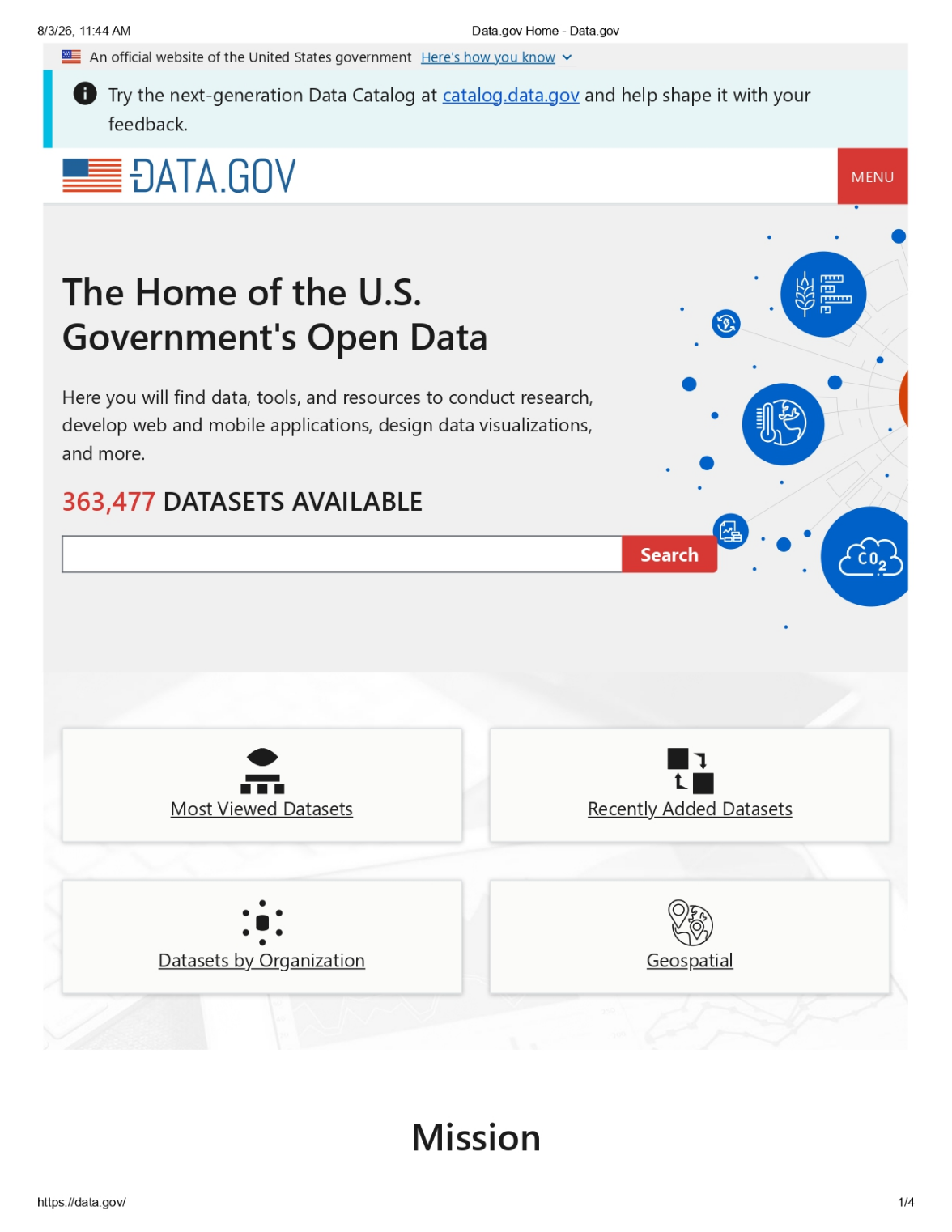
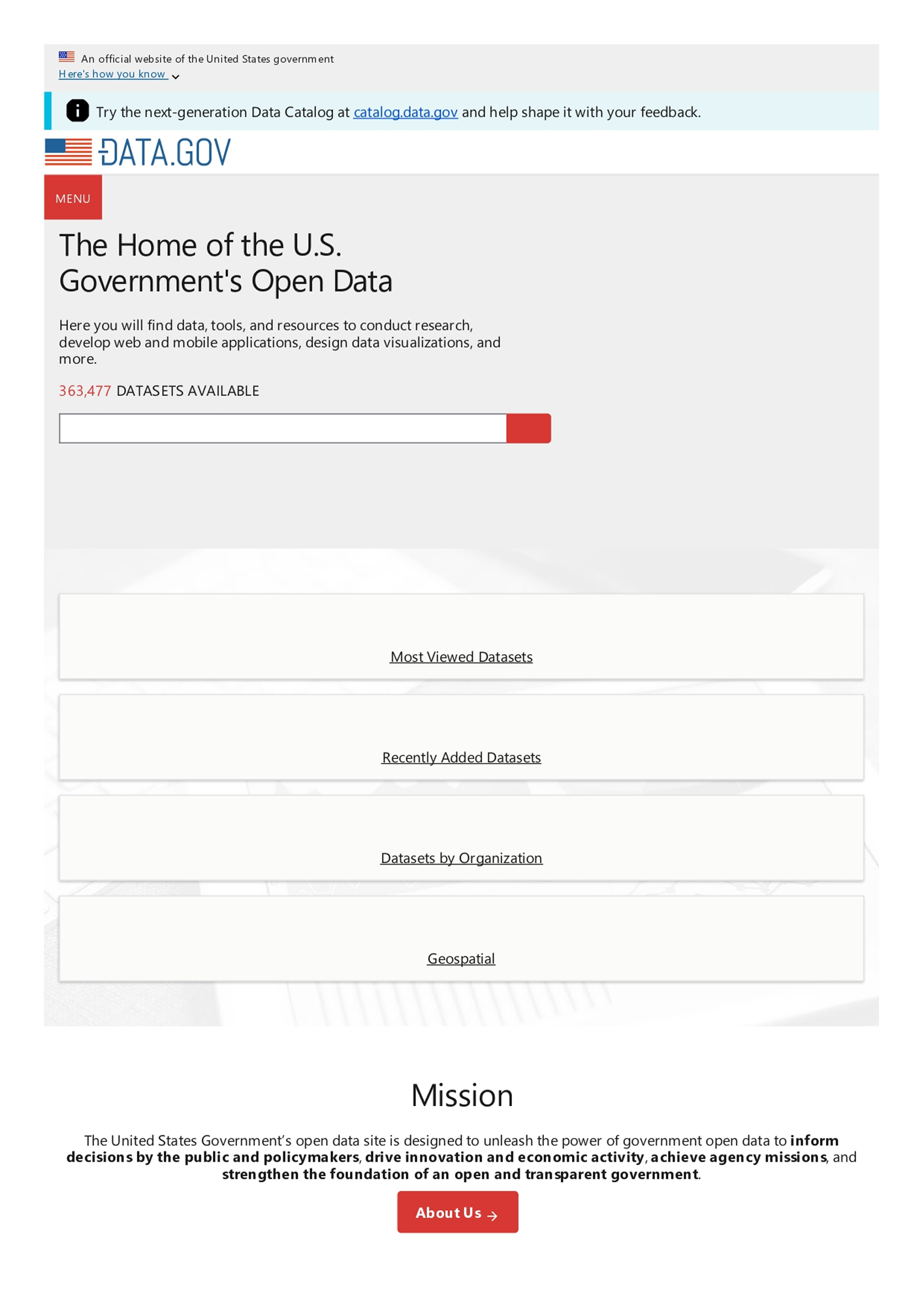
Both tools rendered the live Data.gov homepage on the same day. The difference is what reached the page.
One kept the full layout, the other kept only the words.
wkhtmltopdf renders the words, but the hero illustration, the topic icons, and the search button label all fall out.
The whole page, exactly as the site looks. The Data.gov logo, the hero illustration, the topic icons, the labeled search, and the full layout, all rendered live.
Why IronPDF?
Everything the PDF job needs, in one .NET package

Modern Engine
wkhtmltopdf: renders with a Qt WebKit engine, no Flexbox, no CSS Grid, modern CSS falls back to a plainer layout.
IronPDF: bundles a current browser engine, so the PDF matches today's browser exactly.
Result: modern layouts render as designed, not as a decade-old approximation.

Still Maintained
wkhtmltopdf: archived January 2023, last engine release 2020; no new features and no security patches, ever.
IronPDF: actively maintained, with regular engine and feature updates.
Result: no frozen, unpatched dependency waiting to fail a security review.

Compliance-Ready
wkhtmltopdf: no digital signatures, no encryption, no PDF/A or PDF/UA.
IronPDF: digital signatures, 128/256-bit encryption, VeraPDF-validated PDF/A and PDF/UA.
Result: sign, encrypt, and archive to compliance without extra tools.

Complete Toolkit
wkhtmltopdf: prints HTML to PDF only, then stops.
IronPDF: one package that renders, merges, splits, stamps, fills forms, and extracts.
Result: the whole PDF job in a single dependency.

Native .NET, No Binary
wkhtmltopdf: an external command-line binary you deploy per OS and architecture, driven through Process.Start with temp files and stderr to parse.
IronPDF: integrated via NuGet, operates within your application process safely and manages concurrency without external dependencies.
Result: no native binary to manage, no temp files, safe parallel generation out of the box.

Included Support
wkhtmltopdf: community GitHub issues only, no SLA.
IronPDF: email, chat, and phone support with an SLA.
Result: a real channel when a render breaks in production.
Wkhtmltopdf shells out. IronPDF renders in Chromium.
Wkhtmltopdf hands your HTML to an external binary and gets a flattened page back. IronPDF renders the same
HTML in one native call, so the modern layout arrives exactly as it looks in a browser.

An external binary you shell out to - nothing past the file it returns

A native .NET library - no external binary to ship
Compare side by side
Modern rendering first, then everything a production-grade library adds on.
| Feature Category | | |
|---|---|---|
| Modern Web Rendering | ||
| HTML (and URL) to PDF | ||
| Flexbox and CSS grid | ||
| Modern CSS styling (effects, filters) | ||
| CSS gradient backgrounds | ||
| Web fonts and full Unicode | ||
| Current, maintained engine | ||
| Document Capabilities | ||
| Word, RTF, Markdown to PDF | ||
| Edit, merge, and split PDFs | ||
| Encryption and digital signatures | ||
| PDF/A and PDF/UA compliance | ||
| Engine, Integration & Support | ||
| Engine | Patched Qt WebKit (~2012) | Bundled modern Chromium |
| Maintenance status | Archived 2023 | Actively maintained |
| .NET integration | External CLI binary | Native NuGet package |
| Support | Community, archived | Commercial, enterprise |
世界中の数百万人のエンジニアに信頼されています。























One license, full support included.
wkhtmltopdf ships under LGPLv3 with community support only. IronPDF is a one-time license
with active maintenance, enterprise support, and a 30-day trial.
| License Type | | |
|---|---|---|
| License & Cost | ||
| Model | Open-source (LGPLv3), copyleft obligations | Commercial perpetual, owned outright |
| Single developer (Lite) | No support license | $999 (perpetual) |
| Up to 10 developers (Professional) | No support license | $2,399 (perpetual) |
| Unlimited developers | No support license | $4,799 (perpetual) |
| Maintenance & Support | ||
| Engine updates & security fixes | None (archived 2023) | Included |
| First-year support and updates | Community only | Included free (1 yr) |
| Support channels | Community, no SLA | Email, chat, phone |
| Trial & Evaluation | ||
| Free trial | N/A (open-source) | 30 days, full-featured |
| Money-back guarantee | N/A | 30 days |
Please note: wkhtmltopdf is a trademark of its respective owner. This site is not affiliated with, endorsed by, or sponsored by wkhtmltopdf. All product names, logos, and brands are property of their respective owners. Comparisons are for informational purposes only and reflect publicly available information at the time of writing.
IronPDFへの移行
現在、Nutrient、PSPDFKit、Aspose、またはiTextをご利用の場合、Iron Softwareへの移行を支援いたします。下取り価格、導入サポート、および移行期間を短縮するサポートを提供します。
移行プランを見るCompetitor Trade-In & Upgrade ProgramSwitch from wkhtmltopdf. Save on renewal fees. Get 24/7 Human Support and more.
Find out more
PDFがHTMLのように見える必要があるとき、迅速に。

