
Apryse's viewing and annotation features are basic but when it comes to fast, flexible PDF generation, C# developers choose IronPDF.
Create, edit, and convert PDFs with ease - no bloat, no extra installs, just clean code and results.
 Apryse vs
  IronPDF
Apryse's viewing and annotation features are basic but when it comes to fast, flexible PDF generation, C# developers choose IronPDF.
Create, edit, and convert PDFs with ease - no bloat, no extra installs, just clean code and results.
IronPDF vs PDF Tron - Which PDF library suits you better?



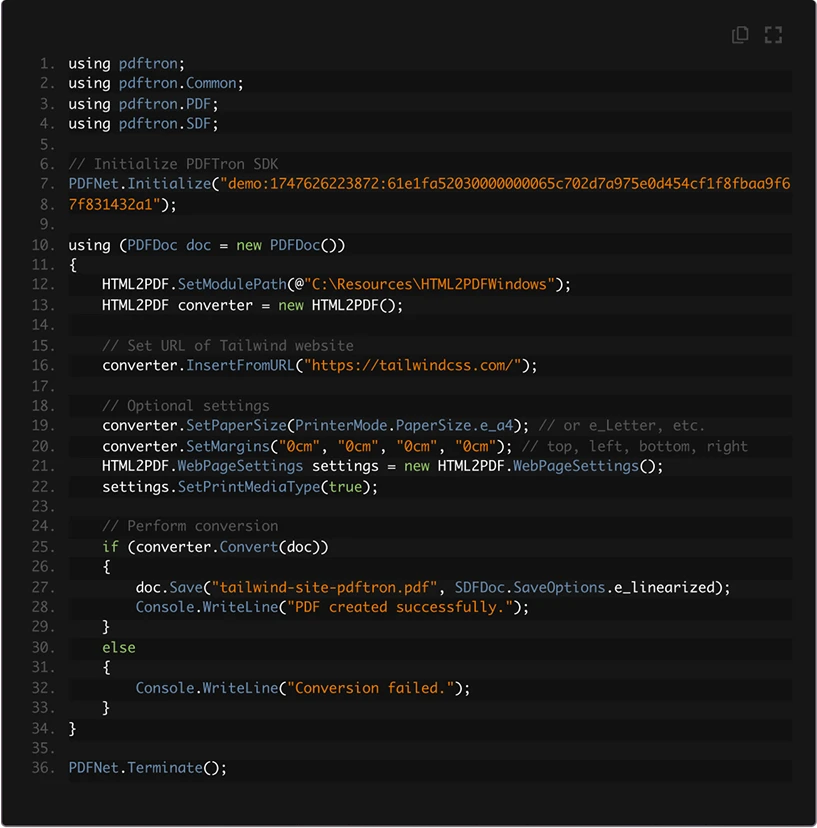

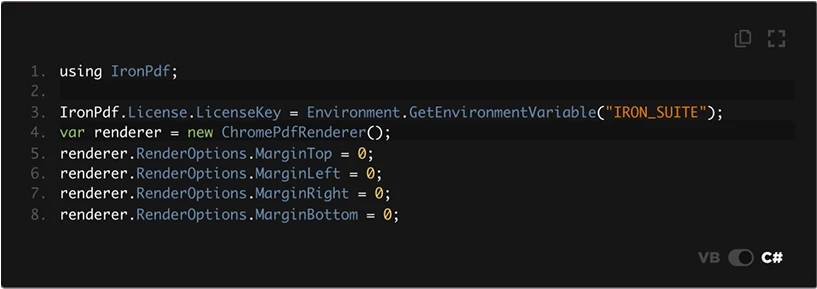

IronPDF uses a built-in Chromium engine, allowing you to go from URL to PDF in just a few lines of code.
We ran the same HTML through both Apryse HTML2PDF and IronPDF.
After 30 minutes of setup and dealing with external modules, Apryse gave us a bulky 805 KB PDF.
IronPDF? 2-minute setup, no extra installs and a clean 264 KB file.
IronPDF was also faster thanks to its native support for parallel rendering. With PDFs rendering, simpler is better.
We can’t satisfy everyone, but being reliable, helpful, and affordable has been our mission since day 1.
 Apryse : Performance & Complexity
"We ran into some performance issues in their latest versions though."
PDFTron’s heavy-weight viewer may lag behind, especially with large documents adding complexity for simple PDF conversion tasks.


IronPDF Advantage
- Convert HTML, Razor, or even Markdown to PDF with a single line of code.
- Lightning-fast rendering with a modern, browser-based engine.

 Apryse : Licensing Costs
"The main issue I have with Arpyse's licensing is that it's not really 'pay as you go'. For server-side PDF generation, their lowest tier... is 15,000 documents."
IronPDF offers clear, reasonable plans with perpetual and pay-as-you-go licenses, allowing people to choose lifetime use or recurring subscription, making it a cost-effective choice for developers.
Apryse : Documentation"It is difficult to configure and integrate the SDK with our software product. The documentation is also out of current, thus embedding takes time."


IronPDF’s documentation is clean, well-structured, and genuinely helps you get things done. What really sets it apart is how clear the deployment guidance is, not just for local dev, but for real-world production environments.
We can impress anyone.

Free Tier
NA - Request a quote
Free for Development
1 Devs, 1 Locations
NA - Request a quote
$999 with 1 year free support
+ OEM $1,999
10 Devs, 10 Locations
NA - Request a quote
$1,999 with 1 year free support
+ OEM $1,999
Unlimited Devs, Unlimited Locations
NA - Request a quote
$3,999 with 1 year free support
Full Product Suite 10 Devs, 10 Locations
NA - Request a quote
$5,998 with 1 year free support
+ OEM $3,998
Subscription Licensing
NA - Request a quote
$500 (10,000 API calls per month)
Includes 10 products, unlimited developers, locations, and OEM redistribution
IronPDF offers Perpetual Licensing and Pay-as-you-go Options. Apryse’s pricing lacks clarity and often includes additional fees for features, deployments, or scaling.
Why wait to find out about extra costs? With IronPDF, you can start saving today.






A few of the reasons IronPDF is a market leader.

What you see in the browser is what you will get in the PDF.

Works on almost all platforms.

From the first download to working in production, in literally 5 minutes.
Download IronPDF

No need for trial and error.
We've got docs and examples for everything.

Engineers answering your live chat questions in under 1 minute.
(except weekends🛌💤)

30 days, no questions asked.
We're confident in our product.
Get free trial
IronPDF vs ApryseWhat you can and can't do |  | |
|---|---|---|
PDF Conversions Features | ||
| HTML to PDF | Requires WebViewer with server-side setup; not built-in or Chromium-based | Built-in with Chromium |
| DOCX to PDF | ||
| PPT to PDF | ||
| Pixel-perfect Chrome rendering for HTML | (don't use the chromium rendering engine) | |
| Javascript Support in HTML | ||
| Convert Razor, XAML, ASPX, RTF, Markdown | Direct conversion from Razor, XAML, ASPX, RTF, MD to PDF | |
PDF Building | ||
| Protect with password and permissions | ||
| Custom Headers and Footers (Text/HTML) | ||
| Custom PDF forms | ||
| Advanced drawing features (Text, Image, Line) | ||
Compatibility | ||
| .NET Latest & Core support | ||
| .NET Framework support | ||
IronPDF is favored by businesses in tech, finance, e-commerce, and healthcare for creating dynamic PDFs, reports, and interactive forms, especially in scalable cloud environments like Azure and AWS.
The best time to choose IronPDF was yesterday. The second-best time? Today.










When you need your PDF to look like HTML, fast.

