푸터 콘텐츠로 바로가기
.NET 도움말

Blazor vs MVC (How It Works For Developers)

In the realm of web development, there are various frameworks and technologies available that developers can choose from to build robust and interactive applications. Blazor and MVC (Model-View-Controller) in the .Net core are two highly regarded options that have gained significant traction in recent years. Both frameworks offer distinct advantages and cater to different development scenarios. In this article, we will delve into the intricacies of Blazor and MVC, comparing their features, architecture, use cases, performance, development workflow, and more, enabling developers to make an informed decision.

What are Blazor and MVC in ASP.NET Core?

MVC

MVC, or Model-View-Controller, is a software architectural pattern that separates the application logic into three interconnected components: Model, View, and Controller. This pattern has been widely adopted in web development due to its clear separation of concerns and ease of maintenance. With MVC, the Model represents the data and business logic, the View defines the user interface and the Controller handles user input and updates the Model and View accordingly.

Blazor

Blazor, developed by Microsoft, is a free and open-source web framework that enables developers to build interactive web applications using C# instead of relying heavily on JavaScript. Blazor leverages WebAssembly, a binary instruction format that enables running code written in different languages in web browsers.

Blazor offers two hosting models: Blazor WebAssembly and Blazor Server. In the WebAssembly model, the entire application is executed client-side in the browser, while in the Server model, the application logic runs on the server, and the UI is rendered and updated in the browser using SignalR.

Working of Blazor and ASP.NET MVC

Working of MVC

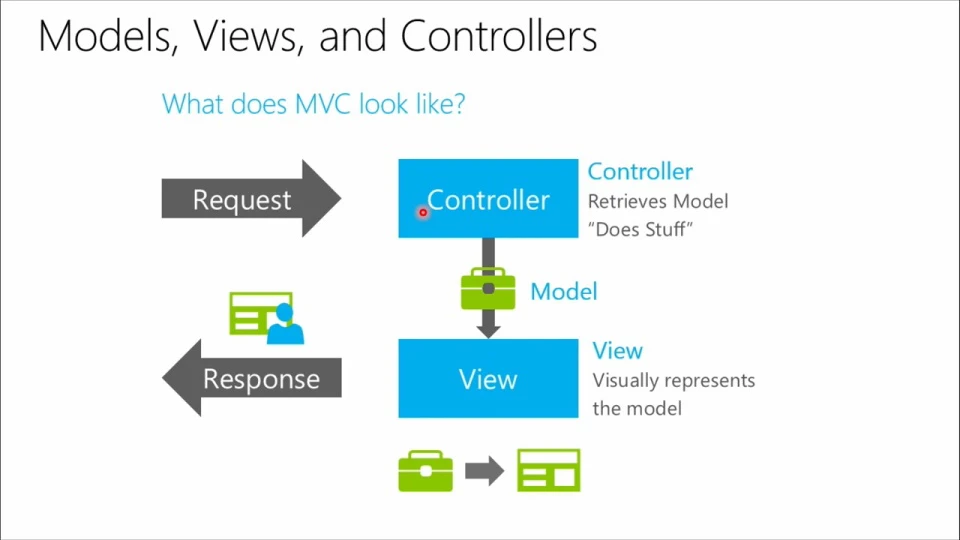
MVC follows a clear separation of concerns, dividing the application logic into three interconnected components: Model, View, and Controller.

  • Model: Represents the data and business logic of the application. It encapsulates the data structures and defines the rules and operations for manipulating the data. It interacts with the database or external data sources to fetch or update data. The Model component is responsible for maintaining data integrity, performing validations, and executing business logic.

  • View: Responsible for presenting the data to the user and capturing user input. It displays the information retrieved from the Model in a user-friendly format. The View can be a web page, a user interface screen, or any other means of visual representation. It does not contain any business logic but rather focuses on the display and presentation of data.

  • Controller: Acts as an intermediary between the Model and the View. It receives user input from the View, processes it, and determines the appropriate actions to be taken. The Controller interacts with the Model to retrieve or update data and then updates the View with the modified data. It handles user actions, such as button clicks or form submissions, and initiates the necessary operations in the Model.

The working of MVC involves the following steps:

  • The user interacts with the View, such as submitting a form or clicking a button. The View captures the user input and sends it to the Controller for processing.
  • The Controller receives the user input from the View. It analyzes the input, performs the required operations on the Model, and updates the data accordingly. The Controller can query the Model for data or modify the data based on the user input.
  • Once the Controller has processed the user input, it updates the Model with the new data or modifies the existing data. The Model ensures data integrity, performs business logic operations, and applies any necessary validations.
  • After the Model is updated, the Controller sends the updated data to the View for presentation. The View receives the data from the Controller and renders it in the appropriate format for the user. The updated View is then displayed to the user, reflecting any changes made in the Model.
  • The updated View is presented to the user, who can then interact with the application again. This completes one cycle of the MVC pattern. The user can continue interacting with the View, triggering subsequent actions in the Controller and updates in the Model.

Blazor vs MVC (How It Works For Developers): Figure 1

The request-response cycle in MVC ensures that user input triggers appropriate actions, data is processed and updated, and the updated data is presented back to the user. This separation of concerns facilitates code modularity, testability, and maintainability.

Working of Blazor

Blazor is a web framework that enables developers to build interactive web apps using C# instead of relying heavily on JavaScript. It utilizes WebAssembly and offers two hosting models: Blazor WebAssembly and Blazor Server.

Blazor WebAssembly

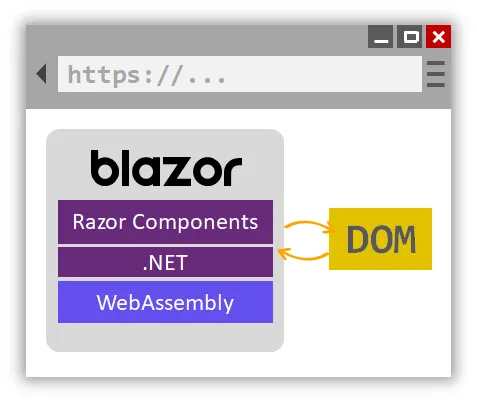
Blazor WebAssembly allows the entire application to run client-side in the user's browser. Here's how it works:

  • When a user accesses a Blazor WebAssembly application, the required files, including the compiled C# code, HTML, CSS, and JavaScript, are downloaded to the user's browser.
  • The downloaded Blazor WebAssembly files are executed by the WebAssembly runtime in the browser environment. WebAssembly is a binary instruction format that enables running code written in various languages, including C#, directly in the browser.
  • Blazor WebAssembly uses components as the fundamental building blocks of the user interface. Components are written in C# and employ a syntax similar to HTML called Razor syntax. When the Blazor WebAssembly application runs, the browser renders the initial component defined in the application's entry point.
  • User interactions, such as button clicks or form submissions, trigger events within the Blazor WebAssembly application. These events are handled by the C# code defined within the components. The event handlers can perform various operations, such as updating the application state, making web API calls, or modifying the UI.
  • Blazor WebAssembly components have a lifecycle that includes different stages, such as initialization, rendering, and disposal. During this lifecycle, components can handle events, modify the application state, and trigger UI updates. Blazor provides lifecycle methods that developers can override to execute specific actions at various stages of the component's lifecycle.
  • Blazor WebAssembly applications can communicate with APIs, services, and databases using C#. Developers can make HTTP requests, invoke RESTful APIs, or utilize gRPC for communication. Blazor WebAssembly provides libraries and tools, such as HttpClient, to simplify API interactions.

Blazor vs MVC (How It Works For Developers): Figure 2

Blazor Server

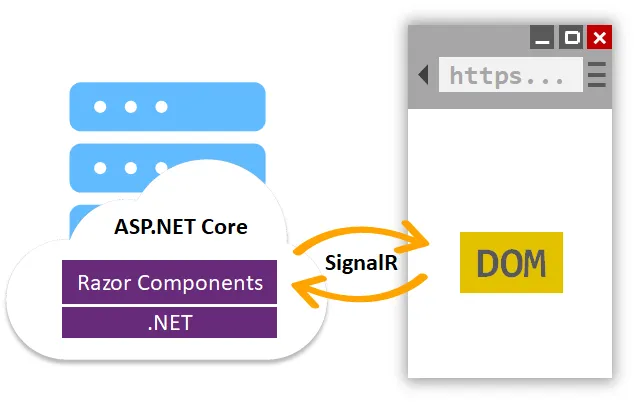
In Blazor Server, the application logic runs on the server, and the UI is rendered and updated on the client side using SignalR. Here's a breakdown of how it functions:

  • When a user accesses a Blazor Server application, the initial HTML page is loaded, similar to traditional web applications. The page references the JavaScript and SignalR client-side libraries required for communication with the server.
  • In Blazor Server, user interactions, such as button clicks, are sent to the server via SignalR, a real-time web communication library. The server-side code processes these events and updates the application state accordingly.
  • After processing the user event, the server generates updated UI components based on the changes in the application state. These updated components are sent back to the client side using SignalR connection.
  • On the client side, the JavaScript code receives the updated UI Razor components from the server. It applies these updates to the Document Object Model (DOM), ensuring that the UI reflects the changes made on the server side. This approach allows for a responsive user experience since only UI changes are transmitted over the network, minimizing data transfer.
  • Blazor Server leverages SignalR to provide real-time updates. When the application state changes on the server side, the server pushes the updated UI components to the client side, ensuring that the UI remains synchronized with the server's state. This real-time communication enables interactive and collaborative experiences in Blazor Server applications.

Blazor vs MVC (How It Works For Developers): Figure 3

Both Blazor WebAssembly and Blazor Server empower developers to write C# code for both the client-side and server-side logic. They provide features like component rendering, data binding, and communication with APIs, allowing for the development of rich, interactive web applications using the power of C#.

Pros and Cons of Blazor and MVC

Let's delve into a detailed exploration of the pros and cons of Blazor and MVC. Understanding the strengths and weaknesses of these frameworks will help you make an informed decision about which one is the best fit for your web development projects. So, let's weigh the advantages and considerations of Blazor and MVC to guide you in choosing the right approach for your specific requirements.

Blazor Pros

  1. Single language development with C#: Blazor app allows software developers to use C# for both client-side and server-side logic, promoting code sharing and reusability.
  2. Rich and interactive user interfaces: Blazor apps enable the creation of dynamic and engaging UIs using C# and Razor syntax.
  3. Full .NET ecosystem integration: Developers can leverage the extensive collection of .NET code libraries, frameworks, and tools for enhanced productivity.
  4. Improved performance (Blazor WebAssembly): Blazor WebAssembly applications run directly in the browser, resulting in faster loading times and reduced server requests.
  5. Cross-platform development capabilities: Blazor WebAssembly supports deployment on various platforms, expanding the reach of the applications.

MVC Pros

  1. Well-established pattern: MVC provides a proven architectural pattern for structuring applications, facilitating code maintenance and testing.
  2. Flexibility and customization: MVC offers fine-grained control over the application's behavior and appearance, allowing for highly customized web applications.
  3. Strong community support: MVC has a large and active community, providing ample resources, documentation, and community-driven support.
  4. SEO-friendly URLs: MVC applications generate clean and search engine-friendly URLs, aiding in search engine optimization efforts.
  5. Legacy integration: MVC is well-suited for integrating with existing legacy systems or databases, providing flexibility in working with different data sources.

Blazor Cons

  1. Learning curve: As a relatively new framework, Blazor may require developers to invest time in learning its concepts, syntax, and best practices.
  2. Limited browser support (Blazor WebAssembly): Older browsers without WebAssembly support may not be able to run Blazor WebAssembly applications, impacting audience reach.
  3. Larger file sizes and longer load times (Blazor WebAssembly): Blazor WebAssembly applications require downloading runtime and application files, resulting in larger sizes and longer initial load times.

MVC Cons

  1. Increased complexity with larger applications: MVC applications can become complex as they grow in size and complexity, requiring careful management of dependencies.
  2. Longer development time: The customization and fine-grained control of MVC can lead to longer development cycles compared to simpler frameworks.
  3. Limited real-time updates: Achieving real-time updates and dynamic UI changes may require additional complexity and the use of libraries like SignalR in MVC.

Considering these factors, developers should carefully evaluate the requirements and trade-offs to choose between Blazor and MVC for their specific project needs.

Comparison MVC vs Blazor

MVC (Model-View-Controller) and Blazor are two distinct web development frameworks that offer different approaches and advantages. Let's compare MVC and Blazor based on various factors:

Architecture

  • MVC: Follows a well-established architectural pattern, separating the application logic into three components: Model, View, and Controller. It promotes the separation of concerns and provides a structured approach to development.

  • Blazor: Introduces a component-based architecture, where UI components are created using C# and Razor syntax. It combines the benefits of both client-side and server-side development approaches.

Language and Tooling

  • MVC: Primarily uses C# for server-side logic and HTML, CSS, and JavaScript for the front end. It has extensive tooling and a mature ecosystem for building web applications.

  • Blazor: Allows developers to write both client-side and server-side logic using C#. It provides a unified programming model for front-end and back-end development, reducing the need to switch between different languages.

Performance

  • MVC: Typically relies on server-side rendering, where the server generates the HTML and sends it to the client. This approach may result in slower initial loading times and increased server requests for dynamic content.

  • Blazor: Offers two modes - Blazor WebAssembly and Blazor Server. Blazor WebAssembly runs client-side in the browser, enabling faster loading times and reducing server requests. Blazor Server relies on real-time communication with the server, providing a responsive user experience.

Development Productivity

  • MVC: Provides a mature development pattern, extensive tooling, and a large community. Developers can leverage existing libraries and frameworks, speeding up development and troubleshooting.

  • Blazor: Component-based architecture promotes code reusability and modularity, making it easier to build complex UI elements. The integration with the .NET ecosystem allows developers to leverage existing libraries and tools.

Browser Support

  • MVC: Applications have wide browser compatibility since they rely on standard HTML, CSS, and JavaScript.

  • Blazor: Blazor WebAssembly requires modern browser support for WebAssembly. Older browsers may not be compatible, limiting the audience reach for Blazor WebAssembly applications.

Ultimately, the choice between MVC and Blazor depends on factors such as project requirements, team expertise, and performance considerations. MVC is a solid choice for traditional server-side rendering and established development practices. Blazor, on the other hand, offers a modern and unified development experience with the power of C# on both the client and server sides.

IronPDF’s key capability is converting HTML to PDF, ensuring that layouts and styles remain intact. It’s an excellent choice for generating PDFs from web-based content such as reports, invoices, and documentation. It can convert HTML files, URLs, and HTML strings into PDFs.

using IronPdf;

class Program
{
    static void Main(string[] args)
    {
        var renderer = new ChromePdfRenderer();

        // 1. Convert HTML String to PDF
        string htmlContent = "<h1>Hello, IronPDF!</h1><p>This is a PDF from an HTML string.</p>";
        var pdfFromHtmlString = renderer.RenderHtmlAsPdf(htmlContent);
        pdfFromHtmlString.SaveAs("HTMLStringToPDF.pdf");

        // 2. Convert HTML File to PDF
        string htmlFilePath = "path_to_your_html_file.html"; // Specify the path to your HTML file
        var pdfFromHtmlFile = renderer.RenderHtmlFileAsPdf(htmlFilePath);
        pdfFromHtmlFile.SaveAs("HTMLFileToPDF.pdf");

        // 3. Convert URL to PDF
        string url = "http://ironpdf.com"; // Specify the URL
        var pdfFromUrl = renderer.RenderUrlAsPdf(url);
        pdfFromUrl.SaveAs("URLToPDF.pdf");
    }
}
using IronPdf;

class Program
{
    static void Main(string[] args)
    {
        var renderer = new ChromePdfRenderer();

        // 1. Convert HTML String to PDF
        string htmlContent = "<h1>Hello, IronPDF!</h1><p>This is a PDF from an HTML string.</p>";
        var pdfFromHtmlString = renderer.RenderHtmlAsPdf(htmlContent);
        pdfFromHtmlString.SaveAs("HTMLStringToPDF.pdf");

        // 2. Convert HTML File to PDF
        string htmlFilePath = "path_to_your_html_file.html"; // Specify the path to your HTML file
        var pdfFromHtmlFile = renderer.RenderHtmlFileAsPdf(htmlFilePath);
        pdfFromHtmlFile.SaveAs("HTMLFileToPDF.pdf");

        // 3. Convert URL to PDF
        string url = "http://ironpdf.com"; // Specify the URL
        var pdfFromUrl = renderer.RenderUrlAsPdf(url);
        pdfFromUrl.SaveAs("URLToPDF.pdf");
    }
}
$vbLabelText   $csharpLabel

Conclusion

Blazor and MVC are both powerful frameworks with their own strengths and use cases. MVC offers a proven architecture, excellent performance, and an extensive ecosystem, making it a reliable choice for traditional web development. On the other hand, Blazor empowers developers to build interactive web applications using C#, promoting code sharing and providing a more modern and streamlined development workflow.

The choice between Blazor and MVC ultimately depends on the specific requirements of the project, the developer's familiarity with the technologies, and the desired user experience. Both frameworks have their merits, and developers should carefully consider these factors before making a decision. Regardless of the choice, both Blazor and MVC contribute to the thriving web development landscape, catering to different needs and driving innovation in the industry. With continuous updates and community support, both frameworks are poised to evolve and address the ever-changing demands of web development.

IronPDF offers a user-friendly solution for creating PDF files, viewing PDFs, updating, and manipulating PDF files in both MVC and Blazor applications. As a valuable component of Iron Software's Iron Suite, it includes a suite of five beneficial libraries that assist in the development of MVC or Blazor web apps with features like Excel integration, PDF manipulation, barcode generation, QR code generation, and image handling. The Iron Suite is available free of charge to users for personal use, and if you require a commercial license, you can find more information on Iron Software's Licensing page.

자주 묻는 질문

Blazor 애플리케이션에서 HTML을 PDF로 변환하려면 어떻게 해야 하나요?

HTML 콘텐츠를 PDF 문서로 렌더링하는 IronPDF의 기능을 사용하여 Blazor 애플리케이션에서 HTML을 PDF로 변환할 수 있습니다. 이 작업은 IronPDF 라이브러리를 Blazor 프로젝트에 통합하고 RenderHtmlAsPdf와 같은 메서드를 사용하여 수행할 수 있습니다.

MVC 애플리케이션에서 PDF를 생성하려면 어떻게 해야 하나요?

MVC 애플리케이션에서는 RenderHtmlFileAsPdf 또는 RenderHtmlAsPdf와 같은 메서드를 호출하여 IronPDF를 사용하여 PDF를 생성할 수 있습니다. 이를 통해 HTML 페이지 또는 콘텐츠로부터 동적 PDF를 효율적으로 생성할 수 있습니다.

Blazor WebAssembly와 Blazor Server의 차이점은 무엇인가요?

Blazor WebAssembly는 WebAssembly를 사용하여 클라이언트 측에서 전적으로 실행되므로 오프라인 기능을 사용할 수 있고 서버 부하를 줄일 수 있습니다. 반면 블레이저 서버는 서버에서 실행되며 실시간 업데이트를 위해 SignalR을 통해 클라이언트와 통신합니다. 두 모델 모두 IronPDF를 사용하여 PDF를 생성할 수 있지만, 일반적으로 성능상의 이유로 서버 측에서 사용됩니다.

웹 개발에 Blazor를 사용하면 어떤 주요 이점이 있나요?

Blazor는 클라이언트 측과 서버 측 로직 모두에 C#을 사용할 수 있어 개발과 유지보수를 간소화할 수 있는 이점을 제공합니다. 또한 컴포넌트 기반 아키텍처와 Blazor Server의 SignalR을 통한 실시간 업데이트를 지원합니다. IronPDF를 Blazor에 통합하여 강력한 PDF 처리 기능을 추가할 수 있습니다.

개발자가 MVC를 사용할 때 직면할 수 있는 어려움은 무엇인가요?

MVC는 강력한 프레임워크이지만 애플리케이션이 확장됨에 따라 복잡해질 수 있으며 구조화된 특성으로 인해 개발 시간이 길어질 수 있습니다. IronPDF는 PDF 생성 및 조작을 간소화하여 개발자가 애플리케이션 로직에 집중할 수 있도록 함으로써 이러한 복잡성을 관리할 수 있도록 도와줍니다.

IronPDF는 웹 개발 프로젝트를 어떻게 향상시키나요?

IronPDF는 PDF 문서를 원활하게 생성, 편집 및 조작할 수 있는 도구를 제공하여 웹 개발 프로젝트를 향상시킵니다. 이는 송장, 보고서 또는 웹 콘텐츠 보관과 같은 문서 생성 기능이 필요한 프로젝트에 특히 유용합니다.

프로젝트에 Blazor와 MVC 중 하나를 선택할 때 고려해야 할 요소는 무엇인가요?

Blazor와 MVC 중 하나를 선택할 때는 프로젝트 요구 사항, 팀의 전문성, 원하는 사용자 경험을 고려하세요. Blazor는 클라이언트와 서버에서 C#을 사용한 최신 개발을 제공하는 반면, MVC는 강력한 커뮤니티 지원과 함께 전통적인 접근 방식을 제공합니다. IronPDF를 통합하면 강력한 PDF 처리 기능으로 두 프레임워크를 모두 향상시킬 수 있습니다.

커티스 차우
기술 문서 작성자

커티스 차우는 칼턴 대학교에서 컴퓨터 과학 학사 학위를 취득했으며, Node.js, TypeScript, JavaScript, React를 전문으로 하는 프론트엔드 개발자입니다. 직관적이고 미적으로 뛰어난 사용자 인터페이스를 만드는 데 열정을 가진 그는 최신 프레임워크를 활용하고, 잘 구성되고 시각적으로 매력적인 매뉴얼을 제작하는 것을 즐깁니다.

커티스는 개발 분야 외에도 사물 인터넷(IoT)에 깊은 관심을 가지고 있으며, 하드웨어와 소프트웨어를 통합하는 혁신적인 방법을 연구합니다. 여가 시간에는 게임을 즐기거나 디스코드 봇을 만들면서 기술에 대한 애정과 창의성을 결합합니다.