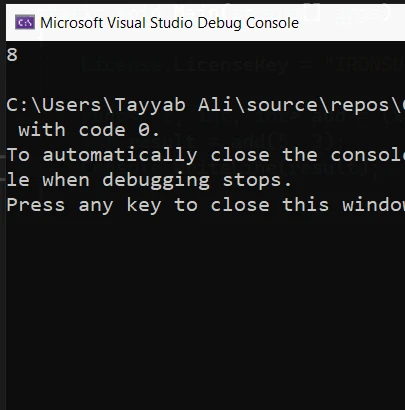
.NET 도움말 C# Action (How It Works For Developers) 커티스 차우 업데이트됨:6월 22, 2025 다운로드 IronPDF NuGet 다운로드 DLL 다운로드 윈도우 설치 프로그램 무료 체험 시작하기 LLM용 사본 LLM용 사본 LLM용 마크다운 형식으로 페이지를 복사하세요 ChatGPT에서 열기 ChatGPT에 이 페이지에 대해 문의하세요 제미니에서 열기 제미니에게 이 페이지에 대해 문의하세요 Grok에서 열기 Grok에게 이 페이지에 대해 문의하세요 혼란 속에서 열기 Perplexity에게 이 페이지에 대해 문의하세요 공유하다 페이스북에 공유하기 트위터에 공유하기 LinkedIn에 공유하기 URL 복사 이메일로 기사 보내기 In this tutorial, we'll teach the concepts of C# Action, Func delegate, and related topics. This guide is designed for beginners and will walk you through the basics, provide examples, and explain key terms of action delegate. Let's begin by understanding what delegates are in C#. We'll explore the IronPDF library later in the article. Understanding Delegates in C# Delegates are a programming construct that acts as references to methods, defined by a particular set of parameters and a return type, encapsulating functionalities like predefined delegate type and allowing methods to return values. It allows the passing of methods as arguments. Essentially, a delegate serves as a function pointer, pointing to the method it represents. In C#, there are two predefined delegate types that are widely used: Func and Action. What is a Func Delegate? The Func delegate represents a method that can have a return value. The last type parameter specifies the return type, and the preceding types specify the input parameters. For instance, a Func<int, int, string> takes two integer parameters and returns a string message. Delegates in Practice: Examples Let's take a look at some examples to understand how Func and Action delegates work in C#. Example of an Action Delegate An Action delegate, a predefined delegate type, is used when you want to execute a method that does not specifically return a value, focusing instead on operations. Here's a basic example: Action<string> display = message => Console.WriteLine(message); display("Hello, World!"); Action<string> display = message => Console.WriteLine(message); display("Hello, World!"); $vbLabelText $csharpLabel This code defines an Action delegate, illustrating the use of an anonymous method, that takes a single string parameter and prints it to the console. The => symbol is used to define a lambda expression, which is a concise way to write anonymous methods. Example of a Func Delegate A Func delegate, which returns a value, can be used as follows: Func<int, int, int> add = (x, y) => x + y; int result = add(5, 3); Console.WriteLine(result); Func<int, int, int> add = (x, y) => x + y; int result = add(5, 3); Console.WriteLine(result); $vbLabelText $csharpLabel This example creates a Func delegate that takes two integer parameters and returns their sum. The sum will show on the console like this: Key Concepts Anonymous Methods Anonymous methods in C# provide a way to define inline methods without a name. They are often used with delegates to create delegate instances directly. Lambda Expressions Lambda expressions are a shorthand for writing anonymous methods. They allow you to write less code while achieving the same result. Generic Delegate A generic delegate can work with any data type. Func and Action are examples of generic delegates, providing more flexibility by allowing you to specify input and output types at runtime. Delegate Instance A delegate instance is created with the new keyword or by simply assigning a method that matches the delegate's signature. System Namespace The System namespace in .NET contains built-in types like Func and Action, which are part of the base class library. Asynchronous Programming with Delegates Delegates, including Action and Func, are integral to managing asynchronous tasks in C#. They allow developers to encapsulate a reference to a method that can then be executed asynchronously. This means that the main application thread can initiate a task and then continue with other work until the task is completed. At that point, a callback method, referenced by a delegate, is called to handle the result. This pattern is vital for creating responsive user interfaces that remain interactive even when performing long-running operations. Example: Asynchronous File Processing Consider an application that needs to process a large file. Using an Action delegate in conjunction with asynchronous programming patterns like Task can significantly enhance application performance: public async Task ProcessFileAsync(string filePath, Action<string> onComplete) { // Asynchronously read file content string fileContent = await File.ReadAllTextAsync(filePath); // Process the file content here (omitted for brevity) // Once processing is complete, invoke the onComplete callback onComplete?.Invoke("File processing completed successfully."); } public async Task ProcessFileAsync(string filePath, Action<string> onComplete) { // Asynchronously read file content string fileContent = await File.ReadAllTextAsync(filePath); // Process the file content here (omitted for brevity) // Once processing is complete, invoke the onComplete callback onComplete?.Invoke("File processing completed successfully."); } $vbLabelText $csharpLabel In this example, File.ReadAllTextAsync is used to read the file content without blocking the main thread. Once the file is processed, an Action delegate named onComplete is invoked to notify the caller that the operation is complete, allowing for further actions like updating the UI or logging results. Introduction of IronPDF: A C# PDF Library IronPDF is a comprehensive C# PDF library designed for .NET developers to create, edit, and manipulate PDF files with ease. It distinguishes itself with a Chrome-based rendering engine, ensuring pixel-perfect PDFs from HTML content, CSS, JavaScript, and images. IronPDF is compatible with a wide range of .NET frameworks and environments, including .NET Standard, .NET Framework, and .NET Core, across Windows, Linux, and macOS platforms. Installing IronPDF To incorporate IronPDF into your .NET projects, you can use NuGet, which is the most straightforward method. Just open the Package Manager Console in Visual Studio and run the following command: Install-Package IronPdf This command fetches and installs the IronPDF package, setting up your project to start using IronPDF for PDF generation and manipulation. Code Example with Action Delegate Here's a simple example demonstrating how to use IronPDF in conjunction with an Action delegate to perform a PDF generation task: using IronPdf; using System; class Program { static void Main(string[] args) { var renderer = new ChromePdfRenderer(); // Define an Action delegate that takes HTML content as a string Action<string> generatePdf = html => { // Render the HTML as a PDF var pdf = renderer.RenderHtmlAsPdf(html); // Save the PDF to a file pdf.SaveAs("example.pdf"); }; // Generate the PDF with the provided HTML generatePdf("<p>Hello, world!</p>"); Console.WriteLine("PDF generated successfully."); } } using IronPdf; using System; class Program { static void Main(string[] args) { var renderer = new ChromePdfRenderer(); // Define an Action delegate that takes HTML content as a string Action<string> generatePdf = html => { // Render the HTML as a PDF var pdf = renderer.RenderHtmlAsPdf(html); // Save the PDF to a file pdf.SaveAs("example.pdf"); }; // Generate the PDF with the provided HTML generatePdf("<p>Hello, world!</p>"); Console.WriteLine("PDF generated successfully."); } } $vbLabelText $csharpLabel This example defines an Action delegate that takes a string of HTML and uses IronPDF to render it into a PDF document. The generated PDF is then saved to the file system. This approach demonstrates how delegates can be used to encapsulate PDF generation logic, making your code more modular and flexible. Licensing IronPDF offers various licensing options for developers, starting from individual developer licenses to enterprise agreements. Pricing for these licenses starts from $799. Conclusion By now, you should have a basic understanding of Action and Func delegates in C#, along with how to use anonymous methods and lambda expressions. Remember, practice is key to mastering delegate concepts. Try creating your own examples to define, assign, and invoke delegates. You can explore IronPDF's capabilities freely with its free trial version. Should it suit your project requirements, you can secure a license with prices commencing at $799. 자주 묻는 질문 C# 액션 델리게이트란 무엇인가요? C#의 액션 델리게이트는 값을 반환하지 않는 메서드를 실행하는 데 사용되는 미리 정의된 델리게이트 유형입니다. 일반적으로 결과를 반환할 필요가 없는 작업에 사용됩니다. C#에서 Func 델리게이트를 사용하려면 어떻게 해야 하나요? Func 델리게이트는 값을 반환하는 메서드를 캡슐화하는 데 사용됩니다. 반환 유형을 마지막 매개변수로 지정합니다. 계산된 결과를 반환해야 하는 메서드에 유용합니다. Func와 Action 델리게이트의 차이점은 무엇인가요? 가장 큰 차이점은 함수 델리게이트는 값을 반환하는 반면 액션 델리게이트는 그렇지 않다는 점입니다. Func는 메서드가 결과를 반환해야 할 때 사용되는 반면, Action은 반환값이 없는 프로시저에 사용됩니다. C# 애플리케이션에서 PDF를 만들려면 어떻게 해야 하나요? IronPDF를 사용하여 C# 애플리케이션에서 PDF를 만들 수 있습니다. Chrome 기반 렌더링 엔진으로 PDF를 생성할 수 있으며 델리게이트를 사용하여 .NET 애플리케이션에 통합할 수 있습니다. C#의 람다 표현식은 무엇이며 델리게이트와 어떤 관련이 있나요? 람다 표현식은 인라인 메서드를 간결하게 작성하는 방법으로, 코드를 간소화하기 위해 델리게이트와 함께 자주 사용됩니다. 람다 표현식을 사용하면 메서드를 간결하게 표현할 수 있으며 액션 및 함수 델리게이트와 함께 자주 사용됩니다. 델리게이트를 사용하여 C#에서 비동기 작업을 처리하려면 어떻게 해야 하나요? Action 및 Func와 같은 델리게이트를 사용하여 비동기적으로 실행되는 메서드를 캡슐화할 수 있습니다. 이 접근 방식을 사용하면 작업이 완료될 때까지 기다리는 동안 애플리케이션에서 다른 작업을 수행할 수 있으므로 성능과 응답성이 향상됩니다. .NET 프로젝트에서 PDF 생성을 위한 C# 라이브러리는 어떻게 설치하나요? .NET 프로젝트에 IronPDF와 같은 라이브러리를 설치하려면 패키지 관리자 콘솔에서 다음 명령을 사용하여 NuGet을 사용하세요: Install-Package IronPdf. 이렇게 하면 프로젝트가 PDF 생성 및 조작을 위한 준비가 완료됩니다. C#에서 익명 메서드란 무엇인가요? 익명 메서드를 사용하면 이름 없이 인라인 메서드를 정의할 수 있으며, 종종 델리게이트와 함께 델리게이트 인스턴스를 직접 생성하는 데 사용됩니다. 코드 블록을 매개변수로 전달할 수 있는 방법을 제공합니다. C#에서 일반 대리인이란 무엇인가요? 일반 델리게이트는 모든 데이터 유형을 사용할 수 있는 델리게이트입니다. 런타임에 입력 및 출력 매개변수의 유형을 정의할 수 있는 함수 및 액션이 일반 델리게이트의 예입니다. .NET에서 시스템 네임스페이스란 무엇이며 그 중요성은 무엇인가요? .NET의 시스템 네임스페이스에는 기본 클래스 라이브러리의 일부이며 C# 애플리케이션 개발에 필요한 핵심 기능을 제공하는 Func 및 Action과 같은 필수 유형과 클래스가 포함되어 있습니다. 커티스 차우 지금 바로 엔지니어링 팀과 채팅하세요 기술 문서 작성자 커티스 차우는 칼턴 대학교에서 컴퓨터 과학 학사 학위를 취득했으며, Node.js, TypeScript, JavaScript, React를 전문으로 하는 프론트엔드 개발자입니다. 직관적이고 미적으로 뛰어난 사용자 인터페이스를 만드는 데 열정을 가진 그는 최신 프레임워크를 활용하고, 잘 구성되고 시각적으로 매력적인 매뉴얼을 제작하는 것을 즐깁니다. 커티스는 개발 분야 외에도 사물 인터넷(IoT)에 깊은 관심을 가지고 있으며, 하드웨어와 소프트웨어를 통합하는 혁신적인 방법을 연구합니다. 여가 시간에는 게임을 즐기거나 디스코드 봇을 만들면서 기술에 대한 애정과 창의성을 결합합니다. 관련 기사 업데이트됨 12월 11, 2025 Bridging CLI Simplicity & .NET : Using Curl DotNet with IronPDF Jacob Mellor has bridged this gap with CurlDotNet, a library created to bring the familiarity of cURL to the .NET ecosystem. 더 읽어보기 업데이트됨 12월 20, 2025 RandomNumberGenerator C# Using the RandomNumberGenerator C# class can help take your PDF generation and editing projects to the next level 더 읽어보기 업데이트됨 12월 20, 2025 C# String Equals (How it Works for Developers) When combined with a powerful PDF library like IronPDF, switch pattern matching allows you to build smarter, cleaner logic for document processing 더 읽어보기 C# Record (How It Works For Developers)C# Object Oriented (How It Works Fo...
업데이트됨 12월 11, 2025 Bridging CLI Simplicity & .NET : Using Curl DotNet with IronPDF Jacob Mellor has bridged this gap with CurlDotNet, a library created to bring the familiarity of cURL to the .NET ecosystem. 더 읽어보기
업데이트됨 12월 20, 2025 RandomNumberGenerator C# Using the RandomNumberGenerator C# class can help take your PDF generation and editing projects to the next level 더 읽어보기
업데이트됨 12월 20, 2025 C# String Equals (How it Works for Developers) When combined with a powerful PDF library like IronPDF, switch pattern matching allows you to build smarter, cleaner logic for document processing 더 읽어보기