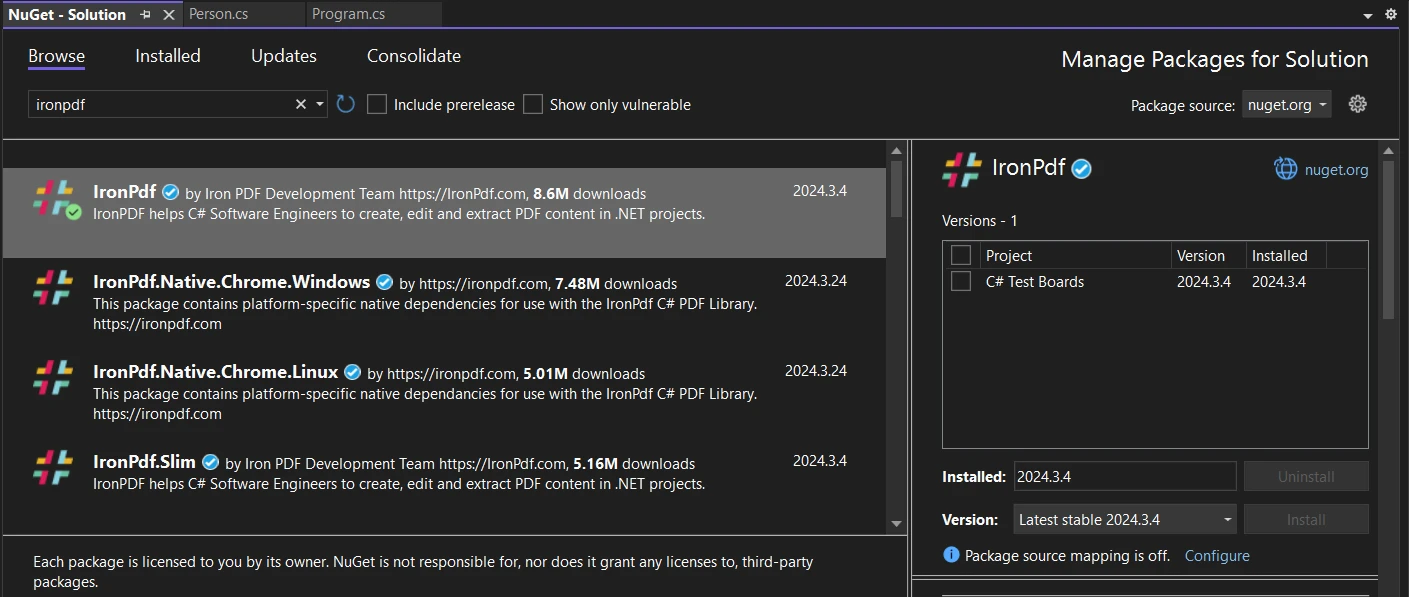
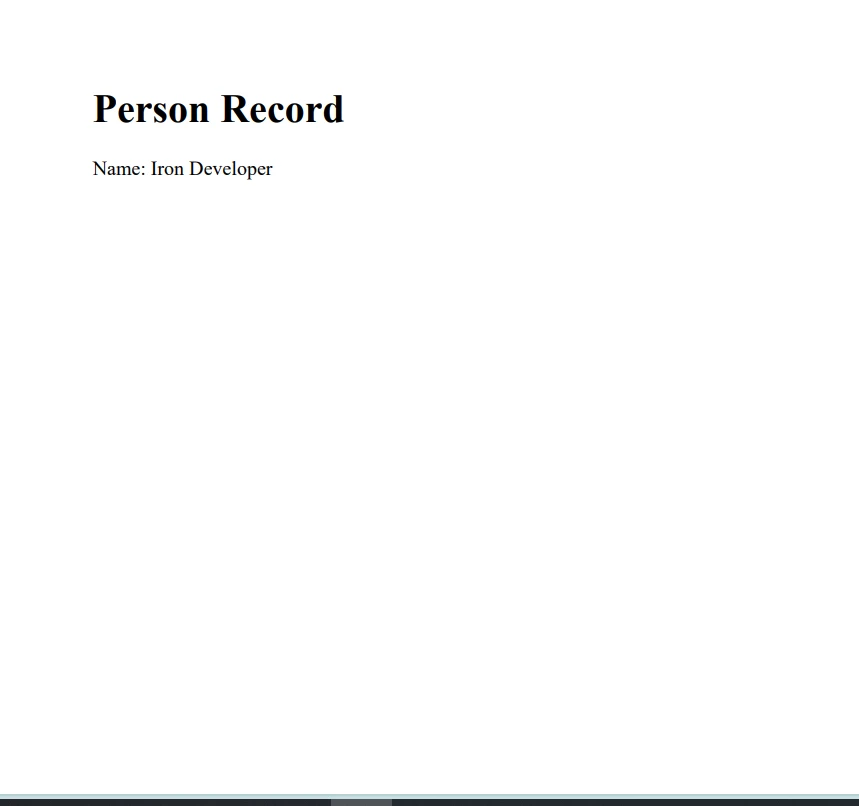
.NET 도움말 C# Record (How It Works For Developers) 커티스 차우 업데이트됨:6월 22, 2025 다운로드 IronPDF NuGet 다운로드 DLL 다운로드 윈도우 설치 프로그램 무료 체험 시작하기 LLM용 사본 LLM용 사본 LLM용 마크다운 형식으로 페이지를 복사하세요 ChatGPT에서 열기 ChatGPT에 이 페이지에 대해 문의하세요 제미니에서 열기 제미니에게 이 페이지에 대해 문의하세요 Grok에서 열기 Grok에게 이 페이지에 대해 문의하세요 혼란 속에서 열기 Perplexity에게 이 페이지에 대해 문의하세요 공유하다 페이스북에 공유하기 트위터에 공유하기 LinkedIn에 공유하기 URL 복사 이메일로 기사 보내기 C# record is a powerful feature introduced to ease the creation of immutable data models and to enhance the coding experience by reducing boilerplate code. This tutorial aims to simplify the concept of records in C# for beginners, guiding you through their syntax, usage, and advantages. Whether you're dealing with data transfer objects, configurations, or simply need an efficient way to represent data, C# records offer a concise and developer-friendly approach. We'll also discuss IronPDF later in the article. What is a C# Record? A record in C# is a reference type that provides a simplified syntax for defining immutable data models. Unlike traditional class definitions, a record emphasizes value-based equality rather than reference equality. This means two record instances are considered equal if their property values are the same, not merely because they refer to the same object location in memory. Record Types: Class and Struct There are two main types of records in C#: Record class: The default record type, which is a reference type. Record struct: Introduced for scenarios requiring value types, these are immutable by default and offer value-based comparison similar to record classes. Record Declaration Declaring a record is straightforward. You can define a record using the record keyword followed by the type (class or struct) and the name of the record. For example, a simple person record can be declared as: public record class Person(string FirstName, string LastName); public record class Person(string FirstName, string LastName); $vbLabelText $csharpLabel This declaration includes positional parameters for FirstName and LastName, which under the hood, generate public properties and a primary constructor for these properties. The Immutable Nature of Records Records are designed to be immutable, meaning once a record instance is created, its property values cannot be changed. This immutability is crucial for creating predictable and thread-safe applications, especially when dealing with concurrent operations. Immutable Record Struct An immutable record struct is declared similarly to a record class but using the record struct syntax. It combines the immutability and value-based comparison of records with the performance benefits of a value type: public readonly record struct ImmutablePerson(string FirstName, string LastName); public readonly record struct ImmutablePerson(string FirstName, string LastName); $vbLabelText $csharpLabel Working with Records Records simplify the creation and use of data-centric types. They support inheritance, allow non-destructive mutation, and provide built-in formatting for easier debugging. Let's explore these features through examples. Creating and Comparing Records Consider the following example where we create two instances of a person record: var person1 = new Person("Iron", "Software"); var person2 = new Person("Iron", "Software"); Console.WriteLine(person1 == person2); // Output: True var person1 = new Person("Iron", "Software"); var person2 = new Person("Iron", "Software"); Console.WriteLine(person1 == person2); // Output: True $vbLabelText $csharpLabel Despite person1 and person2 being two distinct instances, they are considered equal based on their property values, showcasing value-based equality. This is a significant departure from the reference types' default behavior, which focuses on reference equality. Immutable Properties By design, record properties are immutable. This means you cannot change the property values of a record instance after it has been created. // This will result in a compilation error // person1.FirstName = "Jane"; // This will result in a compilation error // person1.FirstName = "Jane"; $vbLabelText $csharpLabel Inheritance with Records Records support inheritance, allowing you to create a hierarchy of data models. Here's how you can extend a base record: public record Employee(string FirstName, string LastName, string Department) : Person(FirstName, LastName); public record Employee(string FirstName, string LastName, string Department) : Person(FirstName, LastName); $vbLabelText $csharpLabel This Employee record extends Person, adding the additional Department property. Advanced Record Features Non-Destructive Mutation Records provide a built-in method for creating a new record instance from an existing one with some properties modified, known as non-destructive mutation. var updatedPerson = person1 with { FirstName = "Jane" }; var updatedPerson = person1 with { FirstName = "Jane" }; $vbLabelText $csharpLabel Built-in Formatting Records come with built-in formatting for easier debugging and logging, automatically providing a string representation of their properties. Console.WriteLine(person1); Console.WriteLine(person1); $vbLabelText $csharpLabel Advantages of Using C# Records Simplified Syntax: Records reduce the need for boilerplate code, making your models more concise and readable. Immutable Data Models: The immutable nature of records helps in creating thread-safe applications. Value-Based Equality: Records use value-based equality instead of reference equality, ideal for data-centric types. Support for Inheritance: Records can inherit from other records, allowing for code reuse and hierarchical data models. Introduction to IronPDF: A C# PDF Library IronPDF Overview is a PDF library for .NET developers, designed for generating, editing, and manipulating PDF documents within C# applications. IronPDF supports rendering PDFs from HTML content, CSS, Images, and JavaScript. Its core capability lies in creating PDF documents from web content, offering a streamlined approach to converting HTML strings, URLs, and ASPX web forms into PDF files. IronPDF operates efficiently across various application types, including forms applications, server applications, and web applications. How to Install the IronPDF Library Installing IronPDF is straightforward and can be accomplished via the NuGet Package Manager in Visual Studio. Follow these steps: In Visual Studio, navigate to Solution Explorer, right-click on References, and select Manage NuGet Packages. In the NuGet Package Manager, select Browse and search for "IronPdf". Find the IronPDF package and click Install. Alternatively, you can install it using the Package Manager Console with the command: Install-Package IronPdf Example: Using C# Record with IronPDF Let's consider a practical example where we use a C# record to hold data that we then use to generate a PDF document with IronPDF: public record Person(string FirstName, string LastName); class Program { static void Main(string[] args) { // Create an instance of the Person record. var person = new Person("Iron", "Developer"); // Initialize a new renderer object for generating PDF files using Chrome's rendering engine. var renderer = new IronPdf.Rendering.ChromePdfRenderer(); // Render an HTML string as a PDF document. var pdf = renderer.RenderHtmlAsPdf($"<h1>Person Record</h1><p>Name: {person.FirstName} {person.LastName}</p>"); // Save the PDF to the specified location. pdf.SaveAs("PersonRecord.pdf"); } } public record Person(string FirstName, string LastName); class Program { static void Main(string[] args) { // Create an instance of the Person record. var person = new Person("Iron", "Developer"); // Initialize a new renderer object for generating PDF files using Chrome's rendering engine. var renderer = new IronPdf.Rendering.ChromePdfRenderer(); // Render an HTML string as a PDF document. var pdf = renderer.RenderHtmlAsPdf($"<h1>Person Record</h1><p>Name: {person.FirstName} {person.LastName}</p>"); // Save the PDF to the specified location. pdf.SaveAs("PersonRecord.pdf"); } } $vbLabelText $csharpLabel This example creates a simple Person record and then uses IronPDF to generate a PDF document displaying the person's name. It showcases how seamlessly C# records can integrate with PDF generation in .NET applications. IronPDF Licensing IronPDF is a commercial product offering various licenses tailored to different needs, including individual and commercial options. Each purchase comes with a lifetime license and a 30-day money-back guarantee. Explore IronPDF Licensing Options before purchasing the license. Conclusion C# records represent a significant step forward in simplifying data modeling in .NET applications. By understanding and leveraging records, developers can create more reliable, maintainable, and readable code bases. Whether you're working on large-scale applications or simple data structures, the features offered by records, from immutability to value-based equality, make them an indispensable tool in your C# toolkit. IronPDF provides an opportunity to test its features using the IronPDF Free Trial before deciding on a purchase. If you find the software meets your needs, you can buy a license starting at $799. 자주 묻는 질문 C#에서 레코드를 사용하여 PDF를 생성하려면 어떻게 해야 하나요? C# 레코드는 데이터를 효율적으로 저장하는 데 사용할 수 있으며, IronPDF에서 이를 활용하여 PDF 문서를 생성할 수 있습니다. 필요한 데이터를 보관할 레코드를 생성하고 IronPDF를 사용하여 이 데이터를 PDF 형식으로 렌더링할 수 있습니다. C# 레코드를 사용하면 어떤 이점이 있나요? C# 레코드는 간소화된 구문, 변경 불가능한 데이터 모델, 값 기반 동일성, 상속 지원 등 여러 가지 이점을 제공합니다. 이러한 기능 덕분에 레코드는 간결하고 신뢰할 수 있는 데이터 중심 유형을 만드는 데 적합합니다. C#에서 레코드는 어떻게 평등을 처리하나요? C#의 레코드는 가치 기반 평등을 강조합니다. 즉, 두 레코드 인스턴스는 메모리 내 위치에 관계없이 속성 값이 일치하면 동일한 것으로 간주됩니다. C#으로 레코드를 어떻게 선언하나요? C#의 레코드는 유형(클래스 또는 구조체) 및 레코드 이름 뒤에 record 키워드를 사용하여 선언합니다. 예를 들어, 공개 레코드 클래스 Person(문자열 FirstName, 문자열 LastName);와 같은 식입니다. 레코드 클래스와 레코드 구조의 차이점은 무엇인가요? 레코드 클래스는 참조 유형이고 레코드 구조체는 값 유형입니다. 둘 다 불변성과 값 기반 비교를 제공하지만 메모리 할당과 사용 사례에서 차이가 있습니다. C# 레코드 생성 후 속성을 수정할 수 있나요? C# 레코드는 변경 불가능하도록 설계되었으므로 레코드가 생성된 후에는 속성을 변경할 수 없습니다. 그러나 비파괴적인 변형을 수행하여 속성이 수정된 새 레코드 인스턴스를 만들 수는 있습니다. IronPDF는 C# 애플리케이션을 어떻게 향상시키나요? IronPDF는 PDF 문서 생성, 편집 및 조작을 위한 강력한 기능을 제공하여 C# 애플리케이션을 향상시킵니다. 개발자가 HTML 콘텐츠로 PDF를 생성할 수 있어 문서 관리를 위한 다용도 도구로 활용할 수 있습니다. .NET 프로젝트에 IronPDF를 어떻게 설치하나요? Visual Studio의 NuGet 패키지 관리자를 사용하거나 패키지 관리자 콘솔에서 Install-Package IronPdf 명령을 실행하여 .NET 프로젝트에 IronPDF를 설치할 수 있습니다. C# 레코드에서 비파괴적 돌연변이는 어떻게 작동하나요? C# 레코드의 비파괴 변형을 사용하면 원본 인스턴스를 변경하지 않고도 일부 속성을 수정한 기존 레코드 인스턴스에서 새 레코드 인스턴스를 만들 수 있습니다. C# 개발에서 PDF 라이브러리는 어떤 용도로 사용되나요? IronPDF와 같은 PDF 라이브러리는 C# 개발에서 PDF 문서를 생성, 편집 및 조작하는 데 사용됩니다. 개발자가 PDF 기능을 애플리케이션에 효율적으로 통합하는 데 도움이 됩니다. 커티스 차우 지금 바로 엔지니어링 팀과 채팅하세요 기술 문서 작성자 커티스 차우는 칼턴 대학교에서 컴퓨터 과학 학사 학위를 취득했으며, Node.js, TypeScript, JavaScript, React를 전문으로 하는 프론트엔드 개발자입니다. 직관적이고 미적으로 뛰어난 사용자 인터페이스를 만드는 데 열정을 가진 그는 최신 프레임워크를 활용하고, 잘 구성되고 시각적으로 매력적인 매뉴얼을 제작하는 것을 즐깁니다. 커티스는 개발 분야 외에도 사물 인터넷(IoT)에 깊은 관심을 가지고 있으며, 하드웨어와 소프트웨어를 통합하는 혁신적인 방법을 연구합니다. 여가 시간에는 게임을 즐기거나 디스코드 봇을 만들면서 기술에 대한 애정과 창의성을 결합합니다. 관련 기사 업데이트됨 12월 11, 2025 Bridging CLI Simplicity & .NET : Using Curl DotNet with IronPDF Jacob Mellor has bridged this gap with CurlDotNet, a library created to bring the familiarity of cURL to the .NET ecosystem. 더 읽어보기 업데이트됨 12월 20, 2025 RandomNumberGenerator C# Using the RandomNumberGenerator C# class can help take your PDF generation and editing projects to the next level 더 읽어보기 업데이트됨 12월 20, 2025 C# String Equals (How it Works for Developers) When combined with a powerful PDF library like IronPDF, switch pattern matching allows you to build smarter, cleaner logic for document processing 더 읽어보기 C# Using Statement (How It Works For Developers)C# Action (How It Works For Developers)
업데이트됨 12월 11, 2025 Bridging CLI Simplicity & .NET : Using Curl DotNet with IronPDF Jacob Mellor has bridged this gap with CurlDotNet, a library created to bring the familiarity of cURL to the .NET ecosystem. 더 읽어보기
업데이트됨 12월 20, 2025 RandomNumberGenerator C# Using the RandomNumberGenerator C# class can help take your PDF generation and editing projects to the next level 더 읽어보기
업데이트됨 12월 20, 2025 C# String Equals (How it Works for Developers) When combined with a powerful PDF library like IronPDF, switch pattern matching allows you to build smarter, cleaner logic for document processing 더 읽어보기