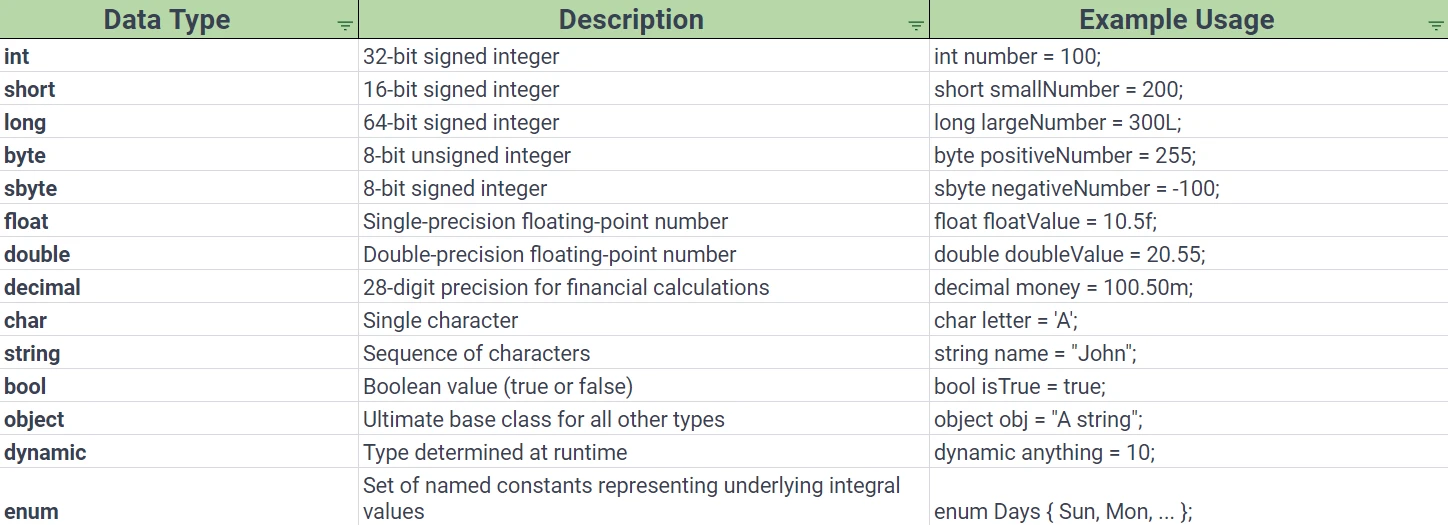
.NET 도움말 C# Data Types (How it Works For Developers) 커티스 차우 업데이트됨:7월 28, 2025 다운로드 IronPDF NuGet 다운로드 DLL 다운로드 윈도우 설치 프로그램 무료 체험 시작하기 LLM용 사본 LLM용 사본 LLM용 마크다운 형식으로 페이지를 복사하세요 ChatGPT에서 열기 ChatGPT에 이 페이지에 대해 문의하세요 제미니에서 열기 제미니에게 이 페이지에 대해 문의하세요 Grok에서 열기 Grok에게 이 페이지에 대해 문의하세요 혼란 속에서 열기 Perplexity에게 이 페이지에 대해 문의하세요 공유하다 페이스북에 공유하기 트위터에 공유하기 LinkedIn에 공유하기 URL 복사 이메일로 기사 보내기 When working with programming languages like C#, understanding data types is crucial. Just like in the real world, where we have various containers to store different types of items, in programming, we use data types to specify what type of data we're storing. In simpler words, a data type specifies the type of actual data stored in a memory location. What are Data Types? In C#, data types can be understood as categorizations for the data we store in our programs. These categorizations help in ensuring that the correct kind of data is stored in the right way. Think of it as choosing the correct jar for storing cookies or spices; the jar is tailored to keep its content safe and accessible. There are mainly two broad categories of data types: Value Data Types: They store the actual data. Value types get stored in the stack region of memory, and their default value is set according to the type. Examples of a value type would be an int type which stores a whole number as a value. Reference Data Types: They do not contain the actual data stored in a variable, but instead contain a reference to the data's memory location. The actual reference types reside in the heap region of memory and have a default value of null. Why are Data Types Important? Understanding data types is like understanding the building blocks of C#. Just like in the C language, data types in C# ensure that: The right amount of memory is allocated. The actual data gets stored efficiently. The data is safely retrieved without any loss or misinterpretation. Predefined Data Types Predefined data types, also known as built-in data types, are the essential components that enable us to perform various actions and store various forms of data within our programs. They are fundamental to C#, as they provide the means to create variables that can store values. Numeric Types Integer Types These value types are used to store whole numbers, both positive and negative. They are further divided into: Int Data Type (int type): Represents 32-bit signed integers. Short Data Type: Represents 16-bit signed integers. Long Data Type: Represents 64-bit signed integers. Byte Data Type: Represents 8-bit unsigned integers. Sbyte Data Type: Represents 8-bit signed integers, allowing negative numbers. int number = 100; short smallNumber = 200; long largeNumber = 300L; byte positiveNumber = 255; sbyte negativeNumber = -100; int number = 100; short smallNumber = 200; long largeNumber = 300L; byte positiveNumber = 255; sbyte negativeNumber = -100; $vbLabelText $csharpLabel Floating Point Types These value types include numbers with decimal points or floating-point numbers. Float Type: Represents single-precision floating-point type. Useful for values that don't require full double precision. Double Type: Represents double-precision floating-point type. It allows more precision than float. float floatValue = 10.5f; double doubleValue = 20.55; float floatValue = 10.5f; double doubleValue = 20.55; $vbLabelText $csharpLabel Decimal Type Specially designed for financial and monetary calculations, the decimal type offers 28-digit precision, making it highly suitable for calculations requiring a high degree of accuracy. decimal money = 100.50m; decimal money = 100.50m; $vbLabelText $csharpLabel Textual Types Char Data Type (char type) Used to store a single character, such as a letter, a digit, or a special character. char letter = 'A'; char letter = 'A'; $vbLabelText $csharpLabel String Data Type (string type) The string data type in C# represents a sequence of characters. It's based on the String class and is incredibly versatile. string name = "John"; string name = "John"; $vbLabelText $csharpLabel Other Predefined Types Bool Data Type Represents a Boolean value, either true or false. bool isTrue = true; bool isTrue = true; $vbLabelText $csharpLabel Object Type The ultimate base class for all other types. It can refer to an object of any other type. object obj = "This is a string"; object obj = "This is a string"; $vbLabelText $csharpLabel Dynamic Type A type that bypasses compile-time type checking. It is determined at runtime, allowing for more flexibility but less safety. dynamic anything = 10; dynamic anything = 10; $vbLabelText $csharpLabel Predefined Reference Types Aside from the above-mentioned value types, there are predefined reference types, including: Class Types: Defines the blueprint of an object. Interface Types: Defines a contract that classes can implement. Array Types: Enables the creation of an array, a collection of items of the same type. Built-in Conversions C# also provides built-in conversions between different predefined data types. For example, you can convert an int to a float without losing information. Default Values Each value data type has a default value that gets assigned if no value is given. For example, the default value of a bool data type is false, while for reference types, it's null. User Defined Data Types in C# Beyond the predefined types, C# offers the flexibility to define our data types, known as user-defined types. These user-defined types are created and defined by the programmer to create structures to suit their specific needs. These include: Struct Types Useful for small data structures. It allows you to group different data types under a single variable name. It can be defined in C# as follows: public struct Point { public int X; public int Y; } public struct Point { public int X; public int Y; } $vbLabelText $csharpLabel Enum Types An enumeration is a set of named constants representing underlying integral values. enum Days { Sun, Mon, Tue, Wed, Thu, Fri, Sat } enum Days { Sun, Mon, Tue, Wed, Thu, Fri, Sat } $vbLabelText $csharpLabel User Defined Reference Types Class Types, Interface Types, Array Types, and Delegate Types: These are reference types and more advanced but equally essential. Class types: Allow you to encapsulate data and methods within a single unit. Interface Types: Define a set of methods that a class type must implement. It's like a guideline to how a class type should be built. Array Types: A data structure that stores a fixed size collection of elements of the same data type. Delegate types: A type that represents a reference to a method. Pointer Data Type While C# is a high-level language and generally abstracts memory management, it does offer pointer data types for specific tasks that need direct memory address manipulation. However, you'd need to use unsafe code blocks to use the pointer data type. unsafe { int var = 10; int* p = &var; // Address operator to get memory address } unsafe { int var = 10; int* p = &var; // Address operator to get memory address } $vbLabelText $csharpLabel Tabular Overview For a concise overview, the following table lists some primary value and reference data types and usage examples: Introducing the Iron Suite Powering Up C# While understanding data types in C# sets the foundation for robust programming, incorporating powerful tools can significantly improve your coding experience. Iron Suite is an example of these tools, made for developers and designed to augment your capabilities, speed up development processes, and simplify complex tasks. IronPDF Your Solution for PDF Operations IronPDF Tool for PDF Manipulation in C# is an indispensable tool when you need to work with PDF documents in your C# projects. This tool can generate PDFs from HTML, images, and ASPX web forms. This can be seen as analogous to working with string data types in C#. IronPDF is a really awesome tool that can turn webpages, URLs, and HTML into PDFs that look exactly like the original. This is perfect for creating PDFs of online stuff like reports and invoices. So, if you ever need to make a PDF from a webpage, IronPDF is the way to go! using IronPdf; class Program { static void Main(string[] args) { var renderer = new ChromePdfRenderer(); // 1. Convert HTML String to PDF var htmlContent = "<h1>Hello, IronPDF!</h1><p>This is a PDF from an HTML string.</p>"; var pdfFromHtmlString = renderer.RenderHtmlAsPdf(htmlContent); pdfFromHtmlString.SaveAs("HTMLStringToPDF.pdf"); // 2. Convert HTML File to PDF var htmlFilePath = "path_to_your_html_file.html"; // Specify the path to your HTML file var pdfFromHtmlFile = renderer.RenderHtmlFileAsPdf(htmlFilePath); pdfFromHtmlFile.SaveAs("HTMLFileToPDF.pdf"); // 3. Convert URL to PDF var url = "http://ironpdf.com"; // Specify the URL var pdfFromUrl = renderer.RenderUrlAsPdf(url); pdfFromUrl.SaveAs("URLToPDF.pdf"); } } using IronPdf; class Program { static void Main(string[] args) { var renderer = new ChromePdfRenderer(); // 1. Convert HTML String to PDF var htmlContent = "<h1>Hello, IronPDF!</h1><p>This is a PDF from an HTML string.</p>"; var pdfFromHtmlString = renderer.RenderHtmlAsPdf(htmlContent); pdfFromHtmlString.SaveAs("HTMLStringToPDF.pdf"); // 2. Convert HTML File to PDF var htmlFilePath = "path_to_your_html_file.html"; // Specify the path to your HTML file var pdfFromHtmlFile = renderer.RenderHtmlFileAsPdf(htmlFilePath); pdfFromHtmlFile.SaveAs("HTMLFileToPDF.pdf"); // 3. Convert URL to PDF var url = "http://ironpdf.com"; // Specify the URL var pdfFromUrl = renderer.RenderUrlAsPdf(url); pdfFromUrl.SaveAs("URLToPDF.pdf"); } } $vbLabelText $csharpLabel IronXL Excel Operations Made Easy Handling Excel files in C# without the right tool can be daunting. This is where IronXL Excel Library for C# steps in. IronXL allows developers to read, write, and create Excel spreadsheets without needing to Interop. With IronXL, handling Excel data becomes as intuitive as manipulating integers or floating-point numbers in C#. IronOCR Effortlessly turn Images to Code Incorporating Optical Character Recognition (OCR) in your applications requires a powerful and precise tool. IronOCR Library for OCR Tasks in C# offers precisely that. With IronOCR, you can read text and barcodes from images, scanned documents, or PDFs, transforming them into actionable data. It eliminates manual data entry and potential errors, offering a streamlined way to digitize your content. IronBarcode Transform how you Handle Barcodes Barcodes are everywhere, and being able to generate or read them in your C# application is crucial for many industries. IronBarcode for Barcode Processing in C# provides a comprehensive suite for all your barcode needs. Whether you're creating barcodes for products, scanning them for data retrieval, or integrating them with inventory systems, IronBarcode has got you covered. Conclusion The Iron Suite, with its range of powerful tools, including IronPDF, IronXL, IronOCR, and IronBarcode, is a valuable asset for any C# developer, just like the predefined data types in C#. Even more appealing is that each product in the Iron Suite offers a free trial of Iron Software Tools, allowing you to explore and experience these tools without any immediate investment. If you find them essential for your projects, the licensing starts from just $799. In an exclusive offer, you can buy the full Iron Suite for the price of just two individual tools. 자주 묻는 질문 C#에서 HTML을 PDF로 변환하려면 어떻게 해야 하나요? IronPDF의 RenderHtmlAsPdf 메서드를 사용하여 HTML 문자열을 PDF로 변환할 수 있습니다. 또한 RenderHtmlFileAsPdf를 사용하여 HTML 파일을 PDF로 변환할 수도 있습니다. C#에서 값 유형과 참조 유형의 주요 차이점은 무엇인가요? 값 유형은 실제 데이터를 저장하고 스택에 할당되는 반면, 참조 유형은 데이터에 대한 참조를 저장하며 힙에 저장됩니다. 이를 이해하는 것은 C#에서 효율적인 메모리 관리를 위해 매우 중요합니다. 데이터 유형은 C#에서 메모리 할당에 어떤 영향을 미치나요? 데이터 유형은 데이터 저장을 위해 할당되는 메모리의 양을 결정합니다. 값 유형은 스택에 메모리를 할당해야 하고 참조 유형은 힙에 할당해야 합니다. 적절하게 사용하면 효율적인 메모리 활용과 데이터 무결성을 보장할 수 있습니다. C#에서 사용자 정의 데이터 유형의 예로는 어떤 것이 있나요? C#의 사용자 정의 데이터 유형에는 구조체 유형, 열거형 유형, 클래스 유형, 인터페이스 유형, 배열 유형, 위임 유형과 같은 참조 유형과 같은 구조체가 포함됩니다. 이를 통해 프로그래머는 사용자 정의 데이터 구조를 만들 수 있습니다. 도구가 데이터 조작을 위한 C# 개발을 어떻게 향상시킬 수 있나요? IronPDF, IronXL, IronOCR, IronBarcode와 같은 도구는 각각 PDF, Excel 파일, OCR 작업, 바코드 처리를 위한 강력한 솔루션을 제공합니다. 이러한 도구는 복잡한 작업을 간소화하여 개발자가 핵심 애플리케이션 로직에 집중할 수 있도록 지원합니다. C#의 숫자 데이터 유형과 그 용도는 무엇인가요? C#의 숫자 데이터 유형에는 정수, 부동 소수점 숫자 및 소수가 포함됩니다. 이러한 데이터 유형은 숫자 데이터를 저장하고 조작하는 데 사용되며, 소수는 재무 계산에 높은 정밀도를 제공합니다. C#에서 문자 및 문자열 데이터 유형은 어떤 역할을 하나요? char 데이터 유형은 단일 문자를 저장하는 반면, string 데이터 유형은 문자 시퀀스에 사용되어 텍스트 데이터 조작 및 저장을 용이하게 합니다. IronPDF를 단순한 PDF 생성 이외의 작업에도 사용할 수 있나요? 예, IronPDF는 기존 PDF를 병합, 분할, 편집하고 텍스트와 이미지를 추출할 수 있어 C# 프로젝트에서 포괄적인 PDF 조작을 위한 다용도 도구입니다. IronXL은 C#에서 Excel 작업을 어떻게 개선하나요? IronXL을 사용하면 개발자가 Excel Interop에 의존하지 않고도 Excel 파일과 상호 작용할 수 있으며, C#에서 프로그래밍 방식으로 스프레드시트를 읽고, 쓰고, 작성할 수 있는 기능을 제공합니다. 커티스 차우 지금 바로 엔지니어링 팀과 채팅하세요 기술 문서 작성자 커티스 차우는 칼턴 대학교에서 컴퓨터 과학 학사 학위를 취득했으며, Node.js, TypeScript, JavaScript, React를 전문으로 하는 프론트엔드 개발자입니다. 직관적이고 미적으로 뛰어난 사용자 인터페이스를 만드는 데 열정을 가진 그는 최신 프레임워크를 활용하고, 잘 구성되고 시각적으로 매력적인 매뉴얼을 제작하는 것을 즐깁니다. 커티스는 개발 분야 외에도 사물 인터넷(IoT)에 깊은 관심을 가지고 있으며, 하드웨어와 소프트웨어를 통합하는 혁신적인 방법을 연구합니다. 여가 시간에는 게임을 즐기거나 디스코드 봇을 만들면서 기술에 대한 애정과 창의성을 결합합니다. 관련 기사 업데이트됨 12월 11, 2025 Bridging CLI Simplicity & .NET : Using Curl DotNet with IronPDF Jacob Mellor has bridged this gap with CurlDotNet, a library created to bring the familiarity of cURL to the .NET ecosystem. 더 읽어보기 업데이트됨 12월 20, 2025 RandomNumberGenerator C# Using the RandomNumberGenerator C# class can help take your PDF generation and editing projects to the next level 더 읽어보기 업데이트됨 12월 20, 2025 C# String Equals (How it Works for Developers) When combined with a powerful PDF library like IronPDF, switch pattern matching allows you to build smarter, cleaner logic for document processing 더 읽어보기 C# AS (How it Works For Developers)C# True False (How it Works For Dev...
업데이트됨 12월 11, 2025 Bridging CLI Simplicity & .NET : Using Curl DotNet with IronPDF Jacob Mellor has bridged this gap with CurlDotNet, a library created to bring the familiarity of cURL to the .NET ecosystem. 더 읽어보기
업데이트됨 12월 20, 2025 RandomNumberGenerator C# Using the RandomNumberGenerator C# class can help take your PDF generation and editing projects to the next level 더 읽어보기
업데이트됨 12월 20, 2025 C# String Equals (How it Works for Developers) When combined with a powerful PDF library like IronPDF, switch pattern matching allows you to build smarter, cleaner logic for document processing 더 읽어보기