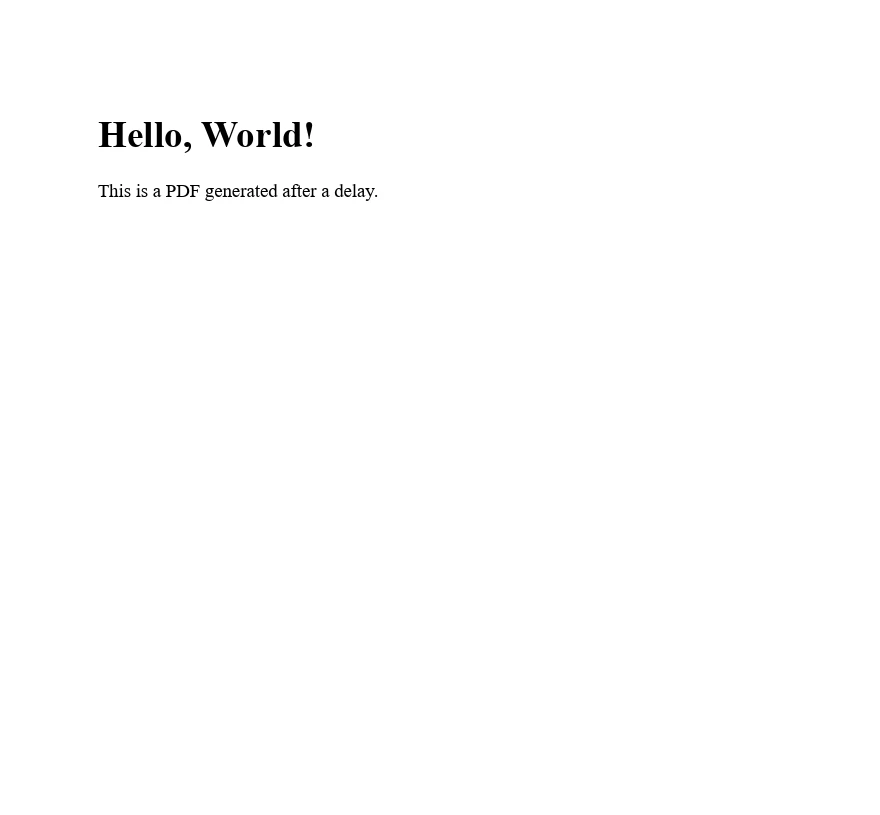
.NET 도움말 C# Sleep (How It Works For Developers) 커티스 차우 업데이트됨:7월 28, 2025 다운로드 IronPDF NuGet 다운로드 DLL 다운로드 윈도우 설치 프로그램 무료 체험 시작하기 LLM용 사본 LLM용 사본 LLM용 마크다운 형식으로 페이지를 복사하세요 ChatGPT에서 열기 ChatGPT에 이 페이지에 대해 문의하세요 제미니에서 열기 제미니에게 이 페이지에 대해 문의하세요 Grok에서 열기 Grok에게 이 페이지에 대해 문의하세요 혼란 속에서 열기 Perplexity에게 이 페이지에 대해 문의하세요 공유하다 페이스북에 공유하기 트위터에 공유하기 LinkedIn에 공유하기 URL 복사 이메일로 기사 보내기 The Thread.Sleep method in C# is a static method belonging to the Thread class within the System.Threading namespace. This method pauses the execution of the current thread for a specified duration. This is to either allow other threads to run or to introduce a delay in execution. The pause duration is specified in milliseconds, making it a precise tool for controlling the timing of thread execution. The purpose of this tutorial is to give you a foundational understanding of how to use the Sleep method in your C# programs, offering practical examples and insights into its behavior and impact on program execution. Understanding the Sleep Method At its core, the Sleep method is straightforward to use. It requires a single parameter: an integer representing the amount of time, in milliseconds, for which to pause the thread. This sleep function is important for tasks that necessitate a delay, providing a straightforward method to allocate CPU time to other threads. Here’s a basic example of using the Sleep method: using System; using System.Threading; class Program { public static void Main() { Console.WriteLine("Execution starts."); Thread.Sleep(2000); // Sleep for 2000 milliseconds Console.WriteLine("Execution resumes after 2 seconds."); } } using System; using System.Threading; class Program { public static void Main() { Console.WriteLine("Execution starts."); Thread.Sleep(2000); // Sleep for 2000 milliseconds Console.WriteLine("Execution resumes after 2 seconds."); } } $vbLabelText $csharpLabel In the above program, the main thread of the program is paused by the Main method using Thread.Sleep(2000), halting execution for 2 seconds before it resumes. This demonstrates how the Sleep method can be applied to introduce a delay in the execution flow. Practical Uses of the Sleep Method The Sleep method finds practical applications in various scenarios, such as simulating time-consuming operations in web development, managing the execution flow in GUI applications, or creating a timer within a console application. By suspending the entire thread execution for a specified amount of time, developers can control the pace of execution, simulate real-world delays, or manage resource consumption by yielding CPU time to other threads or processes. Example in a Loop Consider a scenario where you need to execute a block of code repeatedly at fixed intervals. The Sleep method can be used to introduce the necessary delay in each iteration of the loop: for (int i = 0; i < 5; i++) { Thread.Sleep(1000); // Wait for 1 second Console.WriteLine($"Iteration {i + 1}"); } for (int i = 0; i < 5; i++) { Thread.Sleep(1000); // Wait for 1 second Console.WriteLine($"Iteration {i + 1}"); } $vbLabelText $csharpLabel In the above example, the loop executes five times, with a 1-second pause between each iteration. This technique is often used in tasks like polling for data, where a delay between requests is required. Advanced Usage: TimeSpan Overload The Thread.Sleep method also offers an overload that accepts a TimeSpan object instead of an integer. This allows developers to specify the sleep duration in a more readable and flexible manner, especially when dealing with durations longer than a few seconds or when the delay is dynamically calculated. TimeSpan timeout = new TimeSpan(0, 0, 5); // 5 seconds Thread.Sleep(timeout); TimeSpan timeout = new TimeSpan(0, 0, 5); // 5 seconds Thread.Sleep(timeout); $vbLabelText $csharpLabel This example creates a TimeSpan instance representing 5 seconds and passes it to Thread.Sleep. This method of specifying the delay duration can improve code readability and maintainability. Considerations and Best Practices While the Sleep method is a powerful tool for controlling thread execution, it's important to use it judiciously. Sleeping a thread blocks its execution, which can lead to inefficiencies or unresponsiveness, especially in UI applications or services where responsiveness is key. Always consider alternative approaches, such as asynchronous programming or using timers, which can provide more flexibility and efficiency in managing delays or scheduling tasks without blocking threads. Introduction of IronPDF Library IronPDF is a PDF library designed for the .NET environment, using C# to enable developers to generate PDF files from HTML, CSS, JavaScript, and images. IronPDF stands out because it simplifies the process of creating PDFs, eliminating the need for different APIs. Instead, it leverages the power of a built-in, standards-compliant web browser to render HTML content directly into PDF format. IronPDF supports a variety of applications, including web, server, and desktop platforms, fully compatible with major operating system environments like Windows, Linux, and macOS. It offers functionalities like editing PDF properties and security, adding digital signatures, and extracting text and images from PDF documents. Code Example Let's create a simple C# code example that uses IronPDF to generate a PDF document from HTML content, including a delay (sleep) before the PDF generation process. This example assumes you've already installed the IronPDF package via NuGet in your project. The System.Threading namespace provides the Thread.Sleep method, which we can use to introduce a delay. This can be useful in scenarios where you might need to wait for certain conditions to be met before generating a PDF, such as waiting for data from an external source. using System; using IronPdf; using System.Threading; class Program { static void Main(string[] args) { // Assign a license key License.LicenseKey = "License-Key"; // Create a new instance of ChromePdfRenderer var renderer = new ChromePdfRenderer(); Console.WriteLine("Waiting for 5 seconds before generating PDF..."); // Sleep for 5 seconds (5000 milliseconds) Thread.Sleep(5000); // Generate a PDF from HTML string var pdf = renderer.RenderHtmlAsPdf("<h1>Hello, World!</h1><p>This is a PDF generated after a delay.</p>"); // Save the PDF to a file string filePath = "HelloWorld.pdf"; pdf.SaveAs(filePath); Console.WriteLine($"PDF generated and saved to {filePath}"); } } using System; using IronPdf; using System.Threading; class Program { static void Main(string[] args) { // Assign a license key License.LicenseKey = "License-Key"; // Create a new instance of ChromePdfRenderer var renderer = new ChromePdfRenderer(); Console.WriteLine("Waiting for 5 seconds before generating PDF..."); // Sleep for 5 seconds (5000 milliseconds) Thread.Sleep(5000); // Generate a PDF from HTML string var pdf = renderer.RenderHtmlAsPdf("<h1>Hello, World!</h1><p>This is a PDF generated after a delay.</p>"); // Save the PDF to a file string filePath = "HelloWorld.pdf"; pdf.SaveAs(filePath); Console.WriteLine($"PDF generated and saved to {filePath}"); } } $vbLabelText $csharpLabel This following example does the following: Imports necessary namespaces. Creates an instance of the ChromePdfRenderer class from the IronPDF library. Creates a 5-second delay using Thread.Sleep(5000) before generating the PDF. Converts an HTML string to a PDF document using the RenderHtmlAsPdf method. Saves the generated PDF to a file named HelloWorld.pdf Make sure to adjust the HTML content and the file path as needed for your specific requirements. Conclusion The Thread.Sleep method is a simple yet powerful tool in C# for introducing delays in thread execution. Whether you're developing console applications, working on web development projects, or creating GUI applications, an understanding of how to use Thread.Sleep effectively is essential. By controlling the execution flow, simulating operations, or managing resources, this method provides developers with a straightforward mechanism to meet a variety of programming needs. Remember to use it wisely, considering its impact on application performance and responsiveness. As you continue to build your C# programming skills, experimenting with the Sleep method and other threading functionalities can enhance your ability to create efficient, responsive applications. Lastly, it's worth mentioning that IronPDF offers a trial license for developers to explore its features, with licenses starting from $799. 자주 묻는 질문 C#에서 Thread.Sleep 메서드의 목적은 무엇인가요? C#의 Thread.Sleep 메서드는 밀리초 단위로 지정된 기간 동안 현재 스레드의 실행을 일시 중지하는 데 사용됩니다. 이를 통해 다른 스레드를 실행하거나 실행 지연을 도입할 수 있으므로 시간이 많이 걸리는 작업을 시뮬레이션하거나 실행 흐름을 제어하는 등 다양한 시나리오에서 유용하게 사용할 수 있습니다. C#을 사용하여 PDF 생성에 지연을 통합하려면 어떻게 해야 하나요? 특정 조건이 충족되거나 데이터가 준비될 때까지 실행을 일시 중지하는 Thread.Sleep 메서드를 사용하여 PDF 생성에 지연을 통합할 수 있습니다. 이 기능은 지연 후 PDF를 생성하기 위해 IronPDF를 사용할 때 특히 유용할 수 있습니다. TimeSpan 과부하가 Thread.Sleep의 사용을 어떻게 향상시키나요? Thread.Sleep 메서드의 TimeSpan 오버로드를 사용하면 개발자가 보다 읽기 쉽고 유연한 방식으로 기간을 지정할 수 있습니다. 예를 들어 Thread.Sleep(new TimeSpan(0, 0, 5))를 사용하면 스레드가 5초 동안 일시 중지됩니다. 이는 IronPDF로 PDF를 만들 때와 같이 시간에 민감한 애플리케이션에서 유용할 수 있습니다. C# 애플리케이션에서 Thread.Sleep을 사용하기 위한 모범 사례에는 어떤 것이 있나요? Thread.Sleep을 사용하면 지연 시간을 줄일 수 있지만 애플리케이션의 비효율성이나 응답성 저하를 피하기 위해 신중하게 사용해야 합니다. 보다 유연한 작업 스케줄링을 위해 비동기 프로그래밍 기법을 사용하는 것도 고려해 보세요. 조건이 충족되면 IronPDF를 사용하여 PDF 생성을 효율적으로 처리할 수 있습니다. .NET 애플리케이션에서 PDF 생성을 시작하려면 어떻게 해야 하나요? .NET 애플리케이션에서 PDF 생성을 시작하려면 IronPDF와 같은 라이브러리를 사용할 수 있습니다. NuGet을 통해 패키지를 설치하고 IronPDF의 메서드를 사용하여 HTML, CSS, JavaScript 및 이미지를 PDF로 변환할 수 있습니다. 평가판 라이선스를 통해 기능을 살펴볼 수 있습니다. 여러 운영 체제에서 PDF 라이브러리를 사용할 수 있나요? 예, IronPDF와 같은 PDF 라이브러리는 크로스 플랫폼으로 설계되었으며 Windows, Linux 및 macOS와 호환됩니다. 따라서 웹, 서버 및 데스크톱 애플리케이션을 포함한 다양한 애플리케이션 유형에 적합합니다. 커티스 차우 지금 바로 엔지니어링 팀과 채팅하세요 기술 문서 작성자 커티스 차우는 칼턴 대학교에서 컴퓨터 과학 학사 학위를 취득했으며, Node.js, TypeScript, JavaScript, React를 전문으로 하는 프론트엔드 개발자입니다. 직관적이고 미적으로 뛰어난 사용자 인터페이스를 만드는 데 열정을 가진 그는 최신 프레임워크를 활용하고, 잘 구성되고 시각적으로 매력적인 매뉴얼을 제작하는 것을 즐깁니다. 커티스는 개발 분야 외에도 사물 인터넷(IoT)에 깊은 관심을 가지고 있으며, 하드웨어와 소프트웨어를 통합하는 혁신적인 방법을 연구합니다. 여가 시간에는 게임을 즐기거나 디스코드 봇을 만들면서 기술에 대한 애정과 창의성을 결합합니다. 관련 기사 업데이트됨 12월 11, 2025 Bridging CLI Simplicity & .NET : Using Curl DotNet with IronPDF Jacob Mellor has bridged this gap with CurlDotNet, a library created to bring the familiarity of cURL to the .NET ecosystem. 더 읽어보기 업데이트됨 12월 20, 2025 RandomNumberGenerator C# Using the RandomNumberGenerator C# class can help take your PDF generation and editing projects to the next level 더 읽어보기 업데이트됨 12월 20, 2025 C# String Equals (How it Works for Developers) When combined with a powerful PDF library like IronPDF, switch pattern matching allows you to build smarter, cleaner logic for document processing 더 읽어보기 Contact Javaobject .NET (How It Works For Developers)C# Record Vs Class (How It Works Fo...
업데이트됨 12월 11, 2025 Bridging CLI Simplicity & .NET : Using Curl DotNet with IronPDF Jacob Mellor has bridged this gap with CurlDotNet, a library created to bring the familiarity of cURL to the .NET ecosystem. 더 읽어보기
업데이트됨 12월 20, 2025 RandomNumberGenerator C# Using the RandomNumberGenerator C# class can help take your PDF generation and editing projects to the next level 더 읽어보기
업데이트됨 12월 20, 2025 C# String Equals (How it Works for Developers) When combined with a powerful PDF library like IronPDF, switch pattern matching allows you to build smarter, cleaner logic for document processing 더 읽어보기