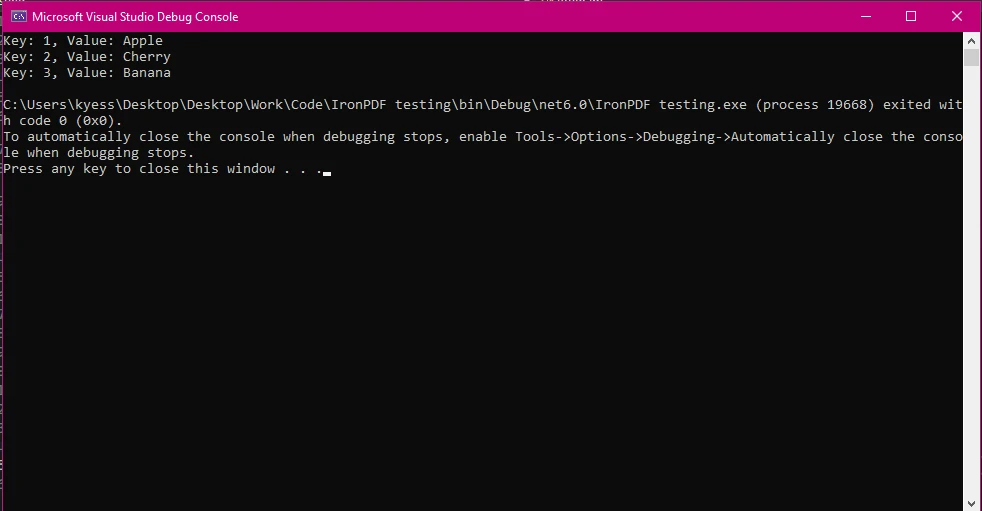
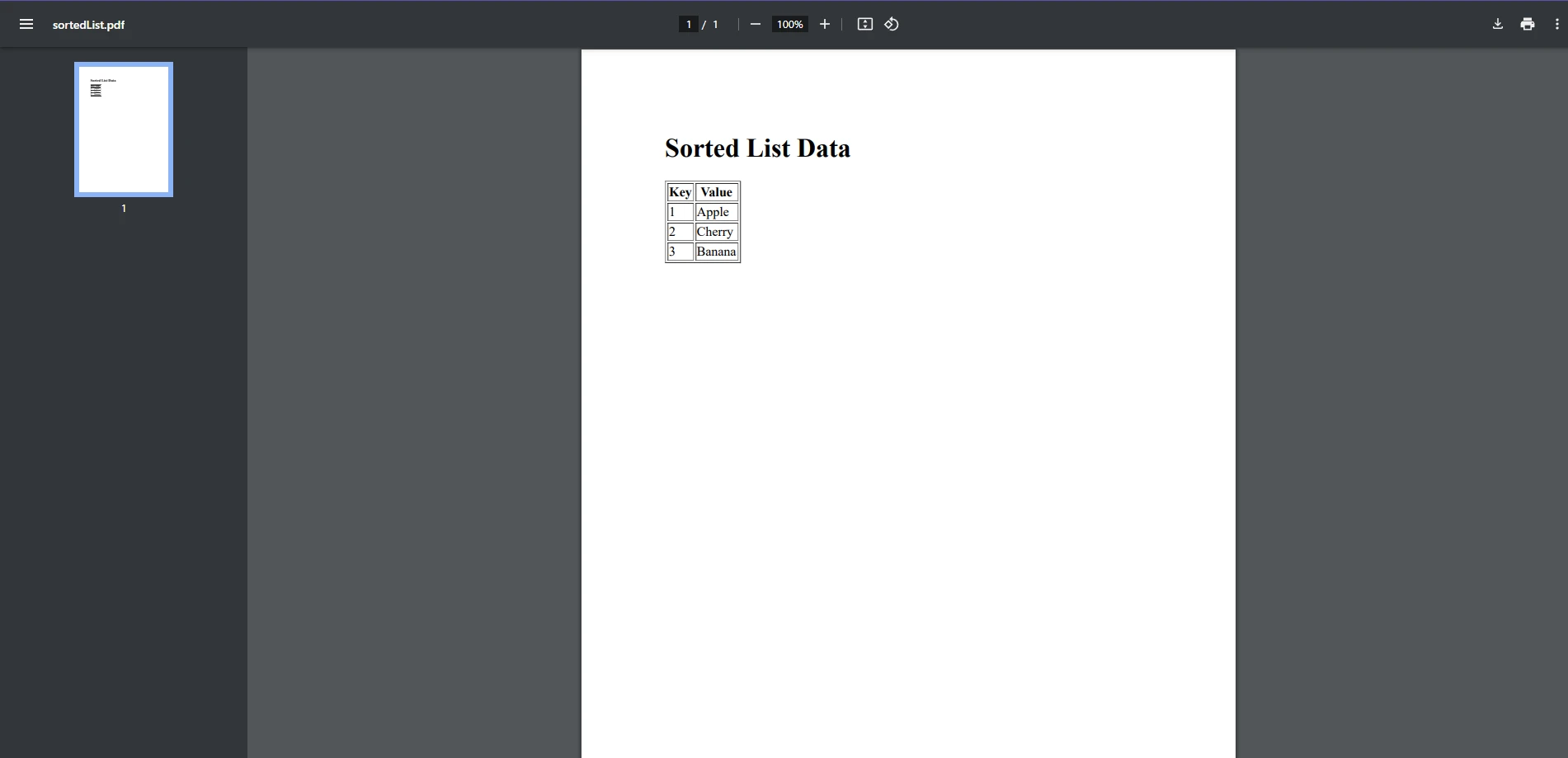
.NET 도움말 C# Sorted List (How it Works for Developers) 커티스 차우 업데이트됨:6월 22, 2025 다운로드 IronPDF NuGet 다운로드 DLL 다운로드 윈도우 설치 프로그램 무료 체험 시작하기 LLM용 사본 LLM용 사본 LLM용 마크다운 형식으로 페이지를 복사하세요 ChatGPT에서 열기 ChatGPT에 이 페이지에 대해 문의하세요 제미니에서 열기 제미니에게 이 페이지에 대해 문의하세요 Grok에서 열기 Grok에게 이 페이지에 대해 문의하세요 혼란 속에서 열기 Perplexity에게 이 페이지에 대해 문의하세요 공유하다 페이스북에 공유하기 트위터에 공유하기 LinkedIn에 공유하기 URL 복사 이메일로 기사 보내기 Introduction to C# SortedList What is a SortedList? The C# SortedList class is a collection of key-value pairs, similar to a dictionary, but it has the added benefit of automatic sorting by keys. It is part of the System.Collections.Generic namespace and is designed for scenarios where you need quick access to sorted data. SortedList<TKey, TValue> is ideal when you need to maintain data in a particular order and access elements efficiently by key. When working with SortedLists alongside PDF generation tasks, IronPDF integrates perfectly with this class, providing enhanced control over PDF generation. Key Features and Use Cases Key-Value Pair Storage: Like a dictionary, SortedList stores data as key-value pairs. Automatic Sorting: SortedList keeps associated values sorted by key in ascending order by default. Efficient Data Retrieval: Quick retrieval of associated values by key makes it suitable for lookups. Use Cases: Useful for applications needing sorted data, such as managing ordered lists of names, dates, or numerical values. How SortedList Works Data Structure Overview The public class SortedList is a hybrid between an array and a hash table and organizes its items by key. Internally, it uses a sorted array to keep key values in order, ensuring efficient lookups by key. However, insertion and deletion operations can be slower than in a Dictionary. Sorting Mechanism By default, SortedList<TKey, TValue> sorts keys in ascending order using the IComparable interface, which ensures that string keys and other types implement a default comparison behavior. If a custom sorting order is needed, a custom comparer can be provided. Advantages and Limitations Pros: Fast Key Access: Provides fast O(log n) access by key. Sorted Order: Data is automatically sorted by key without additional sorting overhead. Cons: Insertion Speed: Slower than Dictionary for insertions, especially with large data sizes. Limited Efficiency for Non-Key Operations: Less efficient in scenarios where data isn’t accessed primarily by specific key values. Working with C# SortedList Creating a SortedList You can create a SortedList in C# using either the default constructor or by passing an IComparer if custom sorting is needed. The SortedList has a default initial capacity of 16, which can be adjusted for performance improvements when the approximate size is known. // Create a SortedList with integer keys and string values SortedList<int, string> sortedList = new SortedList<int, string>(); // Create a SortedList with integer keys and string values SortedList<int, string> sortedList = new SortedList<int, string>(); $vbLabelText $csharpLabel Adding Items Add key-value pairs to the SortedList using the Add method. This keeps items sorted by key. The following code keeps the SortedList data in ascending order of keys. sortedList.Add(1, "Apple"); sortedList.Add(3, "Banana"); sortedList.Add(2, "Cherry"); sortedList.Add(1, "Apple"); sortedList.Add(3, "Banana"); sortedList.Add(2, "Cherry"); $vbLabelText $csharpLabel Accessing and Modifying Elements Access elements in a SortedList by their keys. You can retrieve or modify values associated with keys directly. // Accessing a specific value by key string value = sortedList[1]; // Retrieves "Apple" // Modifying a value sortedList[1] = "Avocado"; // Changes the value associated with key 1 to "Avocado" // Accessing a specific value by key string value = sortedList[1]; // Retrieves "Apple" // Modifying a value sortedList[1] = "Avocado"; // Changes the value associated with key 1 to "Avocado" $vbLabelText $csharpLabel Removing Items Remove items using specific keys with the Remove method or using the specified index with RemoveAt. Both allow controlled deletion of objects from the SortedList. sortedList.Remove(3); // Removes the entry with key 3 sortedList.RemoveAt(0); // Removes the entry at the zero-based index 0 sortedList.Remove(3); // Removes the entry with key 3 sortedList.RemoveAt(0); // Removes the entry at the zero-based index 0 $vbLabelText $csharpLabel Iterating Over a SortedList Iterate over SortedList using a foreach loop to retrieve both keys and values in sorted order. foreach (KeyValuePair<int, string> kvp in sortedList) { Console.WriteLine($"Key: {kvp.Key}, Value: {kvp.Value}"); } foreach (KeyValuePair<int, string> kvp in sortedList) { Console.WriteLine($"Key: {kvp.Key}, Value: {kvp.Value}"); } $vbLabelText $csharpLabel Practical Examples of Using SortedList Example 1: Storing and retrieving data in a simple key-value format where order matters, such as student names by their roll numbers. Example 2: Using SortedList in more complex scenarios, such as displaying sorted transaction logs or ranked scores. Best Practices: Use SortedList when keys are the primary access point and need to remain sorted. For frequent insertions, consider alternatives like SortedDictionary for better performance. Performance Considerations Comparing SortedList with Dictionary and List SortedList vs. Dictionary: SortedList is slower for insertions compared to Dictionary due to sorting overhead. SortedList vs. List: Unlike a list, SortedList is designed for accessing elements by key and maintaining sorted order. When to Use SortedList: Use it when you need sorted data and primarily access it by key, especially for read-heavy scenarios. Integration with IronPDF for PDF Export Introduction to IronPDF IronPDF is a powerful library for generating and modifying PDF files in C#. It allows developers to create PDFs from various sources, add content programmatically, and customize PDF layouts. In this section, we’ll use IronPDF to create a PDF report from SortedList data. Generating PDF Reports from SortedList Data To begin using IronPDF, install the IronPDF NuGet package: Install-Package IronPdf Example: Exporting Data from a SortedList to a PDF The following example demonstrates how to export data from a SortedList to a PDF table. First, set up your SortedList: SortedList<int, string> sortedList = new SortedList<int, string> { { 1, "Apple" }, { 2, "Banana" }, { 3, "Cherry" } }; SortedList<int, string> sortedList = new SortedList<int, string> { { 1, "Apple" }, { 2, "Banana" }, { 3, "Cherry" } }; $vbLabelText $csharpLabel Next, use IronPDF to generate a PDF from this data: // Initialize a PDF renderer ChromePdfRenderer renderer = new ChromePdfRenderer(); // Build HTML string with table format string html = "<h1>Sorted List Data</h1><table border='1'><tr><th>Key</th><th>Value</th></tr>"; foreach (var kvp in sortedList) { html += $"<tr><td>{kvp.Key}</td><td>{kvp.Value}</td></tr>"; } html += "</table>"; // Render HTML to PDF and save it PdfDocument pdf = renderer.RenderHtmlAsPdf(html); pdf.SaveAs("sortedList.pdf"); // Initialize a PDF renderer ChromePdfRenderer renderer = new ChromePdfRenderer(); // Build HTML string with table format string html = "<h1>Sorted List Data</h1><table border='1'><tr><th>Key</th><th>Value</th></tr>"; foreach (var kvp in sortedList) { html += $"<tr><td>{kvp.Key}</td><td>{kvp.Value}</td></tr>"; } html += "</table>"; // Render HTML to PDF and save it PdfDocument pdf = renderer.RenderHtmlAsPdf(html); pdf.SaveAs("sortedList.pdf"); $vbLabelText $csharpLabel This code creates an HTML table from the SortedList data and converts it into a PDF using IronPDF. Advanced Features Customizing PDF Layout: IronPDF allows CSS styling for layouts, fonts, colors, etc. Headers and Footers: IronPDF supports headers and footers, which can include page numbers or logos. Summary and Best Practices SortedList Overview: SortedList is a sorted key-value collection, best for scenarios where data is accessed by specific keys and needs to remain sorted. Using IronPDF for Exporting: IronPDF is a convenient library for exporting SortedList data to PDFs, supporting custom layouts and styling. Conclusion In this article, we explored the C# SortedList class, a powerful tool for managing sorted, key-value data collections. SortedList is especially useful in scenarios where order and efficient access by key are critical. From creating, adding, and removing elements to integrating with IronPDF for PDF export, we covered practical steps and best practices for using SortedList in real-world applications. Additionally, we showcased how IronPDF can simplify the task of exporting specified values from a SortedList to PDF format, allowing for the easy creation of professional, well-organized reports. IronPDF’s versatility, including customizable headers, footers, and CSS styling, makes it an excellent choice for generating PDFs directly from your C# applications. If you’re interested in trying IronPDF, it offers a free trial that allows you to explore its full range of features without commitment. This trial enables testing of PDF generation, customization options, and integration into existing projects to ensure it meets your needs. By combining SortedList and IronPDF, developers gain a robust, efficient solution for managing and reporting sorted data in C# applications. 자주 묻는 질문 C# SortedList란 무엇이며 어떻게 작동하나요? C# SortedList는 키를 자동으로 정렬하는 키-값 쌍의 컬렉션입니다. 이 컬렉션은 System.Collections.Generic 네임스페이스의 일부이며 정렬된 데이터 액세스가 필요한 시나리오에 유용합니다. SortedList는 배열과 해시 테이블 사이의 하이브리드 구조를 사용하여 순서를 유지하므로 효율적인 키 기반 액세스를 제공합니다. C#에서 정렬 목록을 만들려면 어떻게 해야 하나요? C#에서는 기본 생성자를 사용하거나 사용자 지정 정렬을 위해 IComparer를 전달하여 SortedList를 만들 수 있습니다. SortedList를 만드는 예는 다음과 같습니다: SortedList sortedList = new SortedList(); C#에서 사전보다 정렬 목록을 사용하면 어떤 이점이 있나요? 딕셔너리보다 정렬 목록을 사용할 때의 가장 큰 장점은 정렬 목록이 자동으로 키를 정렬하므로 정렬된 데이터가 필요하고 주로 키별로 액세스해야 할 때 유용하다는 것입니다. 이는 읽기가 많은 시나리오에서 특히 유용합니다. C# SortedList에 항목을 추가하려면 어떻게 해야 하나요? Add 메서드를 사용하여 C# SortedList에 항목을 추가할 수 있습니다. 이 메서드를 사용하면 항목이 키별로 정렬된 상태로 유지되어 SortedList의 순서를 유지할 수 있습니다. 정렬 목록을 사용하여 데이터를 PDF로 내보낼 수 있나요? 예, IronPDF를 사용하여 SortedList 데이터에서 PDF 보고서를 생성할 수 있습니다. 이를 통해 개발자는 정렬된 키-값 데이터 모음에서 PDF 문서를 생성할 수 있으며, IronPDF와 C# 애플리케이션의 통합 기능을 보여줄 수 있습니다. C# SortedList의 일반적인 용도는 무엇인가요? C# SortedList의 일반적인 응용 분야에는 학생 이름과 같은 정렬된 목록을 등록 번호별로 저장하거나 정렬된 트랜잭션 로그를 유지하는 것이 포함됩니다. 특히 데이터를 정렬된 순서로 액세스해야 하는 애플리케이션에 유용합니다. 정렬 목록은 삽입 및 삭제 작업 측면에서 어떻게 작동하나요? 정렬 목록은 특히 데이터 크기가 큰 경우 삽입 및 삭제 작업에서 딕셔너리보다 느릴 수 있습니다. 이는 효율적인 조회와 정렬된 순서 유지에 우선순위를 두는 하이브리드 구조 때문입니다. C# SortedList의 기본 키 정렬 순서는 무엇인가요? C# SortedList의 기본 정렬 순서는 오름차순입니다. 사용자 지정 IComparer가 제공되지 않는 한 IComparable 인터페이스를 사용하여 키를 자동으로 정렬합니다. 커티스 차우 지금 바로 엔지니어링 팀과 채팅하세요 기술 문서 작성자 커티스 차우는 칼턴 대학교에서 컴퓨터 과학 학사 학위를 취득했으며, Node.js, TypeScript, JavaScript, React를 전문으로 하는 프론트엔드 개발자입니다. 직관적이고 미적으로 뛰어난 사용자 인터페이스를 만드는 데 열정을 가진 그는 최신 프레임워크를 활용하고, 잘 구성되고 시각적으로 매력적인 매뉴얼을 제작하는 것을 즐깁니다. 커티스는 개발 분야 외에도 사물 인터넷(IoT)에 깊은 관심을 가지고 있으며, 하드웨어와 소프트웨어를 통합하는 혁신적인 방법을 연구합니다. 여가 시간에는 게임을 즐기거나 디스코드 봇을 만들면서 기술에 대한 애정과 창의성을 결합합니다. 관련 기사 업데이트됨 12월 11, 2025 Bridging CLI Simplicity & .NET : Using Curl DotNet with IronPDF Jacob Mellor has bridged this gap with CurlDotNet, a library created to bring the familiarity of cURL to the .NET ecosystem. 더 읽어보기 업데이트됨 12월 20, 2025 RandomNumberGenerator C# Using the RandomNumberGenerator C# class can help take your PDF generation and editing projects to the next level 더 읽어보기 업데이트됨 12월 20, 2025 C# String Equals (How it Works for Developers) When combined with a powerful PDF library like IronPDF, switch pattern matching allows you to build smarter, cleaner logic for document processing 더 읽어보기 C# Trim (How it Works for Developers)C# Float (How it Works for Developers)
업데이트됨 12월 11, 2025 Bridging CLI Simplicity & .NET : Using Curl DotNet with IronPDF Jacob Mellor has bridged this gap with CurlDotNet, a library created to bring the familiarity of cURL to the .NET ecosystem. 더 읽어보기
업데이트됨 12월 20, 2025 RandomNumberGenerator C# Using the RandomNumberGenerator C# class can help take your PDF generation and editing projects to the next level 더 읽어보기
업데이트됨 12월 20, 2025 C# String Equals (How it Works for Developers) When combined with a powerful PDF library like IronPDF, switch pattern matching allows you to build smarter, cleaner logic for document processing 더 읽어보기