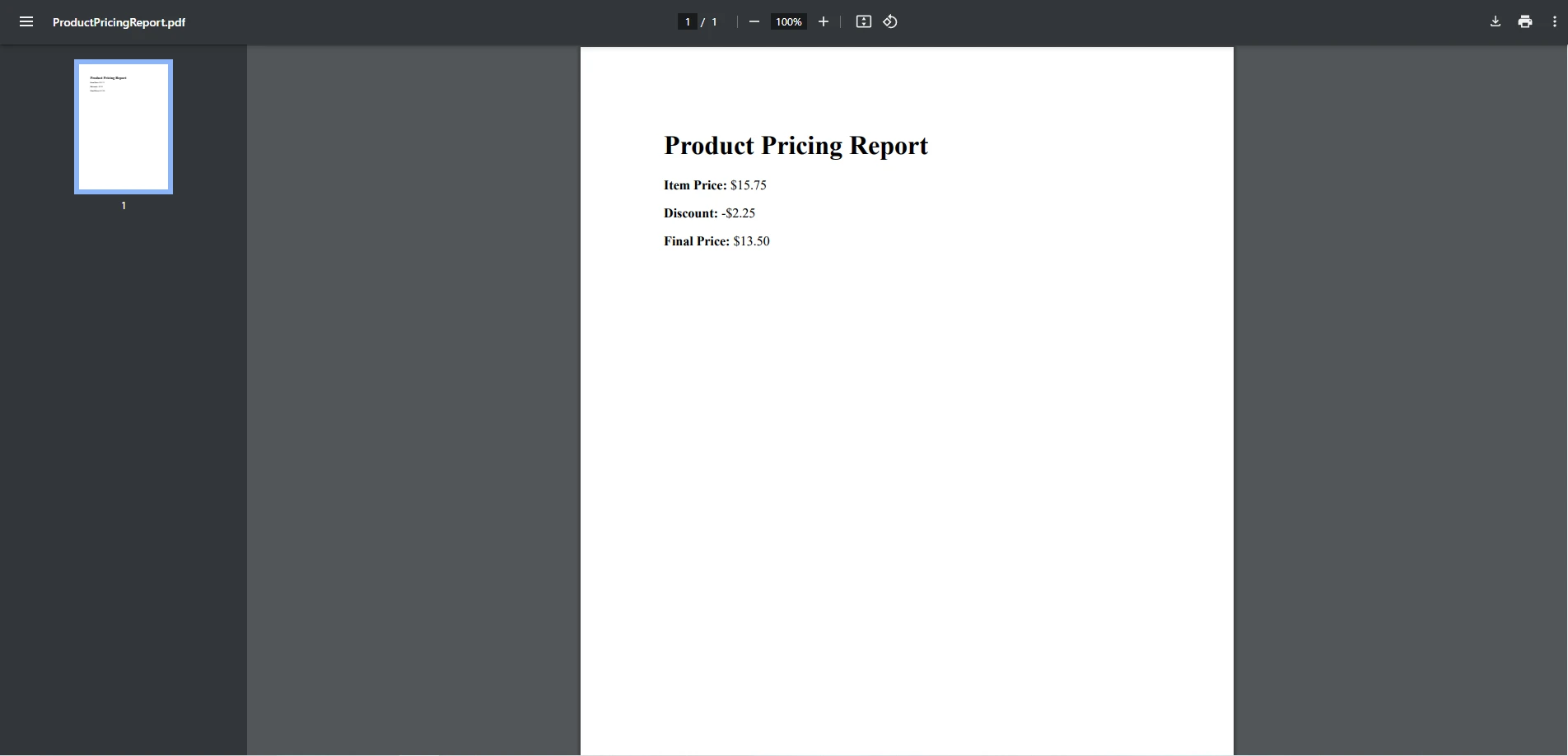
.NET 도움말 C# Float (How it Works for Developers) 커티스 차우 업데이트됨:11월 10, 2025 다운로드 IronPDF NuGet 다운로드 DLL 다운로드 윈도우 설치 프로그램 무료 체험 시작하기 LLM용 사본 LLM용 사본 LLM용 마크다운 형식으로 페이지를 복사하세요 ChatGPT에서 열기 ChatGPT에 이 페이지에 대해 문의하세요 제미니에서 열기 제미니에게 이 페이지에 대해 문의하세요 Grok에서 열기 Grok에게 이 페이지에 대해 문의하세요 혼란 속에서 열기 Perplexity에게 이 페이지에 대해 문의하세요 공유하다 페이스북에 공유하기 트위터에 공유하기 LinkedIn에 공유하기 URL 복사 이메일로 기사 보내기 Introduction to The C# Float Data Type In C#, floating-point types, commonly known as floats, are crucial for representing non-integer values with decimal places. Floats are widely used for various calculations, especially where fractional values are needed, such as in scientific computations or financial calculations. This article will cover the basics of the floating point type in C#, common issues related to precision, and how to apply floating point values in a practical setting by generating PDFs using IronPDF. Basics of Float in C# Definition and Characteristics of Float Data Type The float data type in C# is a 32-bit single-precision floating-point number. It can store a wide range of decimal floating point numbers, though with limited precision. Floats are suitable for many applications but have precision limitations, especially for highly precise calculations where unexpected rounding errors might occur. Float vs Double or Decimal: Float variables are less precise than double but take less memory. Double variables are more precise and take 64 bits, useful for general-purpose floating-point numeric types. Decimal has high precision (128 bits), ideal for financial calculations needing exact decimal point representation. Declaring and Initializing Floats Declaring a float variable in C# involves using the float keyword and suffixing decimal values with an f to specify that it’s a float type. float height = 5.8f; float width = 3.14f; float height = 5.8f; float width = 3.14f; $vbLabelText $csharpLabel Common Operations with Float C# supports standard arithmetic operations on float variables like addition, subtraction, multiplication, and division. Keep in mind that due to precision limits, floating-point comparisons require special handling. Example float a = 10.5f; float b = 3.2f; float result = a + b; // Result will be approximately 13.7 float a = 10.5f; float b = 3.2f; float result = a + b; // Result will be approximately 13.7 $vbLabelText $csharpLabel Type Casting Casting to or from a float can be done implicitly when converting to a larger type like double but requires explicit casting when converting to smaller types like int. Equality Checks Comparing floating point numbers directly for equality is unreliable due to precision issues. A better approach is to check if two values are approximately equal: float a = 0.1f; float b = 0.1f + 0.1f + 0.1f - 0.3f; bool isEqual = Math.Abs(a - b) < 0.0001f; // True if approximately equal float a = 0.1f; float b = 0.1f + 0.1f + 0.1f - 0.3f; bool isEqual = Math.Abs(a - b) < 0.0001f; // True if approximately equal $vbLabelText $csharpLabel Working with Float Precision and Rounding Issues Precision Loss in Floating-Point Calculations Floating-point precision issues arise because some decimal values can’t be represented precisely in binary. Calculations may yield approximate results instead of exact values, which can be problematic in sensitive applications like financial calculations. Rounding Methods in C# To counteract precision issues with a floating point value, rounding functions like Math.Round, Math.Floor, and Math.Ceiling are used. float value = 5.678f; float roundedValue = Math.Round(value, 2); // Rounds to 2 decimal places: 5.68 float floorValue = Math.Floor(value); // Rounds down: 5.0 float ceilingValue = Math.Ceiling(value); // Rounds up: 6.0 float value = 5.678f; float roundedValue = Math.Round(value, 2); // Rounds to 2 decimal places: 5.68 float floorValue = Math.Floor(value); // Rounds down: 5.0 float ceilingValue = Math.Ceiling(value); // Rounds up: 6.0 $vbLabelText $csharpLabel Float and Performance Considerations Floats, with their lower memory footprint, provide a good trade-off between precision and performance. However, for financial or scientific applications requiring high precision, consider using decimal or double to avoid rounding errors. Practical Application: Generating PDFs with Float Data using IronPDF in C# Overview of the IronPDF Library IronPDF is a highly versatile library for generating, editing, and rendering PDFs within .NET applications. It allows developers to convert HTML content directly into PDF format, providing a straightforward way to generate reports, invoices, and other documents directly from C# code. IronPDF’s integration with HTML and CSS gives developers significant control over PDF layout and styling, making it a great choice for producing visually appealing documents from dynamically generated content. With IronPDF, developers can: Generate PDFs from HTML strings, URLs, or even existing HTML files. Customize PDF appearance with CSS, allowing precise control over fonts, colors, and layout. Merge, split, edit, and manipulate existing PDFs to fit specific application needs. Installing IronPDF To use IronPDF, install it via NuGet Package Manager in Visual Studio: Install-Package IronPdf Creating PDF Reports with Float Data Formatting Float Values for PDF Output When displaying float values in a PDF, ensuring clear and consistent formatting is essential. IronPDF’s ability to handle HTML content enables developers to format float values with precision by embedding them within HTML tags. Formatting is particularly useful for reports where numbers are displayed as currency, measurements, or other data types requiring controlled decimal places. float price = 19.995f; string formattedPrice = price.ToString("F2"); // Formats to 2 decimal places: "19.99" float price = 19.995f; string formattedPrice = price.ToString("F2"); // Formats to 2 decimal places: "19.99" $vbLabelText $csharpLabel By embedding formatted float values within HTML, developers can manage presentation and precision to avoid unnecessary decimal places, which might detract from the document's readability. Adding Float Calculations to PDF Content For applications that involve calculations—such as financial reports, statistical summaries, or scientific measurements—IronPDF allows developers to perform float calculations in C# and then insert the results directly into the PDF content. This flexibility makes IronPDF especially suitable for generating complex documents where dynamically calculated values are required. Code Example: Generating a PDF with Float Data in C# Below is an example of using IronPDF to create a simple PDF that includes float data, such as product prices. using IronPdf; using System; class Program { static void Main() { // Initialize the IronPDF Renderer ChromePdfRenderer renderer = new ChromePdfRenderer(); // Sample float data float itemPrice = 15.75f; float discount = 2.25f; float finalPrice = itemPrice - discount; // Format float for display string formattedItemPrice = itemPrice.ToString("F2"); string formattedDiscount = discount.ToString("F2"); string formattedFinalPrice = finalPrice.ToString("F2"); // HTML content for PDF string htmlContent = $@" <h1>Product Pricing Report</h1> <p><b>Item Price:</b> ${formattedItemPrice}</p> <p><b>Discount:</b> -${formattedDiscount}</p> <p><b>Final Price:</b> ${formattedFinalPrice}</p>"; // Generate PDF from HTML PdfDocument pdf = renderer.RenderHtmlAsPdf(htmlContent); // Save PDF to file pdf.SaveAs("ProductPricingReport.pdf"); Console.WriteLine("PDF generated successfully."); } } using IronPdf; using System; class Program { static void Main() { // Initialize the IronPDF Renderer ChromePdfRenderer renderer = new ChromePdfRenderer(); // Sample float data float itemPrice = 15.75f; float discount = 2.25f; float finalPrice = itemPrice - discount; // Format float for display string formattedItemPrice = itemPrice.ToString("F2"); string formattedDiscount = discount.ToString("F2"); string formattedFinalPrice = finalPrice.ToString("F2"); // HTML content for PDF string htmlContent = $@" <h1>Product Pricing Report</h1> <p><b>Item Price:</b> ${formattedItemPrice}</p> <p><b>Discount:</b> -${formattedDiscount}</p> <p><b>Final Price:</b> ${formattedFinalPrice}</p>"; // Generate PDF from HTML PdfDocument pdf = renderer.RenderHtmlAsPdf(htmlContent); // Save PDF to file pdf.SaveAs("ProductPricingReport.pdf"); Console.WriteLine("PDF generated successfully."); } } $vbLabelText $csharpLabel This code: Initializes ChromePdfRenderer, which is used to render HTML to PDF. Defines float values for the item price, discount, and final price. Formats each float value to ensure consistent decimal precision. Embeds the float values within an HTML string. Renders the HTML as a PDF and saves it as ProductPricingReport.pdf. Additional Features of IronPDF IronPDF offers a range of advanced features, making it a powerful tool for .NET developers: Custom Page Settings: Set page size, margins, headers, and footers for professional layout control. Watermarking and Annotations: Add watermarks, footers, and other annotations to enhance document branding or provide additional information. Table and Image Embedding: Embed tables and images within PDFs for richer report content. PDF Manipulation: Merge, split, and extract pages from existing PDFs, providing flexibility for complex document workflows. Best Practices for Using Floats in PDF Reports When using floats in PDF reports with IronPDF: Use Consistent Formatting: Format floats to a standard number of decimal places for uniformity and clarity. Control Precision: Avoid displaying unnecessary decimal places that could clutter the document, especially in financial reports. Consider Units: Label float values with appropriate units (e.g., USD, cm) to improve readability and context for the reader. Conclusion Understanding and effectively working with floating-point numbers (floats) in C# is essential for developers handling calculations that require fractional values. Floats offer a balance of memory efficiency and speed, but they come with precision limitations. This article covered the essentials of using the float data type in C#, from basic declarations and operations to handling common precision issues. With proper formatting and rounding techniques, developers can mitigate many of the challenges associated with floats, especially in applications like data visualization and financial reporting. We also demonstrated how to leverage floats in a practical context by generating a PDF report using IronPDF. This powerful library allows developers to render and manipulate PDF documents with ease, integrating seamlessly into .NET applications. Using IronPDF to create PDF reports enables developers to present data—such as calculated totals, prices, or measurements—with control over formatting, ensuring accurate and professional-looking reports. For developers interested in trying IronPDF, the library offers a free trial version. This trial includes access to its core features, allowing users to explore PDF generation and manipulation capabilities. Download IronPDF today to begin taking your PDF projects to the next level! 자주 묻는 질문 부동 소수점 값이 포함된 HTML을 C#에서 PDF로 변환하려면 어떻게 해야 하나요? IronPDF를 사용하여 부동 소수점 값이 포함된 HTML 콘텐츠를 PDF로 변환할 수 있습니다. IronPDF의 방법을 사용하면 HTML 내 숫자 데이터의 서식을 정확하게 지정할 수 있으므로 최종 PDF 문서에서 정확한 표현을 보장합니다. PDF 보고서 생성에서 플로트를 사용하는 것의 의미는 무엇인가요? 부동 소수점은 정수가 아닌 값을 정확하게 표현하기 위해 PDF 보고서 생성에 필수적입니다. IronPDF를 사용하면 HTML 콘텐츠 내에서 부동 소수점 값의 형식을 지정하여 결과 PDF에서 정확성과 가독성을 유지할 수 있습니다. IronPDF는 C# 애플리케이션에서 부동 소수점 데이터를 어떻게 처리하나요? IronPDF를 사용하면 개발자가 PDF로 변환된 HTML 콘텐츠 내에 부동 데이터를 포함할 수 있습니다. 이를 통해 숫자 값이 PDF에 정확하게 표현되고 형식이 지정되어 전문적인 문서 작성을 지원합니다. C#에서 플로트를 사용할 때 어떤 문제가 발생할 수 있나요? 부동 소수점의 경우 바이너리 표현으로 인한 정밀도 문제가 발생할 수 있습니다. 이는 값이 올바르게 표현되도록 C#의 Math.Round, Math.Floor, Math.Ceiling와 같은 반올림 함수를 사용하여 관리할 수 있습니다. PDF 보고서에서 명확성을 위해 부동 소수점 값의 서식을 지정하려면 어떻게 해야 하나요? IronPDF를 사용하면 PDF로 변환하기 전에 HTML에서 부동 소수점 값의 서식을 지정하여 정밀도와 표현을 제어할 수 있습니다. 이렇게 하면 최종 문서에서 숫자가 명확하고 일관성 있게 표시됩니다. 플로트 데이터로 PDF를 생성할 때 IronPDF에서 페이지 설정을 사용자 지정할 수 있나요? 예, IronPDF는 플로트 데이터로 PDF를 생성할 때 여백 및 방향과 같은 페이지 설정을 사용자 지정할 수 있는 기능을 제공합니다. 이는 잘 구조화되고 전문적인 보고서를 만드는 데 도움이 됩니다. C#에서 부동 소수점 데이터로 보고서를 생성할 때 IronPDF를 사용하면 어떤 이점이 있나요? C#의 플로트 데이터로 보고서를 생성할 때 IronPDF를 사용하면 정확한 서식 지정, 사용자 지정 페이지 설정, 프로그래밍 방식으로 PDF를 조작할 수 있어 문서의 품질과 프레젠테이션이 향상되는 등의 이점을 누릴 수 있습니다. 반올림 메서드는 C#에서 부동 소수점 정밀도를 관리하는 데 어떻게 도움이 되나요? C#의 Math.Round, Math.Floor, Math.Ceiling와 같은 반올림 메서드는 소수점 값을 반올림하는 방법을 제어하여 정확한 계산과 표현을 보장함으로써 부동 소수점 정밀도를 관리하는 데 도움이 됩니다. 커티스 차우 지금 바로 엔지니어링 팀과 채팅하세요 기술 문서 작성자 커티스 차우는 칼턴 대학교에서 컴퓨터 과학 학사 학위를 취득했으며, Node.js, TypeScript, JavaScript, React를 전문으로 하는 프론트엔드 개발자입니다. 직관적이고 미적으로 뛰어난 사용자 인터페이스를 만드는 데 열정을 가진 그는 최신 프레임워크를 활용하고, 잘 구성되고 시각적으로 매력적인 매뉴얼을 제작하는 것을 즐깁니다. 커티스는 개발 분야 외에도 사물 인터넷(IoT)에 깊은 관심을 가지고 있으며, 하드웨어와 소프트웨어를 통합하는 혁신적인 방법을 연구합니다. 여가 시간에는 게임을 즐기거나 디스코드 봇을 만들면서 기술에 대한 애정과 창의성을 결합합니다. 관련 기사 업데이트됨 12월 11, 2025 Bridging CLI Simplicity & .NET : Using Curl DotNet with IronPDF Jacob Mellor has bridged this gap with CurlDotNet, a library created to bring the familiarity of cURL to the .NET ecosystem. 더 읽어보기 업데이트됨 12월 20, 2025 RandomNumberGenerator C# Using the RandomNumberGenerator C# class can help take your PDF generation and editing projects to the next level 더 읽어보기 업데이트됨 12월 20, 2025 C# String Equals (How it Works for Developers) When combined with a powerful PDF library like IronPDF, switch pattern matching allows you to build smarter, cleaner logic for document processing 더 읽어보기 C# Sorted List (How it Works for Developers)C# Select Case (How It Works For De...
업데이트됨 12월 11, 2025 Bridging CLI Simplicity & .NET : Using Curl DotNet with IronPDF Jacob Mellor has bridged this gap with CurlDotNet, a library created to bring the familiarity of cURL to the .NET ecosystem. 더 읽어보기
업데이트됨 12월 20, 2025 RandomNumberGenerator C# Using the RandomNumberGenerator C# class can help take your PDF generation and editing projects to the next level 더 읽어보기
업데이트됨 12월 20, 2025 C# String Equals (How it Works for Developers) When combined with a powerful PDF library like IronPDF, switch pattern matching allows you to build smarter, cleaner logic for document processing 더 읽어보기