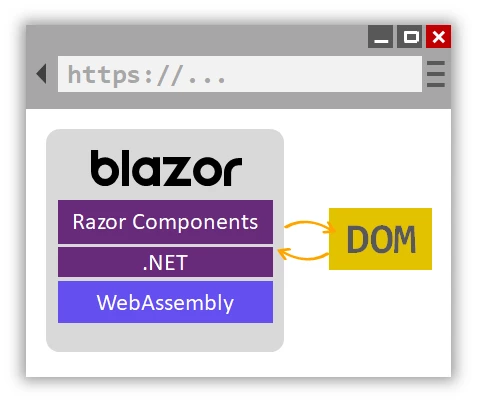
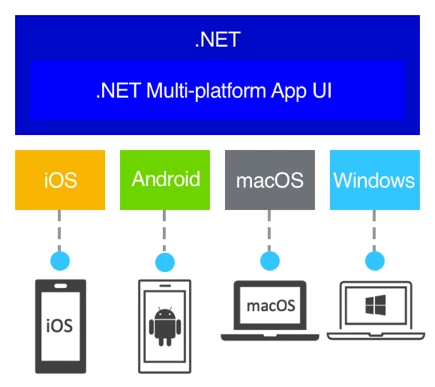
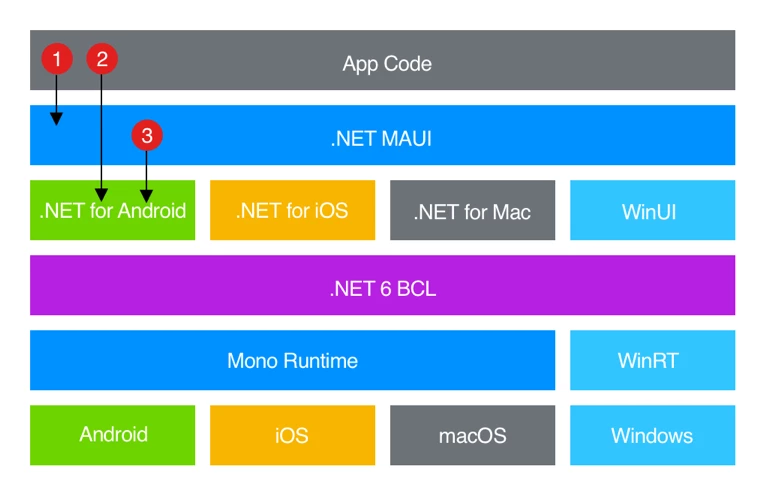
.NET 도움말 MAUI vs Blazor 커티스 차우 업데이트됨:6월 22, 2025 다운로드 IronPDF NuGet 다운로드 DLL 다운로드 윈도우 설치 프로그램 무료 체험 시작하기 LLM용 사본 LLM용 사본 LLM용 마크다운 형식으로 페이지를 복사하세요 ChatGPT에서 열기 ChatGPT에 이 페이지에 대해 문의하세요 제미니에서 열기 제미니에게 이 페이지에 대해 문의하세요 Grok에서 열기 Grok에게 이 페이지에 대해 문의하세요 혼란 속에서 열기 Perplexity에게 이 페이지에 대해 문의하세요 공유하다 페이스북에 공유하기 트위터에 공유하기 LinkedIn에 공유하기 URL 복사 이메일로 기사 보내기 If you’re getting started with .NET development, you’ve probably heard of two popular frameworks: MAUI and Blazor. At first glance, the major difference between the two is that one is better suited for web development while the other is better for mobile applications. However, there are many more subtle differences between them as well. In this guide, we'll take a closer look at Blazor and MAUI and help you decide which one is right for your next project. MAUI vs Blazor - Key Differences Both MAUI and Blazor allow users to build web and mobile applications using C# and .NET, but there are some key differences between the two: Web applications vs mobile applications Development workflows Running in-browser vs on-device Sharing code across multiple platforms Third-party library support Depending on your project, one will be better suited than the other. What is .NET MAUI? MAUI (standing for ‘Multi-platform App UI’) is a cross-platform framework that allows you to build native mobile and desktop applications for iOS, Android devices, and Windows using C# and .NET. MAUI is the successor to Xamarin, another popular framework for mobile app development. With MAUI, you can create cross-platform apps that look and feel native on each platform, and share code between them. MAUI also offers a variety of UI controls and features, making it easier to create complex native apps with less code. MAUI is built for .NET 6 onwards, offering improved performance, reduced startup time, and enhanced cloud capabilities - making it ideal for building scalable and performant applications. MAUI also offers a variety of UI controls, including buttons, labels, text boxes, and more. These controls are designed to look and feel native on each platform and can be customized using styles and templates. What is Blazor? Blazor is a web framework that allows you to build web applications using C# and .NET instead of JavaScript. With Blazor, you can create interactive and responsive web applications using Razor syntax, a markup language that lets you combine HTML and C# code. Blazor is known for its ease of use and fast development time, as well as its ability to work seamlessly with other .NET technologies. Blazor comes in two flavors: Blazor Server and Blazor WebAssembly. Blazor Server is a client-server architecture where the client-side code is executed on the server and communicates with the client using SignalR. Blazor WebAssembly, on the other hand, is a pure client-side architecture that compiles C# code to WebAssembly, a binary format that runs in the browser. Blazor WebAssembly offers better performance and scalability than Blazor Server but requires more client-side resources. MAUI vs Blazor - In-Depth Comparison So, at least on the surface, it seems that MAUI and Blazor offer a lot of the same functionality. However, there are many minor and major differences to consider when choosing which one to use for your next project. Platform The biggest difference between Blazor and MAUI is the platform they target. Blazor is designed for web applications while MAUI is designed for mobile. If you're building a web application, you should use Blazor. If you're building a mobile application, you should use MAUI. UI Controls Blazor offers a variety of web UI components which allow you to create responsive and interactive web applications. MAUI also offers UI controls, but they are specifically designed for mobile applications. If you're building a mobile app, you'll need to use MAUI's UI controls. If you're building a web app, you can choose between Blazor's controls or other .NET UI frameworks like React or Angular. Development Workflow Blazor and MAUI have different development workflows. With Blazor, you write C# and HTML code in the same file. With MAUI, you write C# code and XAML markup separately. This can affect how you organize your code and how you debug your application. Performance Blazor and MAUI have different performance characteristics. Blazor applications run in the browser and can be affected by network latency and browser performance. MAUI applications, on the other hand, are compiled to native code and run directly on the device, which typically results in better performance. However, Blazor WebAssembly has made significant strides in recent years and can offer near-native performance in some cases. Code Sharing Both Blazor and MAUI allow you to share code across different platforms, but they do it in different ways. Blazor allows you to reuse .NET code between server-side and client-side applications, while MAUI allows you to share code between different mobile platforms using .NET Standard libraries. This can make it easier to maintain your codebase and reduce development time. Blazor Hybrid Apps with .NET MAUI Blazor Hybrid is a technology that combines the power of Blazor WebAssembly with native mobile functionality. It allows developers to build hybrid applications that run on both web and mobile platforms with a single codebase. With the release of .NET MAUI, Microsoft has provided additional support for building Blazor Hybrid applications. Blazor Hybrid apps use WebView to render the UI for the application, which allows developers to build native mobile applications with web technologies such as HTML, CSS, and JavaScript. This means that developers can leverage their existing web development skills to build mobile applications with Blazor Hybrid, while still being able to take advantage of native mobile functionality such as camera access, GPS, and push notifications. .NET MAUI provides additional features and functionality for Blazor Hybrid apps, such as support for native navigation, device-specific UI, and platform-specific integrations. This allows developers to build high-quality and feature-rich hybrid applications with a seamless and native-like user experience. One of the benefits of using Blazor Hybrid with .NET MAUI is the ability to share code across platforms. By using .NET MAUI, developers can write code once and use it to build applications that run on multiple platforms, including Android, iOS, and Windows. This can save time and effort in building and maintaining multi-platform applications, while still delivering a great user experience on each platform. In summary, Blazor Hybrid with .NET MAUI is a powerful technology that allows developers to build hybrid applications with web technologies and native functionality. With support for sharing code across platforms, developers can build applications that run on multiple platforms with a single codebase, while still delivering a great user experience. Which One Should You Choose? Ultimately, the choice between Blazor and MAUI depends on the specific needs of your project. If you're building a web application, Blazor is a great choice. If you're building a mobile application, MAUI is the way to go. However, it's worth noting that both technologies are highly flexible and can be used in a variety of scenarios. Third-Party Libraries Support One of the great things about both Blazor and MAUI is that they support a wide range of third-party libraries and components, including Iron Software's suite of .NET development tools. Here are a few examples of how Iron Software's products can be used with Blazor and MAUI: IronPDF: As a PDF library, IronPDF can be used with Blazor, MAUI, and .NET MAUI Blazor app to generate PDF files from within your application. This is especially useful for scenarios where you need to generate reports, invoices, or other types of documents that can be shared or printed. With IronPDF, you can create PDFs from scratch or convert existing HTML or Word documents to PDF format The main advantage of IronPDF is converting HTML to PDF, retaining the original layout and style. This is especially useful for generating PDFs from web content, like reports, invoices, and documentation. HTML files, URLs, and HTML strings can be converted to PDF files. using IronPdf; class Program { static void Main(string[] args) { var renderer = new ChromePdfRenderer(); // 1. Convert HTML String to PDF var htmlContent = "<h1>Hello, IronPDF!</h1><p>This is a PDF from an HTML string.</p>"; var pdfFromHtmlString = renderer.RenderHtmlAsPdf(htmlContent); pdfFromHtmlString.SaveAs("HTMLStringToPDF.pdf"); // 2. Convert HTML File to PDF var htmlFilePath = "path_to_your_html_file.html"; // Specify the path to your HTML file var pdfFromHtmlFile = renderer.RenderHtmlFileAsPdf(htmlFilePath); pdfFromHtmlFile.SaveAs("HTMLFileToPDF.pdf"); // 3. Convert URL to PDF var url = "http://ironpdf.com"; // Specify the URL var pdfFromUrl = renderer.RenderUrlAsPdf(url); pdfFromUrl.SaveAs("URLToPDF.pdf"); } } using IronPdf; class Program { static void Main(string[] args) { var renderer = new ChromePdfRenderer(); // 1. Convert HTML String to PDF var htmlContent = "<h1>Hello, IronPDF!</h1><p>This is a PDF from an HTML string.</p>"; var pdfFromHtmlString = renderer.RenderHtmlAsPdf(htmlContent); pdfFromHtmlString.SaveAs("HTMLStringToPDF.pdf"); // 2. Convert HTML File to PDF var htmlFilePath = "path_to_your_html_file.html"; // Specify the path to your HTML file var pdfFromHtmlFile = renderer.RenderHtmlFileAsPdf(htmlFilePath); pdfFromHtmlFile.SaveAs("HTMLFileToPDF.pdf"); // 3. Convert URL to PDF var url = "http://ironpdf.com"; // Specify the URL var pdfFromUrl = renderer.RenderUrlAsPdf(url); pdfFromUrl.SaveAs("URLToPDF.pdf"); } } $vbLabelText $csharpLabel IronOCR: If you're building an application that needs to extract text from scanned documents or images, IronOCR is a great choice. This OCR library can be used with .NET MAUI Blazor apps to recognize text and convert it to machine-readable formats, such as plain text or searchable PDF. This can be useful in scenarios such as data entry, document processing, or archival IronBarcode: As a barcode library, IronBarcode can be used with both the Blazor hybrid app and .NET MAUI App to generate and read barcodes in a variety of formats. This can be useful for scenarios such as inventory management, asset tracking, or point-of-sale systems. With IronBarcode, you can generate barcodes in formats such as QR codes, UPC codes, and Code 128, and you can also read barcodes from images or camera input IronXL: As an Excel library, IronXL can be used with Blazor, MAUI, and .NET MAUI Blazor apps to create, read, and edit Excel files. This can be useful for scenarios such as data analysis, reporting, or data exchange with other systems. With IronXL, you can read and write Excel files in formats such as XLSX and CSV, and you can also perform calculations, manipulate data, and apply formatting Overall, Iron Software's suite of .NET development tools can be a great asset to developers working with Blazor and MAUI. By using these libraries and components, you can save time and effort in building high-quality applications with advanced features and functionality. Whether you're building a web application with Blazor or a mobile application with MAUI, Iron Software's products can help you achieve your goals and deliver a great user experience. Conclusion In conclusion, Blazor and .NET MAUI are two exciting technologies that are changing the landscape of software development using .NET Technology. Blazor is a great choice for building web applications, while MAUI is ideal for building cross-platform mobile applications. Both technologies offer a range of benefits, such as the ability to use C# and .NET to build client-side applications, support for modern web and mobile development patterns, and the ability to share code across multiple platforms. Additionally, both Blazor and MAUI support a wide range of third-party libraries and components, including Iron Software's suite of .NET development tools, which can help you build high-quality and feature-rich applications. Whether you're just getting started with .NET development or you're an experienced developer looking to stay ahead of the curve, Blazor and MAUI are worth exploring. IronPDF, IronXL, IronBarcode and IronOCR are free to install and use for non-commercial development purposes. A free trial is available for testing in production. Look at the pricing plans for more details about prices and licensing. Users can also benefit from Iron Suite, a collection of five professional .NET Core libraries, including IronXL, IronPDF, IronOCR, IronBarcode and others. 자주 묻는 질문 C#에서 HTML을 PDF로 변환하려면 어떻게 해야 하나요? IronPDF의 RenderHtmlAsPdf 메서드를 사용하여 HTML 문자열을 PDF로 변환할 수 있습니다. 또한 RenderHtmlFileAsPdf를 사용하여 HTML 파일을 PDF로 변환할 수도 있습니다. .NET 개발에서 MAUI의 주요 용도는 무엇인가요? MAUI(멀티플랫폼 앱 UI)는 주로 C# 및 .NET을 사용하여 iOS, Android 및 Windows에서 네이티브 모바일 및 데스크톱 애플리케이션을 구축하는 데 사용됩니다. 웹 개발에서 Blazor를 어떻게 활용할 수 있나요? Blazor를 사용하면 개발자가 C# 및 .NET을 사용하여 웹 애플리케이션을 만들 수 있으므로 JavaScript를 우회할 수 있습니다. 또한 다양한 배포 시나리오를 위한 Blazor Server 및 Blazor WebAssembly와 같은 옵션을 제공합니다. Blazor 애플리케이션에 PDF 생성을 통합할 수 있나요? 예, 웹 콘텐츠에서 보고서, 송장 및 기타 문서용 PDF를 생성할 수 있는 IronPDF를 사용하여 Blazor 애플리케이션에서 PDF 생성을 통합할 수 있습니다. 블레이저 하이브리드를 .NET MAUI와 함께 사용하면 어떤 이점이 있나요? Blazor Hybrid with .NET MAUI를 사용하면 웹 기술을 기본 모바일 기능과 함께 활용하여 웹과 모바일 플랫폼 간에 코드를 쉽게 공유할 수 있는 하이브리드 애플리케이션을 만들 수 있습니다. MAUI는 크로스 플랫폼 앱 성능을 어떻게 향상시키나요? MAUI는 애플리케이션을 네이티브 코드로 컴파일하여 기기에서 직접 실행할 수 있도록 함으로써 앱 성능을 향상시키므로 일반적으로 웹 기반 솔루션에 비해 성능이 향상됩니다. Blazor Server와 Blazor WebAssembly의 차이점은 무엇인가요? Blazor Server는 서버에서 클라이언트 측 코드를 실행하여 빠른 로드 시간과 더 적은 페이로드를 제공하며, Blazor WebAssembly는 C# 코드를 WebAssembly로 컴파일하여 서버 상호 작용 없이 브라우저에서 직접 실행할 수 있도록 합니다. IronPDF는 어떻게 .NET 애플리케이션 개발을 향상시킬 수 있나요? IronPDF는 Blazor, MAUI 또는 하이브리드 프레임워크를 사용하여 구축된 애플리케이션 내에서 문서, 보고서 및 양식을 만드는 데 유용한 강력한 PDF 생성 기능을 제공함으로써 .NET 애플리케이션 개발을 향상시킵니다. MAUI 애플리케이션에 지원되는 플랫폼은 무엇인가요? MAUI는 iOS, Android 및 Windows 플랫폼용 애플리케이션 구축을 지원하여 개발자가 기본 성능 및 UI 컨트롤을 갖춘 크로스 플랫폼 애플리케이션을 만들 수 있도록 합니다. 프로젝트에 MAUI 대신 Blazor를 선택해야 하는 경우는 언제인가요? Blazor는 C# 및 .NET 프레임워크를 사용하여 동적 웹 애플리케이션을 구축하기 위해 특별히 설계되었으므로 웹 애플리케이션을 개발할 때는 MAUI보다 Blazor를 선택해야 합니다. 커티스 차우 지금 바로 엔지니어링 팀과 채팅하세요 기술 문서 작성자 커티스 차우는 칼턴 대학교에서 컴퓨터 과학 학사 학위를 취득했으며, Node.js, TypeScript, JavaScript, React를 전문으로 하는 프론트엔드 개발자입니다. 직관적이고 미적으로 뛰어난 사용자 인터페이스를 만드는 데 열정을 가진 그는 최신 프레임워크를 활용하고, 잘 구성되고 시각적으로 매력적인 매뉴얼을 제작하는 것을 즐깁니다. 커티스는 개발 분야 외에도 사물 인터넷(IoT)에 깊은 관심을 가지고 있으며, 하드웨어와 소프트웨어를 통합하는 혁신적인 방법을 연구합니다. 여가 시간에는 게임을 즐기거나 디스코드 봇을 만들면서 기술에 대한 애정과 창의성을 결합합니다. 관련 기사 업데이트됨 12월 11, 2025 Bridging CLI Simplicity & .NET : Using Curl DotNet with IronPDF Jacob Mellor has bridged this gap with CurlDotNet, a library created to bring the familiarity of cURL to the .NET ecosystem. 더 읽어보기 업데이트됨 12월 20, 2025 RandomNumberGenerator C# Using the RandomNumberGenerator C# class can help take your PDF generation and editing projects to the next level 더 읽어보기 업데이트됨 12월 20, 2025 C# String Equals (How it Works for Developers) When combined with a powerful PDF library like IronPDF, switch pattern matching allows you to build smarter, cleaner logic for document processing 더 읽어보기 Razor Components : How it Works for DevelopersNuGet Packages (PDF, OCR, Barcode, ...
업데이트됨 12월 11, 2025 Bridging CLI Simplicity & .NET : Using Curl DotNet with IronPDF Jacob Mellor has bridged this gap with CurlDotNet, a library created to bring the familiarity of cURL to the .NET ecosystem. 더 읽어보기
업데이트됨 12월 20, 2025 RandomNumberGenerator C# Using the RandomNumberGenerator C# class can help take your PDF generation and editing projects to the next level 더 읽어보기
업데이트됨 12월 20, 2025 C# String Equals (How it Works for Developers) When combined with a powerful PDF library like IronPDF, switch pattern matching allows you to build smarter, cleaner logic for document processing 더 읽어보기