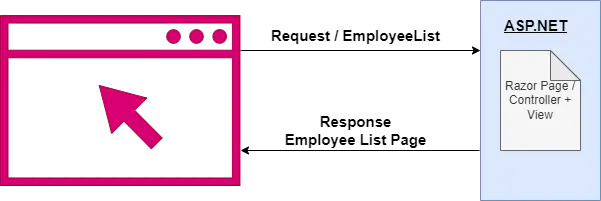
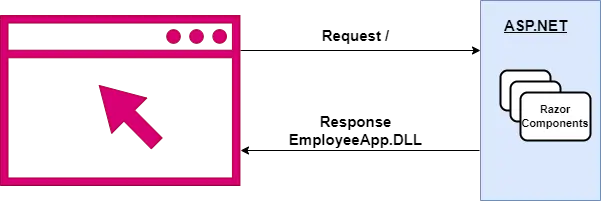
.NET 도움말 Razor vs Blazor 커티스 차우 업데이트됨:9월 1, 2025 다운로드 IronPDF NuGet 다운로드 DLL 다운로드 윈도우 설치 프로그램 무료 체험 시작하기 LLM용 사본 LLM용 사본 LLM용 마크다운 형식으로 페이지를 복사하세요 ChatGPT에서 열기 ChatGPT에 이 페이지에 대해 문의하세요 제미니에서 열기 제미니에게 이 페이지에 대해 문의하세요 Grok에서 열기 Grok에게 이 페이지에 대해 문의하세요 혼란 속에서 열기 Perplexity에게 이 페이지에 대해 문의하세요 공유하다 페이스북에 공유하기 트위터에 공유하기 LinkedIn에 공유하기 URL 복사 이메일로 기사 보내기 Razor and Blazor are two of the most popular web UI frameworks for creating web apps in the Visual Studio development environment. This blog post will examine the similarities and differences between these two .NET technologies based on their syntax, interactions, benefits, and drawbacks. It will also demonstrate some use cases with some code examples. What is Razor and Blazor in ASP.NET Core? Razor Razor is a server-side markup language that allows developers to create web pages dynamically using HTML and embedded .NET server-side code. Razor generates web pages from Razor Pages, web page template files written with C# or VB. Razor pages written with VB code use the .vbhtml file extension, and Razor pages written with C# code use the .cshtml file extension. Modern ASP.NET web applications support Razor, and it can be used in favor of traditional ASP.NET markup to generate application view components. Blazor Blazor is a web application framework that allows developers to build interactive, client-side interfaces using .NET programming languages. Web applications built with Blazor are single-page applications (SPA) that execute inside of a web browser client (not on a web server). Browser-side app execution is made possible through WebAssembly, a cross-platform instruction set library found on all modern web browsers capable of executing .NET source code. With Blazor, developers can create reusable, interactive client-side web components with C#, HTML, and CSS (without needing to incorporate JavaScript). Furthermore, since these components are written in C#, developers have the flexibility to move implementation details back and forth between the client and server as source code and libraries as necessary. Does Blazor use Razor Components? Blazor fully supports the Razor syntax. You can build Blazor apps using Razor's full markup feature set: using loops, conditionals, etc. Consider the following example. @page "/HelloWorld" # Example Component </h1> @foreach (var person in People) { <h2>@person.FirstName</h2> } This Razor component uses a foreach loop to iterate over a collection called People, outputting each person's first name inside <h2> tags. Connection Between Razor and Blazor We can see clearly that there is a relationship between Blazor and Razor. After all, Blazor's name itself is a combination of the words "browser" and "razor." Razor and Blazor are both used to create web applications using HTML and C#. Since they are open-source and free, developers can utilize them immediately and without restriction. When developing ASP.NET web applications, we use the Razor syntax because it is more akin to ASP.NET Core and ASP.NET MVC. Blazor builds flexible, interactive user interfaces from one or more components written with Razor syntax. It is at this point that we must make a significant distinction with how Razor is used in Blazor: it is used to build components (buttons, page elements, etc.), and not to build entire pages. Additionally, Razor files (files with the .cshtml extension) within Blazor are known formally as Razor components, not as Blazor components (although both words get used interchangeably in many development circles). Working of Razor Pages and Blazor Server Razor works within MVC applications to serve entire pages to the browser. Razor Pages in Action When a user clicks a button or a link, the browser sends a request to the server, which hits the database, retrieves the .cshtml Razor Views (or Razor Page), mashes the data and markup together, and returns the entire thing to the browser (re-rendering the entire page). Blazor, on the other hand, allows you to create an entire web page using a series of smaller components written in Razor syntax. Blazor in Action This illustrates the operation of Blazor WebAssembly (Blazor WASM). The first call to your Blazor WASM application returns the complete program, including all of the components you've defined, much like a Single Page Application created using JavaScript. Now that the browser has access to these elements, it can display, conceal, and update them in response to information and events. In this way, Blazor apps are more similar to the applications you'd develop using a "contemporary" JavaScript library/framework such as Vue or Angular. Blazor applications perform network calls to a backend while running in the browser to retrieve and send data. Now, let's discuss some pros and cons of the Blazor app and Razor View engine. Pros and Cons of Blazor and Razor When it comes to creating interactive web apps built on the .NET framework, Blazor and Razor are both highly favored. These technologies offer a novel transition from utilizing C# as the primary programming language for standard JavaScript projects. Here are a few benefits and drawbacks to consider when creating web applications using Razor or Blazor. Benefits of Blazor Client-side Blazor executes .NET code directly in the browser using WebAssembly (making it quicker and less wasteful of network bandwidth) and provides dynamic web content. It uses the same syntax and logic as server-side languages, making it compatible with all .NET libraries and tooling. Drawbacks of Blazor There are limited .NET Tools and debugging support available for client-side .NET application execution using Blazor. The performance advantages of client-side Blazor are not present in the server-side implementation. Benefits of Razor Razor enables the logical (conditional) insertion of C# code into web pages. Razor is highly flexible and can be used to create a wide range of apps. The structure of Razor is well-organized. Drawbacks of Razor JavaScript is required to implement dynamic, client-side interactions. Multiple self-contained pages might be difficult to manage and maintain with Razor. IronPDF’s standout feature is converting HTML to PDF with IronPDF, which keeps layouts and styles preserved. This functionality is ideal for generating PDFs from web-based content, such as reports, invoices, and documentation. HTML files, URLs, and HTML strings can all be converted into PDFs. using IronPdf; class Program { static void Main(string[] args) { var renderer = new ChromePdfRenderer(); // Convert HTML String to PDF var htmlContent = "<h1>Hello, IronPDF!</h1><p>This is a PDF from an HTML string.</p>"; var pdfFromHtmlString = renderer.RenderHtmlAsPdf(htmlContent); pdfFromHtmlString.SaveAs("HTMLStringToPDF.pdf"); // Convert HTML File to PDF var htmlFilePath = "path_to_your_html_file.html"; // Specify the path to your HTML file var pdfFromHtmlFile = renderer.RenderHtmlFileAsPdf(htmlFilePath); pdfFromHtmlFile.SaveAs("HTMLFileToPDF.pdf"); // Convert URL to PDF var url = "http://ironpdf.com"; // Specify the URL var pdfFromUrl = renderer.RenderUrlAsPdf(url); pdfFromUrl.SaveAs("URLToPDF.pdf"); } } using IronPdf; class Program { static void Main(string[] args) { var renderer = new ChromePdfRenderer(); // Convert HTML String to PDF var htmlContent = "<h1>Hello, IronPDF!</h1><p>This is a PDF from an HTML string.</p>"; var pdfFromHtmlString = renderer.RenderHtmlAsPdf(htmlContent); pdfFromHtmlString.SaveAs("HTMLStringToPDF.pdf"); // Convert HTML File to PDF var htmlFilePath = "path_to_your_html_file.html"; // Specify the path to your HTML file var pdfFromHtmlFile = renderer.RenderHtmlFileAsPdf(htmlFilePath); pdfFromHtmlFile.SaveAs("HTMLFileToPDF.pdf"); // Convert URL to PDF var url = "http://ironpdf.com"; // Specify the URL var pdfFromUrl = renderer.RenderUrlAsPdf(url); pdfFromUrl.SaveAs("URLToPDF.pdf"); } } $vbLabelText $csharpLabel This C# program demonstrates the usage of IronPdf for converting HTML content to PDF documents. It supports conversions from an HTML string, an HTML file, and a URL. Conclusion Razor can handle API logic and server-side templating, but it cannot handle client-side logic that is not JavaScript-based. Blazor allows programmers to handle both client and server-side functionality with just C#. Razor is a markup syntax for templates that incorporates server-side code into the HTML. Blazor, on the other hand, is an SPA framework that can run on either Blazor WebAssembly or the Blazor Server, depending on the situation. Discover IronPDF for the easiest way to create, read, update, and manipulate PDF files in both Razor applications and Blazor applications. IronPDF is a part of Iron Software's Iron Suite which contains five useful libraries helpful for creating Razor or Blazor web apps with Excel, PDF, Barcodes, QR Codes, and images. Iron Suite is available free for personal use. For more information about obtaining a commercial license, please visit the Iron Suite Licensing Information. 자주 묻는 질문 Razor를 사용하여 동적 웹 페이지를 만들려면 어떻게 해야 하나요? Razor를 사용하면 개발자가 .NET 서버 측 코드를 HTML에 임베드하여 동적 웹 페이지를 만들 수 있습니다. 이 작업은 .cshtml 파일 내에서 Razor 구문을 사용하여 수행됩니다. Razor는 서버 측 로직을 기반으로 콘텐츠를 동적으로 생성하는 데 도움이 됩니다. 웹 개발에서 Blazor의 주요 용도는 무엇인가요? Blazor는 주로 .NET 언어를 사용하여 대화형 클라이언트 측 웹 애플리케이션을 구축하는 데 사용됩니다. 웹어셈블리를 활용하여 브라우저에서 .NET 코드를 실행하므로 JavaScript에 의존하지 않고 단일 페이지 애플리케이션(SPA)을 개발할 수 있습니다. 클라이언트 측 애플리케이션 개발에도 Razor를 사용할 수 있나요? Razor는 일반적으로 ASP.NET 애플리케이션에서 서버 측 페이지 생성 및 템플릿을 만드는 데 사용됩니다. 클라이언트 측 개발에는 브라우저에서 실행되는 대화형 SPA를 구축할 수 있는 Blazor가 더 적합합니다. 블레이저는 Razor 구문을 사용하면 어떤 이점이 있나요? Blazor는 Razor 구문을 활용하여 클라이언트 측 애플리케이션 내에서 재사용 가능한 구성 요소를 만듭니다. 이러한 통합을 통해 개발자는 루프 및 조건문과 같은 익숙한 Razor 기능을 사용하여 동적인 대화형 웹 컴포넌트를 구축할 수 있습니다. 서버 측 웹 개발에 Razor를 사용하면 어떤 이점이 있나요? Razor는 서버 측 웹 개발에 대한 구조화된 접근 방식을 제공하여 HTML 내에서 C# 코드를 원활하게 통합할 수 있습니다. 다양한 애플리케이션 제작을 지원하여 유연성을 제공하고 콘텐츠와 로직을 깔끔하게 분리합니다. IronPDF는 .NET 애플리케이션에서 웹 콘텐츠 생성을 어떻게 향상시킬 수 있나요? IronPDF는 레이아웃과 스타일을 유지하면서 HTML, URL, HTML 문자열을 PDF 문서로 변환할 수 있습니다. 이는 .NET 애플리케이션 내의 웹 기반 콘텐츠에서 보고서, 송장 및 기타 문서를 생성하는 데 특히 유용합니다. 개발자가 동적 콘텐츠에 Razor를 사용할 때 직면할 수 있는 어려움은 무엇인가요? 동적 콘텐츠에 Razor를 사용하려면 클라이언트 측 상호 작용을 위한 JavaScript가 필요하므로 여러 개의 독립된 페이지를 관리하는 것이 복잡해질 수 있습니다. 개발자는 원활한 클라이언트 측 경험을 유지하는 데 어려움을 겪을 수 있습니다. 블레이저는 SPA(단일 페이지 애플리케이션) 구축을 어떻게 지원하나요? Blazor는 WebAssembly를 통해 브라우저에서 .NET 코드를 실행하여 SPA를 구축할 수 있도록 지원합니다. 이를 통해 개발자는 클라이언트에서 관리되는 동적 콘텐츠를 사용하여 대화형 클라이언트 측 애플리케이션을 만들 수 있으므로 서버 부하를 줄일 수 있습니다. Razor는 어떤 애플리케이션에 가장 적합한가요? Razor는 전체 페이지가 서버에서 생성되는 ASP.NET 애플리케이션의 서버 측 템플릿에 가장 적합합니다. 서버 측 로직에 기반한 동적 콘텐츠 생성이 필요한 애플리케이션에 이상적입니다. 웹 개발에 Blazor를 사용할 때 어떤 제한 사항이 있나요? Blazor는 클라이언트 측 실행을 통해 성능상의 이점을 제공하지만, 클라이언트 측 애플리케이션에 대한 .NET 도구 및 디버깅 지원이 축소되는 등의 한계가 있습니다. 또한 서버 측 버전은 이러한 성능 이점을 완전히 활용하지 못합니다. 커티스 차우 지금 바로 엔지니어링 팀과 채팅하세요 기술 문서 작성자 커티스 차우는 칼턴 대학교에서 컴퓨터 과학 학사 학위를 취득했으며, Node.js, TypeScript, JavaScript, React를 전문으로 하는 프론트엔드 개발자입니다. 직관적이고 미적으로 뛰어난 사용자 인터페이스를 만드는 데 열정을 가진 그는 최신 프레임워크를 활용하고, 잘 구성되고 시각적으로 매력적인 매뉴얼을 제작하는 것을 즐깁니다. 커티스는 개발 분야 외에도 사물 인터넷(IoT)에 깊은 관심을 가지고 있으며, 하드웨어와 소프트웨어를 통합하는 혁신적인 방법을 연구합니다. 여가 시간에는 게임을 즐기거나 디스코드 봇을 만들면서 기술에 대한 애정과 창의성을 결합합니다. 관련 기사 업데이트됨 12월 11, 2025 Bridging CLI Simplicity & .NET : Using Curl DotNet with IronPDF Jacob Mellor has bridged this gap with CurlDotNet, a library created to bring the familiarity of cURL to the .NET ecosystem. 더 읽어보기 업데이트됨 12월 20, 2025 RandomNumberGenerator C# Using the RandomNumberGenerator C# class can help take your PDF generation and editing projects to the next level 더 읽어보기 업데이트됨 12월 20, 2025 C# String Equals (How it Works for Developers) When combined with a powerful PDF library like IronPDF, switch pattern matching allows you to build smarter, cleaner logic for document processing 더 읽어보기 What is Blazor Framework (How it Works for Developers Tutorial)What is NuGet?
업데이트됨 12월 11, 2025 Bridging CLI Simplicity & .NET : Using Curl DotNet with IronPDF Jacob Mellor has bridged this gap with CurlDotNet, a library created to bring the familiarity of cURL to the .NET ecosystem. 더 읽어보기
업데이트됨 12월 20, 2025 RandomNumberGenerator C# Using the RandomNumberGenerator C# class can help take your PDF generation and editing projects to the next level 더 읽어보기
업데이트됨 12월 20, 2025 C# String Equals (How it Works for Developers) When combined with a powerful PDF library like IronPDF, switch pattern matching allows you to build smarter, cleaner logic for document processing 더 읽어보기