



업데이트됨 2026년 4월 21일
Java를 이용하여 TIFF 파일을 PDF로 변환하는 방법
이 종합 가이드는 IronPDF를 사용하여 Java 환경에서 TIFF 이미지를 PDF로 원활하게 변환하는 단계를 안내합니다.
더 읽어보기

이 글에서는 Java를 사용하여 PDF 문서 내에 표를 만드는 방법을 설명합니다.
자바 프로그램을 사용하여 PDF 문서에 표를 생성하려면 타사 라이브러리가 필요합니다. 자바 프로그램을 사용하여 PDF 내부에 표를 생성하는 데 사용할 수 있는 라이브러리가 여러 가지 있습니다. 하지만 이러한 제품들은 가격이 비싸거나, 사용하기 어렵거나, 성능 문제가 있을 수 있습니다. 사용하기 쉽고, 개발 비용이 무료이며, 성능도 우수한 라이브러리를 찾는 것은 쉽지 않습니다.
IronPDF 는 PDF 파일을 조작하는 데 매우 유용한 라이브러리 중 하나입니다. IronPDF 에 대한 자세한 정보는 IronPDF 공식 Java 페이지를 클릭하여 확인할 수 있습니다.
이 글에서는 다음과 같은 단계를 다룹니다.
선호하는 IDE를 엽니다. 이 문서에서는 IntelliJ를 권장하므로 다른 IDE를 사용하는 경우 새 프로젝트를 만드는 단계가 다를 수 있습니다.
IntelliJ IDE를 열고 상단 메뉴에서 파일 > 새 프로젝트를 클릭합니다. 프로젝트 이름을 지정하고, 아래와 같이 위치, 언어, 빌드 시스템 및 JDK를 선택하십시오.
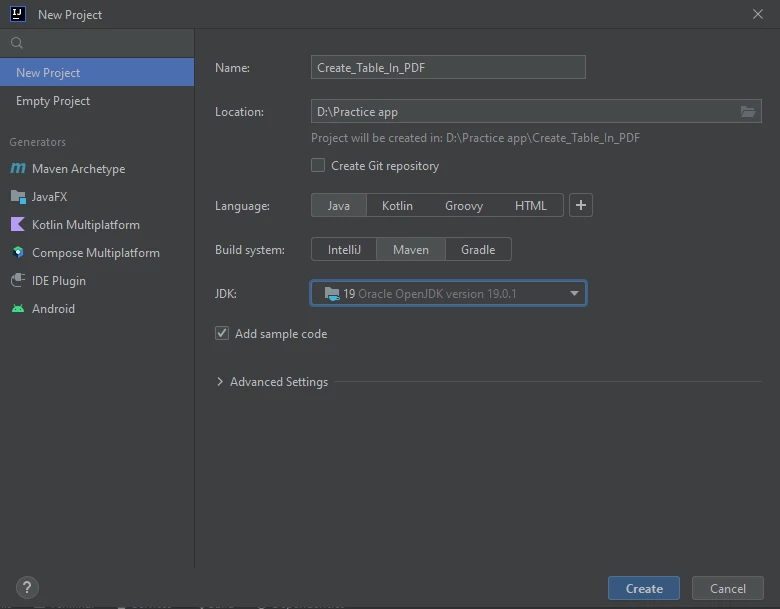 IntelliJ IDE 새 프로젝트 창
'프로젝트 생성' 버튼을 클릭하면 새 프로젝트가 생성됩니다.
이제 새로 생성된 프로젝트에 IronPDF 라이브러리를 설치하세요. 다음 단계를 계속 진행하십시오.
IronPDF를 사용하기 위해 pom.xml 파일을 열어 필수 종속성과 저장소를 추가하세요. 이 기사에서는 pom.xml의 특정 내용을 제공하지 않지만, Maven의 종속성 관리를 사용하여 IronPDF 라이브러리를 올바르게 포함해야 합니다.
<!-- Add IronPDF dependencies here -->
<dependencies>
    <!-- Example dependency for IronPDF, actual group and artifact id to be retrieved from official documentation -->
    <dependency>
        <groupId>com.ironsoftware</groupId>
        <artifactId>ironpdf</artifactId>
        <version>VERSION_NUMBER</version>
    </dependency>
</dependencies>터미널에 다음 명령어를 입력하고 Enter 키를 눌러 지정된 Maven 종속성을 설치하십시오.
mvn install이렇게 하면 이 프로젝트에 IronPDF 설치됩니다.
IronPDF 클래스를 사용하려면 다음 import 문을 추가하십시오.
import com.ironsoftware.ironpdf.*;우선 자바를 이용해 간단한 PDF 문서를 만드는 방법을 배우겠습니다.
다음 예제 코드는 새 PDF 문서를 생성합니다.
public static void main(String[] args) throws IOException {
    // Create a PDF document from an HTML string
    PdfDocument myPdf = PdfDocument.renderHtmlAsPdf("This is a sample PDF file");

    try {
        // Save the created PDF document to a file
        myPdf.saveAs(Paths.get("html_saved.pdf"));
    } catch (IOException e) {
        throw new RuntimeException(e);
    }
}[renderHtmlAsPdf](/java/object-reference/api/com/ironsoftware/ironpdf/PdfDocument.html#renderHtmlAsPdf(java.lang.String) 메서드는 문자열을 인수로 받아 해당 문자열을 PDF 문서 인스턴스로 변환합니다.
[saveAs](/java/object-reference/api/com/ironsoftware/ironpdf/PdfDocument.html#saveAs(java.lang.String) 함수는 파일 경로를 인수로 받아 새로 생성된 PDF 문서를 인수에 지정된 파일 경로에 저장합니다.
위 코드를 실행하면 다음 이미지와 같이 PDF 파일이 생성됩니다.
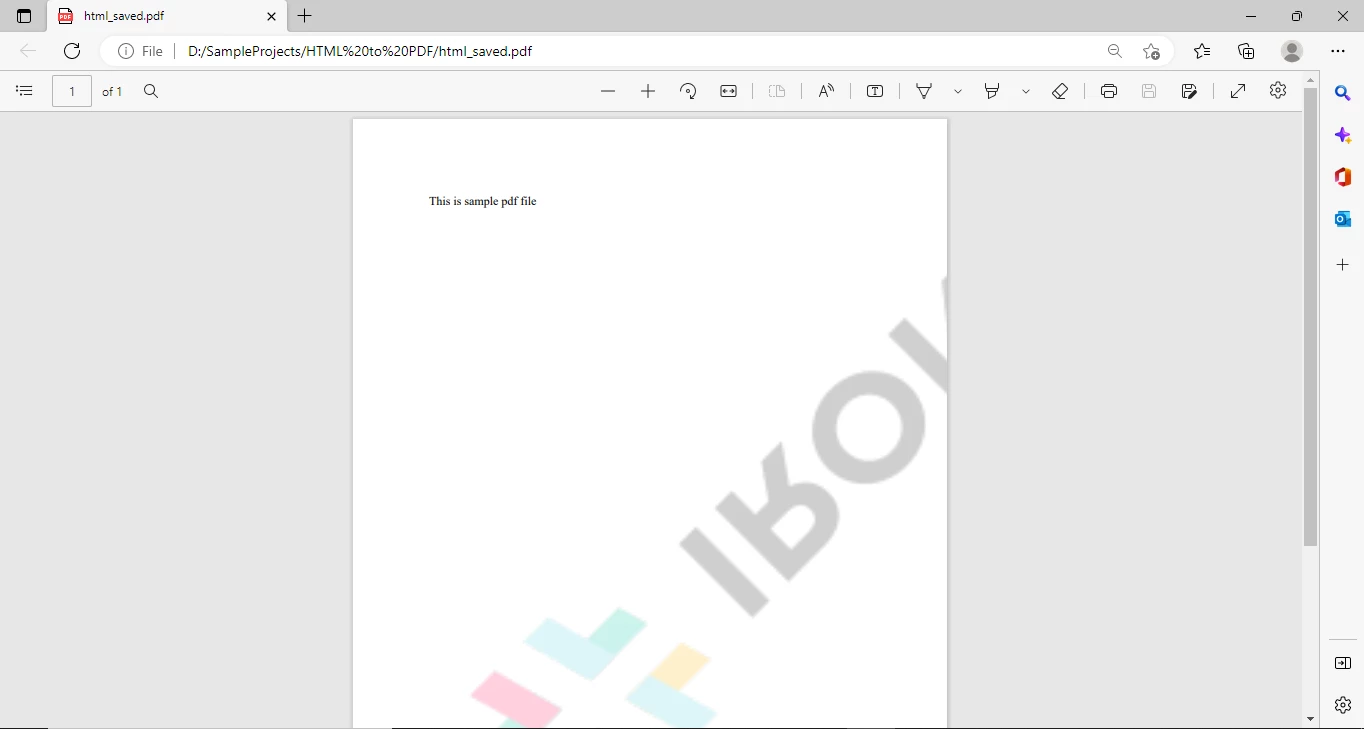 새 PDF 문서
다음 코드는 PDF 파일에 표를 생성합니다.
public static void main(String[] args) throws IOException {
    // HTML content for creating a table
    String tableContent = "<table>\n" +
        "  <tr>\n" +
        "    <th>Company</th>\n" +
        "    <th>Contact</th>\n" +
        "    <th>Country</th>\n" +
        "  </tr>\n" +
        "  <tr>\n" +
        "    <td>Alfreds Futterkiste</td>\n" +
        "    <td>Maria Anders</td>\n" +
        "    <td>Germany</td>\n" +
        "  </tr>\n" +
        "  <tr>\n" +
        "    <td>Centro comercial Moctezuma</td>\n" +
        "    <td>Francisco Chang</td>\n" +
        "    <td>Mexico</td>\n" +
        "  </tr>\n" +
        "  <tr>\n" +
        "    <td>Ernst Handel</td>\n" +
        "    <td>Roland Mendel</td>\n" +
        "    <td>Austria</td>\n" +
        "  </tr>\n" +
        "  <tr>\n" +
        "    <td>Island Trading</td>\n" +
        "    <td>Helen Bennett</td>\n" +
        "    <td>UK</td>\n" +
        "  </tr>\n" +
        "  <tr>\n" +
        "    <td>Laughing Bacchus Winecellars</td>\n" +
        "    <td>Yoshi Tannamuri</td>\n" +
        "    <td>Canada</td>\n" +
        "  </tr>\n" +
        "  <tr>\n" +
        "    <td>Magazzini Alimentari Riuniti</td>\n" +
        "    <td>Giovanni Rovelli</td>\n" +
        "    <td>Italy</td>\n" +
        "  </tr>\n" +
        "</table>";

    // Create a PDF document with table content
    PdfDocument myPdf = PdfDocument.renderHtmlAsPdf("<h1>Example of adding table in a PDF</h1>" + tableContent);

    try {
        // Save the created PDF document to a file
        myPdf.saveAs(Paths.get("html_saved.pdf"));
    } catch (IOException e) {
        throw new RuntimeException(e);
    }
}위 코드는 자바를 사용하여 간단한 HTML 태그로 PDF에 표를 생성합니다. 따라서 표를 만들려면 HTML 태그 사용에 대한 기본적인 지식이 있어야 합니다. 거의 모든 자바 프로그래머는 HTML에 대한 지식을 가지고 있으므로 HTML 태그를 사용하여 새 테이블과 테이블 셀을 만드는 것은 매우 쉽습니다.
이 프로그램으로 생성된 PDF 파일은 다음 이미지와 같습니다.
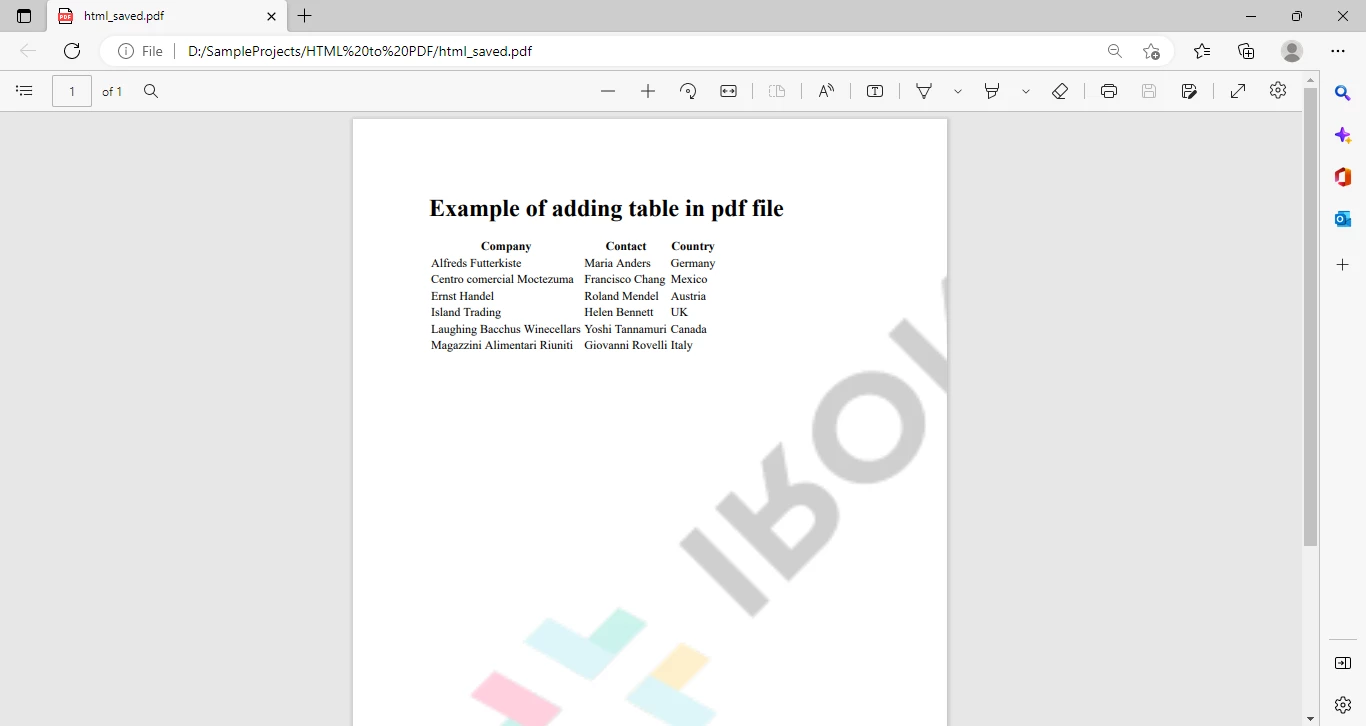 HTML에서 가져온 표가 포함된 PDF 문서
스타일링이 전혀 없는 단순한 테이블입니다.
이제 이 표에 너비, 여백, 레이아웃, 글꼴, 배경색 등을 설정하는 등의 스타일을 추가해 보겠습니다.
다음 샘플 코드는 표의 서식을 지정하고 셀에 스타일을 추가합니다.
public static void main(String[] args) throws IOException {
    // HTML and CSS content for styling the table
    String htmlstyle="<!DOCTYPE html>\n" +
        "<html>\n" +
            "<head>\n" +
                "<style>\n" +
                    "table {\n" +
                    "  font-family: arial, sans-serif;\n" +
                    "  border-collapse: collapse;\n" +
                    "  width: 100%;\n" +
                    "}\n" +
                    "\n" +
                    "td, th {\n" +
                    "  border: 1px solid #dddddd;\n" +
                    "  text-align: left;\n" +
                    "  padding: 8px;\n" +
                    "}\n" +
                    "\n" +
                    "tr:nth-child(even) {\n" +
                    "  background-color: #dddddd;\n" +
                    "}\n" +
                "</style>\n" +
            "</head>\n" +
        "<body>";

    String tableContent = "<table>\n" +
        "  <tr>\n" +
        "    <th>Company</th>\n" +
        "    <th>Contact</th>\n" +
        "    <th>Country</th>\n" +
        "  </tr>\n" +
        "  <tr>\n" +
        "    <td>Alfreds Futterkiste</td>\n" +
        "    <td>Maria Anders</td>\n" +
        "    <td>Germany</td>\n" +
        "  </tr>\n" +
        "  <tr>\n" +
        "    <td>Centro comercial Moctezuma</td>\n" +
        "    <td>Francisco Chang</td>\n" +
        "    <td>Mexico</td>\n" +
        "  </tr>\n" +
        "  <tr>\n" +
        "    <td>Ernst Handel</td>\n" +
        "    <td>Roland Mendel</td>\n" +
        "    <td>Austria</td>\n" +
        "  </tr>\n" +
        "  <tr>\n" +
        "    <td>Island Trading</td>\n" +
        "    <td>Helen Bennett</td>\n" +
        "    <td>UK</td>\n" +
        "  </tr>\n" +
        "  <tr>\n" +
        "    <td>Laughing Bacchus Winecellars</td>\n" +
        "    <td>Yoshi Tannamuri</td>\n" +
        "    <td>Canada</td>\n" +
        "  </tr>\n" +
        "  <tr>\n" +
        "    <td>Magazzini Alimentari Riuniti</td>\n" +
        "    <td>Giovanni Rovelli</td>\n" +
        "    <td>Italy</td>\n" +
        "  </tr>\n" +
        "</table>\n</body>\n" +
        "</html>";

    // Create a PDF document with styled table content
    PdfDocument myPdf = PdfDocument.renderHtmlAsPdf(htmlStyle + "Sample PDF" + tableContent);

    try {
        // Save the created PDF document to a file
        myPdf.saveAs(Paths.get("html_saved.pdf"));
    } catch (IOException e) {
        throw new RuntimeException(e);
    }
}추가된 CSS는 PDF의 표 스타일을 지정하는 데 사용됩니다. 따라서 필요에 따라 CSS를 사용하여 스타일을 지정하는 것이 매우 효율적입니다.
다음은 이 프로그램에서 생성된 PDF 파일입니다.
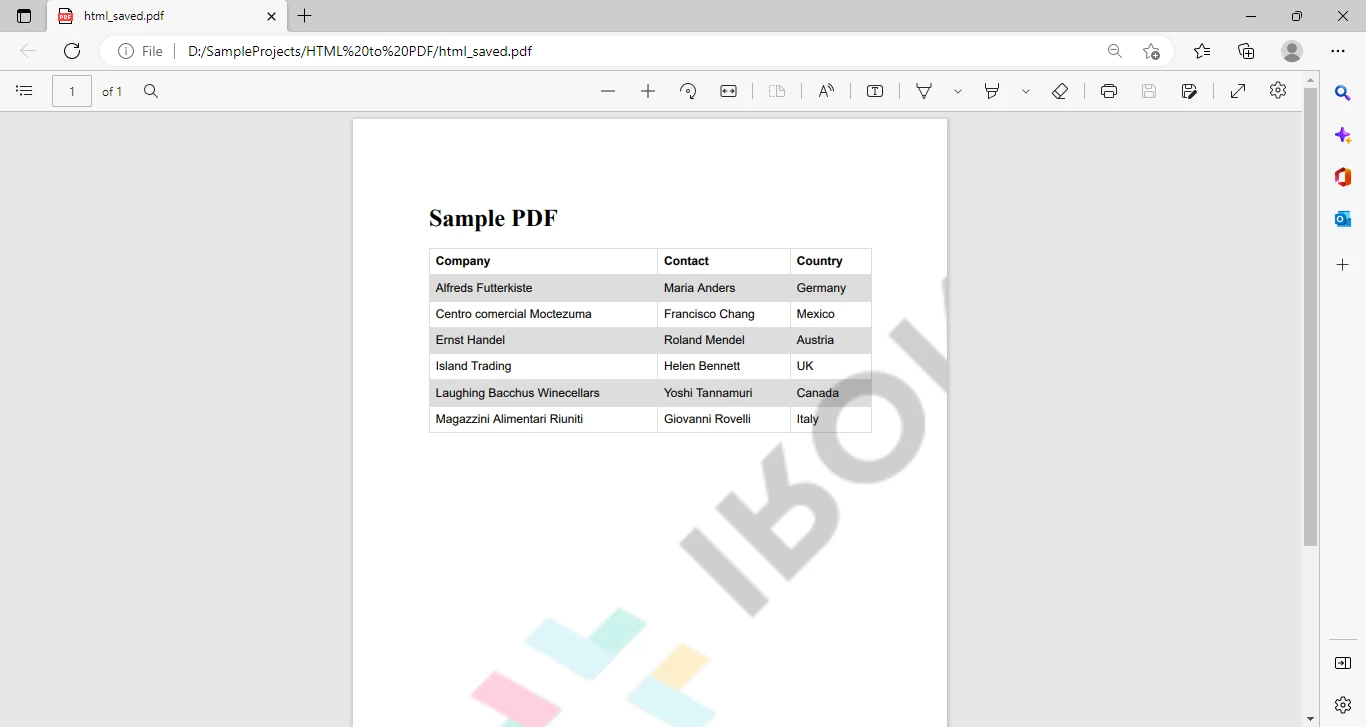 HTML로 작성된 표와 CSS로 스타일링된 표가 포함된 PDF 문서
위 코드는 너무 지저분해 보입니다. 하지만 모든 HTML 콘텐츠를 하나의 HTML 파일로 옮긴 다음 해당 파일에서 PDF를 생성하면 문제를 해결할 수 있습니다.
새 HTML 파일을 만들고 아래와 같이 모든 HTML 콘텐츠를 해당 파일에 추가하세요.
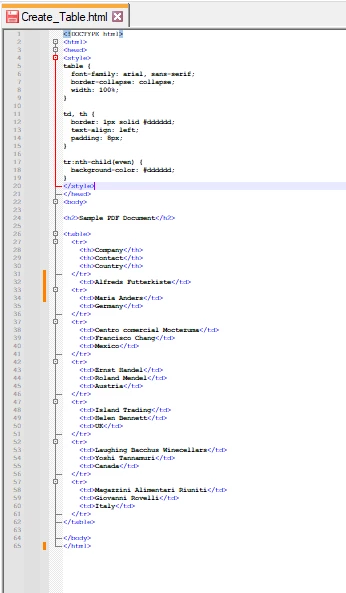 HTML이 별도의 HTML 파일로 이동되었습니다.
자바 프로그램에 다음 코드를 추가하세요.
// Create a PDF document from an HTML file
PdfDocument myPdf = PdfDocument.renderHtmlFileAsPdf("Create_Table.html");

try {
    // Save the created PDF document to a file
    myPdf.saveAs(Paths.get("html_saved.pdf"));
} catch (IOException e) {
    throw new RuntimeException(e);
}HTML 문서를 사용하여 PDF를 생성하는 것이 얼마나 쉬운지 알 수 있습니다. Java에서 PDF 파일을 생성해야 하는 경우 가장 쉬운 방법은 콘텐츠와 스타일이 포함된 별도의 HTML 문서를 만든 다음, 단 한 줄의 코드로 해당 HTML 문서를 PDF로 변환하는 것입니다.
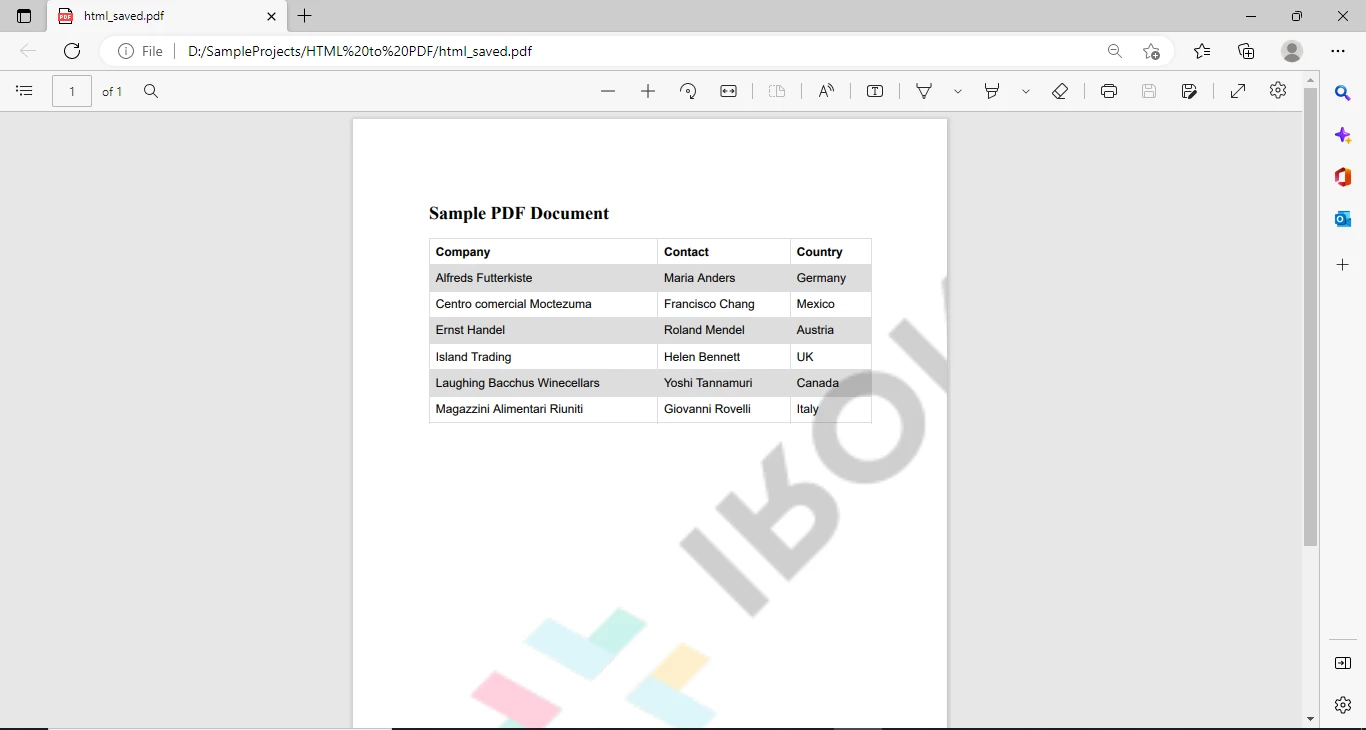 스타일이 적용된 최종 PDF 문서
이 튜토리얼에서는 Java를 사용하여 PDF 파일에 스타일이 적용된 표를 만드는 방법과 HTML 파일을 PDF 파일로 변환하는 방법을 알아보았습니다. IronPDF for Java는 PDF 파일에 이미지를 추가하고, PDF 파일을 분할하고 , 머리글과 바닥글을 추가하고 , 디지털 서명을 적용하는 등 다양한 기능을 제공합니다. IronPDF 설명서를 참조하여 이러한 기능 및 추가 기능에 대해 자세히 알아보세요.
IronPDF 워터마크를 제거하려면 라이선스 키를 구매 하거나 무료 평가판에 등록하세요 .

커티스 차우는 칼턴 대학교에서 컴퓨터 과학 학사 학위를 취득했으며, Node.js, TypeScript, JavaScript, React를 전문으로 하는 프론트엔드 개발자입니다. 직관적이고 미적으로 뛰어난 사용자 인터페이스를 만드는 데 열정을 가진 그는 최신 프레임워크를 활용하고, 잘 구성되고 시각적으로 매력적인 매뉴얼을 제작하는 것을 즐깁니다.



IronPDF는 IRON SUITE 의 일부입니다.
10개의 .NET API 제품, 당신의 사무 문서를 위해

PDF 파일을 HTML처럼 빠르게 변환해야 할 때.

