PDF oznacza Portable Document Format, format pliku, który potrafi wyświetlać tekst i statyczne obrazy. Pliki PDF mogą być również drukowane, konwertowane na HTML lub wysyłane do usługi e-faksu online, aby wysłać przez internet.
Pliki PDF są ważne, ponieważ chronią informacje i są łatwiejsze do udostępnienia niż inne formaty plików, takie jak DOCX, PPTX lub XLSX. Zazwyczaj są edytowane w programach do przetwarzania tekstu lub programach arkuszy kalkulacyjnych.
Dokument PDF zachowuje integralność swojej zawartości, ponieważ formatowanie nie zmienia się, gdy otwierany jest na innych urządzeniach. Dokument PDF nie może być zmieniany, chyba że masz dostęp do oryginalnego pliku, z którego został utworzony. Oznacza to, że nie ma ryzyka przypadkowej edycji, usunięcia lub zmiany jego zawartości bez wiedzy użytkownika. Dokument PDF jest dostępny w domenie publicznej, co oznacza, że każdy może go pobrać i przeczytać bez żadnych problemów prawnych. Pliki PDF stają się coraz ważniejsze w naszym cyfrowym świecie ze względu na ich zdolność do przechowywania informacji w jednym dokumencie, który można udostępniać w dowolnym czasie.
W tym artykule porównamy dwie biblioteki PDF .NET:
IronPDF
IronPDF - potężna biblioteka PDF .NET to biblioteka .NET, która pomaga tworzyć i czytać dokumenty PDF, a także zapewnia narzędzia do zarządzania i adaptacji dokumentów PDF. IronPDF to biblioteka oferująca funkcje budowania do tworzenia, czytania i manipulowania plikami PDF przy zaledwie kilku linijkach kodu.
Następujący artykuł pokaże Ci, jak tworzyć pliki PDF za pomocą IronPDF. Ten samouczek zakłada, że już znasz podstawy C#, Visual Studio i posiadasz podstawową wiedzę o HTML.
Potrzebujemy Visual Studio do pisania, kompilacji i uruchamiania naszej aplikacji, C# do pisania logiki i kodu oraz HTML do formatowania plików PDF, takich jak tworzenie tytułów, nagłówków, dodawanie obrazów, akapitów itp. Ta biblioteka w pełni wspiera .NET Core, .NET 5, Framework i Standard.
Możemy stworzyć plik PDF w C# przy użyciu zaledwie kilku linijek kodu. To bardzo proste zadanie, które wymaga jedynie podstawowej znajomości C# i HTML. To szczegółowy przegląd IronPDF pomoże ci dowiedzieć się więcej o jego funkcjach.
Zainstaluj bibliotekę IronPDF
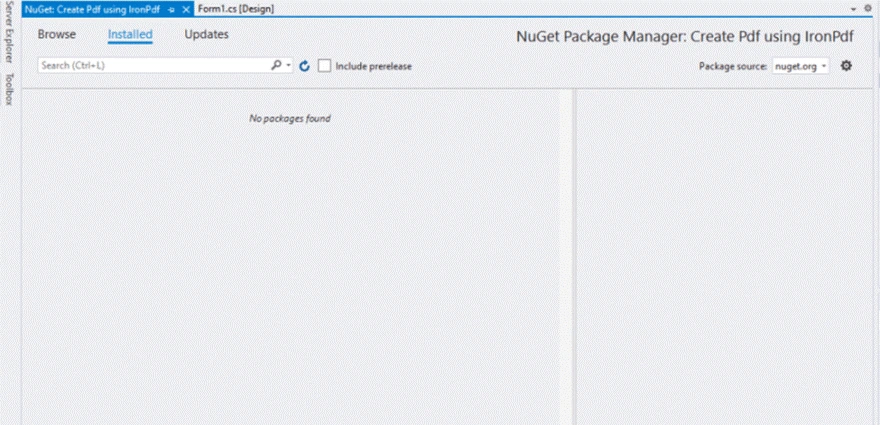
Najpierw musimy zainstalować pakiet IronPDF NuGet, aby opracować rozwiązanie. Z menu wybierz "Projekt" i pojawi się lista rozwijana. Wybierz "Zarządzaj pakietami NuGet IronPDF" z menu rozwijanego. Okno poniżej zostanie wyświetlone:
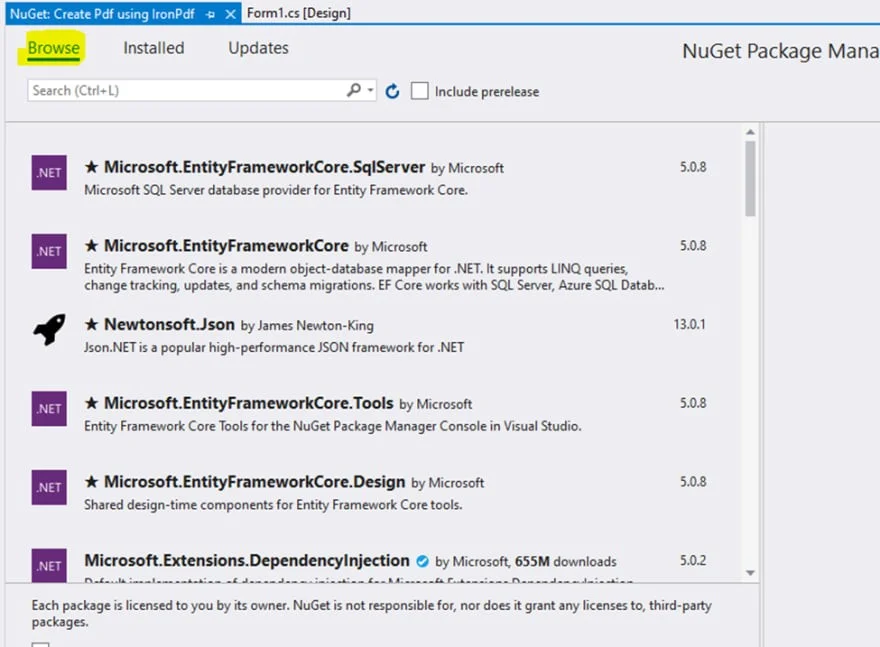
Wybierz kartę "Przeglądaj":
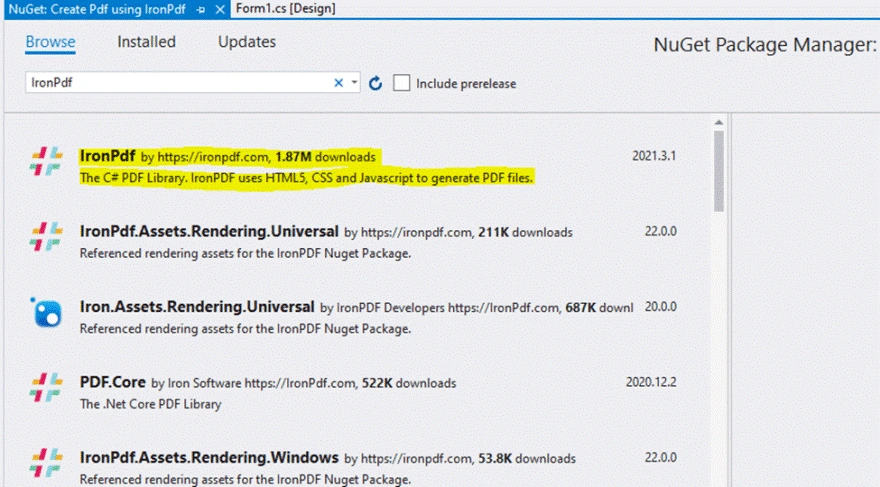
W polu wprowadzania wyszukaj 'IronPDF':
Wybierz IronPDF:
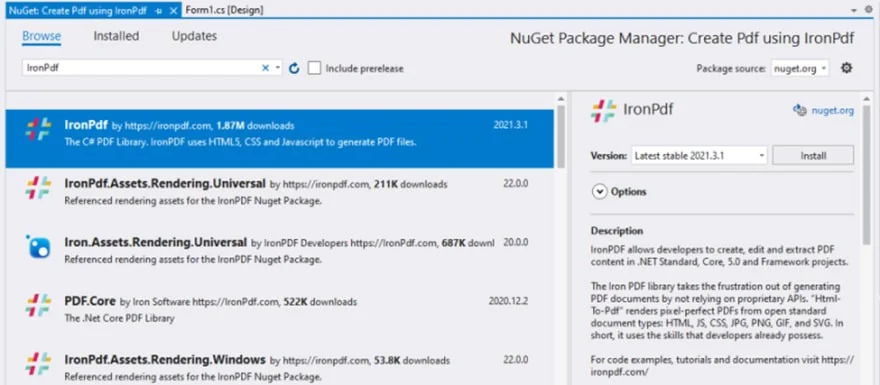
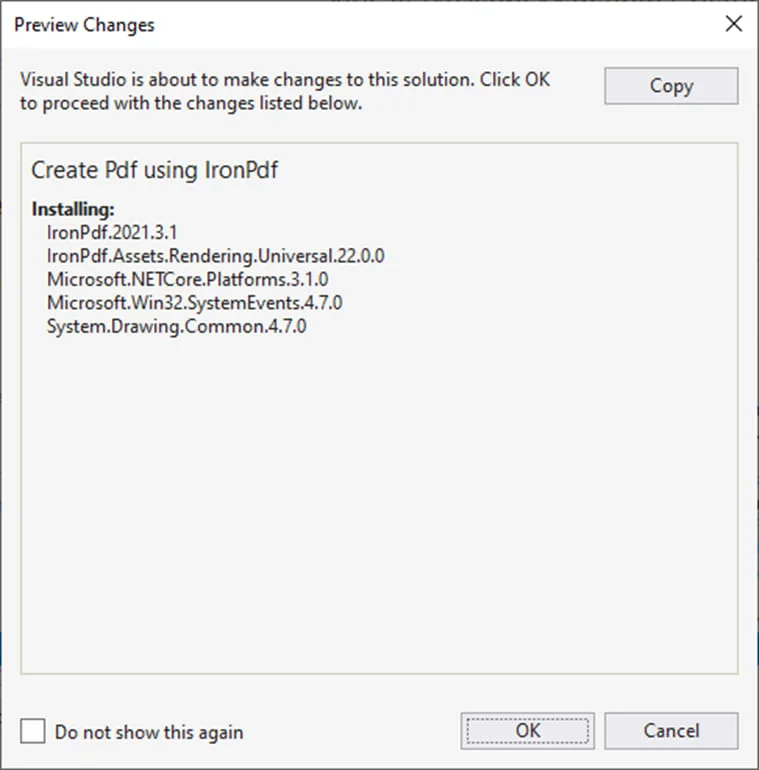
Naciśnij przycisk 'Zainstaluj' i czekaj, aż instalacja się zakończy. Po pomyślnej instalacji pojawi się następne okno:
Po naciśnięciu przycisku 'OK' jesteś gotowy do działania.
Tworzenie PDF
Dodaj przestrzeń nazw Przewodnik po przestrzeniach nazw IronPDF na początku pliku.
using IronPdf;
using IronPdf;
Imports IronPdf
Imports IronPdf
Potrzebujemy ścieżki pliku do zapisania nowo utworzonego PDF. Obiekt SaveFileDialog jest używany w tym celu. Poprosi on użytkownika o wybranie ścieżki pliku i nazwy pliku.
private void Save_Click(object sender, EventArgs e)
{
    // Selects the folder to save the file.
    SaveFileDialog saveFileDialog1 = new SaveFileDialog();
    saveFileDialog1.InitialDirectory = @"D:\";
    saveFileDialog1.Title = "Save Pdf File";
    saveFileDialog1.DefaultExt = "pdf";
    saveFileDialog1.Filter = "Pdf files (*.pdf)|*.pdf|All files (*.*)|*.*";
    saveFileDialog1.FilterIndex = 2;
    saveFileDialog1.RestoreDirectory = true;

    if (saveFileDialog1.ShowDialog() == DialogResult.OK)
    {
        string filename = saveFileDialog1.FileName;
        // Creates the PDF file
        var HtmlLine = new HtmlToPdf();
        HtmlLine.RenderHtmlAsPdf(PdfText.Text).SaveAs(filename);
        // Message displays that file has saved
        MessageBox.Show("File Saved Successfully!");
    }
}
private void Save_Click(object sender, EventArgs e)
{
    // Selects the folder to save the file.
    SaveFileDialog saveFileDialog1 = new SaveFileDialog();
    saveFileDialog1.InitialDirectory = @"D:\";
    saveFileDialog1.Title = "Save Pdf File";
    saveFileDialog1.DefaultExt = "pdf";
    saveFileDialog1.Filter = "Pdf files (*.pdf)|*.pdf|All files (*.*)|*.*";
    saveFileDialog1.FilterIndex = 2;
    saveFileDialog1.RestoreDirectory = true;

    if (saveFileDialog1.ShowDialog() == DialogResult.OK)
    {
        string filename = saveFileDialog1.FileName;
        // Creates the PDF file
        var HtmlLine = new HtmlToPdf();
        HtmlLine.RenderHtmlAsPdf(PdfText.Text).SaveAs(filename);
        // Message displays that file has saved
        MessageBox.Show("File Saved Successfully!");
    }
}
Private Sub Save_Click(ByVal sender As Object, ByVal e As EventArgs)
' Selects the folder to save the file.
Dim saveFileDialog1 As New SaveFileDialog()
saveFileDialog1.InitialDirectory = "D:\"
saveFileDialog1.Title = "Save Pdf File"
saveFileDialog1.DefaultExt = "pdf"
saveFileDialog1.Filter = "Pdf files (*.pdf)|*.pdf|All files (*.*)|*.*"
saveFileDialog1.FilterIndex = 2
saveFileDialog1.RestoreDirectory = True
If saveFileDialog1.ShowDialog() = DialogResult.OK Then
Dim filename As String = saveFileDialog1.FileName
' Creates the PDF file
Dim HtmlLine = New HtmlToPdf()
HtmlLine.RenderHtmlAsPdf(PdfText.Text).SaveAs(filename)
' Message displays that file has saved
MessageBox.Show("File Saved Successfully!")
End If
End Sub
Private Sub Save_Click(ByVal sender As Object, ByVal e As EventArgs)
	' Selects the folder to save the file.
	Dim saveFileDialog1 As New SaveFileDialog()
	saveFileDialog1.InitialDirectory = "D:\"
	saveFileDialog1.Title = "Save Pdf File"
	saveFileDialog1.DefaultExt = "pdf"
	saveFileDialog1.Filter = "Pdf files (*.pdf)|*.pdf|All files (*.*)|*.*"
	saveFileDialog1.FilterIndex = 2
	saveFileDialog1.RestoreDirectory = True

	If saveFileDialog1.ShowDialog() = DialogResult.OK Then
		Dim filename As String = saveFileDialog1.FileName
		' Creates the PDF file
		Dim HtmlLine = New HtmlToPdf()
		HtmlLine.RenderHtmlAsPdf(PdfText.Text).SaveAs(filename)
		' Message displays that file has saved
		MessageBox.Show("File Saved Successfully!")
	End If
End Sub
W powyższym przykładzie kodu SaveFileDialog otworzy okno dialogowe do wyboru folderu i nazwy pliku, aby zapisać plik PDF. Katalog początkowy jest ustawiony na dysk D. Domyślne rozszerzenie jest ustawione na pliki PDF, ponieważ zajmujemy się tylko plikami PDF.
Instrukcja if zawiera cały kod, który utworzy dokument PDF. To zajmuje tylko dwie linie kodu, aby wygenerować plik PDF. PDFText to nazwa pola tekstowego, które zawiera treść do zapisania w dokumencie PDF. Nazwa pliku to ścieżka do pliku i nazwa, która została ustawiona przez użytkownika za pomocą SaveFileDialog.
Odczytywanie PDF
Kod do odczytywania dokumentów PDF może być złożony, trudny i mylący do napisania i zrozumienia. Nie martw się – IronPDF ułatwia i upraszcza to! Odczyt plików PDF zajmuje tylko dwie linie kodu.
Na początku pliku dodaj następujący kod, aby zaimportować bibliotekę IronPDF Reading PDFs Guide.
using IronPdf;
using System;
using System.Windows.Forms;
using IronPdf;
using System;
using System.Windows.Forms;
Imports IronPdf
Imports System
Imports System.Windows.Forms
Imports IronPdf
Imports System
Imports System.Windows.Forms
Wewnątrz funkcji dodaj kod:
private void Read_Click(object sender, EventArgs e)
{
    // Open and read the specified PDF file
    PdfDocument PDF = PdfDocument.FromFile(FilePath.Text);
    // Extract text and display in FileContent (e.g., a text box)
    FileContent.Text = PDF.ExtractAllText();
}
private void Read_Click(object sender, EventArgs e)
{
    // Open and read the specified PDF file
    PdfDocument PDF = PdfDocument.FromFile(FilePath.Text);
    // Extract text and display in FileContent (e.g., a text box)
    FileContent.Text = PDF.ExtractAllText();
}
Private Sub Read_Click(ByVal sender As Object, ByVal e As EventArgs)
' Open and read the specified PDF file
Dim PDF As PdfDocument = PdfDocument.FromFile(FilePath.Text)
' Extract text and display in FileContent (e.g., a text box)
FileContent.Text = PDF.ExtractAllText()
End Sub
Private Sub Read_Click(ByVal sender As Object, ByVal e As EventArgs)
	' Open and read the specified PDF file
	Dim PDF As PdfDocument = PdfDocument.FromFile(FilePath.Text)
	' Extract text and display in FileContent (e.g., a text box)
	FileContent.Text = PDF.ExtractAllText()
End Sub
Zmienna PDF przechowuje dokument PDF do przetwarzania, podczas gdy FileContent będzie przechowywać cały tekst wyodrębniony z pliku PDF.
Kontrola tekstu
Tworzenie, manipulacja, edytowanie i formatowanie plików PDF przy użyciu biblioteki .NET to trudne zadanie. Korzystanie z TX Text Control pozwala na programowe tworzenie dokumentów PDF. TX Text Control automatycznie zarządza szerokościami stron, paginacją, ramkami, tytułami i przerwami w akapitach. Aby generować dokumenty PDF z idealnym odwzorowaniem pikseli, wszystkie te elementy można dostosować.
TX Text Control oferuje liczne sposoby importu plików PDF, które mogą być zamieniane na edytowalne formaty takie jak MS Word. Te dokumenty mogą być edytowane i zapisywane w różnych formatach.
TX Text Control pozwala tworzyć pliki PDF z menu komponentów formularzy do wypełnienia. Dokumenty z komponentami formularzy można produkować w sposób podobny do szablonów korespondencji seryjnej. Są one dynamicznie wypełniane znanymi danymi i pozwalają na tworzenie niestandardowych formularzy, przyspieszając proces manipulacji plikami PDF.
TX Text Control to jedna z wiodących na rynku bibliotek .NET do dokumentacji – jej główne funkcje to:
Scal dane z szablonami kompatybilnymi z MS Word, aby tworzyć Adobe PDF i PDF/A. Twórz doskonałe dokumenty PDF używając funkcji przetwarzania tekstu latającego.
- Wypełnianie formularzy PDF.
TX Text Control daje pełen zestaw narzędzi do tworzenia dokumentów zawierających komponenty formularzy do wypełnienia, takie jak pola tekstowe formularzy, pola wyboru i menu rozwijane.
- Przetwarzanie PDF z osadzonymi plikami.
Osadzając pliki w dokumentach PDF Adobe, można tworzyć elektroniczne pojemniki na dokumenty. Twórz, importuj i przetwarzaj dokumenty takie jak faktury i załączniki.
- Cyfrowe podpisywanie plików PDF.
TX Text Control może korzystać z certyfikatów X.509 do generowania cyfrowych dokumentów Adobe PDF i PDF/A. Do konstruowania tych podpisów można używać plików certyfikatów PFX, DER, CER i Base64 CER.
Tworzenie PDF
Generowanie plików PDF jest często trudnym procesem w aplikacjach biznesowych. Istnieje kilka sposobów na tworzenie dokumentów PDF w VB.NET lub C#. Sterowniki drukarek PDF lub biblioteki PDF umieszczają elementy na stronie, ale w większości przypadków nadal trzeba zadbać o paginację i bardziej złożone zadania jak kontrola wdów i sierot.
Można tworzyć pliki od podstaw z w pełni funkcjonalnym API lub wykorzystać kompatybilne, wcześniej zaprojektowane szablony MS Word z TX Text Control. Rozmiary stron, marginesy, nagłówki i stopki, przerwy sekcyjne i paginacja są obsługiwane przez TX Text Control. Te funkcje można kontrolować i przechowywać w formatach z idealnym odwzorowaniem pikseli, takich jak Adobe PDF, PDF/A, DOC, DOCX i RTF.
SaveSettings saveSettings = new SaveSettings()
{
    MasterPassword = "Master",
    UserPassword = "User",
    DocumentAccessPermissions =
        DocumentAccessPermissions.AllowLowLevelPrinting |
        DocumentAccessPermissions.AllowExtractContents
};

textControl1.Save(StreamType.AdobePDF, saveSettings);
SaveSettings saveSettings = new SaveSettings()
{
    MasterPassword = "Master",
    UserPassword = "User",
    DocumentAccessPermissions =
        DocumentAccessPermissions.AllowLowLevelPrinting |
        DocumentAccessPermissions.AllowExtractContents
};

textControl1.Save(StreamType.AdobePDF, saveSettings);
Dim saveSettings As New SaveSettings() With {
.MasterPassword = "Master",
.UserPassword = "User",
.DocumentAccessPermissions = DocumentAccessPermissions.AllowLowLevelPrinting Or DocumentAccessPermissions.AllowExtractContents
}
textControl1.Save(StreamType.AdobePDF, saveSettings)
Dim saveSettings As New SaveSettings() With {
	.MasterPassword = "Master",
	.UserPassword = "User",
	.DocumentAccessPermissions = DocumentAccessPermissions.AllowLowLevelPrinting Or DocumentAccessPermissions.AllowExtractContents
}

textControl1.Save(StreamType.AdobePDF, saveSettings)
TX Text Control ma funkcjonalność do produkcji dokumentów Adobe PDF z cyfrowymi podpisami. Te podpisy można formatować za pomocą plików certyfikatów DER, PFX lub Base64 CER. Wymagany jest ważny certyfikat zdefiniowany w klasie TXTextControl.SaveSettings.
// Defining certificates
TXTextControl.SaveSettings settings = new TXTextControl.SaveSettings();
X509Certificate2 cert = new X509Certificate2("test.pfx", "123");
settings.DigitalSignature = new TXTextControl.DigitalSignature(cert, null);

textControl1.Save("results.pdf", TXTextControl.StreamType.AdobePDF, settings);
// Defining certificates
TXTextControl.SaveSettings settings = new TXTextControl.SaveSettings();
X509Certificate2 cert = new X509Certificate2("test.pfx", "123");
settings.DigitalSignature = new TXTextControl.DigitalSignature(cert, null);

textControl1.Save("results.pdf", TXTextControl.StreamType.AdobePDF, settings);
' Defining certificates
Dim settings As New TXTextControl.SaveSettings()
Dim cert As New X509Certificate2("test.pfx", "123")
settings.DigitalSignature = New TXTextControl.DigitalSignature(cert, Nothing)
textControl1.Save("results.pdf", TXTextControl.StreamType.AdobePDF, settings)
' Defining certificates
Dim settings As New TXTextControl.SaveSettings()
Dim cert As New X509Certificate2("test.pfx", "123")
settings.DigitalSignature = New TXTextControl.DigitalSignature(cert, Nothing)

textControl1.Save("results.pdf", TXTextControl.StreamType.AdobePDF, settings)
Odczyt Dokumentu PDF
TX Text Control może importować "cyfrowo narodzone" pliki PDF, które można przeglądać, edytować lub konwertować. Zaletą TX Text Control jest to, że jest w pełni programowalny, co oznacza, że można importować i modyfikować dokument PDF w dowolnym formacie takim jak DOC lub DOCX. Pełnie funkcjonalne API można używać do zmiany treści lub przeszukiwania dokumentu. To podejście potrafi otwierać dokumenty PDF i umożliwia przeszukiwanie ciągów w stronach dokumentu.
Interaktywne formularze w formacie Adobe PDF są również znane jako AcroForm – de facto standard do przetwarzania formularzy PDF. Wewnątrz struktura formularza dokumentu PDF może być importowana przy użyciu funkcji importu PDF TX Text Control. Korzystanie z rozszerzenia w przestrzeni nazw DocumentServer może pomóc w przetwarzaniu wyników importu PDF.
Dostarczony kod przegląda wszystkie elementy w listAcroForms, aby odczytać opcje zawartych pól kombi:
AcroForm [] listAcroForms = TXTextControl.DocumentServer.Forms.PDF.ImportForms("form.pdf");

foreach (AcroForm formElement in listAcroForms)
{
    if(formElement.GetType() == typeof(AcroFormComboBox))
    {
        string [] saOptions = ((AcroFormComboBox)formElement).Options;
    }
}
AcroForm [] listAcroForms = TXTextControl.DocumentServer.Forms.PDF.ImportForms("form.pdf");

foreach (AcroForm formElement in listAcroForms)
{
    if(formElement.GetType() == typeof(AcroFormComboBox))
    {
        string [] saOptions = ((AcroFormComboBox)formElement).Options;
    }
}
Dim listAcroForms() As AcroForm = TXTextControl.DocumentServer.Forms.PDF.ImportForms("form.pdf")
For Each formElement As AcroForm In listAcroForms
If formElement.GetType() Is GetType(AcroFormComboBox) Then
Dim saOptions() As String = CType(formElement, AcroFormComboBox).Options
End If
Next formElement
Dim listAcroForms() As AcroForm = TXTextControl.DocumentServer.Forms.PDF.ImportForms("form.pdf")

For Each formElement As AcroForm In listAcroForms
	If formElement.GetType() Is GetType(AcroFormComboBox) Then
		Dim saOptions() As String = CType(formElement, AcroFormComboBox).Options
	End If
Next formElement
Modele Licencjonowania i Ceny IronPDF i Text Control
Modele Licencji i Ceny IronPDF
30-dniowa Gwarancja Zwrotu Pieniędzy: Po zakupie licencji będziesz objęty 30-dniową gwarancją zwrotu pieniędzy.
Łatwe Wdrożenie: Wdrożenie IronPDF w różnych projektach i środowiskach jest niezwykle łatwe, możliwe w jednej linii kodu przy użyciu NuGet lub bezpośredniego pobrania z internetu.
Licencje Wieczyste: Każda kupiona licencja nie wymaga odnawiania.
Bezpłatne Wsparcie i Aktualizacje Produktu: Każda licencja towarzyszy rok bezpłatnego wsparcia i aktualizacji od zespołu za produktem. Rozszerzenia są dostępne do zakupu w dowolnym momencie.
Natychmiastowe Licencje: Po otrzymaniu płatności, wysyłane są zarejestrowane klucze licencyjne.
Wszystkie kupione licencje są wieczyste i dotyczą rozwoju, testowania i produkcji.
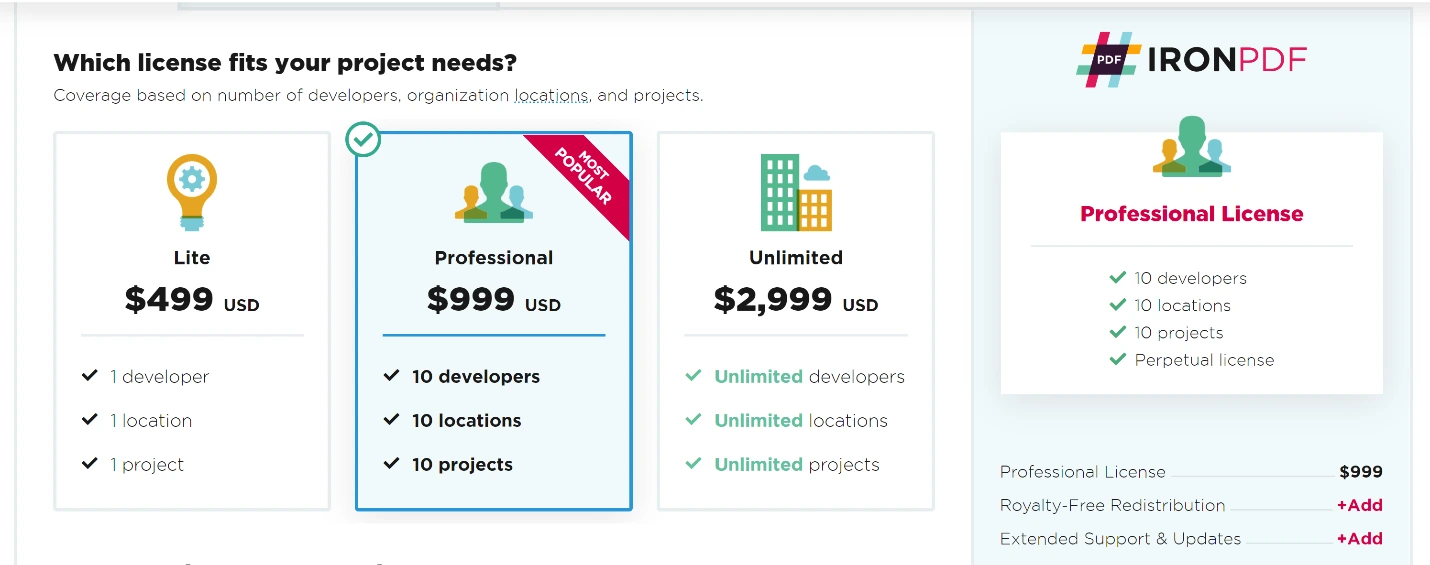
Pakiet Lite
- 1 Deweloper
- 1 Lokalizacja
- 1 Projekt
- Licencja Wieczysta
Pakiet Lite może być wykorzystywany tylko przez jednego programistę w organizacji. Oprogramowanie Iron Software może być wykorzystywane w aplikacjach intranetowych, programach komputerowych lub pojedynczych aplikacjach internetowych.
Licencje są nieprzenoszalne. Oznacza to, że udostępnianie treści poza organizacją lub poza relacją agencja/klient jest niedozwolone. Ten typ licencji, podobnie jak wszystkie inne licencje, wyklucza wszelkie prawa, które nie zostały wyraźnie przyznane w Umowie licencyjnej. W celu redystrybucji OEM oraz wykorzystania oprogramowania Iron Software jako SaaS wymagane jest wykupienie dodatkowej licencji.
Cena: Zaczyna się od $999 rocznie.
Licencja Professional
- 10 Deweloperów
- 10 Lokalizacji
- 10 Projektów
- Licencja Wieczysta
Niniejsza licencja pozwala maksymalnie dziesięciu programistom w organizacji na korzystanie z oprogramowania Iron Software w jednej lokalizacji. Oprogramowanie Iron Software może być używane na dowolnej liczbie stron internetowych, w aplikacjach intranetowych lub aplikacjach desktopowych. Licencje są nieprzenoszalne i nie można ich udostępniać poza organizacją lub relacją agencja/klient. Ten typ licencji, podobnie jak wszystkie inne typy licencji, wyraźnie wyklucza wszelkie prawa nieprzyznane na mocy Umowy, w tym redystrybucję OEM oraz wykorzystywanie oprogramowania Iron Software jako SaaS bez zakupu dodatkowego ubezpieczenia. Licencja ta może być zintegrowana z jednym projektem i maksymalnie 10 projektami.
Cena: Zaczyna się od $1,499 rocznie.
Licencja Unlimited
- Nieograniczona liczba deweloperów
- Nieograniczona liczba lokalizacji
- Nieograniczona liczba projektów
- Licencja Wieczysta
Niniejsza licencja umożliwia nieograniczonej liczbie programistów w organizacji korzystanie z oprogramowania Iron Software w nieograniczonej liczbie lokalizacji. Oprogramowanie Iron Software może być używane na dowolnej liczbie stron internetowych, w aplikacjach intranetowych lub aplikacjach desktopowych. Licencje są nieprzenoszalne i nie można ich udostępniać poza organizacją lub relacją agencja/klient. Ten typ licencji, podobnie jak wszystkie inne typy licencji, wyraźnie wyklucza wszelkie prawa nieprzyznane na mocy Umowy licencyjnej, w tym redystrybucję OEM oraz wykorzystywanie oprogramowania Iron Software jako SaaS bez zakupu dodatkowego zakresu redystrybucji.
Cena: Od 2999 USD rocznie.
Redystrybucja bez opłat licencyjnych: Umożliwia to dystrybucję oprogramowania Iron Software jako części kilku różnych pakietów produktów komercyjnych (bez konieczności uiszczania opłat licencyjnych) w zależności od liczby projektów objętych licencją podstawową. Umożliwia wdrożenie oprogramowania Iron Software w ramach usług SaaS, w oparciu o liczbę projektów objętych licencją podstawową.
Cena: Od 1599 USD rocznie.
Modele licencji i ceny Text Control
Polityka licencyjna: Każdy programista korzystający z tych produktów musi posiadać własną przypisaną licencję. Wszystkie licencje są bezterminowe.
Konserwacja i wsparcie: Subskrypcje obejmują roczny dostęp do aktualizacji i dodatków Service Pack, a także nieograniczoną liczbę zgłoszeń do pomocy technicznej za pośrednictwem poczty elektronicznej, telefonu i czatu.
Odnowienie subskrypcji: Roczne odnowienie subskrypcji TextControl kosztuje 40% ceny katalogowej.
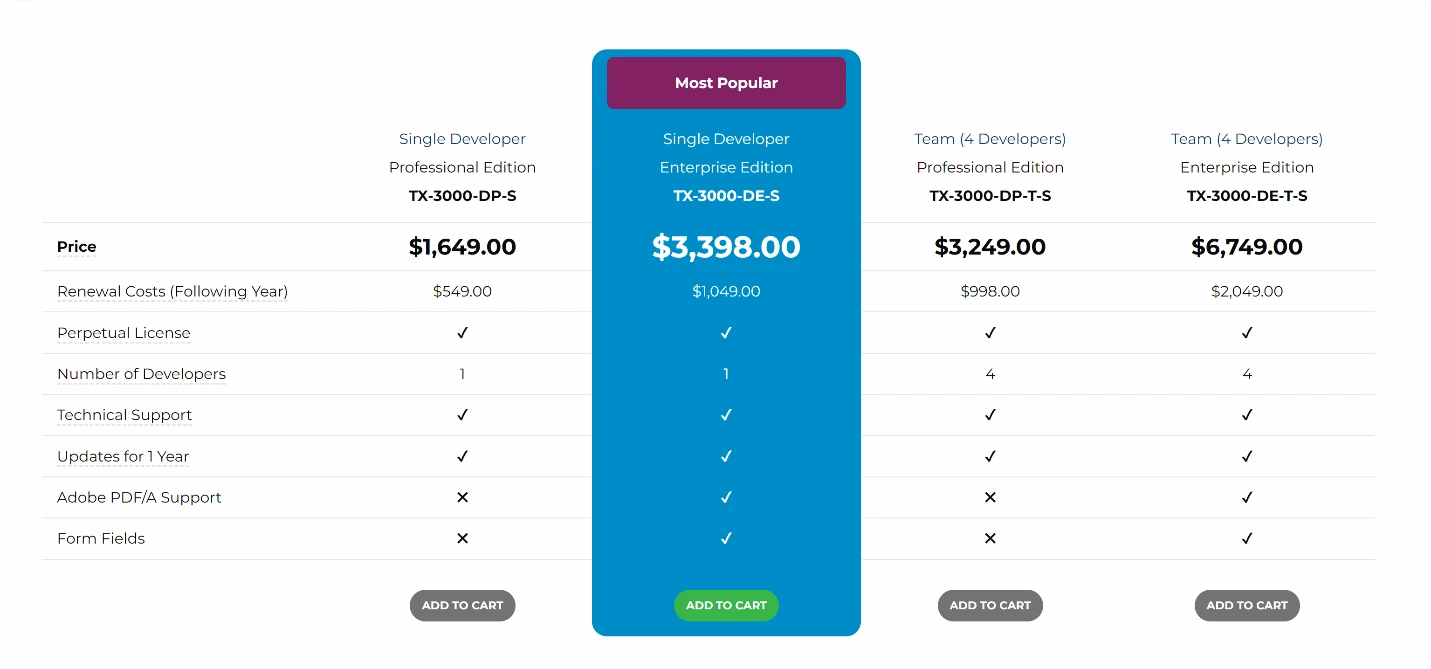
TX-3000-DE-S
TX Text Control .NET for Windows Forms Enterprise 30.0:
- Roczna subskrypcja.
- Wszystkie główne wydania, aktualizacje i wsparcie techniczne przez okres do 12 miesięcy.
Ceny: Od 3398,00 USD rocznie.
TX-3000-DE-T-S
TX Text Control .NET for Windows Forms Enterprise 30.0:
- 4 Team Licenses dla programistów (obejmuje 4 Team Licenses programistyczne).
- Roczna subskrypcja.
- Wszystkie aktualizacje, główne wydania i wsparcie techniczne przez 12 miesięcy.
Ceny: Od 6749,00 USD rocznie
TX-3000-DP-T-S
TX Text Control .NET for Windows Forms Professional 30.0:
- 4 Team Licenses dla zespołu programistów (obejmuje 4 licencje programistyczne).
- Roczna subskrypcja.
- Wszystkie aktualizacje, główne wydania i wsparcie techniczne przez 12 miesięcy.
Ceny: Od 3249,00 USD rocznie.
Pakiet IronPDF Lite zawierający pakiet dla jednego dewelopera z rocznym wsparciem kosztuje około $999. W przypadku Text Control pakiet dla jednego programisty kosztuje 3399 USD i obejmuje wszystkie aktualizacje, główne wydania oraz wsparcie techniczne przez 12 miesięcy. Pakiet IronPDF Professional dla 10 deweloperów z rocznym wsparciem kosztuje $1,499. Text Control nie oferuje pakietu dla 10 programistów - posiada wyłącznie pakiety dla 4 programistów, które kosztują 6749,00 USD rocznie i obejmują wszystkie aktualizacje, główne wydania oraz wsparcie techniczne przez 12 miesięcy.
Zarówno pakiet IronPDF Lite, jak i Professional obejmują usługę SaaS lub OEM, a także opcję 5-letniego wsparcia technicznego. Pakiet Lite dla jednego programisty z 5-letnim wsparciem oraz usługami SaaS i OEM kosztuje 2897 USD. Pakiet Iron Professional dla 10 programistów z 5-letnim wsparciem oraz usługami SaaS i OEM kosztuje 3397 USD. Text Control nie oferuje usług SaaS ani OEM, ani opcji 5-letniego wsparcia.
Wnioski
Biblioteka IronPDF oferuje wiele funkcji. Korzystając z metody konwersji HTML na PDF firmy IronPDF, można renderować widok Razor do postaci ciągu znaków, używać go jako czytnika PDF w języku C# oraz wizualizować i eksportować raporty SSRS do formatu PDF w aplikacjach ASP.NET. Dodatkowo IronPDF może służyć do renderowania migawek danych jako "raportów" w formacie PDF.
IronPDF działa również jako parser PDF w języku C#. Podstawowe podejście polega na tym, aby najpierw wygenerować raport jako dokument HTML, a następnie przekształcić HTML do formatu PDF za pomocą IronPDF.
Stylizacja raportu XML wymaga parsowania XML w celu wygenerowania kodu HTML z danymi. Raporty te mogą być generowane w formacie HTML, a następnie dostosowywane i konwertowane do dokumentów PDF przy użyciu IronPDF. Najprostszym sposobem na obsługę treści HTML w ASP.NET jest użycie klasy IronPdf.AspxToPdf w zdarzeniu Form_Load aplikacji ASP.NET WebForms.
Istnieje kilka sposobów importowania dokumentów PDF za pomocą Text Control. Dokumenty można importować i konwertować do innych formatów, takich jak WORD, a także modyfikować i zapisywać w innych formatach edytowalnych. Dostępna jest funkcja wyszukiwania pełnotekstowego w dokumentach PDF, która pozwala na odzyskanie pozycji i współrzędnych elementów. Dodatkowo, dzięki funkcji Text Control "wyodrębnij wartości pól formularza" możliwe jest wyodrębnianie wyników pobranych z formularzy. Wyszukiwanie promieniowe to również funkcja, która pozwala na zwracanie wierszy z określonego promienia i lokalizacji.
Wykazano, że IronPDF działa bardzo dokładnie podczas konwersji dokumentów. Konkurencyjne rozwiązania wykazały się niedokładnością, generując nieprawidłowe wyniki, takie jak nieudane konwersje obrazów, skutkujące pojawieniem się nieznanych znaków. Z drugiej strony, IronPDF zapewnia bardzo dokładne wyniki.
Pakiety IronPDF oferują konkurencyjne warunki licencyjne i wsparcie techniczne, nie wiążą się z żadnymi stałymi kosztami i są bardziej przystępne cenowo niż niektóre produkty konkurencyjnych marek. Ceny pakietów Text Control zaczynają się od 1649 USD rocznie. IronPDF zaczyna się od $999 i wspiera wiele platform w jednej cenie, oferując imponującą różnorodność funkcji.
Jeśli nie jesteś jeszcze klientem IronPDF, bezpłatna wersja próbna pozwala sprawdzić wszystkie dostępne funkcje. Kupując kompletny pakiet Iron Suite, otrzymujesz wszystkie pięć produktów w cenie zaledwie dwóch! Aby uzyskać więcej informacji na temat Licencji Iron Software, odwiedź Przewodnik zakupu pakietu Iron Suite, aby nabyć kompletny pakiet.
TX Text Control jest zastrzeżonym znakiem towarowym odpowiedniego właściciela. Ta strona nie jest powiązana z firmą TX Text Control, nie jest przez nią promowana ani sponsorowana. Wszystkie nazwy produktów, logo i marki są własnością ich odpowiednich właścicieli. Porównania mają charakter wyłącznie informacyjny i odzwierciedlają informacje dostępne publicznie w momencie pisania.