AES (Zaawansowany Standard Szyfrowania) jest jednym z najczęściej używanych algorytmów szyfrowania symetrycznego. Używa tego samego klucza do szyfrowania i deszyfrowania danych, co sprawia, że szyfrowanie AES jest wydajne i szybkie w zabezpieczaniu wrażliwych danych w wielu aplikacjach.
Ten samouczek skupi się na szyfrowaniu AES w C#, używając klasy AES do szyfrowania i deszyfrowania danych oraz biblioteki IronPDF. Omówimy praktyczne przykłady, przejdziemy przez proces szyfrowania i zobaczymy, jak używać trybu Cipher Block Chaining (CBC) w celu zwiększenia bezpieczeństwa. Przeanalizujemy także zarządzanie kluczami szyfrowania oraz rolę wektóra inicjującego (IV).
Introduction of AES Encryption in C#
Zaawansowany Standard Szyfrowania (AES) to symetryczny algorytm szyfrowania, standaryzowany przez National Institute of Standards and Technology (NIST). Algorytm może mieć rozmiary klucza 128, 192 lub 256 bitów i jest wysokozabezpieczający dla szyfrowania poufnych danych. Używa tego samego klucza szyfrowania do szyfrowania i deszyfrowania danych.
AES działa przez podział oryginalnych danych na bloki i stosowanie transformacji na tych blokach. Działa w różnych trybach szyfrowania, takich jak CBC (Cipher Block Chaining) i Electronic CodeBook (ECB), z których każdy oferuje różne funkcje bezpieczeństwa.
How AES Works in C#
Algorytm szyfrowania AES w C# jest częścią przestrzeni nazw System.Security.Cryptography. Ta przestrzeń nazw zawiera klasę AES, która umożliwia stworzenie instancji AES, określenie rozmiaru klucza, trybu szyfrowania i trybu paddingu, a następnie szyfrowanie i deszyfrowanie danych przy użyciu tajnego klucza.
Aby korzystać z AES w C#, postępuj zgodnie z następującymi krokami:
- Utwórz instancję klasy AES używając
Aes.Create().
- Ustaw klucz, IV i inne odpowiednie parametry, takie jak tryb szyfrowania.
- Zaszyfruj dane za pomocą interfejsu ICryptoTransform i zapisz je do MemoryStream.
- Odszyfruj dane używając tego samego klucza i IV.
Stwórzmy podstawowy proces szyfrowania i program deszyfrujący w C#.
using System;
using System.IO;
using System.Security.Cryptography;
using System.Text;

class Program
{
    // Declare a static byte array for encrypted data
    public static byte[] encryptedData;

    // Main method to demonstrate encryption and decryption
    public static void Main(string[] args)
    {
        // String plaintext to be encrypted
        string plaintext = "This is some sensitive data!";
        string key = "abcdefghijklmnop"; // 128-bit key (16 characters)

        // Encrypt the plaintext
        string ciphertext = Encrypt(plaintext, key);
        Console.WriteLine("Encrypted Data: " + ciphertext);

        // Decrypt the ciphertext
        string decryptedData = Decrypt(ciphertext, key);
        Console.WriteLine("Decrypted Data: " + decryptedData);
    }

    // Method to encrypt data
    public static string Encrypt(string plaintext, string key)
    {
        // Create a new instance of the AES encryption algorithm
        using (Aes aes = Aes.Create())
        {
            aes.Key = Encoding.UTF8.GetBytes(key);
            aes.IV = new byte[16]; // Initialization vector (IV)

            // Create an encryptor to perform the stream transform
            ICryptoTransform encryptor = aes.CreateEncryptor(aes.Key, aes.IV);

            // Create the streams used for encryption
            using (MemoryStream ms = new MemoryStream())
            {
                // Create a CryptoStream using the encryptor
                using (CryptoStream cs = new CryptoStream(ms, encryptor, CryptoStreamMode.Write))
                {
                    using (StreamWriter sw = new StreamWriter(cs))
                    {
                        sw.Write(plaintext);
                    }
                }
                // Store the encrypted data in the public static byte array
                encryptedData = ms.ToArray();
                return Convert.ToBase64String(encryptedData);
            }
        }
    }

    // Method to decrypt data
    public static string Decrypt(string ciphertext, string key)
    {
        using (Aes aes = Aes.Create())
        {
            aes.Key = Encoding.UTF8.GetBytes(key);
            aes.IV = new byte[16]; // Initialization vector (IV)

            // Create a decryptor to perform the stream transform
            ICryptoTransform decryptor = aes.CreateDecryptor(aes.Key, aes.IV);

            // Create the streams used for decryption
            using (MemoryStream ms = new MemoryStream(Convert.FromBase64String(ciphertext)))
            {
                using (CryptoStream cs = new CryptoStream(ms, decryptor, CryptoStreamMode.Read))
                {
                    using (StreamReader sr = new StreamReader(cs))
                    {
                        return sr.ReadToEnd();
                    }
                }
            }
        }
    }
}
using System;
using System.IO;
using System.Security.Cryptography;
using System.Text;

class Program
{
    // Declare a static byte array for encrypted data
    public static byte[] encryptedData;

    // Main method to demonstrate encryption and decryption
    public static void Main(string[] args)
    {
        // String plaintext to be encrypted
        string plaintext = "This is some sensitive data!";
        string key = "abcdefghijklmnop"; // 128-bit key (16 characters)

        // Encrypt the plaintext
        string ciphertext = Encrypt(plaintext, key);
        Console.WriteLine("Encrypted Data: " + ciphertext);

        // Decrypt the ciphertext
        string decryptedData = Decrypt(ciphertext, key);
        Console.WriteLine("Decrypted Data: " + decryptedData);
    }

    // Method to encrypt data
    public static string Encrypt(string plaintext, string key)
    {
        // Create a new instance of the AES encryption algorithm
        using (Aes aes = Aes.Create())
        {
            aes.Key = Encoding.UTF8.GetBytes(key);
            aes.IV = new byte[16]; // Initialization vector (IV)

            // Create an encryptor to perform the stream transform
            ICryptoTransform encryptor = aes.CreateEncryptor(aes.Key, aes.IV);

            // Create the streams used for encryption
            using (MemoryStream ms = new MemoryStream())
            {
                // Create a CryptoStream using the encryptor
                using (CryptoStream cs = new CryptoStream(ms, encryptor, CryptoStreamMode.Write))
                {
                    using (StreamWriter sw = new StreamWriter(cs))
                    {
                        sw.Write(plaintext);
                    }
                }
                // Store the encrypted data in the public static byte array
                encryptedData = ms.ToArray();
                return Convert.ToBase64String(encryptedData);
            }
        }
    }

    // Method to decrypt data
    public static string Decrypt(string ciphertext, string key)
    {
        using (Aes aes = Aes.Create())
        {
            aes.Key = Encoding.UTF8.GetBytes(key);
            aes.IV = new byte[16]; // Initialization vector (IV)

            // Create a decryptor to perform the stream transform
            ICryptoTransform decryptor = aes.CreateDecryptor(aes.Key, aes.IV);

            // Create the streams used for decryption
            using (MemoryStream ms = new MemoryStream(Convert.FromBase64String(ciphertext)))
            {
                using (CryptoStream cs = new CryptoStream(ms, decryptor, CryptoStreamMode.Read))
                {
                    using (StreamReader sr = new StreamReader(cs))
                    {
                        return sr.ReadToEnd();
                    }
                }
            }
        }
    }
}
Imports System
Imports System.IO
Imports System.Security.Cryptography
Imports System.Text
Friend Class Program
' Declare a static byte array for encrypted data
Public Shared encryptedData() As Byte
' Main method to demonstrate encryption and decryption
Public Shared Sub Main(ByVal args() As String)
' String plaintext to be encrypted
Dim plaintext As String = "This is some sensitive data!"
Dim key As String = "abcdefghijklmnop" ' 128-bit key (16 characters)
' Encrypt the plaintext
Dim ciphertext As String = Encrypt(plaintext, key)
Console.WriteLine("Encrypted Data: " & ciphertext)
' Decrypt the ciphertext
Dim decryptedData As String = Decrypt(ciphertext, key)
Console.WriteLine("Decrypted Data: " & decryptedData)
End Sub
' Method to encrypt data
Public Shared Function Encrypt(ByVal plaintext As String, ByVal key As String) As String
' Create a new instance of the AES encryption algorithm
Using aes As Aes = System.Security.Cryptography.Aes.Create()
aes.Key = Encoding.UTF8.GetBytes(key)
aes.IV = New Byte(15){} ' Initialization vector (IV)
' Create an encryptor to perform the stream transform
Dim encryptor As ICryptoTransform = aes.CreateEncryptor(aes.Key, aes.IV)
' Create the streams used for encryption
Using ms As New MemoryStream()
' Create a CryptoStream using the encryptor
Using cs As New CryptoStream(ms, encryptor, CryptoStreamMode.Write)
Using sw As New StreamWriter(cs)
sw.Write(plaintext)
End Using
End Using
' Store the encrypted data in the public static byte array
encryptedData = ms.ToArray()
Return Convert.ToBase64String(encryptedData)
End Using
End Using
End Function
' Method to decrypt data
Public Shared Function Decrypt(ByVal ciphertext As String, ByVal key As String) As String
Using aes As Aes = System.Security.Cryptography.Aes.Create()
aes.Key = Encoding.UTF8.GetBytes(key)
aes.IV = New Byte(15){} ' Initialization vector (IV)
' Create a decryptor to perform the stream transform
Dim decryptor As ICryptoTransform = aes.CreateDecryptor(aes.Key, aes.IV)
' Create the streams used for decryption
Using ms As New MemoryStream(Convert.FromBase64String(ciphertext))
Using cs As New CryptoStream(ms, decryptor, CryptoStreamMode.Read)
Using sr As New StreamReader(cs)
Return sr.ReadToEnd()
End Using
End Using
End Using
End Using
End Function
End Class
Imports System
Imports System.IO
Imports System.Security.Cryptography
Imports System.Text

Friend Class Program
	' Declare a static byte array for encrypted data
	Public Shared encryptedData() As Byte

	' Main method to demonstrate encryption and decryption
	Public Shared Sub Main(ByVal args() As String)
		' String plaintext to be encrypted
		Dim plaintext As String = "This is some sensitive data!"
		Dim key As String = "abcdefghijklmnop" ' 128-bit key (16 characters)

		' Encrypt the plaintext
		Dim ciphertext As String = Encrypt(plaintext, key)
		Console.WriteLine("Encrypted Data: " & ciphertext)

		' Decrypt the ciphertext
		Dim decryptedData As String = Decrypt(ciphertext, key)
		Console.WriteLine("Decrypted Data: " & decryptedData)
	End Sub

	' Method to encrypt data
	Public Shared Function Encrypt(ByVal plaintext As String, ByVal key As String) As String
		' Create a new instance of the AES encryption algorithm
		Using aes As Aes = System.Security.Cryptography.Aes.Create()
			aes.Key = Encoding.UTF8.GetBytes(key)
			aes.IV = New Byte(15){} ' Initialization vector (IV)

			' Create an encryptor to perform the stream transform
			Dim encryptor As ICryptoTransform = aes.CreateEncryptor(aes.Key, aes.IV)

			' Create the streams used for encryption
			Using ms As New MemoryStream()
				' Create a CryptoStream using the encryptor
				Using cs As New CryptoStream(ms, encryptor, CryptoStreamMode.Write)
					Using sw As New StreamWriter(cs)
						sw.Write(plaintext)
					End Using
				End Using
				' Store the encrypted data in the public static byte array
				encryptedData = ms.ToArray()
				Return Convert.ToBase64String(encryptedData)
			End Using
		End Using
	End Function

	' Method to decrypt data
	Public Shared Function Decrypt(ByVal ciphertext As String, ByVal key As String) As String
		Using aes As Aes = System.Security.Cryptography.Aes.Create()
			aes.Key = Encoding.UTF8.GetBytes(key)
			aes.IV = New Byte(15){} ' Initialization vector (IV)

			' Create a decryptor to perform the stream transform
			Dim decryptor As ICryptoTransform = aes.CreateDecryptor(aes.Key, aes.IV)

			' Create the streams used for decryption
			Using ms As New MemoryStream(Convert.FromBase64String(ciphertext))
				Using cs As New CryptoStream(ms, decryptor, CryptoStreamMode.Read)
					Using sr As New StreamReader(cs)
						Return sr.ReadToEnd()
					End Using
				End Using
			End Using
		End Using
	End Function
End Class
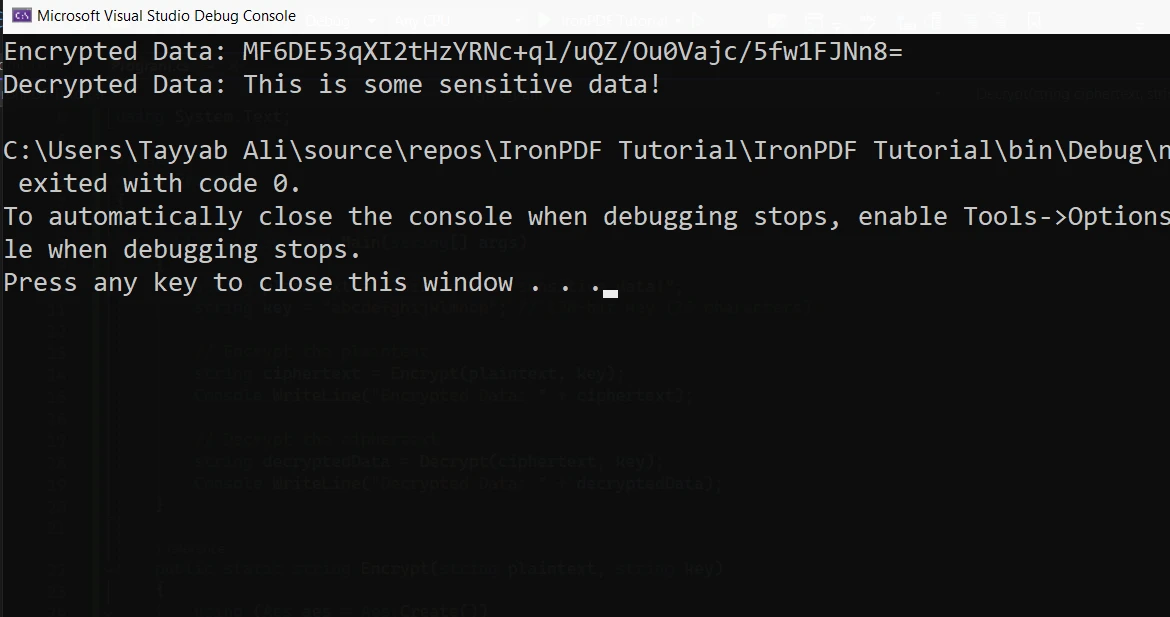
Wyjaśnienie kodu
Aes.Create(): Tworzy nową instancję algorytmu szyfrowania AES.aes.Key: Klucz używany zarówno do szyfrowania, jak i deszyfrowania. Musi mieć odpowiedni rozmiar, taki jak 128 bitów (16 bajtów), 192 bity lub 256 bitów.aes.IV: Wektor inicjalizacyjny (IV), jest używany do losowania procesu szyfrowania. W tym przykładzie używamy IV z zerami dla uproszczenia.- MemoryStream: Umożliwia pracę z zaszyfrowanymi danymi jako strumienie bajtów.
- CryptoStream: Przekształca strumień danych (szyfrowanie lub deszyfrowanie).
Zaawansowany przykład: Szyfrowanie AES z Własnym Kluczem i IV
Rozbudujmy poprzedni przykład przez wygenerowanie losowego klucza i IV, co zwiększa bezpieczeństwo szyfrowania.
public static string EncryptData(string plaintext)
{
    using (Aes aes = Aes.Create())
    {
        aes.Key = new byte[32]; // AES-256 requires a 256-bit key (32 bytes)
        aes.IV = new byte[16];  // 128-bit block size

        // Randomly generate key and IV
        using (RandomNumberGenerator rng = RandomNumberGenerator.Create())
        {
            rng.GetBytes(aes.Key); // Generate a random key
            rng.GetBytes(aes.IV);  // Generate a random IV
        }

        // Create an encryptor to perform the stream transform
        ICryptoTransform encryptor = aes.CreateEncryptor(aes.Key, aes.IV);

        // Create the streams used for encryption
        using (MemoryStream ms = new MemoryStream())
        {
            using (CryptoStream cs = new CryptoStream(ms, encryptor, CryptoStreamMode.Write))
            {
                using (StreamWriter sw = new StreamWriter(cs))
                {
                    sw.Write(plaintext);
                }
            }
            return Convert.ToBase64String(ms.ToArray());
        }
    }
}
public static string EncryptData(string plaintext)
{
    using (Aes aes = Aes.Create())
    {
        aes.Key = new byte[32]; // AES-256 requires a 256-bit key (32 bytes)
        aes.IV = new byte[16];  // 128-bit block size

        // Randomly generate key and IV
        using (RandomNumberGenerator rng = RandomNumberGenerator.Create())
        {
            rng.GetBytes(aes.Key); // Generate a random key
            rng.GetBytes(aes.IV);  // Generate a random IV
        }

        // Create an encryptor to perform the stream transform
        ICryptoTransform encryptor = aes.CreateEncryptor(aes.Key, aes.IV);

        // Create the streams used for encryption
        using (MemoryStream ms = new MemoryStream())
        {
            using (CryptoStream cs = new CryptoStream(ms, encryptor, CryptoStreamMode.Write))
            {
                using (StreamWriter sw = new StreamWriter(cs))
                {
                    sw.Write(plaintext);
                }
            }
            return Convert.ToBase64String(ms.ToArray());
        }
    }
}
Public Shared Function EncryptData(ByVal plaintext As String) As String
Using aes As Aes = Aes.Create()
aes.Key = New Byte(31){} ' AES-256 requires a 256-bit key (32 bytes)
aes.IV = New Byte(15){} ' 128-bit block size
' Randomly generate key and IV
Using rng As RandomNumberGenerator = RandomNumberGenerator.Create()
rng.GetBytes(aes.Key) ' Generate a random key
rng.GetBytes(aes.IV) ' Generate a random IV
End Using
' Create an encryptor to perform the stream transform
Dim encryptor As ICryptoTransform = aes.CreateEncryptor(aes.Key, aes.IV)
' Create the streams used for encryption
Using ms As New MemoryStream()
Using cs As New CryptoStream(ms, encryptor, CryptoStreamMode.Write)
Using sw As New StreamWriter(cs)
sw.Write(plaintext)
End Using
End Using
Return Convert.ToBase64String(ms.ToArray())
End Using
End Using
End Function
Public Shared Function EncryptData(ByVal plaintext As String) As String
	Using aes As Aes = Aes.Create()
		aes.Key = New Byte(31){} ' AES-256 requires a 256-bit key (32 bytes)
		aes.IV = New Byte(15){} ' 128-bit block size

		' Randomly generate key and IV
		Using rng As RandomNumberGenerator = RandomNumberGenerator.Create()
			rng.GetBytes(aes.Key) ' Generate a random key
			rng.GetBytes(aes.IV) ' Generate a random IV
		End Using

		' Create an encryptor to perform the stream transform
		Dim encryptor As ICryptoTransform = aes.CreateEncryptor(aes.Key, aes.IV)

		' Create the streams used for encryption
		Using ms As New MemoryStream()
			Using cs As New CryptoStream(ms, encryptor, CryptoStreamMode.Write)
				Using sw As New StreamWriter(cs)
					sw.Write(plaintext)
				End Using
			End Using
			Return Convert.ToBase64String(ms.ToArray())
		End Using
	End Using
End Function
W tym przypadku generujemy nowy klucz i IV za każdym razem, gdy funkcja jest wywoływana. To zapewnia bardziej solidne szyfrowanie, ponieważ ten sam klucz nie jest używany w każdej operacji. AES obsługuje rozmiary kluczy, takie jak 128, 192 i 256 bitów.
Deszyfrowanie Danych za Pomocą AES
Deszyfrowanie to proces przeciwny do szyfrowania danych. W naszych przykładach, ten sam klucz i IV używane do szyfrowania muszą być dostarczone, aby odszyfrować dane. Proces deszyfrowania polega na konwersji zaszyfrowanych danych z powrotem do ich oryginalnej formy.
Oto przykład używający wcześniej zaszyfrowanych danych:
public static string DecryptData(string ciphertext, byte[] key, byte[] iv)
{
    using (Aes aes = Aes.Create())
    {
        aes.Key = key;
        aes.IV = iv;

        // Create a decryptor to perform the stream transform
        ICryptoTransform decryptor = aes.CreateDecryptor(aes.Key, aes.IV);

        // Create the streams used for decryption
        using (MemoryStream ms = new MemoryStream(Convert.FromBase64String(ciphertext)))
        {
            using (CryptoStream cs = new CryptoStream(ms, decryptor, CryptoStreamMode.Read))
            {
                using (StreamReader sr = new StreamReader(cs))
                {
                    return sr.ReadToEnd();
                }
            }
        }
    }
}
public static string DecryptData(string ciphertext, byte[] key, byte[] iv)
{
    using (Aes aes = Aes.Create())
    {
        aes.Key = key;
        aes.IV = iv;

        // Create a decryptor to perform the stream transform
        ICryptoTransform decryptor = aes.CreateDecryptor(aes.Key, aes.IV);

        // Create the streams used for decryption
        using (MemoryStream ms = new MemoryStream(Convert.FromBase64String(ciphertext)))
        {
            using (CryptoStream cs = new CryptoStream(ms, decryptor, CryptoStreamMode.Read))
            {
                using (StreamReader sr = new StreamReader(cs))
                {
                    return sr.ReadToEnd();
                }
            }
        }
    }
}
Public Shared Function DecryptData(ByVal ciphertext As String, ByVal key() As Byte, ByVal iv() As Byte) As String
Using aes As Aes = Aes.Create()
aes.Key = key
aes.IV = iv
' Create a decryptor to perform the stream transform
Dim decryptor As ICryptoTransform = aes.CreateDecryptor(aes.Key, aes.IV)
' Create the streams used for decryption
Using ms As New MemoryStream(Convert.FromBase64String(ciphertext))
Using cs As New CryptoStream(ms, decryptor, CryptoStreamMode.Read)
Using sr As New StreamReader(cs)
Return sr.ReadToEnd()
End Using
End Using
End Using
End Using
End Function
Public Shared Function DecryptData(ByVal ciphertext As String, ByVal key() As Byte, ByVal iv() As Byte) As String
	Using aes As Aes = Aes.Create()
		aes.Key = key
		aes.IV = iv

		' Create a decryptor to perform the stream transform
		Dim decryptor As ICryptoTransform = aes.CreateDecryptor(aes.Key, aes.IV)

		' Create the streams used for decryption
		Using ms As New MemoryStream(Convert.FromBase64String(ciphertext))
			Using cs As New CryptoStream(ms, decryptor, CryptoStreamMode.Read)
				Using sr As New StreamReader(cs)
					Return sr.ReadToEnd()
				End Using
			End Using
		End Using
	End Using
End Function
Ten kod deszyfruje zaszyfrowane dane z powrotem do oryginalnych danych.
IronPDF z Szyfrowaniem AES
IronPDF to prosta i przyjazna dla deweloperów biblioteka .NET zaprojektowana do generowania, edytowania i manipulowania PDF-ami za pomocą prostego kodu C#. Pozwala deweloperom tworzyć dokumenty PDF bezpośrednio z HTML, CSS i JavaScript, co może być niezwykle przydatne przy dynamicznie generowanych raportach, fakturach lub innych dokumentach. Dzięki wsparciu dla łączenia, dzielenia, a nawet dodawania funkcji bezpieczeństwa, takich jak hasła lub podpisy cyfrowe, IronPDF to kompleksowe rozwiązanie dla generowania PDF w aplikacjach .NET.
Integracja IronPDF z Szyfrowaniem AES
Gdy generujesz poufne raporty lub dokumenty, możesz potrzebować zapewnić, że dane zawarte w tych PDF-ach są zaszyfrowane przed udostępnieniem. Szyfrowanie AES (Zaawansowany Standard Szyfrowania) to doskonałe rozwiązanie do bezpiecznego szyfrowania zawartości plików PDF. Łącząc IronPDF i szyfrowanie AES, możesz chronić dane w swoich PDF-ach, zachowując jednocześnie możliwość pracy z samym dokumentem.
Krok 1: Tworzenie PDF za Pomocą IronPDF
Użyj klasy ChromePdfRenderer do wygenerowania PDF z zawartości HTML i zapisz go do pliku:
var htmlContent = "<h1>Confidential</h1><p>This is sensitive data.</p>";
var renderer = new ChromePdfRenderer();
var pdf = renderer.RenderHtmlAsPdf(htmlContent);
pdf.SaveAs(@"C:\Reports\ConfidentialReport.pdf");
var htmlContent = "<h1>Confidential</h1><p>This is sensitive data.</p>";
var renderer = new ChromePdfRenderer();
var pdf = renderer.RenderHtmlAsPdf(htmlContent);
pdf.SaveAs(@"C:\Reports\ConfidentialReport.pdf");
Dim htmlContent = "<h1>Confidential</h1><p>This is sensitive data.</p>"
Dim renderer = New ChromePdfRenderer()
Dim pdf = renderer.RenderHtmlAsPdf(htmlContent)
pdf.SaveAs("C:\Reports\ConfidentialReport.pdf")
Dim htmlContent = "<h1>Confidential</h1><p>This is sensitive data.</p>"
Dim renderer = New ChromePdfRenderer()
Dim pdf = renderer.RenderHtmlAsPdf(htmlContent)
pdf.SaveAs("C:\Reports\ConfidentialReport.pdf")
Krok 2: Szyfrowanie PDF za Pomocą AES
Po utworzeniu PDF zaszyfruj go za pomocą AES:
byte[] pdfBytes = File.ReadAllBytes(@"C:\Reports\ConfidentialReport.pdf");
using (Aes aes = Aes.Create())
{
    aes.Key = Encoding.UTF8.GetBytes("abcdefghijklmnop");
    aes.IV = new byte[16];
    using (var encryptor = aes.CreateEncryptor(aes.Key, aes.IV))
    using (var ms = new MemoryStream())
    {
        using (var cs = new CryptoStream(ms, encryptor, CryptoStreamMode.Write))
        {
            cs.Write(pdfBytes, 0, pdfBytes.Length);
        }
        File.WriteAllBytes(@"C:\Reports\ConfidentialReport.encrypted", ms.ToArray());
    }
}
byte[] pdfBytes = File.ReadAllBytes(@"C:\Reports\ConfidentialReport.pdf");
using (Aes aes = Aes.Create())
{
    aes.Key = Encoding.UTF8.GetBytes("abcdefghijklmnop");
    aes.IV = new byte[16];
    using (var encryptor = aes.CreateEncryptor(aes.Key, aes.IV))
    using (var ms = new MemoryStream())
    {
        using (var cs = new CryptoStream(ms, encryptor, CryptoStreamMode.Write))
        {
            cs.Write(pdfBytes, 0, pdfBytes.Length);
        }
        File.WriteAllBytes(@"C:\Reports\ConfidentialReport.encrypted", ms.ToArray());
    }
}
Dim pdfBytes() As Byte = File.ReadAllBytes("C:\Reports\ConfidentialReport.pdf")
Using aes As Aes = Aes.Create()
aes.Key = Encoding.UTF8.GetBytes("abcdefghijklmnop")
aes.IV = New Byte(15){}
Using encryptor = aes.CreateEncryptor(aes.Key, aes.IV)
Using ms = New MemoryStream()
Using cs = New CryptoStream(ms, encryptor, CryptoStreamMode.Write)
cs.Write(pdfBytes, 0, pdfBytes.Length)
End Using
File.WriteAllBytes("C:\Reports\ConfidentialReport.encrypted", ms.ToArray())
End Using
End Using
End Using
Dim pdfBytes() As Byte = File.ReadAllBytes("C:\Reports\ConfidentialReport.pdf")
Using aes As Aes = Aes.Create()
	aes.Key = Encoding.UTF8.GetBytes("abcdefghijklmnop")
	aes.IV = New Byte(15){}
	Using encryptor = aes.CreateEncryptor(aes.Key, aes.IV)
	Using ms = New MemoryStream()
		Using cs = New CryptoStream(ms, encryptor, CryptoStreamMode.Write)
			cs.Write(pdfBytes, 0, pdfBytes.Length)
		End Using
		File.WriteAllBytes("C:\Reports\ConfidentialReport.encrypted", ms.ToArray())
	End Using
	End Using
End Using
Wnioski
Integracja IronPDF z szyfrowaniem AES pozwala na generowanie dynamicznych, bezpiecznych dokumentów, które są zarówno dostępne, jak i zaszyfrowane. Niezależnie od tego, czy rozwijasz aplikacje wymagające bezpiecznego generowania dokumentów, czy zarządzasz poufnymi raportami, połączenie IronPDF z solidnym szyfrowaniem chroni Twoje dane. IronPDF upraszcza pracę z PDF-ami, podczas gdy AES gwarantuje, że zawartość pozostaje bezpieczna.
IronPDF oferuje bezpłatny okres próbny, co ułatwia deweloperom sprawdzenie jego funkcji przed podjęciem decyzji. Jeśli jesteś gotowy do wdrożenia IronPDF w swoich projektach, licencje zaczynają się od $999 jako jednorazowy zakup.













